Enhancing Data Accuracy: Bot Filtering & Apple Mail Privacy Protection Compliance

Enhancing Data Accuracy: Bot Filtering & Apple Mail Privacy Protection Compliance

Dear Marketers,


The wait is over! We’re thrilled to share that the enhanced bot filtering feature is now live in Zoho Marketing Automation. Thank you for your patience as we refined this tool to deliver deeper insights into your campaign performance.


Here's a quick overview of what bot filtering means:


What are bot opens/clicks? 

Bot opens/clicks are actions performed by automated software, not humans. These programs often scan emails for security threats like viruses or malicious links. As a result, they can inflate your engagement metrics by showing multiple opens/clicks from a single contact, even if no one actually interacted with the email.


Why bot filtering matters 

Bot-generated activity can distort your campaign performance metrics. Our bot filtering feature helps you eliminate this noise, providing a more accurate picture of your audience's engagement.


Key features of bot filtering

Based on your feedback and our technical improvements, here’s how the feature has evolved:

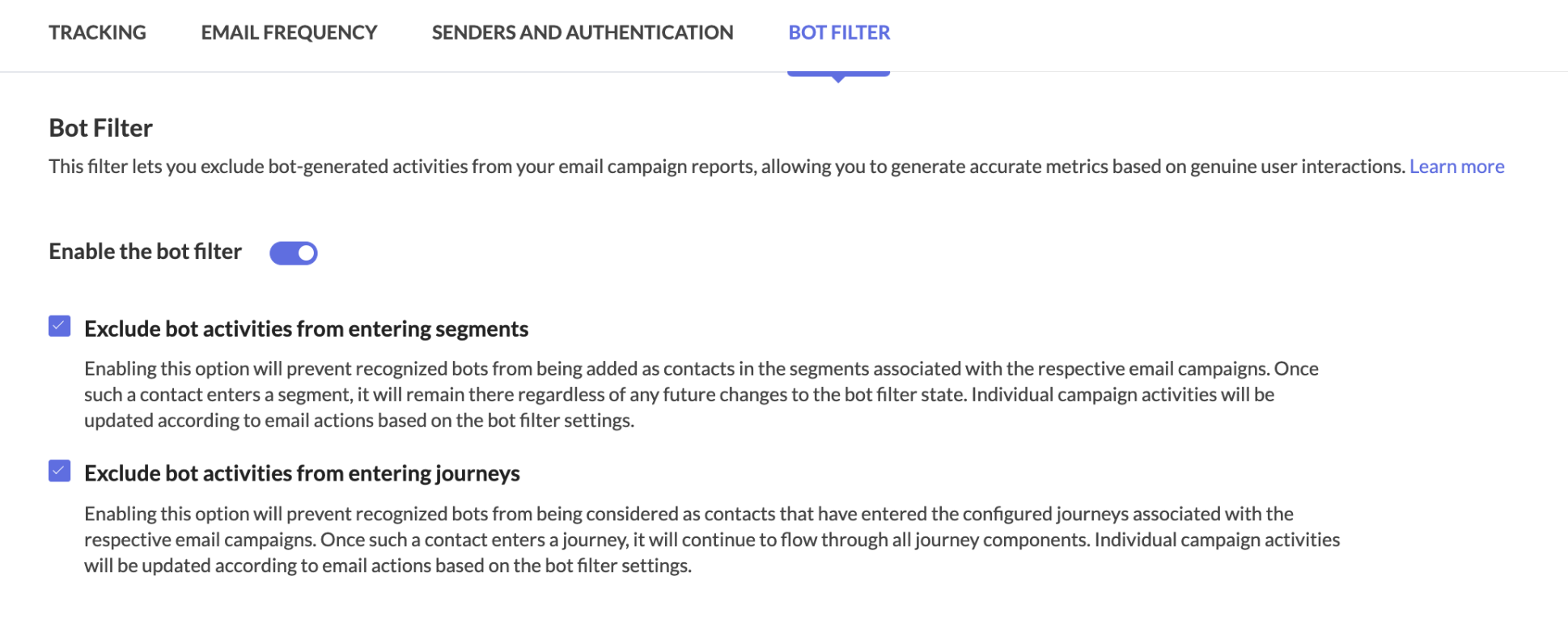
  • Easy toggle: Enable or disable bot filtering with a simple switch in Settings > Marketing Channels> Email. Bot filtering will be enabled by default to ensure your reports prioritize reliable, human-generated engagement from the start.

  • Transparency: A visual indicator in your reports shows whether bot filtering is active, ensuring full transparency in your data analysis.

  • Reporting: Whether you enable or disable the filter, your dashboard will display two distinct metrics:

    • Reliable opens/clicks (verified engagement by individuals)

    • Bot opens/clicks (automated activity)
      This dual view offers a clearer picture of your campaign’s true performance and highlights potential discrepancies.

    • Apple MPP tracking: We’ve added visibility into Apple Mail Privacy Protection (MPP) activity. Reports now include a dedicated metric for Apple MPP opens, allowing you to analyze how privacy-focused auto-opens impact your data.


Apple Mail Privacy Protection (MPP)

Apple Mail offers users the option to enable Mail Privacy Protection (MPP), a feature designed to enhance privacy by preventing email senders from accurately tracking email opens. This feature is not enabled by default, but once activated, Apple Mail pre-loads tracking pixels—regardless of whether the recipient actually opens the email.

As a result, all emails received in Apple Mail appear as opened, leading to inflated and unreliable open rates. Since tracking pixels are triggered automatically, distinguishing between genuine user engagement and automated activity becomes challenging.

How Does Zoho Marketing Automation Address This?  

To counteract the impact of MPP, Zoho Marketing Automation provides dedicated metrics (MPP Opens) to show open rate. Using intelligent data modeling, our system delivers reliable engagement metrics, helping you assess the effectiveness of your campaigns despite Apple’s privacy changes.

Here's how to enable the bot filtering option in Zoho Marketing Automation.

Step 1: Bot filtering option
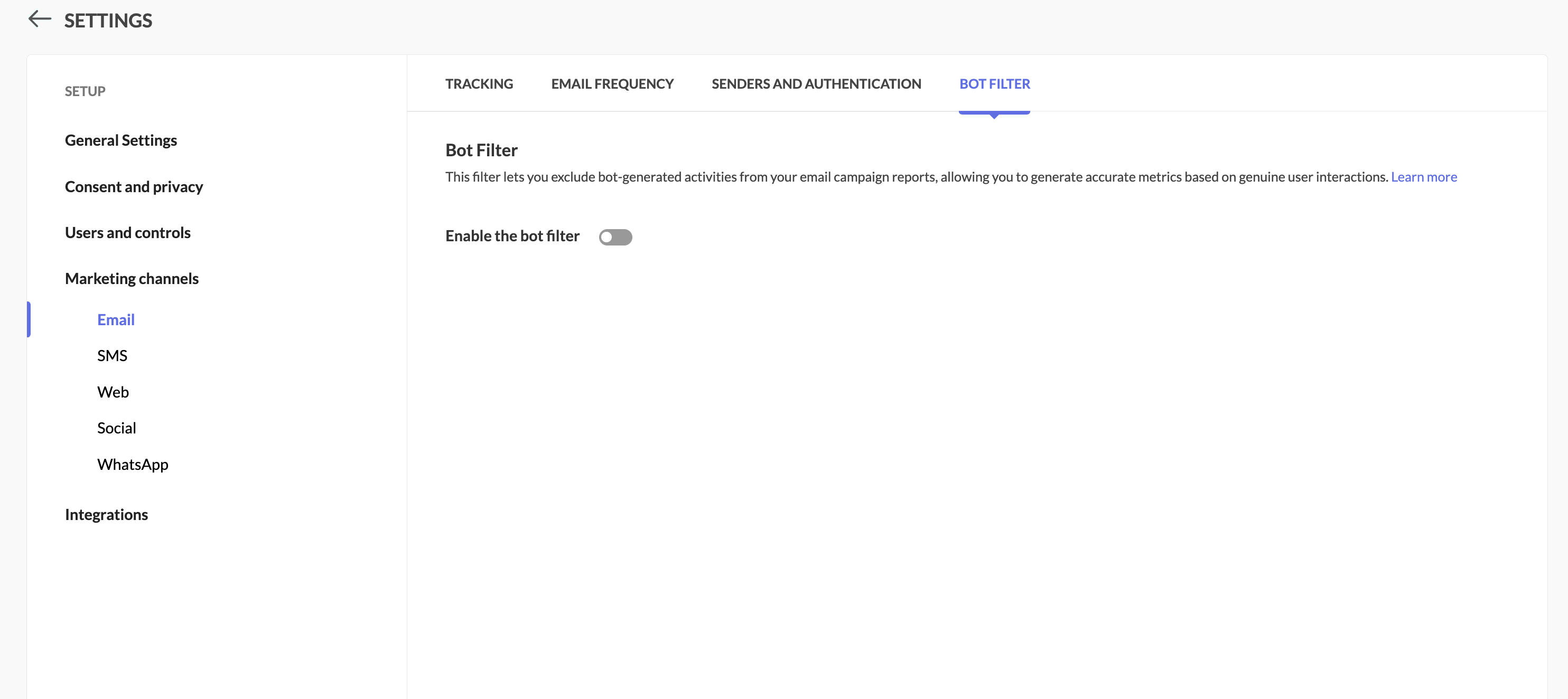
Locate the Bot Filter link under Settings > Marketing Channels.


Step 2: Toggle the bot filtering option

In the Bot Filter setting, you can see that bot filtering capability has been enabled for you by default.
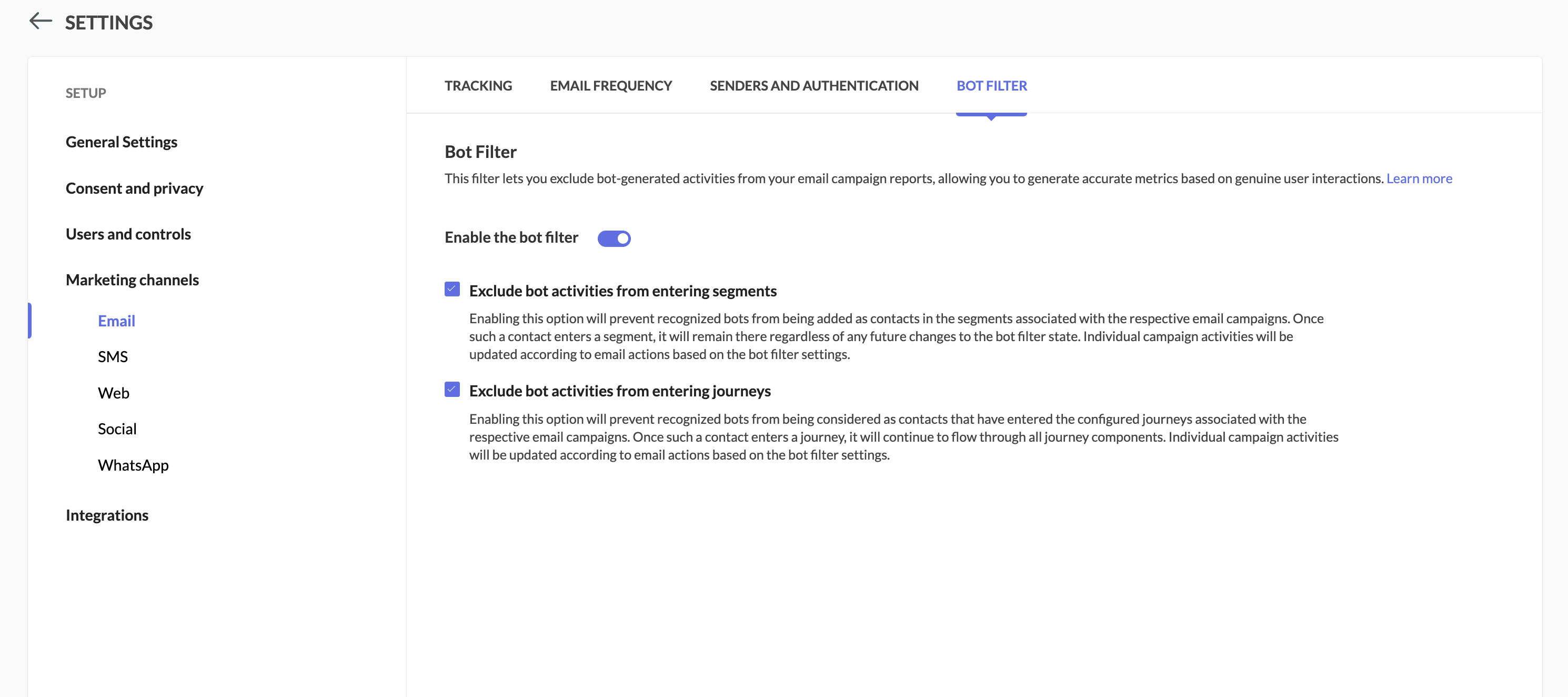


Step 3: Enable/disable the option

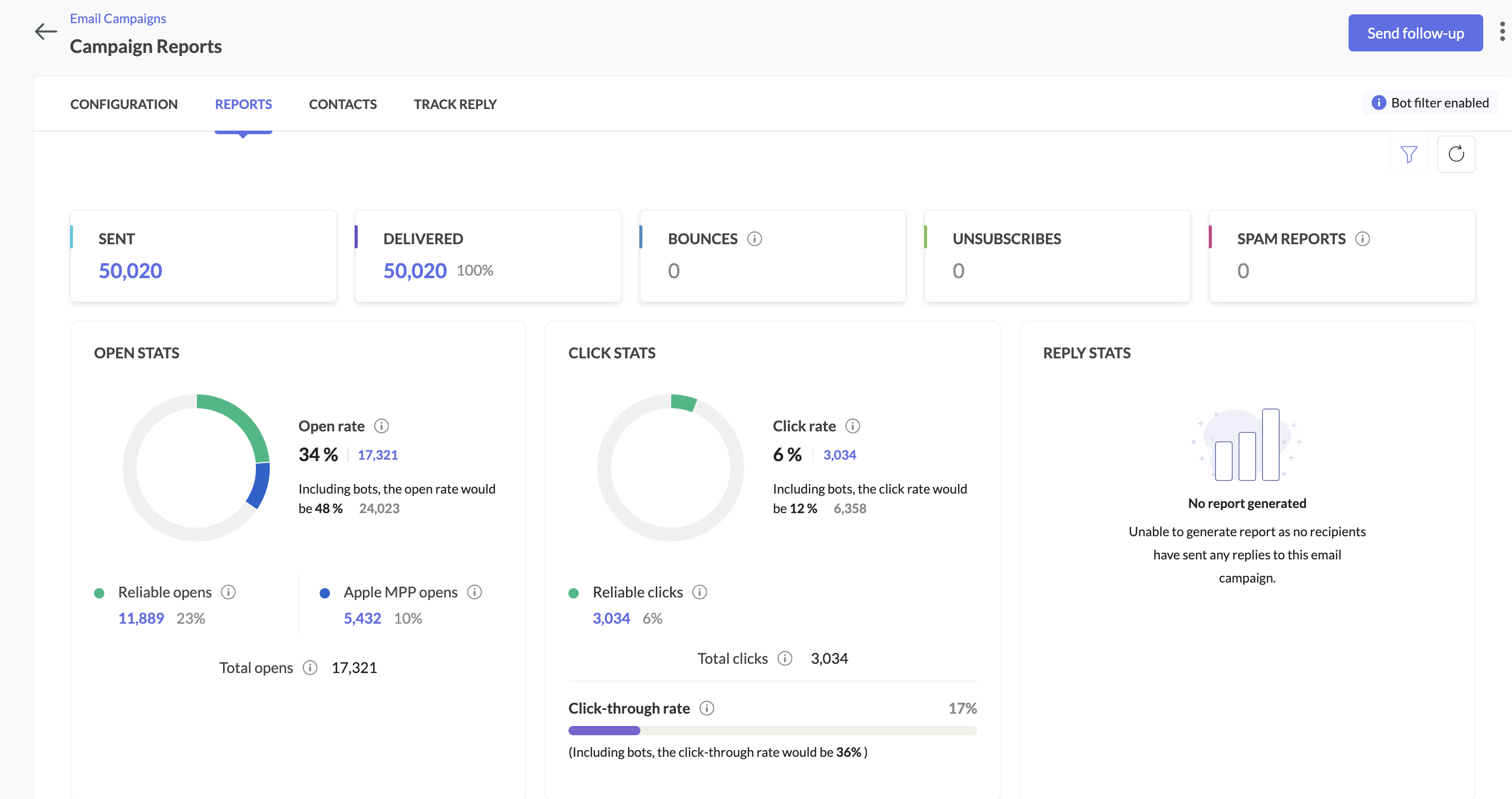
  • Filter enabled: Your primary reports will focus on human engagement, while bot activity is shown separately along with primary reports.

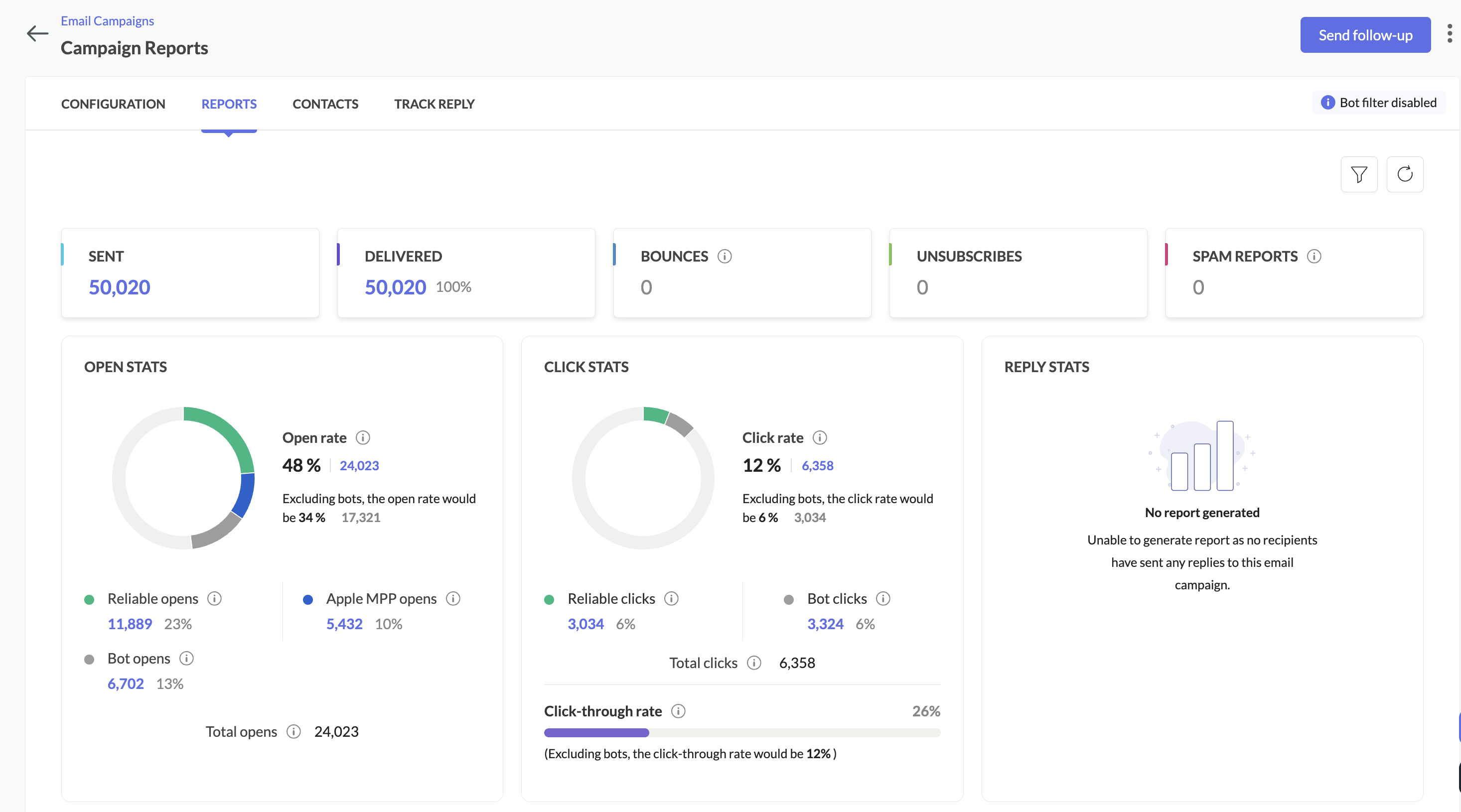
  • Filter disabled: Similar to the option above, all opens/clicks (human + bot) will be shown in main reports, with bot metrics still visible for comparison.

Here's how you can see it in the campaign reports:
When the bot filter setting is disabled


When the bot filter setting is enabled


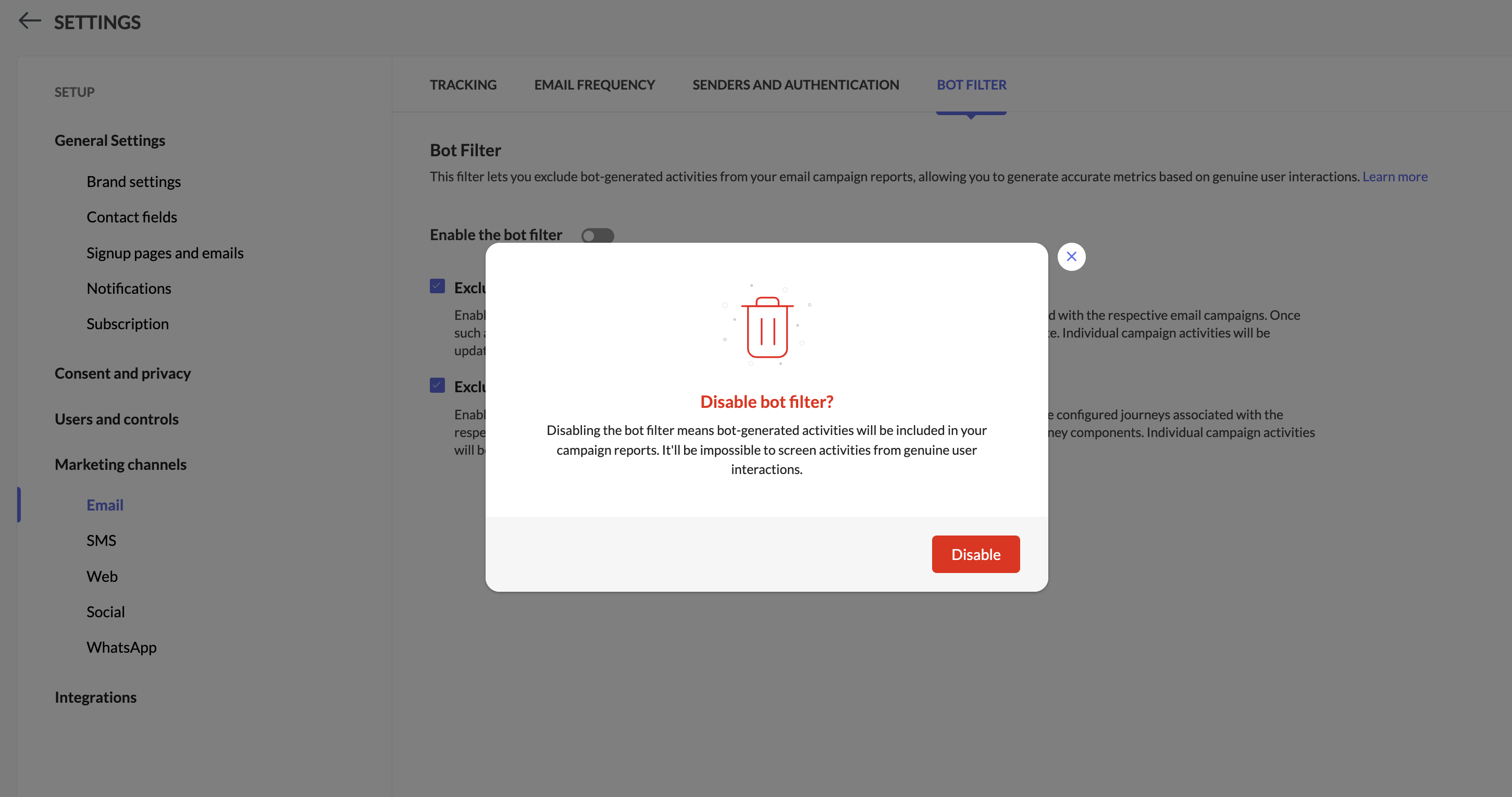
Step 4: Pop-up confirmation to disable bot filtering

You'll see a pop-up while disabling bot filtering.


Info
Notes:

  • While disabling bot filter, users will be prompted whether to allow bots to enter segments or workflows based on which follow-up actions will be triggered.
 

  1. The Apple MPP opens will be part of segments and workflows by default.

  2. Campaigns executed from 6th Feb 2025 will be shown the new reports along with reliable opens, Unreliable opens, and bot opens. Existing campaign reports won't be impacted by this change.

  3. We have introduced new filters within the contacts section in the campaigns report to analyze both reliable opens and bot opens.

  4. Bot engagement metrics will be available now while exporting campaign reports.

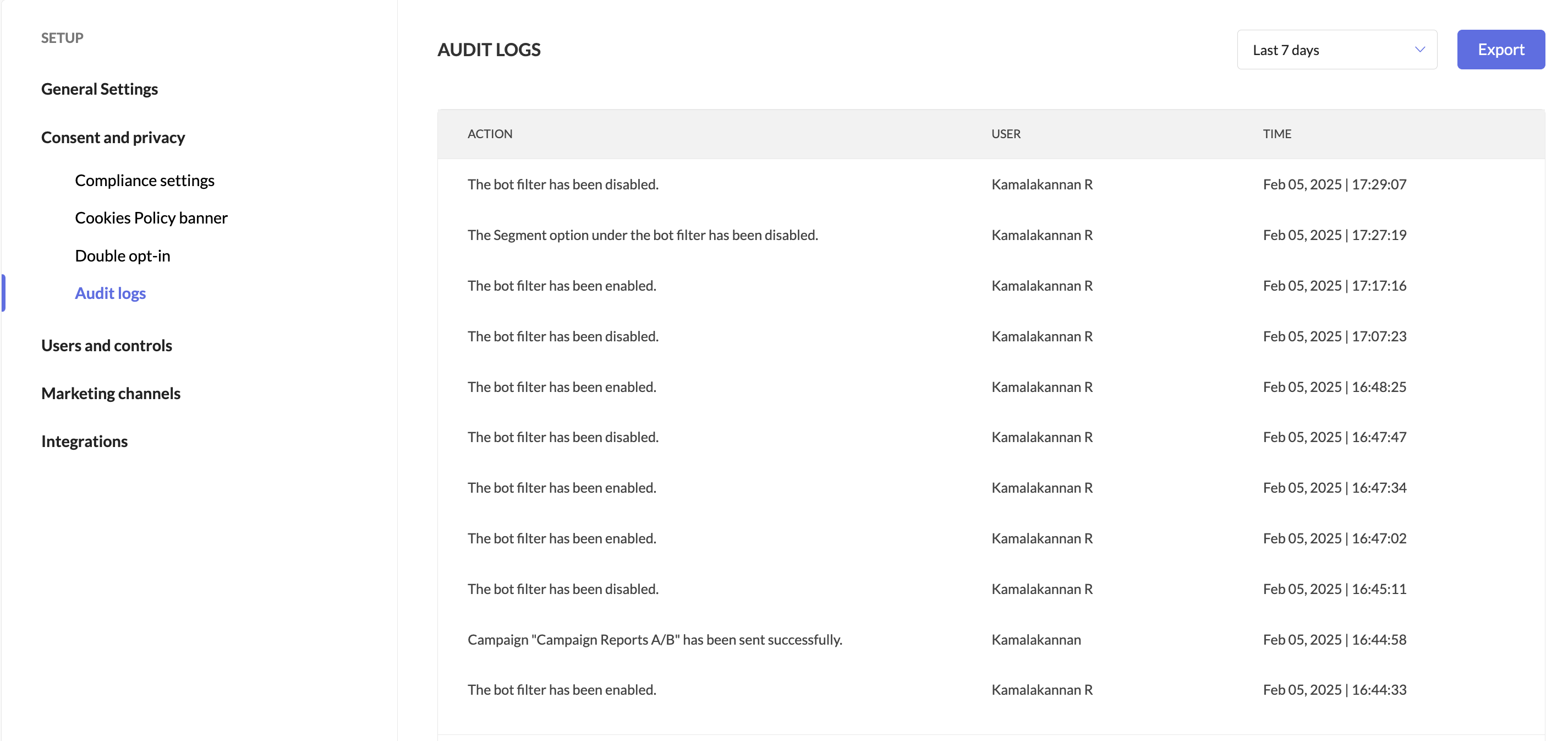
  5. Users can track when the bot filter was enabled or disabled by accessing Audit Logs.


We're here to help

We’re confident this balanced approach will help you optimize campaigns with greater precision. Give it a try, and let us know how it works for you!


Happy marketing!

Best regards,
Zoho Marketing Automation

    Access your files securely from anywhere

          Zoho FSM Video Tutorials


                All-in-one knowledge management and training platform for your employees and customers.


                                      Zoho Developer Community


                                                            • Desk Community Learning Series


                                                            • Digest


                                                            • Functions


                                                            • Meetups


                                                            • Kbase


                                                            • Resources


                                                            • Glossary


                                                            • Desk Marketplace


                                                            • MVP Corner


                                                            • Word of the Day


                                                            • Ask the Experts


                                                                      • Sticky Posts

                                                                      • Marketer’s Space - Automating CRM Actions with Journeys – Part 2

                                                                        Hello marketers! Welcome back to another post in Marketer’s Space. In our previous post, we explored how CRM actions in Journeys help marketing and sales teams work together by nurturing CRM leads and pushing only engaged prospects back to sales. If you
                                                                      • Introducing automation and utility conversations in WhatsApp marketing

                                                                        We’re excited to announce the addition of two new features to our WhatsApp integration: Automation and Utility conversations. These enhancements will allow you to streamline your marketing efforts and engage with your customers more effectively by automating
                                                                      • Tip of the week 02 - The art of 'seeing' your leads

                                                                        What's the last page that your lead visited before signing up for your brand? What was the page that first convinced your lead to explore more about you? Where are your leads coming in from? Well, these are some perennial questions today's marketers live upon. And, knowing the answers to these questions is crucial, considering the vitality of leads in every business. In the journey of finding lead opportunities, it's important to understand that every detail about a lead is useful. While the channels
                                                                      • Zoho Marketing Automation Update: Topics, Contacts, and List Management

                                                                        At Zoho Marketing Automation, our highest priority is making it easier for you to use our product to accomplish your business goals. With that in mind, we are updating three of our pivotal features: Topic, Contacts, and List Management.   These existing
                                                                      • Important: Zoho MarketingHub is now Zoho Marketing Automation

                                                                        Hello Everyone,   We hope you all are doing well. We'd like to notify you that we have rebranded Zoho MarketingHub to Zoho Marketing Automation. We'll discontinue using the term "MarketingHub" from May 26, 2021. However, there will be no changes in the


                                                                      Manage your brands on social media


                                                                            Zoho TeamInbox Resources


                                                                                Zoho CRM Plus Resources

                                                                                  Zoho Books Resources


                                                                                    Zoho Billing Resources

                                                                                      Zoho Projects Resources


                                                                                        Zoho Sprints Resources


                                                                                          Qntrl Resources


                                                                                            Zoho Creator Resources


                                                                                                Zoho CRM Resources

                                                                                                • CRM Community Learning Series

                                                                                                  CRM Community Learning Series


                                                                                                • Kaizen

                                                                                                  Kaizen

                                                                                                • Functions

                                                                                                  Functions

                                                                                                • Meetups

                                                                                                  Meetups

                                                                                                • Kbase

                                                                                                  Kbase

                                                                                                • Resources

                                                                                                  Resources

                                                                                                • Digest

                                                                                                  Digest

                                                                                                • CRM Marketplace

                                                                                                  CRM Marketplace

                                                                                                • MVP Corner

                                                                                                  MVP Corner


                                                                                                    Design. Discuss. Deliver.

                                                                                                    Create visually engaging stories with Zoho Show.

                                                                                                    Get Started Now


                                                                                                      Zoho Show Resources

                                                                                                        Zoho Writer

                                                                                                        Get Started. Write Away!

                                                                                                        Writer is a powerful online word processor, designed for collaborative work.

                                                                                                          Zoho CRM コンテンツ


                                                                                                            Nederlandse Hulpbronnen


                                                                                                                ご検討中の方


                                                                                                                          • Recent Topics

                                                                                                                          • 10/22 15時〜 オンラインもくもく会のお知らせ | Zoho ワークアウト

                                                                                                                            ユーザーの皆さま、こんにちは。コミュニティグループの中野です。 10月22日(木)開催の「Zoho ワークアウト」をご案内します。 Zoho ワークアウトは、参加者それぞれが取り組みたいテーマを持ち寄り、ユーザー同士で交流しながら、 設定・検証・運用改善を進めるオンラインの「もくもく会」です。 「試してみたい設定があるけれど、なかなか時間を取れない」 「一人で進めていると、途中で手が止まってしまう」 「他のユーザーの活用方法や工夫を聞いてみたい」 そんな方は、Zoho ワークアウトで一緒に取り組んでみませんか?
                                                                                                                          • Reporting tags associated to Project in Zoho books?

                                                                                                                            Hi, I know you can add reporting tags to contact, articles and transactions. Is it possible to add reporting tags to Project. We Zoho reports I would be able to generate reports by tags. Sometimes tags for a contact is different for projects (ie Projects
                                                                                                                          • Reporting Tags in Profit and Loss Reports Analysis

                                                                                                                            Hello Community and Zoho Books Product Team, I would like to highlight a limitation I encountered with Reporting Tags in Zoho Books. Reporting Tags Not Applying to Automated Inventory Journal Postings from Product Invoices. For inventory product invoices,
                                                                                                                          • Spam Quarantine: Manage suspicious emails in Zoho Mail

                                                                                                                            When an email is quarantined by spam processing, it need not always be blocked right away. Some emails may be marked incorrectly, or may need to be reviewed before a final decision is made. The Spam Quarantine feature in the Zoho Mail Admin Console gives
                                                                                                                          • What is the difference between "Reply" and "Public Comment" in a ticket?

                                                                                                                            Hey, my company is thinking about switching to Zoho Desk but we do not understand the difference between the "Reply" and the "Public Comment" feature. When should we use which? And why? What is the difference between them? Thank you for your help! Kindest
                                                                                                                          • Comments Vs. Replies

                                                                                                                            I'm curious as to the difference between a "Reply" and a "Comment" on a ticket. It appears that "Replies" are what's used to determine response time SLA's and there are also used to automatically re-open tickets. I'm just trying to understand the key differences so I can educate both our clientele and our back-end users on which function/feature to use to better improve the ticket lifecycle. If anyone has any insight it would be appreciated. Thanks!
                                                                                                                          • What's New in Zoho Inventory | July & August 2026

                                                                                                                            Hello users, The July and August 2026 releases bring a range of new features and improvements across the product. From the Nigeria Edition and Super Admin enhancements to Sri Lanka IRD-compliant invoicing, Loyalty Program Management, and improvements
                                                                                                                          • Forms data export bug

                                                                                                                            The export csv with a password has changed for the worst. It is less secure by not allowing complex passwords. Just last week and the last year (at least) I was able to use a complex, secure password. Export CSV moreover doesn't even work if I use a simple
                                                                                                                          • Fax and email questions

                                                                                                                            Does Zoho offer faxing capability? If so, how to do it? And, why is has my email inbox stopped in 2019? There are no more emails since then. Also if I delete all of those emails, will they delete it from my gmail account (I'm linked to a gmail email address).
                                                                                                                          • Create a single record from multiple images with ICR

                                                                                                                            Hello all, Zia's Intelligent Character Recognition can now create a single record from multiple images based on the configured ICR rule. Users can upload up to three images at once, such as an ID, a passport, and a business card, and Zia will extract
                                                                                                                          • How to present an Analytic on a CRM dashboard and filter it on loginuser id

                                                                                                                            How to present an Analytic on a CRM dashboard and filter it on loginuser id? I want to display an Analytics pivot table (as a widget) on a CRM dashboard and have the pivot filtered on the loginuser. I want additional user-filters available, such as date,
                                                                                                                          • CNIL - Suivi de Pixel

                                                                                                                            Bonjour à tous, À la suite de la nouvelle recommandation de la CNIL sur les pixels de suivi dans les e-mails, savez-vous si Zoho Campaigns permet : de conditionner le suivi des ouvertures au consentement de chaque contact ; de proposer un lien permettant
                                                                                                                          • Live connection to DS files in Zoho Creator / ChatGPT

                                                                                                                            As an idea, we are using ChatGPT to build with Zoho Creator (outside of Zia), which is works brilliantly to assist write deluge, provide test suggesitons etc. Currently we are uploading the DS files which are very point in time, it would be great to have
                                                                                                                          • Setting default From address when replying to request

                                                                                                                            At the moment, if I want to reply to a request, the From field has three options, company@zohosupport.com, support@company.zohosupport.com, and support@company.com. The first two are really internal address that should never be seen by the customer and
                                                                                                                          • Zoho Payroll: Product Updates - Q3, FY2026

                                                                                                                            Over the past quarter, Zoho Payroll has added several updates to make payroll easier to process, configure, and manage. The most notable improvements cover bank integrations, reimbursement support, payslip enhancements, employee exit documentation, payroll
                                                                                                                          • Convert OLM to PST on Mac and Windows Using Free Methods

                                                                                                                            When your Outlook for Mac data is stored in an OLM file and you want to use it with Outlook for Windows, the simplest approach to transfer your emails and other mailbox information is to convert the OLM file to a PST file. OLM is primarily associated
                                                                                                                          • Add Payment Information (like Bank details)

                                                                                                                            I am using the Free plan of Zoho Books. I need to add the bank details/ UPI details on the invoice. How can I do that. I have added the details in the Bank Section.
                                                                                                                          • Placeholders for Multi-Level Discount

                                                                                                                            I am using custom templates for Invoices and all other modules. Since i have activated multi-level discount (an early-access feature from zoho) "discount at line-item and transaction level", I need placeholders for using them in my custom templates. With
                                                                                                                          • Running Balance

                                                                                                                            Please add automatically Running balance in ledger view. Taking lot of time, every time to add manually
                                                                                                                          • Accounting on the Go Series-47: Effortless GSTIN Management- Auto Populate TaxPayer Details in Zoho Books Mobile App

                                                                                                                            Hello everyone, Welcome back! Today, we're focusing on a feature specifically designed for our Indian users in the Zoho Books-Indian edition, particularly those who deal with GST compliance regularly. We understand the importance of accurate and efficient
                                                                                                                          • URGENT: Stalled DC Migration >72 Hours - Records Locked [Ticket #: 167813877

                                                                                                                            The DC migration was started on 1st October at 6 pm and we were informed migration period as 48 hours but even after more than 72 hours, the migration seems still in progress. We sent two emails to check the status but no responses. We need the migration
                                                                                                                          • Zoho Webinar - Sharing System Audio (NOT AVAILABLE)

                                                                                                                            Hi, We are having a serious problem with Zoho Webinar. In the webinars we run, we very often share the audio from a video we are streaming directly from YouTube or other applications. Until recently we were using Zoom, but as we use other Zoho applications
                                                                                                                          • Cash Recipt

                                                                                                                            You can not receive cash more than 10000 from one party in a day and two lakh in a year. In statement you can't differentiate cash or bank receipt. zoho does not support this
                                                                                                                          • Need to set workflow or journey wait time (time delay) in minutes, not hours

                                                                                                                            Minimum wait time for both Campaigns workflows and Marketing Automation journeys is one hour. I need one or the other to be set to several minutes (fraction of the hour). I tried to solve this by entering a fraction but the wait time data type is an integer
                                                                                                                          • Concern Regarding Stock Validation in Inventory Management

                                                                                                                            Hi Zoho Team, We would like to highlight a concern regarding stock validation in the inventory system. As per standard inventory management practices, if the stock level is zero, the system should not allow users to create a shipment, packing slip, or
                                                                                                                          • Change from OST to PST on Windows 10/11 Using Free Method

                                                                                                                            There is an advantage in converting OST files to PST format if you need to access your Outlook data on a different computer, want to keep a local copy, or are trying to recover items from an old Outlook profile. The good point is that users of Windows
                                                                                                                          • Important: Whitelist new proxy outgoing IPs for IN, SA, and UAE data centers

                                                                                                                            Hello everyone, We're expanding the pool of proxy outgoing IP addresses for our IN, SA, and UAE data centers by introducing new IPs alongside the existing ones. This helps ensure high availability, optimal load distribution, and redundancy for outgoing
                                                                                                                          • Zoho Flow Custom Function Issue

                                                                                                                            I have a use case where I will be needing to post data to a wordpress site. Specifically to a custom post type with a bunch of ACF fields. I have setup trigger event correctly for Tookan and can receive data from the webhook. In order to post the data
                                                                                                                          • How to Open .mbox file in Gmail with Attachments?

                                                                                                                            Gmail offer users to backup INBOX folder in .mbox file format via Google Takeout Feature. Howver there is no such option to Restore Gmail MBOX. Thus I would like to suggest you to choose an alternate approach i.e. MBOX to Gmail Wizard. This utility will open .mbox file in Gmail with attachments.  Steps to open MBOX file in Gmail are; Run MBOX to Gmail Wizard Click Add File and add .mbox file. Enter your Gmail login credentials. Click Convert button. Finished! This is how you can open MBOX file in
                                                                                                                          • Custom Validation for On Duty

                                                                                                                            Hi Team, We would like to have custom validation support for the On Duty form in the Attendance module. We need to apply some restrictions, such as: Limit the number of On Duty requests per month. Restrict On Duty requests on selected days. Allow employees
                                                                                                                          • Integrating FaceBook Ads into MarketingHub

                                                                                                                            I would like to track the clicks from a FB Ad campaign into my website via marketinghub.  I cannot currently add a MH form directly to my FB page, as I receive an error telling me I need at least 2000 subscribers on FB to be allows to do that (yikes!) What is the best way to set up MH so I can track which FB are converting well?  I know I can reach the FB reports directly, but these do not track conversions from the MH forms on my website. Best regards, Joe
                                                                                                                          • Migration from GoDaddy to Zohomail

                                                                                                                            Hi All, I am trying to migrate all the emails from Go Daddy to zohomail account using the migration tool. i tried with imap method, its not working. when i try it with pop method, then only the emails from the go daddy account inbox ( not other folders), is getting transferred, how can i transfer all the folders in the email account from go daddy to zoho. and also the emails which are coming from go daddy are like new unread emails ( is there any where i can differentiate from read and unread emails)
                                                                                                                          • How do I migrate from Office 365 to Zoho Mail?

                                                                                                                            Check out Advik Email Migration Wizard, this software is specially developed to move mailboxes from Office 365 to Zoho Webmail. In addition you can migrate from Gmail, Yahoo, Rediffmail and 80+ webmail servers to ZOHO MAIL. Isn't it amazing? This is an all in one email migration solution. Steps to export emails from Office 365 to Zoho Webmail are as follows; Run Advik Email Migration Tool in your system. Select Office 365 as source and enter its login credentials. Select mailbox folders and choose
                                                                                                                          • How to Backup Zoho to PST?

                                                                                                                            I'm looking for a simple way to backup Zoho Mail emails to PST format. I tried the IMAP method with Outlook, but it seems slow and complicated for large mailboxes. I need a solution that can: Export Zoho emails to PST Preserve attachments and folder hierarchy
                                                                                                                          • Shopify connector – product cost ("Cost per item") not synced, so COGS/gross margin can't be calculated

                                                                                                                            Hi Zoho Analytics team, I use the native Shopify connector in Zoho Analytics (cloud) to build reporting dashboards for Shopify stores. As far as I can tell, the connector does not sync product cost, so there's no way to calculate Cost of Goods Sold (COGS),
                                                                                                                          • Zoho Sprints - Q3 Updates for 2026

                                                                                                                            Another quarter, another set of productive features. This time our focus was mainly to simplify in-app navigations and control all your work related activities within Zoho Sprints. We delivered 7 major features and 9 enhancements, which include Zoho Sprints
                                                                                                                          • The Social Wall: August 2024

                                                                                                                            Hi everyone, We're thrilled to bring you the latest updates, features, and improvements to help you get the most out of Zoho Social. Let's see what was new for us at Social in August. Post documents on LinkedIn You can now reach a lot more people and
                                                                                                                          • Free PST Password Recovery Tool

                                                                                                                            Recoveryfix PST Password Recovery is a specialized standalone utility designed to instantly unlock encrypted Microsoft Outlook PST files . It provides an efficient way to recover, reset, or entirely remove passwords when access credentials are lost or
                                                                                                                          • Cash Flow Statement : Direct Method

                                                                                                                            I can not see how can I see the cash flow statement using direct method. AS 3 recommends two formats of cash flow statement. The indirect method is there on Zoho but there report in Direct method. How can I see that by Direct method.
                                                                                                                          • ZeptoMail is now Zoho CPaaS!

                                                                                                                            ZeptoMail has a new name and it’s expanding beyond email. With ZeptoMail, our focus was simple : help developers and businesses with reliable transactional emails. At the time, email handled a big part of those customer moments. But transactional communication
                                                                                                                          • Next Page