Function #17: Automatically update customer owner from Zoho Books to Zoho CRM
Today's function caters to those who use both Zoho Books and Zoho CRM. In Zoho CRM, you can pick a user to be the owner of an account or contact. Zoho Books has a similar functionality called "Customer owner" allowing you to assign a user as the owner who will be able to manage records of assigned customers only.
Prerequisites:
1. Create a Connection named "zbooks" to successfully execute the function. You can watch the GIF attached below to learn how to create the connection.
1. Create a Connection named "zbooks" to successfully execute the function. You can watch the GIF attached below to learn how to create the connection.

2. Create another connection called "zcrm_connection" as owner details need to be updated in Zoho CRM. You can watch the GIF below to learn the steps to create the connection.

Custom Function:
Navigate to Settings -> Automation -> Custom Functions -> +New Custom Function > Add the function code from this GitHub link.
Workflow Rule:
Go to Settings -> Automation -> Workflow Rules -> +New Workflow Rule and set up the workflow rule as shown below:-
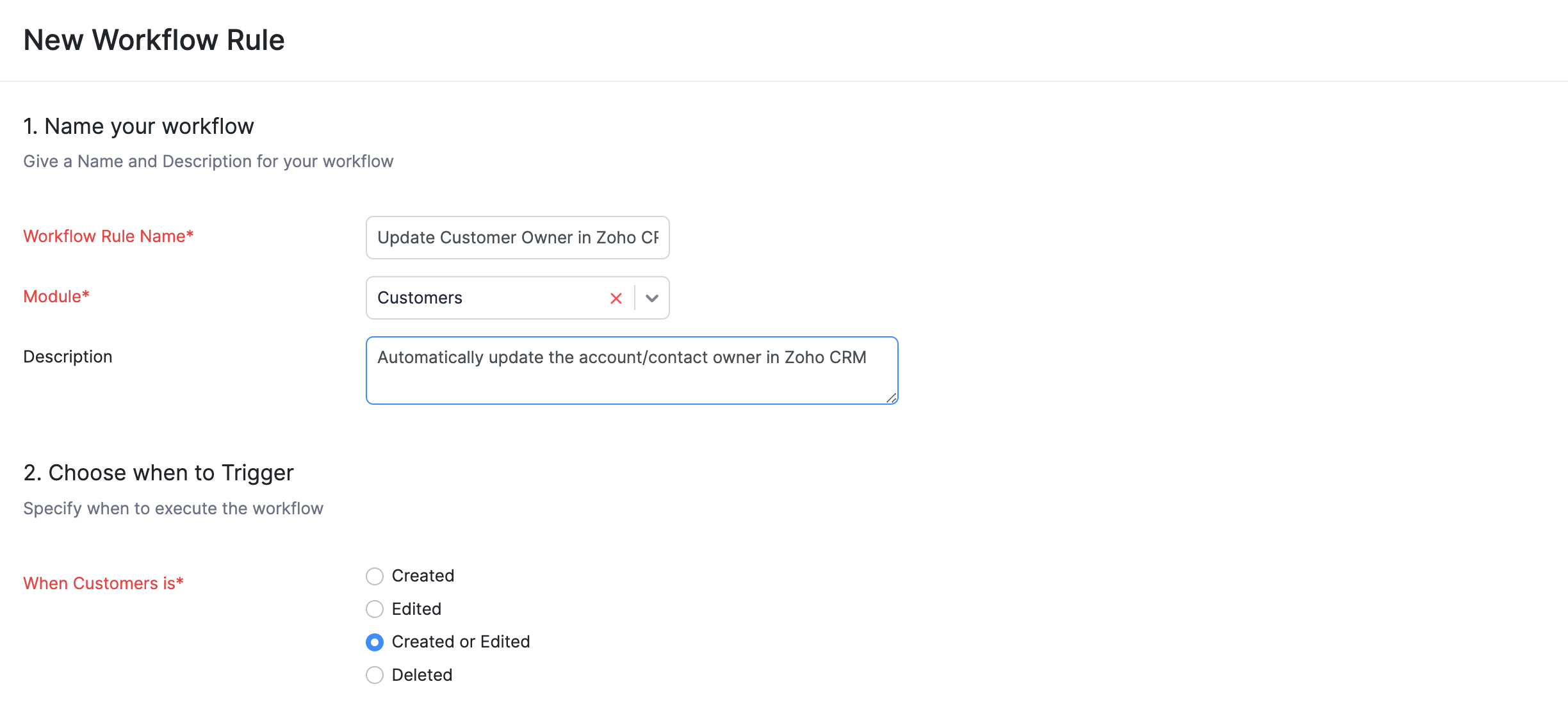

In the final step of this workflow rule, associate the custom function you created and then hit Save.
Note: If the user mentioned as the Customer owner is not a part of the Zoho CRM organization, then the owner details will not get updated.
If you need any assistance in setting up this function, feel free to reach out to our support team at support[at]zohobooks[dot]com. We're here to help you!
Regards,
Shireen Farhana S
Zoho Books.Shireen Farhana S