Function #52: Automatically associate Price Lists to customers based on currency
Hello everyone, and welcome back to our series!
Businesses operating globally often need to invoice in different currencies based on the customer's location. In such cases, maintaining item rates in multiple currencies becomes essential. This is where Price Lists come into play. Price Lists in Zoho Books let you establish custom rates for your items. You can adjust the rate of items based on a certain percentage or set different rates in various currencies.
Typically, when creating a customer in Zoho Books, you can link a Price List to their profile. Then, when creating a sales transaction for the customer, the assigned Price List is automatically applied to the transaction. Today's custom function automates the process of linking the Price List. Upon creating a new customer, the function checks the customer's currency and automatically associates the Price List created in the same currency with the customer.
Prerequisites:
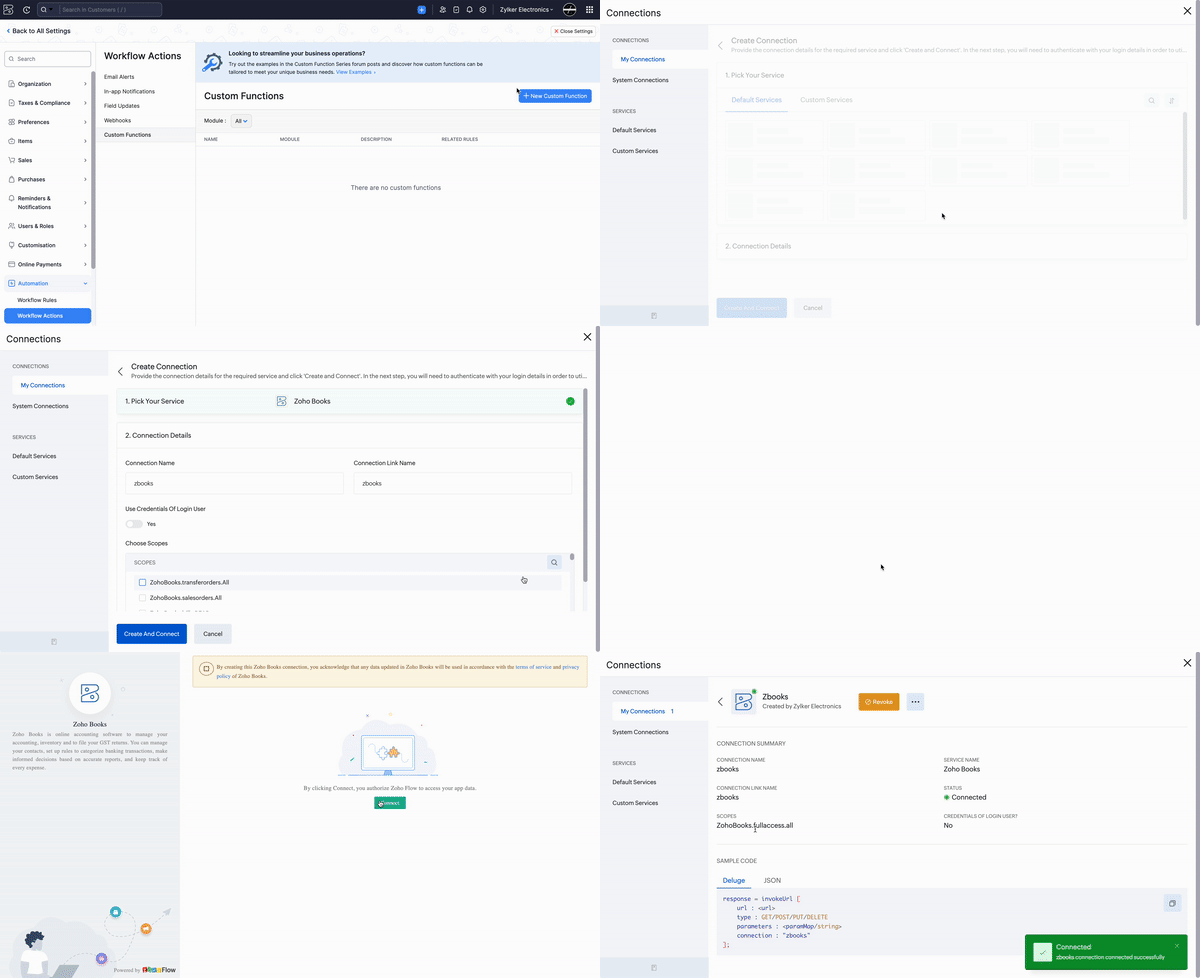
1. Create a Connection named "zbooks" to successfully execute the scheduler. You can watch the GIF attached below to know how to create the connection.
2. Ensure that the Price Lists are named in the format:[Currency Code][Space]Price Listing. For example, USD Price Listing.
Custom Function:
Navigate to Settings -> Automation -> Workflow Actions -> Custom Functions -> +New Custom Function -> Add the function code from this GitHub link -> Save.
Workflow Rule:
Go to Settings -> Automation -> Workflow Rules -> +New Workflow Rule and set up the workflow rule as shown below:-


In the final step of this workflow rule, associate the custom function you created and then hit Save.
Implementing this function ensures that price lists are always correctly linked to your foreign currency customers, reducing the risk of invoicing errors. If you have any questions about the function or need assistance with setting it up, please don't hesitate to reach out to our Support team at support[at]zohobooks[dot]com. We are always happy to help you.
Regards,
Shireen Farhana
Zoho Books