Handling identifiers during an import

Handling identifiers during an import

Importing your data

When importing data into an application, it is crucial to prevent data loss or duplication. These types of errors can hinder the development of a clean and well-organised database, which is essential for effective data management and security.


Zoho Desk provides robust functionality for importing your data. The system intelligently automates the mapping of modules and fields to reduce the risk of data loss and maintain data integrity. Users have the advantage of verifying the field mappings in advance, thus adding an extra layer of security to the import process.
 
This capability is essential not only for clarity but also in mitigating the challenges associated with user adoption. For instance, clients can be accurately mapped to the Contact name field, while company names can seamlessly align with the Account name field. This approach to data management helps maintain an organised database, thereby enhancing productivity and user trust in the system. 

Related knowledge base article: Importing data into Zoho Desk.
Info
Prerequisites
  • Users can upload a .csv file or a .zip file containing multiple .csv files. 
  • The .zip file must be named, for example, Contacts.zip, Accounts.zip, etc.

Working with the Identifier Field
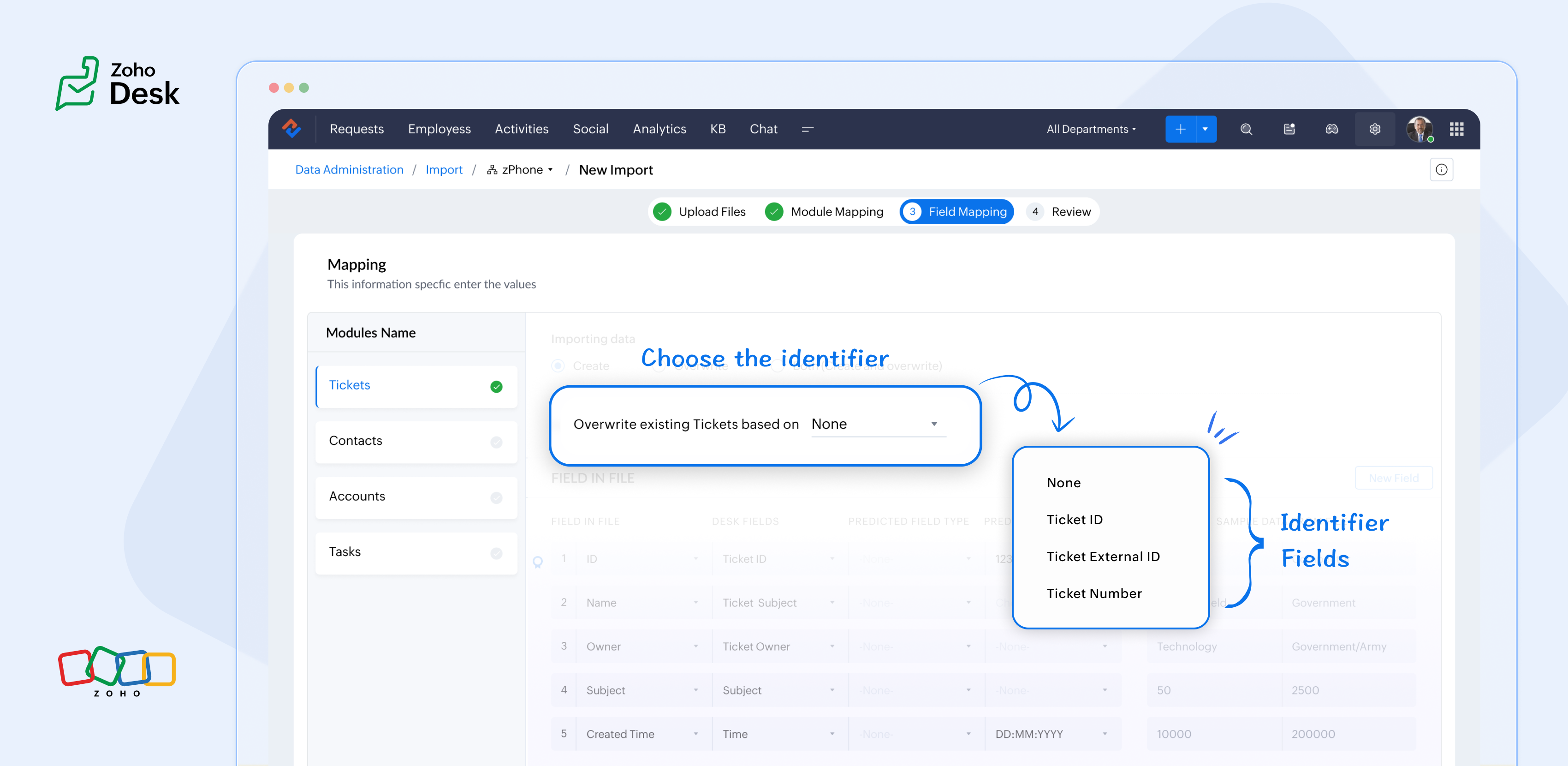
When importing data into Zoho Desk, the Identifier Field is essential because it helps identify existing records and avoid duplicate entries. 


What are the Identifier Fields?  

Identifier fields are fields used to find and match existing records when importing data into the product. They also help link related records, like connecting a contact’s name with their email address.

Each module supports different unique identifier fields for identification, as described in the table below:


Module

Unique Identifier Fields

Accounts

Account ID 

Account External ID

Account Name

Contacts

Contact ID

Contact External ID 

Last Name

First Name

Email

Phone Number

Mobile

Tickets

Ticket ID

Ticket External ID

Ticket Number

Products

Product ID

Product External ID

Product Name

Tasks

TaskId

Task External ID

Calls

Call ID

Call External ID

Events

Event ID

Event External ID

Article Translation

Translation: External ID

Translation ID

Custom Modules

Record External ID

Custom Module Name


Idea

Points to remember:

  • While these fields help find matching records.
  • So, if multiple records match the value, the first matching record will be selected automatically.
  • This can lead to unexpected matches or data being updated in the wrong record if you're not careful.

For your understanding:

Some users expressed a preference for matching Contacts by Last Name instead of Email, highlighting the importance of flexibility in their workflow. Furthermore, some additional users approached matching through the use of a custom field, emphasising the need for tailored solutions to fit their unique requirements. Moreover, users requested that the functionality be enhanced by updating existing records with the relevant entity's Zoho Desk ID, aiming to streamline their processes and improve data accuracy.

Commonly used identifier fields:

  • Find By is used to identify an existing record during the import process.
  • Map By is utilized to link a child record to a parent record, for instance, by linking a Contact to a Ticket.


You can now select specific fields for matching, providing enhanced control and customization during bulk processes or integrations. This functionality enables more precise data handling, ensuring that the information aligns with your specific requirements. By tailoring the matching criteria, you can streamline processes, ultimately leading to enhanced efficiency and better outcomes for your team. This flexibility enables you to harness the full potential of your data.

Import Systems

Let's start by preparing the CSV file.

A sample tickets module CSV file is given below,


External ID

Subject

Contact Email

Contact Name

About

101

Hitman

rohit@bcci.com

Sharma

Rohit Sharma's journey from a gifted schoolboy to an international icon and fierce competitor reflects resilience, elegance, and remarkable leadership.

102

King Kohli

virat@bcci.com

Virat

Virat Kohli is a world-renowned Indian cricketer known for his aggressive batting, unmatched consistency, and passionate leadership across all forms of the game.

103

Lambu Ishanth

ishanth@bcci.com

Sharma

Ishant Sharma is a tall and experienced Indian fast bowler known for his 300 test wickets and key performances in overseas conditions.


Then choose the appropriate Find By identifier field.

The Find By field is selected from a predefined set of fields specific to each module. It is used to determine whether a record already exists in Zoho Desk.


When using the import tool, the system searches the Desk portal for a record (e.g., a ticket) that matches the value mapped to the selected Find By field. This prevents duplicate records by identifying existing entries based on the chosen field.  


  • Once the file is uploaded, you need to choose a Find By Field — for instance, Ticket External ID.
  • Whichever Find By field we choose must correspond to the relevant column in the CSV file. Since we've selected the Ticket External ID, the Case External ID column in your file should be mapped to the Ticket External IDfield.
QuoteIf the chosen operation is to 'create new records while avoiding duplicates', and there is no existing ticket with the External ID 101, the import tool will generate a new ticket using the mapped fields. To associate the ticket to the correct Contact, the import tool utilizes the Map By field feature.

Finally, choose the appropriate Map By field.

The Map By field enables users to link imported records to their corresponding dependent records, such as associating a ticket with a specific contact. This functionality ensures that when you import ticket data, the import tool actively searches for a matching Contact in Zoho Desk based on the value defined in the selected Map By field.


For instance, during the field mapping process, you can specifically choose to map the Ticket to a Contact using criteria such as the Contact's email ID. This approach enhances the accuracy of data integration by ensuring that each ticket is correctly associated with the relevant Contact, thereby improving data integrity and streamlining the support process. This meticulous mapping not only minimizes the chances of errors but also facilitates a more organized and efficient ticket management system, ultimately leading to improved customer experiences and satisfaction.


Idea

Map by identifier field functionality

The tool efficiently searches for contacts associated with the provided email address.    


Search: When a user submits a ticket, the system initiates a search for contacts associated with the specified email address.   


Match found: If a single match is identified, the ticket is seamlessly associated with that Contact, ensuring that all relevant customer information is readily accessible for support agents.   


Multiple Matches: If numerous contacts are found with the same email address, the system will prioritize and use the first match. This helps streamline the ticketing process while maintaining clarity in customer support.   


No Match Found: If no matches are found within the system, the ticket will not be created. This prevents unnecessary duplication and ensures that support agents are only working with valid, existing customer records. 

In summary, the strategic use of Custom Unique Fields and External ID fields as identifiers, along with the potential for composite identifiers, positions support teams to operate more effectively and improve overall customer interactions.

Significant improvements in user experience 

Transparent process and status tracking 

We’ve implemented a straightforward, step-by-step process for data imports, complete with real-time status updates for each stage. This transparency enables users to monitor import progress and understand the current state of the process.

Unique identifiers for entity mapping 

New fields have been introduced to help users identify if a parent entity already exists when importing related child entities. For example, users can seamlessly map a contact to an existing account in Zoho Desk, streamlining the import process while minimizing the risk of duplicate entries.

Enhanced error handling and log accessibility

We’ve made significant improvements in error handling by allowing users to download detailed error logs directly from the history page in the event of import failures. This enhancement provides users with greater insight into any issues, facilitating faster troubleshooting and resolution.

Support for custom modules

The import UI has been revamped to support custom modules, providing users with greater flexibility and customization options. This enables a more personalized and efficient data import experience.

Takeaway

For instance, a large corporation merging client data from multiple legacy systems into Zoho Desk modules will benefit significantly from automatic field mapping, ensuring that contact and account names are accurately aligned. This attention to detail not only improves the user experience but also enhances overall data integrity during the merging process.
 
Please stay tuned for more Desk updates.
 
Cheers,
 
Kavya Rao
The Zoho Desk Team

    Access your files securely from anywhere


                            Zoho Developer Community


                                                  • Desk Community Learning Series


                                                  • Digest


                                                  • Functions


                                                  • Meetups


                                                  • Kbase


                                                  • Resources


                                                  • Glossary


                                                  • Desk Marketplace


                                                  • MVP Corner


                                                  • Word of the Day


                                                  • Ask the Experts


                                                            • Sticky Posts

                                                            • Zoho Desk Partners with Microsoft's M365 Copilot for seamless customer service experiences

                                                              Hello Zoho Desk users, We are happy to announce that Zoho Desk has partnered with Microsoft's M365 to empower customer service teams with enhanced capabilities and seamless experiences for agents. Microsoft announced their partnership during their keynote
                                                            • WhatsApp pricing changes: Pay per message starting July 1, 2025

                                                              Starting July 1, 2025, WhatsApp is shifting from conversation-based pricing to per-message billing. That means every business-initiated message you send will count. Not just the first one in a 24-hour window. Pricing updates on the WhatsApp Business Platform
                                                            • Live Webinar - Work smarter with Zoho Desk and Zoho Workplace integration

                                                              Hello customers! Zoho Desk and Zoho Workplace are coming together for a webinar on 14th May, 2024. Zoho Workplace is a suite of productivity apps for email, chat, docs, calls, and more at one single place. Zoho Desk is closely integrated with a few tools
                                                            • Apple iOS 17 and iPadOS 17 updates for Zoho Desk users

                                                              Hello Zoho Desk users! Apple recently announced the release of iOS 17 and iPad OS 17. These latest OS updates will help you stay productive and efficient, through interactive and seamless user experiences. Zoho Desk has incorporated the updates to help
                                                            • Zoho Desk Cheat Sheet For The Year-End

                                                              Check out these Zoho Desk best practices to end this year on a high and have a great one ahead! #1 Set Business (Holiday) Hours - If you have limited working hours, please make sure you restrict your business hours or set them as holidays for the coming days. Let your customers know when you will, and won't, be available. #2 Update the Annual Holiday List - Check the holidays for the new year and update the holiday schedule. Usually, holidays from the current year will be carried over for the next


                                                            Manage your brands on social media


                                                                  Zoho TeamInbox Resources


                                                                      Zoho CRM Plus Resources

                                                                        Zoho Books Resources


                                                                          Zoho Subscriptions Resources

                                                                            Zoho Projects Resources


                                                                              Zoho Sprints Resources


                                                                                Qntrl Resources


                                                                                  Zoho Creator Resources


                                                                                      Zoho CRM Resources

                                                                                      • CRM Community Learning Series

                                                                                        CRM Community Learning Series


                                                                                      • Kaizen

                                                                                        Kaizen

                                                                                      • Functions

                                                                                        Functions

                                                                                      • Meetups

                                                                                        Meetups

                                                                                      • Kbase

                                                                                        Kbase

                                                                                      • Resources

                                                                                        Resources

                                                                                      • Digest

                                                                                        Digest

                                                                                      • CRM Marketplace

                                                                                        CRM Marketplace

                                                                                      • MVP Corner

                                                                                        MVP Corner


                                                                                          Design. Discuss. Deliver.

                                                                                          Create visually engaging stories with Zoho Show.

                                                                                          Get Started Now


                                                                                            Zoho Show Resources

                                                                                              Zoho Writer

                                                                                              Get Started. Write Away!

                                                                                              Writer is a powerful online word processor, designed for collaborative work.

                                                                                                Zoho CRM コンテンツ


                                                                                                  Nederlandse Hulpbronnen


                                                                                                      ご検討中の方


                                                                                                              • Recent Topics

                                                                                                              • Leave Report Emailed Weekly

                                                                                                                I am wondering if someone knows how to have a report generated either weekly or monthly or both for department heads and ownership of upcoming employee leave. For instance, it would be nice to get an emailed report on Friday for the upcoming week of who
                                                                                                              • Zoho desk desktop application

                                                                                                                does zoho desk has a destop applicaion?
                                                                                                              • Tip #54- Exploring the Files Icon in Zoho Assist- 'Insider Insights'

                                                                                                                As we’re already in mid-December, it’s a good time to take a closer look at one of the most useful options in the Zoho Assist remote support dashboard—the Files icon. To get started, log in to Zoho Assist using your credentials. Once you’re in, navigate
                                                                                                              • Tip#47: Estimation planner

                                                                                                                Sprint planning becomes easier, smoother, more collaborative and more accurate with the Estimation Planner extension. Most work items involve multiple users, and each user's role and effort vary. To provide an unbiased and fair estimation point to the
                                                                                                              • Painfully Slow Zoho mail

                                                                                                                Since yesterday Zoho Mail seems to have starting functioning very slowly and having a few bugs. It's slow to open mails, slow to send, slow to change between email accounts. Sometimes clicking on a particular folder (eg Sent folder) stops working and
                                                                                                              • Upcoming update to Google Drive integration in Zoho Creator

                                                                                                                Hello everyone, We're writing to inform you about an upcoming update to how Zoho Creator integrates with Google Drive. In Zoho Creator, during actions like importing files to create an app or attaching files to fields, you can choose files directly from
                                                                                                              • Time Tracking on Iphone doesn't stop

                                                                                                                When I start a time tracking session the timer starts as expected. However when I hit stop, the timer remains on that project. The only buttons available are discard and start. Start runs the timer more and discard says it will throw away the data from
                                                                                                              • Zoho Sign - Zoho CRM extension upgrade

                                                                                                                Hi everyone, We've updated Zoho Sign extension for Zoho CRM with significant internal changes. Impact on existing Zoho Sign extension users Users using the extension without customization If you are using the integration without implementing Zoho Sign's
                                                                                                              • Zoho Books blocks invoicing without VeriFactu even though it is not mandatory until 2027

                                                                                                                I would like to highlight a very serious issue in Zoho Books for Spain. 1. The Spanish government has postponed the mandatory start of VeriFactu to January 1st, 2027. This means that during all of 2026 businesses are NOT required to transmit invoices
                                                                                                              • Group by Owner/ Owner Kanban /Group by Custom Field

                                                                                                                Hi, We are missing the option of viewing Tasks grouped by their owner, as it is an essential function for us to manage our employees' working tasks. We find it hard to inspect what are the tasks that our employees are working on.  We are seeking an option
                                                                                                              • Flow using way too many tasks

                                                                                                                I built a flow that is using way too many tasks for what it is doing. I reached out to support a week ago but never heard back so hoping the community can help. Does a filter count as a task? I am seeing tons of records filtered with < 1 Sec Time Taken
                                                                                                              • Regarding the integration of Apollo.io with Zoho crm.

                                                                                                                I have been seeing for the last 3 months that your Apollo.io beta version is available in Zoho Flow, and this application has not gone live yet. We requested this 2 months ago, but you guys said that 'we are working on it,' and when we search on Google
                                                                                                              • Start Workflow from Deluge Script

                                                                                                                I have developed a customized process from our CRM that leverages a deluge script to create a statement of work document. Once the document has been created via the merge and store function, I would like the ability to start a workdrive review & approve
                                                                                                              • Saved Sections?

                                                                                                                In sites editor, the + button reveals options to add a section, element, etc. It includes Saved Sections, but I can find no way to save a section I've already created. Otherwise, is there a way to copy a section from one page to another?
                                                                                                              • Marketer's Space: Unable to select a sender address? Here's the fix

                                                                                                                Hello Marketers, Welcome back to yet another post! So you've added a sender address in Zoho Campaigns and later found that you're not able to select it while creating an email campaign. Has this ever happened to you? If so, don't worry—you're not alone.
                                                                                                              • Loading Project Balances in ZOHO Books for each project

                                                                                                                Hello, What is the best method for loading project balances actual and budget into ZOHO books to provide tracking to our project managers. We have projects and federal awards (also treated as projects) which span multiple years. We are converting from
                                                                                                              • Auto-Invite Users to Portals in Zoho CRM based on Conditions

                                                                                                                Hello Everyone, You can now automate portal invitations in Zoho CRM with the new Auto-Invite users feature in Portal management. No more manually enabling portal access one by one. With this enhancement, you can automatically send invites for users to
                                                                                                              • Scale up your writing style with content analysis tool in Knowledge Base

                                                                                                                Hello everyone, Sometimes writers may have strong knowledge about the subject but may find it challenging to articulate clearly or produce comprehensible, jargon free content. To make the process easier and to ensure consistent, high-quality articles,
                                                                                                              • Zoho Books "Update" Trigger for Zapier?

                                                                                                                Hi Zoho Team, I've been in talks with Zapier about using their services to connect my Zoho Books account to various apps, but I require an additional trigger beyond the "New" trigger. I require an "Update" trigger, which will allow me to filter and create Zaps only when certain conditions are fulfilled on the Zoho Books end before I automate a separate app. Specifically this will help me create invoices in QuickBooks Online only when payments are recorded in Zoho Books, rather than when a new invoice
                                                                                                              • How to prevent editing of closed tickets in Zoho Desk?

                                                                                                                I would like to confirm whether it is possible to completely prevent agents from editing tickets once their status is set to Closed. Is there any configuration, permission, or best practice in Zoho Desk to ensure that closed tickets remain read-only and
                                                                                                              • Zoho Desk Limitations

                                                                                                                Good day, all, I would like to know whether others share my frustration with some of Zoho's limitations. Don't get me wrong, I like Desk (and I also have a subscription for Analytics), I have been with them for close to 10 years, and unfortunately, I
                                                                                                              • New Mandatory One-Click Unsubscribe Link Overshadowing Custom Unsubscribe Link

                                                                                                                I was recently informed by Zoho CRM Support that they are now mandated by the large email service providers like Google and Yahoo to provide a one-click unsubscribe option in the header (not the body) of all mass emails. I have a custom unsubscribe link
                                                                                                              • how to undoreconciled transaction

                                                                                                                how to undo reconciled transaction
                                                                                                              • Can I export all attachments from Zoho CRM?

                                                                                                                Can I export all attachments from Zoho CRM?
                                                                                                              • Exciting Updates to the Kiosk Studio Feature in Zoho CRM!

                                                                                                                Hello Everyone, We are here again with a series of new enhancements to Kiosk Studio, designed to elevate your experience and bring even greater efficiency to your business processes. These updates build upon our ongoing commitment to making Kiosk a powerful
                                                                                                              • Change eMail Template for Event-Invitations

                                                                                                                Hello ZOHO-CRM Team How I can change the eMail Template for Event-Invitations? I work with the German Version of the Free Version. I know how I can modify eMail alerts or Signature Templates, but where I can other eMails modify you send out? Thank you for your answer. Regards, Juerg
                                                                                                              • Right-Click Pipeline to Open in New Tab

                                                                                                                Please add the ability to right-click on a pipeline to open it in a new tab
                                                                                                              • Service Title in Service Report Template Builder

                                                                                                                I am currently working on the Service Report Template Builder in Zoho FSM. I have created three separate service report templates for different workflows: Preventive Maintenance Report Requested Service Report Installation Report My issue is that I cannot
                                                                                                              • Zoho Sign for Zoho Projects

                                                                                                                Documents authorization and validation with signature is now easier in project management with Zoho Projects' Zoho Sign extension. Sign documents or send them for signatures directly from tasks and issues using Zoho Sign extension in Zoho Projects. Extension
                                                                                                              • Deluge Learning Series – Best Practices in Deluge | December 2025

                                                                                                                We’re excited to bring you the next session of the Deluge Learning Series, focused entirely on writing cleaner, faster, and more reliable Deluge code. In this edition, we’ll dive deep into the essential best practices every Deluge developer should follow
                                                                                                              • Associate a Contact to a Campaign using deluge?

                                                                                                                If I want to add one record to another related list, which zoho function do I use? zoho.updateRelatedRecord is not it I don't think.  I simply want to take a "Contact" and associate it to a "Campaign" using deluge.  Can anyone help? contactId = 5122008000000796037;
                                                                                                              • Add "Groups" above "Users" in the Zoho Forms Left Menu

                                                                                                                Hi, We have Groups but you have to go to a Form and Share or use the Directory App to manage them, please add "Groups" above "Users" in the Zoho Forms Left Menu so you can manage them in 1 place within Zoho Forms too. Thanks Dan
                                                                                                              • Zoho Books | Product updates | October 2025

                                                                                                                Hello users, We’ve rolled out new features and enhancements in Zoho Books. From iOS 26 updates to viewing reports as charts, explore the updates designed to enhance your bookkeeping experience. Zoho Books Updates for Apple Devices At WWDC 2025, Apple
                                                                                                              • Adding Taxes to paid consultations in Zoho Bookings

                                                                                                                I created a 'paid' consultation under Zoho Booking and integrated it with payment gateways for online/instant payment before a booking is done. How can I add 'taxes' to the price of consultation? I can add taxes to other Zoho apps (liks Books, Checkout,
                                                                                                              • Zoho CRM Reports Module on Mobil App

                                                                                                                I have the mobile app and the reports module doesn't appear in the sidebar for some reason. I saw a Youtube video where the user had the Reports module on mobile. Is there a setting to show it on mobile? Thanks.
                                                                                                              • Inquiry on Help Centre Tab Customisation

                                                                                                                Hi Zoho team, I’m wondering if it’s possible to further customise the Help Center tabs, specifically the descriptions under Knowledge Base, Community, and Tickets. While the current setup allows customising tab names, being able to tailor the descriptions
                                                                                                              • Passing a form object to a function

                                                                                                                Suppose I have a sort_order field in multiple tables and I want to increment it by +1 onCreate of a new record. Is there a way to pass the form object as an argument into the function to keep things DRY? The following function from Zia works, but I'd
                                                                                                              • Can you copy and paste a page within a form?

                                                                                                                I have been looking at trying to copy/duplicate a whole page within a form. I can't see how I can do this without having to add all the data in again. This is very time consuming. Any help would be great.
                                                                                                              • SMS to customers from within Bigin

                                                                                                                Hi All, Is there anyone else crying out for Bigin SMS capability to send an SMS to customers directly from the Bigin interface? We have inbuilt telephony already with call recordings which works well. What's lacking is the ability to send and receive
                                                                                                              • Unable to sort as Descending order

                                                                                                                Trying to change the sort order for a lookup field (checkboxes) from Ascending to Descending and keep getting an error in Deluge that the order must be Ascending Did anyone ran into this? Thanks Eyal
                                                                                                              • Next Page