Handling identifiers during an import

Handling identifiers during an import

Importing your data

When importing data into an application, it is crucial to prevent data loss or duplication. These types of errors can hinder the development of a clean and well-organised database, which is essential for effective data management and security.


Zoho Desk provides robust functionality for importing your data. The system intelligently automates the mapping of modules and fields to reduce the risk of data loss and maintain data integrity. Users have the advantage of verifying the field mappings in advance, thus adding an extra layer of security to the import process.
 
This capability is essential not only for clarity but also in mitigating the challenges associated with user adoption. For instance, clients can be accurately mapped to the Contact name field, while company names can seamlessly align with the Account name field. This approach to data management helps maintain an organised database, thereby enhancing productivity and user trust in the system. 

Related knowledge base article: Importing data into Zoho Desk.
Info
Prerequisites
  • Users can upload a .csv file or a .zip file containing multiple .csv files. 
  • The .zip file must be named, for example, Contacts.zip, Accounts.zip, etc.

Working with the Identifier Field
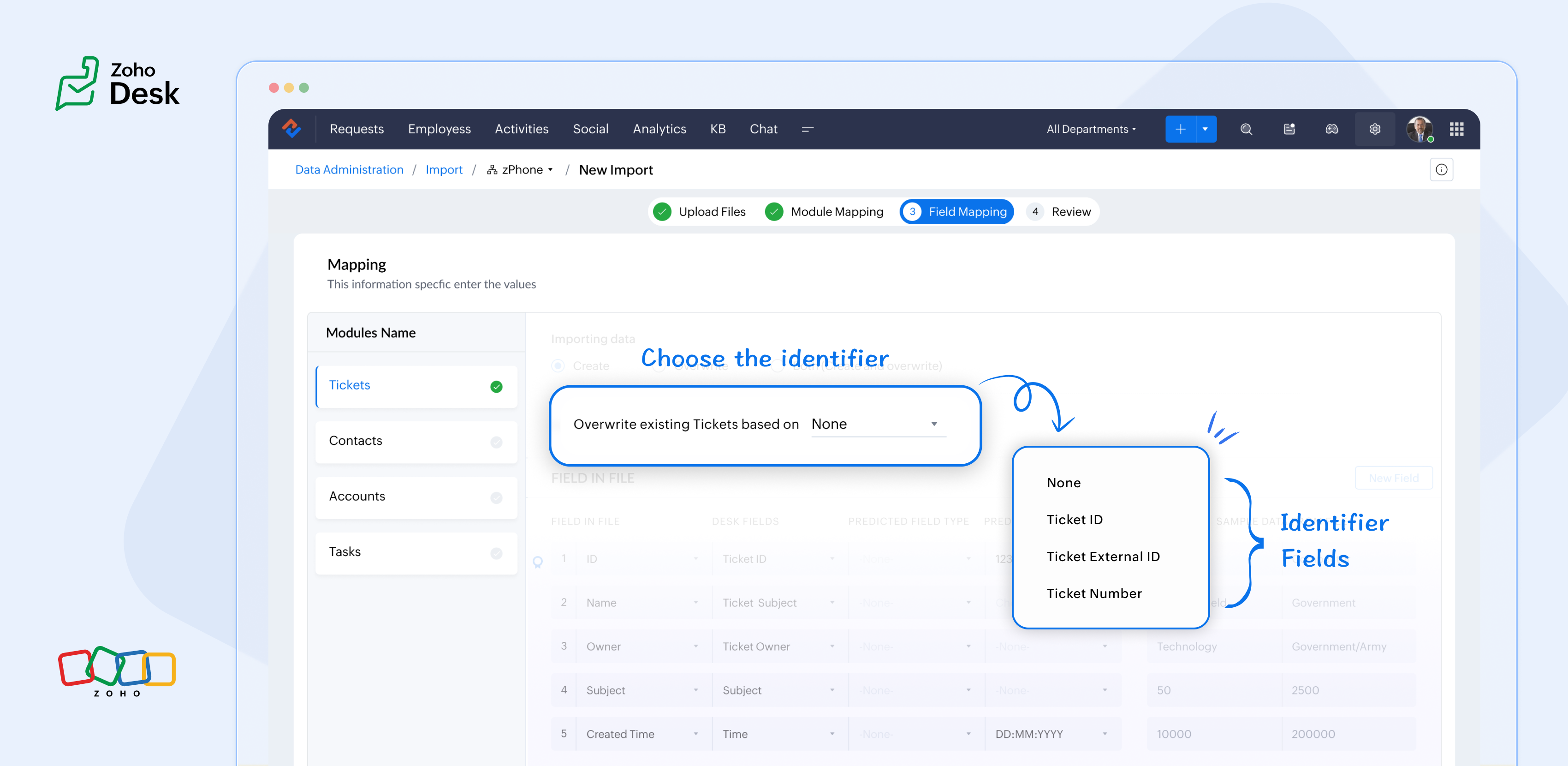
When importing data into Zoho Desk, the Identifier Field is essential because it helps identify existing records and avoid duplicate entries. 


What are the Identifier Fields?  

Identifier fields are fields used to find and match existing records when importing data into the product. They also help link related records, like connecting a contact’s name with their email address.

Each module supports different unique identifier fields for identification, as described in the table below:


Module

Unique Identifier Fields

Accounts

Account ID 

Account External ID

Account Name

Contacts

Contact ID

Contact External ID 

Last Name

First Name

Email

Phone Number

Mobile

Tickets

Ticket ID

Ticket External ID

Ticket Number

Products

Product ID

Product External ID

Product Name

Tasks

TaskId

Task External ID

Calls

Call ID

Call External ID

Events

Event ID

Event External ID

Article Translation

Translation: External ID

Translation ID

Custom Modules

Record External ID

Custom Module Name


Idea

Points to remember:

  • While these fields help find matching records.
  • So, if multiple records match the value, the first matching record will be selected automatically.
  • This can lead to unexpected matches or data being updated in the wrong record if you're not careful.

For your understanding:

Some users expressed a preference for matching Contacts by Last Name instead of Email, highlighting the importance of flexibility in their workflow. Furthermore, some additional users approached matching through the use of a custom field, emphasising the need for tailored solutions to fit their unique requirements. Moreover, users requested that the functionality be enhanced by updating existing records with the relevant entity's Zoho Desk ID, aiming to streamline their processes and improve data accuracy.

Commonly used identifier fields:

  • Find By is used to identify an existing record during the import process.
  • Map By is utilized to link a child record to a parent record, for instance, by linking a Contact to a Ticket.


You can now select specific fields for matching, providing enhanced control and customization during bulk processes or integrations. This functionality enables more precise data handling, ensuring that the information aligns with your specific requirements. By tailoring the matching criteria, you can streamline processes, ultimately leading to enhanced efficiency and better outcomes for your team. This flexibility enables you to harness the full potential of your data.

Import Systems

Let's start by preparing the CSV file.

A sample tickets module CSV file is given below,


External ID

Subject

Contact Email

Contact Name

About

101

Hitman

rohit@bcci.com

Sharma

Rohit Sharma's journey from a gifted schoolboy to an international icon and fierce competitor reflects resilience, elegance, and remarkable leadership.

102

King Kohli

virat@bcci.com

Virat

Virat Kohli is a world-renowned Indian cricketer known for his aggressive batting, unmatched consistency, and passionate leadership across all forms of the game.

103

Lambu Ishanth

ishanth@bcci.com

Sharma

Ishant Sharma is a tall and experienced Indian fast bowler known for his 300 test wickets and key performances in overseas conditions.


Then choose the appropriate Find By identifier field.

The Find By field is selected from a predefined set of fields specific to each module. It is used to determine whether a record already exists in Zoho Desk.


When using the import tool, the system searches the Desk portal for a record (e.g., a ticket) that matches the value mapped to the selected Find By field. This prevents duplicate records by identifying existing entries based on the chosen field.  


  • Once the file is uploaded, you need to choose a Find By Field — for instance, Ticket External ID.
  • Whichever Find By field we choose must correspond to the relevant column in the CSV file. Since we've selected the Ticket External ID, the Case External ID column in your file should be mapped to the Ticket External IDfield.
QuoteIf the chosen operation is to 'create new records while avoiding duplicates', and there is no existing ticket with the External ID 101, the import tool will generate a new ticket using the mapped fields. To associate the ticket to the correct Contact, the import tool utilizes the Map By field feature.

Finally, choose the appropriate Map By field.

The Map By field enables users to link imported records to their corresponding dependent records, such as associating a ticket with a specific contact. This functionality ensures that when you import ticket data, the import tool actively searches for a matching Contact in Zoho Desk based on the value defined in the selected Map By field.


For instance, during the field mapping process, you can specifically choose to map the Ticket to a Contact using criteria such as the Contact's email ID. This approach enhances the accuracy of data integration by ensuring that each ticket is correctly associated with the relevant Contact, thereby improving data integrity and streamlining the support process. This meticulous mapping not only minimizes the chances of errors but also facilitates a more organized and efficient ticket management system, ultimately leading to improved customer experiences and satisfaction.


Idea

Map by identifier field functionality

The tool efficiently searches for contacts associated with the provided email address.    


Search: When a user submits a ticket, the system initiates a search for contacts associated with the specified email address.   


Match found: If a single match is identified, the ticket is seamlessly associated with that Contact, ensuring that all relevant customer information is readily accessible for support agents.   


Multiple Matches: If numerous contacts are found with the same email address, the system will prioritize and use the first match. This helps streamline the ticketing process while maintaining clarity in customer support.   


No Match Found: If no matches are found within the system, the ticket will not be created. This prevents unnecessary duplication and ensures that support agents are only working with valid, existing customer records. 

In summary, the strategic use of Custom Unique Fields and External ID fields as identifiers, along with the potential for composite identifiers, positions support teams to operate more effectively and improve overall customer interactions.

Significant improvements in user experience 

Transparent process and status tracking 

We’ve implemented a straightforward, step-by-step process for data imports, complete with real-time status updates for each stage. This transparency enables users to monitor import progress and understand the current state of the process.

Unique identifiers for entity mapping 

New fields have been introduced to help users identify if a parent entity already exists when importing related child entities. For example, users can seamlessly map a contact to an existing account in Zoho Desk, streamlining the import process while minimizing the risk of duplicate entries.

Enhanced error handling and log accessibility

We’ve made significant improvements in error handling by allowing users to download detailed error logs directly from the history page in the event of import failures. This enhancement provides users with greater insight into any issues, facilitating faster troubleshooting and resolution.

Support for custom modules

The import UI has been revamped to support custom modules, providing users with greater flexibility and customization options. This enables a more personalized and efficient data import experience.

Takeaway

For instance, a large corporation merging client data from multiple legacy systems into Zoho Desk modules will benefit significantly from automatic field mapping, ensuring that contact and account names are accurately aligned. This attention to detail not only improves the user experience but also enhances overall data integrity during the merging process.
 
Please stay tuned for more Desk updates.
 
Cheers,
 
Kavya Rao
The Zoho Desk Team

    Access your files securely from anywhere


          All-in-one knowledge management and training platform for your employees and customers.


                                Zoho Developer Community


                                                      • Desk Community Learning Series


                                                      • Digest


                                                      • Functions


                                                      • Meetups


                                                      • Kbase


                                                      • Resources


                                                      • Glossary


                                                      • Desk Marketplace


                                                      • MVP Corner


                                                      • Word of the Day


                                                      • Ask the Experts


                                                                Manage your brands on social media


                                                                      Zoho TeamInbox Resources


                                                                          Zoho CRM Plus Resources

                                                                            Zoho Books Resources


                                                                              Zoho Subscriptions Resources

                                                                                Zoho Projects Resources


                                                                                  Zoho Sprints Resources


                                                                                    Qntrl Resources


                                                                                      Zoho Creator Resources


                                                                                          Zoho CRM Resources

                                                                                          • CRM Community Learning Series

                                                                                            CRM Community Learning Series


                                                                                          • Kaizen

                                                                                            Kaizen

                                                                                          • Functions

                                                                                            Functions

                                                                                          • Meetups

                                                                                            Meetups

                                                                                          • Kbase

                                                                                            Kbase

                                                                                          • Resources

                                                                                            Resources

                                                                                          • Digest

                                                                                            Digest

                                                                                          • CRM Marketplace

                                                                                            CRM Marketplace

                                                                                          • MVP Corner

                                                                                            MVP Corner


                                                                                              Design. Discuss. Deliver.

                                                                                              Create visually engaging stories with Zoho Show.

                                                                                              Get Started Now


                                                                                                Zoho Show Resources

                                                                                                  Zoho Writer

                                                                                                  Get Started. Write Away!

                                                                                                  Writer is a powerful online word processor, designed for collaborative work.

                                                                                                    Zoho CRM コンテンツ


                                                                                                      Nederlandse Hulpbronnen


                                                                                                          ご検討中の方


                                                                                                                    • Recent Topics

                                                                                                                    • How do I delete all my leads so I can start again?

                                                                                                                      How do I delete all my leads at one time so I can start again?
                                                                                                                    • Le cauchemar de PEPPOL avec Zoho Books

                                                                                                                      Après de longues hésitations — car je défends toujours les produits Zoho malgré leurs imperfections —, je me suis décidé à poster cet avis sur ce forum. En effet, depuis plus de 5 mois, les nombreux soucis relatifs à la facturation par PEPPOL semblent
                                                                                                                    • What is a realistic turnaround time for account review for ZeptoMail?

                                                                                                                      On signing up it said 2-3 business days. I am on business-day 6 and have had zero contact of any kind. No follow-up questions, no approval or decline. Attempts to "leave a message" or use the "Contact Us" form have just vanished without a trace. It still
                                                                                                                    • number auto generate

                                                                                                                      There is a basic need for a function to auto generate numbers. Presently the help pages layout several confusing and non-working ideas. You will not get my subscription without a simple auto number function.
                                                                                                                    • Mailbox delegation - A secure way to enable collaboration

                                                                                                                      Admins often encounter scenarios where a user needs another team member to access and manage their mailbox during extended leave, role transitions, or while handling high email volumes. In such situations, ensuring business continuity without sharing
                                                                                                                    • Service currently unavailable

                                                                                                                      The Zoho Mail Webmail is working, the Mail Admin Console is not: "Our service is temporarily unavailable, please try after sometime." How long must I wait to retry? edit: To add to this, the Webmail is not working 100% - I can open mail in the inbox,
                                                                                                                    • Email Opt Out Question

                                                                                                                      Has the problem where if a customer is emailed opt out prevents you sending standard emails? For me this feature is simply to stop any email marketing and should not block people from receiving emails via Zoho mobile, which makes no sense.
                                                                                                                    • Rich-text fields in Zoho CRM

                                                                                                                      Moderation Update: During the initial release of Rich Text fields, it was supported only in the Enterprise and Ultimate editions. We have gradually extended Rich Text fields to all the paid editions of Zoho CRM. Hello everyone, We're thrilled to announce
                                                                                                                    • incoming mails not received

                                                                                                                      incoming mails not received
                                                                                                                    • Power up your Kiosk Studio with Real-Time Data Capture, Client Scripts & More!

                                                                                                                      Hello Everyone, We’re thrilled to announce a powerful set of enhancements to Kiosk Studio in Zoho CRM. These new updates give you more flexibility, faster record handling, and real-time data capture, making your Kiosk flows smarter and more efficient
                                                                                                                    • FSM- are we getting there

                                                                                                                      We have now tried the FSM a couple of times. We have been defeated on the offline access. As you can imagine the enginner needs to know the customers details, the job and the equipment. This needs to be cache. Is it yet? Plus Our engineers do multiple
                                                                                                                    • Agents in Homepage

                                                                                                                      Hello all, Your agents do useful work. They find things like important leads, deals, and updates for you. But until now, you could not see any of this on your Home page. To check what an agent had found, you had to open the agent on its own, away from
                                                                                                                    • How can I get quantity number for each item from collection ?

                                                                                                                      How can I get quantity from sub form in another form when I fetch data get it in collection  ​
                                                                                                                    • Updates on Report Panel Selection Customization

                                                                                                                      Zoho Dev Team, I would like to check if we have updates on Search Panel selection list. And if we can finally select a few instead of going to the list.
                                                                                                                    • Global search

                                                                                                                      Hi! I think it would be great to have a global search that would give you results from all records of a database, no only for a single field of a single form as we have now. Thanks!
                                                                                                                    • Lightbox Pop-up form

                                                                                                                      I would like to embed my form using the lightbox pop up. I don't want it to load automatically. I want it to load when some clicks the button. I can see this option, however when I use the "show pop-up launch button" on the website, the button automatically
                                                                                                                    • Format print pos

                                                                                                                      can anyone help me create a format to print in thermal pos format as epson t20ii printer
                                                                                                                    • Getting the Record ID of a form once it is submitted - so that form can be edited later

                                                                                                                      In Zoho Forms, where can I access the record ID of a form once the form is submitted? - Record ID is not available in webhook payloads - It is not available to form fields, including in formulas - It is not available as a parameter in a thankyou page
                                                                                                                    • Tip#51: Use Nested Picklists for cleaner forms

                                                                                                                      Are you looking for a dropdown field that branches out with multiple child options? Zoho Sprints supports Nested Picklist where you can create a parent-child relationship to navigate the users seamlessly with the required options. This ensures that the
                                                                                                                    • #19 The Easier It is to Pay, the Faster You Get Paid

                                                                                                                      In our previous post, we looked at recording offline payments to keep your books accurate. But what if you could eliminate that manual step altogether? Imagine sending an invoice where your customer doesn't have to copy your bank details, switch between
                                                                                                                    • All new Address Field in Zoho CRM: maintain structured and accurate address inputs

                                                                                                                      Availability Update: 29 September 2025: It's currently available for all new sign-ups and for existing Zoho CRM orgs which are in the Professional edition exclusively for IN DC users. 2 March 2026: Available to users in all DCs except US and EU DC. 24
                                                                                                                    • Mass Email: Individual or Bulk?

                                                                                                                      Can anyone confirm that the mass email feature sends as an individual email or as bulk? I'm curious to know what a mass email header looks like.
                                                                                                                    • How do I add our corporate fonts to campaign template?

                                                                                                                      We have developed a custom campaign template in Zoho Campaigns. Unfortunately there is such a small option of fonts by Zoho default. We need to add our 2 corporate fonts so that our campaigns are in line with our brand. How do we do this?
                                                                                                                    • Export current view on timesheet bug?

                                                                                                                      When you export current view on timesheet, which is a welcome change, it states: Only the current view with its visible columns will be exported from Zoho Books in CSV or XLS format.". However when this is done, the current view is not fully exported.
                                                                                                                    • What's New in Zoho Invoice | April – June 2026

                                                                                                                      Hello everyone! We're back with the latest updates and enhancements we've rolled out in Zoho Invoice from April to June 2026. Here's what's new this quarter: Connect Zoho Invoice to AI Using Zoho MCP Customize Accessibility Preferences Attach Annexure
                                                                                                                    • Marketing Tip #38: Increase order value with free shipping thresholds

                                                                                                                      Free shipping is one of the easiest ways to nudge customers to spend a little more. Instead of offering free shipping on every order, set a minimum order value customers need to reach. This encourages shoppers to add one more item to their cart, which
                                                                                                                    • Integration between Zoho Creator & Zoho Projects?

                                                                                                                      Hie , Integration between Zoho Creator & Zoho Projects? Is that possible if yes then How??
                                                                                                                    • Zoho CRM's Old User Interface is set for EOL - Deadline and What to Expect

                                                                                                                      Hello Everyone, We are nearing the completion of enabling the Next Gen UI for users as announced in this post. The Next Gen UI introduces CRM For everyone with an improved workspace experience housing features like Teamspaces, Team Modules, enhanced views,
                                                                                                                    • Error AS101 when adding new email alias

                                                                                                                      Hi, I am trying to add apple@(mydomain).com The error AS101 is shown while I try to add the alias.
                                                                                                                    • Improved Email Management: More control over outgoing email delivery in Zoho Creator

                                                                                                                      Hello everyone, Managing how your Zoho Creator applications send emails just got a whole lot more powerful. We've completely revamped the Email Management feature to give you greater flexibility, better deliverability, and deeper control over your outgoing
                                                                                                                    • Send a converted Contact or Deal back to Leads using the Restore Lead extension for Zoho CRM

                                                                                                                      Hello everyone, This comes up more than people expect: a Lead gets converted into a Contact, and sometimes a Deal along with it, because at the time it looked ready. Then the situation changes the opportunity turns out to be much further off than expected,
                                                                                                                    • Marketer's Space: Make your emails more engaging with polls and surveys

                                                                                                                      Hello Marketers! Welcome back to Marketer's Space. This week, we're looking at two features that can turn a one-way email blast into an actual conversation: polls and surveys. Why to use polls and surveys? Most emails go out and you hear nothing back.
                                                                                                                    • DYK 9: Dependent Layout Rules

                                                                                                                      Did you know that you can configure dependent fields in Task and Issue Layouts? In a project, tasks and issues vary in nature and so do the fields needed for each. Displaying relevant fields and values keeps the layout organised and ensures necessary
                                                                                                                    • Error when connecting zoho projects mcp to Claude

                                                                                                                      When trying to connect zoho projects mcp through cloude, I am redirected to zoho login page, and then after adding my registered email I receive this error: Error while Initiating OAuth Invalid server url. Kindly re-verify oauth url from metadata and
                                                                                                                    • Item image on document

                                                                                                                      I know what I am asking may not be possible, but I will ask anyway, maybe I will get lucky, and someone else is doing it. My business is based on special orders only from various online stores. When I send a quote to a client, I generate a separate quote
                                                                                                                    • Cash Recipt

                                                                                                                      You can not receive cash more than 10000 from one party in a day and two lakh in a year. In statement you can't differentiate cash or bank receipt. zoho does not support this
                                                                                                                    • MCP > Creator connection failing with Claude

                                                                                                                      I'm trying to get claude to access any of my Zoho Creator apps and it keeps failing. I have enabled all tools for creator and ensured in claude settings that everything is authorised. Here is what claude says : Unfortunately, the error messages I'm receiving
                                                                                                                    • Zoho Analytics Aggregates

                                                                                                                      I have the attached report that lists Jobs and I want to aggregate the totals of Total Budgets, Total Bills and Difference for each Construction Stage. Can anyone tell me how I aggregate them?
                                                                                                                    • Customer/Vendor Portal session duration - can it be extended?

                                                                                                                      Hi all, We'd like to know how long the login session lasts for the Customer/Vendor Portal in Zoho Books, and whether there's any way to extend it (either through settings or via support/API). Right now this is causing a pretty poor experience for our
                                                                                                                    • is it possible to adjust the date field to show Monday as a first day

                                                                                                                      Hi, Is it possible to adjust somewhere the date field, so the first day of the week is Monday (instead of Sunday)? Thank you! Ferenc
                                                                                                                    • Next Page