How to Automatically Populate the Deal ID in the Parent Lead After Creating a New Deal with Blueprint?
Hello Everyone! 🎉
I wanted to share a solution to a problem that some of you might have encountered. In Zoho CRM, when creating a Deal from a Lead using a Blueprint, data can only flow in one direction—from the Lead (parent) to the Deal (child). But what if you need the newly created Deal’s ID to be automatically added back to the Lead?
The Problem:
When creating a new Deal, it’s straightforward to pass the Lead ID to the Deal via a custom field, but there’s no native way to automatically link the new Deal’s ID back to the originating Lead.
The Solution:
I worked around this limitation by using a short Deluge script in a workflow that triggers after the creation of a new Deal. Here’s how it works:
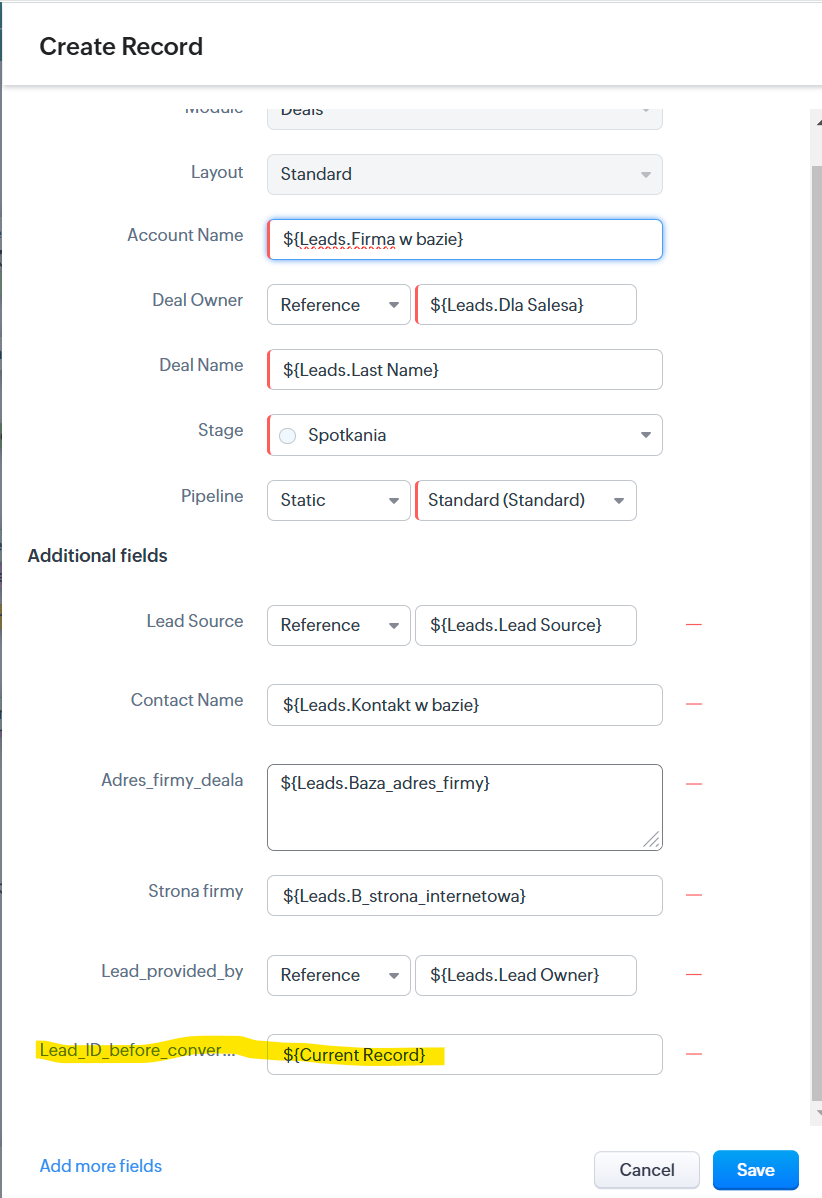
- While creating a Deal via Blueprint, I populate a custom field in the Deal (
Lead_ID_before_conversion) with the Lead’s ID. - A workflow runs a Deluge script that:
- Retrieves the Lead ID from the Deal’s custom field.
- Updates the Lead with the ID of the newly created Deal.
Deluge Script:
void automation.FetchDealIDToMotherLead(int recordId)// Fetch the Deal record based on the passed ID in JSON format dealInfo = zoho.crm.getRecordById("Deals", recordId, "json"); // Retrieve the Lead ID from the Lead_ID_before_conversion field leadIdJson = dealInfo.get("Lead_ID_before_conversion"); if(leadIdJson != null) { // Extract the ID directly from the JSON object leadId = leadIdJson.get("id"); // Update the Lead by setting the Deal_ID_after_conversion field to the current Deal ID leadMap = Map(); leadMap.put("Deal_ID_after_conversion", recordId); updateLead = zoho.crm.updateRecord("Leads", leadId, leadMap); } }
Steps to Implement:
- While creating the Deal in your Blueprint, make sure the field
Lead_ID_before_conversionis populated with the originating Lead’s ID.
(I’attach a screenshot showing where to configure this in the Blueprint!) - Create an automated workflow for newly created Deals that triggers the Deluge script.
With this simple solution, you can effectively connect Leads to their Deals and streamline your data management! 😊
If you have any questions or need more details, feel free to ask! 💬
Best Regards
Katarzyna Ochnik
kochnik | LinkedIn