In ZohoCRM Dashboards - Editing Shown Columns on Drilldown of Components
Hello!
I'm working with some Dashboards inside of ZohoCRM. When creating a component (In this case, specifically a KPI Ranking Component), I'd like to customize which fields show when trying to drilldown. For example, when I click on one of the sales team members, what I currently see is only the Lead Name, Created Time, and the Lead Owner. I'd like to see some additional fields. Is this possible?
Screenshot of what I'm trying to accomplish:
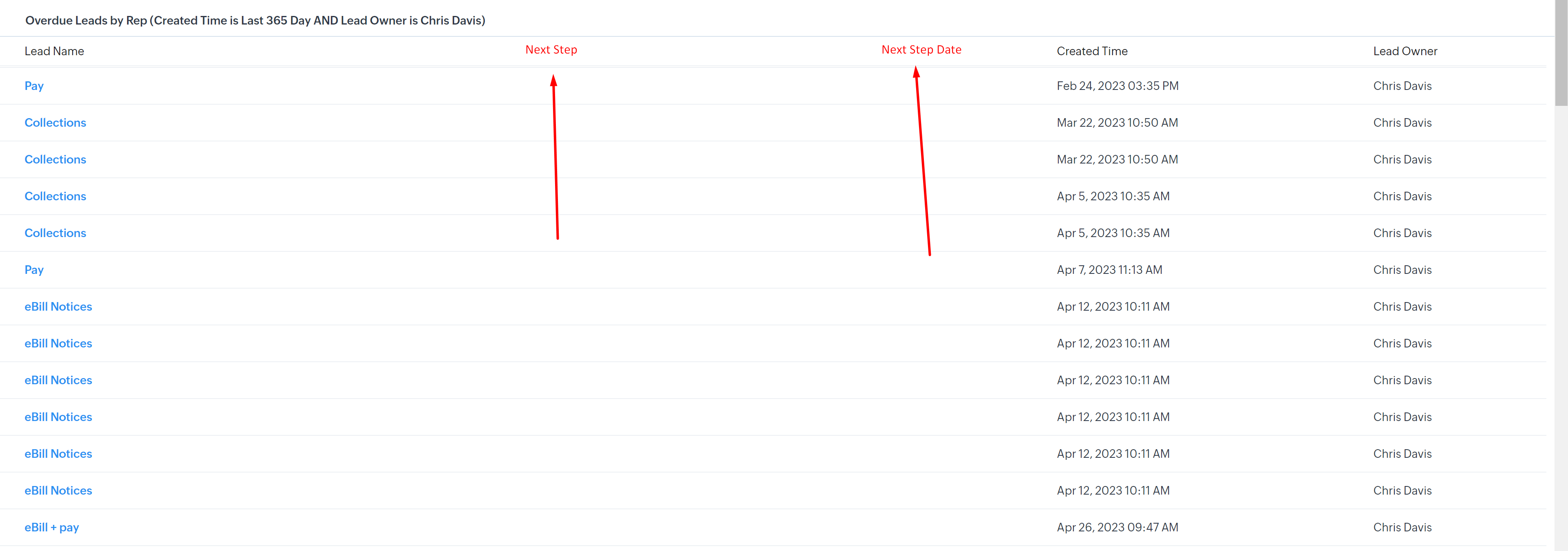
I'm working with some Dashboards inside of ZohoCRM. When creating a component (In this case, specifically a KPI Ranking Component), I'd like to customize which fields show when trying to drilldown. For example, when I click on one of the sales team members, what I currently see is only the Lead Name, Created Time, and the Lead Owner. I'd like to see some additional fields. Is this possible?
Screenshot of what I'm trying to accomplish:
Moderation Update:
The enhancement is being enabled in phases. It is expected to be rolled out to everyone by the end of a month or two, as we are fine tuning the same. We will keep you posted when it is available for all. In the meantime, you can add a comment if you are interested in having it enabled for your account.