Introducing AWS authentication for connections in Deluge

Introducing AWS authentication for connections in Deluge

Hello everyone,

We're incredibly excited to announce the all-new AWS authentication for connections in Deluge! This highly anticipated feature simplifies connecting to Amazon Web Services, opening up a world of possibilities and allowing you to seamlessly integrate your Zoho apps with the power and scalability of the AWS cloud.

What does this mean for you? 

This new integration empowers you to connect and access AWS services like S3 directly from within Deluge. This eliminates the need for third-party tools to achieve a connection between Zoho and AWS. It also allows you to harness AWS's scalability for handling massive datasets while utilizing Deluge's power for complex transformations.

How does it work? 

AWS is now offered as a custom connector in Deluge. This AWS connection utilizes Signature Version 4 authentication, the most up-to-date and secure method for authenticating requests to AWS services. It offers several key advantages that help protect your AWS credentials and prevent unauthorized access.

Availability 

The new AWS authentication for connections is available across all Zoho services that support Deluge connections. This means you can use it within your existing Zoho applications, be it CRM, Books, Mail, or others, to unlock new possibilities.

Creating an AWS connection 


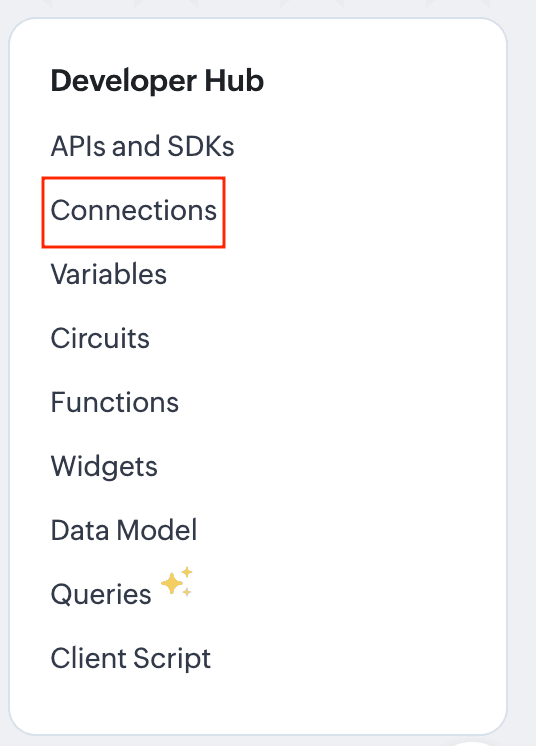
  1. Navigate to the Connections section of the desired Zoho service. For this example, we'll use Zoho CRM. For Zoho CRM, you can access it under Settings -> Developer Hub -> Connections.
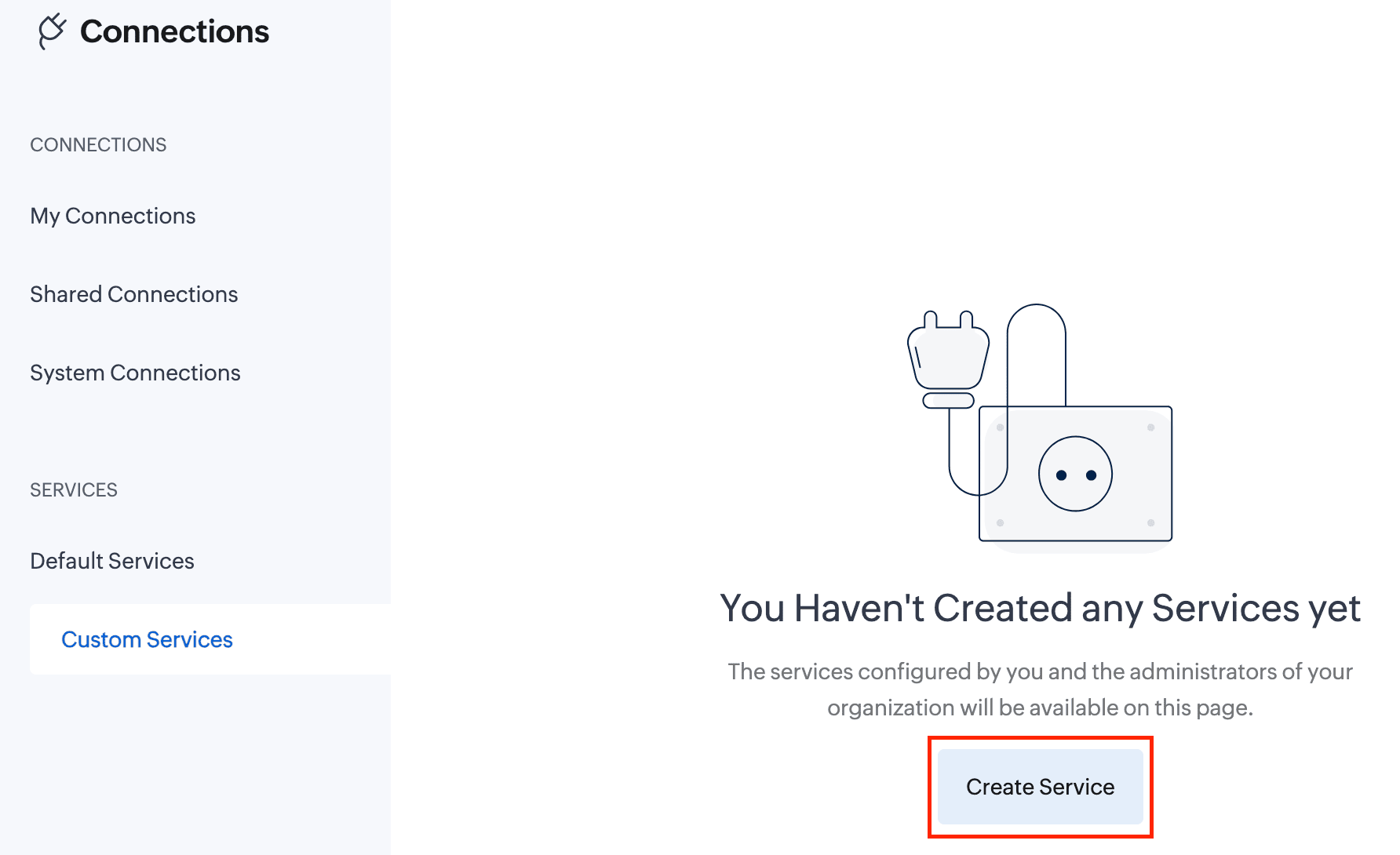
  2. In the Connections section, go to Custom Services and click the Create Service button.
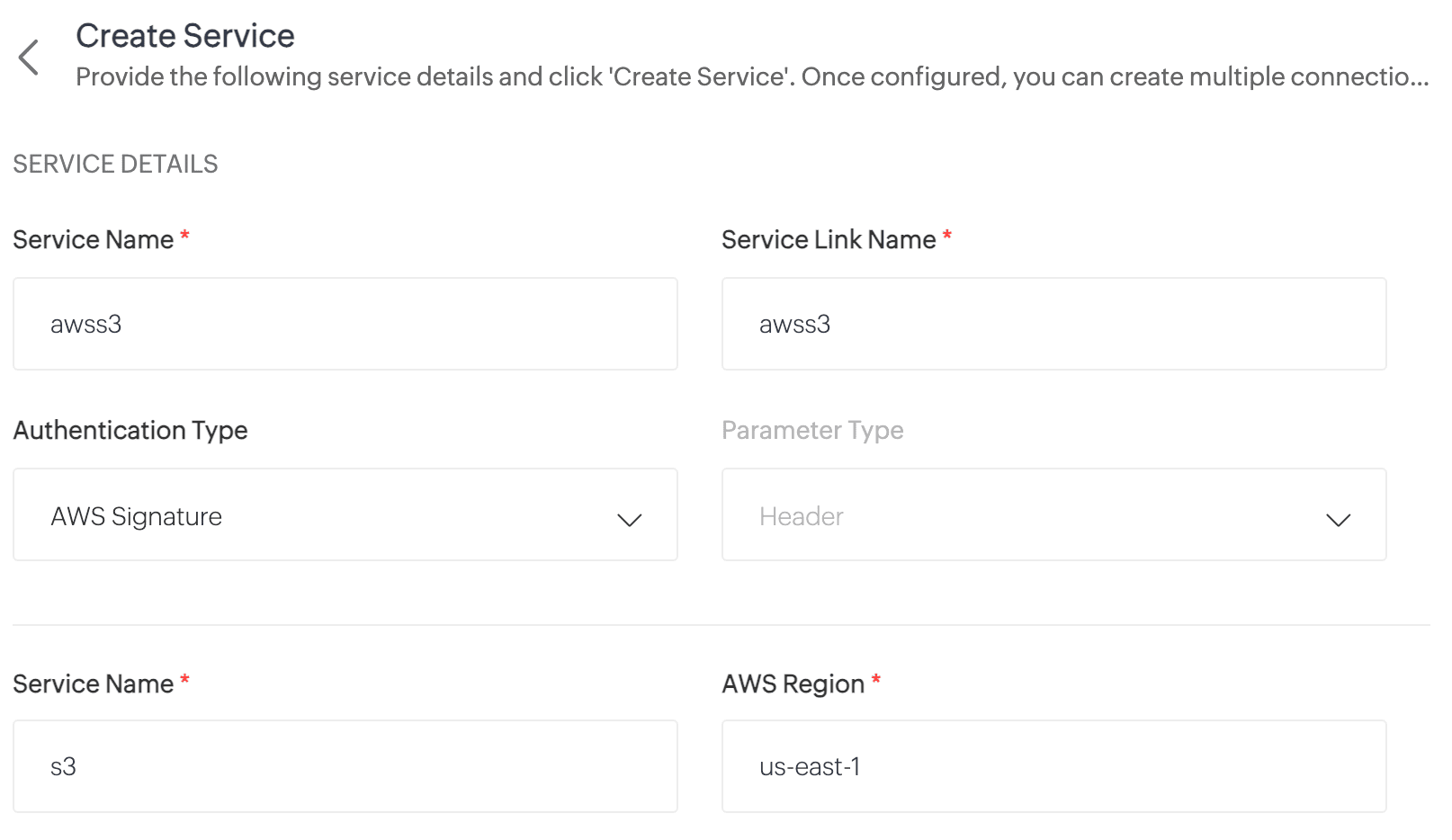
  3. On the Create Service page, enter the following details:
    Service Name: awss3 //Custom connector name
    Service Link Name: awss3
    Authentication Type: AWS Signature
    Service Name: s3 //Amazon service name
    AWS Region: Enter your AWS region. To find your AWS region, log in to your AWS account and navigate to Console -> S3 -> General Purpose Buckets. Locate your storage buckets and copy the AWS region (e.g., us-east-1) displayed next to the required bucket.
  4. Click Create Service. The AWS S3 custom service will now be created.
  5. Now, navigate to My Connections and click Create Connection.
  6. On the Create Connection page, go to Custom Services under Pick Your Service and select awss3.
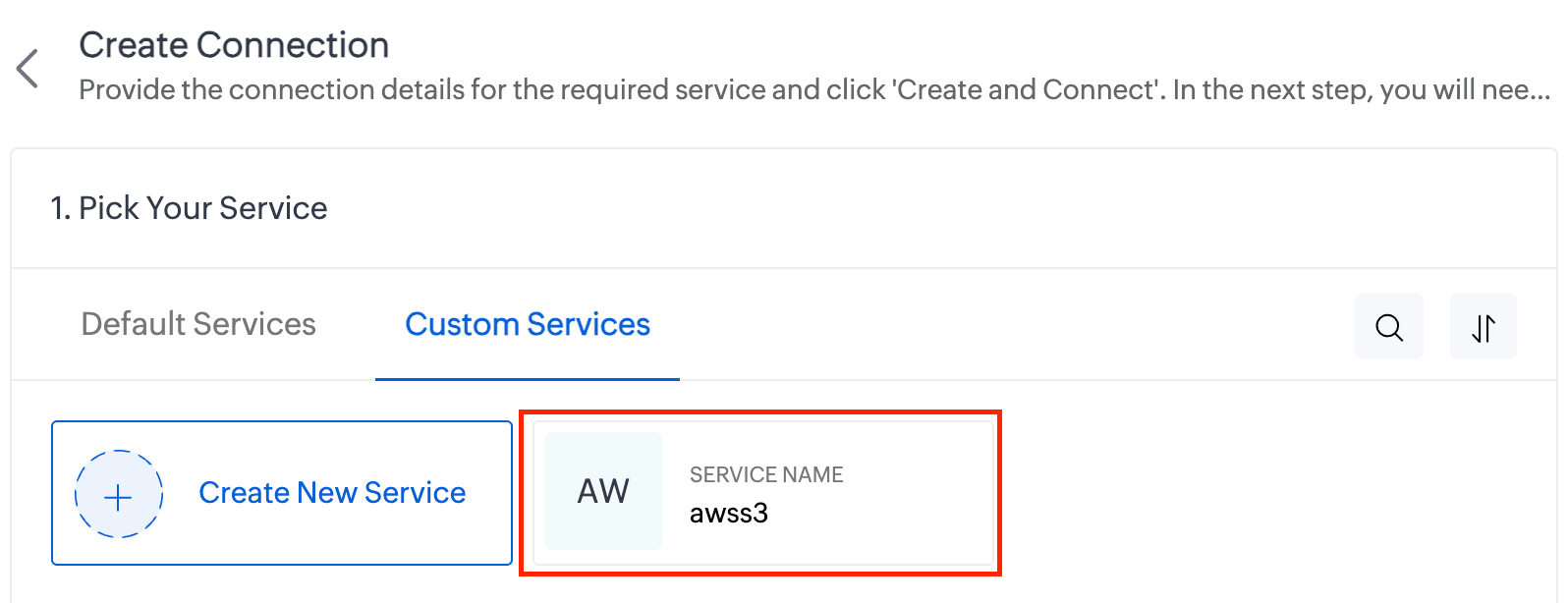
  7. Enter the Connection Name and Connection Link Name. Then click Create and Connect.
  8. You'll be redirected to the AWS authorization page, where you'll need to enter your Access Key and Secret Key.
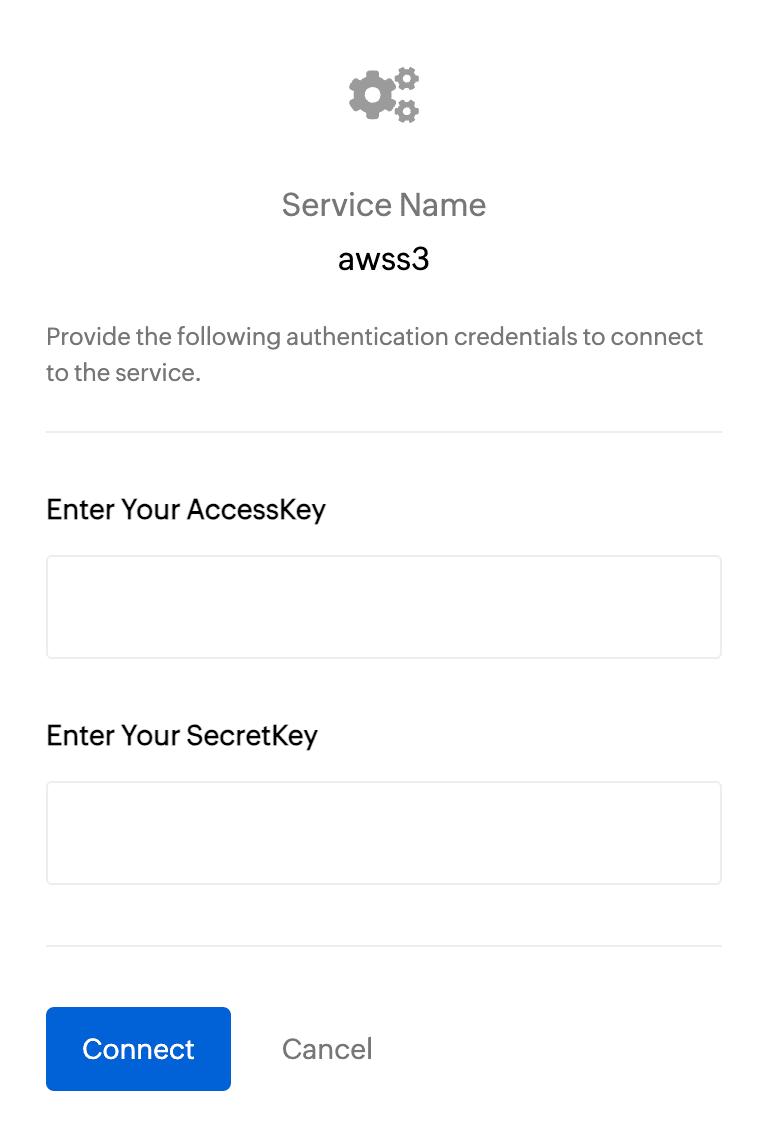
    To get the Access Key and Secret Key:
    1. Log in to your AWS account and navigate to IAM.
    2. In the left pane, under Access Management, click Users.
    3. Select the required user from the list.
    4. On the User Details page, go to the Security Credentials section.
    5. Under Access Keys, click Create Access Key.
    6. On the next page, choose Command Line Interface (CLI) as the use case and click Next.
    7. Click Create Access Key.
    8. Copy the Access Key and Secret Key, then paste them into the respective fields on the AWS authorization page.
    9. Finally, click Connect.
  9. Your AWS connection has now been successfully created!

Working with AWS connections

Now you can utilize this AWS connection to integrate with AWS services and perform various actions, such as storing and retrieving data from Amazon S3. This connection can be leveraged across Zoho services (such as functions) to automate your data workflows.

For example, let's create a function to upload a file to AWS S3:
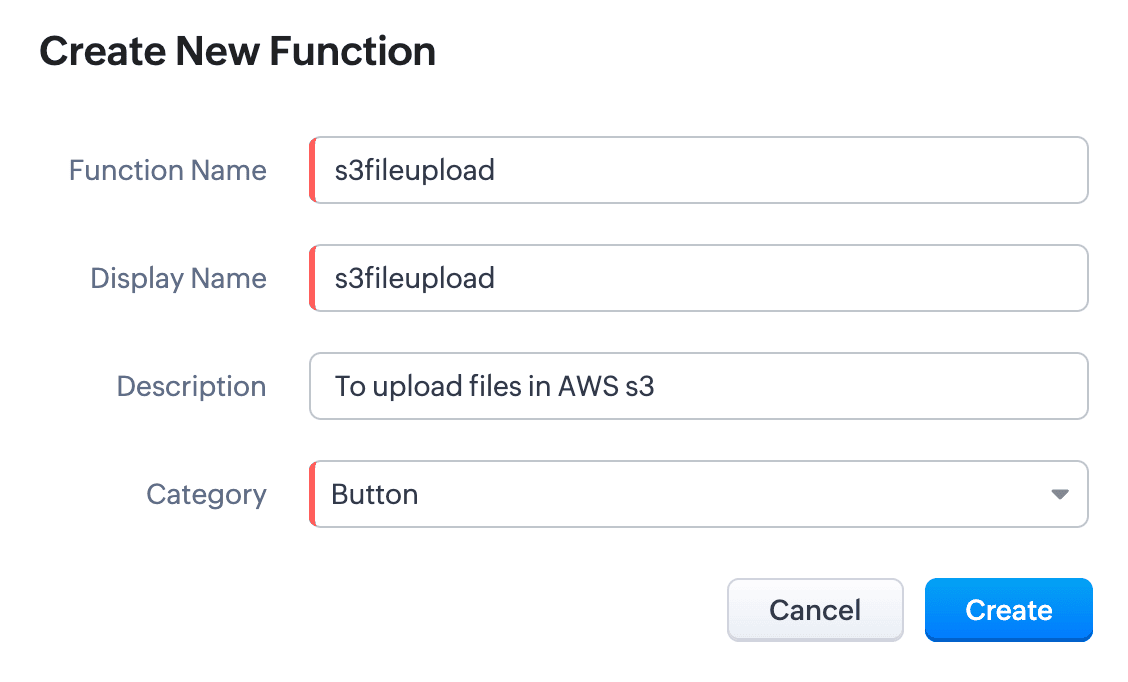
  1. Create a new function. Name the function and choose the appropriate type.
  2. Write the required scripts in the Deluge editor.
    Here's a sample script which fetches a file from a given URL and uploads it to an AWS S3 bucket using the configured AWS connection:
    Quote
    fileResponse = invokeUrl
    [
    url:"https://filesamples.com/samples/document/txt/sample1.txt"
    type: GET
    ];
    file = tofile(fileResponse,"sample1.txt");

    // Upload the file to AWS S3
    awsResponse = invokeUrl
    [
    "https://<your-bucket-name>.s3.amazonaws.com/<file-name>" // Replace with your bucket name and file name
    type: PUT
    parameters:file
    content-Type : "application/octet-stream"
    connection: "awss3" // Use the AWS connection created earlier
    detailed:true
    ];

    // Log the response
    info awsResponse;
  3. Execute the function by clicking the Save and Execute button.
  4. Switch to your AWS account, go to Console -> S3 -> General Purpose Buckets, and select the required bucket.
  5. You’ll see the sample file from the script listed under the Objects section. Every successful execution results in the file being uploaded to the bucket

Use cases 

  • Zoho CRM: You can automatically back up important customer documents from Zoho CRM to AWS S3. For instance, when a new file (e.g., contracts, proposals) is uploaded to a CRM record, a Deluge function can be triggered to fetch and store the file in S3 storage.
  • Zoho Books: You can store and retrieve invoices from Zoho Books to AWS S3. When an invoice is generated, a Deluge function fetches the PDF and uploads it to an S3 bucket. This can act as centralized space for all your invoices.
 
We have comprehensive documentation covering everything you need to know about Deluge connections. For more information, visit our Deluge Connections help doc.

Note: Please be aware that Zoho Creator has its own Connections feature, and we are working to bring AWS connections to Creator soon.

That’s all from us on the AWS connector! We hope you find it valuable and make the most of it across Zoho services. Give it a try, explore its possibilities, and let us know your thoughts.

And if you need any assistance, don’t hesitate to reach out to us. We’re always happy to help.

Regards,
The Deluge Team

    Access your files securely from anywhere


                          Zoho Developer Community


                                                • Desk Community Learning Series


                                                • Digest


                                                • Functions


                                                • Meetups


                                                • Kbase


                                                • Resources


                                                • Glossary


                                                • Desk Marketplace


                                                • MVP Corner


                                                • Word of the Day


                                                • Ask the Experts


                                                          • Sticky Posts

                                                          • Function #41: Sync Associated Subforms!

                                                            Welcome back everyone! The last custom function showed how to update a Contact with Product details from it's Related list in Deals. This week, let's look at a function that lets you update subform records in two modules simultaneously when one of them is updated. Business scenario Let's look at how subform helps in an education institution that has deployed Zoho CRM. National Public School, Austin (made up, of course!) has set up Zoho CRM and it follows the same relationship pattern of "Students",


                                                          Manage your brands on social media


                                                                Zoho TeamInbox Resources


                                                                    Zoho CRM Plus Resources

                                                                      Zoho Books Resources


                                                                        Zoho Subscriptions Resources

                                                                          Zoho Projects Resources


                                                                            Zoho Sprints Resources


                                                                              Qntrl Resources


                                                                                Zoho Creator Resources


                                                                                    Zoho CRM Resources

                                                                                    • CRM Community Learning Series

                                                                                      CRM Community Learning Series


                                                                                    • Kaizen

                                                                                      Kaizen

                                                                                    • Functions

                                                                                      Functions

                                                                                    • Meetups

                                                                                      Meetups

                                                                                    • Kbase

                                                                                      Kbase

                                                                                    • Resources

                                                                                      Resources

                                                                                    • Digest

                                                                                      Digest

                                                                                    • CRM Marketplace

                                                                                      CRM Marketplace

                                                                                    • MVP Corner

                                                                                      MVP Corner


                                                                                        Design. Discuss. Deliver.

                                                                                        Create visually engaging stories with Zoho Show.

                                                                                        Get Started Now


                                                                                          Zoho Show Resources

                                                                                            Zoho Writer

                                                                                            Get Started. Write Away!

                                                                                            Writer is a powerful online word processor, designed for collaborative work.

                                                                                              Zoho CRM コンテンツ


                                                                                                Nederlandse Hulpbronnen


                                                                                                    ご検討中の方


                                                                                                          • Recent Topics

                                                                                                          • Live webinar: Mastering data migration, organization, and team collaboration

                                                                                                            Hello everyone, We’re excited to invite you to our upcoming live webinar! Discover how to seamlessly migrate your data, optimize file organization, and boost team collaboration using Zoho WorkDrive’s powerful features. This is a fantastic opportunity
                                                                                                          • BARCODE PICKLIST

                                                                                                            Hello! Does anyone know how the Picklist module works? I tried scanning the barcode using the UPC and EAN codes I added to the item, but it doesn’t work. Which barcode format does this module use for scanning?
                                                                                                          • Join our live webinar: Explore the WorkDrive TrueSync application!

                                                                                                            Hello everyone, We are thrilled to invite you to a live webinar focused on mastering the WorkDrive TrueSync application. Discover how to seamlessly sync your content between the cloud and your computer, ensuring smooth and efficient file management. Our
                                                                                                          • Bug tracking

                                                                                                            Hi, does anyone know how to track errors during picking or packing? This way I can keep track and see how to improve and prevent errors in this area.
                                                                                                          • Can the Product Image on the Quote Template be enlarged

                                                                                                            Hello, I am editing the Quote Template and added ${Products.Product Image} to the line item and the image comes up but it is very tiny. Is there anyway that you can resize this to be larger? Any help would be great! Thanks
                                                                                                          • Zoho Creator customer portal limitation | Zoho One

                                                                                                            I'm asking you all for any feedback as to the logic or reasoning behind drastically limiting portal users when Zoho already meters based on number of records. I'm a single-seat, Zoho One Enterprise license holder. If my portal users are going to add records, wouldn't that increase revenue for Zoho as that is how Creator is monetized? Why limit my customer portal to only THREE external users when more users would equate to more records being entered into the database?!? (See help ticket reply below.)
                                                                                                          • Script Editor not an option

                                                                                                            I am trying to apply a script to a sheet and Script Editor is not an option. I don't want to go outside Sheets to do this (like Creator) if it can be done inside Sheets.
                                                                                                          • Send Automated WhatsApp Messages and Leverage the Improved WhatsApp Templates

                                                                                                            Greetings, I hope all of you are doing well. We're excited to announce a major upgrade to Bigin's WhatsApp integration that brings more flexibility, interactivity, and automation to your customer messaging. WhatsApp message automation You can now use
                                                                                                          • Envio de mails

                                                                                                            Hola! No puedo enviar mails pero si recibirlos. No se como solucionarlo! Mi dominio es chidobebes.com.ar
                                                                                                          • ERROR CODE :554 - Your access to this mail system has been rejected due to poor reputation of a domain used in message transfer

                                                                                                            In my email configuration: The domain's MX Records are pointed to Zoho The domain's SPF Records have been pointed out successfully DKIM is enabled. DMARC Record is pointed for the domain. The domain name is digioorja.in. Still facing the issue of Error:
                                                                                                          • This Operation has been restricted. Please contact support-as@zohocorp.com for further details

                                                                                                            l tried to verify my domain (casalimpaeperfumada.com.br) and its shows this error: This Operation has been restricted. Please contact support-as@zohocorp.com for further details.
                                                                                                          • SLOW EMAILS

                                                                                                            Is there an issue with the Zoho server? For two days now I've been having issues with very long buffering. Please advise. Thank you.
                                                                                                          • POP3 authentication error - SOLVED

                                                                                                            Just in case others are as forgetful as me ... As Zoho has changed the POP server for personal and free organisational users, I needed to change the POP server on my email client. This failed persistently but eventually I remembered that I had chosen
                                                                                                          • Solution to Import PST File into Office 365.

                                                                                                            MailsDaddy OST to Office 365 Migration Tool is an outstanding solution to recover OST files and migrate them into Office 365 without any hassle. Using this software users can multiple OST files into Office 365 with complete data security. It offers users
                                                                                                          • Add Zoho One Groups/Departments to Shared Mailbox Access

                                                                                                            Hi, I hope you're doing well. Currently, in Zoho Mail, I can manually add specific users or the entire organization to a shared mailbox. However, there is no option to add Zoho One groups or departments. Feature Request: We would like the ability to assign
                                                                                                          • Allow Filters with Only Special Characters in Zoho Mail

                                                                                                            Hi Zoho Mail Team, I hope you're doing well. We have noticed that currently, Zoho Mail does not allow creating filter criteria using only special characters, such as = or #. However, there are scenarios where such a filter is necessary. For example: Filtering
                                                                                                          • How to save email as PDF?

                                                                                                            I saw 2 previous threads about this. One is from 14 years ago. The other was closed as "answered" a year ago but the feature was never implemented: https://help.zoho.com/portal/en/community/topic/how-to-download-save-emails-as-pdf Is the "save as PDF"
                                                                                                          • Flexible plans

                                                                                                            Hi, I have a Workplace Standard subscription. On Zoho's website, it mentions that with the annual plan it's possible to have multiple plans under the same organization—for example, Workplace Standard and Mail Lite. However, I can’t find a way to do this
                                                                                                          • Weekly Tips : Teamwork made easy with Multiple Assignees

                                                                                                            Let's say you are working on a big project where different parts of a single task need attention from several people at the same time—like reviewing a proposal that requires input from sales, legal, and finance teams. Instead of sending separate reminders
                                                                                                          • Cannot give public access to Html Snippet in Zoho Creator Page

                                                                                                            Hi, I created a form in Zoho Creator and published it. The permalink works but I want to override the css of the form. (style based URL parameters is not good enough) So I created a page and added an Html snippet. I can now override the css, which is
                                                                                                          • Weekly Tips : Customize your Compose for a smoother workflow

                                                                                                            You are someone who sends a lot of emails, but half the sections in the composer just get in your way — like fields you never use or sections that clutter the space. You find yourself always hunting for the same few formatting tools, and the layout just
                                                                                                          • Unable to confirm Super Admin assignment — confirmation button not working

                                                                                                            I’m trying to change the roles within my organization. I am currently a super admin and would like to add another user as a super admin. When I attempt to confirm the action, a screen appears asking for my password to verify my identity. However, when
                                                                                                          • Installing EMAIL Setup in New Domain

                                                                                                            Respected Support team, I'm facing an issue with cloudflare in Pakistan, I want to setup Zoho Mail Setup but I Don't know how to enable Zoho mail setup without cloudflare. My Website https://stumbleguyzzapk.com/, https://fakservices.com/ is using CF,
                                                                                                          • Will I Get a Refund If I Downgrade Zoho Mail?

                                                                                                            Hello, We upgraded an email account for our new employee. However, the employee left after one month, and now I've reduced the number of Zoho Mail users from 7 to 6. Can we get a refund for the remaining portion of our annual payment?
                                                                                                          • Accounting on the Go Series-43:Enhancing Your Reporting Efficiency with Dashboard Filter State Retention

                                                                                                            Hello everyone! Welcome back to our series on Zoho Books mobile app features. Today, we will talk about a feature that yet again helps you focus on work that really matters-Dashboard Filter State Retention. Imagine you're working on your Zoho Books dashboard,
                                                                                                          • Zoho books/payroll tax payment

                                                                                                            I accidentally made a second payment to my taxes for $300 which is reflected in my bank account and therefore on Zoho books but I can not match it to any transactions because its not reflected in payroll as a tax payment. Is there a way to add an extra
                                                                                                          • I can't renew the Finance Plus subscription

                                                                                                            I tried to renew the Finance Plus subscription but it keeps reloading the same page over and over when ever I click on "Renew Subscription" button
                                                                                                          • Estimate vs Quote

                                                                                                            they are different. Quote is for 1 piece price + other charges. Estimate is for total quantity to be ordered. The gross total amount of the Estimate is the amount payable. Replacing Estimate as Quote is not understandable because they are different. In
                                                                                                          • Accounting on the Go Series-47: Effortless GSTIN Management- Auto Populate TaxPayer Details in Zoho Books Mobile App

                                                                                                            Hello everyone, Welcome back! Today, we're focusing on a feature specifically designed for our Indian users in the Zoho Books-Indian edition, particularly those who deal with GST compliance regularly. We understand the importance of accurate and efficient
                                                                                                          • Accounting on the Go Series-48: Enhance Accuracy with Custom Work Week Start Days in Zoho Books iOS app

                                                                                                            Hello everyone, Welcome back! We’re here with another feature spotlight that might seem small but can have a big impact on your daily routine: setting the first day of the work week in the Zoho Books iOS app. Imagine this: You’re a business owner who
                                                                                                          • Time to Get Paid Report in ZBooks

                                                                                                            Hello, One of our customers who has 25 different companies around the world gets 60 days to make payments. Unfortunately, the subject report does not report an average time to get paid (in days) or the ability to look at a custom period of time. Currently
                                                                                                          • How to prepare a balance sheet for a company that has no operations yet?

                                                                                                            .
                                                                                                          • Project Billing Method from Zoho People

                                                                                                            Normaly our customers use Zoho Projects to manage projects and timesheet that are being charge to the customer. Using the integration from Zoho Project we can have projects base on different billing method. For example most of our customer use Hourly
                                                                                                          • Zoho Books-Accounting on the Go Series!

                                                                                                            Dear users, Continuing in the spirit of our 'Function Fridays' series, where we've been sharing custom function scripts to automate your back office operations, we're thrilled to introduce our latest initiative – the 'Zoho Books-Accounting on the Go Series'.
                                                                                                          • Zoho Books | Product updates | July 2025

                                                                                                            Hello users, We’ve rolled out new features and enhancements in Zoho Books. From plan-based trials to the option to mark PDF templates as inactive, explore the updates designed to enhance your bookkeeping experience. Introducing Plan Based Trials in Zoho
                                                                                                          • Zoho Books | Product updates | August 2025

                                                                                                            Hello users, We’ve rolled out new features and enhancements in Zoho Books. From the right sidebar where you can manage all your widgets, to integrating Zoho Payments feeds in Zoho Books, explore the updates designed to enhance your bookkeeping experience.
                                                                                                          • Apply Payment Received Amount Zoho Books Invoice

                                                                                                            Hello team here is the sample code How can apply the payment received record over a unpaid zoho books invoice. //......................... paymentID = customer_payment.get("payment_id"); organizationID = organization.get("organization_id"); paymentmaplist
                                                                                                          • Update or Upsert Records Using Unique Custom Fields

                                                                                                            Hello customers, We've enhanced the process of updating records via API. You can now: Update records using unique custom fields Upsert records using unique custom fields Note: Both the features are available in the Zoho Books and Zoho Inventory apps.
                                                                                                          • [Webinar] Understanding the New Invoice Management Systems

                                                                                                            Join industry expert CA Pritam Mahure as he discusses the importance of the new Invoice Management System (IMS) and its impact on taxpayers. Topics Covered: - Concept of IMS and pre-requisites - Applicability and Restrictions on Invoices/Records for IMS
                                                                                                          • Accounting on the Go Series-51: Effortless Transactions: Create and Manage Directly from Uploaded Documents

                                                                                                            Hello everyone, We’re back with another useful feature that makes working with Zoho Books even easier! This time, we’re simplifying the process of creating transactions directly from uploaded documents. Imagine you’re out meeting clients, and you receive
                                                                                                          • Next Page