Vibe
Hello Partners!
AI is changing the way we work and build things every day. Everyone is using AI to build widgets and front-end apps, turning their ideas and requirements into working experiences faster than ever.
Imagine simply describing what you want to build and watching it come alive inside your CRM, instantly without complex setup, configuration, deployments.
Say hello to Vibe, the newest AI-powered leap in Zoho CRM that transforms your ideas into fully functional apps, internal tools, custom pages, dashboards, and trackers with just a few words.
From Idea to Live UI in Minutes
Think of this AI powered feature as your personal and mini app builder living right inside Zoho CRM. No developers, no external tools, no waiting on IT tickets. No technical background or coding experience needed. Vibe renders live data over the tailored UI that you've built.

For the initial release, Vibe can be used to build Tabs.
Use case 1 : Build a Sales Leaderboard

Prompt : Build a stunning, premium, enterprise-grade CRM Sales Dashboard with rich, interactive visualizations and a modern SaaS UI. Include revenue trends, sales forecasts, KPI cards with sparklines, target achievement, interactive sales funnel, deal conversion rates, win/loss analysis, regional sales heatmaps, product performance, team leaderboards, and customer insights. Add AI-powered recommendations, pipeline risk alerts, and actionable sales intelligence. Support dynamic filters, chart drill-downs, hover tooltips, smooth animations, and contextual detail panels. Use elegant typography, subtle gradients, vibrant yet balanced colors, spacious layouts, and polished micro-interactions. Populate with realistic CRM data. Ensure a responsive, visually immersive experience using diverse charts. Make every interaction functional and deliver a world-class dashboard, not a generic admin template.
Simply type the prompt and watch the prompt come to life.
This use case helps you understand who is driving sales performance, where revenue is building, and where coaching may help most.
Track performance: Shows revenue progress, forecasts, targets, conversion, win/loss patterns, regional results, products, customers, and team performance.
Investigate quickly: Filters and interactive charts let people narrow the view, select a trend or funnel stage, and open the related opportunity details without losing their place.
Prioritize action: Highlights pipeline risk and sales recommendations so the team can focus on deals that need attention or have the strongest next-step potential.
Use case 2 : Account Management Console
Prompt: Create an account-management dashboard that acts as a portfolio command center for account managers. Make the account list the primary workspace, enabling users to identify, assess, and act on at-risk relationships without leaving the list. Each row should clearly show account name, relationship health, renewal timing, revenue or opportunity exposure, attention status, and concise reasons behind any risk signal. Prioritize urgent alerts and use clear severity cues so users can rapidly triage the portfolio. Include an account-review summary that highlights the number of accounts needing immediate attention and upcoming renewals within 90 days. Use a polished enterprise dashboard aesthetic with strong hierarchy, compact labels, data-dense but uncluttered rows, and visually prominent urgent states.
This helps account managers make faster, more confident decisions from the portfolio view.
Urgent work is easier to spot: Immediate-attention accounts are grouped in a consistent place, reducing the chance that a critical relationship is missed.
The scan path is clearer: A vertical summary follows the natural top-to-bottom reading flow, so teams can review urgency, renewal timing, and exposure quickly.
The account list stays central: Managers can assess each relationship and move into the right account without switching away from their primary workspace.
Smaller screens stay practical: The summary moves above the list when space is tight, keeping the same key information easy to reach.
Use case 3 : Build a Commission Computation Tool
Prompt: Build a commission computation tool that connects to our CRM. Use these defaults, all overridable inline:
Org - base rate 5%, tier 1 at 8% above 75% quota, tier 2 at 12% above 100%, accelerator 1.5× above 120%.
Deal - bonus 2% above $50K, 5% above $100K. Multipliers: new logo 1.3×, upsell 1.0×, renewal 0.8×.
Rep - monthly quota $80K, attainment tracked live, individual multiplier 1.0× adjustable per rep.
Show live: commission for this deal, daily run rate, projected monthly and quarterly earnings. Highlight tier breakthroughs in real time. Include a custom field for one-off bonuses or deductions.
The Commission Calculator helps you:
Plan settings: You can change the base rate, quota thresholds, accelerators, deal bonuses, and deal-type multipliers directly on the page.
Deal calculation: Select a deal and the calculator combines its value, type, current attainment, and any one-off bonus or deduction to show its commission.
Rep progress: Deal values contribute to the selected rep’s monthly attainment, with editable quota and personal multiplier settings.
Earnings outlook: It shows today’s pace plus projected monthly and quarterly earnings, while calling out when a rep reaches a higher commission tier.
Wherever You're Starting From, We've Got You
Prompt Enhancer: Not sure how to phrase your idea? Hit Enhance, and AI sharpens it into a clear, detailed prompt.

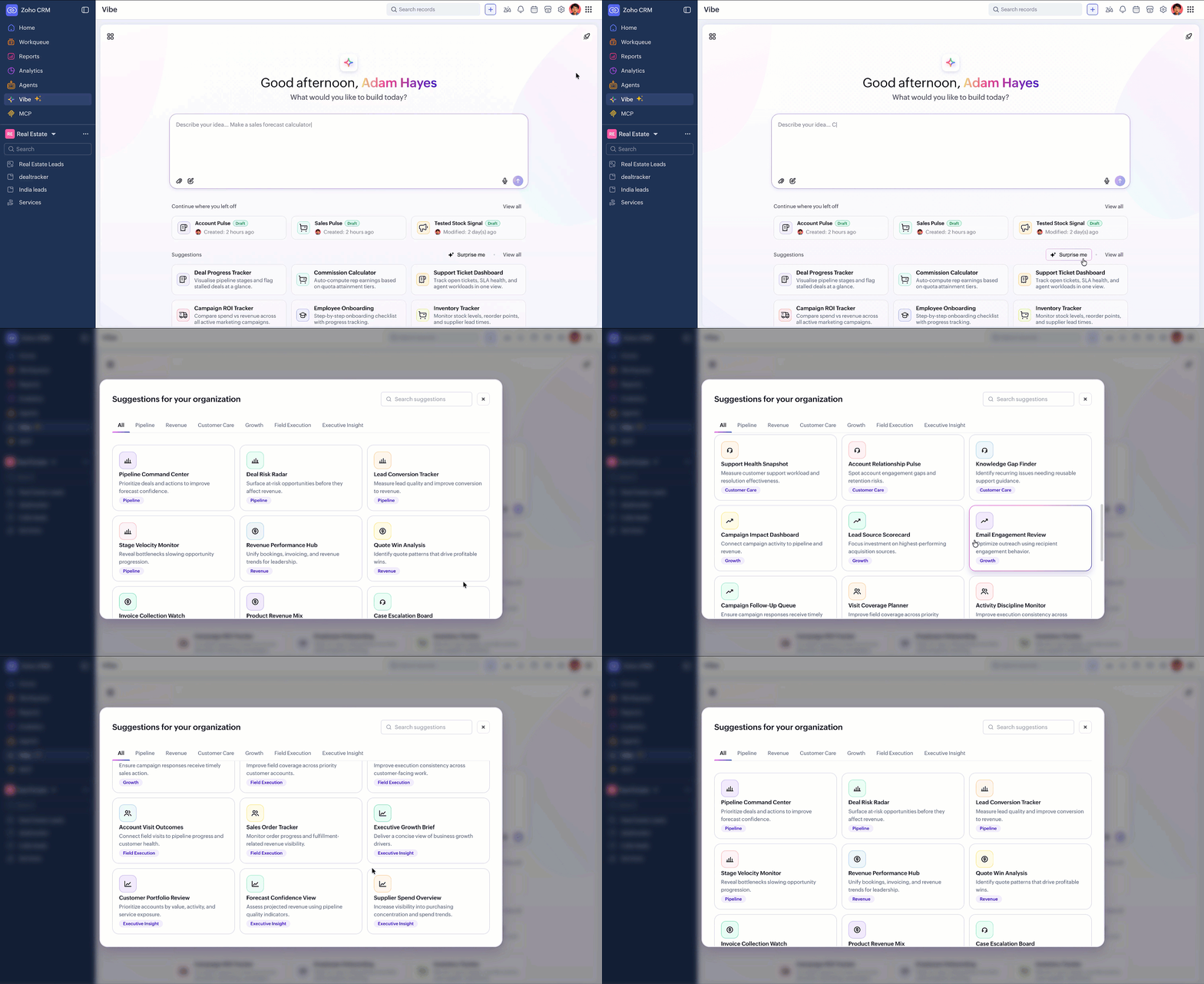
Surprise Me: Need some inspiration? Click it, and AI whips up prompt ideas tailored for your organization.
Design Mode : Miss your designing days? You can also perform granular edits directly on the artboard. Switch to Design Mode and customize easily from the property panel, covering appearance, border, layout, and position.
Snip Tool: Hassle-free surgical edits using our snipping tool. Just draw around the section in the preview, describe your changes, and AI focuses on the right area and performs the modifications.
Discuss Mode: Brainstorm your idea with AI and arrive at a unified conscience before building your experience. Switch to Discuss Mode, and AI will ask clarifying questions before generating your output.
Context (@): Want AI to understand your exact context? Type @, attach your modules or connections, and it instantly gets your structure.
Suggestions: Don't know where to start? Pick a ready made prompt and send it as is, or tweak it to fit.
Presets, Commands, Image-Based Prompts, Voice Input: Speed things up with ready-to-use presets, quick commands, prompts built from images, and voice input when typing feels slow.
Safety Checks, Built Right Inside
Before going live, run a Security Review and AI checks it across six categories to ensure security, privacy and compliance. It will check your packages, source code, connections, outbound APIs, privacy concerns, and performance improvements, so you control exactly everything that you're publishing.
Also, if you ever need to roll back, Revision History keeps every published version, so you're always one click away from a previous state.
Why You'll Want to Try This
- Your first output is a production grade output that can be published instantly for your users to use.
- Prompt in English, Japanese, French, Korean, and more. Build the experience precisely for your users.
- It is inside an isolated engine to ensure security and performance for the end users.
- Vibe leverages frontier models from OpenAI and Anthropic. You can configure them with ZKS and BYOK.
What's Next
Vibe will empower users to build CRM based front-end apps that can be used with App Switcher and tailored Detail Page for your modules, in near future.

We've started the phased rollout, beginning with the US, IN, and EU DCs.
Stay tuned for further updates.