Item Mapping in Analytics from billing is wrong
Hi all,
We've run into what looks like a field mapping bug in the Items table in Zoho Analytics, and wanted to flag it here in case others are hitting it too (or in case I'm missing a setting somewhere).
Some background: our Items table in Analytics is a unified table pulling in both Zoho Inventory Items and Zoho Billing/Subscriptions Addons. For the Inventory Items, everything maps as expected — Item Name gets the descriptive name, SKU gets the short code. But for Addon-sourced rows, it's backwards: the Addon Code ends up in the Item Name column, and SKU is left completely blank. The actual descriptive Addon Name doesn't show up anywhere.
Here's a clean example. We picked an addon where the Addon ID and the resulting Item ID match exactly, so we could rule out any ID mismatch and isolate this to purely a "wrong field went into the wrong column" issue:
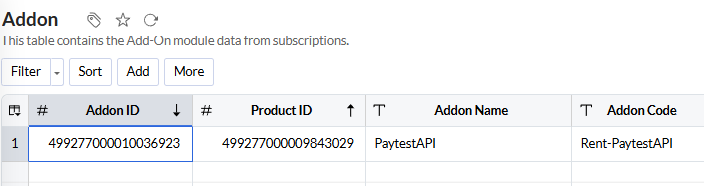
In the Addon table (Subscriptions module):
- Addon ID: 499277000010036923
- Addon Name: PaytestAPI
- Addon Code: Rent-PaytestAPI
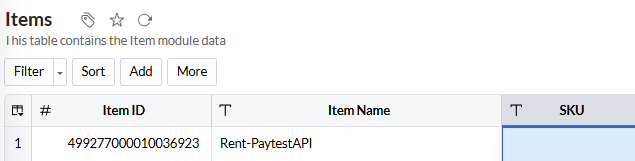
In the Items table (Analytics), same ID:
- Item ID: 499277000010036923
- Item Name: Rent-PaytestAPI
- SKU: (blank)
So what we'd expect is Item Name = "PaytestAPI" and SKU = "Rent-PaytestAPI" — instead we get Item Name = "Rent-PaytestAPI" and SKU is empty.
Since the IDs match exactly, this really does look like a mapping issue on Zoho's side rather than anything wrong with our data. Practically, it means every addon in our Items table shows up with a code instead of a name, and has no SKU at all — which breaks anything that relies on matching addon line items back to a proper item/SKU reference.
Has anyone else seen this, or knows if there's a way to fix the mapping ourselves? Otherwise, would appreciate if someone from Zoho could take a look — feels like it should be a straightforward fix (swap which field feeds Item Name vs SKU for Addon-sourced rows), just not something we can configure from our end.
Thanks!