Kaizen #127 - Circuits in Zoho CRM - Part 2

Kaizen #127 - Circuits in Zoho CRM - Part 2

Hello everyone!

We're back with part 2 of Circuits in Zoho CRM!
We are as excited as you are with this topic! Let's dive right in!

As promised, in today's post, we will discuss a use case, see how execution happens, and associate that circuit with a workflow.

In our next post(Yes! There's going to be another one!), we will associate the circuit with a button and a blueprint, view logs, and debug issues.

Sample use case - Loan Verification Process

Consider that we have a module in CRM called Customers, where we have personal information of customers, tax-related details, tax and personal ID verification details and status. Our aim is to check the requested loan amount, check eligibility, and then grant or reject it.
Here is a screenshot of a record in the Customers module.
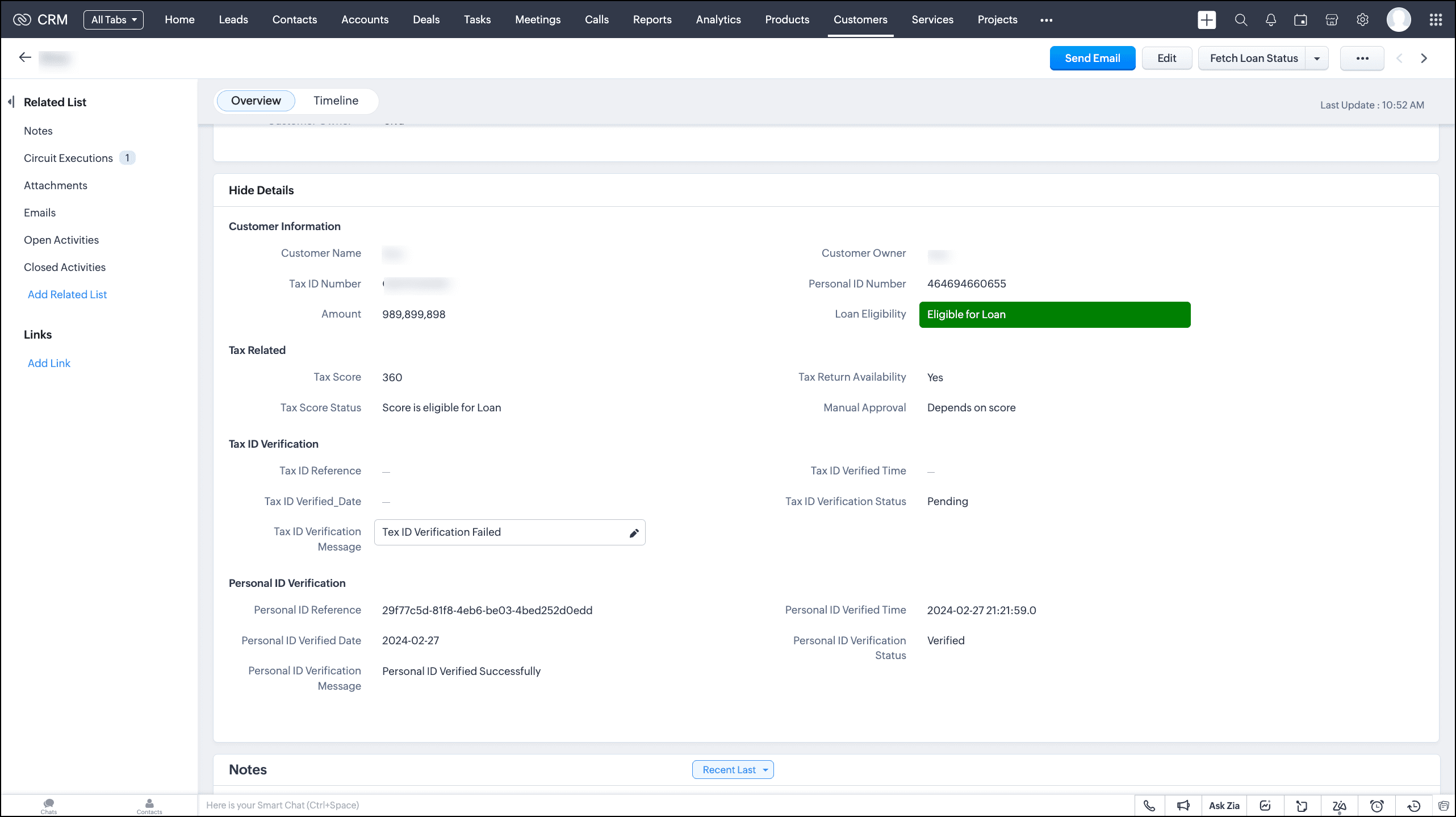

Our condition is that whenever the loan amount is less than Rs. 500,000, the circuit should directly proceed to document verification. When the requested loan amount is greater than Rs. 500,000, we must check a few eligibility criteria before proceeding to document verification.
We can automate this entire process using Circuits, and execute it through a button, associate it with a workflow or a blueprint.

Let's take a look at the Circuit's flow.
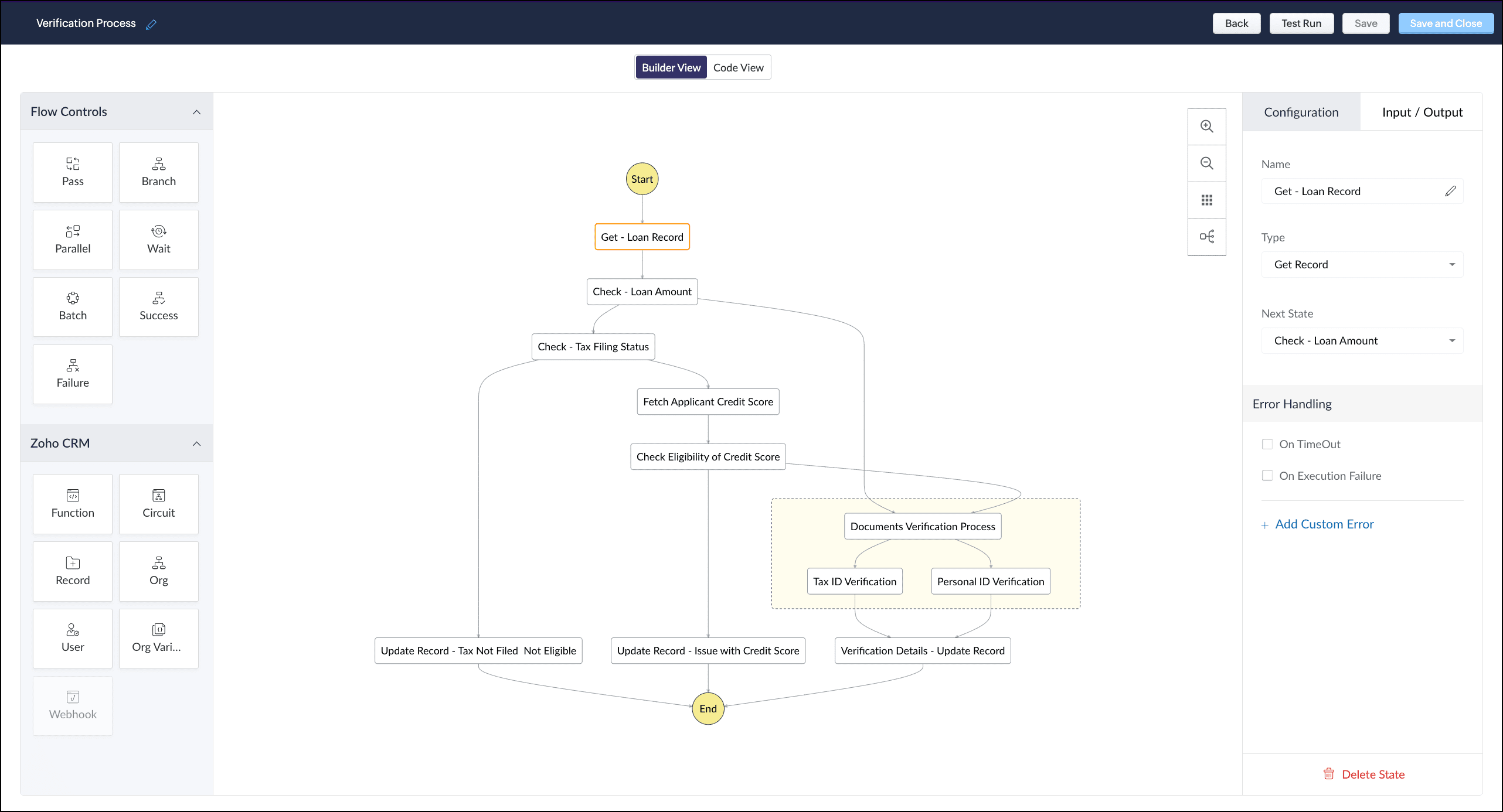


Here are the different states of the Circuit that explain the logic.
  1. Get the loan record.
  2. Check the loan amount.
  3. If the loan amount is less than Rs. 500,000, proceed to document verification.
  4. If the loan amount is greater than Rs. 500,000, check the tax filing status.
  5. If tax is not filed, update the record's Loan Eligibility field with the value "Tax not filed. Hence, not eligible for loan".
  6. If tax is filed, fetch the applicant's credit score and check the eligibility.
  7. If the credit score falls short, update the record's Loan Eligibility field with the value "Issue with credit score".
  8. If the credit score is up to the mark, proceed to document verification—Personal ID and Tax ID verification.
  9. Update the details of the record to sanction the requested loan.

Let's discuss each of these states in detail.

1. Get the loan record

Builder View
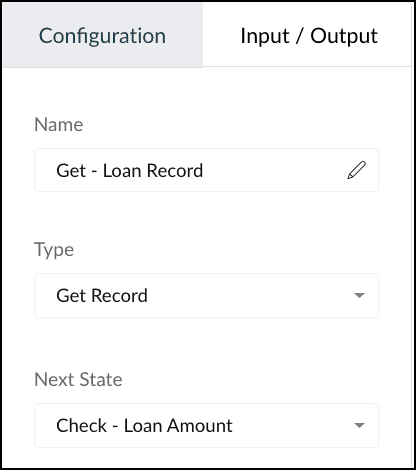


Type: Get Record from Zoho CRM's states.
Action: Gets the details of the loan record from the Customers module. The output is in the following format.

{
    "ZohoCRM": {
        "record_id": "5575270000005762031",
        "user_id": "5575270000005379053",
        "module": {
            "api_name": "Customers",
            "tab_label": "Customers",
            "id": "5575270000001975002"
        }
    },
    "record": {
        "data": [
            {
                "Owner": {
                    "name": "Patricia Boyle",
                    "id": "5575270000001947001",
                    "email": "p.boyle@zylker.com"
                },
                "$currency_symbol": "$",
                "Tax_ID_Verification_Message": "Tax ID Verified Successfully",
                "$review_process": {
                    "approve": false,
                    "reject": false,
                    "resubmit": false
                },
                "$sharing_permission": "full_access",
                "Personal_ID_Number": "464694660655",
                "Personal_ID_Verification_Message": "Personal ID Verified Successfully",
                "Name": "Stephen Adams",
                "Manual_Approval": "Depends on score",
                "$state": "save",
                "$process_flow": false,
                "Tax_Score_Status": "Score is eligible for Loan",
                "$locked_for_me": false,
                "Tax_ID_Number": "GBHPS3618H",
                "id": "5575270000005762031",
                "Tax_ID_Verified_Date": "2024-02-26",
                "Loan_Eligibility": "Eligible for Loan",
                "$approval": {
                    "delegate": false,
                    "approve": false,
                    "reject": false,
                    "resubmit": false
                },
                "Modified_Time": "2024-02-29T12:26:11+05:30",
                "Tax_ID_Verification_Status": "Verified",
                "Tax_Return_Availability": "Yes",
                "Tax_ID_Verified_Time": "2024-02-26 23:28:39.0",
                "Personal_ID_Verified_Time": "2024-02-26 23:28:39.0",
                "Created_Time": "2024-02-29T12:26:11+05:30",
                "Amount": 600000,
                "$editable": true,
                "Personal_ID_Reference": "6cefa3d4-b87b-46a6-8814-b21fb422a28d",
                "$orchestration": false,
                "Tax_ID_Reference": "f6697aa8-8efc-4ee9-8dcc-0bc838755cb4",
                "Tax_Score": 450,
                "Personal_ID_Verification_Status": "Verified",
                "Personal_ID_Verified_Date": "2024-02-26",
                "$in_merge": false,
                "Locked__s": false,
                "Tag": [],
                "$zia_owner_assignment": "owner_recommendation_unavailable",
                "$approval_state": "approved",
                "$pathfinder": false
            }
        ]
    }
}

You can use any part of this output as input to other states. You can achieve this by using the JSON Path expression in the “result path” to traverse the result JSON of the state.
Result path allows you to combine state result with state input to pass as output. You can add the result path in the "Input/Output" section in the Builder view as well as the JSON in Code view.
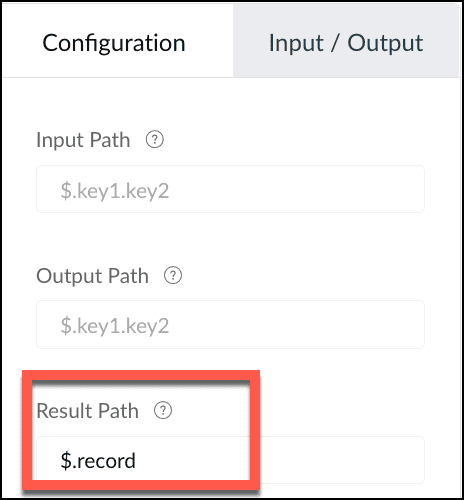


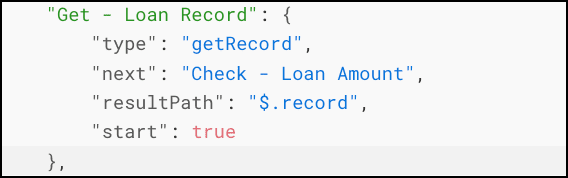
In our case, we want to use the data inside the “record” JSON object. So, the result path will be $.record.
Result path is mandatory when you use the Get Record Zoho CRM state.
Next state: Check Loan Amount

Code View


2. Check Loan Amount

Builder View
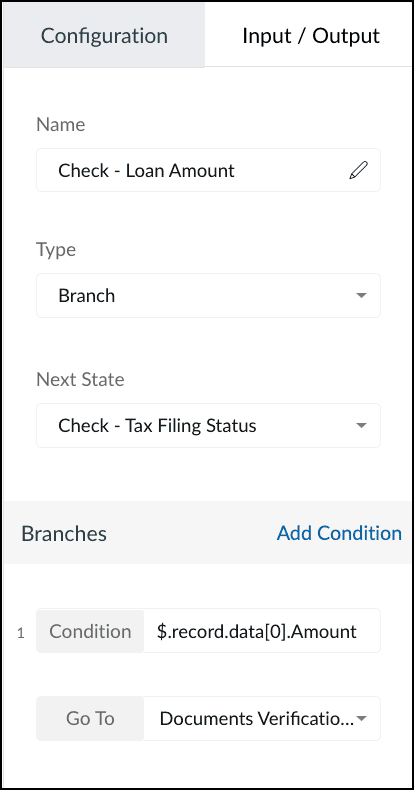


Type: Branch
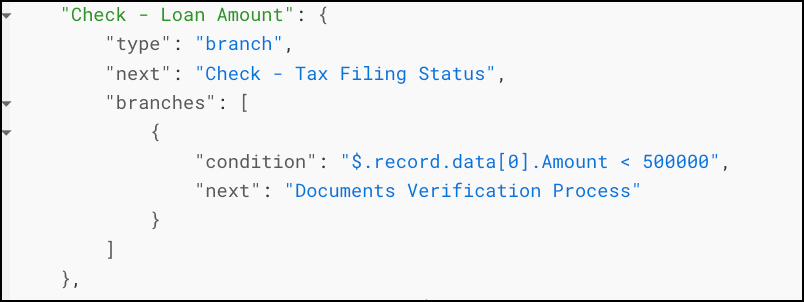
Action: Checks for the condition specified in the branch—check if the loan amount < 500,000. If yes, and Go to Documents verification state, else go to Check tax filing status state.
Next state: Check Tax filing status(if loan amount > 500,000)

Code View


3. Check Tax Filing Status

Builder View


Type: Branch
Action: Checks for the condition specified in the branch—if the tax filing status is Yes, fetch the credit score. Else, update the record with "Tax not filed; not eligible for loan".
Next state: Fetch Applicant Credit Score

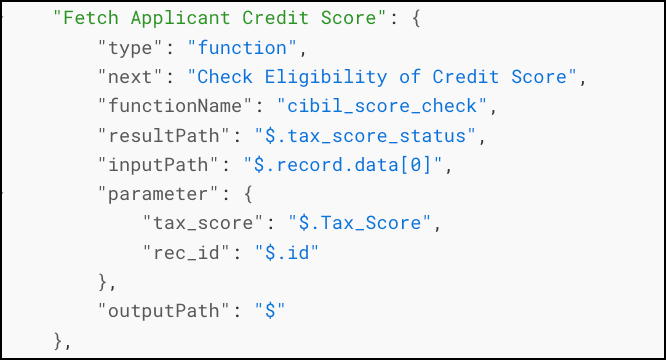
4. Fetch Applicant Credit Score

Builder View
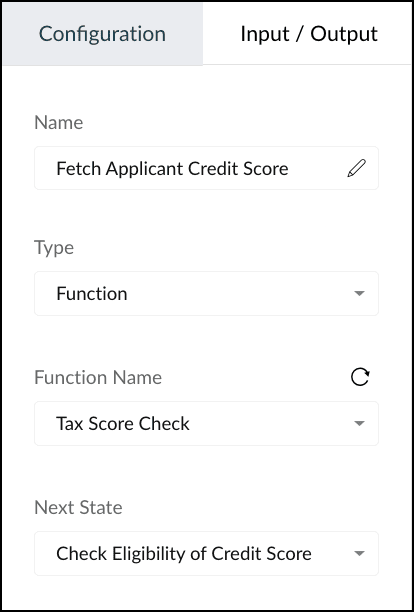


Type: Function
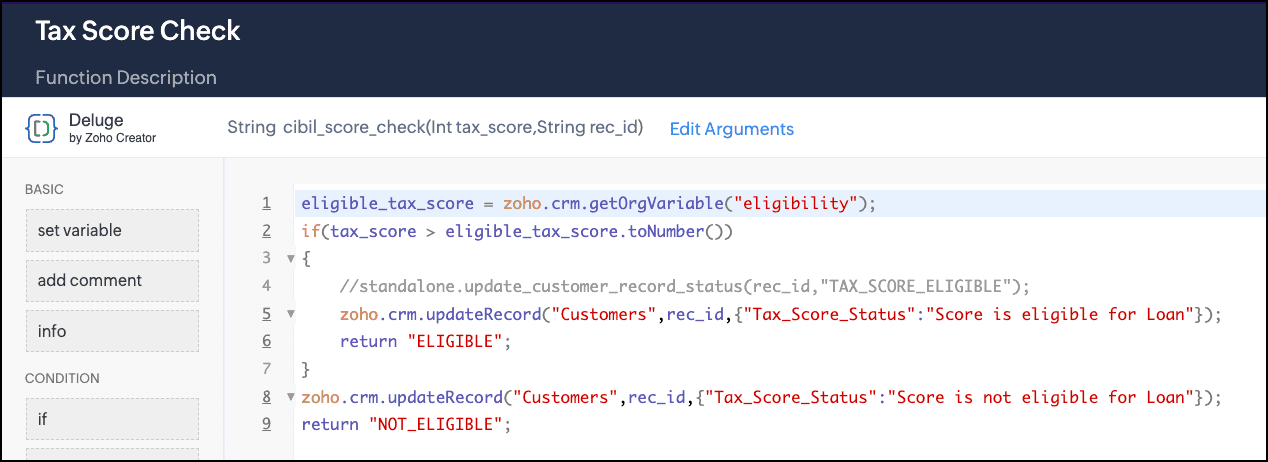
Action: Executes the CRM function "Tax Score Check" that holds the logic to get the basic eligibility stored in the Org variable "eligibility", compare it with the tax score of the applicant, and update the record, accordingly. Here is the snippet of this function.
Next state: Check eligibility of Credit Score

Code View

5. Check eligibility of Credit Score

Builder View
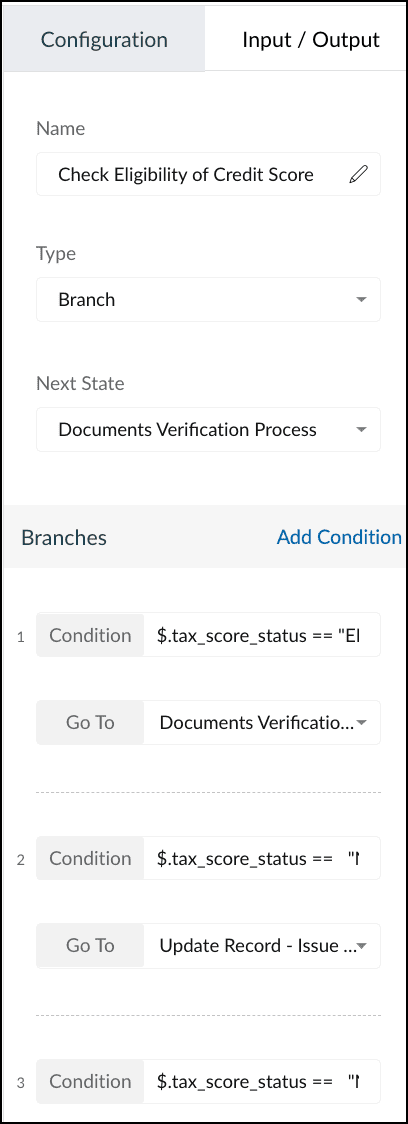


Type: Branch
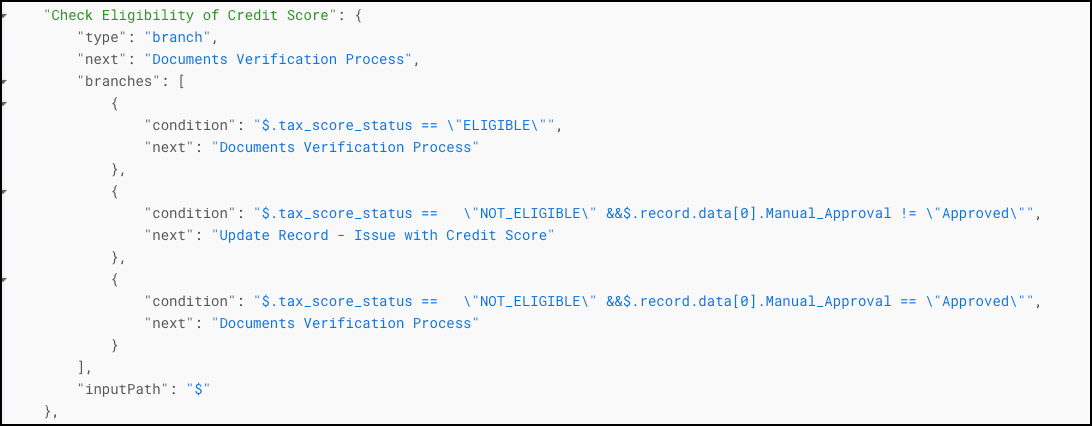
Action: Checks for multiple conditions—if Tax Score Status = Eligible, go to Document Verification.
If Tax Score Status = Not eligible & the value of the field "Manual Approval" = "Not approved", update the record with "Issue in Tax Score".
If Tax Score Status = Not Eligible & "Manual Approval" = "Approved", proceed to document verification.
Next state: Depends on the condition that is met in the "Check Tax Score Eligibility" state.

Code View

6. Documents Verification Process

Builder View
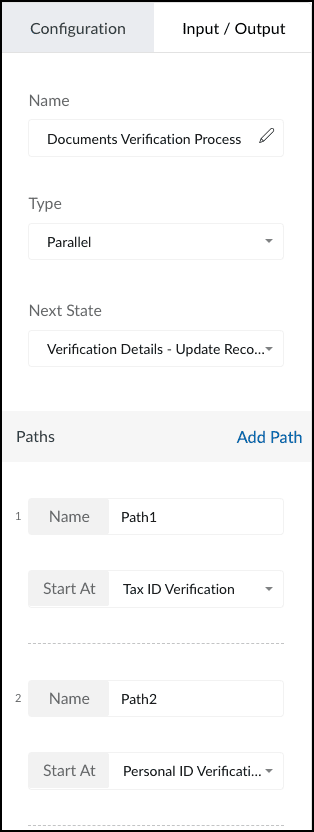


Type: Parallel
Action: Verifies the Tax ID and Personal ID of the applicant.
Next state: Verification Details - Update Record

Code View
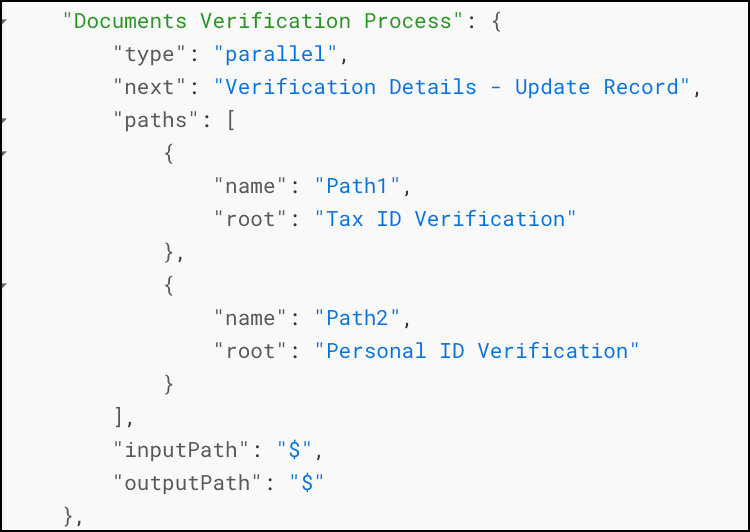

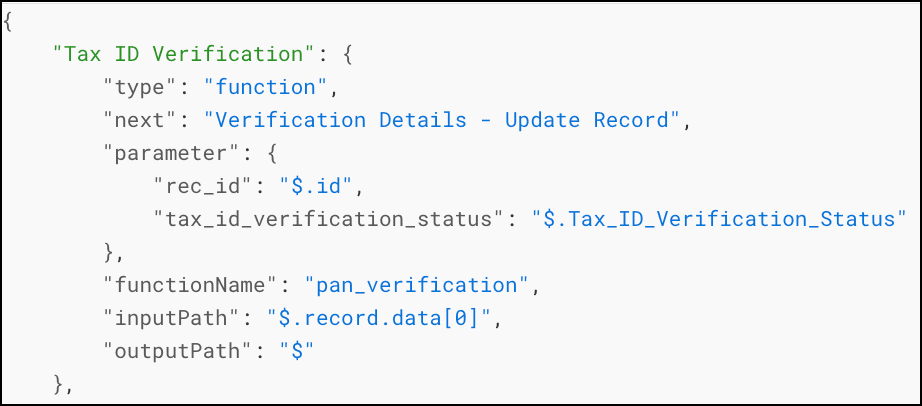
7. Tax ID Verification

Builder View
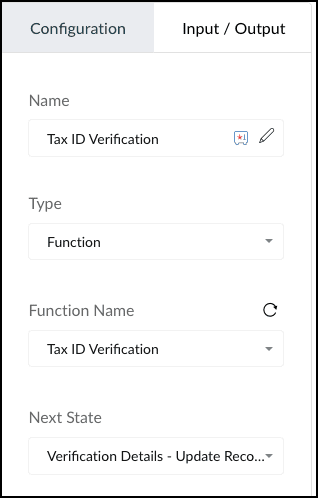

Type: Function
Action: Executes the function "Tax ID Verification" that has the logic to verify the tax details of the applicant.
Here is the snippet of this function.
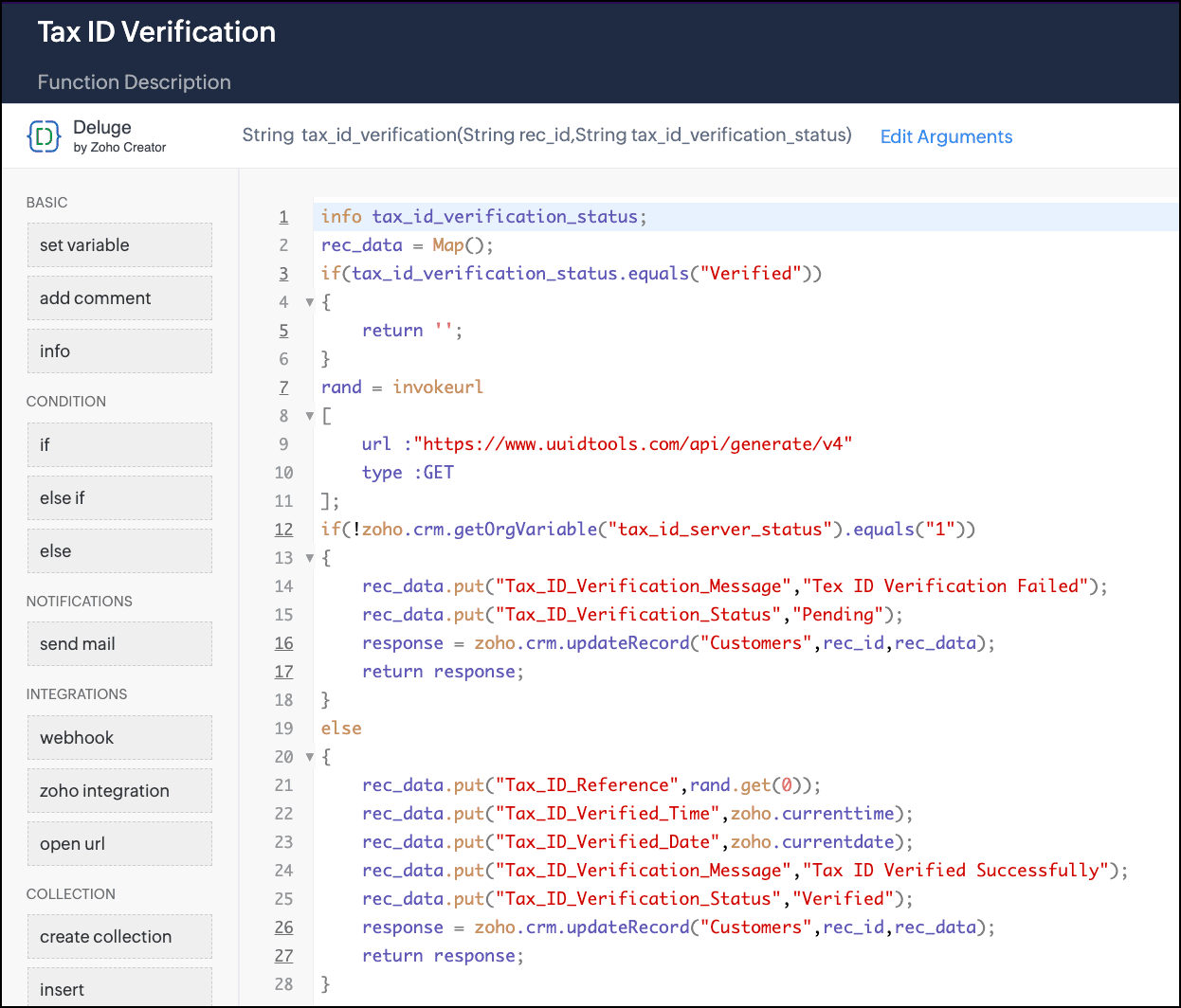
Next state: Verification Details - Update Record

Code View

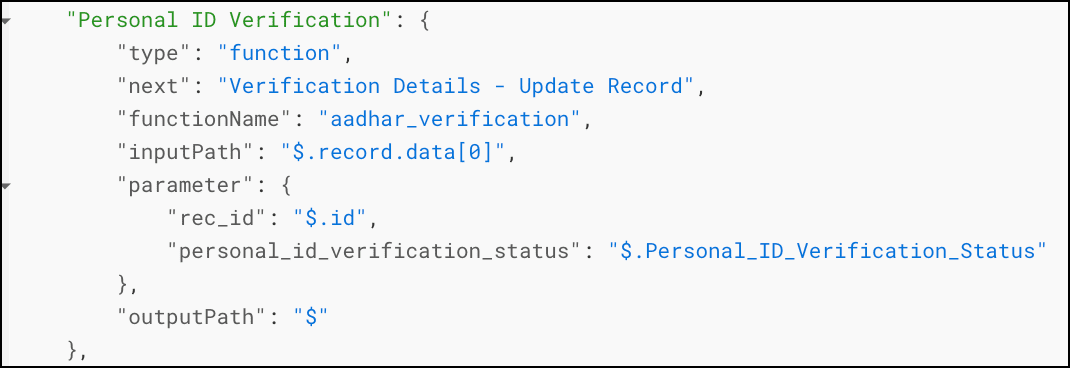
8. Personal ID Verification

Builder View
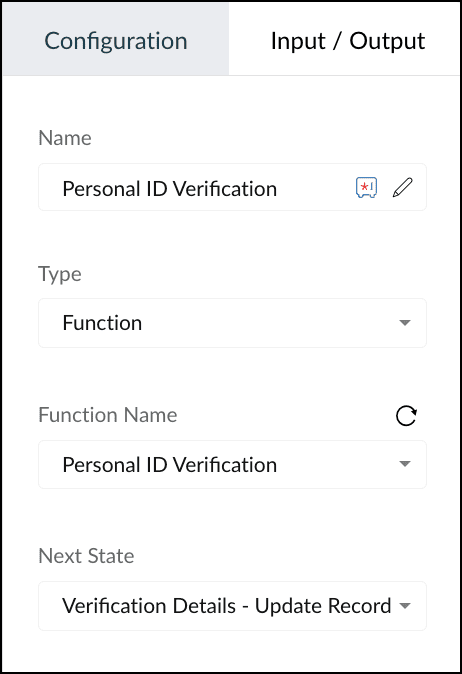

Type: Function
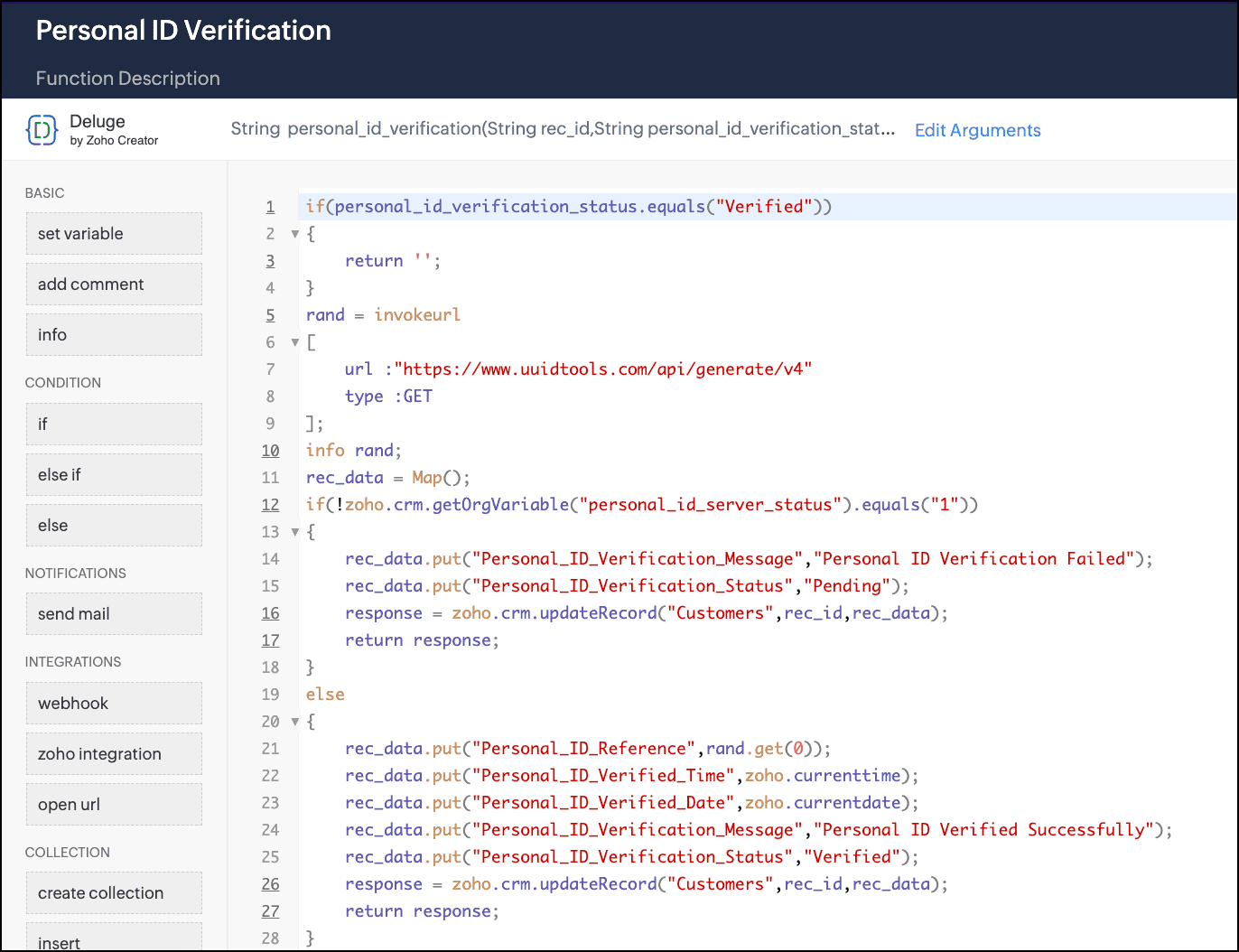
Action: Executes the function "Personal ID Verification" that has the logic to check for the applicant's personal details.
Here is how the function looks.
Next state: Verification Details - Update Record

Code View


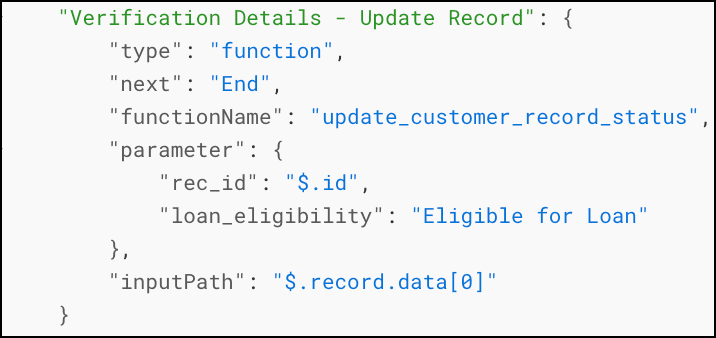
9. Verification Details - Update Record

Builder View
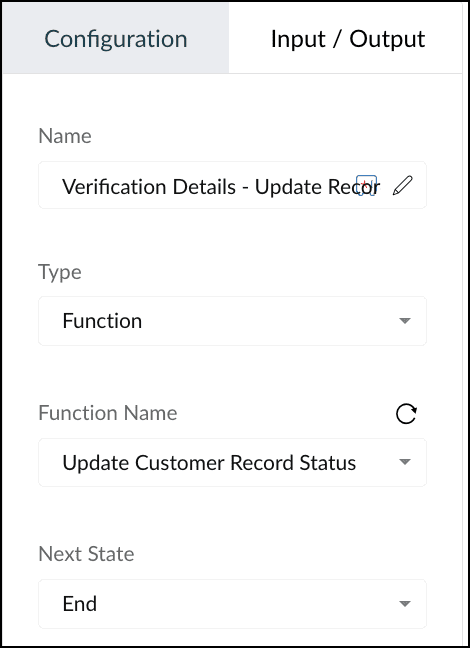

Type: Function
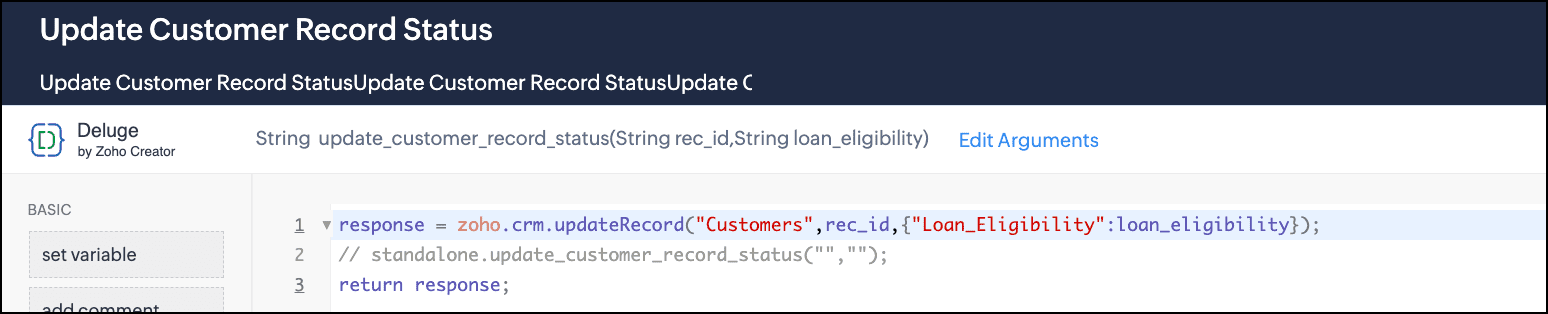
Action: Executes the function "Update Customer Record status" that uses the Deluge Update Record integration task to update the "Loan eligibility" field.
Here is how the function looks.
Next state: End

Code View

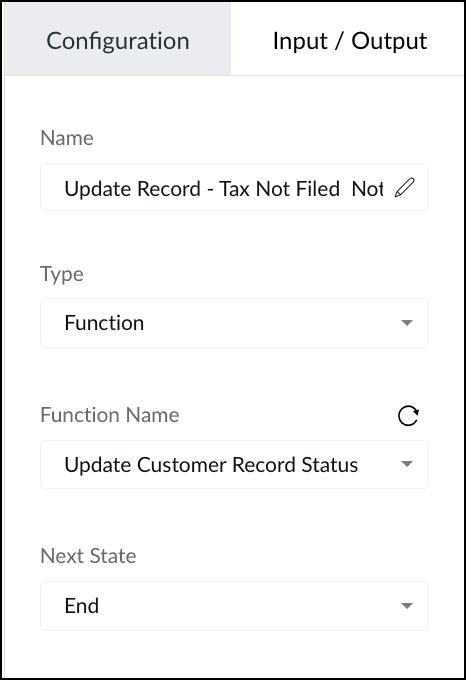
10. Update Record - Tax Not Filed, Not Eligible

Builder View

Input/Output
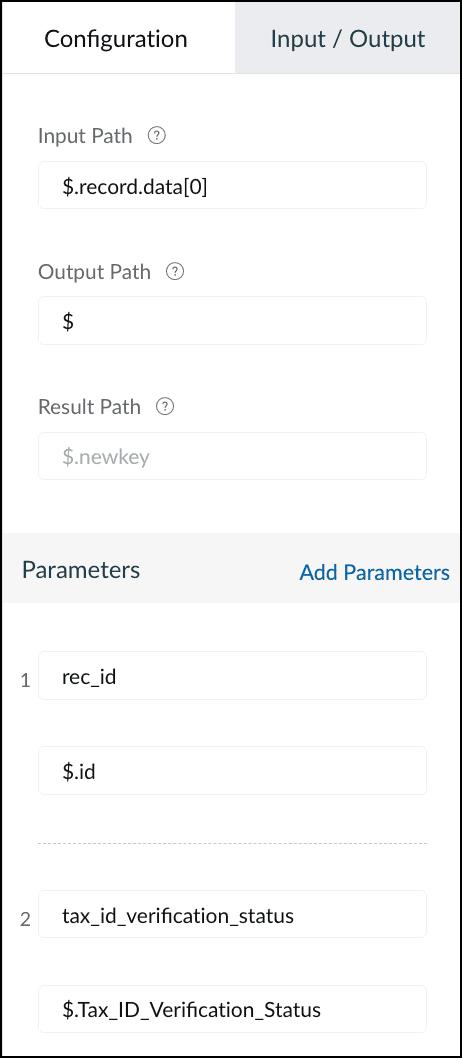

Type: Function
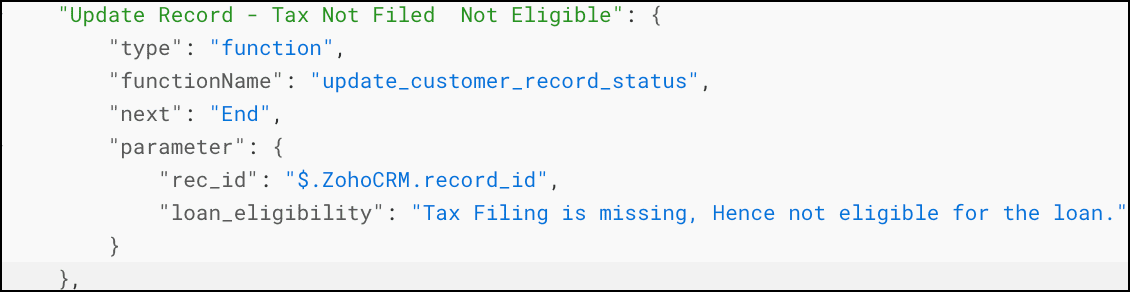
Action: When the requested loan is greater than Rs.500,000 and the Tax Filing Status in "Not Filed", this state executes the function "Update Customer Record status". This function uses the Deluge Update Record integration task to update the "Loan eligibility" field, and takes the parameters "rec_id" and "loan_eligibility" with the values "$.ZohoCRM.record_id" and "Tax Filing is missing, Hence not eligible for the loan.", respectively.
Next state: End

Code View

11. Update Record - Issue with Credit Score

Builder View
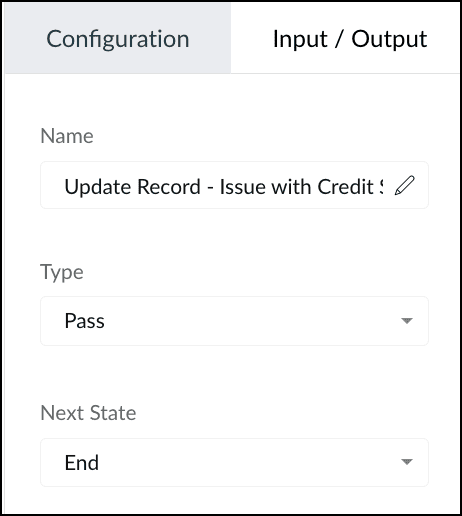

Type: Pass
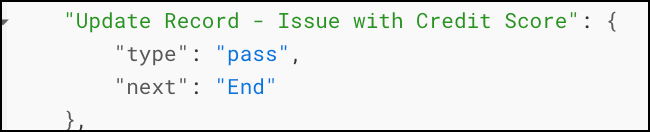
Action: When the tax score eligibility does not meet the requirement, this state ends the circuit's execution.
Next state: End

Code View


Testing and Execution

Let us see the execution of this circuit with a sample record ID.
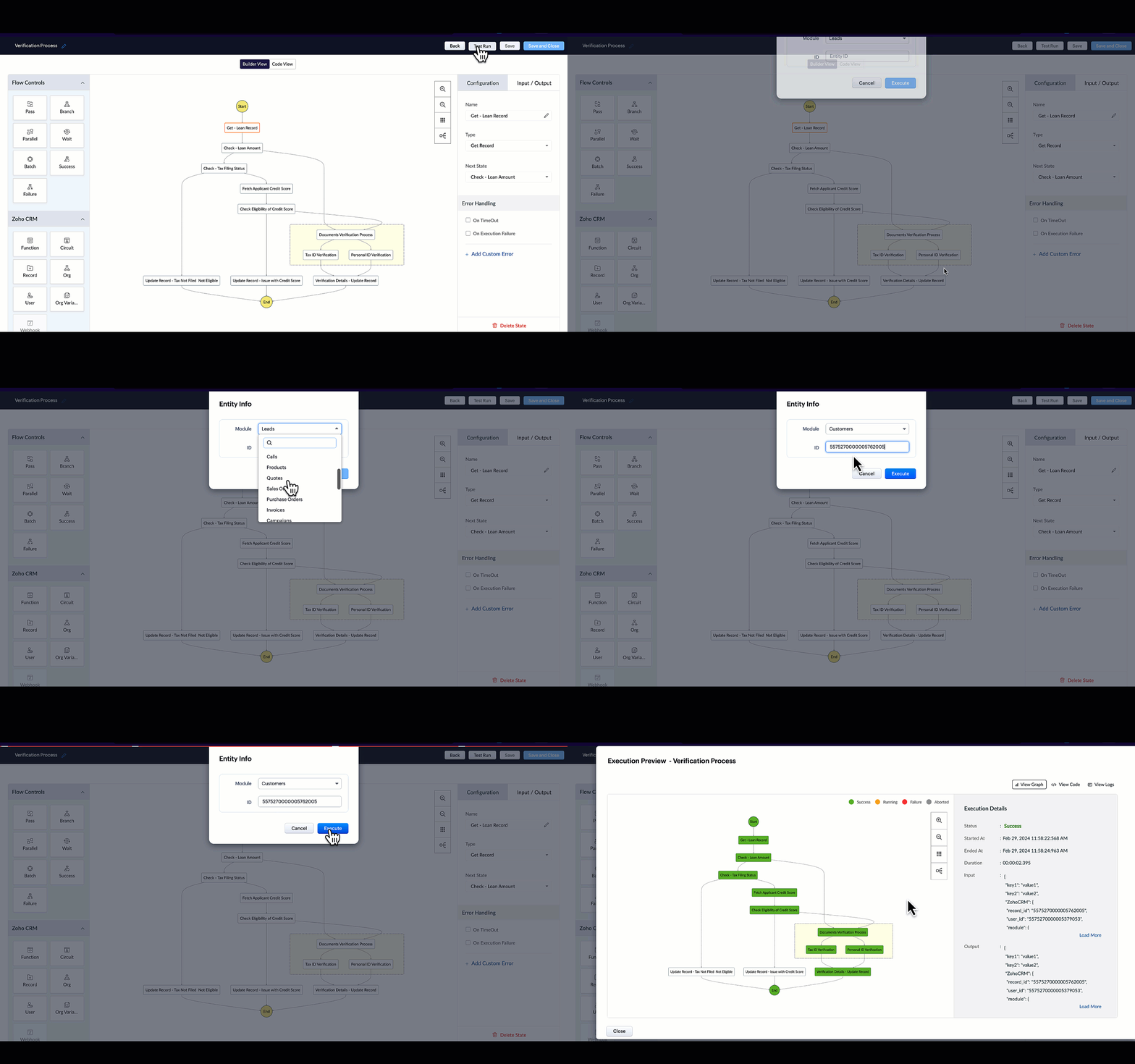

When you click each state, you can see the input and output of that state.
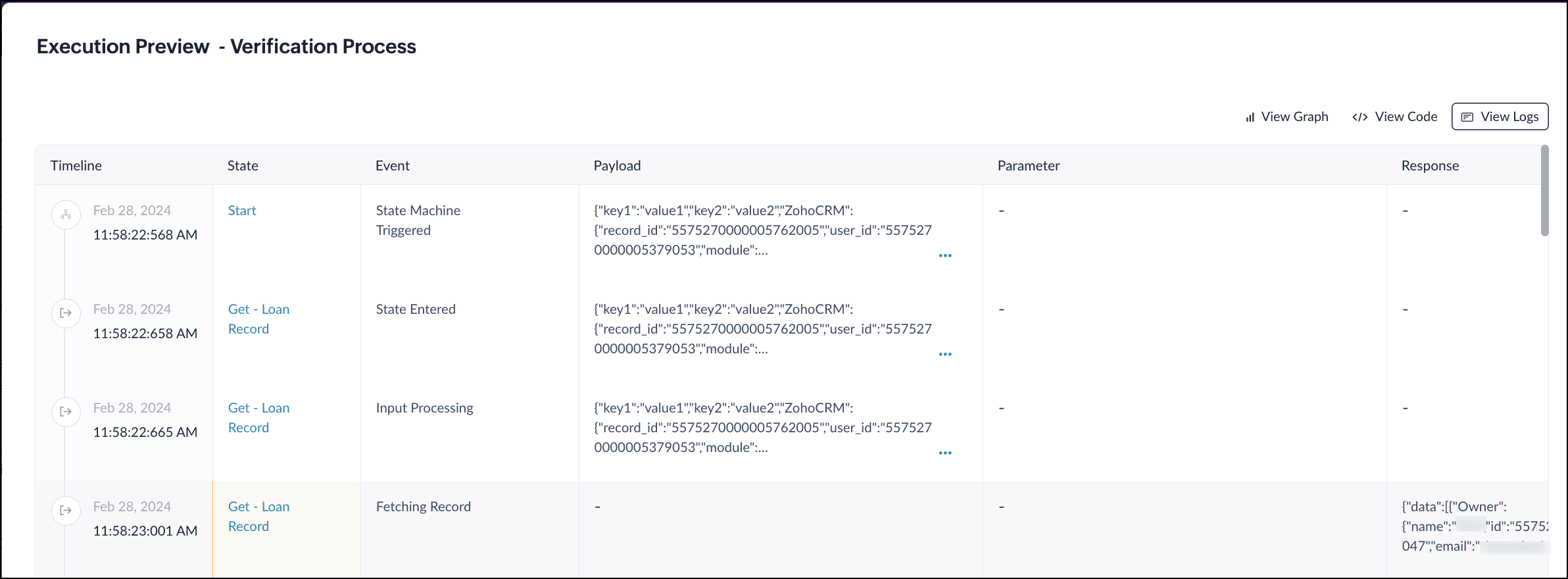
When you click "View Logs", you can see how execution has happened, the payload for each state, the response, etc.

Associating this Circuit with a Workflow

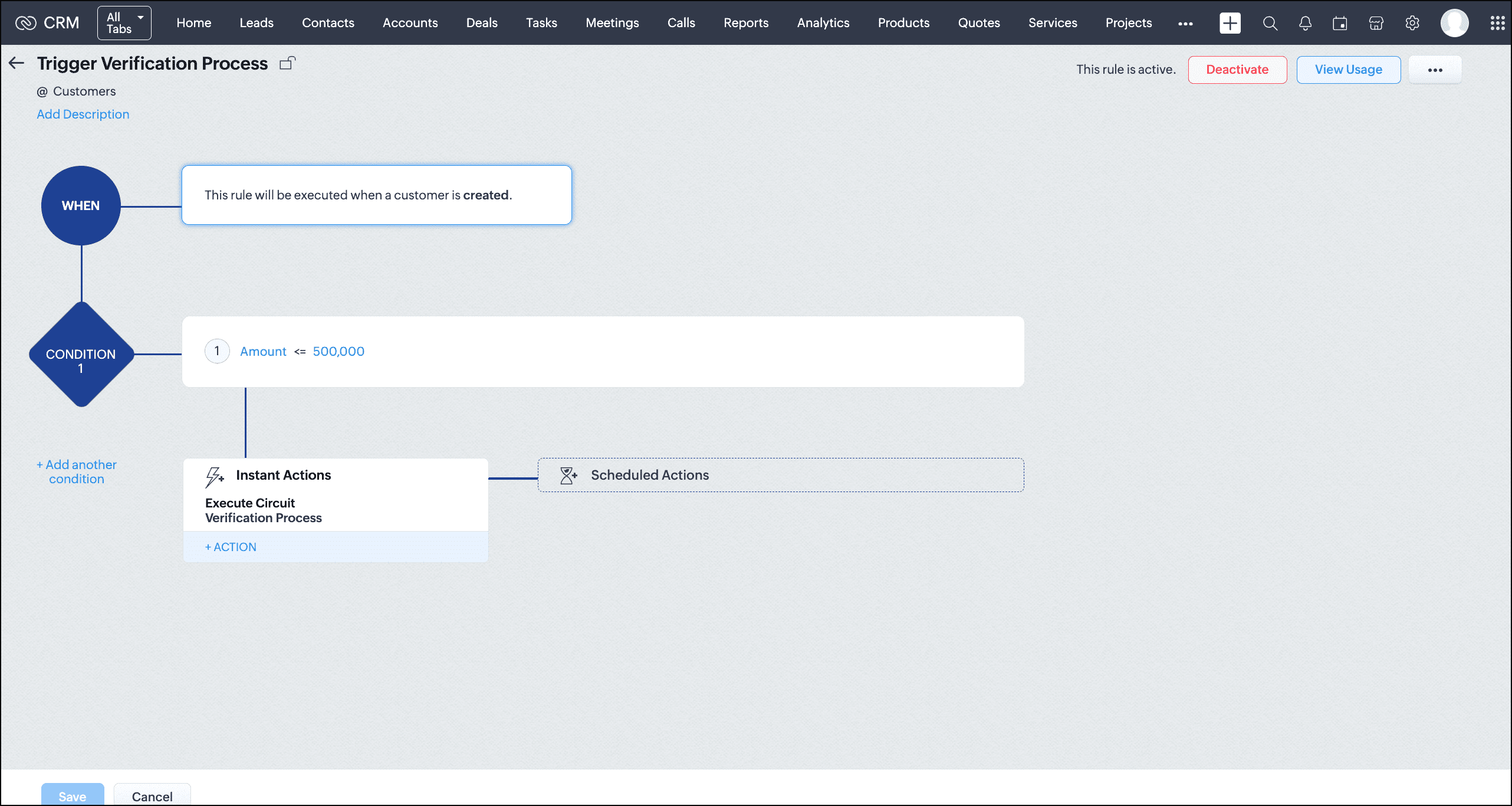
Follow the steps mentioned in this article to create a workflow.
The condition for this workflow to execute the circuit is when the requested loan is greater than Rs. 500,000.
The Action is to execute the circuit. Choose the option "Execute Circuit" from the Instant Actions and select the Verification Process Circuit.
Save the workflow.

Let's test this workflow by creating a record in the Customers module with the loan amount less than Rs. 500,000.
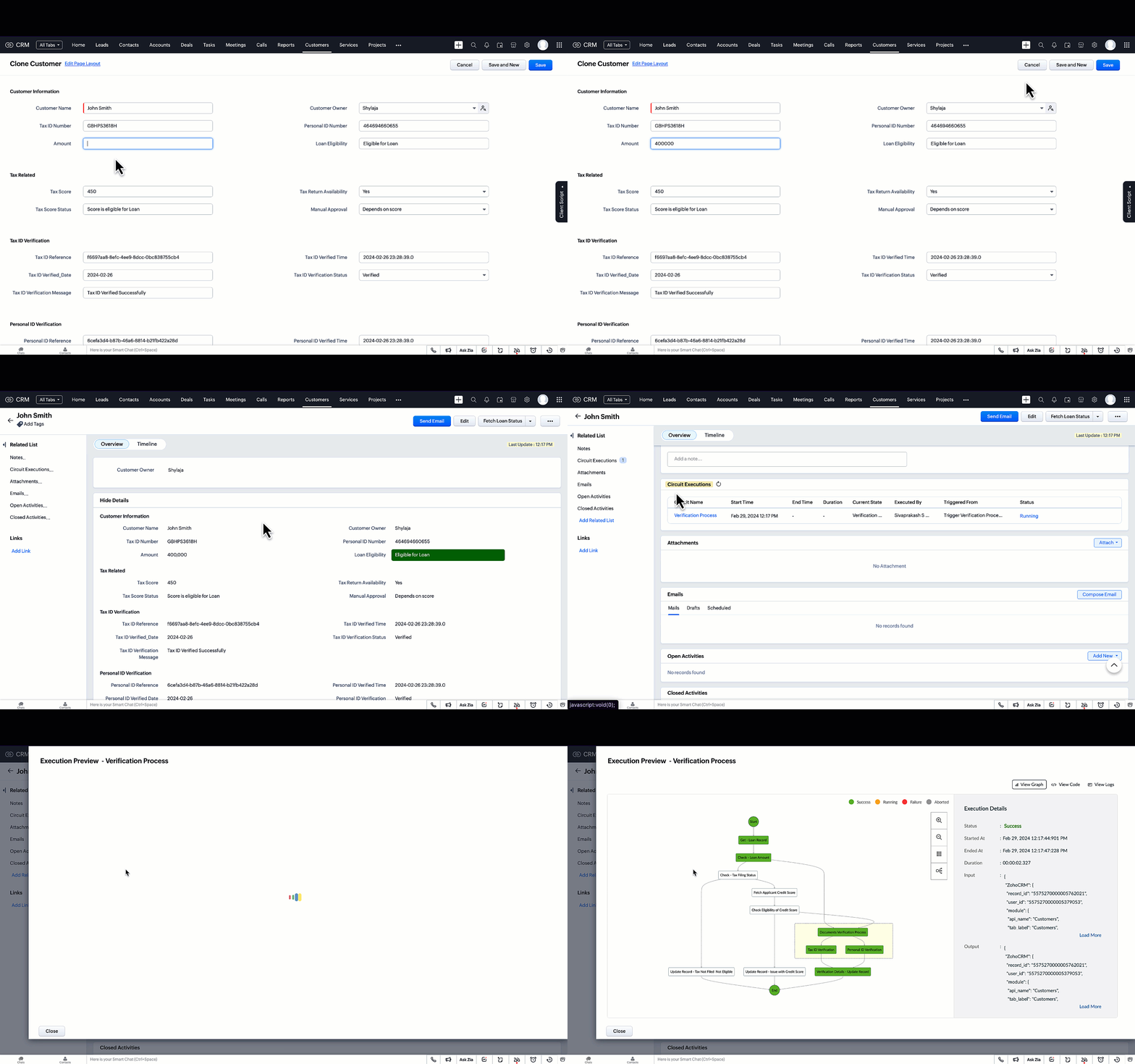

As you can see, the workflow is triggered and executes the circuit when the loan amount is less than Rs. 500,000.
You can view the circuit's execution and other details as a related list.

Summary

Circuits allow you to automate entire business processes by allowing you to orchestrate functions along with your business logic as you see fit.
As you witnessed in this example, we used multiple independent functions written in CRM to achieve our business case through utilizing them in a circuit. This gives you the benefit of writing functions that can be reused in multiple places while saving you from the grief of dealing with huge volumes of code that are hard to maintain and harder to debug when written as a single function.

We hope you liked this post. We'll see you next week with another post on Circuits.
Let us know if you have any questions or feedback. We are listening!

Cheers!
Shylaja S

Additional Reading:

    Access your files securely from anywhere


          All-in-one knowledge management and training platform for your employees and customers.


                                Zoho Developer Community


                                                      • Desk Community Learning Series


                                                      • Digest


                                                      • Functions


                                                      • Meetups


                                                      • Kbase


                                                      • Resources


                                                      • Glossary


                                                      • Desk Marketplace


                                                      • MVP Corner


                                                      • Word of the Day


                                                      • Ask the Experts


                                                                • Sticky Posts

                                                                • Kaizen #198: Using Client Script for Custom Validation in Blueprint

                                                                  Nearing 200th Kaizen Post – 1 More to the Big Two-Oh-Oh! Do you have any questions, suggestions, or topics you would like us to cover in future posts? Your insights and suggestions help us shape future content and make this series better for everyone.
                                                                • Kaizen #226: Using ZRC in Client Script

                                                                  Hello everyone! Welcome to another week of Kaizen. In today's post, lets see what is ZRC (Zoho Request Client) and how we can use ZRC methods in Client Script to get inputs from a Salesperson and update the Lead status with a single button click. In this
                                                                • Kaizen #222 - Client Script Support for Notes Related List

                                                                  Hello everyone! Welcome to another week of Kaizen. The final Kaizen post of the year 2025 is here! With the new Client Script support for the Notes Related List, you can validate, enrich, and manage notes across modules. In this post, we’ll explore how
                                                                • Kaizen #217 - Actions APIs : Tasks

                                                                  Welcome to another week of Kaizen! In last week's post we discussed Email Notifications APIs which act as the link between your Workflow automations and you. We have discussed how Zylker Cloud Services uses Email Notifications API in their custom dashboard.
                                                                • Kaizen #216 - Actions APIs : Email Notifications

                                                                  Welcome to another week of Kaizen! For the last three weeks, we have been discussing Zylker's workflows. We successfully updated a dormant workflow, built a new one from the ground up and more. But our work is not finished—these automated processes are


                                                                Manage your brands on social media


                                                                      Zoho TeamInbox Resources


                                                                          Zoho CRM Plus Resources

                                                                            Zoho Books Resources


                                                                              Zoho Subscriptions Resources

                                                                                Zoho Projects Resources


                                                                                  Zoho Sprints Resources


                                                                                    Qntrl Resources


                                                                                      Zoho Creator Resources


                                                                                          Zoho CRM Resources

                                                                                          • CRM Community Learning Series

                                                                                            CRM Community Learning Series


                                                                                          • Kaizen

                                                                                            Kaizen

                                                                                          • Functions

                                                                                            Functions

                                                                                          • Meetups

                                                                                            Meetups

                                                                                          • Kbase

                                                                                            Kbase

                                                                                          • Resources

                                                                                            Resources

                                                                                          • Digest

                                                                                            Digest

                                                                                          • CRM Marketplace

                                                                                            CRM Marketplace

                                                                                          • MVP Corner

                                                                                            MVP Corner


                                                                                              Design. Discuss. Deliver.

                                                                                              Create visually engaging stories with Zoho Show.

                                                                                              Get Started Now


                                                                                                Zoho Show Resources

                                                                                                  Zoho Writer

                                                                                                  Get Started. Write Away!

                                                                                                  Writer is a powerful online word processor, designed for collaborative work.

                                                                                                    Zoho CRM コンテンツ


                                                                                                      Nederlandse Hulpbronnen


                                                                                                          ご検討中の方


                                                                                                                    • Recent Topics

                                                                                                                    • Error 1011 saving website personalisation — blocking all changes (corrupted "home_page.content" field)

                                                                                                                      When trying to save changes under Settings → Brands → MY COMPANY → Website → Personalisation → Messenger, I receive the following error: "Either the request parameters are invalid or absent" upon checking on the developer console of the browser I get
                                                                                                                    • Canvas View: Add font family selection (incl. Google Fonts / Hebrew & RTL fonts)

                                                                                                                      Hi Zoho CRM team, The Canvas design suite (List View, Tile View, Table View and Record Detail) currently allows customizing font weight, size, color, alignment and case - but there is no option to choose the font family. All text is rendered in the built-in
                                                                                                                    • This user is not allowed to add in Zoho. Please contact support-as@zohocorp.com for further details

                                                                                                                      Hello, Just signed up to ZOHO on a friend's recommendation. Got the TXT part (verified my domain), but whenever I try to add ANY user, I get the error: This user is not allowed to add in Zoho. Please contact support-as@zohocorp.com for further details I have emailed as well and writing here as well because when I searched, I saw many people faced the same issue and instead of email, they got a faster response here. My domain is: raisingreaderspk . com Hope this can be resolved.  Thank you
                                                                                                                    • Issue embedding image Zoho Books email signature

                                                                                                                      I am trying to embed my company logo to my email signature using the image url tool on the settings but I keep getting the following error: Enter a valid public image URL I am using a public link from either WorkDrive or OneDrive and I still get the same
                                                                                                                    • Certain items certain shipping

                                                                                                                      Me again it would be helpful to have different shipping for different categories. Our example are salt. Delivery is free but have a minimum delivery. Pickup is cheaper so it has its own category- pickup.
                                                                                                                    • E-Mail Distribution List

                                                                                                                      How do I create an e-mail distribution list in Zoho Mail?
                                                                                                                    • Tip #80- Secure Connect: Add an Extra Layer Before You Connect – 'Insider Insights'

                                                                                                                      Tip 80 – Secure Connect: Add an Extra Layer Before You Connect – 'Insider Insights' Hello Zoho Assist Community! Picture this: your support team relies on unattended access to keep the business running. Servers need overnight patches. Remote workstations
                                                                                                                    • Business Whatsapp is not Showing

                                                                                                                      I’ve attached a screenshot from the Zoho CRM Android app when clicked the call button. It is showing Personal WhatsApp, which is not installed on the phone. Also, the installed WhatsApp Business account is not showing.
                                                                                                                    • How to access a unified inbox for more than one zoho accounts (using paid workplace services)

                                                                                                                      Hello, we are using zoho for a few months and also suggest your services, setting them up for our clients. Several from our clients, our company as well, use more than 1 email addresses. Using the web version, we are only able to add them as accounts
                                                                                                                    • Modify a standard wedget to create my own customized wedget ?

                                                                                                                      Below is the std wedget available for dashboard which is great to show the the overdue, current, and all tasks as well as issues for each team member. My problem is this; The list of users cannot be edited (there are admin users which are not relavant
                                                                                                                    • Advanced Formatted Resume Templates for Applications

                                                                                                                      Advanced Formatted Resume Templates can now be created and used directly from the Applications module, with support for application module fields. Until now, Advanced templates were limited to the Candidates module. That meant resumes generated from Applications
                                                                                                                    • Zoho Books | Product updates | July 2026

                                                                                                                      Hello users, We’re excited to bring you the latest updates in Zoho Books for July 2026! This month's release introduces Terminal Payments, CMP-08 filing for composition taxpayers, SEPA Credit Transfer support, the new Receipts and Payments Report for
                                                                                                                    • Boost your CRM communication with new font types, sizes, and default reply-to options while composing emails

                                                                                                                      Hello Everyone, We’re excited to introduce a series of impactful enhancements to the email composer settings in Zoho CRM. These updates enable you to personalize and optimize your customer interactions with greater efficiency. So what's new? Add custom
                                                                                                                    • Zoho CRM Community Digest - June 2026| Part 2

                                                                                                                      Hello Everyone! Welcome to the second half of our June Zoho CRM Community Digest! We are keeping the momentum going with powerful updates to filter out unnecessary email syncs, a revamped CRM Import tool, smarter follow-up updates in cadences, and Zia
                                                                                                                    • Migrate from Zoho Mail to G Suite

                                                                                                                      I am unable to find any documentation on how one can migrate from Zoho Mail to another platform, like G Suite or Office 365. Please point me to the right documentation. Thank you.
                                                                                                                    • Zoho Desk Android app - Option to set an email template as default

                                                                                                                      Hello everyone! We have enhanced the Email Template section in our app by introducing the ability to set a template as default directly from the Zoho Desk Android app, making it easier to access your preferred template without repeated manual selection.
                                                                                                                    • Zoho Desk Android and iOS app update: Odia Language

                                                                                                                      Hello everyone! We have now brought in support to access the Zoho Desk app in Odia language. Please update the app to the latest version directly from the Play Store/ App Store or using the links below: Zoho Desk - Play Store Zoho Desk - App Store Once
                                                                                                                    • How to check Leads with no Task (open activity)

                                                                                                                      Hi everyone, I was wondering if there’s a way to view leads that don’t have any tasks assigned or open activities linked to them.
                                                                                                                    • How do I migrate from Office 365 to Zoho Mail?

                                                                                                                      Check out Advik Email Migration Wizard, this software is specially developed to move mailboxes from Office 365 to Zoho Webmail. In addition you can migrate from Gmail, Yahoo, Rediffmail and 80+ webmail servers to ZOHO MAIL. Isn't it amazing? This is an all in one email migration solution. Steps to export emails from Office 365 to Zoho Webmail are as follows; Run Advik Email Migration Tool in your system. Select Office 365 as source and enter its login credentials. Select mailbox folders and choose
                                                                                                                    • Feature Request: Include Creator-applicable Deluge updates in the Creator Release Notes

                                                                                                                      I'd like to put forward a suggestion about how Deluge updates are surfaced to Zoho Creator developers, and I'm hoping the Creator team will consider it. Zoho Creator is built on Deluge. Every workflow, custom function, validation and schedule we write
                                                                                                                    • Bridging the gap between incident management and project delivery

                                                                                                                      As an organization, you can have structured backup plans to handle issues that arise during project execution. Despite best efforts, even efficient processes can fall into an escalation trap where a red flag travels up the tiers but no real action follows.
                                                                                                                    • Update on default settings for AI features in Cliq

                                                                                                                      Hello all, We'd like to provide clarity on a recent change to AI feature defaults in Cliq. As part of our regular review of AI features conducted in April 2026, we re-evaluated how these features are enabled by default. We've decided that the AI features
                                                                                                                    • Associate Zoho Billing Invoices with multiple Zoho FSM Work Orders

                                                                                                                      Hello Latha, We are writing a custom Deluge automation script in Zoho FSM to handle monthly consolidated billing. The script successfully compiles line items from multiple completed Work Orders, interfaces with the Zoho Billing API, and generates a single
                                                                                                                    • How do I delete all my leads so I can start again?

                                                                                                                      How do I delete all my leads at one time so I can start again?
                                                                                                                    • Le cauchemar de PEPPOL avec Zoho Books

                                                                                                                      Après de longues hésitations — car je défends toujours les produits Zoho malgré leurs imperfections —, je me suis décidé à poster cet avis sur ce forum. En effet, depuis plus de 5 mois, les nombreux soucis relatifs à la facturation par PEPPOL semblent
                                                                                                                    • What is a realistic turnaround time for account review for ZeptoMail?

                                                                                                                      On signing up it said 2-3 business days. I am on business-day 6 and have had zero contact of any kind. No follow-up questions, no approval or decline. Attempts to "leave a message" or use the "Contact Us" form have just vanished without a trace. It still
                                                                                                                    • number auto generate

                                                                                                                      There is a basic need for a function to auto generate numbers. Presently the help pages layout several confusing and non-working ideas. You will not get my subscription without a simple auto number function.
                                                                                                                    • Mailbox delegation - A secure way to enable collaboration

                                                                                                                      Admins often encounter scenarios where a user needs another team member to access and manage their mailbox during extended leave, role transitions, or while handling high email volumes. In such situations, ensuring business continuity without sharing
                                                                                                                    • Service currently unavailable

                                                                                                                      The Zoho Mail Webmail is working, the Mail Admin Console is not: "Our service is temporarily unavailable, please try after sometime." How long must I wait to retry? edit: To add to this, the Webmail is not working 100% - I can open mail in the inbox,
                                                                                                                    • Email Opt Out Question

                                                                                                                      Has the problem where if a customer is emailed opt out prevents you sending standard emails? For me this feature is simply to stop any email marketing and should not block people from receiving emails via Zoho mobile, which makes no sense.
                                                                                                                    • Rich-text fields in Zoho CRM

                                                                                                                      Moderation Update: During the initial release of Rich Text fields, it was supported only in the Enterprise and Ultimate editions. We have gradually extended Rich Text fields to all the paid editions of Zoho CRM. Hello everyone, We're thrilled to announce
                                                                                                                    • incoming mails not received

                                                                                                                      incoming mails not received
                                                                                                                    • Power up your Kiosk Studio with Real-Time Data Capture, Client Scripts & More!

                                                                                                                      Hello Everyone, We’re thrilled to announce a powerful set of enhancements to Kiosk Studio in Zoho CRM. These new updates give you more flexibility, faster record handling, and real-time data capture, making your Kiosk flows smarter and more efficient
                                                                                                                    • FSM- are we getting there

                                                                                                                      We have now tried the FSM a couple of times. We have been defeated on the offline access. As you can imagine the enginner needs to know the customers details, the job and the equipment. This needs to be cache. Is it yet? Plus Our engineers do multiple
                                                                                                                    • Agents in Homepage

                                                                                                                      Hello all, Your agents do useful work. They find things like important leads, deals, and updates for you. But until now, you could not see any of this on your Home page. To check what an agent had found, you had to open the agent on its own, away from
                                                                                                                    • How can I get quantity number for each item from collection ?

                                                                                                                      How can I get quantity from sub form in another form when I fetch data get it in collection  ​
                                                                                                                    • Updates on Report Panel Selection Customization

                                                                                                                      Zoho Dev Team, I would like to check if we have updates on Search Panel selection list. And if we can finally select a few instead of going to the list.
                                                                                                                    • Global search

                                                                                                                      Hi! I think it would be great to have a global search that would give you results from all records of a database, no only for a single field of a single form as we have now. Thanks!
                                                                                                                    • Lightbox Pop-up form

                                                                                                                      I would like to embed my form using the lightbox pop up. I don't want it to load automatically. I want it to load when some clicks the button. I can see this option, however when I use the "show pop-up launch button" on the website, the button automatically
                                                                                                                    • Format print pos

                                                                                                                      can anyone help me create a format to print in thermal pos format as epson t20ii printer
                                                                                                                    • Next Page