Kaizen #172 - Leveraging the 'crmAPIResponse' Object in Queries

Kaizen #172 - Leveraging the 'crmAPIResponse' Object in Queries


Hello everyone!
Welcome back to another week of Kaizen!

We released the Queries feature sometime back and hope you have tried it out.

A little gist about this feature before we move on to our post.

Zoho CRM's Queries feature enables dynamic data retrieval from both CRM modules and external services, facilitating seamless integration and informed decision-making.

Key Components

  • Sources: Pre-configured sources like Modules and COQL are available, with the option to add custom sources via REST APIs.
  • Queries: Fetch data by selecting modules, writing COQL statements, or specifying REST API endpoints, headers, and parameters.
  • Variables: Incorporate variables in criteria, COQL statements, and endpoints to pass dynamic values during execution.
  • Schema: Auto-generated schemas define the structure of query responses, with editable paths, field types, and labels for customization.
  • Serializer: Utilize JavaScript to manipulate and customize query responses, ensuring data is in the desired format for further processing.

Types of Queries

  • Modules: Retrieve records by selecting specific modules and fields, applying conditions to filter data as needed.
  • COQL (CRM Object Query Language): Write SQL-like queries to fetch data, supporting complex operations like joins and aggregations.
  • REST API: Fetch data from external services by specifying endpoints, headers, parameters, and connections.

With the Queries feature, you can efficiently access and display relevant data within Zoho CRM, enhancing workflow efficiency and decision-making capabilities.

A little insight into Functions before we dive into today's Kaizen!

Functions, Queries, you get the connection, right? Read on!

Many of us use Functions in Zoho CRM extensively to perform our business logic and customize the way things work in Zoho CRM. You can use Functions in blueprints, workflows, Circuits etc.

Let's say you have a function that gets the employee records from the Employees module. Technically, the function executes an API call or an integration task, and gives a response.

The response can be a string or map(JSON), depending on how the function is written and where it is used. Since functions can be used in many places, the same response format may not be the right one to be used in a circuit or a workflow.

This is where the genie 'crmAPIResponse' object comes into picture!

The power of the 'crmAPIResponse' object

The crmAPIResponse object to be returned in the CRM function should encapsulate the response in a way that it can be used in Queries, Circuit, workflow etc. The details needed are encapsulated as a map. It should include details like crmStatusCode, status, message, body in order to construct the desired format for handling data and customizing the error handling logic.

Let's consider the following example function where we use the getRecordByID integration task.

The response of the integration task contains all the fields in that module, but we want only certain parts of the response JSON and also add custom error messages, to be used in other components like Queries, Circuits, etc,.

Here is the code.
{
leadId = "3652397000018025772"; // Replace with a valid Lead ID

// Initialize customAPIResponse map
customAPIResponse = map();

// Fetch lead details
crmResponse = zoho.crm.getRecordById("Leads", leadId);

// Log the raw response for debugging
info "CRM API Raw Response: " + crmResponse;

// Validate and process the response to include only the required fields
if (crmResponse != null && crmResponse.containsKey("id"))
{
// Extract required fields
filteredData = map();
filteredData.put("id", crmResponse.get("id"));
filteredData.put("Last_Name", crmResponse.get("Last_Name"));
filteredData.put("Email", crmResponse.get("Email"));

customAPIResponse.put("crmStatusCode", 200);
customAPIResponse.put("status", "success");
customAPIResponse.put("message", "Lead data retrieved successfully.");
customAPIResponse.put("body", filteredData); // Include only filtered data
}
else
{
customAPIResponse.put("crmStatusCode", null);
customAPIResponse.put("status", "error");
customAPIResponse.put("message", "Invalid or null response from Zoho CRM API.");
customAPIResponse.put("body", null);
}

// Return the customAPIResponse
return {"crmAPIResponse": customAPIResponse};

}


Here, you can see that we have parsed the response of the integration task to get the Last_Name, Email, and record ID using the crmResponse.get("field_API_name") statement and constructed the customAPIresponse object using the customAPIResponse.put("key", "value") statement.
The statement return {"crmAPIResponse": customAPIResponse}; returns the response body as depicted in the previous statements.

Response to the info "CRM API Raw Response: " + crmResponse; statement
"CRM API Raw Response: {"Owner":{"name":"Patricia Boyle","id":"3652397000000186017","email":"p.boyle@zylker.com"},"$field_states":null,..}}}


Response of the return {"crmAPIResponse": customAPIResponse}; statement

{
    "crmAPIResponse": {
        "crmStatusCode": 200,
        "status": "success",
        "message": "Lead data retrieved successfully.",
        "body": {
            "id": "3652397000018025772",
            "Last_Name": "Math",
            "Email": "math@gmail.com"
        }
    }
}

Error response

{
    "crmAPIResponse": {
        "crmStatusCode": null,
        "status": "error",
        "message": "Invalid or null response from Zoho CRM API.",
        "body": null
    }
}

You can see that we have used the crmAPIResponse object to get only the required keys from the response and constructed a much simpler response.
Refer to our help page on Response Object for more details.

Finally, to today's Kaizen!

We've established that you can use the crmAPIResponse object to construct responses in a way that's suitable to be consumed at another place like a circuit or a workflow.
We also know that Queries allows you to have sources of the REST API type to fetch data from various sources. This means that you can have a standalone function that is enabled as a REST API as a source in Queries.

Let's see an example.
There is a simple function that uses the getRecords integration task to get the records from the Employees module.
I have used the crmAPIresponse object to construct a response as shown in the following code.

string standalone.getRecords()
{
result = zoho.crm.getRecords("Employees");
response = Map();
response.put("status_code",200);
response.put("body",{"code":"success","details":result,"message":"function executed successfully"});
return {"crmAPIResponse":response};
}

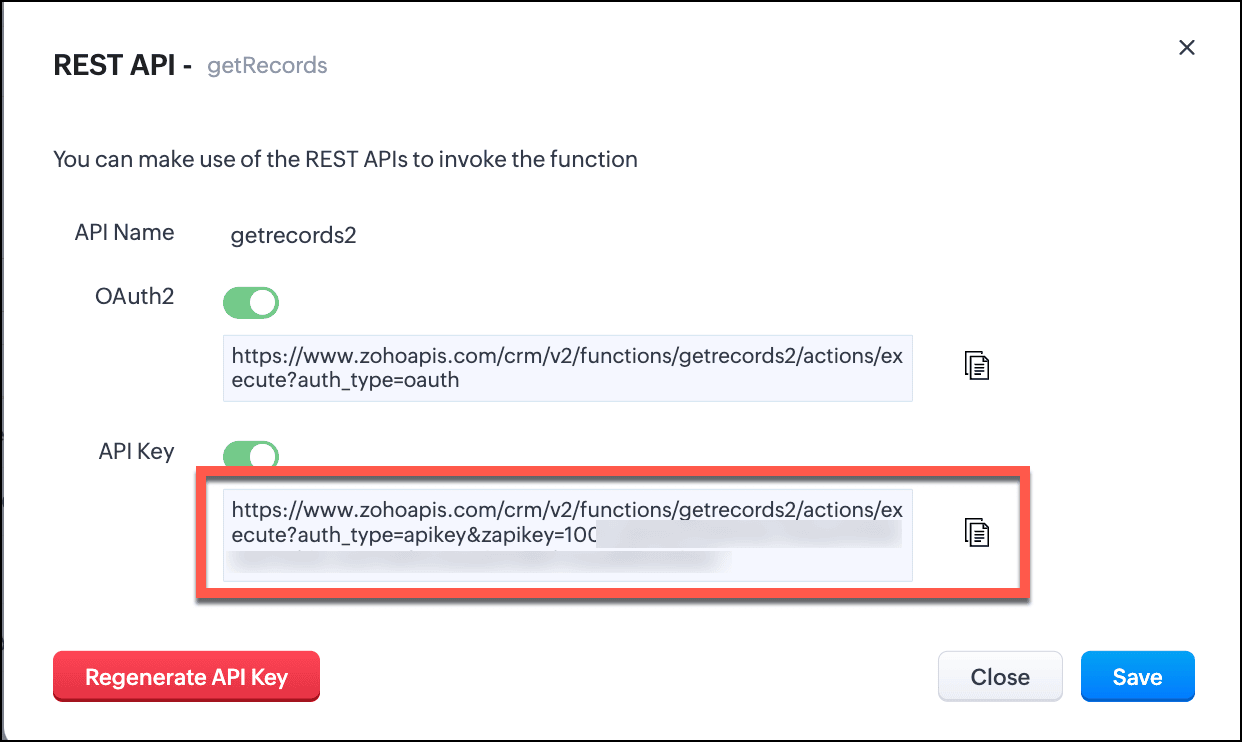
The response of this function is a string in the crmAPIResponse object as shown in this image.
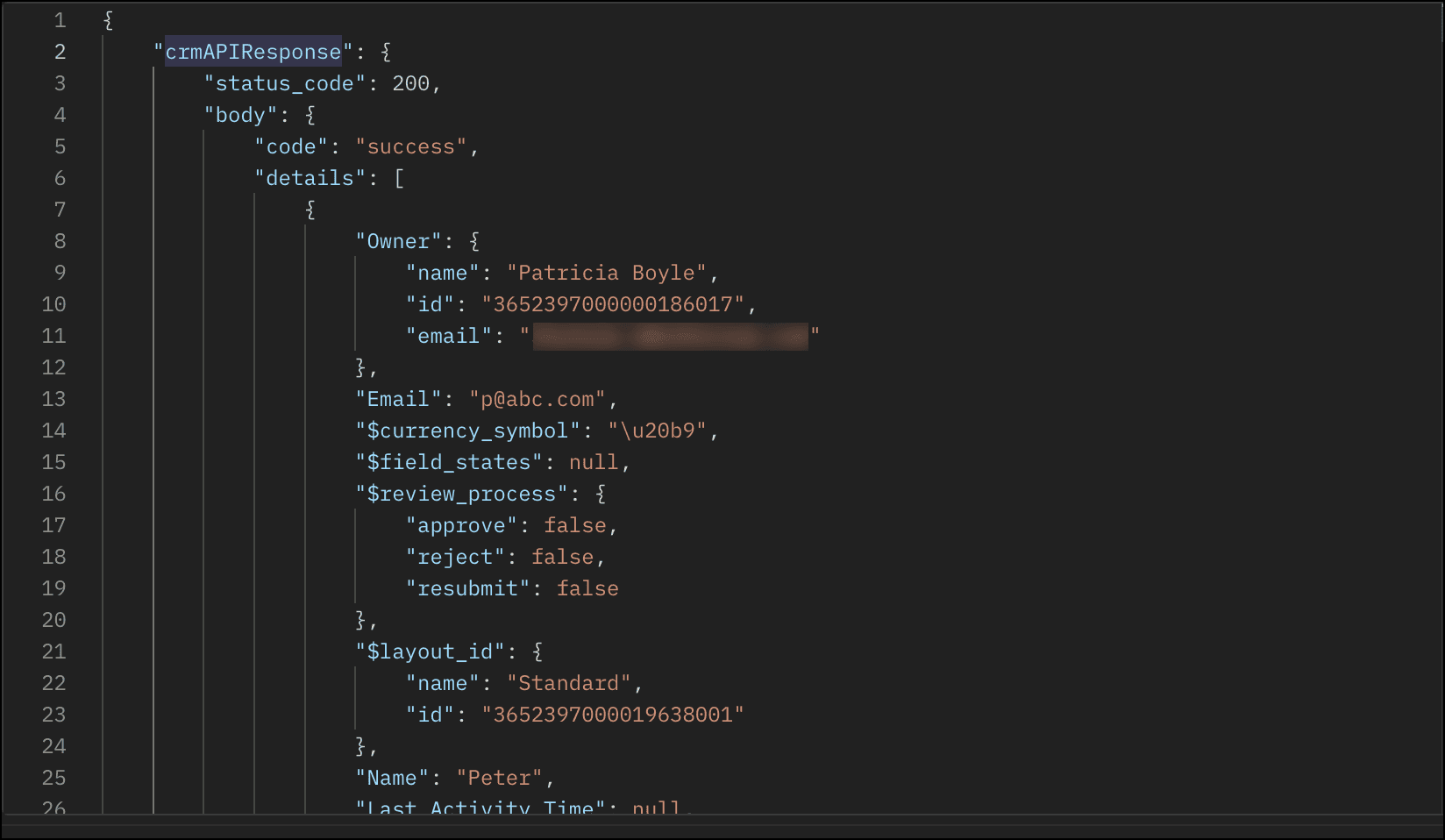

  1. Save this function and enable REST API.
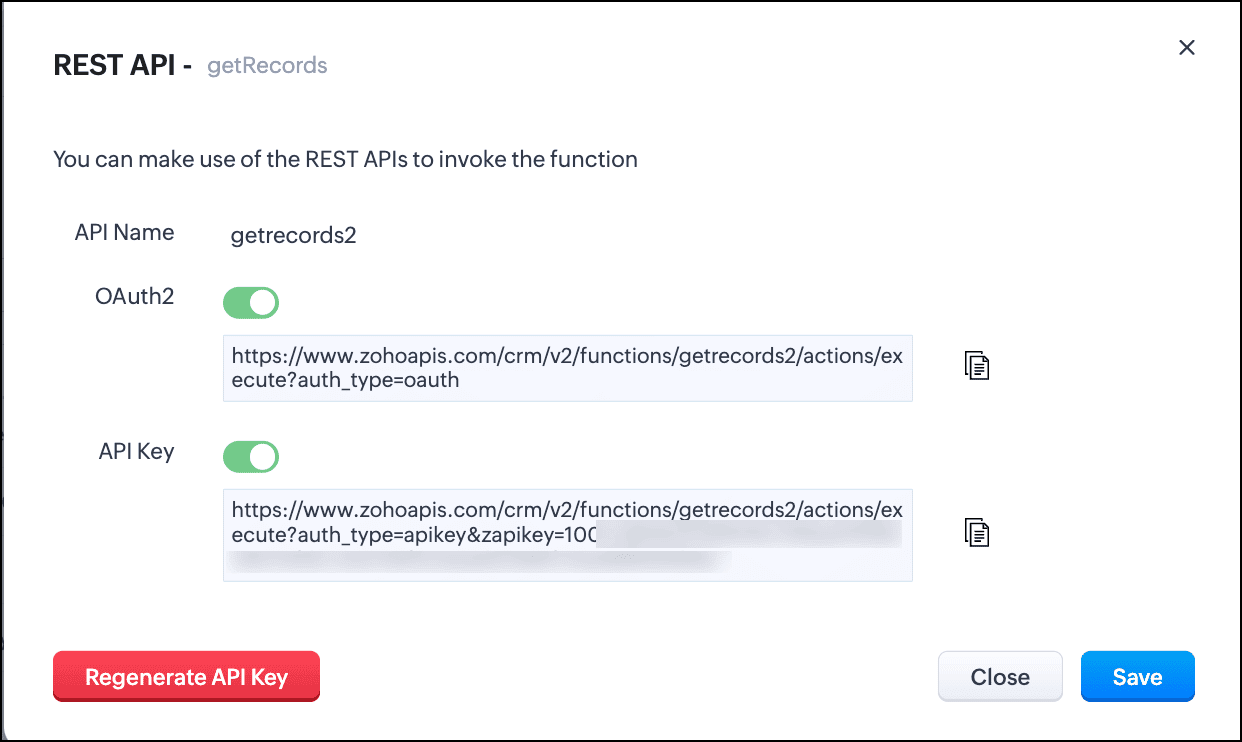
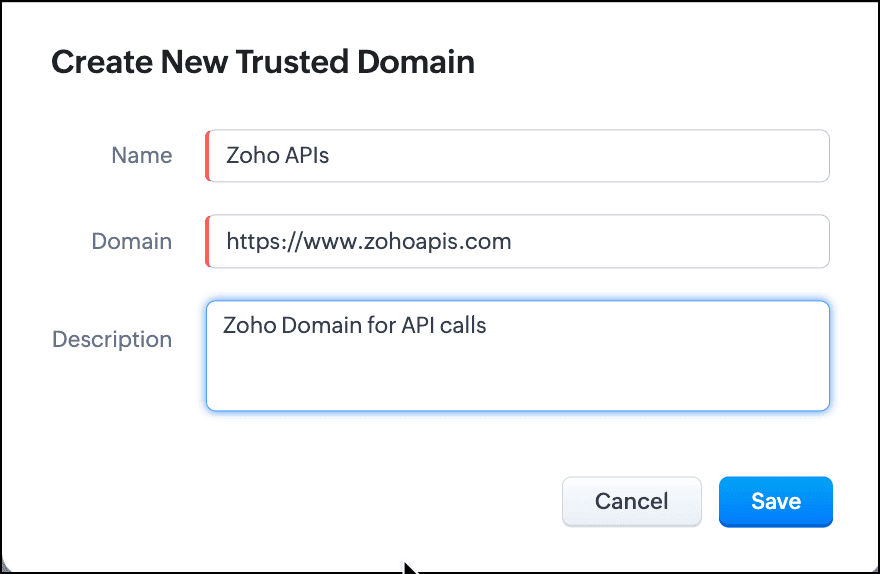
  2. You can see that the domain is https://www.zohoapis.com. To be able to use this in a Query, register this domain in Trusted Domain.
  3. To create a REST API type source, you must add the source. Go to Setup > Developer Hub > Queries > Sources tab.
  4. Click Add Source and give the details like the name, base URL, headers, and parameters under the Information section.
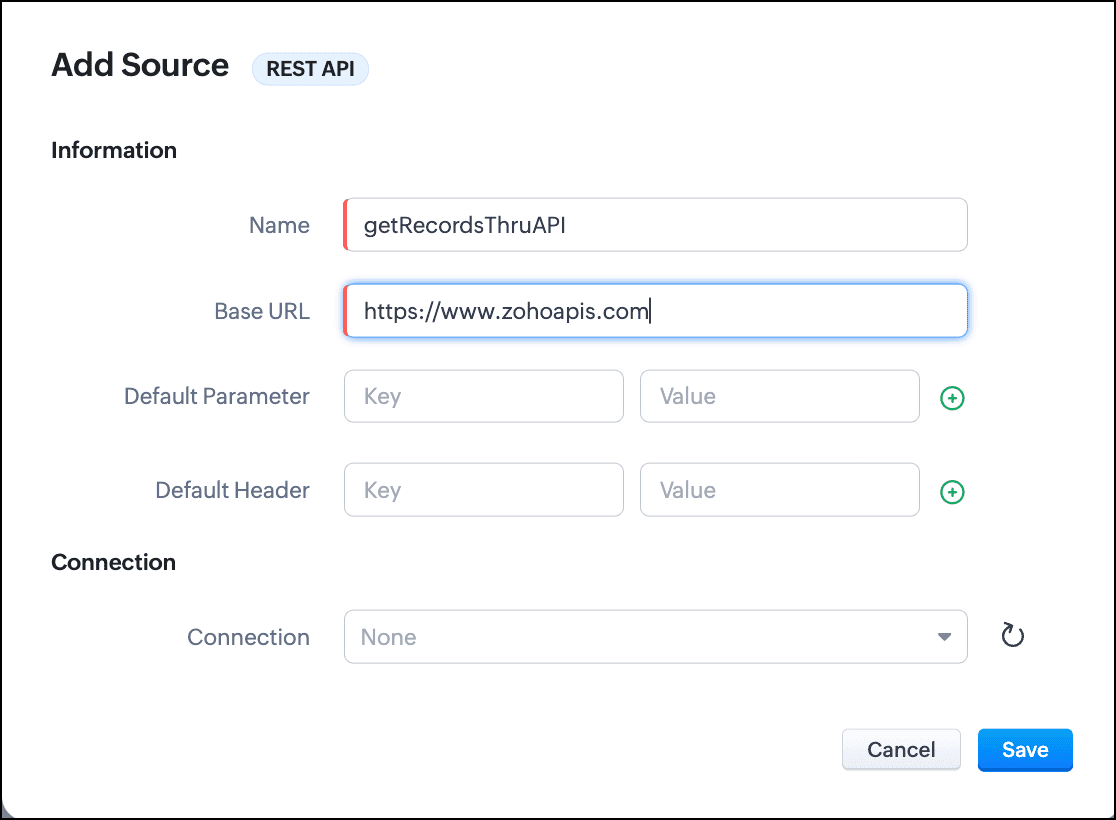
  5. Click Save.
  6. Go to the Queries tab and click Add Query.
  7. For Source, choose the source you just added.
  8. Under Information, enter the name, API name of the query.
  9. For the endpoint, enter the API Key URL of the function.
  10. Enter the parameter name and values in the Parameter field.
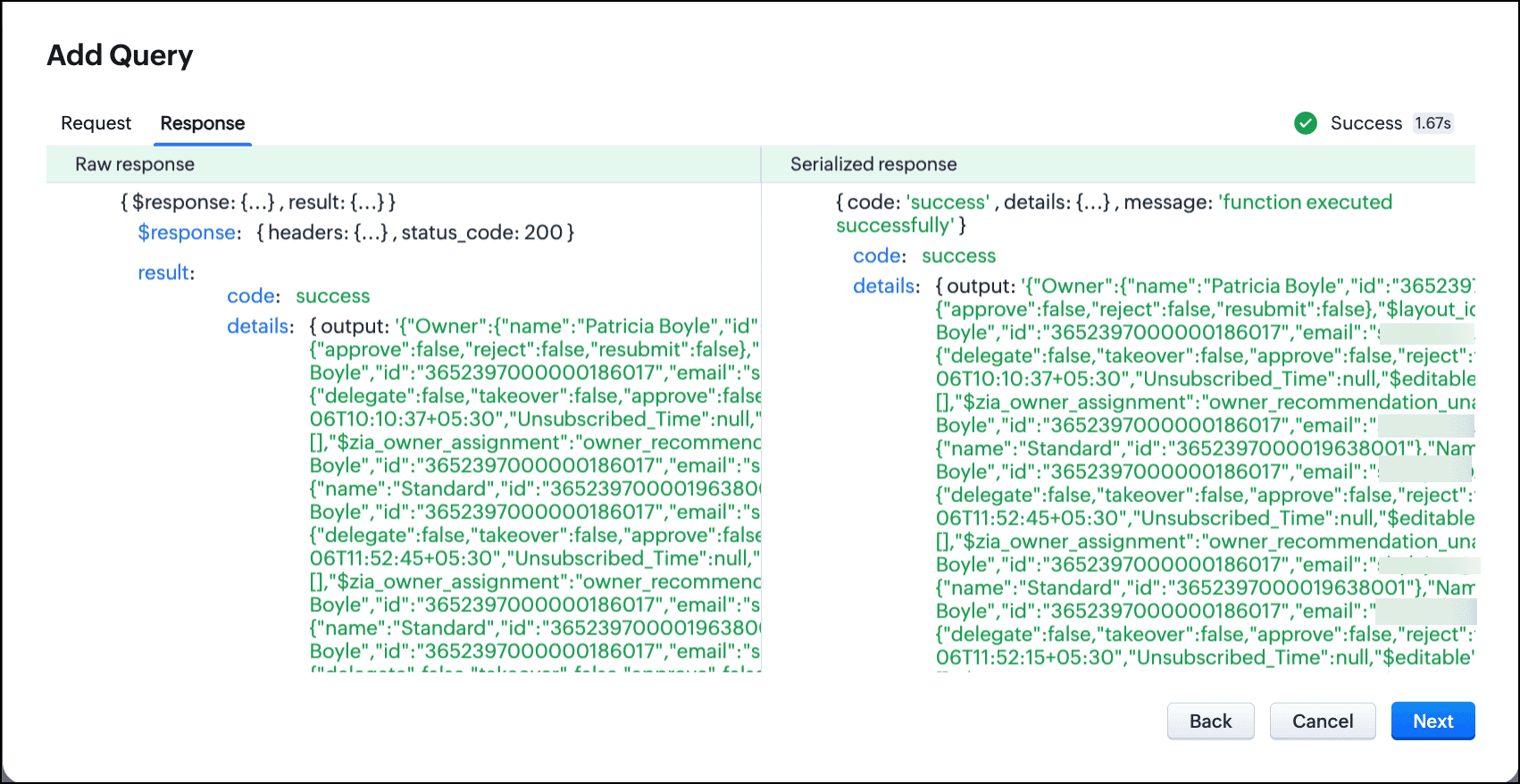
  11. Click Add Serializer if you want to serialize the response. In this example, I have serialized the response to include only the Name, Email, and Position fields in the output. The result contains the 'body' object that we returned in the crmAPIResponse object of the function.

  12. Click Save to save the serialization.
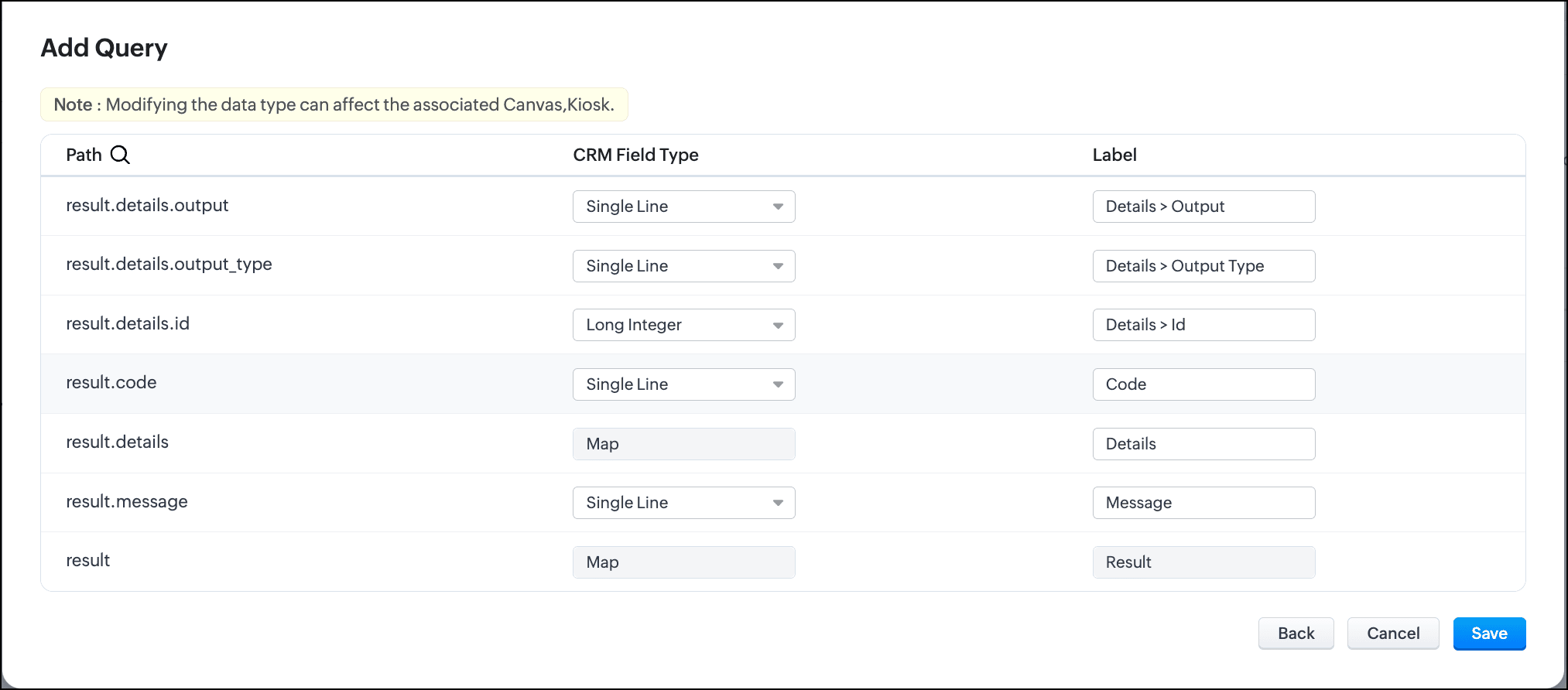
  13. Click Next to view the schema of the query. Make changes as required.
  14. Save the query.
You can now use this query in Canvas or associate it with Kiosk to solve your business needs.

Let us see how the crmAPIResponse object in the function affects the response of the query.

Query with the function without crmAPIResponse:

Let's consider that the function getRecords() does not use the crmAPIResponse object. In that case, the function returns a response that is a string. This response string cannot be serialized or used elsewhere.

Schema of the query without crmAPIResponse:

Query with the function with crmAPIResponse and serialization:

The same getRecords() function that uses the crmAPIResponse object allows you to construct the response as JSON. You can serialize this response easily and use it in a circuit, query, workflow etc.


You can see here that the response is now a JSON.

Schema of the query with crmAPIResponse:


In conclusion, you can use the crmAPIResponse object in Functions to construct the desired response and use the REST API-enabled function as a source in Queries.
Leveraging the advantage of the crmAPIResponse object in functions and using it in Queries increases the prospect of solving many more business cases easily and customize more efficiently.

We hope you liked this post and found it useful. Let us know your thoughts in the comments.
If you'd like us to cover any other topic in this series, feel free to comment or reach us at support@zohocrm.com.


Cheers!

------------------------------------------------------------------------------------------------------------------------------------------------
Info
More enhancements in the COQL API are now live in Zoho CRM API Version 7. Check out the V7 Changelog for detailed information on these updates.


    Access your files securely from anywhere

        All-in-one knowledge management and training platform for your employees and customers.


                              Zoho Developer Community


                                                    • Desk Community Learning Series


                                                    • Digest


                                                    • Functions


                                                    • Meetups


                                                    • Kbase


                                                    • Resources


                                                    • Glossary


                                                    • Desk Marketplace


                                                    • MVP Corner


                                                    • Word of the Day


                                                    • Ask the Experts


                                                              • Sticky Posts

                                                              • Kaizen #198: Using Client Script for Custom Validation in Blueprint

                                                                Nearing 200th Kaizen Post – 1 More to the Big Two-Oh-Oh! Do you have any questions, suggestions, or topics you would like us to cover in future posts? Your insights and suggestions help us shape future content and make this series better for everyone.
                                                              • Kaizen #226: Using ZRC in Client Script

                                                                Hello everyone! Welcome to another week of Kaizen. In today's post, lets see what is ZRC (Zoho Request Client) and how we can use ZRC methods in Client Script to get inputs from a Salesperson and update the Lead status with a single button click. In this
                                                              • Kaizen #222 - Client Script Support for Notes Related List

                                                                Hello everyone! Welcome to another week of Kaizen. The final Kaizen post of the year 2025 is here! With the new Client Script support for the Notes Related List, you can validate, enrich, and manage notes across modules. In this post, we’ll explore how
                                                              • Kaizen #217 - Actions APIs : Tasks

                                                                Welcome to another week of Kaizen! In last week's post we discussed Email Notifications APIs which act as the link between your Workflow automations and you. We have discussed how Zylker Cloud Services uses Email Notifications API in their custom dashboard.
                                                              • Kaizen #216 - Actions APIs : Email Notifications

                                                                Welcome to another week of Kaizen! For the last three weeks, we have been discussing Zylker's workflows. We successfully updated a dormant workflow, built a new one from the ground up and more. But our work is not finished—these automated processes are


                                                              Manage your brands on social media


                                                                    Zoho TeamInbox Resources


                                                                        Zoho CRM Plus Resources

                                                                          Zoho Books Resources


                                                                            Zoho Subscriptions Resources

                                                                              Zoho Projects Resources


                                                                                Zoho Sprints Resources


                                                                                  Qntrl Resources


                                                                                    Zoho Creator Resources


                                                                                        Zoho CRM Resources

                                                                                        • CRM Community Learning Series

                                                                                          CRM Community Learning Series


                                                                                        • Kaizen

                                                                                          Kaizen

                                                                                        • Functions

                                                                                          Functions

                                                                                        • Meetups

                                                                                          Meetups

                                                                                        • Kbase

                                                                                          Kbase

                                                                                        • Resources

                                                                                          Resources

                                                                                        • Digest

                                                                                          Digest

                                                                                        • CRM Marketplace

                                                                                          CRM Marketplace

                                                                                        • MVP Corner

                                                                                          MVP Corner


                                                                                            Design. Discuss. Deliver.

                                                                                            Create visually engaging stories with Zoho Show.

                                                                                            Get Started Now


                                                                                              Zoho Show Resources

                                                                                                Zoho Writer

                                                                                                Get Started. Write Away!

                                                                                                Writer is a powerful online word processor, designed for collaborative work.

                                                                                                  Zoho CRM コンテンツ


                                                                                                    Nederlandse Hulpbronnen


                                                                                                        ご検討中の方


                                                                                                                • Recent Topics

                                                                                                                • Zoho Desk blank screen

                                                                                                                  opened a ticket from my email, zoho desk comes up blank, nothing loads. our receptionist also gets the same thing under her login on her computer. our sales rep also gets same thing on zoho desk at his home on a different computer. I tried clearing cache/history/cookies,
                                                                                                                • Optimum CRM setup for new B2B business

                                                                                                                  Can some advise the most common way to setup Zoho CRM to handle sales for a B2B company? Specifically in how to handle inbound/outbound emails. I have spent hours researching online and can't seem to find an accepted approach, or even a tutorial. I have
                                                                                                                • filter on sheets mobile (iOS, iPadOS) does not work

                                                                                                                  I have this issue on every spreadsheet, whether imported or created natively in Zoho Sheets. I can use on desktop without issue: desktop screenshot on iOS the filter dropdowns are not there and there is no way to add them mobile iPadOS looks the same
                                                                                                                • 【Zoho CRM】商談タブへのデータインポート

                                                                                                                  Zoho使用前にエクセルで管理していた商談情報を、Zoho一括管理のため、商談タブにインポートしたいのですが、お客さまの氏名だけが紐づけられませんでした。 「Zoho CRMにインポートする項目を関連付ける」のところが画像のようになっています。 (弊社では、「姓」を「★個人データ名」という項目名に変更し、フルネームを入れて使用しています。) どのようにしたら氏名をインポートできるかご存じの方がいらっしゃいましたら、ご教示いただきたく、よろしくお願いいたします。 (投稿先が間違っていましたらご指
                                                                                                                • Canva Integration

                                                                                                                  Hello! As many marketing departments are streamlining their teams, many have begun utilizing Canva for all design mockups and approvals prior to its integration into Marketing automation software. While Zoho Social has this integration already accomplished,
                                                                                                                • Can't edit Segments

                                                                                                                  Happening with 2 different Zoho One environments, in different browsers. Please fix.
                                                                                                                • Zoho Sheet for Desktop

                                                                                                                  Does Zoho plans to develop a Desktop version of Sheet that installs on the computer like was done with Writer?
                                                                                                                • Transfer ownership of files and folders in My Folders

                                                                                                                  People work together as a team to achieve organizational goals and objectives. In an organization, there may be situations when someone leaves unexpectedly or is no longer available. This can put their team in a difficult position, especially if there
                                                                                                                • Consumer Financing

                                                                                                                  Does Zoho currently have a payment gateway (such as Stripe, Square, etc) which offers financing for customers? So, let's say the estimate we give the customer is greater than what they can afford at the time, but we can sell the service now, letting them
                                                                                                                • Subform edits don't appear in parent record timeline?

                                                                                                                  Is it possible to have subform edits (like add row/delete row) appear in the Timeline for parent records? A user can edit a record, only edit the subform, and it doesn't appear in the timeline. Is there a workaround or way that we can show when a user
                                                                                                                • Zoho CRM - Option to create Follow-Up Task

                                                                                                                  When completing a Zoho CRM Task, it would be very helpful if there was an option to "Complete and Create Follow-Up Task" in the pop-up which appears. It could clone the task you are closing and then show it on the screen in edit mode, all the user would
                                                                                                                • Deluge function to copy parent record file upload field to child record file upload field

                                                                                                                  I'm stuck trying to write a deluge function that is triggered via automation in child record "Appointments," confirms if a file is in file upload "Report" field of parent "Contacts" record via Contacts lookup field "Contact_Name". If no file is in parent
                                                                                                                • Make panel configuration interface wider

                                                                                                                  Hi there, The same way you changed the custom function editor's interface wider, it would be nice to be able to edit panels in pages using the full width of the screen rather than the currently max-width: 1368px. Is there a reason for having the configuration panel not taking the full width? Its impossible at this width to edit panels that have a lot of elements. Please change it to 100% so we can better edit the layouts. Thanks! B.
                                                                                                                • Image Compression Options

                                                                                                                  Much better if we have level of options to compress the image [20%, 40%...] We are dealing with service reports daily that has before and after photos (image field)- the file size too large and one thing, the current limit is 10mb or 15mb for report
                                                                                                                • Cannot get code to work with v2.mergeAndStore!

                                                                                                                  Please can someone help me pass subform items into a repeating mail merge table row using v2.mergeAndStore? I have a mail merge template created in Writer and stored in Workdrive. This template is referenced by a custom CRM function which merges all of
                                                                                                                • How to hide or archive a blog post temporarily in Zoho commerce website builder?

                                                                                                                  I would like to temporarily hide or archive a blog post in zoho commerce website builder so that it doesnt appear on my website till I enable it again. I tried to look for this option but could not find it.  It only allows me to permanently delete a blog
                                                                                                                • Founders using Zoho — are you leveraging Zoho Campaigns + Zoho Social for thought leadership… or just sending emails?

                                                                                                                  I’ve noticed something interesting in the Zoho ecosystem. Many founders use Zoho Campaigns and Zoho Social for basic marketing—newsletters, scheduled posts, and announcements. But very few are using these tools strategically to: • Position themselves
                                                                                                                • How to mix different types of inputs (such as dropdown list and textbox)

                                                                                                                  Hi, I'm creating a form called "Room Reservations" for a company. I created a "table" using "Matrix Choice". I created "Room 1", "Room 2" and "Room 3" with the "Questions". I would then like to create two columns with the "Answers", one called "Department"
                                                                                                                • How to Convert NSF to PST Format Effortlessly? - SYSessential

                                                                                                                  It is highly recommended to obtain the error-free solution of the SYSessential NSF to PST converter to convert NSF files from Lotus Notes. Using this professional software, it becomes easier to convert all NSF database items, including emails, journals,
                                                                                                                • Zoho Commerce - Poor Features Set for Blogging

                                                                                                                  Hi Zoho Commerce team, I'm sure you will have noticed that I have been asking many questions about the Blogs feature in Commerce. I thought that it would be useful if I share my feedback in a constructive way, to highlight the areas which I feel need
                                                                                                                • Pass shipping info to payment gateway Zoho Books to Authorize.net

                                                                                                                  For some reason the integration from Zoho books to Authorize.net does not pass the shipping address. Authorize.net is ready to receive it, but zoho books does not send it
                                                                                                                • Massive Zoho Books failure

                                                                                                                  We have not received any communication or notification from Zoho, but we have detected that Zoho Books is not working for all our users. We cannot access or use Zoho Books. This is critical. We are trying to contact Zoho on the Spain telephone number,
                                                                                                                • Does the Customer “Company Name” field appear anywhere in the Zoho Books UI outside of PDFs?

                                                                                                                  Hi everyone, I’m trying to understand how the Company Name field is actually used in Zoho Books. There is a Company Name field on the customer record, but when viewing transactions like a Sales Order in the normal UI (non-PDF view), that field doesn’t
                                                                                                                • Email outbox is now available in the sandbox

                                                                                                                  Hello all! Testing emails without visibility has always been a blind spot in the sandbox. With the new Outbox, that gap is closed. You can now view and verify every email triggered from your sandbox, whether it’s through workflows, approvals, or mass
                                                                                                                • Looking For Recruit Developer

                                                                                                                  Hi everyone, I am looking for a Zoho Certified Developer to assist with a development project for MetalXpert. We are building a software system designed to bridge the gap between a candidate mobile app and an employer web portal using Zoho Recruit as
                                                                                                                • sales IQ issue on website

                                                                                                                  i integrated the zoho sales IQ code on the website but it is comming in distroted form i am sharing the screenshot below the website is bulit in wix platform
                                                                                                                • Deprecation of the Zoho OAuth connector

                                                                                                                  Hello everyone, At Zoho, we continuously evaluate our integrations to ensure they meet the highest standards of security, reliability, and compliance. As part of these ongoing efforts, we've made the decision to deprecate the Zoho OAuth default connector
                                                                                                                • I need to know the IP address of ZOHO CRM.

                                                                                                                  The link below is the IP address for Analytics, do you have CRM's? IP address for Analytics I would like to know the IP address of ZOHO CRM to allow communication as the API server I am developing is also run from CRM. Moderation Update: The post below
                                                                                                                • Important Update: Google Ads & YouTube Ads API Migration

                                                                                                                  To maintain platform performance and align with Google's newest requirements, we are updating the Google Ads and YouTube Ads integrations by migrating from API v19 to the newer v22, before the official deprecation of v19 on February 11, 2026. Reference:
                                                                                                                • Zoho recruit's blueprint configuration is not functioning as mapped

                                                                                                                  Current Status: Zoho Blueprint is not functioning as configured. Issue: We are moving a Candidate status in Zoho Recruit "for active file" but we encountered: "Status cannot be changed for records involved in Blueprint." This happens to various client
                                                                                                                • Super Admin Logging in as another User

                                                                                                                  How can a Super Admin login as another user. For example, I have a sales rep that is having issues with their Accounts and I want to view their Zoho Account with out having to do a GTM and sharing screens. Moderation Update (8th Aug 2025): We are working
                                                                                                                • Blocklist candidates in Zoho Recruit

                                                                                                                  We’re introducing Block Candidate, which helps recruiters to permanently restrict a candidate from applying to current/future job openings. Once the candidate is blocked, they will no longer be able to participate in the recruitment process. This will
                                                                                                                • Admin asked me for Backend Details when I wanted to verify my ZeptoMail Account

                                                                                                                  Please provide the backend details where you will be adding the SMTP/API information of ZeptoMail Who knows what this means?
                                                                                                                • Zoho Desk - Upsert Ticket

                                                                                                                  Hi Desk Team, It is common to request more information from end-users. Using forms is a great way to ensure all the required information is collected. It would be great if there were an "upsert" option on the Zoho Form -> Zoho Desk integration which would
                                                                                                                • All new Address Field in Zoho CRM: maintain structured and accurate address inputs

                                                                                                                  The address field will be available exclusively for IN DC users. We'll keep you updated on the DC-specific rollout soon. It's currently available for all new sign-ups and for existing Zoho CRM orgs which are in the Professional edition. Latest update
                                                                                                                • Client Side Scripts for Meetings Module

                                                                                                                  Will zoho please add client side scripting support to the meetings module? Our workflow requires most meeting details have a specific format to work with other software we have. So we rely on a custom function to auto fill certain things. We currently
                                                                                                                • Introducing Multiple Sandbox Types and Support for Module's Data Population

                                                                                                                  Register here for the upcoming Focus Group webinar on Multiple Sandbox | Help documentation to learn more about the new enhancements Hello everyone,  Sandbox in CRM is a testing environment for users to create and test new configurations like workflow
                                                                                                                • Creator Offline

                                                                                                                  We had online access setup and working on our iphones. We have just set it up on an 'Android Tablet' and it is not downloading all the images? We use it to show customers our catalogue. Any ideas. Offline components all setup on both devices
                                                                                                                • Updated font library: New font styles and custom font options in Zoho Sheet

                                                                                                                  Zoho Sheet's font library now supports 500+ font styles in 60+ languages! The updated font library is stacked with new font styles, and some of the previously available font styles have been replaced with equivalent options. There are two ways you can
                                                                                                                • Enable or disable any Field Rule!

                                                                                                                  Hello Zoho Forms Community, We are excited to announce a powerful new enhancement to Field Rules that gives you greater control and flexibility in managing your form logic! Previously, if you wanted to temporarily deactivate a field rule, you had two
                                                                                                                • Next Page