Kaizen# 204 - Answering Your Questions | Perform Field Updates before Blueprint transition via Client Script

Hello everyone!
Welcome back to another exciting Kaizen post.
One of the questions we received through your Kaizen feedback was:
“How can I update fields before Blueprint transition and how to prevent a transition based on a condition using Client Script?”
In today’s post, let’s walk through how to achieve this with a simple real-world example.
We have previously explored how to use Blueprint Events in this Kaizen post and how to implement custom validations within a Blueprint in another Kaizen post.
In this Kaizen post,
In this Kaizen post,
1. Use Case
1. Use Case
A. Field Update during Blueprint Transition
B. Prevent Transition
2. Solution
3. Summary
4. Related Links
1. Use Case
Lisa, the CRM Admin at Zylker, wants to enhance the Lead follow-up Blueprint by capturing the reason behind each transition. Before any transition, a popup should prompt the user to enter a comment.
Field Update:
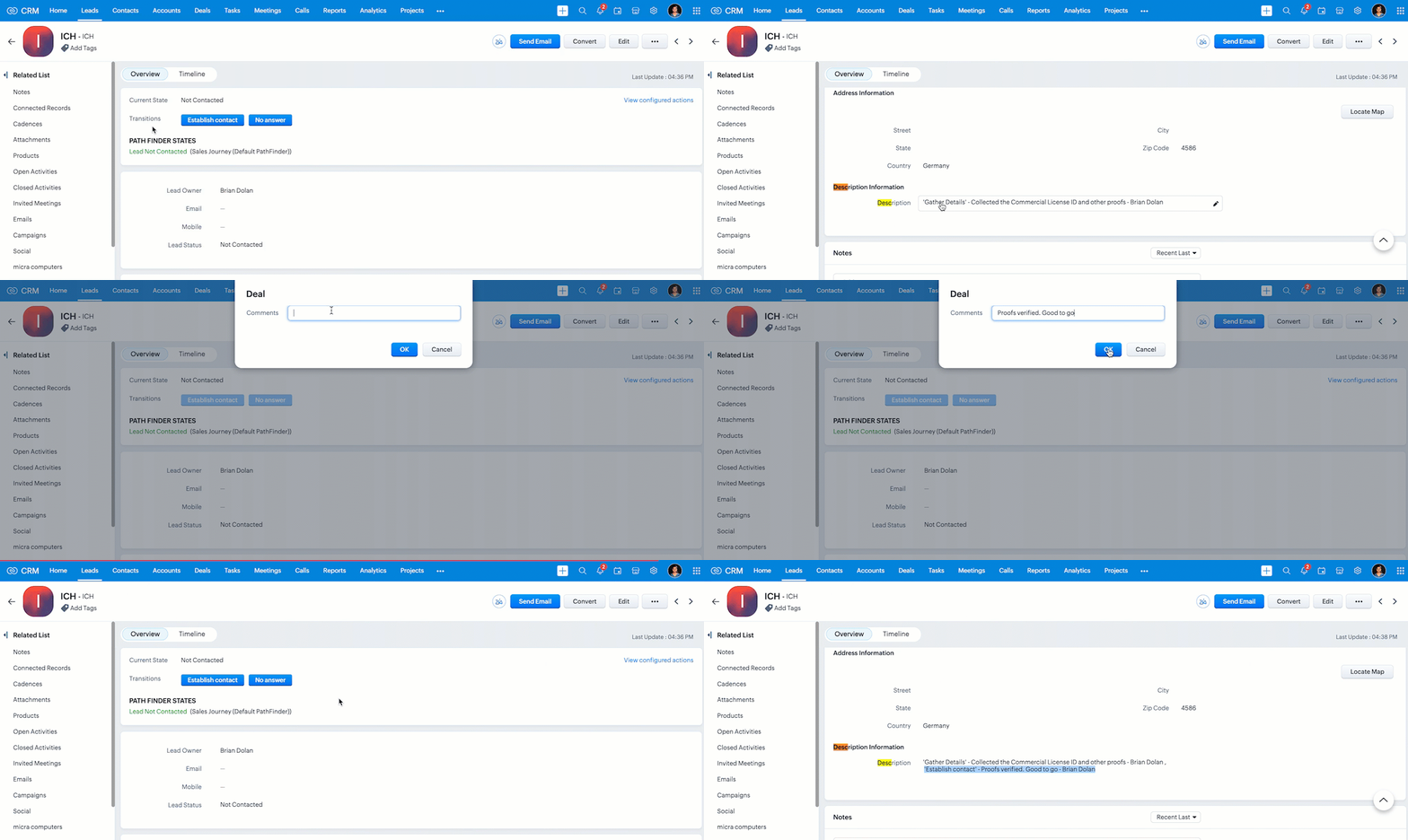
The Description field should act as the comment history for all Blueprint transitions. When a user enters a comment during a transition, the system should append the comment along with the transition name and the user’s name to this field if the comment has more than 25 characters.
Prevent Transition:
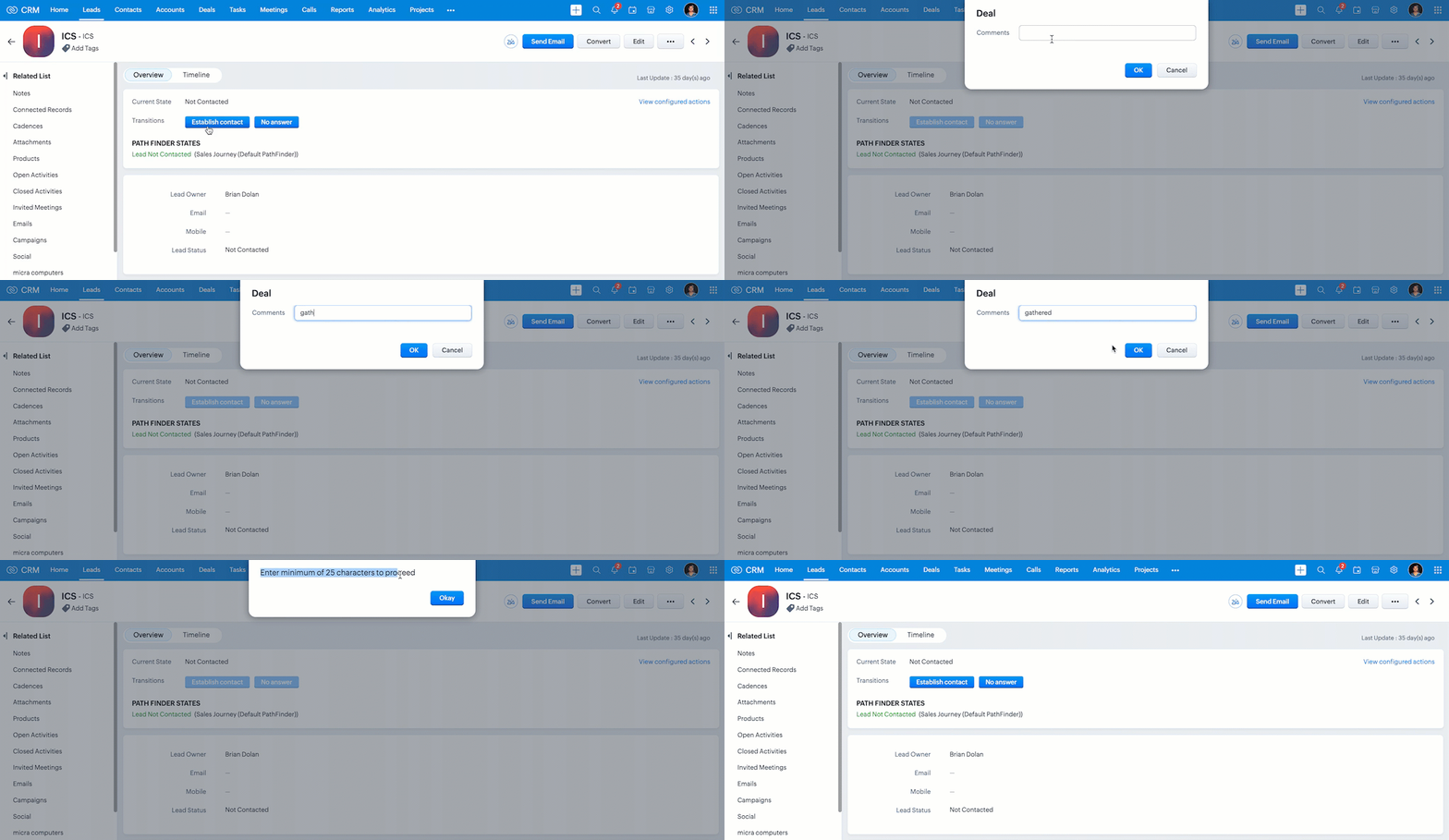
If the comment is less than 25 characters, the transition should be prevented.
2. Solution:
- To achieve this, you should create a Client Script that runs during the beforeTransition Blueprint event in your Blueprint.
- The Before Transition event allows you to control what happens just before a Blueprint transition is executed, and this is perfect for tasks like validating inputs or updating fields dynamically.
- Go to Setup > Developer Space > Client Script.
- Click +New Script.
- Specify the details to create a script and click Next.
- Enter the following script and click Save.
- // Show a popup input asking the user to enter comments
- var notes_pop_up = ZDK.Client.getInput(
- [{ type: 'text', label: 'Comments' }], // Input type and label
- 'Deal', // Title of the popup
- 'OK', // Confirm button text
- 'Cancel' // Cancel button text
- );
- // Get the "Description" field from the current record
- var notes_field = ZDK.Page.getField("Description");
- // Check if the input comment length is greater than 25 characters
- if (notes_pop_up.length > 25) {
- // If the Blueprint transition is "Gather Details", create a new description with just this comment
- if (transition.name == "Gather Details") {
- var desc = transition.name + "- " + notes_pop_up + ",";
- }
- // For other transitions, append the new comment to the existing description along with the user name
- else {
- var desc = notes_field.getValue() + " ,\n '" + transition.name + "' - " + notes_pop_up + " - " + $Crm.user.full_name;
- }
- // Fetch the Lead record using the record ID from the page
- var lead = ZDK.Apps.CRM.Leads.fetchById($Page.record_id);
- // Update the Description field of the lead
- lead.Description = desc;
- // Save the updated lead record
- var response = ZDK.Apps.CRM.Leads.updateById(lead, $Page.record_id);
- }
- // If comment length is less than or equal to 25 characters, prevent the transition
- else {
- ZDK.Client.showAlert("Enter minimum of 25 characters to proceed");
- return false; // Block transition
- }
- To prompt the user for comments during a Blueprint transition, use ZDK.Client.getInput(), which displays a popup input box.
- The existing value of the Description field can be fetched using ZDK.Page.getField("Description").
- To retrieve full lead details based on the current record, call ZDK.Apps.CRM.Leads.fetchById() using $Page.record_id.
- Once the new comment is prepared, update the lead by calling ZDK.Apps.CRM.Leads.updateById().
- If the entered comment is too short (e.g., under 25 characters), the code displays an alert using ZDK.Client.showAlert() to guide the user.
- The user’s full name is accessed via $Crm.user.full_name.
- Finally, return false will stop the Blueprint transition if the number of characters is less than 25.
- Here is how the Client Script works if the user specifies a description with sufficient length.
- As you can see in the following gif, if the user enters a short description, the Client Script shows an alert and prevents the Blueprint transition.
We hope you found this post useful. We will meet you next week with another interesting topic!
If you have any questions, let us know in the comment section.
Click here for more details on Client Script in Zoho CRM.
3. Summary
A. How can I update fields during a Blueprint transition using Client Script
B. How to prevent Blueprint transition
4. Related Links

Previous Kaizen : Kaizen #203 - Answering Your Questions | Handling API Limits and Error Responses | Kaizen Directory : Home