Kaizen 252 : Managing Data Sharing Rules using APIs

Kaizen 252 : Managing Data Sharing Rules using APIs


Hey everyone! Welcome to another Kaizen week!

Data Sharing Rules are one of those CRM features that are usually configured during implementation and then left untouched for months, or even years. For small teams with a simple reporting structure, managing them through Setup > Security Control > Roles and Sharing > Data Sharing Settings is straightforward.

However, as organizations grow, managing sharing rules becomes more challenging. New departments are created, regional teams are reorganized, business units merge, and compliance requirements change. Every change can affect who should and should not have access to CRM records. Zylker Technologies faced the same challenge.

Every quarter, Zylker's Information Security team reviews the organization's data access policies and publishes an updated set of sharing requirements. CRM administrators then have to compare the approved rule with the existing CRM configuration, identify the required changes, update sharing rules across multiple modules, apply those changes to existing records, and verify that everything had been processed successfully.

To streamline this process, Zylker integrated its internal Security Governance Portal with Zoho CRM. The Governance Portal serves as the central system where the Information Security team defines and approves access policies for their business applications, including Zoho CRM. Once a rule is approved, the portal retrieves the current sharing configuration from CRM, compares it with the approved rule, applies the required changes, and tracks the progress of the deployment through the Data Sharing Rules APIs.

While Zoho CRM already provides a user interface for managing Data Sharing Rules, these APIs enable organizations to integrate CRM with governance, compliance, or change management systems. Developers can also use them to build custom administrative applications, automate repetitive tasks, and incorporate Data Sharing Rule management into their own business workflows. Throughout this Kaizen, we will use Zylker's Security Governance Portal to understand how each API fits into this workflow.

Understanding Data Sharing Rules

Before we look at the implementation, let us understand how Data Sharing Rules behave.
By default, Zoho CRM follows the organization's data sharing settings to determine who can access a record. Depending on the module's default sharing model, records are visible only to the record owner, users higher in the role hierarchy, or other users based on the configured permissions. Data Sharing Rules extend this access by granting access to other users, roles, or groups without changing record ownership.
Zoho CRM supports two types of Data Sharing Rules:

1. Record owner based rules

A Record Owner Based Rule shares records based on who owns them.
For example, suppose all Deals owned by users in the Enterprise Sales role should also be accessible to the Legal team for contract review. Instead of sharing each Deal individually, a Record Owner Based rule grants Legal read access to all Deals owned by Enterprise Sales users automatically. Any new Deal created by users in that role automatically follows the same sharing rule.

2. Criteria based rules

Criteria Based Rules work differently. Instead of sharing records based on ownership, they share records that satisfy specified conditions.
For example, share all Deals where Billing Country is Singapore or Malaysia with Zylker's Asia Pacific Sales group. Or share all Deals where Amount is greater than $500,000 with the Legal team for contract review.
Any existing or future Deal matching these criteria becomes accessible to the specified group.

Notes
Note:
Data Sharing Rules are module-level configurations, not record-level permissions. A single sharing rule applies to every record in the module that satisfies the rule.

The solution

Let us see how Zylker uses these APIs in practice.
When a policy is approved, CRM administrators use the Governance Portal to review the current configuration, apply the approved changes, and monitor their deployment. Each action in the portal invokes the corresponding Data Sharing Rules API.
The overall workflow looks like this.
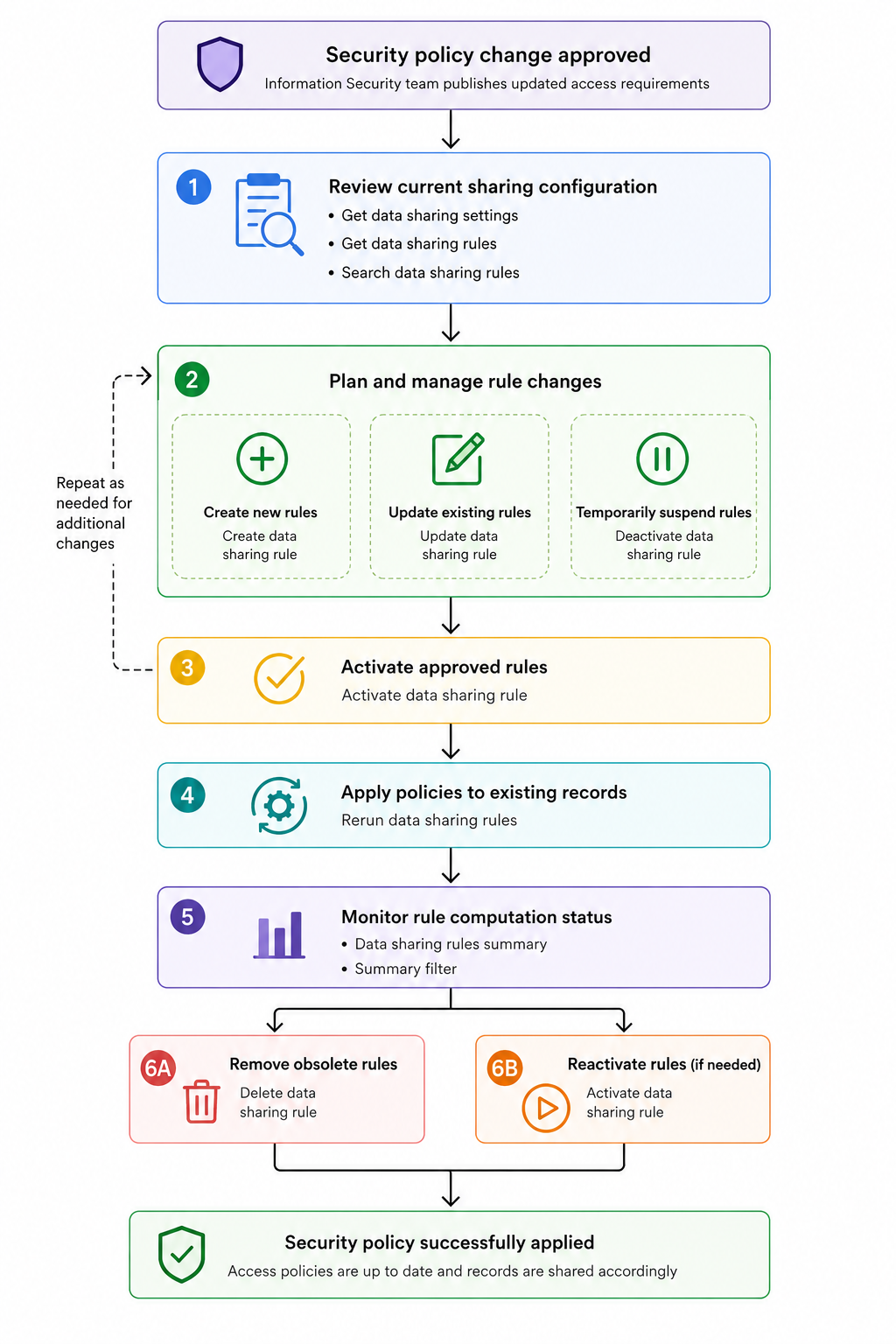
Before administrators can deploy a new sharing rule, they need to review the existing configuration. Once the required rules are created or updated, they can activate or deactivate them as needed. Finally, they can monitor the computation status to confirm everything has completed successfully.
Each step in this workflow maps to one or more Data Sharing Rules APIs.

1. Reviewing the current sharing configuration

Before deploying a new sharing rule, administrators need to understand the organization's current configuration. The portal retrieves the module's sharing settings and existing sharing rules, allowing administrators to review the current configuration and locate specific rules using three APIs.

1.1 Get Data Sharing settings

The Get Data Sharing Settings API retrieves the default sharing model configured for each module in the org, both standard and custom.
Endpoint : GET {api-domain}/crm/v8/settings/data_sharing
Sharing rules only apply to modules set to private. If a module is already public, all users can access its records regardless of any rules.

Sample Response:

{
    "data_sharing": [
        {
            "public_in_portals": false,
            "share_type": "private",
            "module": {
                "api_name": "Leads",
                "id": "4876876000000002175"
            },
            "rule_computation_running": false
        },
        {
            "public_in_portals": false,
            "share_type": "private",
            "module": {
                "api_name": "Accounts",
                "id": "4876876000000002177"
            },
            "rule_computation_running": false
        },
.....
]}

The share_type property indicates the module's default sharing model. rule_computation_running indicates whether a Rerun is currently in progress for that module.

1.2 Get Data Sharing Rules

After retrieving the sharing settings, the portal fetches the data sharing rules configured for the Deals module using the Get Data Sharing Rules API.
Endpoint: GET {api-domain}/crm/v8/settings/data_sharing/rules?module=Deals

Sample Response:
{
    "sharing_rules": [
        {
            "module": {
                "api_name": "Deals",
                "name": "Deals"
            },
            "name": "Enterprise Sales to Corporate Finance",
            "type": "Record_Owner_Based",
            "shared_from": {
                "resource": {
                    "name": "Enterprise Sales"
                },
                "type": "roles"
            },
            "shared_to": {
                "resource": {
                    "name": "Corporate Finance"
                },
                "type": "roles"
            },
            "permission_type": "read",
            "superiors_allowed": true,
            "status": "active"
        },
        {
            "module": {
                "api_name": "Deals",
                "name": "Deals"
            },
            "name": "High Value Deals Review",
            "type": "Criteria_Based",
            "shared_to": {
                "resource": {
                    "name": "Risk Assessment Team"
                },
                "type": "groups"
            },
            "permission_type": "read",
            "superiors_allowed": true,
            "status": "active"
        },
....
    ],
    "info": {
        "count": 5,
        "more_records": false
    }
}


For Criteria Based rules, shared_from is absent. These rules share records based on field conditions, not ownership, so there is no source role. superiors_allowed controls whether users in roles above the shared_to role also receive access. 

1.3 Search Data Sharing Rules

Administrators often need to locate rules that match specific criteria. For example, every active rule that shares records owned by the Enterprise Sales role, or every rule that grants access to a specific group.
The Search Data Sharing Rules API lets you filter rules by status, permission type, shared-to role or group, shared-from role or group, superiors allowed, and rule name. Refer to the API documentation for the full list of supported fields and operators.
Endpoint: POST {api-domain}/crm/v8/settings/data_sharing/rules/search

The sample request below searches for all active rules in the Deals module where the shared_from role is Enterprise Sales:
{
    "page": 1,
    "module": "Deals",
    "filters": [
        {
            "group_operator": "and",
            "group": [
                {
                    "group_operator": "or",
                    "group": [
                        {
                            "group_operator": "and",
                            "group": [
                                {
                                    "field": { "api_name": "shared_from.resource.id" },
                                    "value": ["4876876000024524004"],
                                    "comparator": "in"
                                },
                                {
                                    "field": { "api_name": "shared_from.type" },
                                    "value": "R",
                                    "comparator": "equal"
                                }
                            ]
                        }
                    ]
                },
                {
                    "field": { "api_name": "status" },
                    "value": "active",
                    "comparator": "equal"
                }
            ]
        }
    ]
}


The response contains only the rules that match the specified filters. shared_from.type uses short codes: R for roles, RS for roles and subordinates, and G for groups. 

Sample Response:
{
    "sharing_rules": [
        {
            "module": {
                "api_name": "Deals",
                "name": "Deals",
                "id": "4876876000000002181"
            },
            "superiors_allowed": true,
            "type": "Record_Owner_Based",
            "shared_to": {
                "resource": {
                    "name": "Service Team",
                    "id": "4876876000024524086"
                },
                "type": "roles",
                "subordinates": false
            },
            "shared_from": {
                "resource": {
                    "name": "Enterprise Sales",
                    "id": "4876876000024524004"
                },
                "type": "roles",
                "subordinates": false
            },
            "permission_type": "read",
            "name": "Sales to Service",
            "id": "4876876000024524103",
            "status": "active",
            "match_limit_exceeded": false
        },
        ....

    ],
    "info": {
        "per_page": 200,
        "count": 2,
        "page": 1,
        "more_records": false
    }
}


With the current configuration loaded, administrators can now begin deploying new or updated sharing policies.

2. Deploying new sharing policies

Once administrators have reviewed the current configuration, they can begin deploying new or updated sharing policies.
Suppose Zylker expands its operations into North America. As part of the new governance rule, every Deal owned by the North America Sales team must also be accessible to the Legal Reviewers group for contract verification. Since no such sharing rule exists yet, the administrator creates it from the portal by selecting the module, rule type, source role, target group, and permission level. When they click Deploy, the portal calls the Create Data Sharing Rule API.
Endpoint: POST {api-domain}/crm/v8/settings/data_sharing/rules?module=Deals

The request body defines the new sharing rule.
{
    "sharing_rules": [
        {
            "name": "North America Sales to Legal Reviewers",
            "type": "Record_Owner_Based",
            "shared_from": {
                "resource": {
                    "id": "4876876000067394753"
                },
                "type": "roles",
                "subordinates": false
            },
            "shared_to": {
                "resource": {
                    "id": "4876876000029463849"
                },
                "type": "roles",
                "subordinates": false
            },
            "permission_type": "read_write",
            "superiors_allowed": true
        }
    ]
}

A few things to note about this request.
  1. permission_type accepts three values: read (read only), read_write (read/write), and read_write_delete (read/write/delete).
  2. Do not include the status key in the request body. Rules created via API are automatically set to active, and passing status will return a NOT_ALLOWED error.
For a Criteria Based rule, shared_from is omitted and a criteria object is added instead:

{
    "sharing_rules": [
        {
            "name": "High Value Deals - Review",
            "type": "Criteria_Based",
            "criteria": {
                "group_operator": "AND",
                "group": [
                    {
                        "comparator": "greater_than",
                        "field": { "api_name": "Amount" },
                        "type": "value",
                        "value": "500000"
                    }
                ]
            },
            "shared_to": {
                "resource": {
                    "id": "4876876000008680002"
                },
                "type": "groups",
                "subordinates": false
            },
            "shared_from": null,
            "permission_type": "read",
            "superiors_allowed": false
        }
    ]
}

Updating Existing Policies

Not every rule change requires creating a new rule. Sometimes an existing rule simply needs to be modified. For example, suppose Corporate Finance already has access to Deals, but only with Read Only permission. The new compliance rule now requires Read/Write access. Instead of deleting the rule and creating another one, the administrator edits the existing rule from the portal. The portal calls the Update Data Sharing Rule API.
Endpoint: PUT {api-domain}/crm/v8/settings/data_sharing/rules?module=Deals

Only the specified properties are updated; the rule itself remains unchanged. The API accepts partial updates. Include only the fields you want to change, along with id, type, and name.
shared_from, shared_to, permission_type, and superiors_allowed can all be updated independently.

Sample Request:
{
    "sharing_rules": [
        {
            "id": "4876876000024554001",
            "type": "Record_Owner_Based",
            "name": "Enterprise Sales to Corporate Finance",
            "shared_from": {
                "resource": {
                    "id": "4876876000024524004"
                },
                "type": "roles",
                "subordinates": false
            },
            "shared_to": {
                "resource": {
                    "id": "4876876000024524034"
                },
                "type": "roles",
                "subordinates": false
            },
            "permission_type": "read_write",
            "superiors_allowed": true
        }
    ]
}


Info
Every Create and Update automatically triggers a background execution for that module. Zoho CRM sends an email notification when the execution completes. Until then, no other Create, Update, or Delete operations can be performed on rules for that module. Attempting to do so returns CANNOT_PROCESS. If you are deploying multiple rules, wait for the email confirmation before proceeding with the next one.

3. Managing existing Data Sharing Rules

Sharing policies evolve continuously. Departments are reorganized, projects end, business units merge. The APIs provide separate operations for temporarily suspending a rule and permanently removing one.

Temporarily suspending  and reactivating a Rule

Suppose Zylker is restructuring its Customer Success department. The governance team decides to suspend their access to Deals until the new reporting structure is finalized. Since this is temporary, deleting the rule is unnecessary.
The administrator deactivates it using the Deactivate Data Sharing Rule API. The rule still exists in CRM but stops participating in record sharing until reactivated. No request body is needed.

Deactivate Endpoint: DELETE {api-domain}/crm/v8/settings/data_sharing/rules/{rule_id}/actions/deactivate?module=Deals
Activate Endpoint: PUT {api-domain}/crm/v8/settings/data_sharing/rules/{rule_id}/actions/activate?module=Deals

Permanently removing a rule

Sometimes a sharing rule is no longer required. For example, suppose Zylker retires an old Sales Operations department after migrating its responsibilities elsewhere. Since the department no longer exists, its sharing rules should be removed permanently. In this case, the administrator deletes the rule from the portal, using the Delete Data Sharing Rule API.

Endpoint: DELETE {api-domain}/crm/v8/settings/data_sharing/rules/{rule_id}?module=Deals

Unlike deactivation, deletion permanently removes the rule from CRM. Use Delete only when the rule is genuinely obsolete.

4. Applying the rule to existing records

When a rule is created or updated, Zoho CRM automatically triggers a background execution for that module and sends an email notification when it completes. This applies the new rule to records going forward.
However, if the background execution fails for any reason, existing records may not reflect the updated rule. The Rerun Data Sharing Rules API lets administrators manually trigger the sharing rule computation for a module, reprocessing all existing records against the current active rules. The portal exposes this as a manual option for when the automatic execution does not complete successfully.

Endpoint: POST {api-domain}/crm/v8/settings/data_sharing/rules/actions/run?module=Deals

Sample Response:
{
    "sharing_rules": [
        {
            "code": "SCHEDULED",
            "details": {},
            "message": "Rerun successfully scheduled",
            "status": "success"
        }
    ]
}

The Rerun API is asynchronous. When called, it schedules a rule computation job that runs in the background, applying all active rules across all records in the module. The response returns SCHEDULED to confirm the job has been queued. To check whether the computation has completed, use the Data Sharing Rules Summary API.

Monitoring Status

The Data Sharing Rules Summary API provides a snapshot of the sharing rule configuration across all modules in the org. For each module, it returns rule_computation_status, which indicates whether a computation is currently running, and rule_count, which is the total number of rules configured for that module including both active and inactive ones. Zylker's admin portal uses this to check whether a computation is running before allowing administrators to create, update, or delete rules, and to confirm whether a scheduled Rerun has completed.

Endpoint: GET {api-domain}/crm/v8/settings/data_sharing/rules/actions/summary

Sample Response:

{
    "sharing_rules_summary": [
        {
            "module": { "api_name": "Deals" },
            "rule_computation_status": false,
            "rule_count": 5
        },
        {
            "module": { "api_name": "Leads" },
            "rule_computation_status": false,
            "rule_count": 0
        },
...
    ]
}

Data Sharing Rules summary filter

The Data Sharing Rules Summary Filter API accepts a filter body to get module-wise data on the number and running status of a filtered set of data sharing rules. For example, you can use this API to check how many rules involve a specific role in a given module, without fetching all rules and counting them manually.

Endpoint: POST {api-domain}/crm/v8/settings/data_sharing/rules/actions/summary?module=Deals

Sample Input:
{
    "filters": [
        {
            "group_operator": "and",
            "group": [
                {
                    "field": {
                        "api_name": "shared_from.resource.id"
                    },
                    "value": [
                        "4876876000024524004"
                    ],
                    "comparator": "in"
                },
                {
                    "field": {
                        "api_name": "shared_from.type"
                    },
                    "value": "R",
                    "comparator": "equal"
                }
            ]
        }
    ]
}

Sample Response:
{
    "sharing_rules_summary": [
        {
            "module": {
                "api_name": "Deals",
                "id": "4876876000000002181"
            },
            "rule_computation_status": false,
            "rule_count": 2
        }
    ]
}

We hope this gives you a clear picture of the Data Sharing Rules APIs and how they fit together. If you are building administration tools around sharing policies or integrating them into your existing workflows, these APIs cover the complete lifecycle from configuration to monitoring.

If you have questions, drop them in the comments below, or write to us at support@zohocrm.com. We will be happy to help you with your queries.

Happy coding!


    Access your files securely from anywhere

          Zoho FSM Video Tutorials


                All-in-one knowledge management and training platform for your employees and customers.


                                      Zoho Developer Community


                                                            • Desk Community Learning Series


                                                            • Digest


                                                            • Functions


                                                            • Meetups


                                                            • Kbase


                                                            • Resources


                                                            • Glossary


                                                            • Desk Marketplace


                                                            • MVP Corner


                                                            • Word of the Day


                                                            • Ask the Experts


                                                                      • Sticky Posts

                                                                      • Announcing the new SKILL.md for Zoho CRM and the updated OAS repository!

                                                                        We are introducing a new zoho-crm skill to make working with Zoho CRM Developer tools (like APIs, functions, widgets, client scripts, queries etc) easier and faster, with the help of AI in your preferred AI harness like Claude Code, Codex, Cursor, VSCode
                                                                      • Kaizen #261 : Using Zoho CRM Skill to generate complex COQL queries

                                                                        Hello everyone, In the previous Kaizen posts, we introduced the zoho-crm SKILL.md and discussed how it can help you when you are working with Zoho CRM APIs and Client Script. In this Kaizen, we will focus on using the Zoho CRM `SKILL.md` with GitHub Copilot
                                                                      • Kaizen #256 - Build an Arrival Readiness Web Tab in Zoho CRM

                                                                        Hi everyone! Welcome back to the Kaizen series! In the post, we discuss a use case in hospitality industry: how an Arrival Readiness web tab widget can be used to let reception staff identify and resolve issues before arrival of guests. Use case In the
                                                                      • Kaizen #198: Using Client Script for Custom Validation in Blueprint

                                                                        Nearing 200th Kaizen Post – 1 More to the Big Two-Oh-Oh! Do you have any questions, suggestions, or topics you would like us to cover in future posts? Your insights and suggestions help us shape future content and make this series better for everyone.
                                                                      • Kaizen #226: Using ZRC in Client Script

                                                                        Hello everyone! Welcome to another week of Kaizen. In today's post, lets see what is ZRC (Zoho Request Client) and how we can use ZRC methods in Client Script to get inputs from a Salesperson and update the Lead status with a single button click. In this


                                                                      Manage your brands on social media


                                                                            Zoho TeamInbox Resources


                                                                                Zoho CRM Plus Resources

                                                                                  Zoho Books Resources


                                                                                    Zoho Billing Resources

                                                                                      Zoho Projects Resources


                                                                                        Zoho Sprints Resources


                                                                                          Qntrl Resources


                                                                                            Zoho Creator Resources


                                                                                                Zoho CRM Resources

                                                                                                • CRM Community Learning Series

                                                                                                  CRM Community Learning Series


                                                                                                • Kaizen

                                                                                                  Kaizen

                                                                                                • Functions

                                                                                                  Functions

                                                                                                • Meetups

                                                                                                  Meetups

                                                                                                • Kbase

                                                                                                  Kbase

                                                                                                • Resources

                                                                                                  Resources

                                                                                                • Digest

                                                                                                  Digest

                                                                                                • CRM Marketplace

                                                                                                  CRM Marketplace

                                                                                                • MVP Corner

                                                                                                  MVP Corner


                                                                                                    Design. Discuss. Deliver.

                                                                                                    Create visually engaging stories with Zoho Show.

                                                                                                    Get Started Now


                                                                                                      Zoho Show Resources

                                                                                                        Zoho Writer

                                                                                                        Get Started. Write Away!

                                                                                                        Writer is a powerful online word processor, designed for collaborative work.

                                                                                                          Zoho CRM コンテンツ


                                                                                                            Nederlandse Hulpbronnen


                                                                                                                ご検討中の方


                                                                                                                          • Recent Topics

                                                                                                                          • information on a suggestion how to treat old records in the - pipeline deals, notes, activities (tasks- events-calls) and emails etc.

                                                                                                                            Hi, I would like information or a suggestion on how to treat old records in the - pipeline deals, notes, activities (tasks- events-calls) and emails etc. ? As each option (pipeline deal, notes, activities, emails etc.) counts as a record and as we advance
                                                                                                                          • Automating Employee Birthday Notifications in Zoho Cliq

                                                                                                                            Have you ever missed a birthday and felt like the office Grinch? Fear not, the Cliq Developer Platform has got your back! With Zoho Cliq's Schedulers, you can be the office party-cipant who never forgets a single cake, balloon, or awkward rendition of
                                                                                                                          • zoho stream web notifications

                                                                                                                            since im locked out of IMAP and cant use my mail app that lets my team collaborate and chat below emails, im trying out the zoho version of this... zoho streams. On the bottom of an email in the zoho mail web app, i "comment" and mention another user.
                                                                                                                          • New in Zoho CRM: Pre-fill Public Forms with CRM Data

                                                                                                                            Public forms just got more flexible! With the new Pre-fill Public Forms with CRM Data option in the Zoho Forms integration, people filling out your public forms can search for a CRM record, select the right one, and have the form automatically populate
                                                                                                                          • HEIC File Type Viewer

                                                                                                                            Hi, It would be nice to be able to click on the images in the All Entries/Reports Tables which are HEIC the same as JPG, PNG, etc. so they open in a viewer from Zoho or the Attachment Service, today HEIC requires you to download each image and open it
                                                                                                                          • Zoho Books | Product updates | October 2026

                                                                                                                            Hello users, October brings a range of new features and enhancements to Zoho Books, designed to simplify compliance, streamline accounting workflows, and improve inventory management. From the launch of the Nigeria Edition and France’s e-invoicing capabilities
                                                                                                                          • Specific ListView Canvas on Canvas Home Page Always Loads Most Recent ListView, Not the One Specified

                                                                                                                            I had mentioned this to ZOHO, but I mainly wanted to see if others in the Community are also facing this problem. I created a Canvas ListView for a Custom Module, and then created a Canvas Home page (technically on a tab item, but I'm not sure if that
                                                                                                                          • print preview

                                                                                                                            We are using microsoft edge, till 12 sep we were getting directly print option. Now we are getting this preview option we have to click print option again. How to bypass this-preview option?
                                                                                                                          • Zoho Projects - Has something changed regarding to linking Projects and Deals via the API?

                                                                                                                            I am trying to link Zoho Projects to Deals in CRM using the API, but each time, the Deal Contact is added as a Client user and receives an email invite asking them to join the organisation. These are internal projects and the customer should not have
                                                                                                                          • Connection into Cliq?

                                                                                                                            I have the SalesIQ chat widget on my site using the Zohobot but I'm not always on and my employees don't keep it open all the time. We do have Cliq open all the time though so I'd love a way to manage those discussions directly in Cliq as they come in.
                                                                                                                          • Kaizen #264 - Using zoho-crm Skill to Write Functions

                                                                                                                            Hello CRM wizards, Welcome back to another week of Kaizen. In our previous Kaizens, we explored how the zoho-crm skill can assist you across various Zoho CRM developer tools. This time, let us see how it can help you write Deluge Functions, from simple
                                                                                                                          • Edit Pinned Comments in Zoho Desk

                                                                                                                            It's great that private comments can now be pinned to the top of the ticket but what would be extremely helpful would be to allow for the pinned comment to be edited vs. having to find the comment in the ticket to edit it.
                                                                                                                          • Recover accidentally deleted mail account

                                                                                                                            Email account was accidentally deleted from admin console. 
                                                                                                                          • mail sent to gmail goes directly to spam

                                                                                                                            Hi TKIM and SPF are configured and verified. E-mails coming from zoho to my personal gmail account are going directly to the spam folder. How can I solve this? I can send you guys the headers privately if you need to.
                                                                                                                          • Shopify Integration: How do I change the default Unit of Measure from KG to PCS

                                                                                                                            For those using Shopify with Zoho Inventory, has anyone managed to have imported items default to PCS/EA instead of KG? If so, where is this configured? I can only find weight units in Shopify, not a sales unit of measure.
                                                                                                                          • flexible subscription plan

                                                                                                                            Greetings! We currently have 5 Standard plans, but would like to add 5 mail-lite one just to receive emails (do not need other business features or storage. As Super Admin, I tried to do that my self but didnt see the option on your sales platform. Please
                                                                                                                          • mail

                                                                                                                            We want our tracked links in campaign and journey emails to use our own domain instead of the shared maillist-manage.net domain. We have already created the CNAME links.rexven.com → customer-campaign.zoho.com (DNS only). Does our plan support a custom
                                                                                                                          • Useless support and impossible to add users for whom I paid for

                                                                                                                            Over a week ago i signed up for 5 emails addresses and 10GB, and so far I only have 1 email working, no access to the dashboard. Remote connection with "support"....useless Screen grabs sent to "support" useless Messages to "support"... now not answering
                                                                                                                          • Mr

                                                                                                                            can't access my email
                                                                                                                          • Reduce Mail Lite Renewal from 2 licenses to 1

                                                                                                                            Hello Zoho Support, I have a Mail Lite 5GB subscription with 2 licenses. have deleted the unused user, and now only 1 user/license is being used. My subscription is due for renewal, but the renewal page still shows 2 licenses and does not give me an option
                                                                                                                          • Adding additional records dynamically to a subset of fields

                                                                                                                            I'm trying to create a service ticket layout which will be passed to a Creator application for Field Service Management (FSM) purposes. We need to be able to define a specific subset of service product fields such as "Service Product", "Service Product Serial Number", "Service Product Warranty End Date" and "Service Product Current Warranty Status". We may need to record more than one of these subsets, in case the customer has more than one product which has to be serviced on their site. It seems
                                                                                                                          • Push error with Zoho Books and Zoho CRM

                                                                                                                            I have successfully linked Books and CRM but I have some push errors with the following message: "The customer associated to this record is not linked to module chosen in the current contact sync configuration." I am unable to work this out, could you help please.
                                                                                                                          • Function #24: Automatically display deal name from Zoho CRM on quotes in Zoho Books

                                                                                                                            Deals allow businesses to organize and visualize their sales pipeline. This provides a clear overview of all potential opportunities and helps in making informed decisions. Zoho CRM empowers you to create deals or potentials for your clients and monitor
                                                                                                                          • {"code":57,"message":"You are not authorized to perform this operation"}

                                                                                                                            In my trial version of Zoho account, I am trying to integrate Zoho CRM Contact Module with Zoho books but when i call API it gives such type of error {"code":57,"message":"You are not authorized to perform this operation"}. I am using refreshed token
                                                                                                                          • Allow widgets to be placed between native sections in the Ticket Properties panel

                                                                                                                            One of our biggest frustrations with the Tickets module is how rigid the Ticket Properties panel is. Every section there is built only from native Zoho Desk fields. We can add sections, rearrange fields, and pick layouts, but we can’t put anything custom
                                                                                                                          • #13 Understanding Your Zoho Invoice Limits

                                                                                                                            Ravi's busiest month was also the month his invoicing stopped working. He had been using Zoho Invoice comfortably for months. Then, just when business picked up, he hit a limit he hadn't expected. The problem wasn't that he had missed a payment or forgotten
                                                                                                                          • Map Dependency Upgrades in Zoho CRM

                                                                                                                            Map Dependency Fields enhancements are now available across all DCs. Hello everyone, We’ve introduced a set of enhancements to Map Dependency Fields to make setup simpler, faster, and more intuitive. Map Dependency helps control how values appear across
                                                                                                                          • How to Allocate Incoming Purchase Stock to Specific Sales Orders in Zoho Inventory?

                                                                                                                            Hi all, We are using Zoho One Enterprise and need guidance on managing sales order–wise allocation of incoming stock in Zoho Inventory. Our workflow is: A customer order is received, and the Sales Order is confirmed. The sales team immediately creates
                                                                                                                          • How to disable automatic ticket closure emails for specific outgoing communications?

                                                                                                                            Is there a way to disable the automatic "Ticket Closed" email notification for specific tickets or outgoing emails? Currently, every time we send an email to a customer, the system automatically sends a "Ticket Created" email, followed by a "Ticket Closed"
                                                                                                                          • Zoho Webinar - Sharing System Audio (NOT AVAILABLE)

                                                                                                                            Hi, We are having a serious problem with Zoho Webinar. In the webinars we run, we very often share the audio from a video we are streaming directly from YouTube or other applications. Until recently we were using Zoom, but as we use other Zoho applications
                                                                                                                          • What's new in Zoho Workplace | September 2026

                                                                                                                            Hello Zoho Workplace community! Here's a roundup of all the new features and announcements that went live across Zoho Workplace applications in September. Zoho Mail Compose Options Across Templates You can now use the Undo, Redo, and New List options
                                                                                                                          • Unable to export reports despite enabled report export permissions

                                                                                                                            Hi Zoho Community, We are unable to export reports in Zoho CRM. When attempting an export, we receive the following error: “Cannot Export Report — You do not have permission to export one or more modules used in this report. Please contact your administrator.”
                                                                                                                          • What does "Tickets for Review" do?

                                                                                                                            What is the purpose of the va nilla view " Tickets for Review?"
                                                                                                                          • Set department automatically for incoming calls

                                                                                                                            Is it possible, when receiving an incoming call through Zoho Desk (using Twilio integration), for the department to be auto-selected based on the phone line being called? Currently, we have to manually select the department from the dropdown menu when
                                                                                                                          • Zoho Desk training for administrators in EU and US region

                                                                                                                            Hello Everyone, Get ready for the certified Virtual Classroom training for our Zoho Desk users in Europe and the US. Our in-house Zoho Desk expert, @Dheeraj | Zoho Desk, will conduct the virtual classroom training. This training focuses on simplifying
                                                                                                                          • Support Plan: Recuring Issue

                                                                                                                            Hi Zoho Team, Could you please look into this recurring alert and provide clarification on why this restriction is still in place? This issue has become a bottleneck in our workflow, significantly limiting our automation capabilities. We are unable to
                                                                                                                          • Webinar de Zoho People: tecnología para RR. HH.

                                                                                                                            ¿Y si RR. HH. pudiera estar tan conectado con el negocio como el resto de tu organización? La gestión de personas está evolucionando, y los departamentos de Recursos Humanos necesitan herramientas que les permitan ir más allá de las tareas administrativas
                                                                                                                          • Zoho CRM still doesn't let you manage timezones (yearly reminder)

                                                                                                                            This is something I have asked repeatedly. I'll ask once again. Suppose that you work in France. Next month you have a trip to Guatemala. You call a contact there, close a meeting, record that meeting in CRM. On the phone, your contact said: "meet me
                                                                                                                          • WhatsApp in Zoho CRM Plus: inbound works, every outbound message fails with crm.bm.msg.failed.undefined since Oct 14 (business stopped)

                                                                                                                            Hello Zoho team and community, We are Roxo Inc, a Zoho CRM Plus customer in Florida. WhatsApp is our main sales and support channel, and since October 14, 11:11 AM EDT we cannot send any WhatsApp message from Zoho CRM. We are facing a large drop in sales
                                                                                                                          • Pushover Notification Module

                                                                                                                            Hello, it would be good if there would be a "Pushover" (https://pushover.net/) module besides the standard SMS module. Pushover is now very well known, especially in IT, and is becoming more and more popular. The biggest advantage are the customizable
                                                                                                                          • Next Page