Kaizen #62 - Using field related functions in Client Script

Kaizen #62 - Using field related functions in Client Script

Welcome to another week of Kaizen!
This post is about the Field related functions in Client Script.

Field related functions in Client Script

You can use the ZDK functions to achieve desired actions for various events.

ZDK function
Description
getField
To fetch the field information by api name
getFields
To fetch the list of fields in the Page as an array 
getApiName
To fetch the API name of field
mask
To mask the field value
showError
To show inline error message for an input field
setValue
To set the value for a field
getValue
To get the value of a field
setMandatory
To set the mandatory attribute for the input field
setMaxLength
To set the max length of field input
setReadOnly
To set the read-only attribute of field input

Use Case

ABC is a hardware manufacturing company. Let us consider that you want to achieve the following using Client Script.
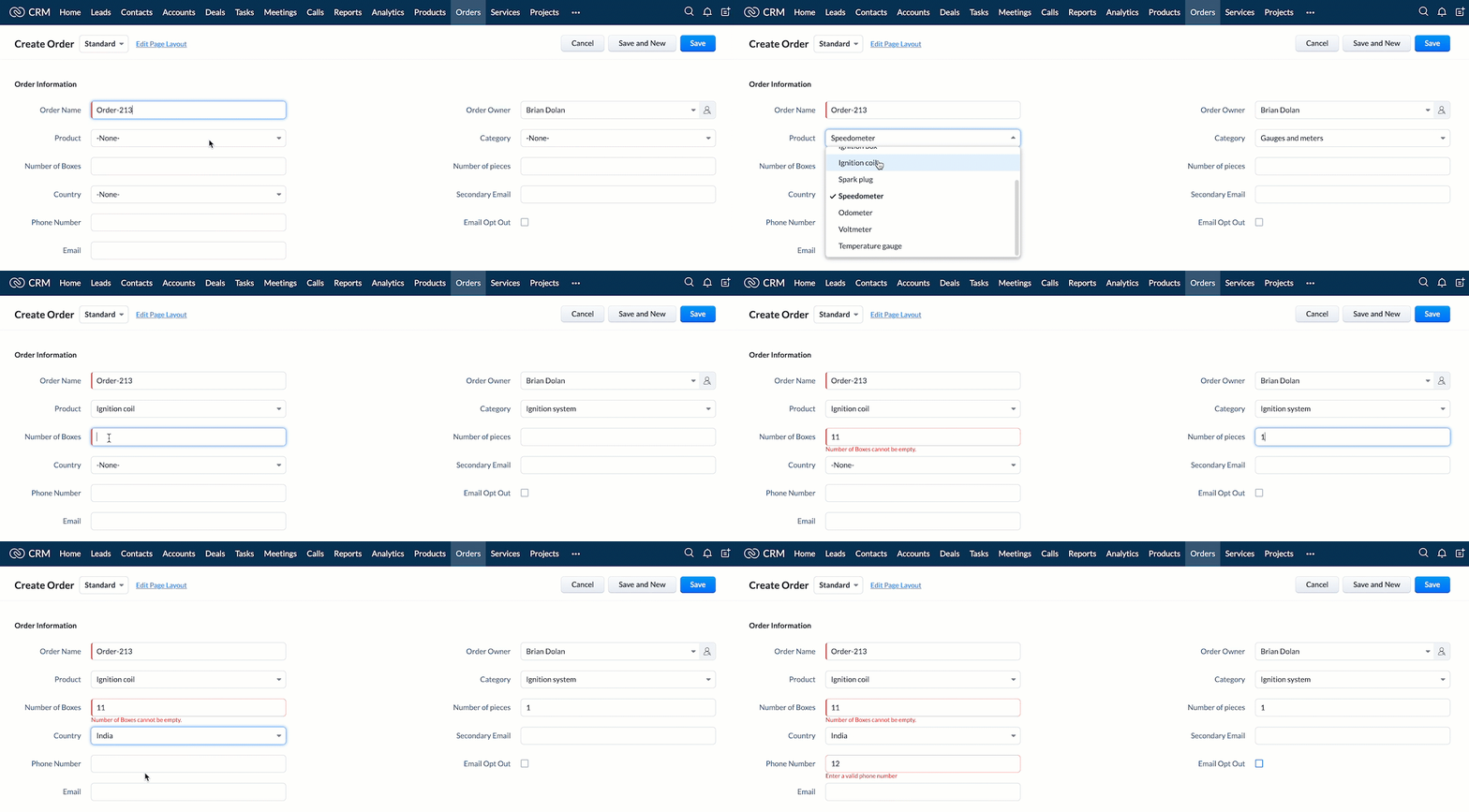
  1. In the create page of Order module, whenever the field Product is selected, the field Category
    should get auto-populated based on the following table.    
    Category
    Products
    Ignition system
    Sparking cable, Ignition box, Ignition coil, Spark plug
    Gauges and meters
    Speedometer,Odometer, Voltmeter, Temperature gauge

  2. If the Category is Ignition System, the field Number of Boxes should be mandatory.
  3. If the field Country is India, the maximum number of digits that the user can enter in the field Phone Number should be limited to 10. 
  4. Whenever the user edits or adds the Phone Number with length less than 10, display an error message near the field. 
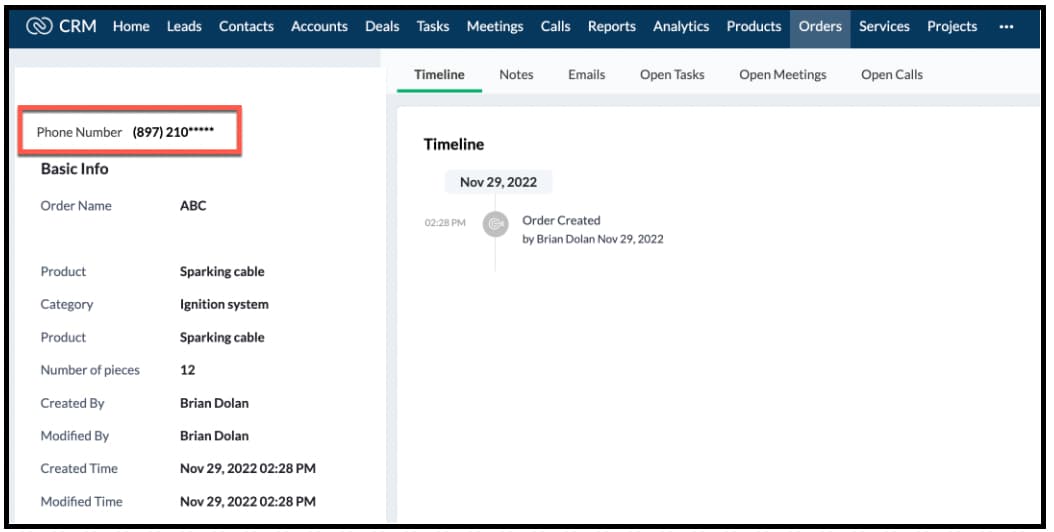
  5. The last five digits of the Phone Number field value should be masked for all profiles except the Administrator.
Solution using Client Script
The requirements 1-4 are for the create page of Orders module. The 5th requirement is on the detail page of the module Orders. So create two scripts as follows.
  • Client script for create page (requirements 1-4)
  • Client script for detail page (requirement 5).
1. Client Script for create page (covers requirements 1-4)
  • Go to Setup > Developer Space > Client Script. Click +New Script.
  • Specify the details to create a script and click Next.
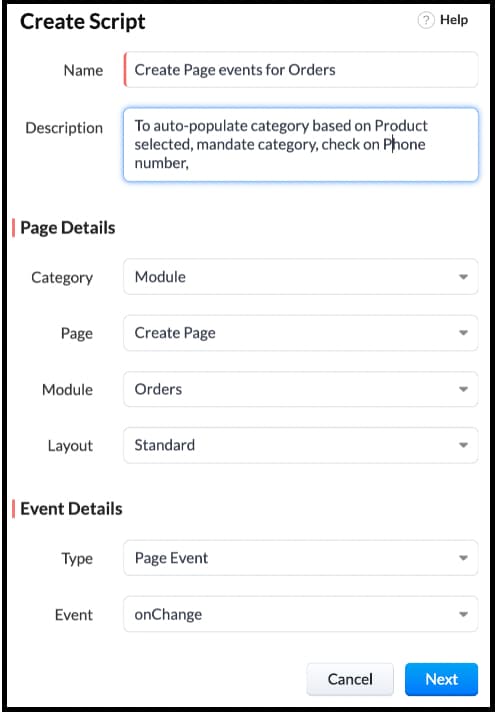
  • Enter the following script and click save.

 switch (field_name) {
    case 'Product':
        var product_name = ZDK.Page.getField('Product').getValue();
        var category_field = ZDK.Page.getField('Category');
        // requirement - 1
        if (['Sparking cable', 'Ignition box', 'Ignition coil', 'Spark plug'].includes(product_name)) {
            // Populate value for picklist field 'Category' based on the condition
            category_field.setValue("Ignition system");
            ZDK.Page.getField('Number_of_Boxes').setMandatory(true); // requirement - 2
        } else if (['Speedometer', 'Odometer', 'Voltmeter', 'Temperature gauge'].includes(product_name)) {
            // Populate value for  picklist field 'Category' based on the condition
            category_field.setValue('Gauges and meters');
        }
        break;

  case 'Phone_Number':
        var phone_field = ZDK.Page.getField('Phone_Number');
        if (phone_field.getValue().length < 10) {
            phone_field.showError('Enter a valid phone number'); // requirement - 4
        }
        break;

 case 'Country':
       ZDK.Page.getField('Phone_Number').setMaxLength(10);
       break;
    case 'Category':
        if (ZDK.Page.getField('Category').getValue() === 'Ignition system') {
            ZDK.Page.getField('Number_of_Boxes').setMandatory(true); // requirement - 2 when category is changed in ui
        }
        break;

}

  • Here is how the client Script works,


2. Client Script for detail(canvas) page (covers requirement 5)
  • Go to Setup > Developer Space > Client Script. Click +New Script.
  • Specify the details to create a script and click Next.
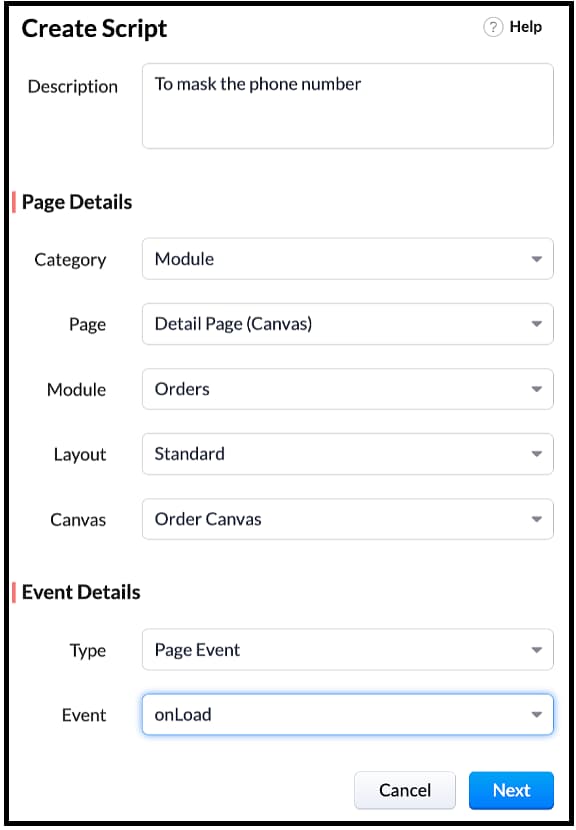


  • Enter the following script and click save.

  var user = ZDK.Apps.CRM.Users.fetchById($Crm.user.id);
  if (user.profile.name !== 'Administrator') {
    ZDK.Page.getField('Phone_Number').mask({ character: '*', length: 5, reverse: true });
  }


Note: $Crm is a constant supported by Client Script, using which you can get the org related information and use it in your script. 

  • You can see that the Phone Number is partially masked when you view the order canvas page as a Standard User.
  • You can see that the Phone Number is not masked when you view the order canvas page as an Administrator.
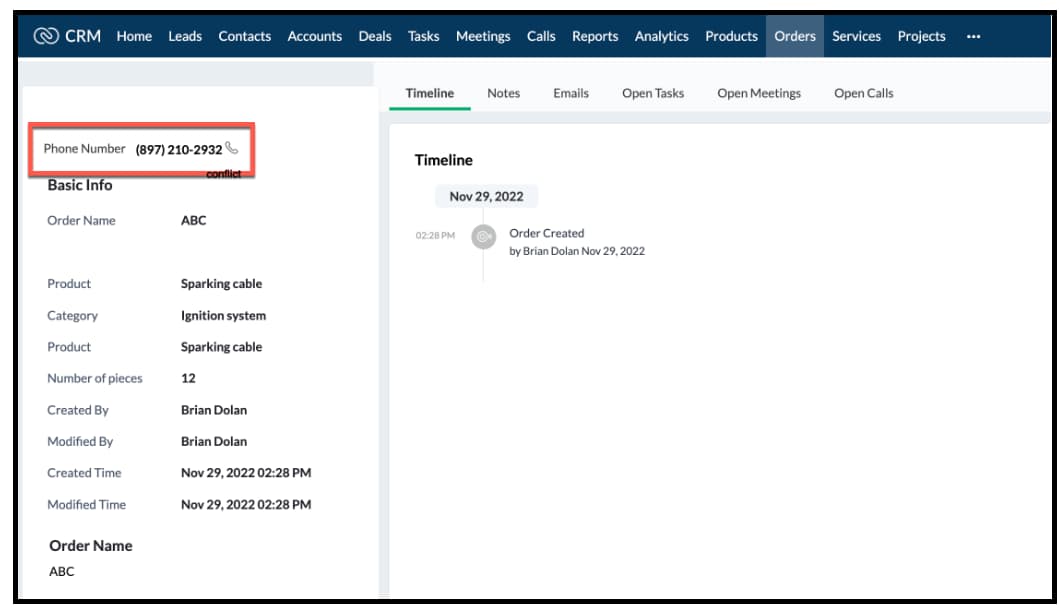

We hope you found this post useful. We will meet you next week with another interesting topic!
If you have any questions let us know in the comment section.
Cheers!


Previous Kaizen post: Composite API

    Access your files securely from anywhere


                            Zoho Developer Community


                                                  • Desk Community Learning Series


                                                  • Digest


                                                  • Functions


                                                  • Meetups


                                                  • Kbase


                                                  • Resources


                                                  • Glossary


                                                  • Desk Marketplace


                                                  • MVP Corner


                                                  • Word of the Day


                                                  • Ask the Experts


                                                            • Sticky Posts

                                                            • Kaizen #226: Using ZRC in Client Script

                                                              Hello everyone! Welcome to another week of Kaizen. In today's post, lets see what is ZRC (Zoho Request Client) and how we can use ZRC methods in Client Script to get inputs from a Salesperson and update the Lead status with a single button click. In this
                                                            • Kaizen #222 - Client Script Support for Notes Related List

                                                              Hello everyone! Welcome to another week of Kaizen. The final Kaizen post of the year 2025 is here! With the new Client Script support for the Notes Related List, you can validate, enrich, and manage notes across modules. In this post, we’ll explore how
                                                            • Kaizen #217 - Actions APIs : Tasks

                                                              Welcome to another week of Kaizen! In last week's post we discussed Email Notifications APIs which act as the link between your Workflow automations and you. We have discussed how Zylker Cloud Services uses Email Notifications API in their custom dashboard.
                                                            • Kaizen #216 - Actions APIs : Email Notifications

                                                              Welcome to another week of Kaizen! For the last three weeks, we have been discussing Zylker's workflows. We successfully updated a dormant workflow, built a new one from the ground up and more. But our work is not finished—these automated processes are
                                                            • Kaizen #152 - Client Script Support for the new Canvas Record Forms

                                                              Hello everyone! Have you ever wanted to trigger actions on click of a canvas button, icon, or text mandatory forms in Create/Edit and Clone Pages? Have you ever wanted to control how elements behave on the new Canvas Record Forms? This can be achieved


                                                            Manage your brands on social media


                                                                  Zoho TeamInbox Resources


                                                                      Zoho CRM Plus Resources

                                                                        Zoho Books Resources


                                                                          Zoho Subscriptions Resources

                                                                            Zoho Projects Resources


                                                                              Zoho Sprints Resources


                                                                                Qntrl Resources


                                                                                  Zoho Creator Resources


                                                                                      Zoho CRM Resources

                                                                                      • CRM Community Learning Series

                                                                                        CRM Community Learning Series


                                                                                      • Kaizen

                                                                                        Kaizen

                                                                                      • Functions

                                                                                        Functions

                                                                                      • Meetups

                                                                                        Meetups

                                                                                      • Kbase

                                                                                        Kbase

                                                                                      • Resources

                                                                                        Resources

                                                                                      • Digest

                                                                                        Digest

                                                                                      • CRM Marketplace

                                                                                        CRM Marketplace

                                                                                      • MVP Corner

                                                                                        MVP Corner


                                                                                          Design. Discuss. Deliver.

                                                                                          Create visually engaging stories with Zoho Show.

                                                                                          Get Started Now


                                                                                            Zoho Show Resources

                                                                                              Zoho Writer

                                                                                              Get Started. Write Away!

                                                                                              Writer is a powerful online word processor, designed for collaborative work.

                                                                                                Zoho CRM コンテンツ


                                                                                                  Nederlandse Hulpbronnen


                                                                                                      ご検討中の方