Kiosk Studio + Zia Agents: Use probabilistic AI inside deterministic workflows | Kiosk Studio Sessio
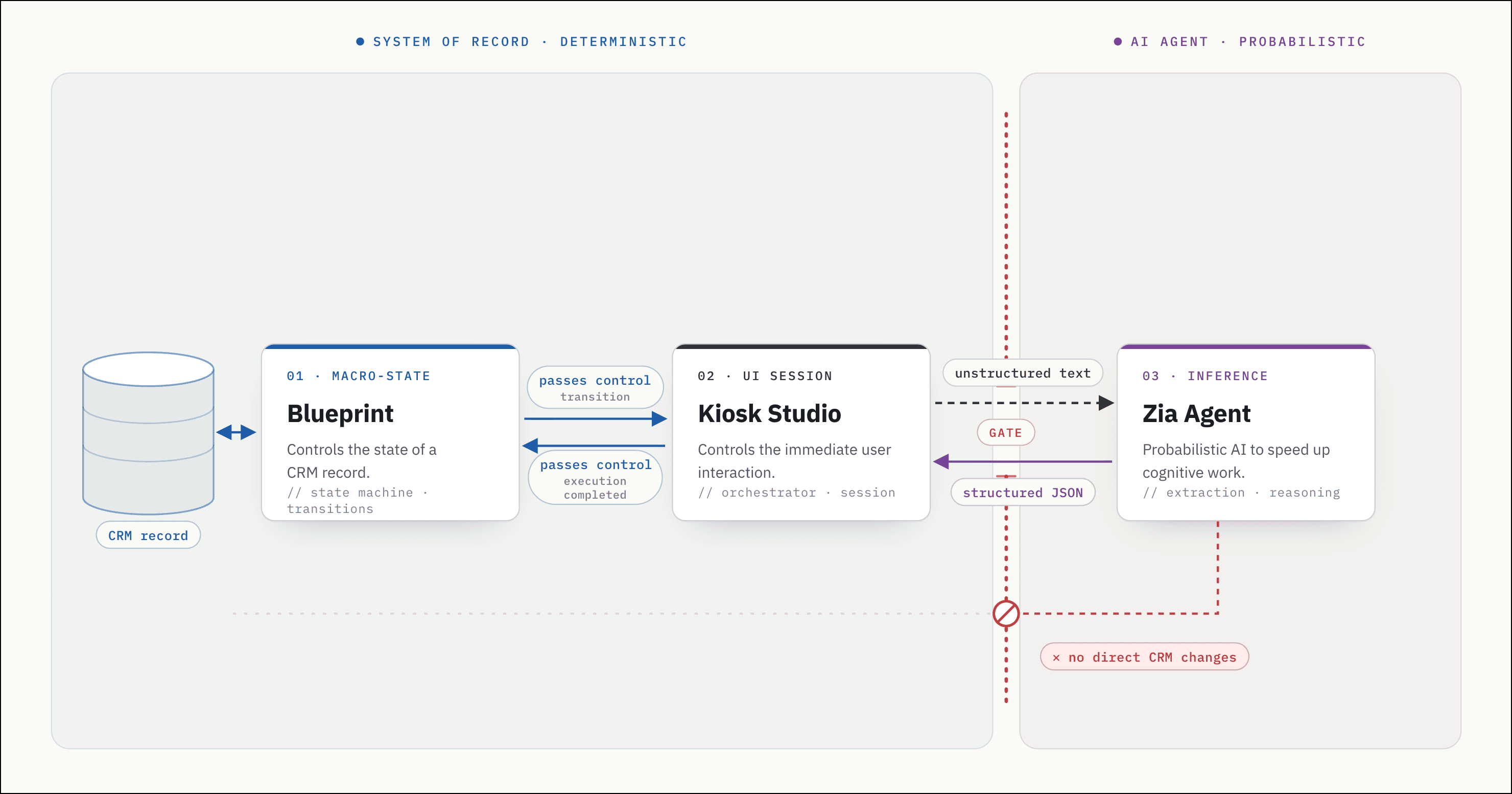
As Zoho CRM administrators, this community builds systems to govern user behavior and protect database integrity. We rely on deterministic tools to enforce these rules:
We use blueprints to control the macro-state of a record, ensuring a deal cannot move from Qualification to Negotiation without specific inputs.
When a blueprint requires immediate, complex data entry, we use Kiosk Studio to lock the user into a strict, multi-screen flow that demands mandatory inputs and decisions.
We expect these tools to execute exactly as configured, every single time.
The safe-slow vs. fast-risky divide
Business inputs rarely arrive in neat, structured formats. When users process unstructured data (a panicked vendor email, a dense financial document, or a complex customer complaint), deterministic tools cannot parse the text.
They extract the variables, reason about context, and act through connected tools. The catch is that agents on their own are probabilistic. Without the right guardrails, they can misread context or take actions you didn't intend.
We are faced with a fundamental dilemma:
If we allow a probabilistic AI agent to update a CRM record directly or trigger a third-party API, we bypass our own compliance rules and risk data corruption.
Conversely, if we exclude AI from the CRM entirely to preserve safety, we force our users to waste thousands of hours manually reading emails, checking external databases, and keying data into Kiosk screens.
The resolution: bounding AI execution to be safe and fast
To resolve this tension, we've released a recent update: Admins can now invoke Zia Agents directly as native components inside Kiosk Studio.
Here is how you architect this boundary using a logistics workflow.
The scenario: handling a disruption
Imagine your operations team manages global freight. The shipment record sits locked in an In Transit Blueprint state. A vendor emails your operations rep: "Vessel 409 is delayed by 4 days due to Cyclone Jasper. We are rerouting and applying a $4,500 emergency holding fee."
Next, a rep from the vendor calls you to let you know that the fee has been reduced to $3,000.
Without AI, the rep reads the email to understand context, opens a new tab to check weather and vessel databases to verify details, remembers the information passed over the call, reasons about all of this, and finally updates the CRM.
We will build a kiosk that automates the extraction, research, and even a decision using AI, but retains absolute control over the flow. Here's how it will work for the end user.
Now, let's look at how to build it.
Step 1: The Blueprint trigger and input for the agent
 The Kiosk lets the user choose the raw email content and enter additional information in the Set context screen. It passes this unstructured data to the Zia Agent component for processing.
The process begins when the rep clicks the "Log Emergency Disruption" blueprint transition on the Shipment record. This action launches our kiosk. To make this happen, you build the kiosk and associate it with the During section of the blueprint transition.
The kiosk presents a simple opening screen:
A table to select the relevant email
A multi-line field to enter additional notes and
A "Run AI Analysis" button.
The rep simply selects the relevant email and enters additional details. When the rep clicks the button, the Kiosk triggers your deployed Zia agent. The agent does not just extract the emergency fee. Because you have added custom tools to this specific Zia agent, the AI pauses its extraction, queries the weather API for "Cyclone Jasper," checks the vessel location using another tool, and cross-checks the vendor's claim.
Step 2: Dynamic branching based on agent's output
 The Kiosk decision element routes the user based on the boolean verification flag returned by the Zia Agent's JSON payload.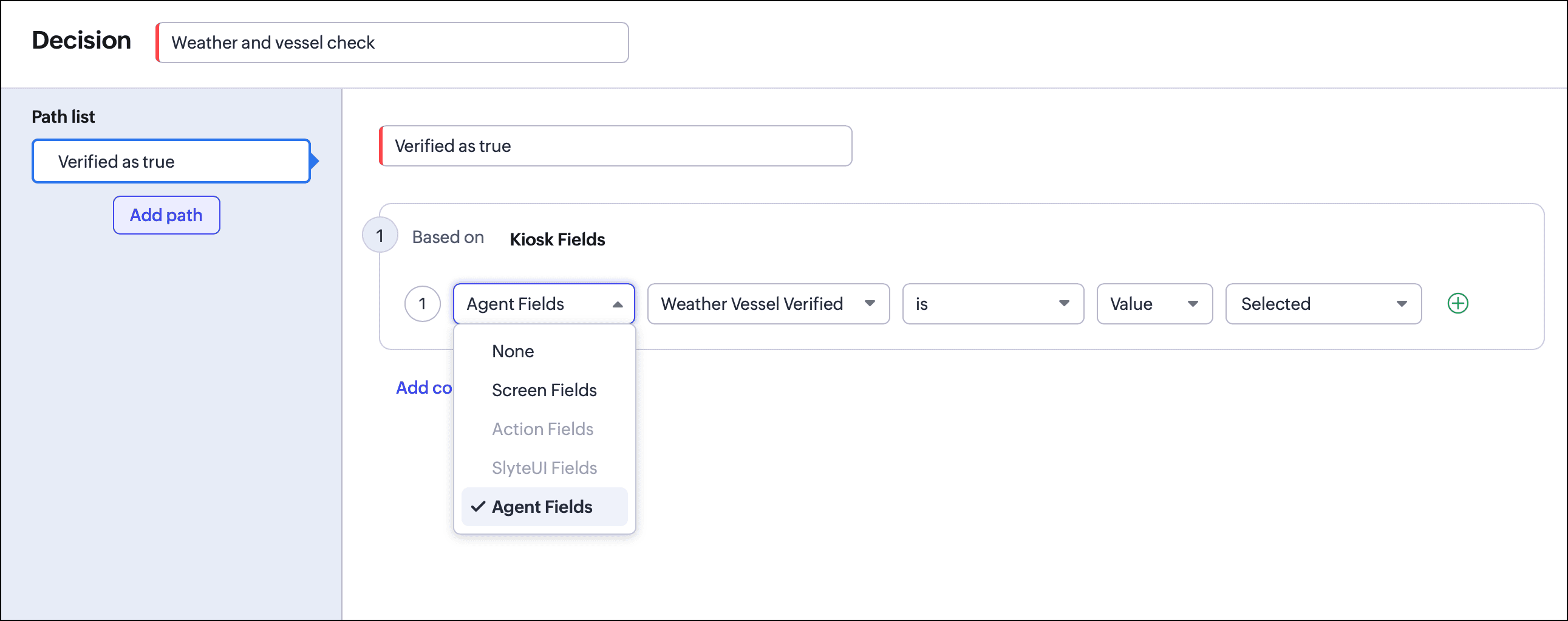
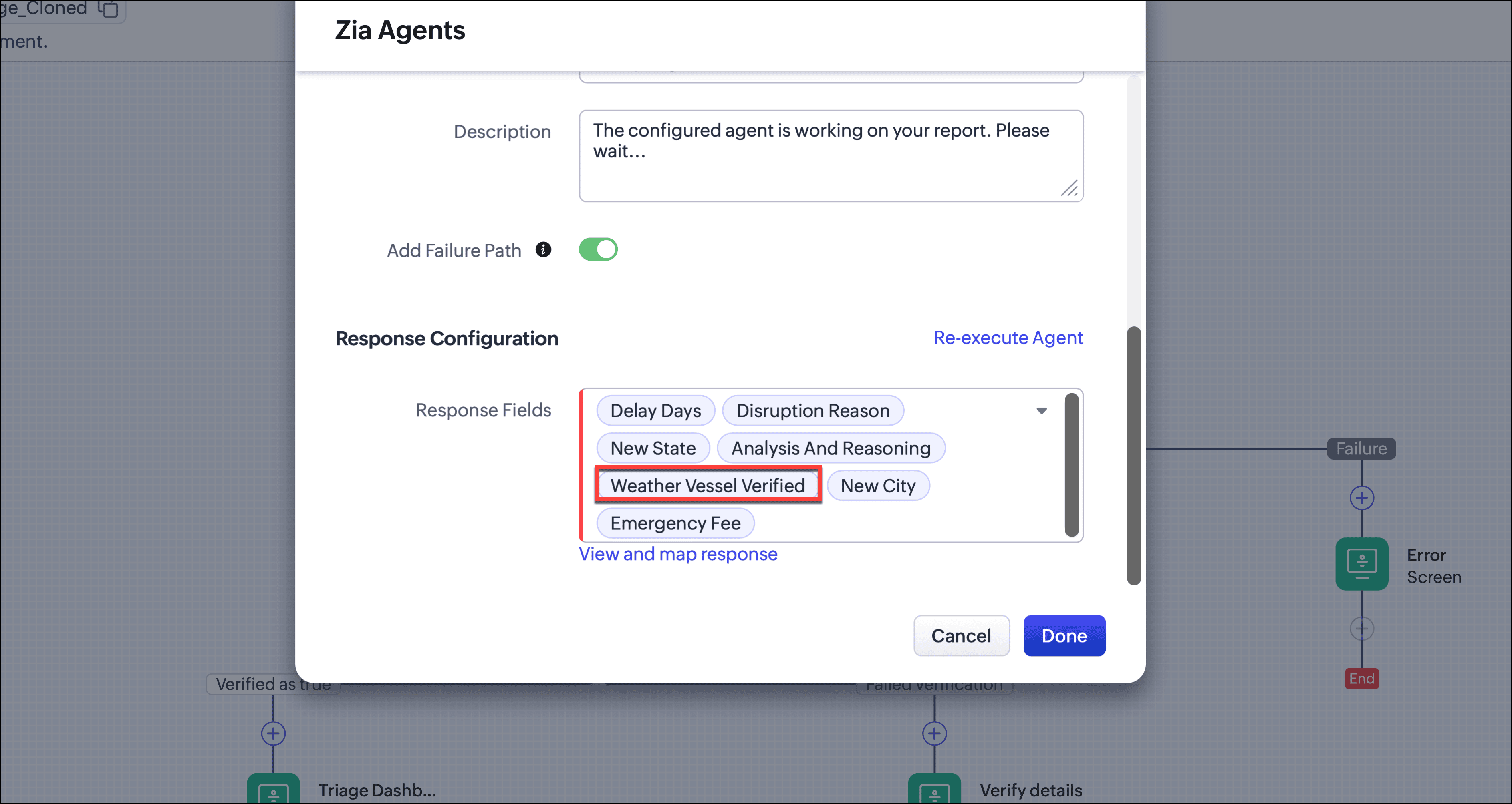
If we send the user straight to an approval screen, we fail to utilize the AI's research. Instead, we place a decision element immediately following the Zia agent. This allows our deterministic kiosk to change the user's path based on the AI's probabilistic research.
- If Zia confirms the storm exists, the Kiosk routes the rep to the standard Triage Dashboard screen. The rep reviews the details, clicks "Update CRM," and the kiosk executes its automated actions (updating CRM fields, adding tags, adding notes, etc) and hands control back to the blueprint to advance the stage.
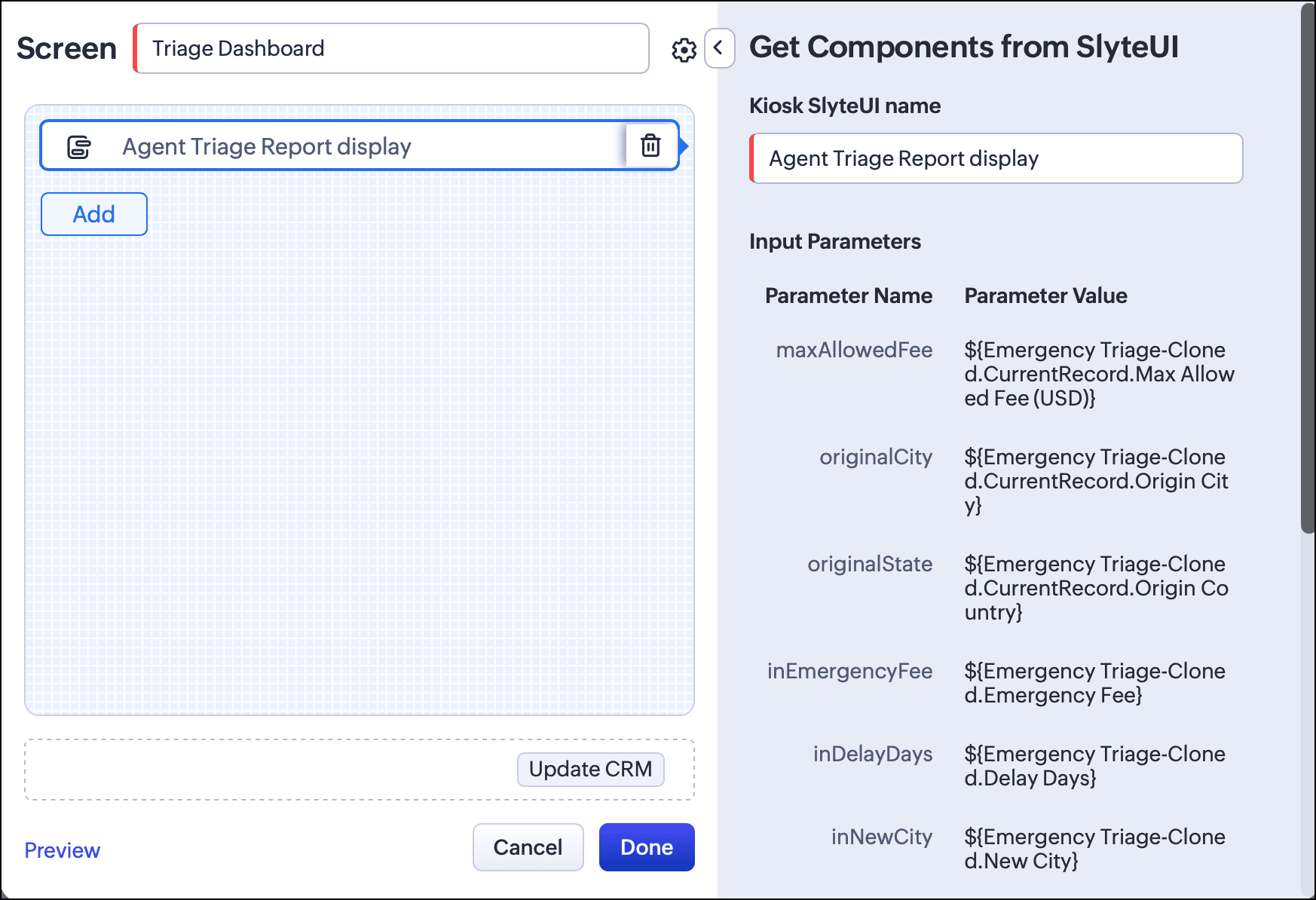
 The Triage Dashboard component, built using SlyteUI and added to the Kiosk screen, serves as the human-in-the-loop checkpoint. The Zia Agent reasons over the CRM data and surfaces its proposed response in the Kiosk; the user reviews the reasoning and the suggested action, and commits the change only after verification. Nothing reaches the CRM without an explicit human decision.
 The list of actions that will be executed when the rep clicks "Update CRM".If Zia’s weather tool finds no active storm in that sector or discrepancies in the vessel location, the kiosk dynamically routes the rep down a "Failed verification" path and shows a screen asking the rep to verify details.
Step 3: The failed verification path
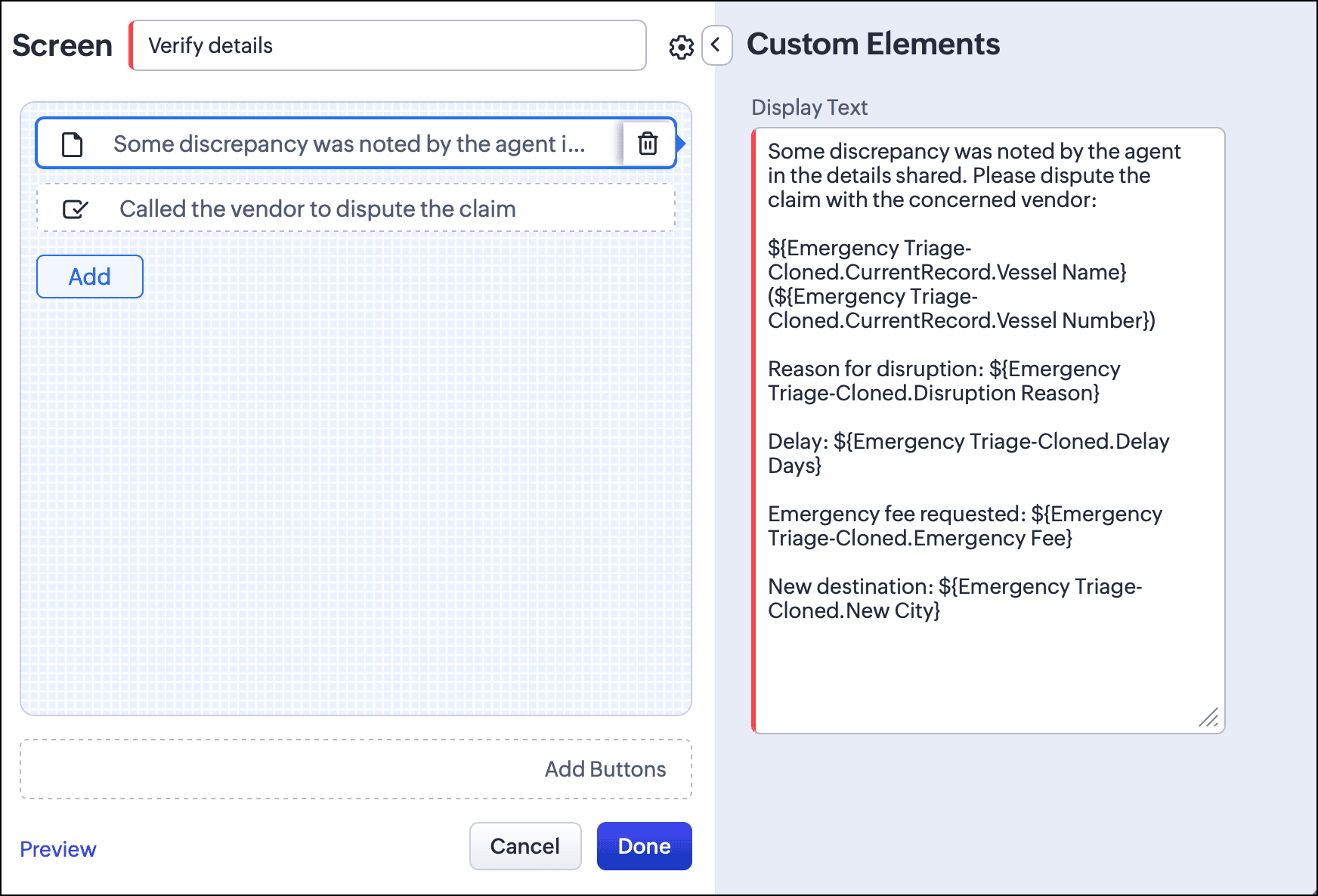
 If verification fails, the Kiosk UI prevents further changes and forces the user to close the session.
The Kiosk presents a warning screen to let the rep know that there are issues with the claim and to check with the vendor. We intentionally design this screen as a dead end. We've removed all buttons here. The rep can only click the x at the top right to end this session.
The kiosk terminates the flow, the database remains completely untouched, and the Blueprint remains locked in its original In Transit state. The system forces the human to resolve the discrepancy before proceeding.
Why not just use Deluge?
Veteran developers in this community might ask: Why do I need a native Zia Agent component? Since this Kiosk flow is specifically built to handle weather and rerouting emergencies, I can already write a Custom Function, ping the weather and vessel APIs, call the OpenAI API, and parse the JSON myself.
You certainly can, but building this in Deluge forces you to code and maintain the entire recursive API loop yourself.
Because your script does not know which storm or vessel to look up until the AI reads the vendor email, you cannot ping the external APIs first. You are forced to build a three-step middleware sequence:
First Call: Deluge sends the email to the LLM strictly to extract the storm_name and vessel_id.
The Fetch: Deluge parses that JSON, handles any formatting errors, and queries the weather and vessel APIs.
Second Call: Deluge bundles those API results with the original email and calls the LLM a second time so the AI can evaluate if the delay is justified.
If your operations team later asks you to handle a different disruption, such as a simple billing issue, this hardcoded sequence becomes a liability. Your Deluge script will either blindly execute weather queries for a billing ticket, or you will have to write complex if/else conditional logic to manage which APIs fire for which emails.
By using the native Zia Agent component, you eliminate the middleware. The agent reads the unstructured text, autonomously extracts the parameters, triggers the required APIs, and evaluates the results in a single backend cycle. If you expand the scope to include port strikes or billing systems, you do not write new routing code. You simply upload a new OpenAPI YAML file in the Zia Agent Studio. The agent dynamically reads the new tools and chooses when to use them, freeing you to focus entirely on the kiosk design.
Auditing every agent run
Every agent execution is captured in Zia Agent Studio's Observability tab. You can drill into any session to inspect the agent's step-by-step reasoning, the tools it called, and the exact JSON it sent and received. If a rep ever flags a strange recommendation, or you want to verify why the agent routed a case down the failed-verification path, you have a complete audit trail of every decision the AI made.
By stacking these tools (Blueprints for the record lifecycle, Kiosk for deterministic UI flows, Zia for unstructured data extraction and reasoning, and Observability for full auditability), you create workflows that parse chaotic inputs without ever sacrificing data integrity.
If you've used agents in Kiosk Studio, we encourage you to share your ideas and feedback here.
More Kiosk Studio Sessions
Each session covers one business scenario, the kiosk built for it, and how that kiosk is configured.
Previous: Session #8: View subform entries without opening a record