Maintain steady traffic to your domain: How Domain Aliasing helps

Maintain steady traffic to your domain: How Domain Aliasing helps

Consider this scenario: An organization has its primary domain as administrator.com. Now it wants to shorten its domain to admin.com because it's simpler and easier to remember.

However, changing the domain completely can cause the following problems:
  1. Emails sent to registered but not aliased domains will be rejected with "User not found" error.

  2. Administrators must create and maintain separate, independent accounts across different domains, instead of having a single unified user account.

  3. Having different domains leads admins to manage different consoles, increasing the chances of misconfiguration.

  4. Customers may be confused about your brand's authenticity.

  5. Domains that are not managed or aliased are prime targets for cyber attackers to use similar domains for phishing and cause reputational damage to your organization.

This is where Domain Aliasing comes in handy. Instead of replacing the original domain, you can add the new domain (admin.com) as an alias to your existing primary domain (administrator.com). This allows emails sent to the alias domain to reach the corresponding accounts in your primary domain without creating new mailboxes.


Why is it important to have Domain Aliasing?

Domain Aliasing is the process of mapping a new domain as an alias to the already configured domain in your email service provider.

Uses of Domain Aliasing extend to:

Company rebranding - Domain Aliasing allows you to switch to a new domain without losing emails from the old one. Emails sent to the old domain will still arrive in your inbox, so customers don’t face any disruption during the change.
Maintain a single inbox for multiple domains - With Domain Aliasing, emails sent to different domain names are delivered to the same inbox under primary domain. For example, messages sent to user@admin.com are sent to user@administrator.com.
Reduces administrative overhead and challenges - Domain Aliasing allows admins to manage multiple domains under a single console, thereby reducing the overall administrative work and making settings configuration easier.
Support separate domains for marketing and campaign - You can set up campaign-specific or promotional domains as aliases, such that they still point to your main domain. This allows anyone visiting or emailing to your campaigning domain to end up in your primary system, thereby providing flexibility for marketing without maintaining a separate inbox.

How to configure Domiain Aliasing from Zoho Mail Admin Console?
  1.  Log in to Zoho Mail Admin Console.

  2. Under Domains section, select a domain for which you have to add Domain Aliasing.
    Note:
    Ensure that you have already added the domain and setup in Zoho Mail.

  3. Navigate to Domain Aliasing under Advanced Settings.

  4. Select +Add and select a domain that you wish to add as an Alias domain under Add Domain Alias dialog box.
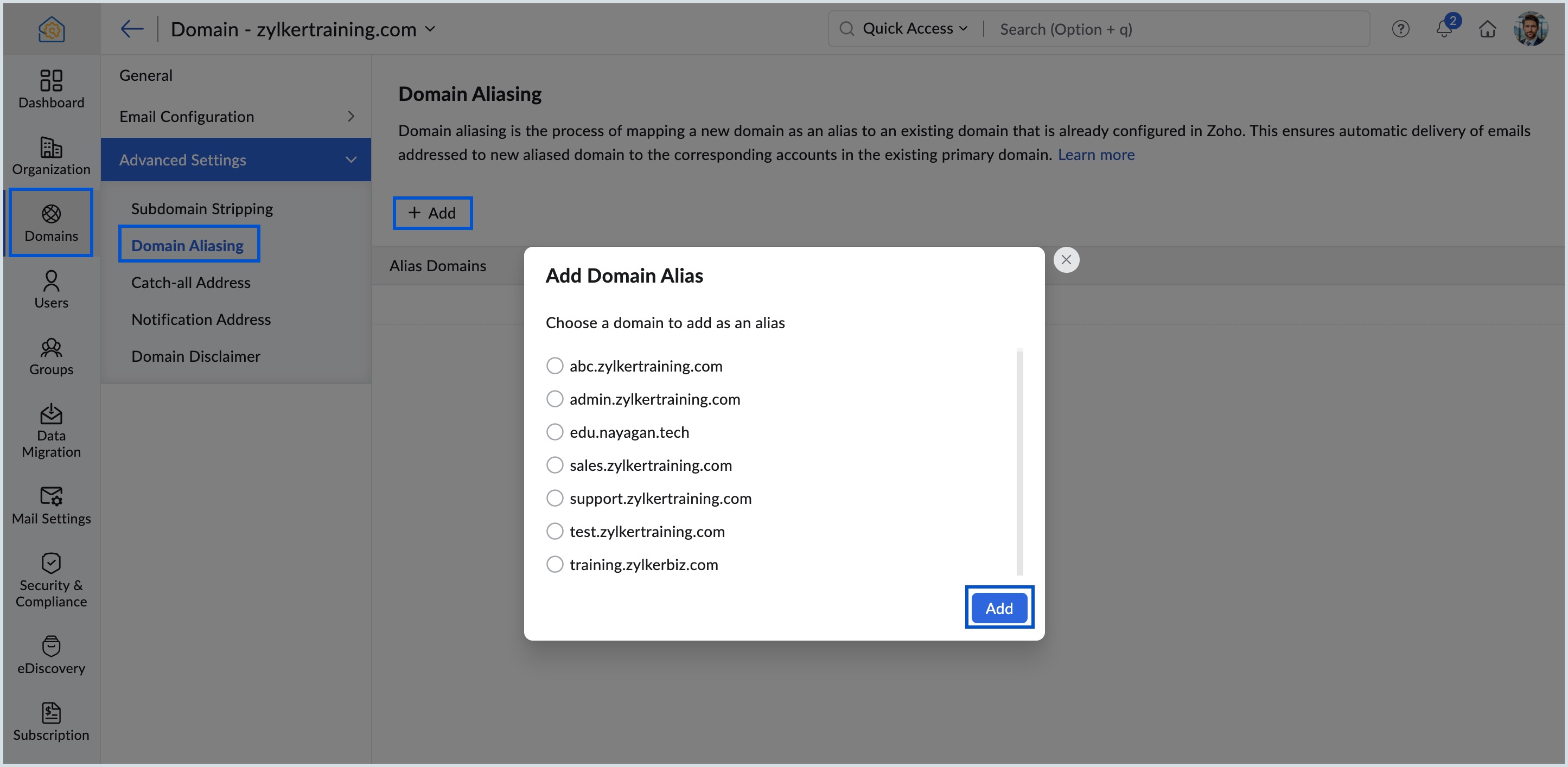
    Add Domain Alias

  5. Review the warning message that pops up carefully and click Proceed.
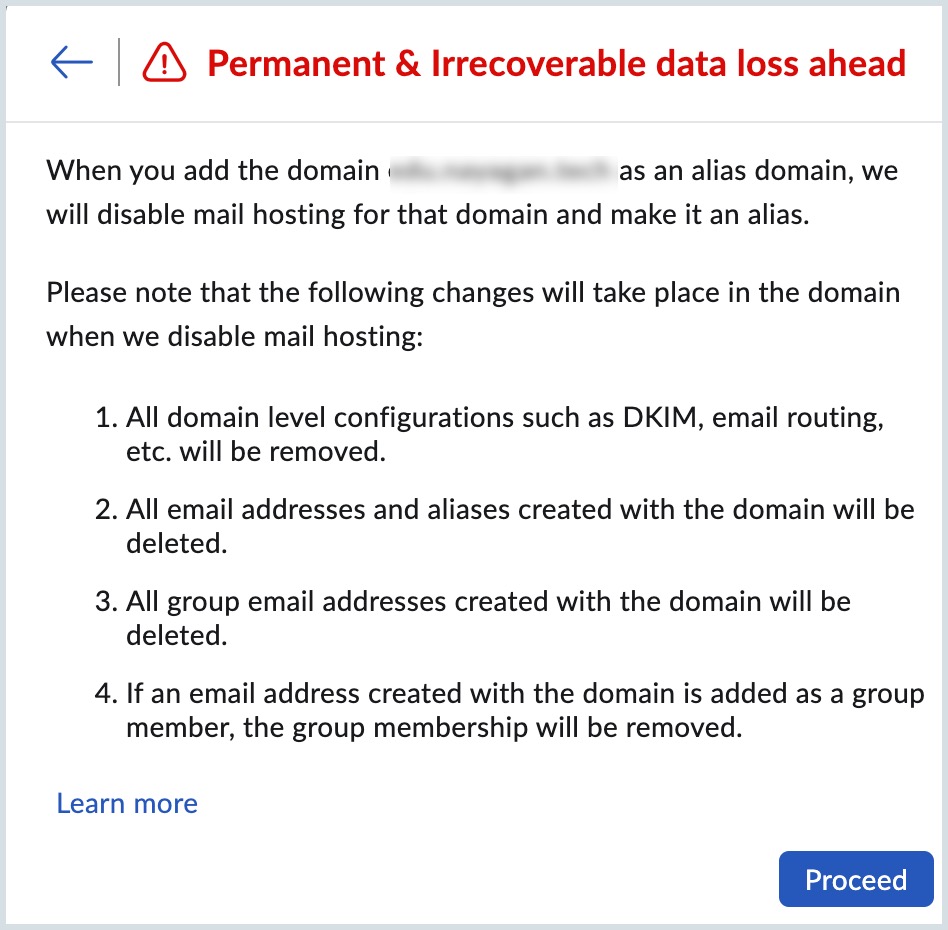
    Warning Message

Once done, the alias domain will be linked to the primary domain and emails sent to alias domain will be delivered to corresponding primary domain accounts.

View detailed steps in the Domain Aliasing help page.

By configuring Domain Aliasing, you can maintain a single inbox for multiple domains, make stronger branding, and increased visibility for your organization.


    Access your files securely from anywhere

        All-in-one knowledge management and training platform for your employees and customers.


                              Zoho Developer Community


                                                    • Desk Community Learning Series


                                                    • Digest


                                                    • Functions


                                                    • Meetups


                                                    • Kbase


                                                    • Resources


                                                    • Glossary


                                                    • Desk Marketplace


                                                    • MVP Corner


                                                    • Word of the Day


                                                    • Ask the Experts


                                                              Manage your brands on social media


                                                                    Zoho TeamInbox Resources


                                                                        Zoho CRM Plus Resources

                                                                          Zoho Books Resources


                                                                            Zoho Subscriptions Resources

                                                                              Zoho Projects Resources


                                                                                Zoho Sprints Resources


                                                                                  Qntrl Resources


                                                                                    Zoho Creator Resources


                                                                                        Zoho CRM Resources

                                                                                        • CRM Community Learning Series

                                                                                          CRM Community Learning Series


                                                                                        • Kaizen

                                                                                          Kaizen

                                                                                        • Functions

                                                                                          Functions

                                                                                        • Meetups

                                                                                          Meetups

                                                                                        • Kbase

                                                                                          Kbase

                                                                                        • Resources

                                                                                          Resources

                                                                                        • Digest

                                                                                          Digest

                                                                                        • CRM Marketplace

                                                                                          CRM Marketplace

                                                                                        • MVP Corner

                                                                                          MVP Corner


                                                                                            Design. Discuss. Deliver.

                                                                                            Create visually engaging stories with Zoho Show.

                                                                                            Get Started Now


                                                                                              Zoho Show Resources

                                                                                                Zoho Writer

                                                                                                Get Started. Write Away!

                                                                                                Writer is a powerful online word processor, designed for collaborative work.

                                                                                                  Zoho CRM コンテンツ


                                                                                                    Nederlandse Hulpbronnen


                                                                                                        ご検討中の方