Manage WhatsApp Conversations Across Zoho Services Using One Phone Number
If your teams use multiple Zoho services to handle different business functions, such as support, sales, or other Zoho tools, you might have asked this question:
Can we manage all WhatsApp conversations using the same business phone number across these services?
The answer is yes. You can now use a single WhatsApp Business number and associate it across multiple Zoho services.

What changes when customers and teams use one WhatsApp number across services
- Customers interact with one number, regardless of which team responds
- Teams across different Zoho products can work on the same conversation thread
- Agents can see the conversation timeline, even if it started in another service
This keeps the interaction continuous, instead of splitting it across multiple channels or numbers.
Note: While the timeline is visible across services, the full message content may not always be displayed.
How a single WhatsApp number keeps conversations in sync across multiple Zoho services
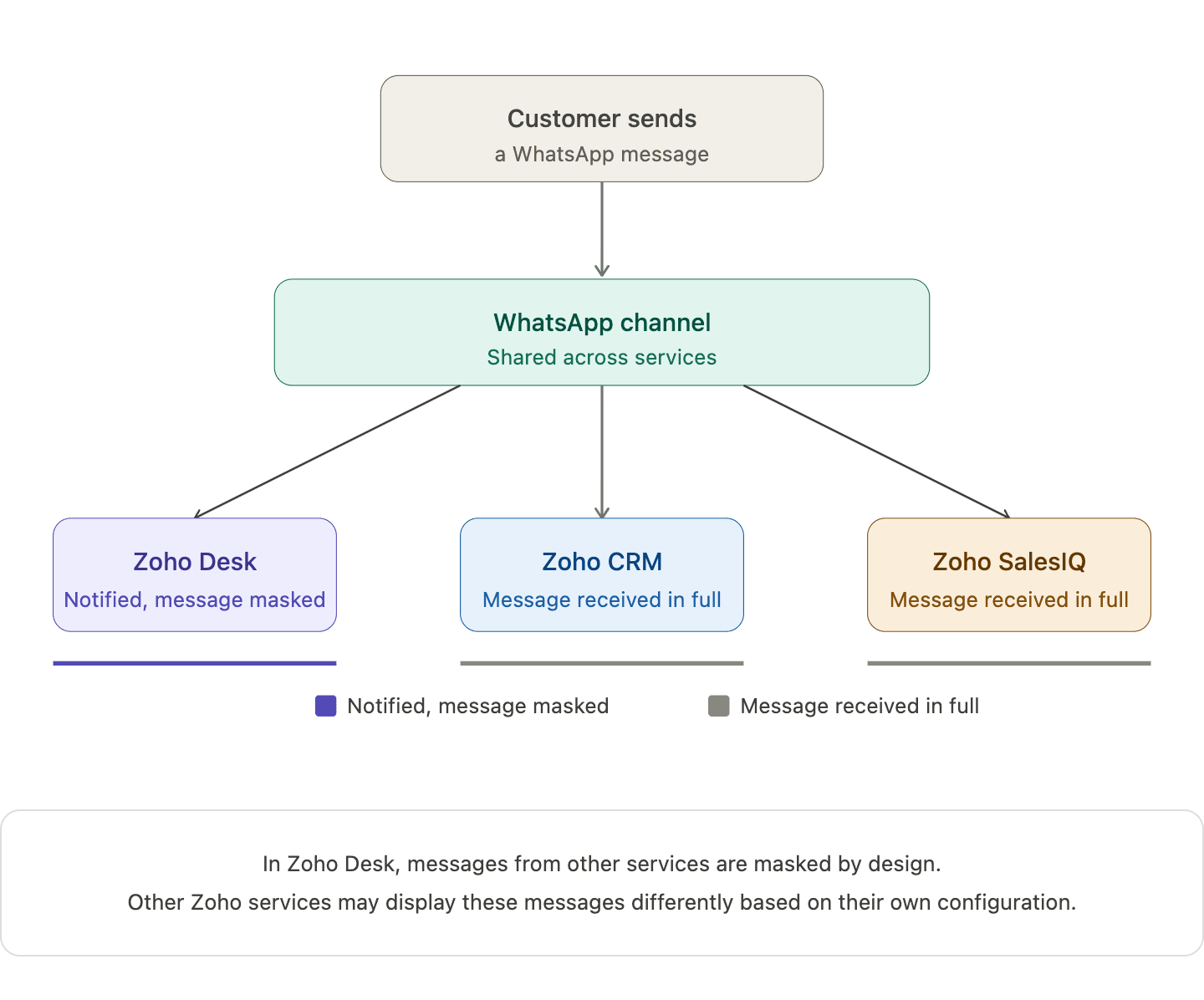 When you connect one WhatsApp number across multiple Zoho services, a single WhatsApp channel is created and shared across those services. Incoming messages appear in all connected services, and the underlying WhatsApp conversation continues as one unified thread.
When an agent replies from one service, that response is reflected in others as well. For example, in Zoho Desk, replies from other services appear in a masked format. This helps teams stay aware of the interaction without exposing the full message content.
What your team actually sees when different Zoho services handle the same conversation
Action | What happens |
Customer sends a WhatsApp message | Appears in all connected Zoho services |
Agent replies from one service | Reply appears in Zoho Desk in masked form (Masked replies indicate that a response was sent from another service, without showing the full message content) |
Another agent opens the conversation | The conversation timeline is visible, while message content may remain masked |
Two agents attempt to handle the same conversation | The system shows a warning but does not block access |
Note: In Zoho Desk, messages from other services are masked by design. Other Zoho services may display these messages differently based on their own configuration.
How one Zoho service becomes the owner of the shared WhatsApp channel

When a WhatsApp number is connected across multiple Zoho services, the first service where the number is configured becomes the parent service.
Other Zoho services that use the same number are automatically subscribed to this channel, allowing different teams to stay connected to the same conversation.
If the parent service is removed later, another subscribed service is automatically assigned as the new parent, without affecting ongoing conversations or message history.
What the parent service actually controls in this setup
The parent service is the Zoho service where the WhatsApp number is first configured. Once your WhatsApp number is shared across Zoho services, this parent service becomes the control point for automation.
This is where automation such as chatbots (including Guided Conversations), auto-replies, workflow-triggered messages, and outbound notifications are managed.
Other services can still participate in conversations, but they don’t control or trigger automation on that number.
How different types of automation behave across services
Chatbots
- Bots run only from the parent service
- Customer messages trigger bot responses from that service
- Other services can see the interaction but cannot run their own bots
Auto-Replies
- Only the parent service can send automatic replies
- Auto-replies configured in other services will not trigger
Workflow-Based Messages
- Messages triggered by workflows (like ticket creation or lead updates) run only from the parent service
- Workflows in other services cannot send WhatsApp messages using the shared number
Notifications and Outbound Messages
- Scheduled or event-based messages are sent only from the parent service
- Other services cannot use the same number for outbound automation
What changes when one service disconnects from the shared WhatsApp number
When one Zoho service disconnects from the shared WhatsApp number, only that service is unsubscribed from the channel. Other subscribed services continue to receive incoming messages, and customer conversations remain active without any disruption.
Note: WhatsApp connectivity stops only if the number is removed from all connected services.
The following Zoho bundles support shared WhatsApp numbers :
- Zoho One
- Zoho CRM Plus
- Other Zoho bundles with appropriate access
A few products, plans, or portals currently have restrictions:
- Standalone Zoho product licenses
- Portals upgraded from standalone plans
- Applications like Zoho Books, Inventory, Invoice, Subscriptions, Expense, Commerce, Checkout, and Payroll
Note: The same WhatsApp number can still be connected the above-listed services, but each product maintains its own Channel and conversation history.
What teams should align on before and after sharing a WhatsApp number
Identify which service will act as the parent before setup. You can check this in Zoho Desk under the WhatsApp channel configuration, where the parent service is indicated.
Ensure agents understand what it means when another service has already picked up a conversation.
Define how conversations should move between support, sales, and other teams.
If your teams are already working across multiple Zoho services, this setup can simplify how conversations are handled day to day.
We're curious to know how others are approaching this. Are you already using a shared WhatsApp number across teams, or planning to try it out?
FAQ
Does this create multiple WhatsApp conversations for the same customer?
No. There is only one underlying WhatsApp conversation shared across the connected services.
Can two agents reply at the same time from different services?
The system shows a warning if another agent has already picked up the conversation, which helps reduce duplicate replies.
Why do replies appear as masked in other services?
Masked replies help other teams stay aware that a response was sent, without exposing the full message content across services.
Which service controls automation and bot behavior?
Automated features such as chatbots, auto-replies, and workflows are controlled by the parent service where the WhatsApp number was first configured.