Marketer’s Space - Automating CRM Actions with Journeys - Part 1

Marketer’s Space - Automating CRM Actions with Journeys - Part 1


Marketing and sales go hand in hand, yet teams often struggle with inefficiencies in lead management. Leads may go cold due to delayed follow-ups, and valuable prospects might get lost in the shuffle. This is where integrating Zoho CRM with Zoho Marketing Automation (ZMA) comes into play. By utilizing CRM actions in Journeys, businesses can automate lead nurturing, push only engaged leads to sales, and ensure seamless collaboration between the marketing and sales teams. This integration helps marketers target the right prospects at the right time while allowing sales teams to act on high-intent leads without delays.

In this post, we’ll explore how leads that originate in Zoho CRM are nurtured through ZMA before being handed off back to sales.

Syncing Leads from Zoho CRM, Engaging Them, and Automating Sales Follow-Ups

Many businesses capture leads first in Zoho CRM—through website forms, inbound inquiries, or sales outreach. However, not all leads are immediately ready for sales engagement. That’s where marketing steps in, using Zoho Marketing Automation to nurture these leads until they show clear interest. Here’s how you can set up a CRM-integrated Journey to automate this process from start to finish.

Sync Leads from Zoho CRM to Zoho Marketing Automation

To ensure a smooth transition of records between Zoho CRM and ZMA, you first need to sync your CRM leads into Marketing Automation. This allows marketers to send targeted campaigns to the right audience. Ensure all relevant fields (such as Name, Email, Lead Source, and Lead Stage) are mapped properly. Once synced, these leads will now be available in ZMA for segmentation and targeted campaigns.
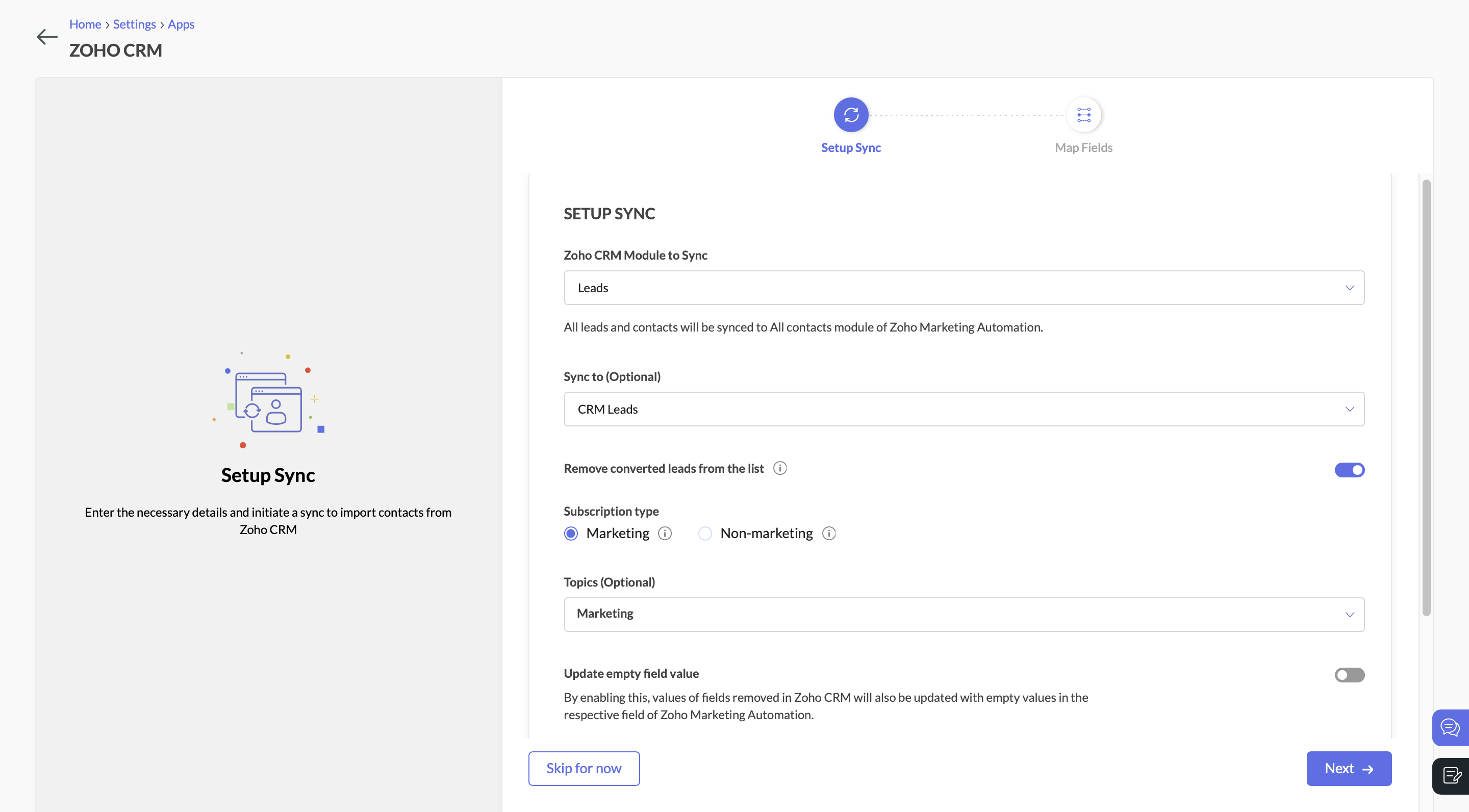
Setup syncSync Leads from Zoho CRM to Zoho Marketing Automation

Send a Marketing Campaign to Engage CRM Leads

With the leads synced, you can now target them with an email campaign. Let’s say you’re promoting a product demo or a free consultation. You send an email with a call-to-action (CTA) button, inviting leads to learn more.

Create a Journey to Target Interested Leads

Navigate to the Journeys section in Zoho Marketing Automation and create a new Journey. This Journey will track engagement and ensure that interested leads are identified, categorized, and updated in both ZMA and Zoho CRM.
  • Add the Email Action Trigger . Click on “Specific Email” and choose the email campaign.
  • Then select the email action “Specific link clicked” and choose the CTA that you included in the campaign.
  • Specify the exact URL you want to track (e.g., a demo request page, a pricing page, or a consultation booking link).
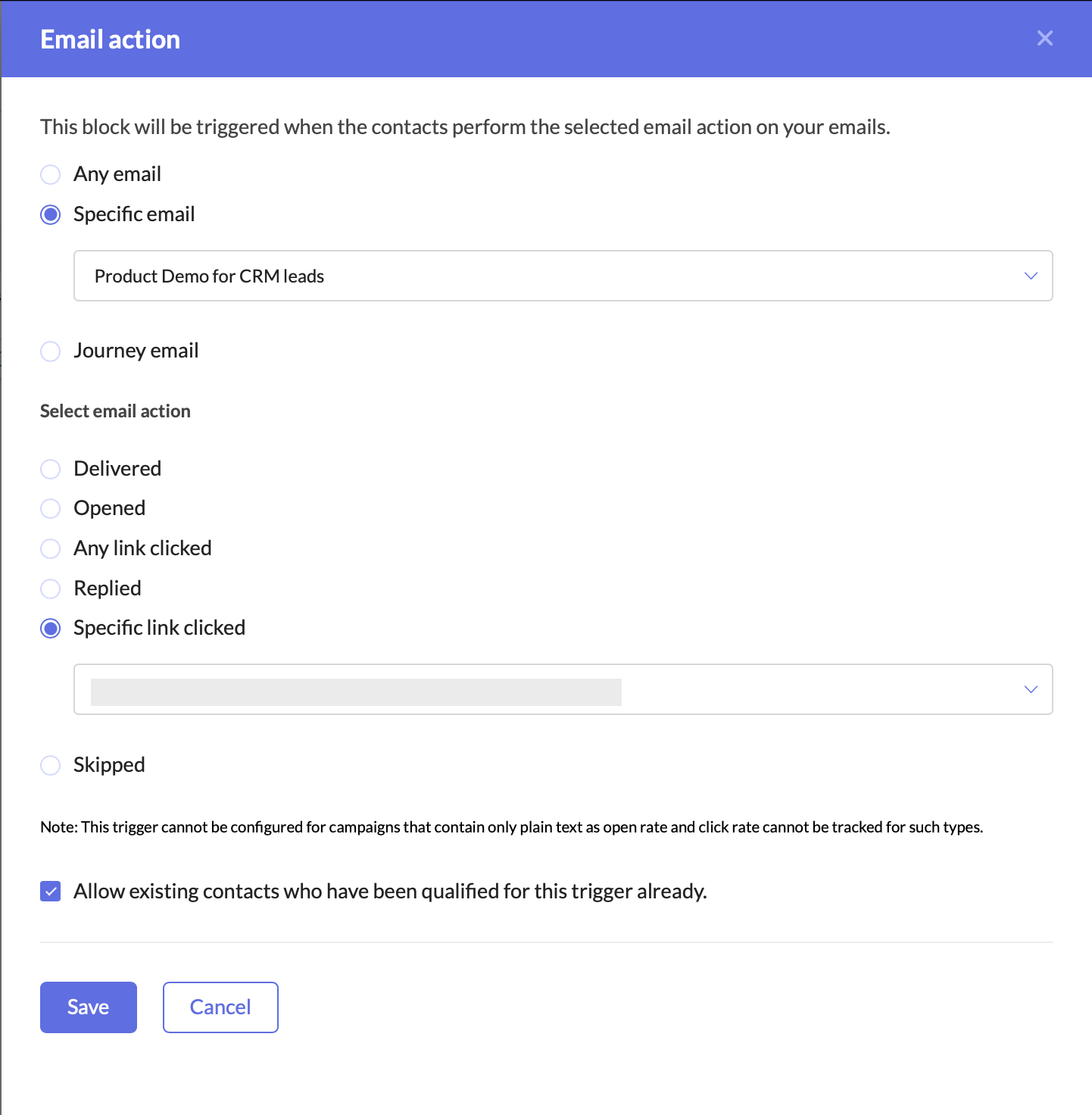
Email ActionCreate a Journey to target interested leads

Adding this trigger ensures that your Journey only targets leads who have shown clear intent by clicking on your email’s CTA. This helps you:
  • Identify engaged leads who are actively interested in your offering.
  • Filter out unresponsive leads, allowing marketing and sales teams to focus their efforts on high-potential prospects.
  • Automate lead qualification without manual tracking.
Once a lead clicks on the CTA, they enter the Journey, signaling that they are engaged and should be prioritized for further marketing and sales efforts.

Update the Lead Stage in Zoho Marketing Automation

Now that the lead has clicked on the CTA and entered the Journey, the next step is to update their lead stage to reflect this new level of engagement.
  • Add the Update Lead Stage action component right after the Email Action Trigger.
  • Configure it to move these contacts to the “Marketing Engaged” stage in ZMA.
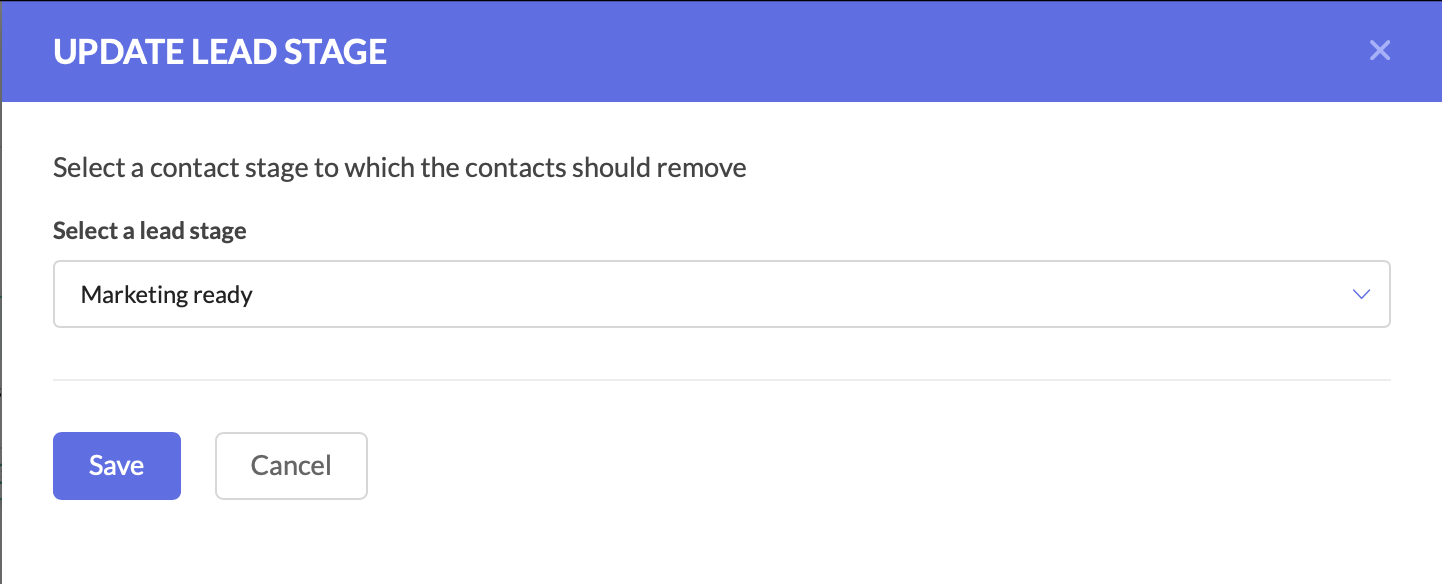
Update lead stageUpdate the Lead Stage in Zoho Marketing Automation

By moving them to the Marketing Engaged stage, you’re ensuring that these leads are recognized as actively interested, making it easier to track their Journey through your funnel.

Push the Updated Lead Data to Zoho CRM

At this stage, the lead stage has been updated in Zoho Marketing Automation, but we also need to reflect these changes in Zoho CRM. Since both platforms need to have the latest details, we now push the updated lead information back to Zoho CRM.
  • Add the Push Data to CRM action component after the Update Lead Stage action.
  • Configure it to push the lead’s latest details into the Leads module in Zoho CRM.
  • Ensure that all relevant fields are mapped correctly.
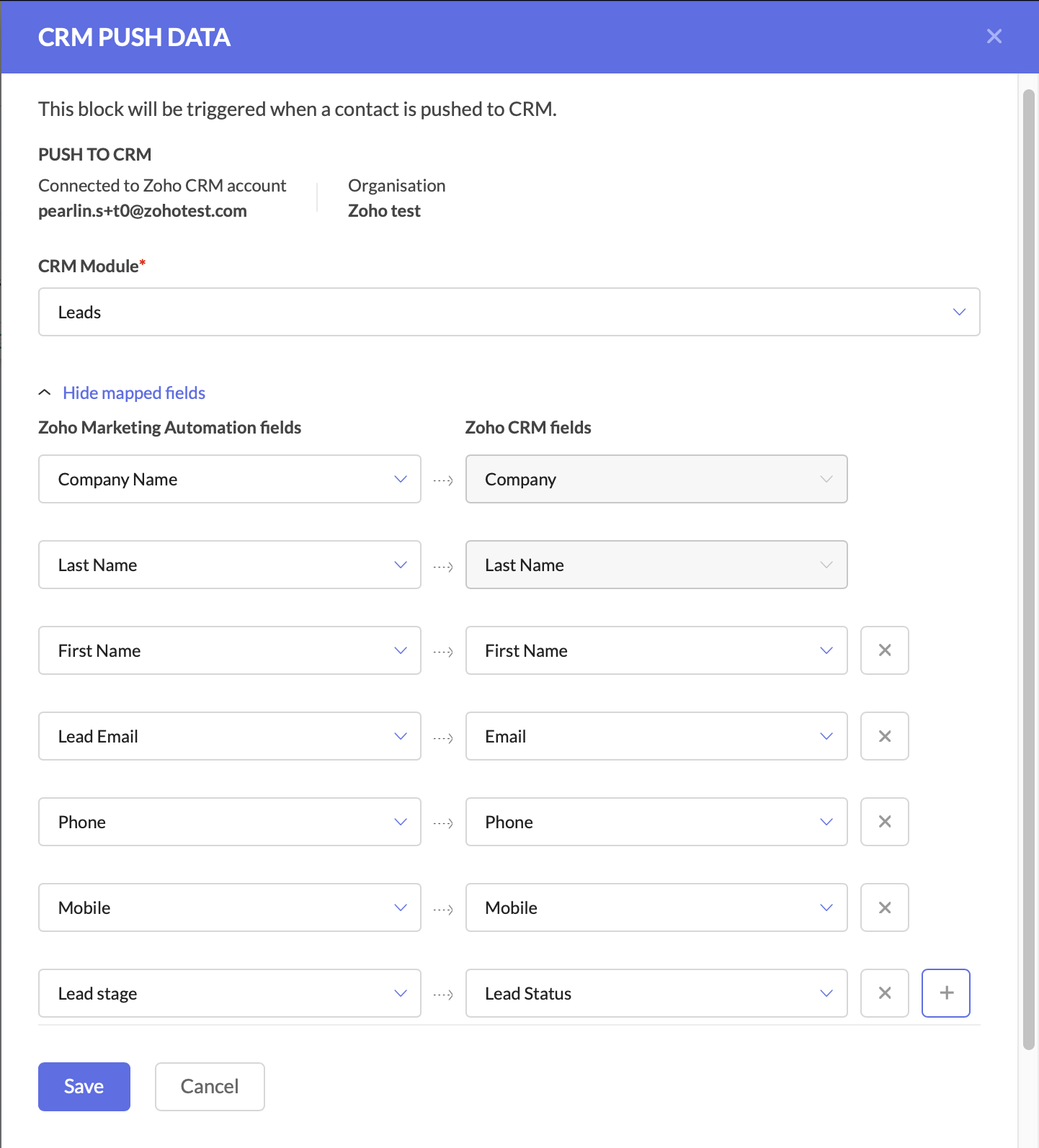
CRM push dataPush the Updated Lead Data to Zoho CRM

Keeping Zoho CRM up to date is critical for sales teams, as it ensures they are always working with the latest information.
At this point, your Journey has:
  • Tracked engaged leads through the Email Action Trigger.
  • Updated the lead stage in ZMA to “Marketing Engaged.”
  • Pushed the updated lead data back to Zoho CRM.
With these foundational steps in place, you are now ready to take the next action—automating deal creation and assigning follow-up tasks to the sales team.

Create a Deal for the Interested Lead

At this stage, the lead has shown interest, so we should automatically create a deal in Zoho CRM.
  • Add the Create Deal CRM Action Component and configure the deal name, due date, stage, amount, and deal assignment.
  • You can also map fields at this stage.
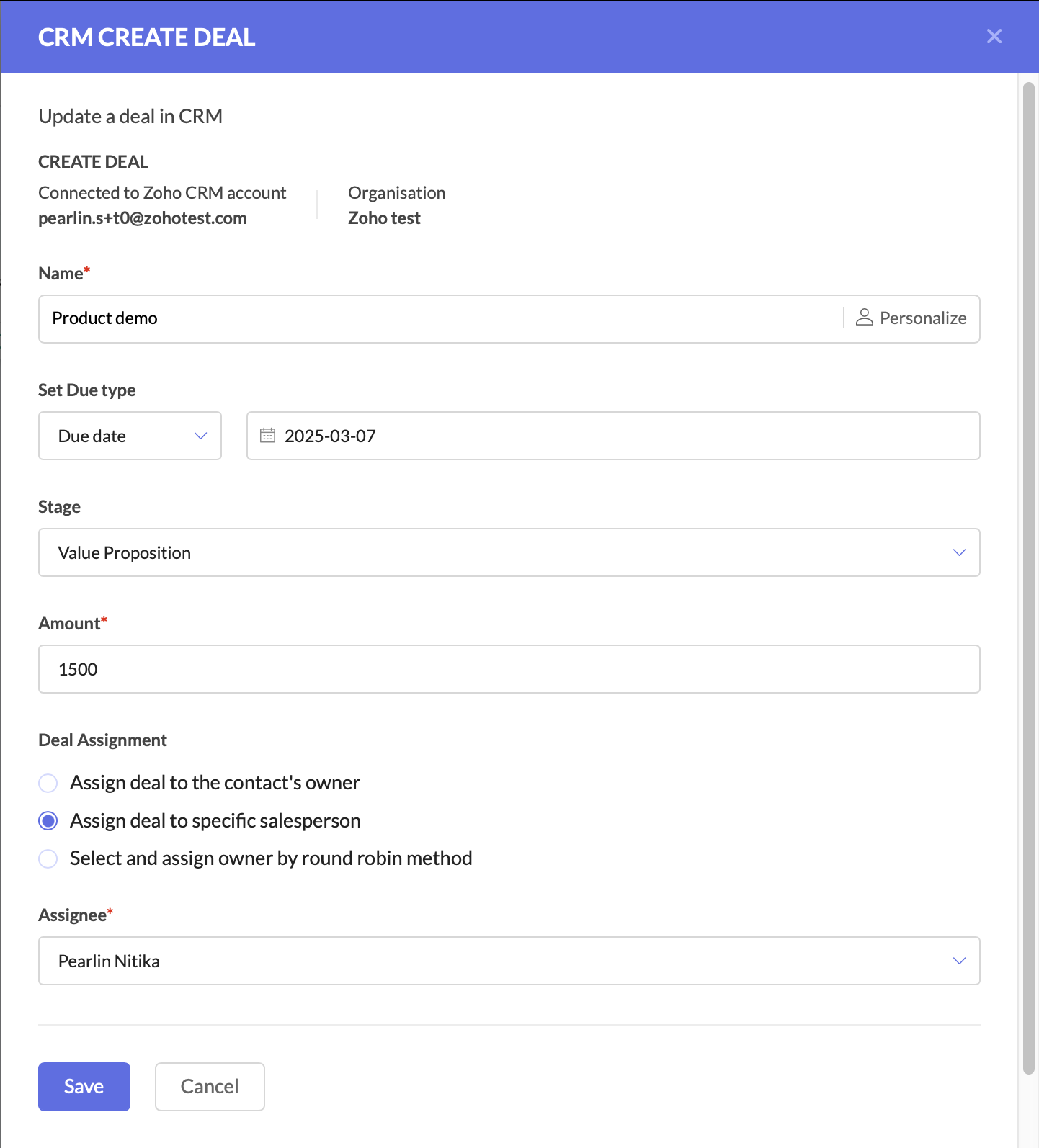
CRM Create dealCreate a deal for the interested lead

Create a Task for Follow-Up

The final step is to ensure a salesperson takes action on the newly created deal.
  • Add the Create Task CRM Action Component.
  • Configure the CRM module, subject and description, due date, priority, status, and assign the task to the deal owner in CRM.
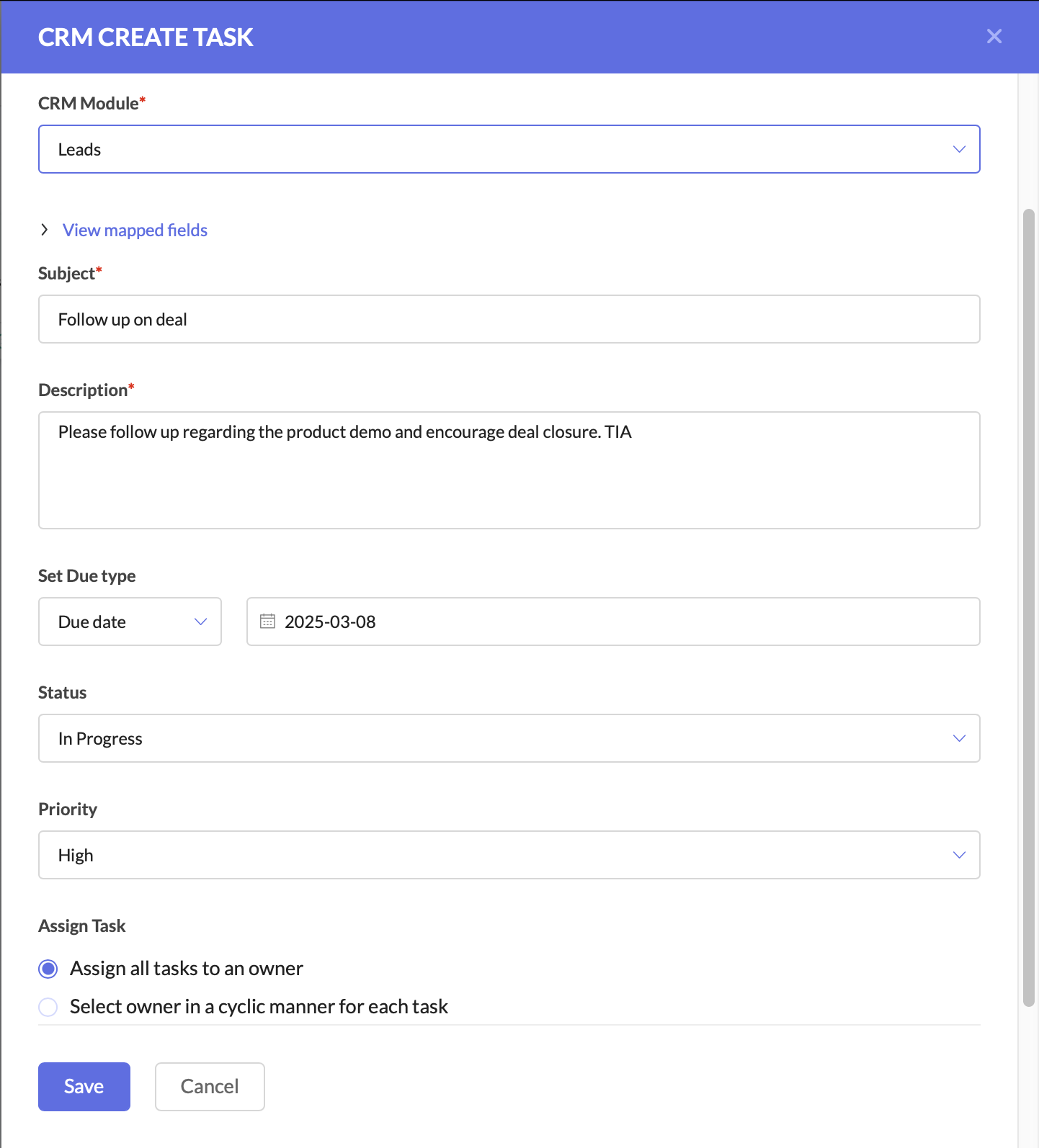
CRM Create taskCreate a task for follow-up

After this, you can connect the components to ensure a seamless flow.


This setup ensures that leads are not just nurtured, but also seamlessly handed off to sales when they show interest. The sales team receives up-to-date CRM records, active deals, and clear follow-up tasks, increasing their chances of closing the deal faster.

Why This Matters for Businesses

By using Zoho CRM and ZMA together, marketing and sales teams need not waste time on cold outreach, and can focus on high-intent leads.
For businesses, this means:
  • Higher revenue by focusing only on engaged leads.
  • Stronger collaboration between marketing and sales.
  • Better customer experience with timely follow-ups.
This is just one of the many ways you can use Zoho CRM actions in ZMA Journeys to refine your lead management process and ensure that only high-intent prospects reach your sales team. In the next post, we’ll explore another powerful use case—how to handle leads that originate in ZMA and transition them seamlessly into Zoho CRM for sales follow-up. Stay tuned for part two, and until then, happy marketing!

Regards,
Pearlin Nitika
User education | Zoho Marketing Automation

    Access your files securely from anywhere


                            Zoho Developer Community


                                                  • Desk Community Learning Series


                                                  • Digest


                                                  • Functions


                                                  • Meetups


                                                  • Kbase


                                                  • Resources


                                                  • Glossary


                                                  • Desk Marketplace


                                                  • MVP Corner


                                                  • Word of the Day


                                                  • Ask the Experts


                                                            Manage your brands on social media


                                                                  Zoho TeamInbox Resources


                                                                      Zoho CRM Plus Resources

                                                                        Zoho Books Resources


                                                                          Zoho Subscriptions Resources

                                                                            Zoho Projects Resources


                                                                              Zoho Sprints Resources


                                                                                Qntrl Resources


                                                                                  Zoho Creator Resources


                                                                                      Zoho CRM Resources

                                                                                      • CRM Community Learning Series

                                                                                        CRM Community Learning Series


                                                                                      • Kaizen

                                                                                        Kaizen

                                                                                      • Functions

                                                                                        Functions

                                                                                      • Meetups

                                                                                        Meetups

                                                                                      • Kbase

                                                                                        Kbase

                                                                                      • Resources

                                                                                        Resources

                                                                                      • Digest

                                                                                        Digest

                                                                                      • CRM Marketplace

                                                                                        CRM Marketplace

                                                                                      • MVP Corner

                                                                                        MVP Corner


                                                                                          Design. Discuss. Deliver.

                                                                                          Create visually engaging stories with Zoho Show.

                                                                                          Get Started Now


                                                                                            Zoho Show Resources

                                                                                              Zoho Writer

                                                                                              Get Started. Write Away!

                                                                                              Writer is a powerful online word processor, designed for collaborative work.

                                                                                                Zoho CRM コンテンツ


                                                                                                  Nederlandse Hulpbronnen


                                                                                                      ご検討中の方


                                                                                                              • Recent Topics

                                                                                                              • Associate a Contact to a Campaign using deluge?

                                                                                                                If I want to add one record to another related list, which zoho function do I use? zoho.updateRelatedRecord is not it I don't think.  I simply want to take a "Contact" and associate it to a "Campaign" using deluge.  Can anyone help? contactId = 5122008000000796037;
                                                                                                              • Add "Groups" above "Users" in the Zoho Forms Left Menu

                                                                                                                Hi, We have Groups but you have to go to a Form and Share or use the Directory App to manage them, please add "Groups" above "Users" in the Zoho Forms Left Menu so you can manage them in 1 place within Zoho Forms too. Thanks Dan
                                                                                                              • Zoho Books | Product updates | October 2025

                                                                                                                Hello users, We’ve rolled out new features and enhancements in Zoho Books. From iOS 26 updates to viewing reports as charts, explore the updates designed to enhance your bookkeeping experience. Zoho Books Updates for Apple Devices At WWDC 2025, Apple
                                                                                                              • Adding Taxes to paid consultations in Zoho Bookings

                                                                                                                I created a 'paid' consultation under Zoho Booking and integrated it with payment gateways for online/instant payment before a booking is done. How can I add 'taxes' to the price of consultation? I can add taxes to other Zoho apps (liks Books, Checkout,
                                                                                                              • Zoho CRM Reports Module on Mobil App

                                                                                                                I have the mobile app and the reports module doesn't appear in the sidebar for some reason. I saw a Youtube video where the user had the Reports module on mobile. Is there a setting to show it on mobile? Thanks.
                                                                                                              • Inquiry on Help Centre Tab Customisation

                                                                                                                Hi Zoho team, I’m wondering if it’s possible to further customise the Help Center tabs, specifically the descriptions under Knowledge Base, Community, and Tickets. While the current setup allows customising tab names, being able to tailor the descriptions
                                                                                                              • Passing a form object to a function

                                                                                                                Suppose I have a sort_order field in multiple tables and I want to increment it by +1 onCreate of a new record. Is there a way to pass the form object as an argument into the function to keep things DRY? The following function from Zia works, but I'd
                                                                                                              • Can you copy and paste a page within a form?

                                                                                                                I have been looking at trying to copy/duplicate a whole page within a form. I can't see how I can do this without having to add all the data in again. This is very time consuming. Any help would be great.
                                                                                                              • SMS to customers from within Bigin

                                                                                                                Hi All, Is there anyone else crying out for Bigin SMS capability to send an SMS to customers directly from the Bigin interface? We have inbuilt telephony already with call recordings which works well. What's lacking is the ability to send and receive
                                                                                                              • Unable to sort as Descending order

                                                                                                                Trying to change the sort order for a lookup field (checkboxes) from Ascending to Descending and keep getting an error in Deluge that the order must be Ascending Did anyone ran into this? Thanks Eyal
                                                                                                              • How do I copy an email message to one or more other folders?

                                                                                                                I can move a message to another folder using the "move to" option but I can't figure out how to copy a message. 
                                                                                                              • New feature request: Allow copy of email message to another folder

                                                                                                                Hello Zoho team, This is a suggested new feature to allow copy an email message to either another folder or the same folder. Within the same Zoho account. This is not a support request about "label". This is a suggested new feature to allow copies of
                                                                                                              • Hotmail is blocking the zoho mail IP

                                                                                                                Greetings, Since last Tuesday (5 days ago today) I wrote to Zoho support and I still haven't received a single response (Ticket ID: 2056917). Is this how you treat people who pay for your email service? I am making this public so that those who want to
                                                                                                              • Desk DMARC forwarding failure for some senders

                                                                                                                I am not receiving important emails into Desk, because of DMARC errors. Here's what's happening: 1. email is sent from customer e.g. john@doe.com, to my email address, e.g info@acme.com 2. email is delivered successfully to info@acme.com (a shared inbox
                                                                                                              • Creator Simplified #11: Create a custom button to download files

                                                                                                                Hey there! This time, let's see how to create custom buttons to download the files uploaded in the file upload field. Sample use-case A training app has a module that provides the materials for all the available courses. Students can click on the corresponding
                                                                                                              • Hide horizontal lines at bottom of form

                                                                                                                Hi I have a page with 3 forms embedded in html snippets. On each of the forms I can hide the submit button easily but I am left with the horizontal lines that bound that section and I cannot figure out to remove them (see below for the two sets of horizontal
                                                                                                              • Autosaving of Form Field

                                                                                                                HI can anyone suggest a way of autosaving or simulating an autosave function for a specific field in a form. The story is as follows. I have a bunch of technicians who write notes on how they do a repair. Sometimes they write for a couple of hours the troubleshooting process. If they click incorrectly, press ESC, Cancel or the browser crashes the information is lost which can be heartbreaking so my guys use notepad and then copy the information in. The only way around this is to click submit on the
                                                                                                              • Zoho Tracking Image location

                                                                                                                So we've been having an issue with tracking email opens. Specifically in Gmail. Our emails are not that long either, maybe 4 sections of image/250 characters of text/button per section.  But all my test accounts I used via Gmail we're showing opens. But then come to find out the tracking image is at the very bottom of the email. So If the message is clipped (It always just clips our social icons on the bottom) and the user doesn't click the show more button it never tracks the open.  Looking at other
                                                                                                              • AI Interview Insights: Turn Recorded Interviews into Quick Transcripts & Summaries

                                                                                                                Evaluating interviews shouldn’t require replaying long recordings or taking manual notes. With AI Interview Insights, you can now review complete transcripts and AI-generated summaries of your One-way (Recorded) interviews right inside Zoho Recruit. This
                                                                                                              • API in E-Invoice/GST portal

                                                                                                                Hi, Do I have to change the api in gst/e-invoice portal as I use zoho e books for my e-invoicing. If yes, please confirm the process.
                                                                                                              • Ask the Experts 26: Brighten every customer interaction with Zoho Desk all year long

                                                                                                                Hello everyone, Greetings and welcome to Ask the Experts 26. As we wrap up 2025, we are excited to invite you to the 26th episode of our Ask the Expert series. 🎄The Merry Metrics Edition = Best of Zoho Desk [Best Practices + Holiday Automation + Year-End
                                                                                                              • Pricing calculator

                                                                                                                Alright, so I'm trying to create a pricing calculator/pricing report generator to use in a cabinet shop. I did all the logic and such, and the calculator works. I have a few other things that I would need it to be able to do though, I'll do my best to
                                                                                                              • Bug Details

                                                                                                                In the Bug detail the milestoneid is missing
                                                                                                              • Stop completed task lists from disappearing?

                                                                                                                Is there any way to stop projects from making tasks lists disappear when all the tasks in the list are completed? That's one of those little things where we're constantly fighting the product. For instance we have some projects which are ongoing - no start and end date. We use Kanban view to show the various task lists. We don't want the kanban list to disappear every time the items on it happen to be closed out. Thanks
                                                                                                              • One Contact with Multiple Accounts with Portal enabled

                                                                                                                I have a contact that manages different accounts, so he needs to see the invoices of all the companies he manage in Portal but I found it not possible.. any idea? I tried to set different customers with the same email contact with the portal enabled and
                                                                                                              • Change of Blog Author

                                                                                                                Hi, I am creating the blog post on behalf of my colleague. When I publish the post, it is showing my name as author of the post which is not intended and needs to be changed to my colleague's name. How can I change the name of the author in the blogs?? Thanks, Ramanan
                                                                                                              • Allow customers to choose meeting venue and meeting duration on booking page

                                                                                                                My business primarily involves one-to-one meetings with my clients. Given the hybrid-work world we now find ourselves in, these meetings can take several forms (which I think of as the meeting "venue"): In-person Zoom Phone call I currently handle these
                                                                                                              • Booking outside of scheduled availability

                                                                                                                Is there a way for staff (such as the secretary) to book appointments outside of the scheduled availability? Right now to do this special hours must be set each time. There should be a quicker way. Am I missing something?
                                                                                                              • Operation Questions.

                                                                                                                Hello, I hope you are well. To explain a little, we are a company that sells services and products with a technical team responsible for installation and maintenance. Zoho FSM can be useful for the technical team, namely for the technical coordinator
                                                                                                              • Direct Access and Better Search for Zoho Quartz Recordings

                                                                                                                Hi Zoho Team, We would like to request a few enhancements to improve how Zoho Quartz recordings are accessed and managed after being submitted to Zoho Support. Current Limitation: After submitting a Quartz recording, the related Zoho Support ticket displays
                                                                                                              • Update date & time when a cell is edited

                                                                                                                Hi All, I am desiring to have a cell update with the current date and time when another cell is edited. Any ideas?  Thank you
                                                                                                              • Add "Groups" to "Share With" on Reports & All Entries

                                                                                                                Hi, On Forms we can share Publicly, with Specific Users And/Or Specific Groups or All Users. With Reports and All Entries we lack the "Groups" option, please add this as with many users this saves a lot of work. Thanks Dan
                                                                                                              • Add Pause / Resume Option to Zoho Quartz Recordings

                                                                                                                Hi Zoho Team, We would like to request an enhancement to Zoho Quartz recordings: the ability to pause and resume an ongoing recording. Current Limitation: At the moment, when recording an issue with Zoho Quartz, the recording continues even when we are
                                                                                                              • Custom Fields Not Showing Up in Invoice PDF Template Document Information

                                                                                                                I have added 2 custom fields under Sales > Invoices > Manage Custom Fields. They are set to show in all PDFs. However when I am editing my Invoice PDF template, i do not see the custom fields under Document Information.
                                                                                                              • Tracking Non-Inventory Items

                                                                                                                We have several business locations and currently use zoho inventory to track retail items (sales and purchase orders). We were hoping to use zoho inventory to track our non-inventory items as well (toilet paper, paper towels, etc). I understand that we
                                                                                                              • Can I use a Standalone CRM Function as the Callback URL For Async Export Data API?

                                                                                                                I am creating an export job using this API https://www.zoho.com/analytics/api/v2/bulk-api/export-data-async/create-export/view-id.html There is a "callbackUrl" key in the CONFIG object. I tried copying the URL for a standalone function in CRM which can
                                                                                                              • ZOHO Books

                                                                                                                Hi there, Why after I upgrade my Zoho invoice > Books then i wanted to add plugin which i cannot do. Please advise.
                                                                                                              • How is Your eCommerce Experience w/Zoho Inventory?

                                                                                                                First off, I'm SUPER grateful for the advent of Zoho Inventory and now the Zoho Commerce Suite. Overall, Inventory is a great product, especially for customers without an eCommerce presence. For eCommerce companies (especially those shipping more than ~10 packages/day), however, there are certain drawbacks that keep my clients from moving over to Zoho Inventory: Cons: 1. Invoice + Package Creation from Shopify/Other eCommerce Integrations: Zoho Inventory makes the somewhat perplexing decision to
                                                                                                              • Error AS101 when adding new email alias

                                                                                                                Hi, I am trying to add apple@(mydomain).com The error AS101 is shown while I try to add the alias.
                                                                                                              • Simplify Mass Replies with Predefined Templates and Snippets

                                                                                                                Hello everyone, We are happy to introduce a new enhancement to Mass Reply that helps agents respond to customers quickly and consistently. With the addition of Email Templates and Snippets in the reply window, agents can use predefined messages while
                                                                                                              • Next Page