The all new Marketing Automation 2.0 is now part of Marketing Plus

The all new Marketing Automation 2.0 is now part of Marketing Plus

Hey everyone,
 
We're excited to introduce the latest version of Marketing Automation to Zoho Marketing Plus for all users. The new version comes with a lot of features to help simplify and streamline your marketing activities

Here's a brief overview of what's new and how you can migrate to the latest version in Zoho Marketing Plus.

Revamped user interface 

The Marketing Automation module has a whole new user interface that's carefully designed to make it easy to navigate and manage your marketing activities, including creating campaigns, personalizing journeys, generating leads via signup forms, building landing pages, and much more. 


Simplified contact management 

Managing your contact list in Marketing Automation is a lot easier with the all-new Contacts module, which was previously known as the Leads module. Firstly, a new dashboard offers a holistic picture of your contacts by offering insightful metrics such as your total number of contacts, contacts that are ready for marketing or sales, contacts by stage, source, and location, and much more.


The detailed contacts view has a new look as well. You can view important details like stages, associated lists, segments, journeys, subscription details, engagements, and a timeline of all activities in chronological order.


You can also view a complete list of contacts filtered by stage with the help of a Kanban view, and you can easily drag and drop contacts across various stages.
 
Lists have also been simplified. Each list has a detailed dashboard related to contacts, such as contact growth, associated entities, status, and so on. You can also view associated journeys and campaigns for a particular contact list, segment your contacts based on various criteria, and manage them from Marketing Automation.
 
The Contacts module also comes with various ways to qualify your leads with the help of scores. You can configure scores based on the activities the contact performs with regard to email campaigns, such as opens, clicks, or replies, or based on field values and various website other activities. 

More ways to generate leads 

Websites are one of the best and most effective marketing channels, as they help visitors understand more about your brand and what you offer. Hence, it's essential for businesses to optimize their websites in order to capture and convert these visitors as leads.

Marketing Automation comes equipped with just that. Using signup forms, pop-ups, and landing pages, you can capture information about your prospects and synchronize them with Zoho CRM. You can also automatically add these leads to lists, modify their scores, add them to specific journeys, and much more.


Keep tabs on your website  

Once your website is live, it's important to measure the performance to increase conversions. Marketing Automation module comes with a detailed dashboard and in-depth analytics on the behavior and acquisition of your website visitors. The behavior report gives you the complete picture of how visitors are interacting with your website, the top performing page, time spent on pages, the page through which visitors first land on your website, and the last page visited before they exit, and lot more.

The acquisition report, on the other hand helps you identify how these visitors land on your website; the different sources, channels, or the country. This helps you identify the right channel that works for you and plan your marketing activities accordingly. With PageSense already part of Marketing Plus, all your goals, and other important website analytics are in sync with Marketing Automation. 

Marketing campaigns simplified 

Marketing Automation now offers a whole new streamlined experience in creating and managing your campaigns across channels. You can create your email campaigns and promote your surveys, webinars, SMS campaigns, and promotions via WhatsApp.

Personalize touchpoints with Journeys 

The journey builder comes with a lot of updates. With Journey X-Ray, you can dissect and understand the path your contacts take, the most- and least-engaged actions, the number of entrances and exits, and a lot more. This is designed to give you a better understanding of your customer journey across various touchpoints to help optimize them further.

All the journeys you've created in previous versions will be migrated to the new version as drafts. The following components are deprecated in the new version:

Triggers
Actions
Missed goal
Date field trigger (revised)
Email action trigger (revised)
Video click
Attachment download
Send survey mail
Reminder loop
A/B test
Three-way condition
Update deal
Mile stone
End of process components


If you've created journeys with these deprecated components, you'll need to replace them manually before migrating them to the new version.
 
Also, any autoresponders from the previous version will be discontinued in 2.0. You can convert your old autoresponders into journeys.

Revamped roles and permissions 

Roles and privileges in Marketing Plus enable you to define and control access to data and various features in Marketing Plus. There are four different roles available by default: Brand Admin, Brand Marketer, Brand Member, and Event Member.

Previously, Marketing Automation users were only permitted to manage the records they created.


Now, we've introduced more control over how users can access data and features. You can define appropriate permissions for contacts and lists, lead generation functions, marketing channels, websites, and assets. 


Accessing the new version  

The all-new Marketing Automation will be available for all Marketing Plus users starting on June 4, 2024. All topics, integrations, SMS gateways, and smart URLs will have to be migrated to start accessing the new version.

Migrating topics 

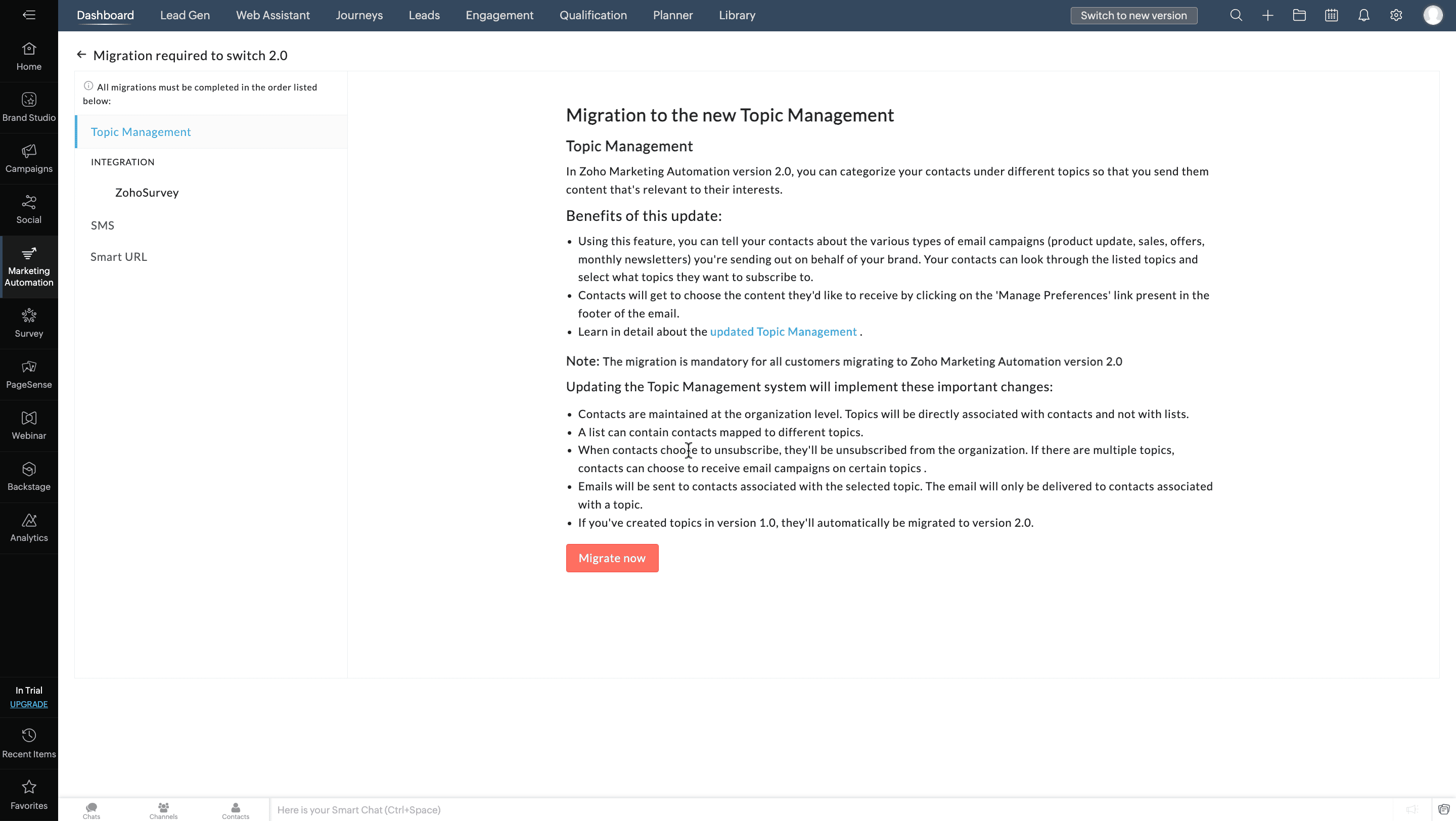
Previously, topics in Marketing Automation were usually associated with lists. Now, you can associate them with contacts directly, as well as associate multiple topics to a contact. They can unsubscribe from these topics per their preferences.

Migrating integrations 

Previously, Marketing Automation users could integrate and create syncs with Zoho or other third-party services, which was sometimes hard to track and led to data duplication.
 
To streamline integrations between solutions, now only the administrator of both applications can integrate and create syncs in Marketing Automation—and only one integration and sync.
 
For example, if you want to integrate Marketing Automation in Marketing Plus and Zoho CRM, you need to be the Brand Admin in Marketing Plus and an Administrator in Zoho CRM. Once an account is integrated, other users in your organization can't configure another integration.
 
If multiple integrations are configured in Marketing Automation, you can see the complete list of all the accounts while migrating to the new version. Make sure to select the account you want to retain in the new version. 

Migrating SMS providers 

To increase accuracy, SMS campaigns will only be sent to the mobile numbers specified in each contact's Mobile field. If you've used any other field to store the contact information in the older version, the data will need to be moved to the Mobile field to start sending SMS campaigns in this new version.

Migrating Smart URLs 

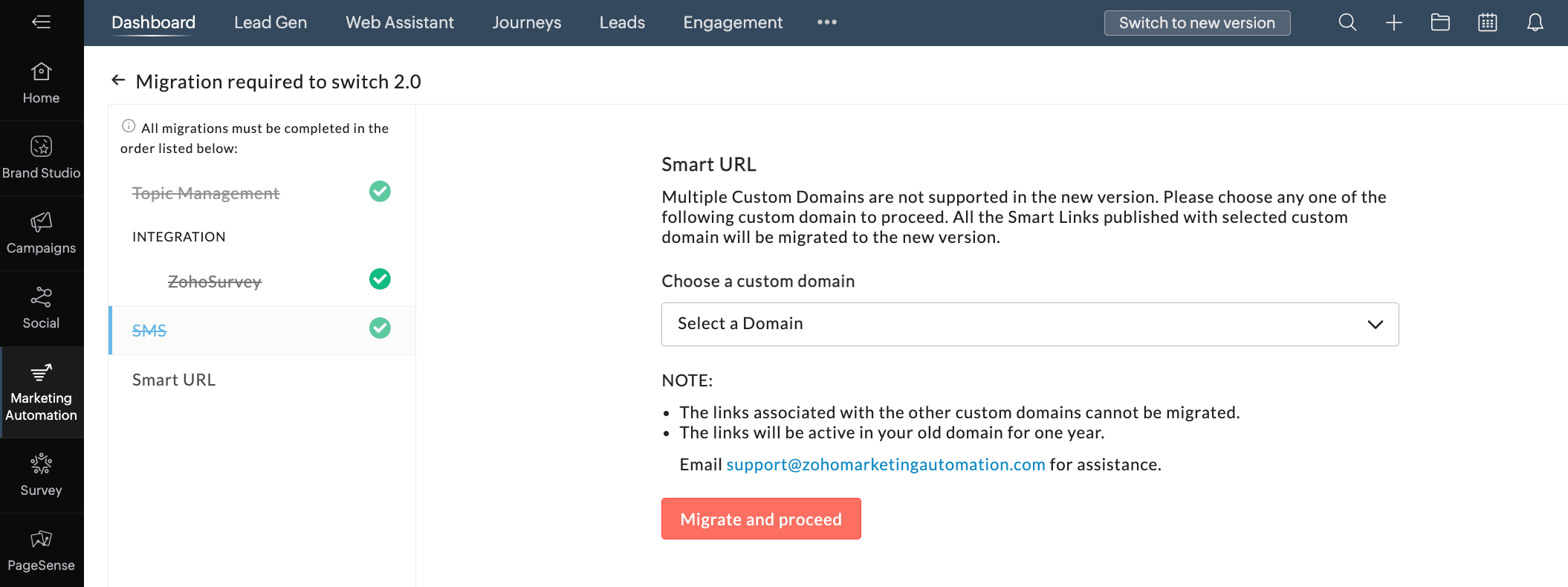
Previously, Smart URLs in Marketing Automation can be created for two custom domains. Now, in the new version, you can create smart URLs using the default or your custom domain. Only one custom domain can be connected. So, while migrating to the new version, you can choose the domain that you want to migrate to the new version.  

To access the new version
  1. Go to the Marketing Automation module in Marketing Plus and click Switch to new version
  2. Click Proceed in the pop-up.
  3. In the Topic Management tab, click Migrate now

  4. Select an integration from the Integration tab and click Migrate and Proceed.
    Do the same if more integrations are listed in the Integration tab.
  5. In the SMS tab, select your preference.
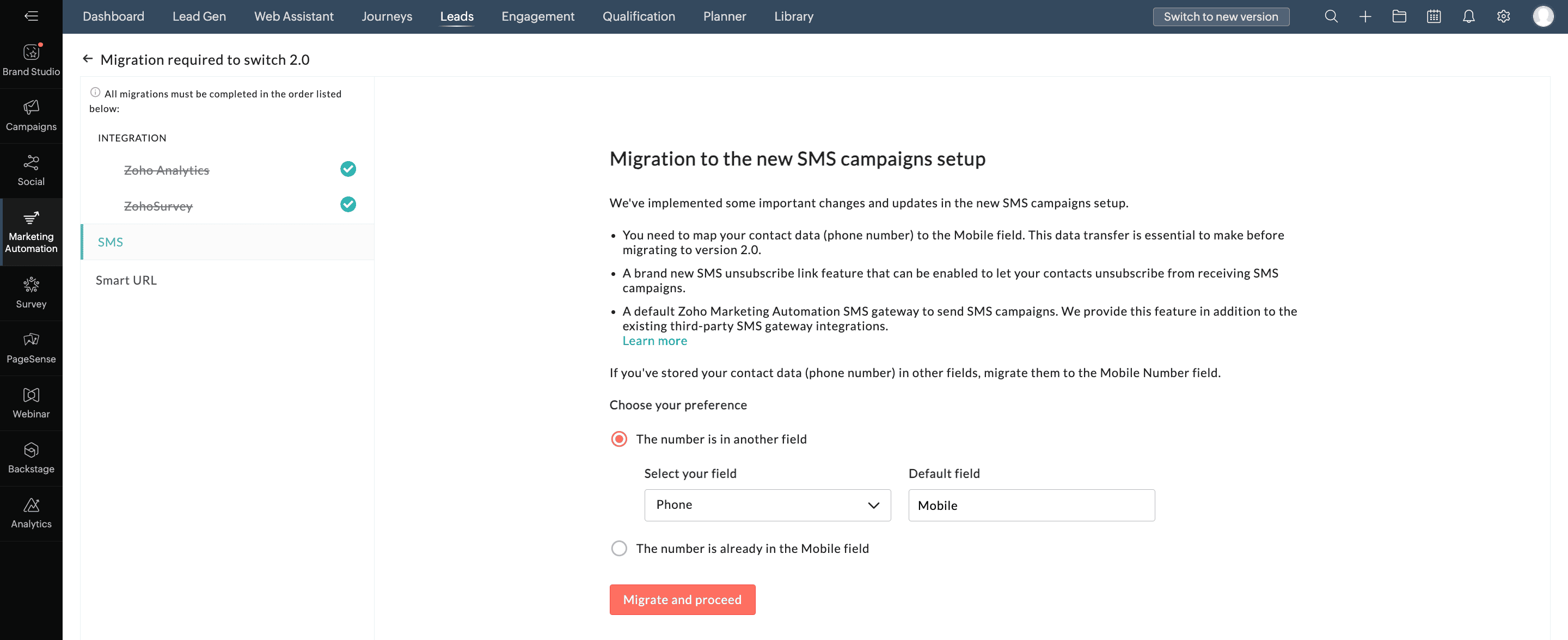
  6. Click Migrate and Proceed.
  7. In the Smart URL tab, select the appropriate domain from the drop down list.
  8. Click Migrate and Proceed.

  9. Click Switch Now in the pop-up.
We hope you find this information useful. Please give it a try and feel free to share your valuable feedback with us.
 
Regards,
The Marketing Plus Team

    Access your files securely from anywhere


                            Zoho Developer Community


                                                  • Desk Community Learning Series


                                                  • Digest


                                                  • Functions


                                                  • Meetups


                                                  • Kbase


                                                  • Resources


                                                  • Glossary


                                                  • Desk Marketplace


                                                  • MVP Corner


                                                  • Word of the Day


                                                  • Ask the Experts


                                                            Manage your brands on social media


                                                                  Zoho TeamInbox Resources


                                                                      Zoho CRM Plus Resources

                                                                        Zoho Books Resources


                                                                          Zoho Subscriptions Resources

                                                                            Zoho Projects Resources


                                                                              Zoho Sprints Resources


                                                                                Qntrl Resources


                                                                                  Zoho Creator Resources


                                                                                      Zoho CRM Resources

                                                                                      • CRM Community Learning Series

                                                                                        CRM Community Learning Series


                                                                                      • Kaizen

                                                                                        Kaizen

                                                                                      • Functions

                                                                                        Functions

                                                                                      • Meetups

                                                                                        Meetups

                                                                                      • Kbase

                                                                                        Kbase

                                                                                      • Resources

                                                                                        Resources

                                                                                      • Digest

                                                                                        Digest

                                                                                      • CRM Marketplace

                                                                                        CRM Marketplace

                                                                                      • MVP Corner

                                                                                        MVP Corner


                                                                                          Design. Discuss. Deliver.

                                                                                          Create visually engaging stories with Zoho Show.

                                                                                          Get Started Now


                                                                                            Zoho Show Resources

                                                                                              Zoho Writer

                                                                                              Get Started. Write Away!

                                                                                              Writer is a powerful online word processor, designed for collaborative work.

                                                                                                Zoho CRM コンテンツ


                                                                                                  Nederlandse Hulpbronnen


                                                                                                      ご検討中の方


                                                                                                              • Recent Topics

                                                                                                              • Item/service subtotal

                                                                                                                Just discovered & really pleased that we can drag to re-order the line items in Sales orders & Invoices, a very nice feature which doesn't seem to be documented? It would be nice to be able to insert a subtotal as a line item to complete this great feature
                                                                                                              • Converting Sales Order to Purchase Order

                                                                                                                Hi All, Firstly, this code works to convert a sales order(SO) to a purchase order (PO) via a button, however I am running into an issue when I convert the SO where the values from the line items are not pulled across from the SO to the PO. The ones in
                                                                                                              • how to Solve Conflict Invoices in Zoho POS

                                                                                                                Hello Team, I am facing a repeated issue in Zoho POS while saving a sale that contains service-based items. My products are intentionally created as Service (Non-Inventory) items because I do not want to track stock for them. However, every time I try
                                                                                                              • All new Address Field in Zoho CRM: maintain structured and accurate address inputs

                                                                                                                The address field will be available exclusively for IN DC users. We'll keep you updated on the DC-specific rollout soon. It's currently available for all new sign-ups and for existing Zoho CRM orgs which are in the Professional edition. Latest update
                                                                                                              • Copy, Paste, Highlighted text

                                                                                                                when i copy paste text it gets highlighted. Fix this.  WTF is with this black highlight ? Fix copy pasting. Some people pay for using this mail service. 
                                                                                                              • Pricing Strategies: #6 Common Mistakes while Configuring Pricing

                                                                                                                "Why does this month's billing feel messy again?" That was the exact line Priya muttered while staring at the spreadsheet full of edited pricing, one-off discounts and mismatched subscription details. Her business was growing, but the pricing machine
                                                                                                              • Publish to LinkedIn via API

                                                                                                                Hi, Is it possible to publish a job opening to LinkedIn (paid job slots) if creating a job opening via api / deluge function? Or is the user required to manually publish via the job boards process? Many Thanks Adrian
                                                                                                              • FSM - Associating and selecting Contacts based on Service Addresses

                                                                                                                Hi FSM team, I've come across an FSM limitation I wanted to share for improvement. I'm currently configuring FSM for a client who provides heating system install and maintenance services. The are often sub contracted by building management companies to
                                                                                                              • 日本語フォントの選択肢拡充についての要望

                                                                                                                日本語フォントの選択肢がとても少ないと感じたことはありませんか? 多くのアプリ(たとえば Invoice)ではフォントが1種類しかなく、正直あまり使いやすい・見た目が良いとも言えません。 そろそろ、もっと多くの日本語フォントを追加してほしい、そしてすべてのアプリで同じフォント選択肢を使えるようにしてほしいと、私たちユーザーが声を上げる時期だと思います。 ご存じのとおり、現状ではアプリごとにフォント周りの仕様にほとんど一貫性がありません。 みなさん、一緒に要望を出していきましょう!
                                                                                                              • Do Unpublished Products in Shopify Sync to Zoho POS?

                                                                                                                Will an unpublished product in Shopify sync to Zoho POS? I would like to know how Zoho POS handles products that are in draft/unpublished status in Shopify.
                                                                                                              • Problem in Zoho POS frontend ERP.

                                                                                                                We are facing some difficulties in our billing and inventory processes and require your support to resolve them at the earliest. Customer Advance Payments We receive advance payments from customers for upcoming sales. Please guide us on how to record
                                                                                                              • How to create estimates/Invoices with sub-totals

                                                                                                                Every other accounting package can create estimates and invoices with Sub-totals. How can I do that in ZohoBooks?
                                                                                                              • Categorize Items with Item Headers

                                                                                                                Hello customers, Did you ever want to classify items based on specific categories to help your customers understand your invoice better? With the new Item Header feature, you can easily categorize items in your invoices and estimates and give them a common title.  Item Headers are available in the Invoices, the Recurring Invoices and the Estimates module. It can be carried forward from estimates to invoices at the time of converting the estimates.  To add an item header: Go to the Estimates, Invoices
                                                                                                              • Emails sent through Bigin are not posting in IMAP Sent folder

                                                                                                                I have set up my email to work from within Bigin using IMAP.  I am using IMAP so I can sync my email across multiple devices - phone / laptop / desktop / iPad / etc.  I want all my emails to populate my email client (outlook & iphone email) whether or
                                                                                                              • Ask the Experts 26: Brighten every customer interaction with Zoho Desk all year long

                                                                                                                Hello everyone, Greetings and welcome to Ask the Experts 26. As we wrap up 2025, we are excited to invite you to the 26th episode of our Ask the Expert series. 🎄The Merry Metrics Edition = Best of Zoho Desk [Best Practices + Holiday Automation + Year-End
                                                                                                              • Painfully Slow Zoho mail

                                                                                                                Since yesterday Zoho Mail seems to have starting functioning very slowly and having a few bugs. It's slow to open mails, slow to send, slow to change between email accounts. Sometimes clicking on a particular folder (eg Sent folder) stops working and
                                                                                                              • Discount on the transaction level in POS

                                                                                                                "Is it possible to apply a discount on the total bill before tax in Zoho POS?" I want to apply a discount on the total transaction amount in Zoho POS, but the discount should be calculated before the taxes are applied. Is there an option to do this in
                                                                                                              • Zoho DataPrep switching Date Format

                                                                                                                When using a pipeline that is importing Zoho Analytics data into Zoho DataPrep, the month and day of date fields are switched for some columns. For example, a Zoho Analytics record of "Nov. 8, 2025" will appear in Zoho DataPrep as "2025/08/11" in "yyyy/MM/dd"
                                                                                                              • Create Tasklist with Tasklist Template using API v3

                                                                                                                In the old API, we could mention the parameter 'task_template_id' when creating a tasklist via API to apply a tasklist template: https://www.zoho.com/projects/help/rest-api/tasklists-api.html#create-tasklist In API v3 there does not seem to be a way to
                                                                                                              • Send Automated WhatsApp Messages and Leverage the Improved WhatsApp Templates

                                                                                                                Greetings, I hope all of you are doing well. We're excited to announce a major upgrade to Bigin's WhatsApp integration that brings more flexibility, interactivity, and automation to your customer messaging. WhatsApp message automation You can now use
                                                                                                              • Jobs at multiple locations

                                                                                                                Hi A lot of times we have same job open at multiple locations. So I would like an option where we can create a job and choose multiple locations. Currently we have to create individual jobs for each location. If we can create one job and mention multiple
                                                                                                              • From Zoho CRM to Paper : Design & Print Data Directly using Canvas Print View

                                                                                                                Hello Everyone, We are excited to announce a new addition to your Canvas in Zoho CRM - Print View. Canvas print view helps you transform your custom CRM layouts into print-ready documents, so you can bring your digital data to the physical world with
                                                                                                              • Passing the CRM

                                                                                                                Hi, I am hoping someone can help. I have a zoho form that has a CRM lookup field. I was hoping to send this to my publicly to clients via a text message and the form then attaches the signed form back to the custom module. This work absolutely fine when
                                                                                                              • Tag Adding Option in Kanban Card Customization Bigin CRM Mobile App

                                                                                                                I would like to request an option to add and display tags on Kanban cards in the Bigin CRM mobile app. This feature would make it easier to categorize deals and quickly identify priorities while working on the go.
                                                                                                              • Empowered Custom Views: Cross-Module Criteria Now Supported in Zoho CRM

                                                                                                                Hello everyone, We’re excited to introduce cross-module criteria support in custom views! Custom views provide personalized perspectives on your data and that you can save for future use. You can share these views with all users or specific individuals
                                                                                                              • WhatsApp Voice Message Sending Option in Bigin CRM

                                                                                                                I would like to request a feature that allows users to send WhatsApp voice messages directly from Bigin CRM. This would help improve communication efficiency and make it easier for teams to respond quickly to customer inquiries.
                                                                                                              • CRM: hosting a single html file in Zoho and displaying it as a widget

                                                                                                                I have seen that CRM offers the option of uploading a web project to Zoho itself and displaying it as a widget in CRM. The instructions then talk about setting a development environment with Node and developing an application to upload to Zoho. But I
                                                                                                              • How to change position button transtition of Blueprint?

                                                                                                                Hi Everyone, Look at my screenshoot, it is possible move the reject button to the right? I couldn't find that setting in the blueprint. Thank you.
                                                                                                              • Marketer’s Space - WhatsApp Pricing Update: What Marketers Need to Know and Do

                                                                                                                Hello Marketers, Welcome back to Marketer’s Space! WhatsApp made changes to their pricing model on July 1, 2025, moving from conversation-based pricing to a per-message pricing model. This week’s post focuses on what these changes mean for your WhatsApp
                                                                                                              • Multi file upload

                                                                                                                Hi, I just wonder if one could upload multiple files in one shot, say between one and three files, without adding multiple File Upload fields? Thanks, Alalbany
                                                                                                              • Sorting Descending in a lookup

                                                                                                                I have a case number lookup on multiple forms. I need the most recent added to appear at the top of the lookup or as the list of cases grom it's too much to scroll. Is there a way to have a look up sort descending?
                                                                                                              • Importing customer comments and multiple shipto addresses

                                                                                                                I am evaluating Zoho Books and have most of my data imported with two exceptions: (1) Import customer comments - in my current system I have several comments of different types, and I need to bring these into Zoho. Preferably Books customer records, but
                                                                                                              • Can we add custom fields to portal community profiles?

                                                                                                                How do we add custom fields to our profile pages in our portal community? If we have the ability to add custom fields, will we be able to access those fields via API? We want to use our Desk community in our help portal as our primary community and would
                                                                                                              • Auto-upload Creator Files to WorkDrive

                                                                                                                Hi everyone, I’m working on a workflow that uploads files from Zoho Creator to specific subfolders in Zoho WorkDrive, as illustrated in the attached diagram. My Creator application form has two multi-file upload fields, and I want—on successful form submission—to
                                                                                                              • Horrible Connectivity!

                                                                                                                I have used Meetings several times, but most of the time the connection is horrible. The video freezes, the audio freezes, and we end up cancelling the meeting. I am on a high speed internet connection, and Zoom works fine, so I know it's not a problem
                                                                                                              • Asap Widget 2.0

                                                                                                                Where's the documentation for the new ASAP widget? https://www.zoho.com/desk/developers/asap/#introduction this one is outdated How can we dynamically navigate between different views? How can we prefill ticket forms using ASAP 2.0?
                                                                                                              • Update date & time when a cell is edited

                                                                                                                Hi All, I am desiring to have a cell update with the current date and time when another cell is edited. Any ideas?  Thank you
                                                                                                              • CRM x WorkDrive: File storage for new CRM signups is now powered by WorkDrive

                                                                                                                Availability Editions: All DCs: All Release plan: Released for new signups in all DCs. It will be enabled for existing users in a phased manner in the upcoming months. Help documentation: Documents in Zoho CRM Manage folders in Documents tab Manage files
                                                                                                              • Can the Trigger be changed?

                                                                                                                I'm afraid I already know the answer, but here goes... After activating a workflow (under Campaigns > Automations), Then later choosing to Edit the workflow, Can the Workflow's Trigger be changed? Currently the entire Trigger section + options are gone
                                                                                                              • Marketer's Space: Proven tips to improve open rates – I

                                                                                                                Hello Marketers! Welcome back to another post in Marketer's Space! In this week's post, we'll discuss the ever-important concept of open rates. This will be a multi-part series, as we have a range of topics to cover. Open rates—which measure the percentage
                                                                                                              • Next Page