Marketing Tip #16: Ideal sizes and formats for adding images to your online store

Here are recommended image sizes you can follow in your Zoho Commerce store:
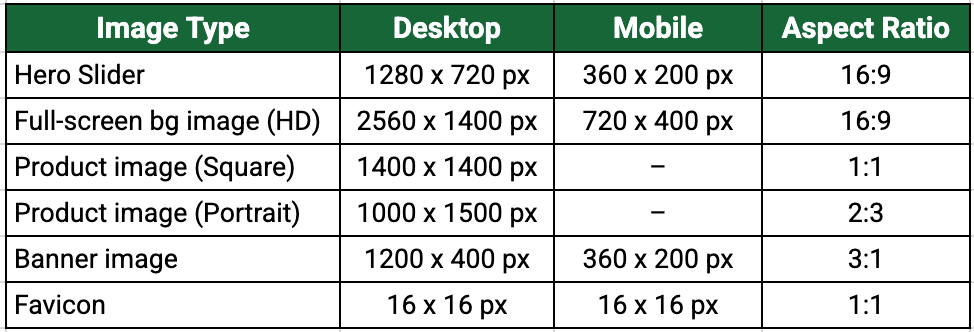
Ideal image format: .webp (great quality with smaller file size).
Pro tip: Use transparent-background images for logos, icons, and design elements so they blend nicely with any themed background. Maintain consistent aspect ratios and backgrounds across all product images, so your online store looks organized and professional.
Try this today:
Pick one area of your store (hero slider, a banner, or a best-selling product) and replace the current image with a correctly sized .webp image using the recommended dimensions above. See the difference for yourself, and incorporate those changes gradually to your entire online store.
If you have any doubts, we're here to help you.