New Features rolled out on September. 27, 2016
Beta Announcements
We are extremely happy to announce the Beta releases of two much-awaited integrations with Zoho Reports.

Note
- As these integrations are currently in public beta testing you may encounter certain functional bugs and limitations.
- This add-on is currently enabled only for customers in the paid plan (Standard and above). We will come up with a pricing plan as a part of the general release.
MailChimp Advanced Analytics Add-on (Beta)
The beta version of Zoho Reports Advanced Analytics Add-on for MailChimp enables you to easily analyze your email campaigns in MailChimp and derive great insights, with the in-depth reporting and analytical capabilities of Zoho Reports. Product marketers and analysts can slice & dice their campaigns data, measure and track key campaign metrics and effectively execute their email campaigns.
This add-on comes bundled with over 40+ insightful reports such as campaign conversion funnel, active days of a campaign, customer domain specific analytics etc. that enables you to analyze your data deeper. You can also create your own reports using the easy to use drag and drop interface.
Xero Advanced Analytics Add-on (Beta)
Zoho Reports provides financial analytical capabilities using its dynamic and robust integrations with Zoho Books and QuickBooks Online. Now, it's time for Xero to join the league.
Zoho Reports advanced analytics add-on for Xero empowers your financial data and helps you derive great insights. You can create and analyze reports such as financial overview, bill trend, pending invoices and do much more. The Xero Analytics add-on comes with 45+ insightful reports and dashboards that are capable of giving you a greater visibility on your financial data.
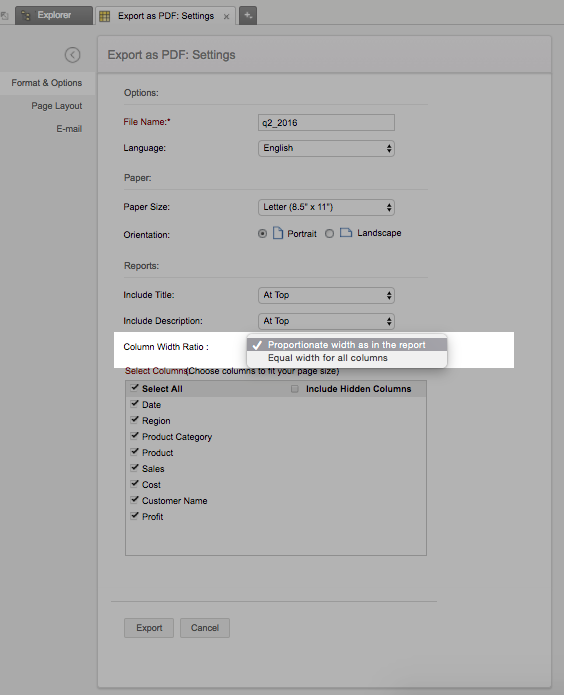
Support to Set 'Column Width Ratio' while Exporting as PDF
Zoho Reports now provides you with options to set the column width ratio while exporting any tabulated report (Pivots, Tabular View and Summary View) as a PDF. You can choose to either export the report with
- Equal width for all columns
- Proportionate width as in the report