New in Office Integrator: Detect patterns and auto-fill data in your spreadsheet
Hi users,
We are pleased to introduce the Pattern Fill feature in Zoho Office Integrator's spreadsheet editor. It intelligently detects patterns in your data based on a hint you provide and automatically fills in values for the remaining cells. With this feature, your users can skip repetitive data entry and let the editor populate structured data directly within your web app.
Highlights of the Pattern Fill capability:
- Smart pattern detection: Provide just one example of the desired output, and the editor infers the pattern across the entire column.
- Keyboard shortcut support: Trigger Pattern Fill instantly using Cmd/Ctrl + E without navigating the menu.
- Flexible post-fill actions: After data is generated, choose to accept suggestions, select all blank cells to fill them manually, or select all changed cells to apply formatting.
- Iterative refinement: Tweak your input hint at any time to regenerate the filled data.
Steps
- Open your spreadsheet in your web app.
- In an adjacent column, type the desired output in one cell to establish the pattern.
- Go to Data > Pattern Fill (or press Cmd/Ctrl + E).
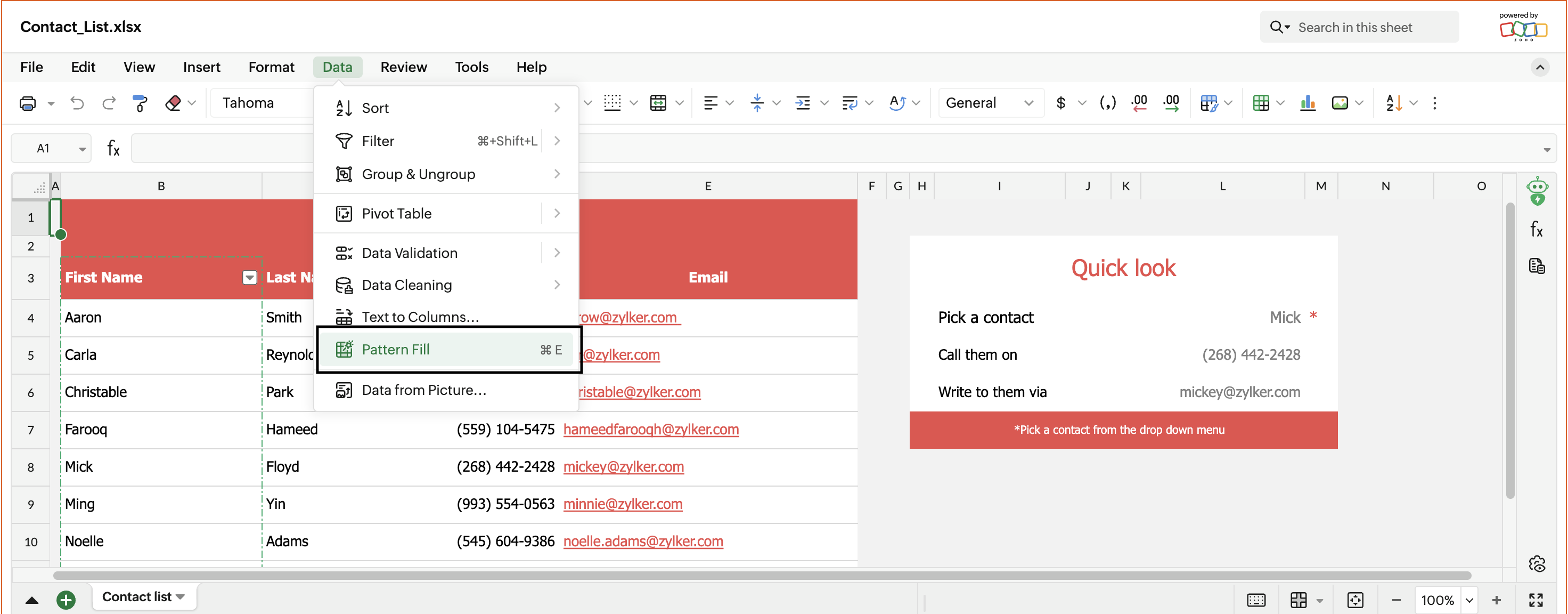
- Review the auto-filled data across the column.
- From the Pattern Fill dropdown, choose Accept Suggestions to finalize, Select all blank cells to identify gaps, or Select all changed cells to apply formatting.
Learn more
Check out the new updates to the spreadsheet editor in Zoho Office Integrator and let us know your feedback at support@zohoofficeapi.com or support@eu.zohoofficeapi.com or in the comments below.
Regards,
The Office Integrator Team