Parallel Transitions in Zoho Projects
In a Blueprint, a transition refers to the link between two statuses. Often, tasks require inputs from multiple teams or people before they are completed or moved to the next stage. In Zoho Projects, a user can execute two or more transitions in parallel. The Status will be updated only if all the parallel transitions are completed. There can be up to 4 transitions in parallel between two stages.
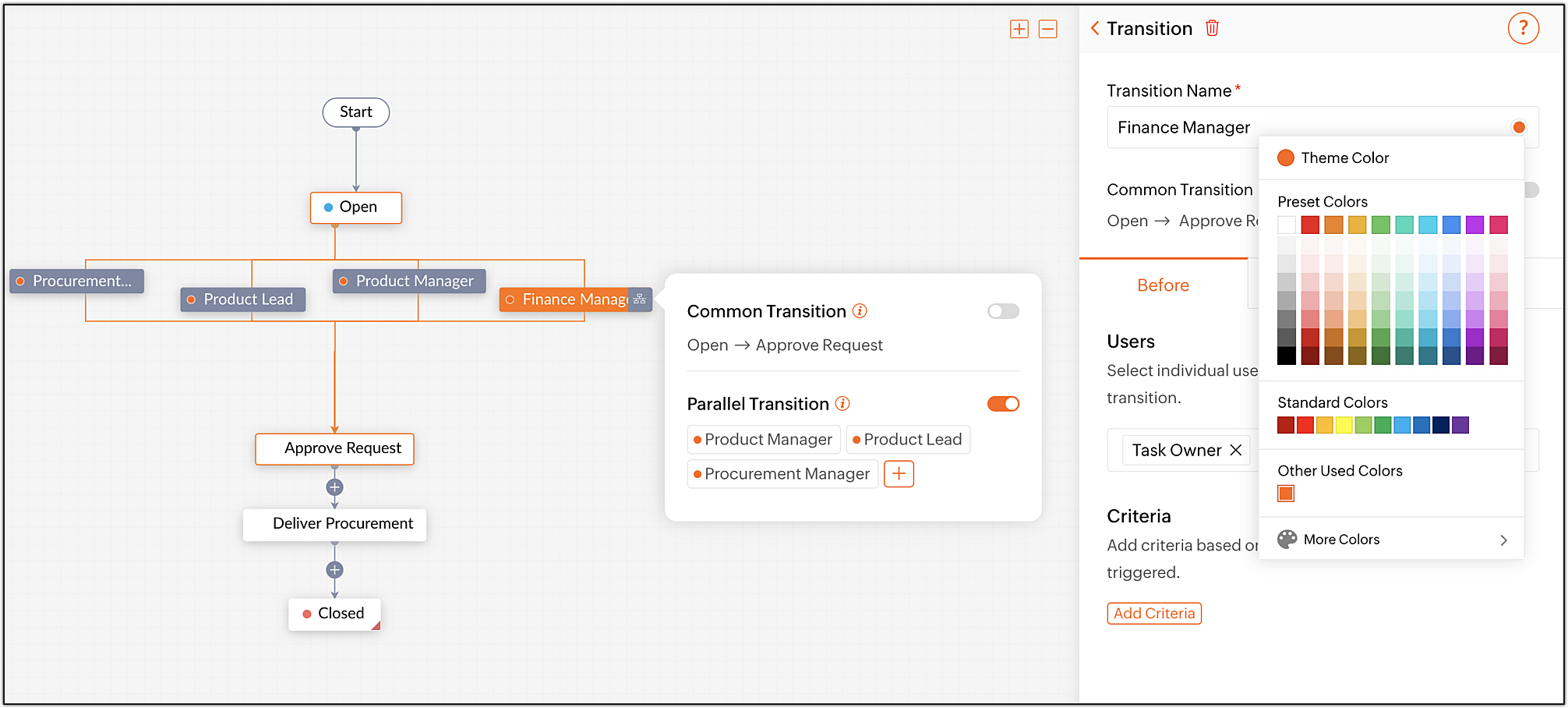
For instance, consider the process of approving a procurement request. Before providing the procurement, the admin must check for the approval from the
Product Lead, Product Manager, Finance Manager and the Procurement Manager. All these approvals have to be completed in parallel.
In a blueprint, the admin can automate this process by adding these processes as parallel transitions.
Unless all the approvals are received, the transaction will not progress to delivery stage. These transitions can also be color coded and reordered from the Blueprint as well.
Learn more about
Parallel Transitions
.
If you have any questions, do leave a comment below or mail to us at:
support@zohoprojects.com
.