Plug Sample #10 - Simplify Ticket Management (Zoho Desk) with Chatbots
Hi everyone!
We're here with another simple yet effective plug for your chatbot to integrate with Zoho Desk.
When a customer reports an issue/request during chat, it's logged as a ticket on Desk. When they return for updates, you end up searching through past tickets, reading conversations, and updating them manually. Imagine if your bot could automate this, retrieving ticket details and providing updates effortlessly.

Are you new to SalesIQ? Wondering what plugs and bots are?
SalesIQ offers chatbots to automate customer interactions. Using the Codeless bot builder, you can build chatbots by using cards in the bot-builder gallery. However, at times, businesses would require unique actions from the bot and for those instances, we have plugs. With plugs, you can create any specific action and bring it as a card inside the codeless bot builder, like the rest of the cards.
In this post, we will learn how to create a plug and list the customer's recent support tickets from Zoho desk.
How does this Plug work?
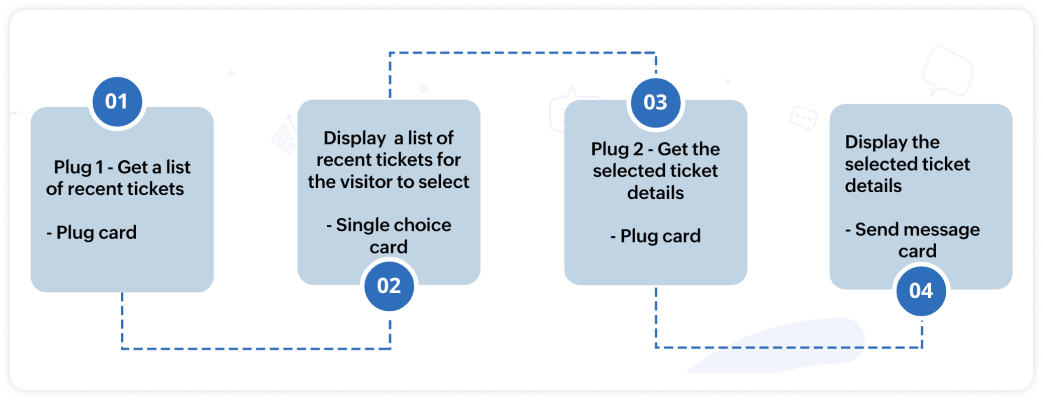
- The bot will get the email address of the visitor (Email card).
- Next, the bot will search and get a list of tickets associated with the respective email from Desk (Plug 1).
- Then, this ticket list will be displayed to the visitor (Single choice card).
- When the visitor selects one of the displayed tickets, the bot will fetch the neccessary ticket details. (Plug 2)
- And these details will be displayed to the visitor (Any response/input card).

Note:
- There are two plugs involved in this process, one is to display the ticket list and another is to display the ticket details.
- In this post, we will look at the plug to display the ticket list.
- The plug sample to display the ticket details is already available, click here to know more.
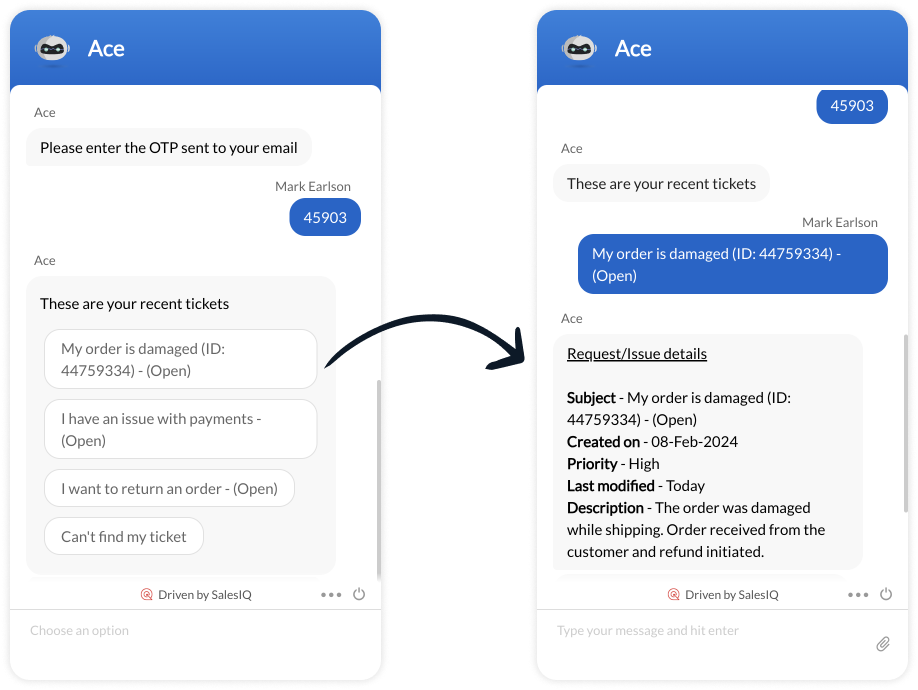
Plug output
How to build this Plug?
Step 1 - Create connection with Zoho Desk
- On your SalesIQ dashboard, navigate to Settings > Developers > Plugs > click on Add.
- Provide your plug a name, and description, select the Platform as SalesIQ Scripts, and finally, click on Connection to your left bottom. You will be redirected to the connection interface.
- Click on Create connection at the top right corner.
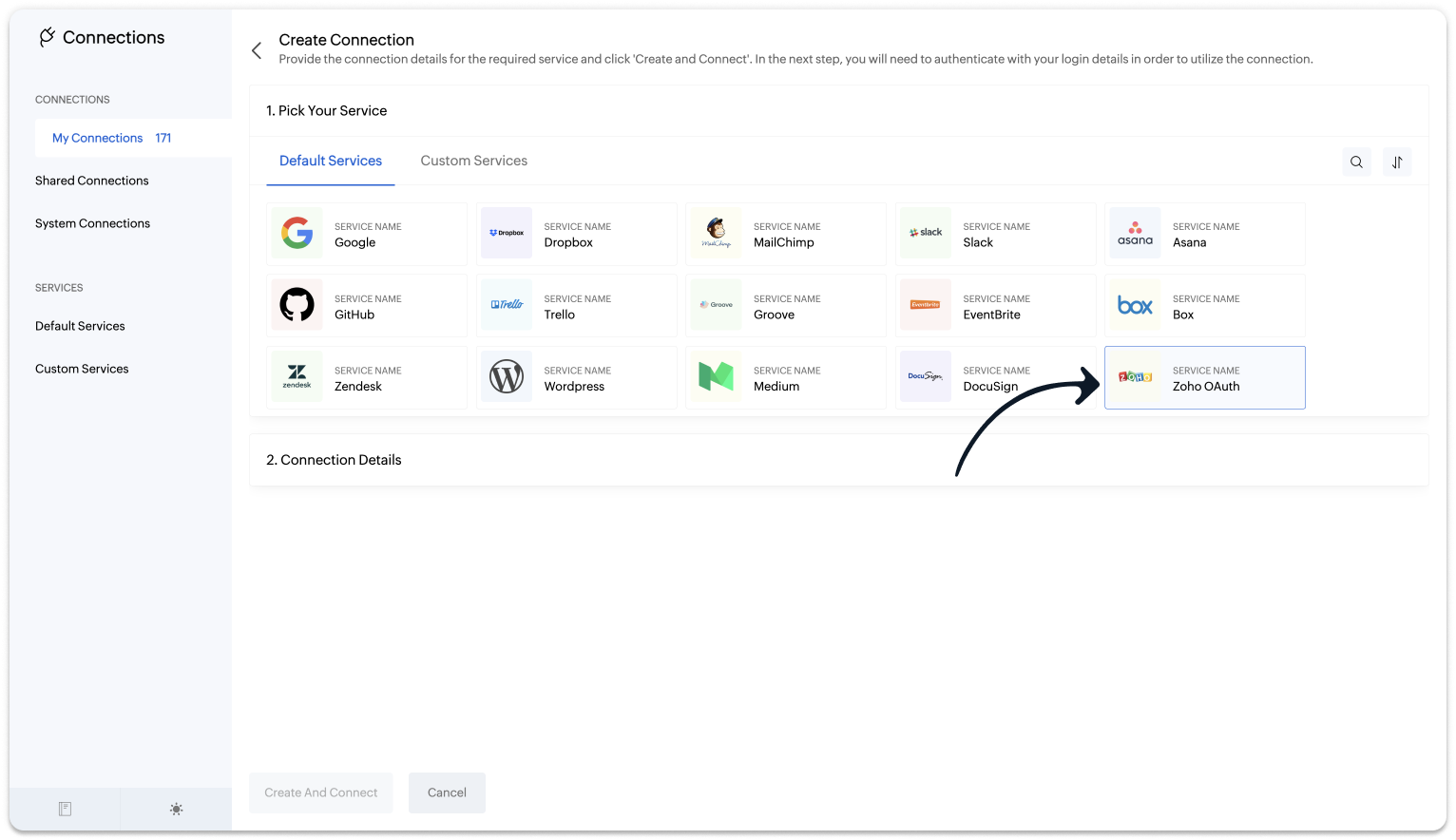
- Under Default connection, select Zoho OAuth service.
- Provide your connection name, connection link name, and choose the scopes below.
- Desk.search.READ
- Desk.contacts.READ
- Desk.tickets.READ
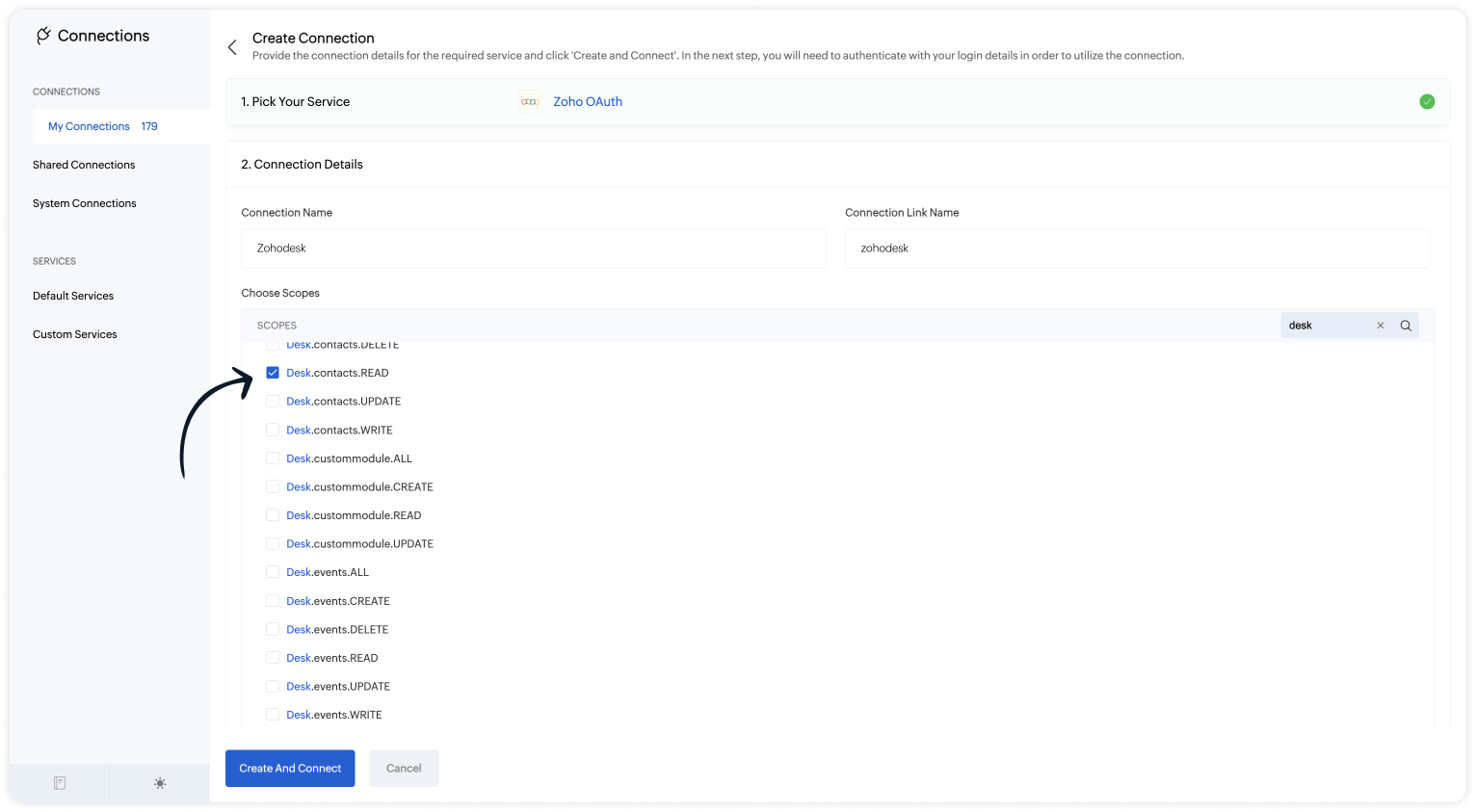
 Note: The Connection Link Name will be used in the scripts to invoke URL tasks.
- Click on Create And Connect to connect Zoho SalesIQ and Zoho Desk.
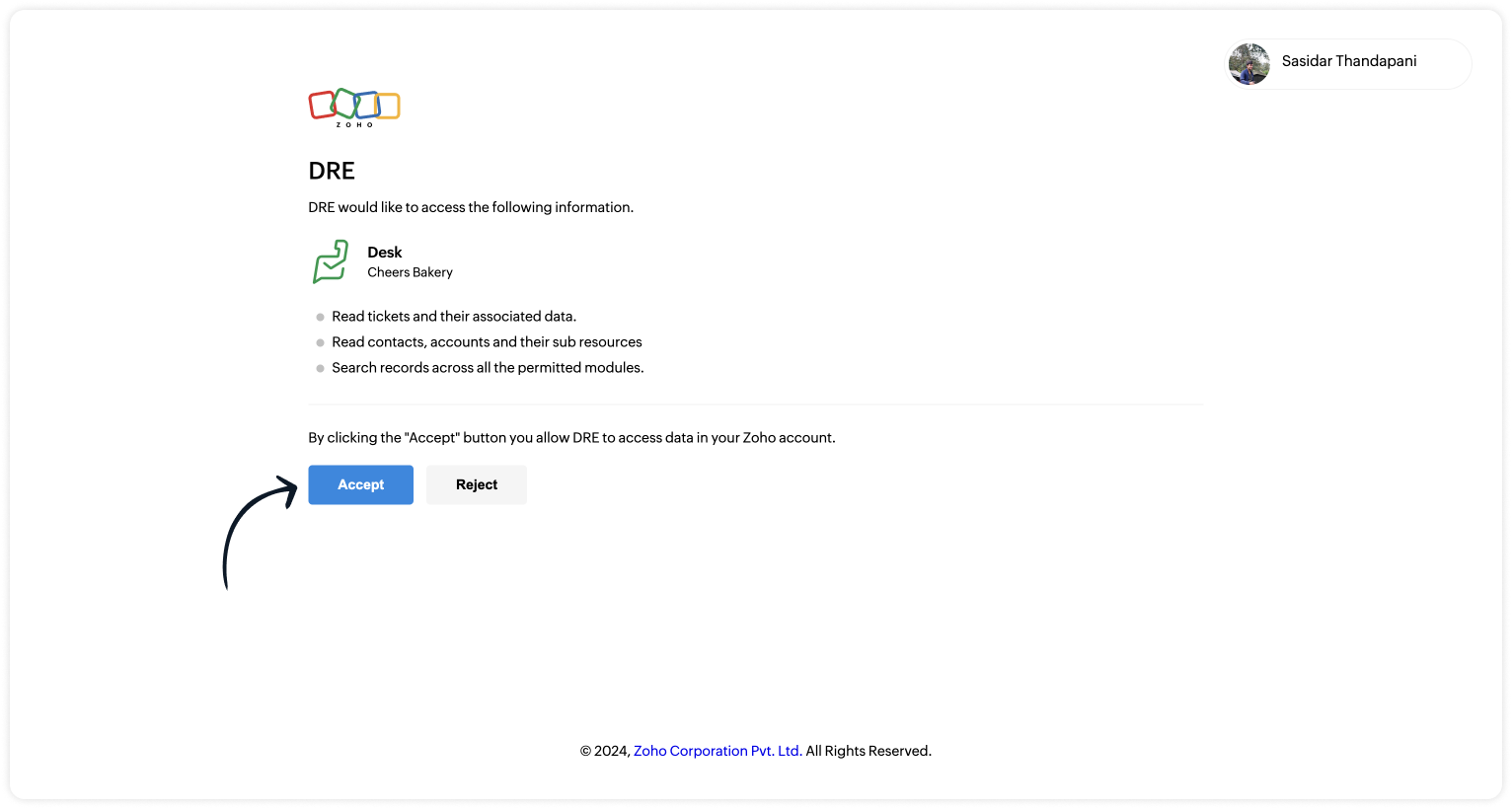
- Upon successful authentication, Zoho SalesIQ will be connected with Zoho Desk.
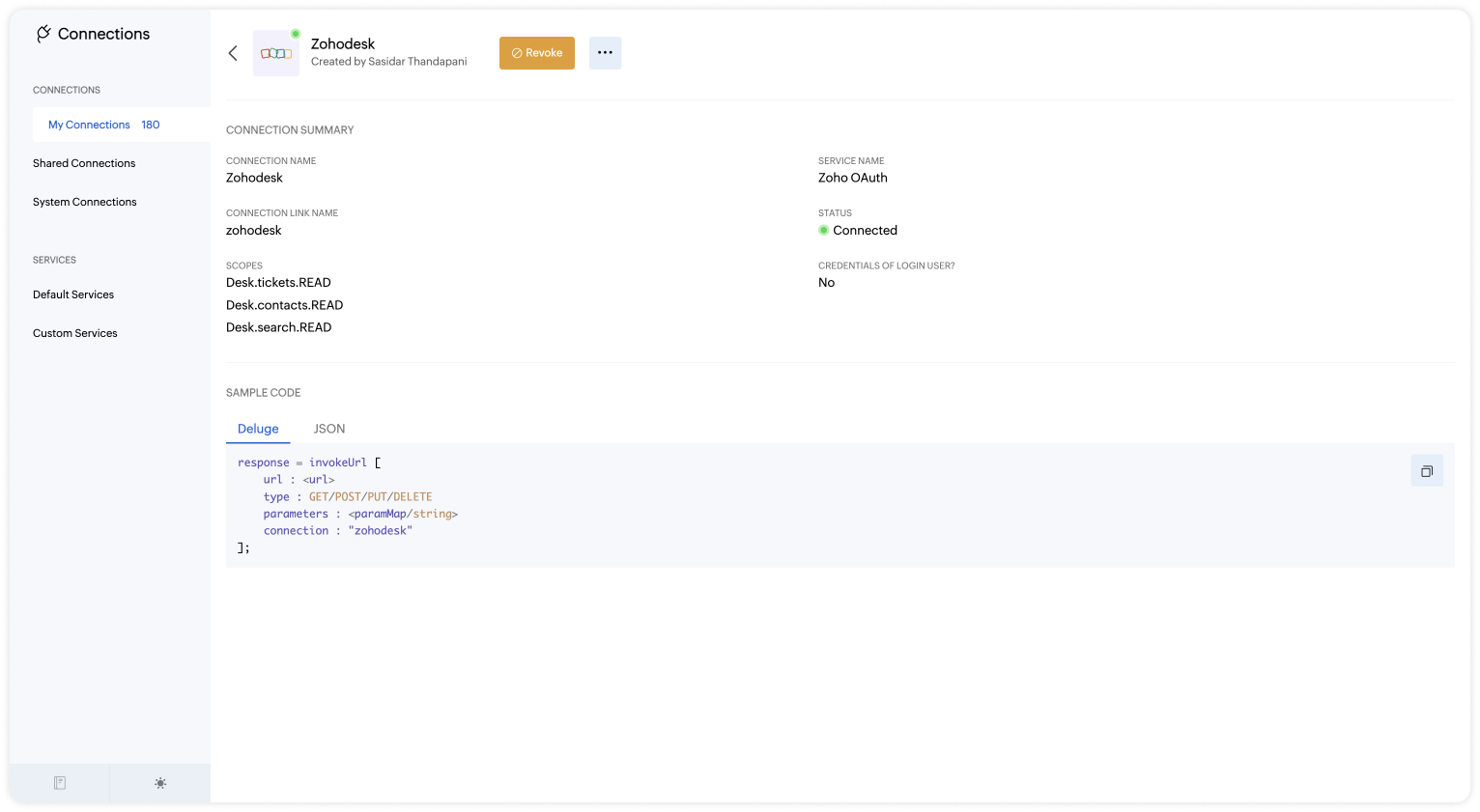
- The connection is successfully established.
Step 2 - Build the Plug
As we have created a connection between SalesIQ and Desk successfully, it's time to build the plug. The first step in building the plug is defining the parameters.
Input Parameters
- Name : email | Type : Email
Output Parameters
- Name : ticketList | Type : Option List
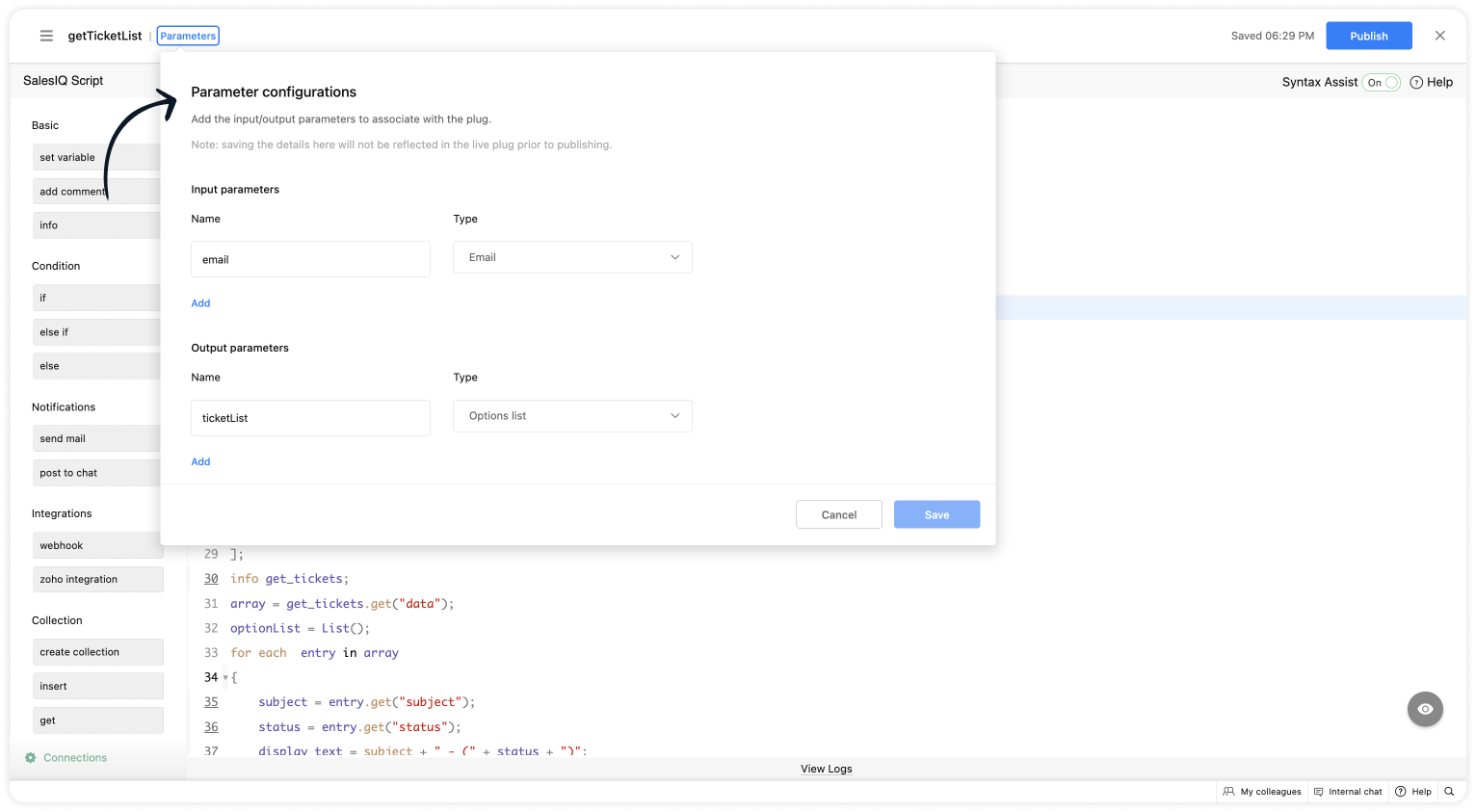
Script to get the list of tickets
- Copy the code below and paste it into your plug builder. Then, make the following changes.
- In line #8, get your Desk org ID (Settings > Developer Space > API > Scroll down to find the "OrgId").
- if(session.containsKey("email"))
- {
- email = session.get("email").get("value");
- }
- // Getting the contact ID from the email - https://desk.zoho.com/DeskAPIDocument#Search#Search_SearchContacts
- url = "https://desk.zoho.com/api/v1/contacts/search?email=" + email;
- header = Map();
- header.put("orgId","012345");
- //Change your org ID (Settings > Developer Space > API > Scroll down > "OrgId")
- getcontact = invokeurl
- [
- url :url
- type :GET
- headers:header
- connection:"zohodesk3"
- ];
- info getcontact;
- contact_id = getcontact.get("data").getJSON("id");
- info contact_id;
- url_ticket = "https://desk.zoho.com/api/v1/contacts/" + contact_id + "/tickets?sortBy=-createdTime&limit=3";
- // Get associate ticket of a contact - https://desk.zoho.com/DeskAPIDocument#Contacts#Contacts_ListContactsByIds
- get_tickets = invokeurl
- [
- url :url_ticket
- type :GET
- headers:header
- connection:"zohodesk3"
- ];
- info get_tickets;
- array = get_tickets.get("data");
- optionList = List();
- for each entry in array
- {
- subject = entry.get("subject");
- status = entry.get("status");
- display_text = subject + " - (" + status + ")";
- ticketNumber = entry.get("ticketNumber");
- optionList.add({"id":ticketNumber,"text":display_text});
- }
- response = Map();
- response.put("ticketList",optionList);
- return response;
- Then, click Save, preview the plug and Publish it.
Step 3 - Adding the plug to the Codeless bot builder
- Navigate to Settings > Bot > Add, provide the necessary information, and select Codeless Bot as the bot platform. You can also open an existing bot.
- Click on Plugs under Action cards, select the plug you have created and provide the input values for the parameters defined in the plug builder.
- Choose the %visitor.email% variable for the name.
- Provide a variable name for the ticket list.
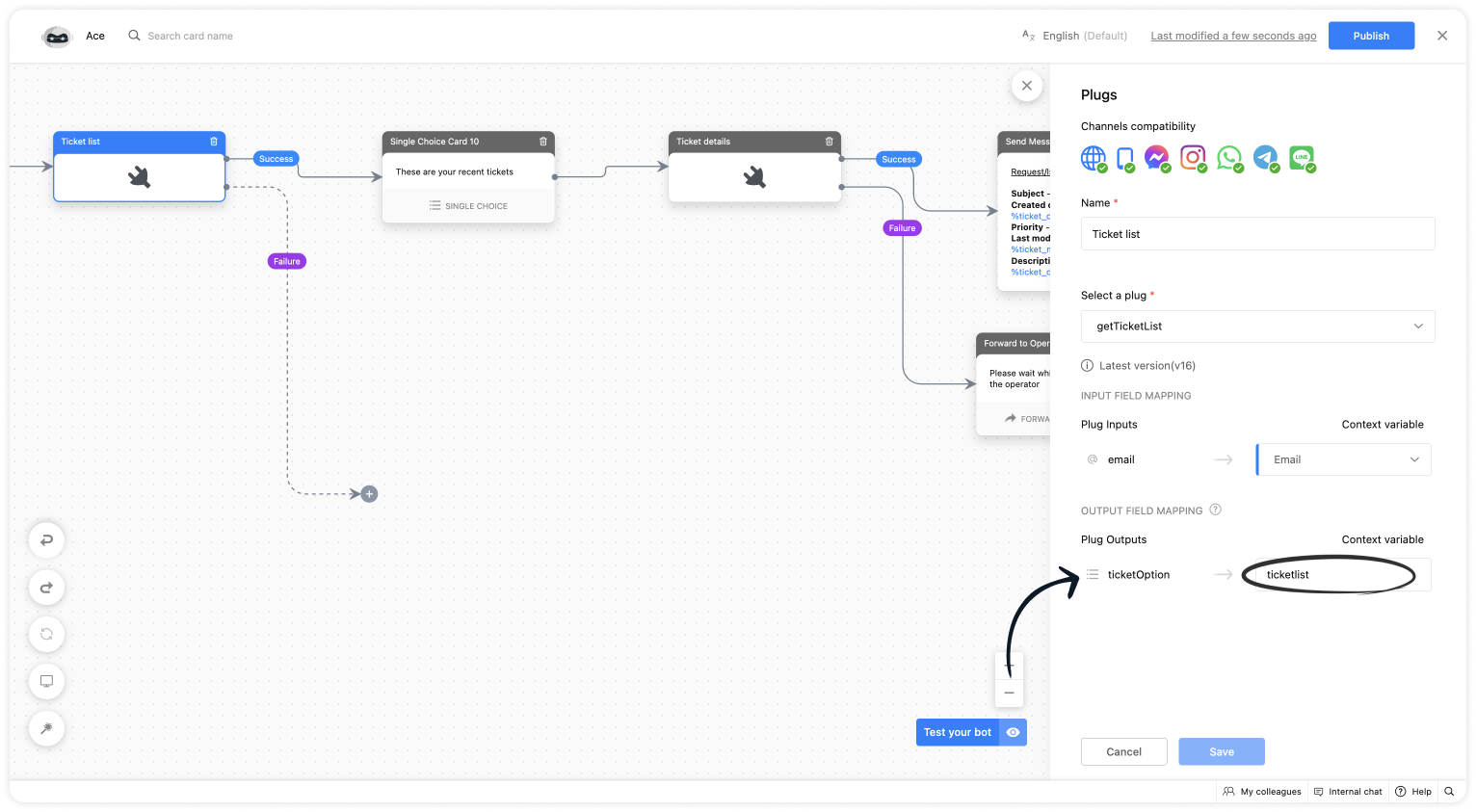
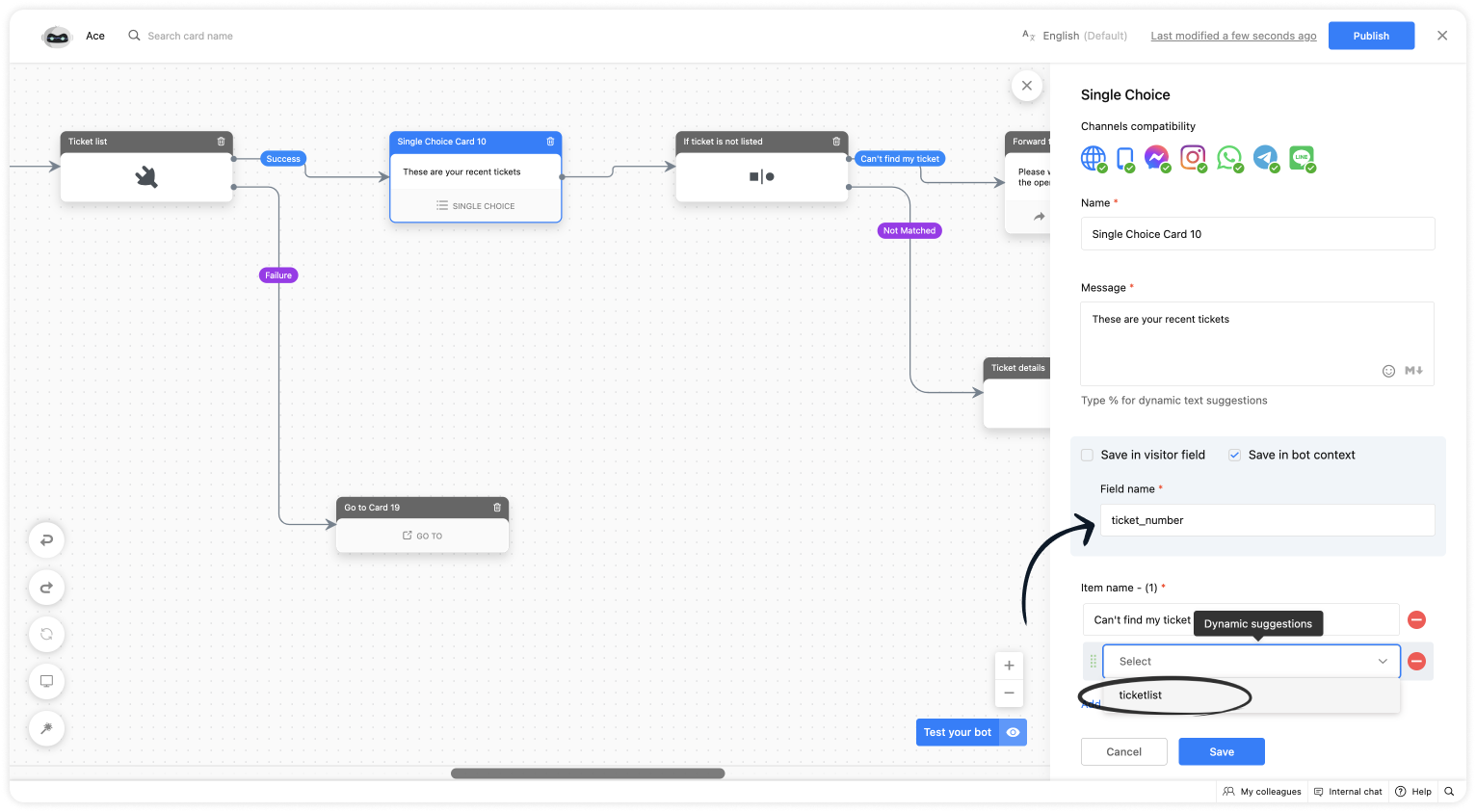
- Use a single choice card, click on Save in bot context, give a variable name and select the context variable under dynamic suggestion.
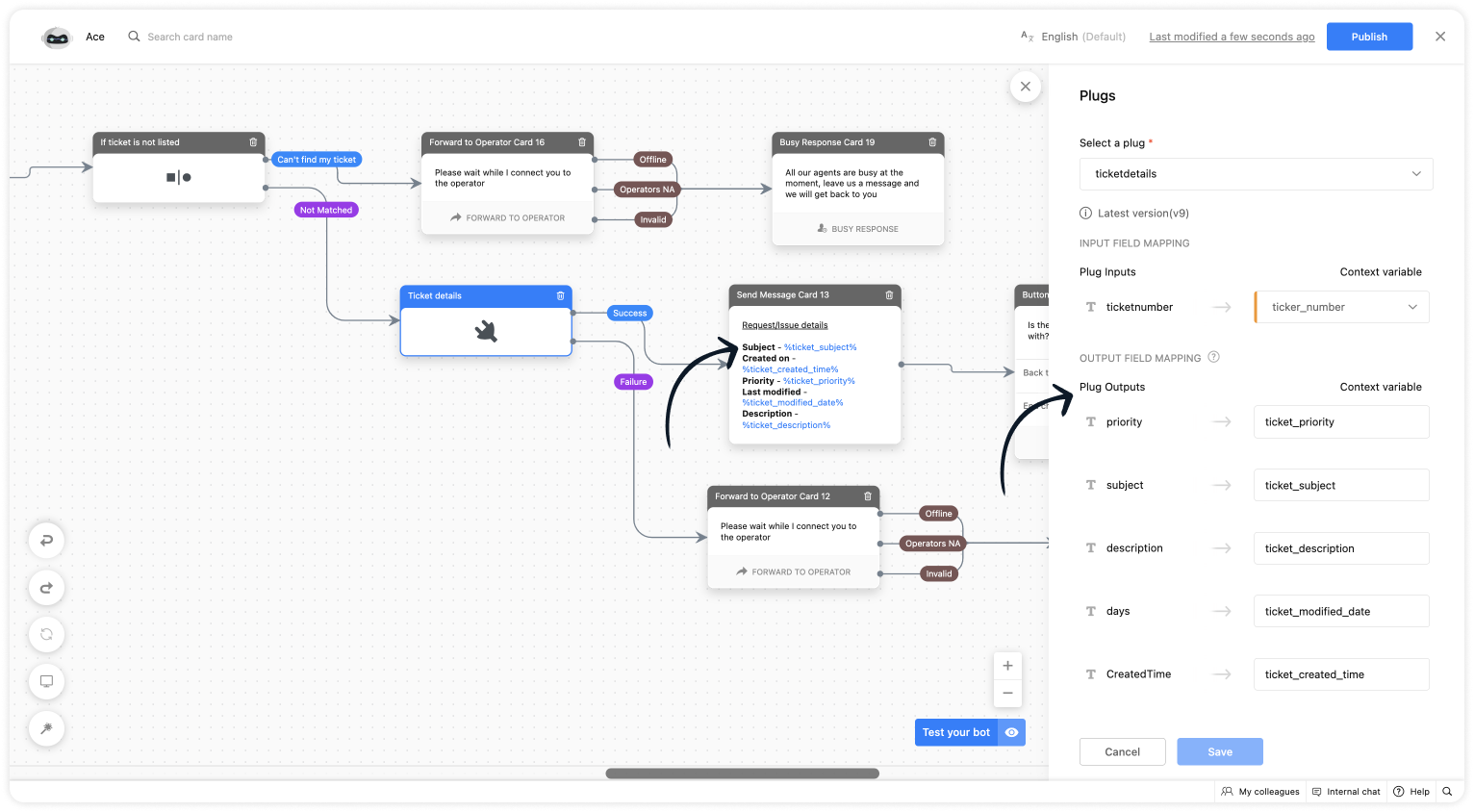
- Then, use this plug to show the ticket details.
I hope this was helpful. Please feel free to comment if you have any questions. I'll be happy to help you.
Related links:
- Plug guides
- Codeless bot guide
- Plugs for OTP verification.
- Plug to create a lead in Zoho CRM.
- Plug for getting the status of the ticket in Zoho Desk
- Plug to schedule appointments in Zoho Bookings
- Plug to read and write data in Google Sheet
- Plug to integrate bot with OpenAI
- Plug to track ecommerce orders from Zoho Commerce
- Zobot troubleshooting page
Best regards
Sasidar Thandapani
Access your files securely from anywhere
New to Zoho Recruit?

Zoho Developer Community
New to Zoho LandingPage?
Zoho LandingPage Resources
New to Zoho Survey?
New to Zoho CRM Plus?
Deliver unforgettable customer experiences
New to Zoho CRM Plus?
Deliver unforgettable customer experiences
New to Zoho Marketing Plus?
Everything you need to run your marketing
New to Zoho Marketing Plus?
Everything you need to run your marketing
New to Bigin?





Topic Participants
Sasidar Thandapani
Arbo Bath
Ram Freedman
Sticky Posts
Big Things Just Dropped in the SalesIQ Universe: Top Upgrades You’ll Love in Nova’25
Nova'25 has landed, and it’s packed with meaningful upgrades to help you engage smarter, work faster, and scale with ease. Whether you're into proactive messaging, smarter automation, or better admin control, there's something here for everyone. Here'sYour bot just got smarter: AI-Powered routing that reads between the lines
What if your bot could tell the difference? Between a visitor who just needs a quick answer, someone actively comparing options, and a frustrated customer one click away from leaving? Most bots can't. They deliver the same response to everyone, missingAlert: Audio Call Support to be discontinued for Old Live Chat Widget from December 31, 2025
Action Required: Upgrade to the New SalesIQ Live Chat Widget We're reaching out with an important update regarding the SalesIQ Live Chat Widget that requires your immediate attention. Effective December 31, 2025, audio call functionality will no longerPlug Sample #10 - Simplify Ticket Management (Zoho Desk) with Chatbots
Hi everyone! We're here with another simple yet effective plug for your chatbot to integrate with Zoho Desk. When a customer reports an issue/request during chat, it's logged as a ticket on Desk. When they return for updates, you end up searching throughOpenAI Alert! Plug Sample #11 - Next-generation chatbots, Zobot + ChatGPT Assistant
Hi Everyone! We have great news for all AI enthusiasts and ChatGPT users! The much anticipated Zobot integration with ChatGPT Assistant is now available with Plugs. Note: SalesIQ offers native integration with OpenAI, supporting several ChatGPT models,
New to Zoho TeamInbox?
Zoho TeamInbox Resources
Zoho CRM Plus Resources
Zoho Books Resources
Zoho Subscriptions Resources
Zoho Projects Resources
Zoho Sprints Resources
Qntrl Resources
Zoho Creator Resources
Zoho CRM Resources
Design. Discuss. Deliver.
Zoho Show Resources

Get Started. Write Away!
Writer is a powerful online word processor, designed for collaborative work.
Zoho CRM コンテンツ
-
オンラインヘルプ
-
Webセミナー
-
機能活用動画
-
よくある質問
-
Ebook
-
-
Zoho Campaigns
- Zoho サービスのWebセミナー
その他のサービス コンテンツ
Nederlandse Hulpbronnen

ご検討中の方
Recent Topics
Cliq iOS can't see shared screen
Hello, I had this morning a video call with a colleague. She is using Cliq Desktop MacOS and wanted to share her screen with me. I'm on iPad. I noticed, while she shared her screen, I could only see her video, but not the shared screen... Does Cliq iOS is able to display shared screen, or is it somewhere else to be found ? RegardsSpotlight #7 - Automatic Transitions in Blueprint
Previously, records could not be moved from one state to another without user intervention. With automatic transitions, move records from one state to another automatically, when it elapses its pre-defined time. This Spotlight discusses how automaticWhatsapp Connection Status still "Pending" after migration
Hello, I migrated my WhatsApp API to Zoho from another provider a day ago. So far the connection status is still “Pending”. There is a problem? How long does it usually take?Adding Multiple Files to a Zoho Vault Entry
There is a old blog post talking about adding multiple file attachments to one Zoho Vault Secret: https://www.zoho.com/blog/vault/introducing-new-features-in-zoho-vault-powerful-password-sharing-wider-storing.html Is that still possible, I can see howGet user last login
1. Is there a way to programmatically get the last user login to trigger certain workflows? 2. Is there a way to programmatically access the custom fields on a user's account?Dropshipping Address - Does Not Show on Invoice Correctly
When a dropshipping address is used for a customer, the correct ship-to address does not seem to show on the Invoice. It shows correctly on the Sales Order, Shipment Order, and Package, just not the Invoice. This is a problem, because the company beingAdd Attachment Support to Zoho Flow Mailhook / Email Trigger Module
Dear Zoho Support Team, We hope you are well. We would like to kindly request a feature enhancement for the Mailhook module in Zoho Flow. Currently, the email trigger in Zoho Flow provides access to the message body, subject, from address, and to address,Zoho Invoice Customer Login Portal
Are there any plans for a customer portal to Zoho Invoice, ala Freshbooks? I would like customers that I invoice to be able to login to review invoices and invoice history. I have not switched from Freshbooks for this very reason.the custom domain forwards by default to the old career site / how to switch it off??
dear friends, how to switch off the old version of the career site?? The set up custom domain forwards directly to the old site, so that I cant publish it... Any ideas? Thank you! KR, VictoriaPartner with HDFC And Sbi Bank.
Hdfc and sbi both are very popular bank if zoho books become partner with this banks then many of the zoho books users will benefit premium features of partnered banks.Can Zoho Flows repeat Actions more than once?
I'm attempting to make an intentional Zoho Flow loop using the below layout. However, when "WithinLimit" condition is met, the program fails to execute the action "Get & Add Request Co..." again. Is this by design? Is Zoho Flows unable to repeat actionsWhat KPIs Do You Use to Measure Your Support Team’s Performance in Zoho Desk?
Hi everyone, We hope you’re all doing well. We are trying to improve how we measure the performance and effectiveness of our support department, and we would really appreciate learning from the community. We assume there are several common and widely-usedPreserve Ticket Issue Mapping When Migrating from Jira to Zoho Projects
Hello Zoho Projects Team, We hope you are doing well. We are currently exploring a full migration from Jira to Zoho Projects, and we identified a critical limitation during the migration process involving Zoho Desk integration. Current Situation: We useResend Client Portal Invitation + View Email Delivery Status
Hi Zoho Team, We hope you are doing well. We would like to request two important enhancements related to the Zoho Creator Client Portal invitation process. At the moment, when we add a user to the Client Portal, Zoho Creator automatically sends an invitationCRM iOS App Missing Tags support
Hi, I remember reading either a tread on iOS (Maybe Later) & Android (i believe Now Supported) regarding “Tags” in the mobile apps unfortunately I can’t seem to find either. Could we clarify are “Tags” support coming to CRM iOS app as searching the forumsImported contacts succesful but contacts do not show up in Contacts
I imported +300 contacts. I can see them in import history. When clicking on a contact in import history I see all the imported contact details for any given contact. So import seems to be successful. However the imported contacts do not show up in the contacts tab. Not in All contacts, and not in a filtered view where they absolutely should show up. The search function also does not find any imported contact. Help?Hotmail is STILL blocking the zoho mail IP
Greetings, as I already mentioned in my last message, my Zoho IP has been blocked by Hotmail for more than 15 days. Although someone said that the issue was "solved," it still isn't, and this amount of time seems neither normal for a "serious" company,Pre-fill webforms in Recruit
I don't want to use the career site portal (as I have my own already), but I would like to direct users to the application forms for each role, from my website job pages. Is there a way to pre-fill fields in Recruit application forms, so that I only haveZia Actions: AI-powered Workflow Automation for Faster and Smarter Execution
Hello everyone, Workflows got a notch better with AI-based actions. Actions such as field extraction, prediction, auto reply, and content generation facilitate quick execution with improved speed and accuracy. Zia can intercept useful details in newlyImport KB template OR Export template for zoho desk?
Greetings. Can you tell me if there is a way to get an EXPORT of my KB articles? OR is there a template you supply for importing KB articles into my zoho desk? I am looking for a method of understanding what fields can be imported, and what their possibleThis user is not allowed to add in Zoho. Please contact support-as@zohocorp.com for further details
Hello, Just signed up to ZOHO on a friend's recommendation. Got the TXT part (verified my domain), but whenever I try to add ANY user, I get the error: This user is not allowed to add in Zoho. Please contact support-as@zohocorp.com for further details I have emailed as well and writing here as well because when I searched, I saw many people faced the same issue and instead of email, they got a faster response here. My domain is: raisingreaderspk . com Hope this can be resolved. Thank youXML format to import knowledgebase into Zoho Desk
Hi, We just started to use Zoho Desk and want to import our knowledgebase from our old support system (Freshdesk) to Zoho Desk. Can anyone give us information about the format of xml file to import? There is no explanation on the related page.Can we add custom fields to portal community profiles?
How do we add custom fields to our profile pages in our portal community? If we have the ability to add custom fields, will we be able to access those fields via API? We want to use our Desk community in our help portal as our primary community and wouldWeekly Sales Summary
Is it possible to generate a weekly report in Zoho Books to show -$$ amount of estimates generated -# of estimates generated by Salesperson -$$ amount of Sales Orders created -$$ amount of Invoices generatedClient Portal ZOHO ONE
Dear Zoho one is fantastic option for companies but it seems to me that it is still an aggregation of aps let me explain I have zoho books with client portal so client access their invoice then I have zoho project with client portal so they can access their project but not their invoice without another URL another LOGIN Are you planning in creating a beautiful UI portal for client so we can control access to client in one location to multiple aps at least unify project and invoice aps that wouldRestrict Addresses in Zoho Forms?
In the address field, is there a way to restrict the addresses that auto populate (via Zoho Maps or Google Maps) to a specific state (I know it's possible with the country). Additionally, how often does the address in Zoho Maps get updated? Certain addressesDo Individual Forums within Categories, in Desk Community, Produce Their Own RSS Feed?
Do Individual Forums within Categories, in Desk Community, Produce Their Own RSS Feed? If not, can anyone share a work-around that could help me get an RSS feed for individual category forums?ASAP Widget Not showing "My Tickets"ed
Hello Team, I have created a ZOHO ASAP Widget and embedded to my portal app.clearvuiq.com , widget renders ok and I can open tickets from widget. However I want my opened tickets to be visible in the widget. How can I achieve that?Add Zoho Forms to Zoho CRM Plus bundle
Great Zoho apps like CRM and Desk have very limited form builders when it comes to form and field rules, design, integration and deployment options. Many of my clients who use Zoho CRM Plus often hit limitations with the built in forms in CRM or Desk and are then disappointed to hear that they have to additionally pay for Zoho Forms to get all these great forms functionalities. Please consider adding Zoho Forms in the Zoho CRM Plus bundle. Best regards, Mladen Svraka Zoho Certified Consultant andHow to view CRM Sales Orders in Desk
What's the usual way to view all CRM sales orders linked to a contact, when viewing a ticket in Desk? I don't want to have to open a new tab to see the order in CRM. And the Desk CRM sidebar doesn't seem to be configurable. Would I have to use an extensionKaizen #219: Actions API - Webhooks APIs - Part 1
Hello all!! Welcome back to a fresh Kaizen week. In the previous weeks, we covered Workflow Rules APIs, Actions APIs - Email Notification APIs, Tasks Update API, and Field Update API. This week, we will continue with another Actions API - Webhooks APIPricing Strategies: #3 Services never Stop with just Plans
"Hey, while you're here, could you also take a look at the vegetable patch?" Aaron hears that line almost every week. He runs a small gardening service, the kind where customers subscribe to a simple monthly plan that includes basic maintenance, mowing,Presenting ABM for Zoho CRM: Expand and retain your customers with precision
Picture this scenario: You're a growing SaaS company ready to launch a powerful business suite, and are looking to gain traction and momentum. But as a business with a tight budget, you know acquiring new customers is slow, expensive, and often deliversLead Blueprint transition in custom list view
Hi, Is It possible to insert the Blueprint transition label in a custom Canvas list view? I am using Lead module. I see the status, but it would be great if our users could execute the Blueprint right from the list view without having to enter the detailedCropping Photos for Zoho Sites
Hi, I'm wondering if there is a built in crop tool for zoho sites for my photos so I can crop them and see what the crop looks like on the site?Deluge scripts
Why is there not a search function to make it easier to find the script of interest when modifications are required.WorkDrive and CRM not in sync
1/ There is a CRM file upload field with WorkDrive file set as the source: 2/ Then the file is renamed in WorkDrive (outside CRM): 3/ The File in CRM is not synced after the change in WorkDrive; the file name (reference) in CRM record is not updated (herezoho sheet stuck
I Need help. ZOHO sheets stuck on the loading screen. I've already deleted the system cache and cookies of my browser (google chrome) but it's still not opening.bulk edit records and run internal logic
hi there is few logics in manner "it this than that" logics work well when i edit entry openning it one by one (via workflow "on add/edit - on success" , for custom field "on update/on user input") but when i try bulk edit records - logic does not work. how can i turn on logic to work as programmed - for mass editing records via bulk edit?Duplicate Accounts
Hi There, I am looking for a solution, script, workflow or anything to solve an issue we have - in our customers section we have a rule that doesn't allow duplicates, however Zoho will allow customers with xxxxx and xxxxx PLC or LTD so effectivley weNext Page