Roles and Privileges in Zoho Mail: Define and control administrative access in your organization
Imagine a growing organization where the IT team needs to manage users, the support team needs to handle spam settings, and the group admins need to oversee email groups, all without giving everyone full access to the Admin Console. This can be achieved with Roles and Privileges in Zoho Mail Admin Console.
What are the types of roles available in Zoho Mail Admin Console?
Zoho Mail organizes access into three roles, each with a defined scope of responsibility.
Super Administrator: The user who sets up the organization in Zoho Mail is assigned as the Super Administrator by default. There can only be one Super Administrator in an organization, and they hold the highest level of access. Only the Super Administrator can change user roles, assign a new Super Administrator, and update the organization's name and logo.
User: Users are end-users who access Zoho Mail for communication and do not have any administrative capabilities.
How can administrators use Roles and Privileges effectively in Zoho Mail Admin Console?
Roles and Privileges in Zoho Mail give administrators the ability to distribute administrative responsibilities across the organization without compromising security or granting unnecessary access.
Delegate specific responsibilities: Instead of assigning full admin access to everyone, administrators can assign custom roles such as Spam Control Admin or Quarantine Admin to users who need access only to those specific functions.
Control group creation: Restrict who can create Organization Groups or Personal Groups within the organization, ensuring that group management follows the organization's communication policies.
Protect Super Administrator access: Since there can only be one Super Administrator, organizations can ensure that the highest level of access is always held by the right person by transferring the role when needed.
Custom Administrator roles in Zoho Mail
Instead of giving full admin access to everyone who needs to manage a specific function, Zoho Mail allows Super Administrators to assign custom administrator roles based on specific responsibilities:
User Management Admin: Manages user accounts, including adding and deleting users, configuring user settings, and resetting passwords.
Group Management Admin: Manages group-level operations such as adding or removing group members, deleting groups, and configuring group settings.
Spam Control Admin: Manages the organization's spam settings, including Allowed and Blocked Lists and actions for SPF, DKIM, DMARC, and DNSBL failures.
Helpdesk Admin: Accesses audit logs, manages blocked accounts, handles bounced emails, and adds email recovery options.
Quarantine Admin: Manages quarantined emails, including delivering, denying, or exporting quarantine emails for both incoming and outgoing emails.
Marketplace Developers: Builds applications using Developer Space. The Super Administrator has developer rights by default.
Client Script Admin: Creates, shares, approves, or rejects client scripts configured for the organization.
Managing Group Privileges
In addition to user roles, Zoho Mail also allows administrators to control who can create Organization Groups and Personal Groups within the organization. For each group type, administrators can restrict creation to the Super Administrator only, Administrators only, or allow all users to create groups. Personal Groups can also be configured to allow or restrict external members from being added.
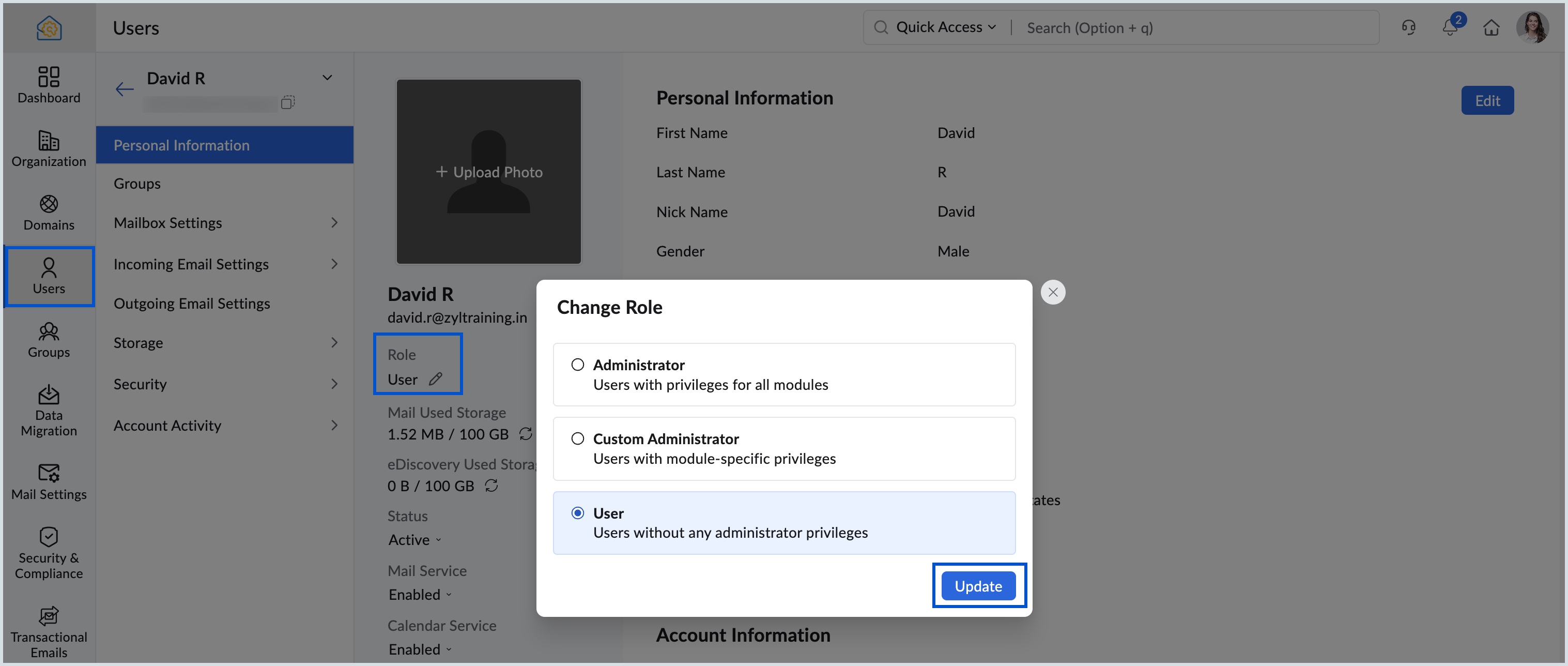
Steps to change a user's role
Log in to Zoho Mail Admin Console.
Navigate to Users in the left pane and click on the user whose role you want to change.
Click the Edit icon in the Role field under Personal Information.
Select the role you want to assign and click Update.
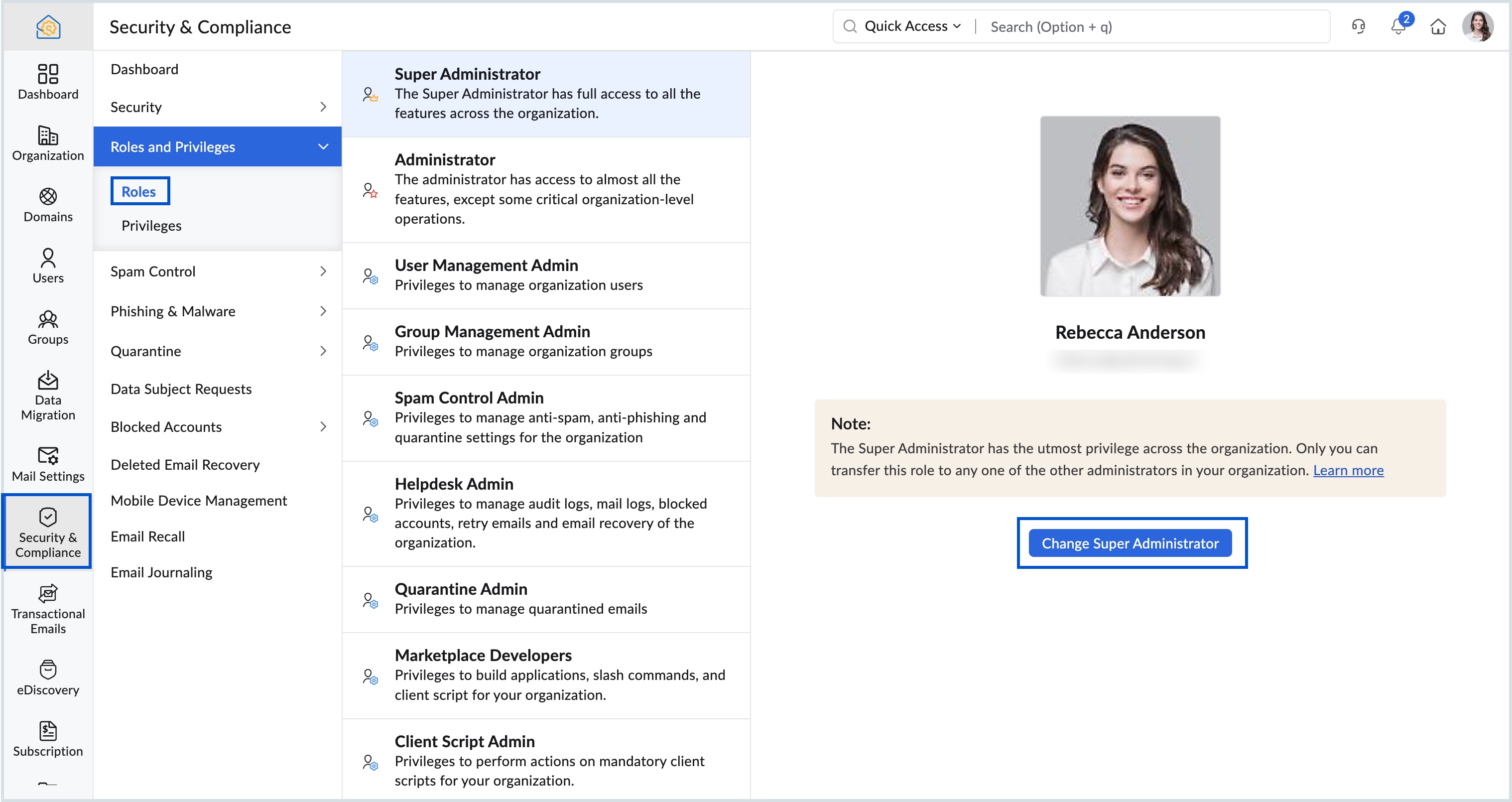
Steps to change the Super Administrator
Log in to Zoho Mail Admin Console.
Navigate to Security and Compliance and select Roles and Privileges.
Go to Roles and click Super Administrator.
Click Change Super Administrator and select the administrator you want to assign as the new Super Administrator.
Authenticate with your password and click Assign.
Points to note
The Super Administrator role can only be assigned to an existing Administrator. Custom administrators are not eligible.
Changing the Super Administrator requires re-authentication using the MFA method configured for your account.
Once the Super Administrator role is transferred, the previous Super Administrator's role changes to Administrator.
Custom administrator roles are available only for organizations on paid Zoho Mail plans.