Timeline Tracking Support for records updates via module import and bulk write api

Note:
- This update is currently available in Early Access and will soon be rolled out across all data centers (DCs) and for all editions of Zoho CRM.
- The update will be available to all users within your organization, regardless of their profiles or roles.
Hello friends,
I am here to share an interesting update in the Timeline View and Audit logs of your records in Zoho CRM. This update comes directly from customer feedback as always, we listen to what our customers need and bring it to life in our product.
We all know that leads or contacts can be added to our CRM systems in multiple ways manually, through imports, or via the Bulk Write API. Often, some information might be missing when data is collected or provided by vendors. That means records often need to be updated later.
The Timeline View captures all events related to a record, including their source and timestamp. However, it currently logs only data that’s added directly within the system. Updates made through module imports or the Bulk Write API aren’t reflected here. When handling large volumes of customer data, this visibility becomes crucial especially to track what changed, when, and by whom, ensuring better coordination among multiple sales reps working on the same records.
To address this, we have now introduced support for Bulk Write API/Import in the Timeline View, including details about who updated the record and how.
How it will appear in the record timeline :
Let’s say your firm imported a set of leads into the system using a CSV or XLS file. Later, you realize that the mobile number field is missing for several leads.

To fix this, you decide to add the missing phone numbers by importing another file. This time, while uploading, choose “Update existing Leads only.”
Once the update is complete, you will see the phone numbers reflected in the respective records

Now, when you open the Timeline history of any updated record, you will find detailed information about the update including who updated the field, how it was updated, when it happened, along with the previous and new field values.

Similarly, if an update is performed via a Bulk Write API, the same level of detail will be captured under the Timeline history.
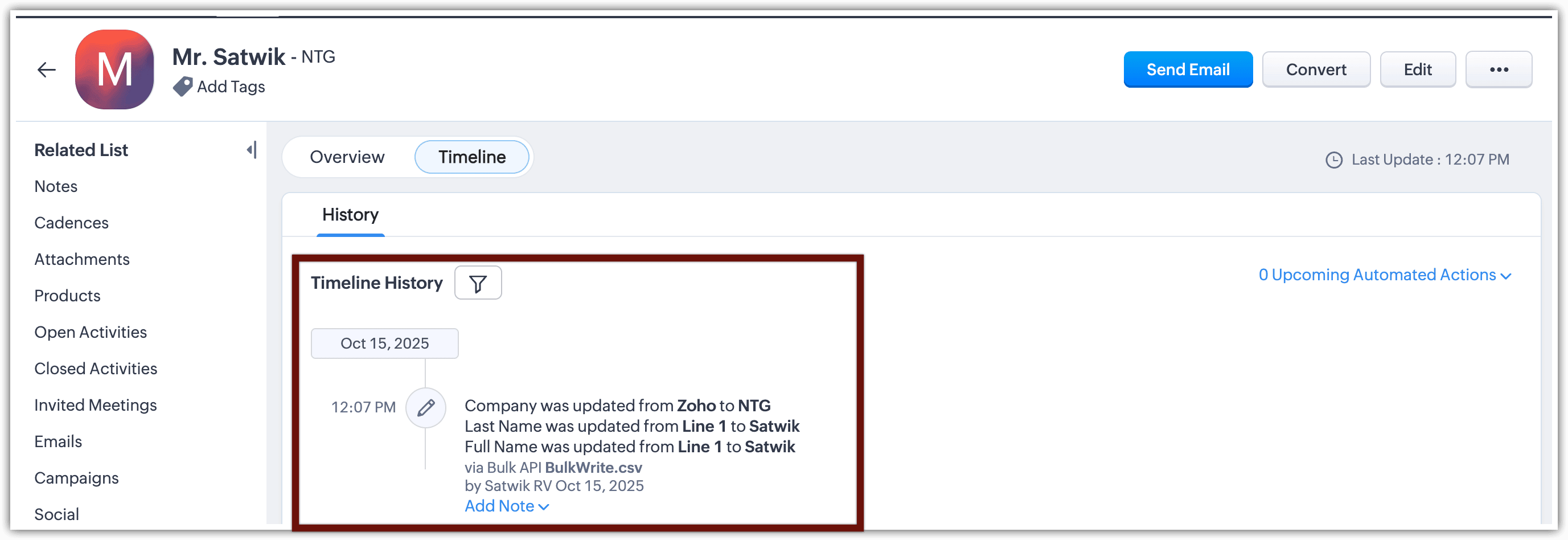
You will also be able to view this information in the Audit Logs. It will show details such as who added which records, the record names, how they were added (for example, via an import), and the number of records added.

So, going forward, all bulk updates made to your records whether through imports or bulk update actions will be captured in the Timeline history within the record detail page.
Stay tuned for more updates!
Thanks!
Thanks!