Tip #90 – Stay on top of every session event in real time with Webhooks – 'Insider Insights'
Hello Zoho Assist Community!
An IT manager wants to know the moment a remote session starts on a critical server. A support lead wants their helpdesk tool updated automatically whenever an inbound request is picked up or dropped. A DevOps team wants device status changes, online, offline, or deleted, pushed to their monitoring system without anyone having to manually log and report it.
All of these need the same thing: real-time information flowing between Zoho Assist and the tools their teams already use, automatically, without manual intervention.
That's exactly what Webhooks in Zoho Assist are built to do.
What are Webhooks?
A webhook automatically notifies a connected system the moment a specific event occurs, no manual checking, no delays. Something happens in Zoho Assist, and your connected tool knows about it instantly. Think of it like a bank transaction alert: you don't check your balance to find out, the notification comes to you.
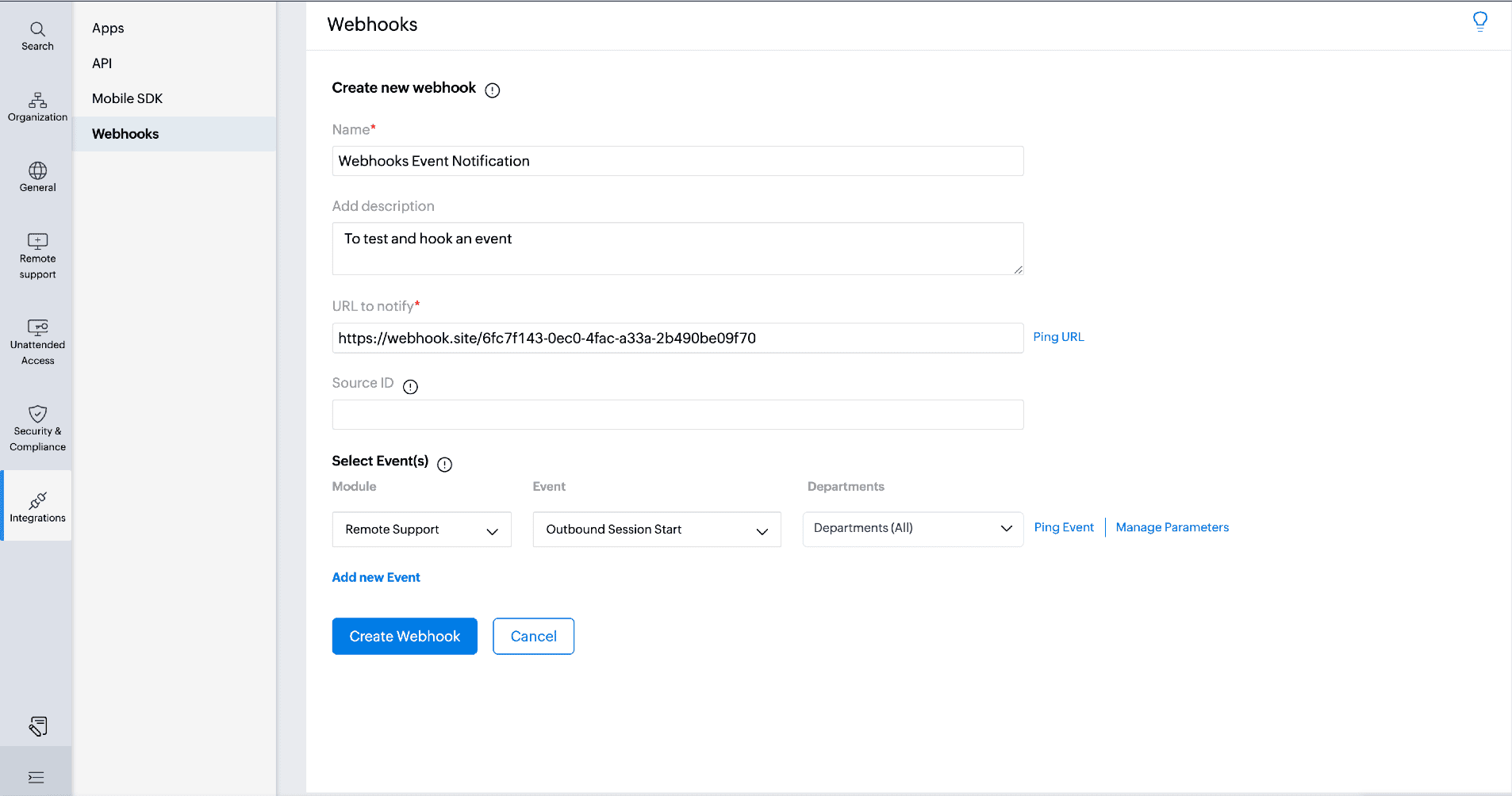
Navigate to Settings > Integrations > Webhooks and click Add Webhook. Add a name, description, and callback URL, then select the module, event name, and department. Use Ping URL to test your callback URL and Ping Event to trigger a test run before going live. Once created, webhooks can be accessed and edited anytime from the Webhooks menu.
What events can you track?
Webhooks in Zoho Assist cover a wide range of session and device events, including:
Session Start and Session End (Remote Support and Screen Share)
Customer Join
Inbound Request Created, Transferred, Delegated, Picked, Declined, Dropped, or Expired
Device Add, Device Online, Device Offline, and Device Delete
Each event delivers a notification in JSON format via HTTP POST to your configured callback URL the moment it's triggered.
Note:
Webhooks are available on the Zoho Assist Enterprise edition only.
You can create up to 20 webhooks in total, with up to 10 webhooks configured per event.
A third-party integration is required. Use Zoho Flow or any third-party service to create your callback URL.
If your team relies on connected tools and real-time visibility to manage support operations, Webhooks give you the automation layer to make it all work together seamlessly.
Have you set up Webhooks in Zoho Assist? We'd love to hear what integrations your team has built. Share your experience in the comments below!
For help or questions, reach out to us at support@zohoassist.com. We're always happy to help!