Todas las novedades de Zoho Desk
Todas las novedades de Zoho Desk

Un Nuevo Zoho Desk

¡Hola comunidad!

Novedades en Zoho Desk 2022
 
Como agente de atención al cliente, por mucho que ames a tus clientes y tu trabajo, es probable que te encuentres con días difíciles. Nos referimos a los días en los que pulsas el botón equivocado, se derrama el café en tu camisa favorita y entras en el trabajo y te encuentras con una pila de solicitudes de asistencia sin abrir en la cola. A veces, durante esos turnos de asistencia, un "gracias por tu ayuda" es lo que te hace seguir adelante.

Los agentes de atención al cliente desempeñan un papel tan vital en la felicidad del cliente que algunas empresas han redefinido el papel como "agente de la felicidad del cliente". Los agentes juegan un papel directo en asegurar que los clientes tengan una gran experiencia con tu empresa. Y en Zoho Desk, nuestra misión es mantenerte el "agente de la felicidad" feliz.
Con la felicidad del cliente en mente, la nueva versión de Zoho Desk fortalece la comunicación omnicanal, el autoservicio del cliente y la experiencia del agente. Sigue leyendo para conocer todo lo que hemos hecho.  

Mensajería instantánea
Estamos encantados de desvelar una nueva forma de interactuar con tus clientes en Zoho Desk. La plataforma de mensajería instantánea (IM) para Zoho Desk permite a los clientes contactar con tu negocio a través de WhatsApp, Telegram, LINE y WeChat. Dado que la mayoría de tus clientes ya están utilizando estas plataformas para comunicarse, tiene sentido reunirse con ellos allí. Hemos combinado todas las herramientas que ya conoces con nuestro completo módulo de mensajería instantánea, junto con algunas nuevas características diseñadas para maximizar la productividad.
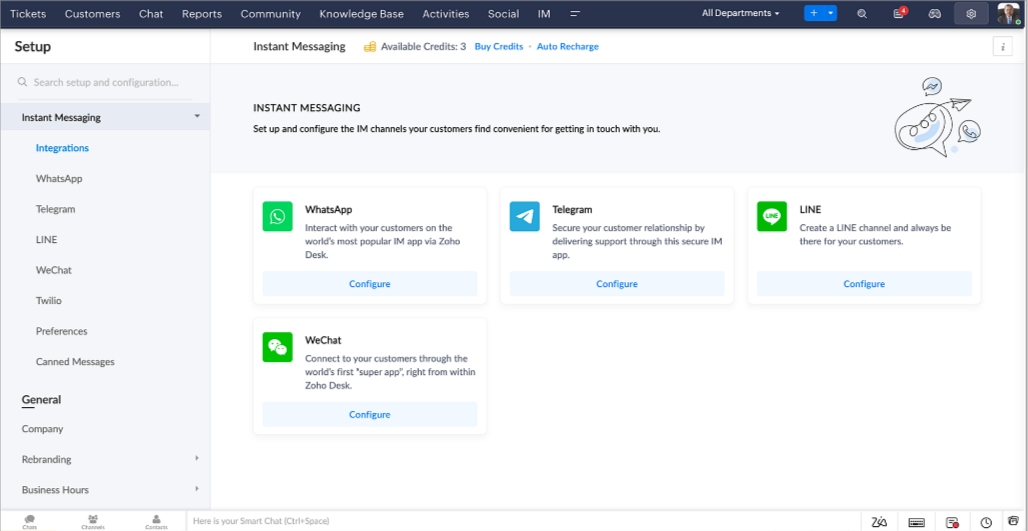


Zoho Desk te notifica los chats entrantes en tiempo real para que puedas conectarte fácilmente con los clientes desde la interfaz que ya utiliza y le encanta. Mientras tanto, tu puedes:
  • Seguir el contacto con el cliente, la información del ticket, el historial de conversaciones entre canales y los detalles de los archivos adjuntos dentro de la ventana de chat del cliente para obtener un contexto inmediato.
  • Acceder y adjuntar artículos de la base de conocimientos directamente desde la sección de entrada, utilizar respuestas enlatadas para obtener esoluciones rápidas y añadir emojis para una mayor personalización.
  • Participar en varios chats simultáneamente en todos los canales sin tener que cambiar de pestaña.
  • Asignar conversaciones a tus compañeros de equipo.
  • Convertir las conversaciones en tickets para facilitar el seguimiento hasta su resolución.
  • ¿Y la automatización? Ya lo tienes. La automatización, como los flujos de trabajo, los Blueprints, las reglas de asignación y los SLAs, y más, que son posibles para los tickets creados desde otros canales, son posibles para los tickets creados desde los canales de mensajería instantánea. También puedes establecer respuestas automáticas para las horas en las que estás ausente o tus clientes deciden enviar mensajes a horas extrañas.
  • Facilitar que los clientes se pongan en contacto instalando códigos QR en los puntos de venta físicos o incrustando en el sitio web nuestro botón fácil de implementar. Incluso pueden ponerse en contacto contigo a través de la búsqueda directa de negocios en la plataforma de mensajería instantánea como Telegram. 

Conversaciones guiadas
Estamos especialmente contentos de presentar las Conversaciones Guiadas (CG), que son el resultado del compromiso de nuestro equipo de productos para ofrecerte las mejores opciones de autoservicio.
Como profesional de la atención al cliente, sabes que la mayoría de las preguntas no tienen respuestas sencillas. A menudo requieren preguntas de seguimiento, y mucho contexto, antes de que surja una solución. Ahí es donde entra GC. Se trata de una plataforma de autoservicio proactiva y de bajo código que simplifica el camino hacia las respuestas a las preguntas complejas de tus clientes. Selecciona entre una serie de preguntas o respuestas de seguimiento predefinidas para crear un flujo de CG que conduzca sistemáticamente a los clientes a las mejores soluciones posibles. Puede crear CG con funcionalidades específicas para tu público. Además, en cualquier momento de la conversación, puedes dirigir a tus clientes a la interacción humana, y luego volver a cambiar, si es necesario.
Las conversaciones guiadas pueden utilizarse en diversas situaciones, como la reserva, el pedido, la solicitud de devolución o la recopilación de información para el procesamiento de la tarjeta de crédito o el seguro. Las posibilidades son infinitas. Así es como utilizamos las Conversaciones Guiadas para Zoholics, nuestra conferencia anual más importante:
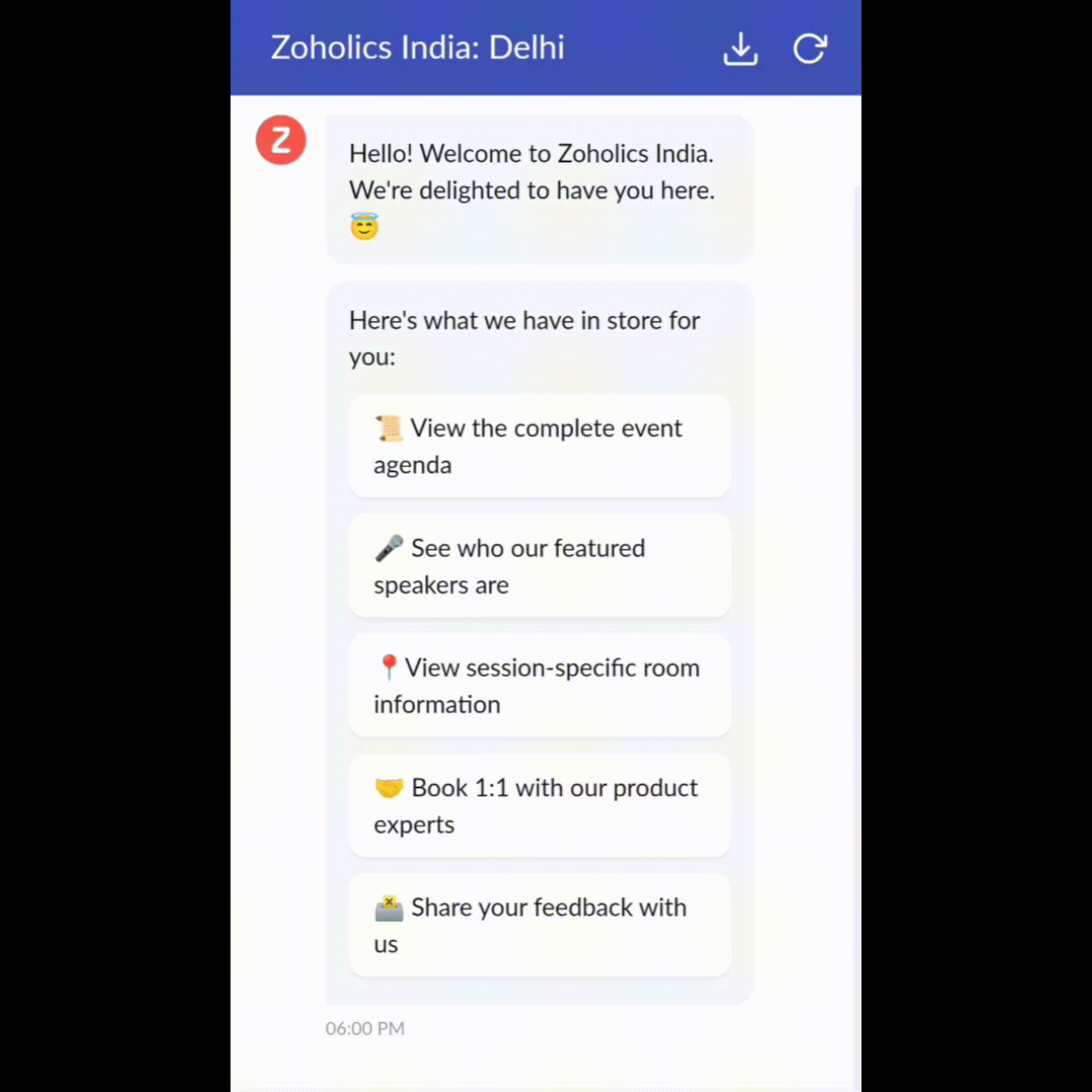
 

Drag-and-drop builder
Construye tu flujo de CG utilizando una serie de formatos o bloques de respuesta, como texto, imágenes, moneda, fecha y hora, deslizador, elección, salto y vuelta a empezar. Para construir un flujo de CG, basta con arrastrar y soltar bloques, añadir variables o marcadores de posición dinámicos y conectar rutas para determinar la secuencia de eventos en función de la elección del usuario en cada etapa de compromiso.

Webhooks para una integración inmejorable
Al configurar los bloques Webhook, puedes construir tu flujo de conversación para interactuar con los procesos de Zoho Desk, otros servicios de Zoho o aplicaciones de terceros. Por ejemplo, si el usuario ya es tu contacto, el bloque Webhook recuperará su información directamente de tu CRM, en lugar de pedirle que la proporcione cada vez.
Incrusta la CG en cualquier lugar para que los clientes puedan acceder a ella
Previsualizar y luego implementar tu flujo final asociándolo a tu centro de ayuda ASAP en tu sitio web, páginas de destino y aplicaciones móviles.
¡Estamos deseando ver los flujos únicos que creas usando las Conversaciones Guiadas de Zoho Desk!

Experiencia mejorada
Es posible que ya hayas notado la opción de probar la nueva versión en Zoho Desk e incluso hayas probado nuestra renovada interfaz de usuario (UI), que introdujimos a principios de este año. Esto es parte de nuestro esfuerzo para hacer Zoho Desk más lógico y visualmente atractivo para darle la mejor experiencia de trabajo-porque sabemos que una mesa de ayuda complicada puede hacer que ocho horas parezcan 20.

¿Qué ha cambiado?
Una interfaz de usuario más limpia, más contexto y una navegación más sencilla
Creemos que un software bien diseñado necesita pocas o ninguna instrucción. Con esto en mente, hemos creado una interfaz de usuario más atractiva, cohesionada y comprensible. Presenta mejor los datos, ofrece más contexto y es más fácil de navegar.
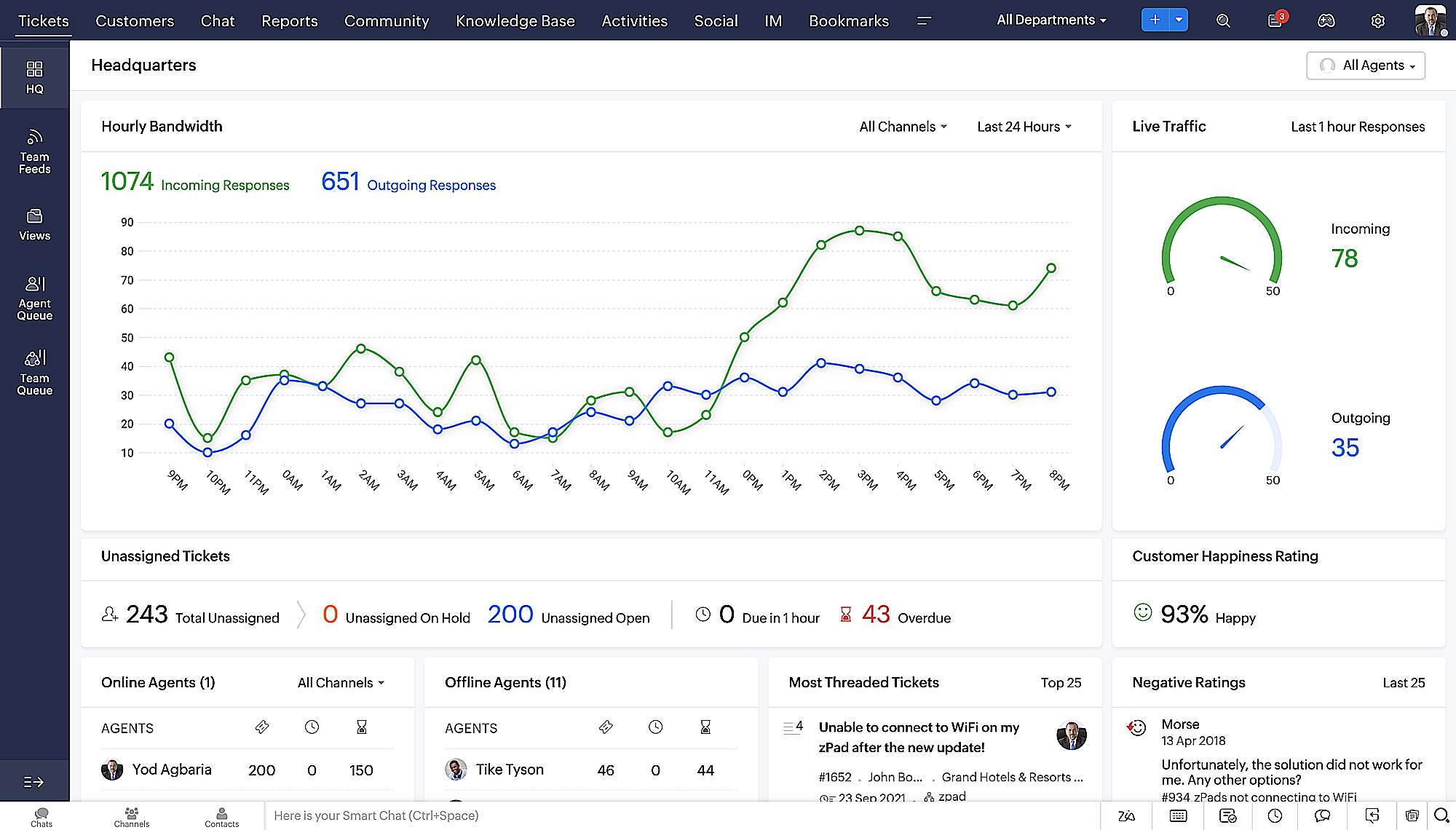
No se puede exagerar la importancia de que los equipos de atención al cliente tengan un acceso rápido a la información relevante. Hemos optimizado nuestra interfaz de usuario y hemos facilitado la navegación por las distintas pantallas para localizar la información adecuada. También hemos renovado algunas pantallas para ofrecerte una visión global de tus clientes y tickets en una única interfaz. ¿Recuerdas lo mucho que nos gusta darte contexto? Echa un vistazo a nuestro nueva interfaz en:
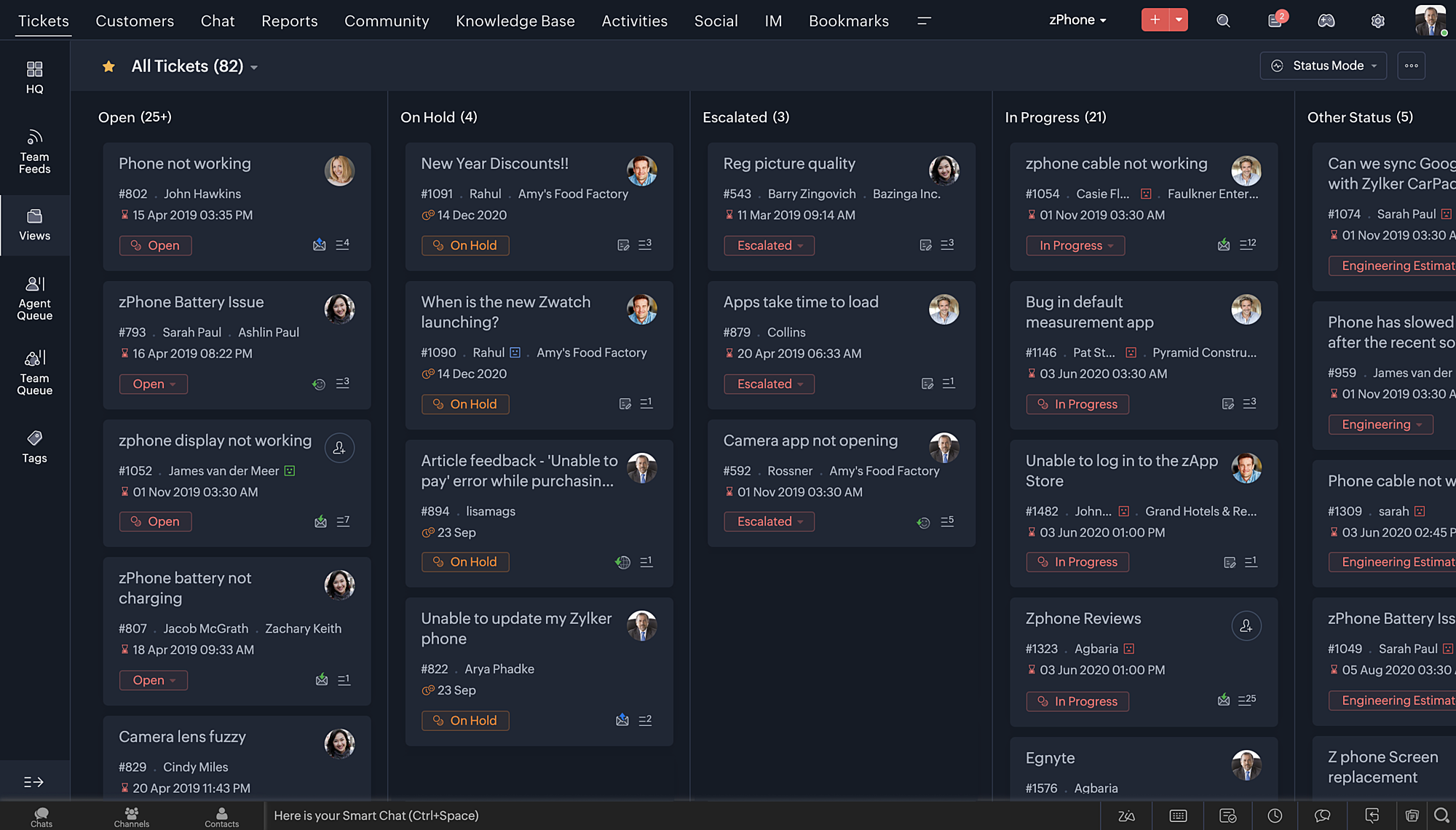
Vista de la Sede más reciente, con una disposición de datos refinada y un aspecto general renovado.

 
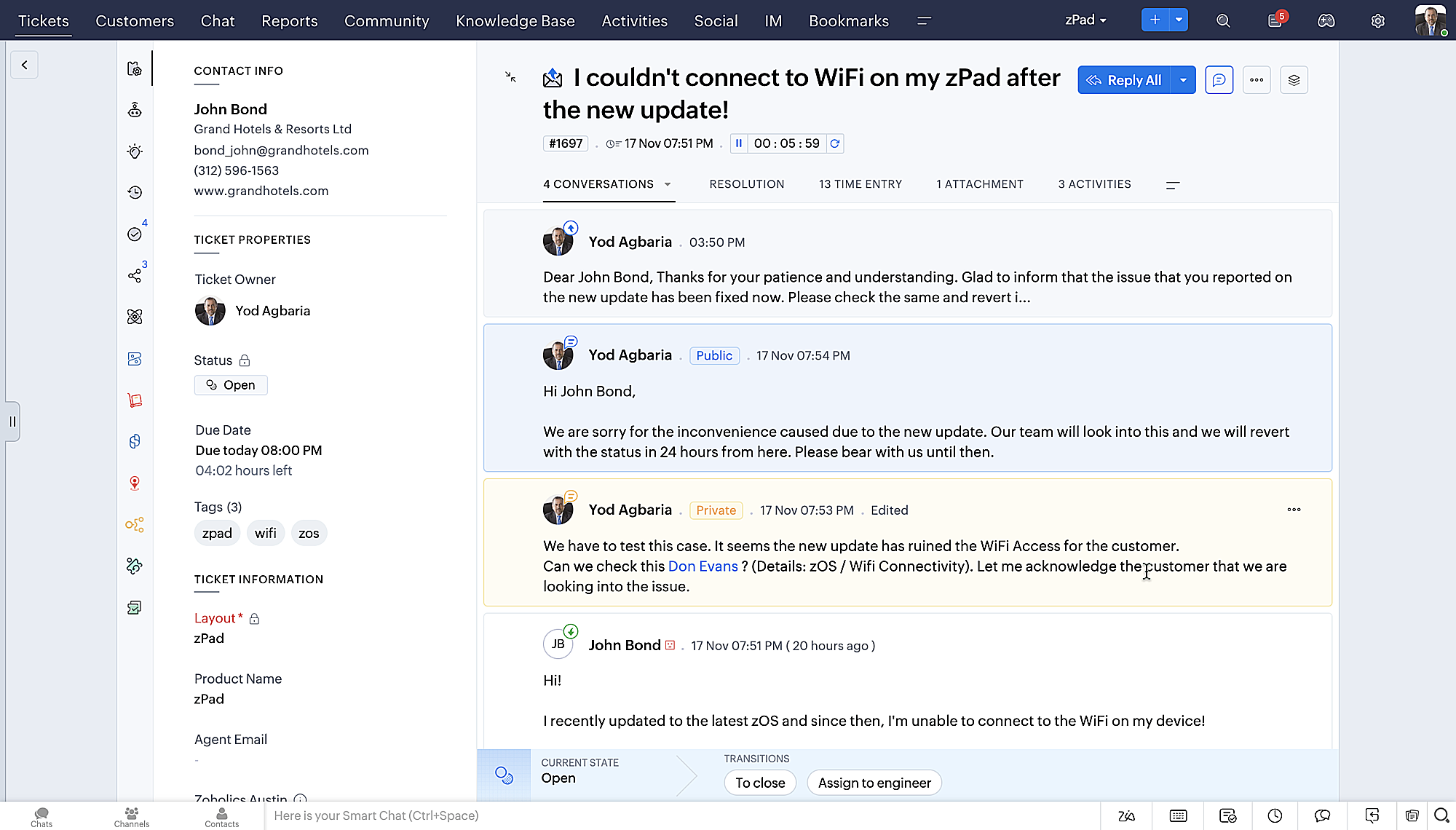
  • Vista detallada de los tickets con hilos codificados por colores para facilitar la navegación entre las conversaciones y los comentarios.

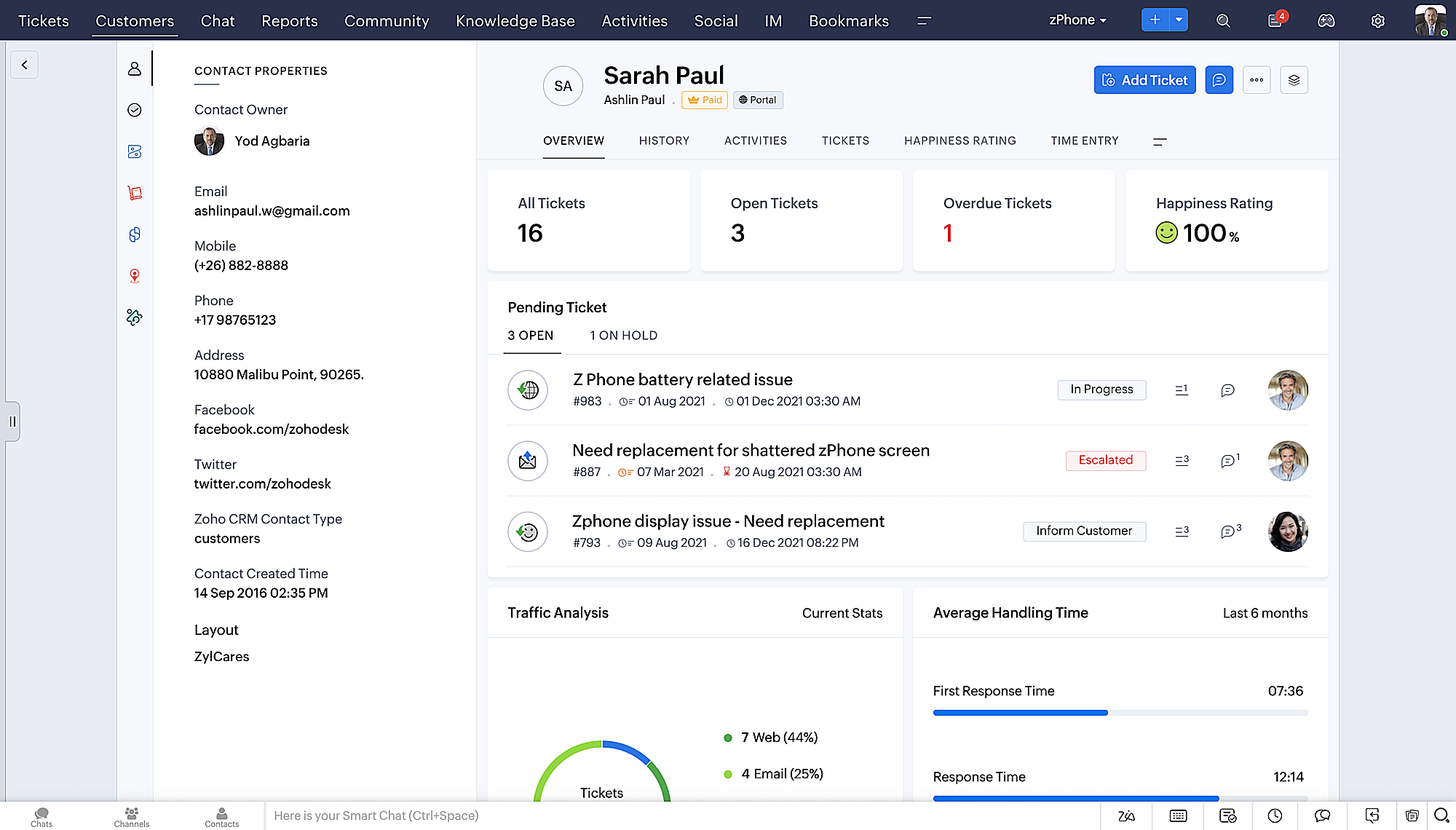
  • Vista detallada de los contactos con botones de adición rápida, una sección de tickets pendientes y una visión general de Ticket Insights.
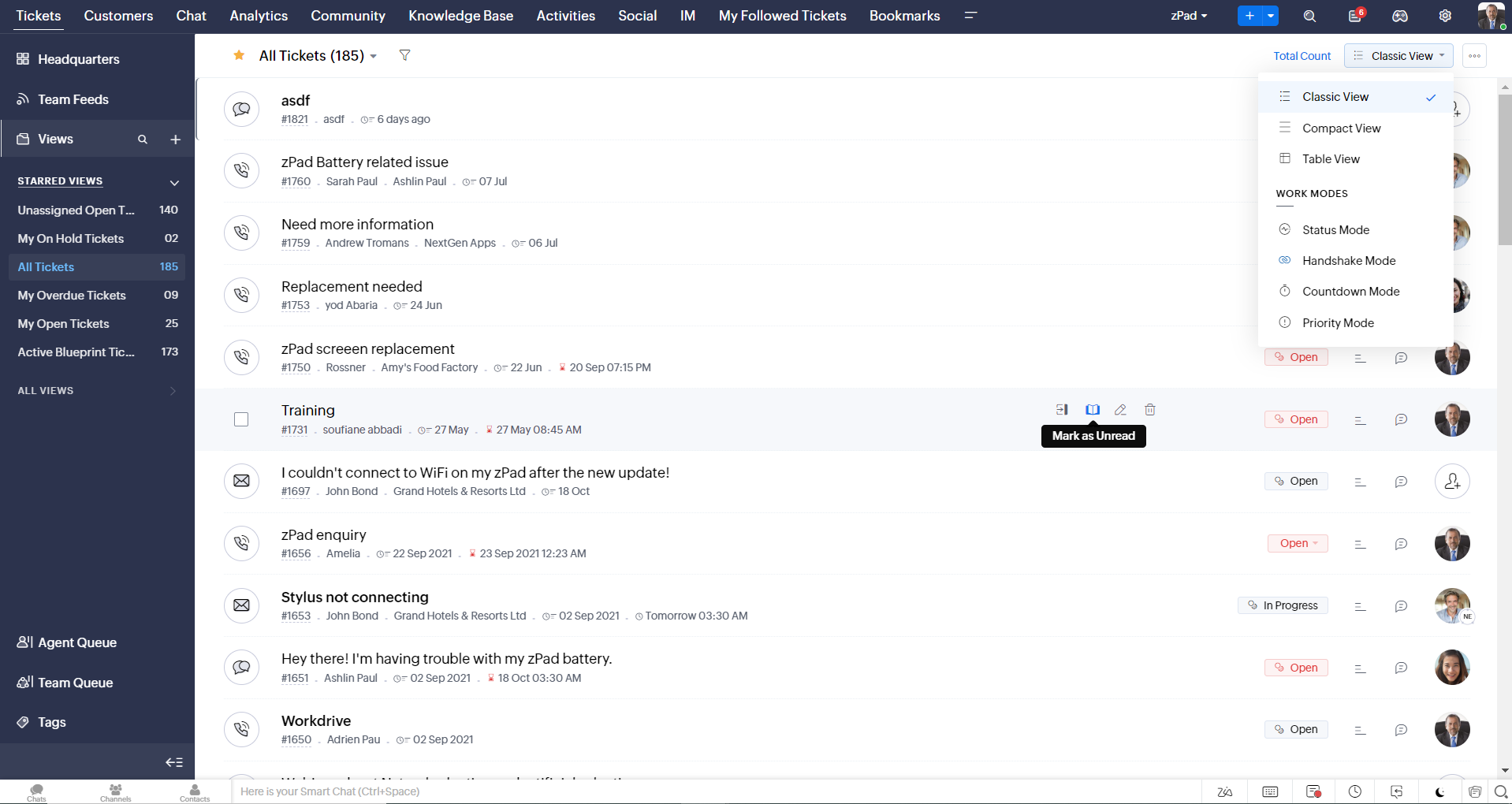
  • Vista de la cola de tickets con opciones de estado desplegables, para que pueda ofrecer actualizaciones rápidas sin tener que abrir la vista de detalles de los tickets.
  • Una nueva opción de marcar como leído/no leído en la vista de lista de tickets, y un desplegable consolidado de modos de trabajo implementado en todo el módulo de tickets.

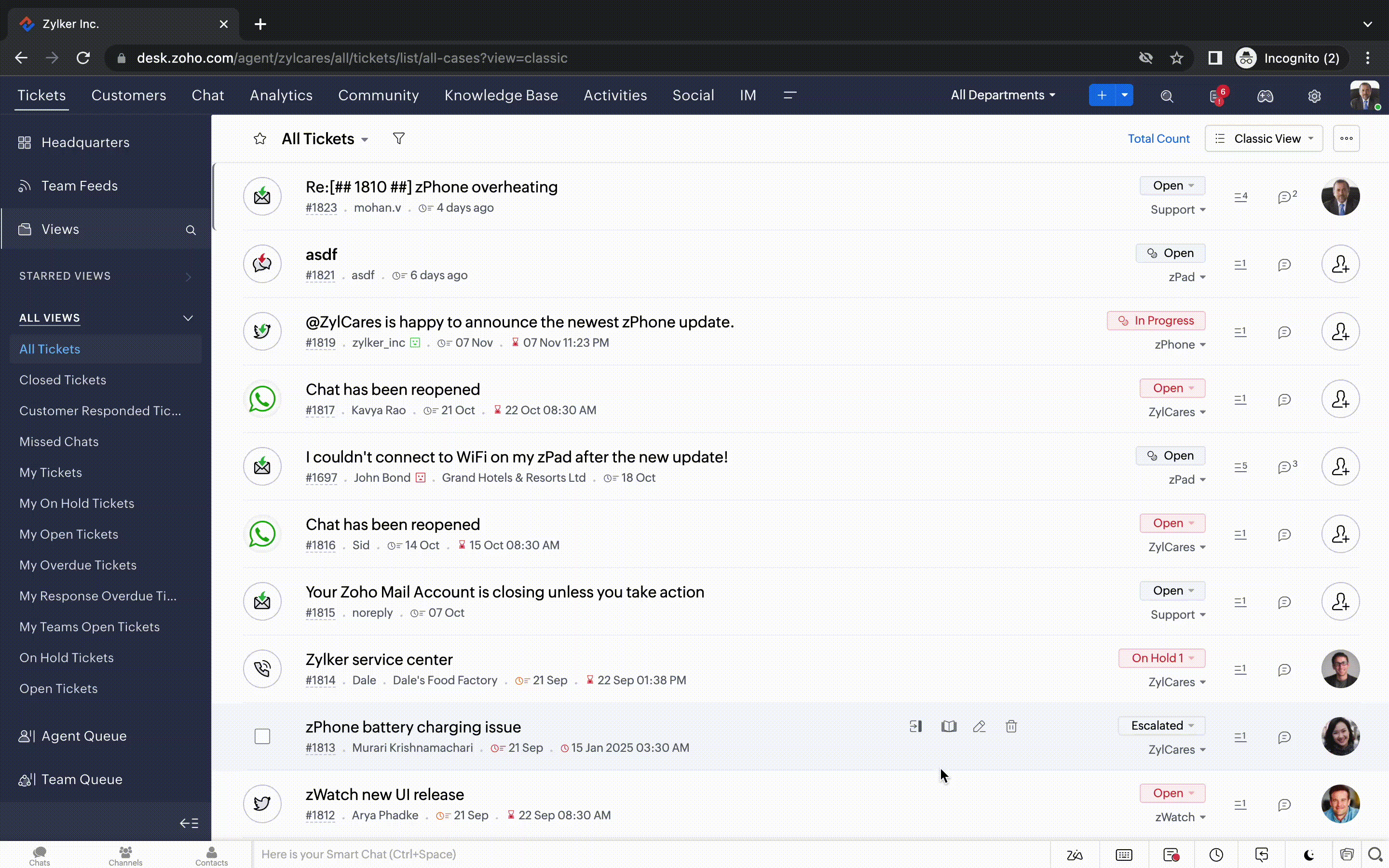
  • Desplazamiento infinito para una búsqueda más rápida de entradas y botones de navegación que le llevan rápidamente a la parte superior o inferior de la página.


Nuevas opciones de personalización del usuario:
La personalización se ha convertido en una parte tan común de nuestra vida diaria que tendemos a esperarla en la mayoría de nuestras interacciones con los productos.
En Zoho Desk ya puedes personalizar diseños, campos, roles, plantillas y tu centro de ayuda. Ahora, también puedes personalizar el aspecto de tu portal para que te sientas más conectado con tu centro de ayuda. Esto es lo nuevo:
  • Dark Mode/Night Mode para una cómoda experiencia de visualización y lectura en condiciones de poca luz.

  • Nuevos temas para ver el Escritorio en su color favorito, o en los colores que representan tu marca.
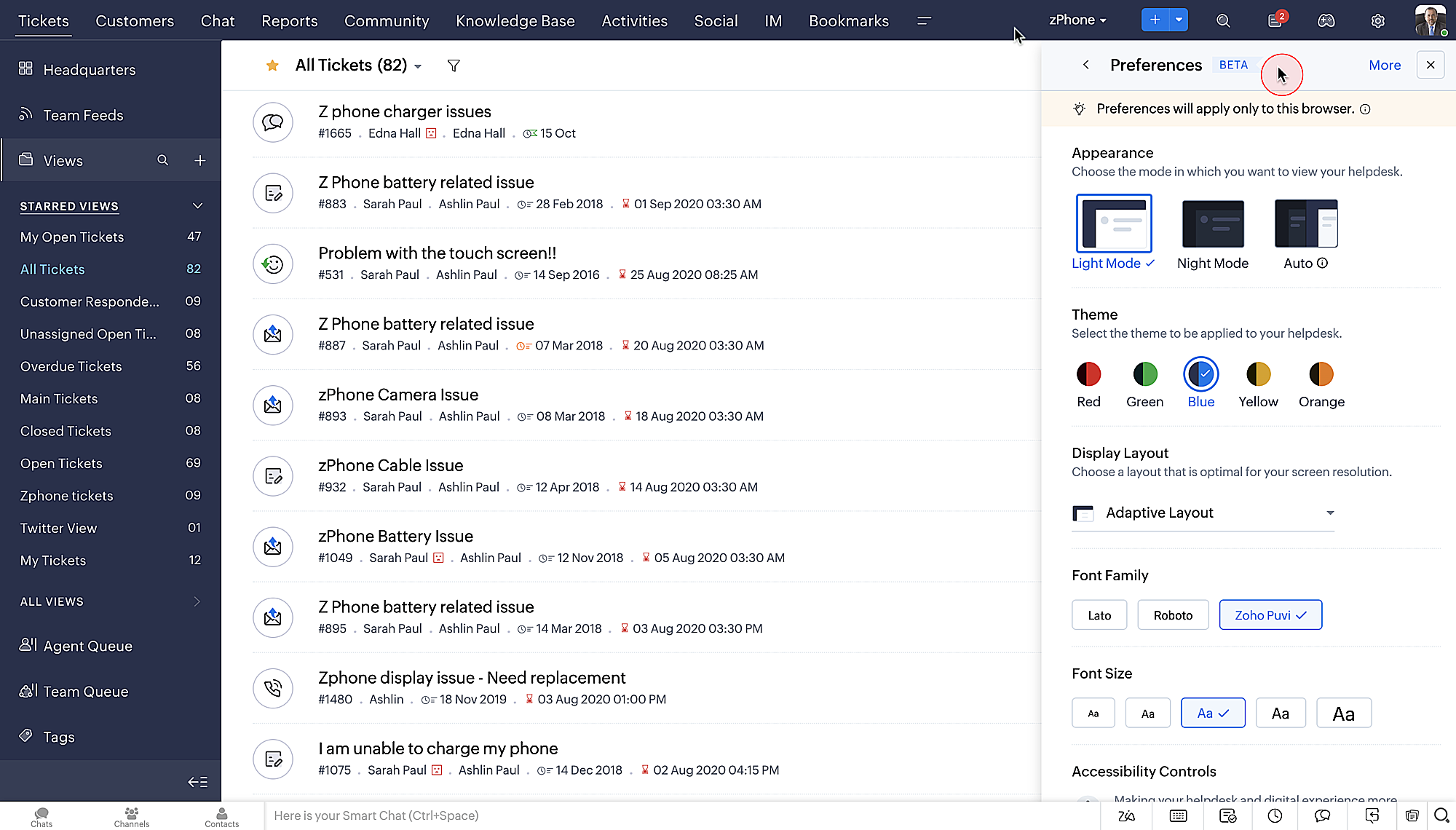

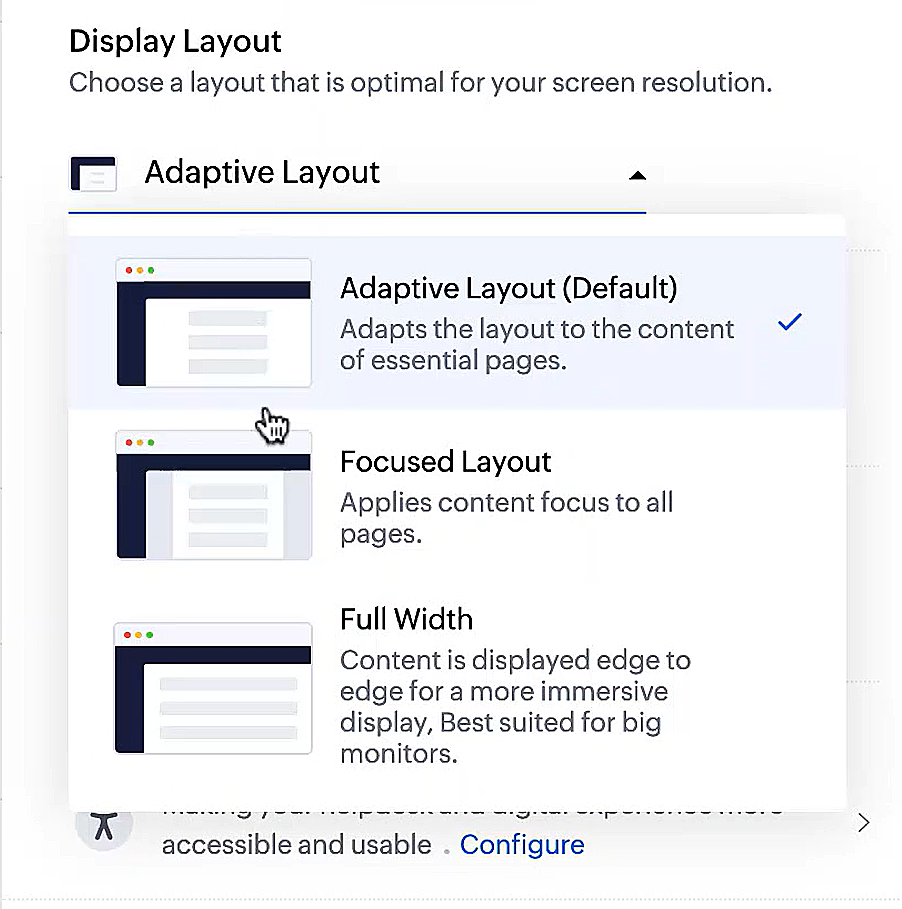
  • Diseños de pantalla que te permiten elegir cómo se presenta tu contenido.

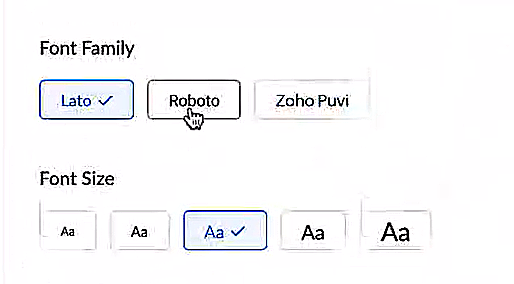
  • Nuevos tipos y tamaños de letra para que tu texto se ajuste exactamente a tus preferencias.
 
Controles de accesibilidad
Nuestra misión siempre ha sido facilitar a todos los usuarios el acceso a nuestros productos y, con nuestros nuevos controles de accesibilidad, estamos más cerca de conseguirlo. Hemos añadido múltiples controles para apoyar sus necesidades de visión, físicas y motoras, y de aprendizaje.
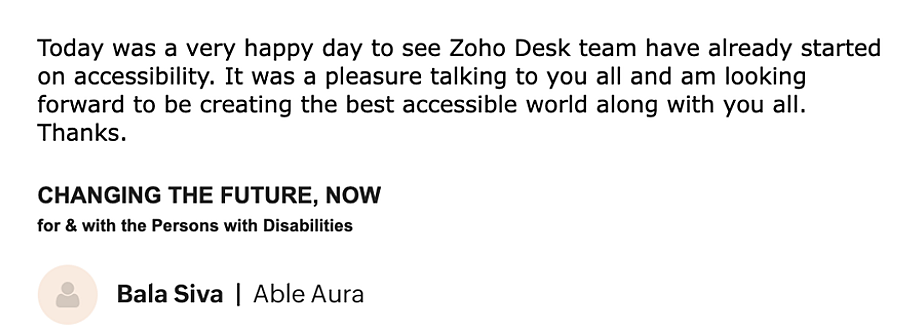

  • Resaltar la información crítica muestra la información clave, como el ID del ticket, el propietario del v y los datos de contacto en un color llamativo.
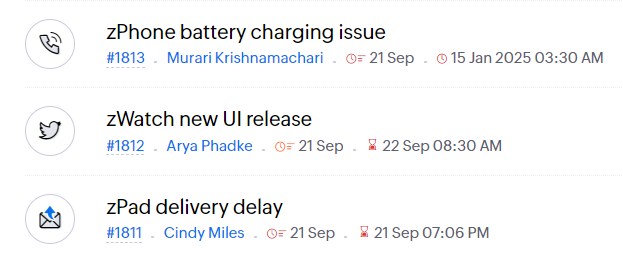

  • Subrayar enlaces aumenta la visibilidad de los enlaces en los que se puede hacer clic.
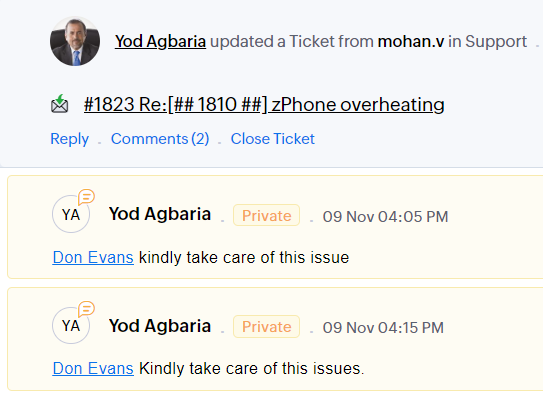

  • Enfatizar área de enfoque: añade un borde alrededor de su área de enfoque para indicar la extensión y la posibilidad de hacer clic.
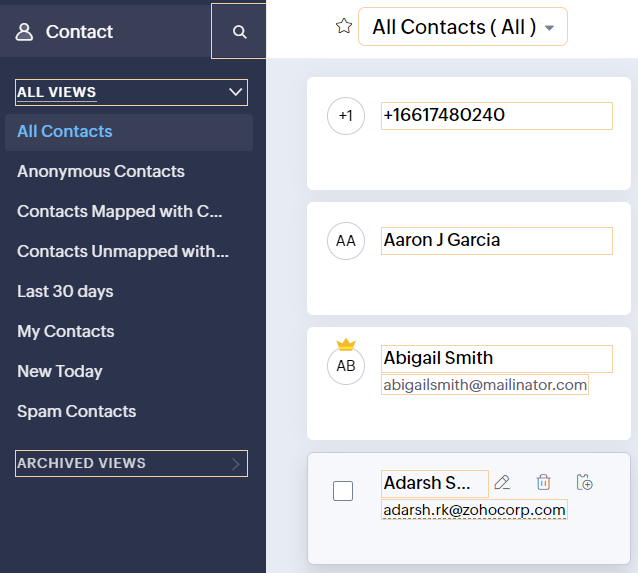

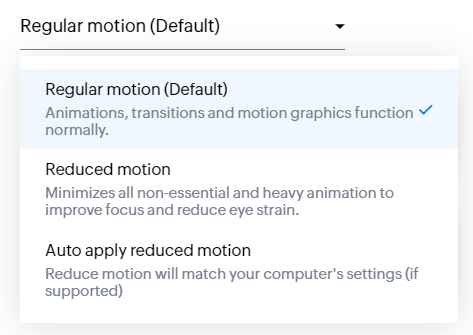
  • Los controles de animación optimizan las animaciones y transiciones en tu servicio de asistencia.

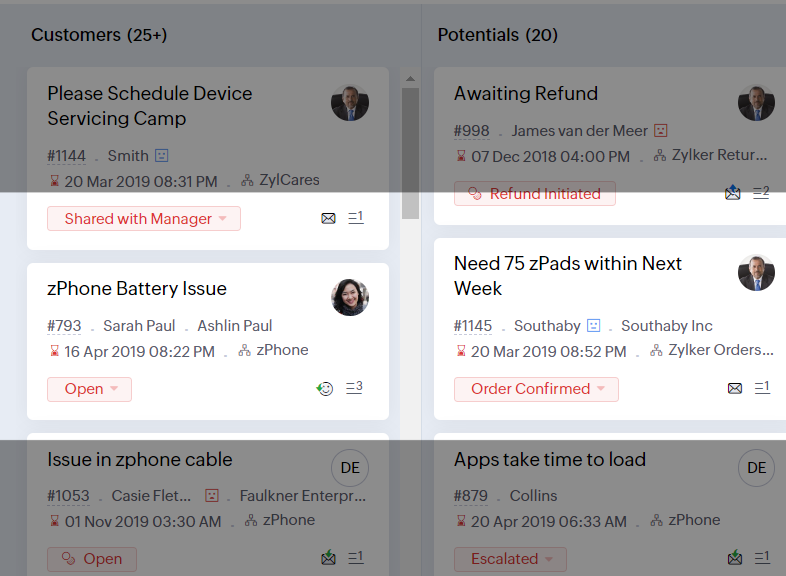
  • La máscara de lectura elimina las distracciones enmascarando el texto que no estás leyendo.

  • Nivel de zoom te permite ampliar y reducir hasta que la página sea fácil de ver.
  • Ajustar el tamaño de la fuente hasta que la página sea fácil de leer.
Con todas las nuevas características de la edición Zoho Desk 2022, las empresas tienen ahora más poder para fomentar agentes felices y clientes incluso más felices.

Nos encantaría saber qué opinas de las nuevas funciones añadidas. Comparte tu opinión en los comentarios o en las redes sociales. 

¡Hasta pronto!

    Access your files securely from anywhere

        All-in-one knowledge management and training platform for your employees and customers.


                              Zoho Developer Community


                                                    • Desk Community Learning Series


                                                    • Digest


                                                    • Functions


                                                    • Meetups


                                                    • Kbase


                                                    • Resources


                                                    • Glossary


                                                    • Desk Marketplace


                                                    • MVP Corner


                                                    • Word of the Day


                                                    • Ask the Experts


                                                              • Sticky Posts

                                                              • Nuevos tiempos en Zoho Community en español

                                                                ¡Hola! Os saluda Elsa Perpiñá Subiñas, la cara visible de la comunidad en español, y encargada de crear y mantener esta plataforma como un lugar donde conectar y compartir con otros usuarios. Os doy la bienvenida a una nueva era en esta comunidad, en la que las publicaciones, contenido, preguntas y respuestas estarán escritas en español, y realizadas especialmente para vosotros. A partir de esta semana podréis encontrar:  1. Nuevos subforums en los que encontrar información y realizar vuestras consultas,


                                                              Manage your brands on social media


                                                                    Zoho TeamInbox Resources


                                                                        Zoho CRM Plus Resources

                                                                          Zoho Books Resources


                                                                            Zoho Subscriptions Resources

                                                                              Zoho Projects Resources


                                                                                Zoho Sprints Resources


                                                                                  Qntrl Resources


                                                                                    Zoho Creator Resources


                                                                                        Zoho CRM Resources

                                                                                        • CRM Community Learning Series

                                                                                          CRM Community Learning Series


                                                                                        • Kaizen

                                                                                          Kaizen

                                                                                        • Functions

                                                                                          Functions

                                                                                        • Meetups

                                                                                          Meetups

                                                                                        • Kbase

                                                                                          Kbase

                                                                                        • Resources

                                                                                          Resources

                                                                                        • Digest

                                                                                          Digest

                                                                                        • CRM Marketplace

                                                                                          CRM Marketplace

                                                                                        • MVP Corner

                                                                                          MVP Corner


                                                                                            Design. Discuss. Deliver.

                                                                                            Create visually engaging stories with Zoho Show.

                                                                                            Get Started Now


                                                                                              Zoho Show Resources

                                                                                                Zoho Writer

                                                                                                Get Started. Write Away!

                                                                                                Writer is a powerful online word processor, designed for collaborative work.

                                                                                                  Zoho CRM コンテンツ


                                                                                                    Nederlandse Hulpbronnen


                                                                                                        ご検討中の方


                                                                                                                • Recent Topics

                                                                                                                • Kaizen #233 - Generating AI-powered Follow-up Emails Using CRM Functions and Widgets

                                                                                                                  Hey everyone! Welcome back to another interesting post in the Kaizen series! Sales teams regularly capture interaction notes in CRM after speaking with prospects. However, drafting a follow-up email that reflects the conversation context can be repetitive
                                                                                                                • Connect Bank in Zoho Books

                                                                                                                  Can I connect UOB or Ariwallex in Zoho Books?
                                                                                                                • Using MPN across multiple SKUs and inventory tracking

                                                                                                                  I have several different SKU's that share a common MPN and would like to track inventory by MPN. SKU1 has MPN1 assigned SKU2 has MPN1 assigned Here is an example If I start with 5 of MPN 1 in stock I want each SKU1 and SKU2 to show as 5 in stock, If I
                                                                                                                • Extend Zoho Canvas Customization to Zoho Creator Forms and Reports

                                                                                                                  Currently, Zoho Canvas allows users to design and customize the UI of Zoho CRM modules with a much better visual experience. This helps organizations create cleaner layouts, improve usability, and design interfaces that match their workflows. However,
                                                                                                                • Marketing Tip #1: Optimize item titles for SEO

                                                                                                                  Your item title is the first thing both Google and shoppers notice. Instead of a generic “Leather Bag,” go for something detailed like “Handcrafted Leather Laptop Bag – Durable & Stylish.” This helps your items rank better in search results and instantly
                                                                                                                • Feature Enhancement Request – Text Formatting Options in Item Description (Zoho Books/Quotes Module)

                                                                                                                  Dear Zoho Development Team, Greetings from Radiant360 Integrated Technical Services LLC. We would like to bring to your attention a functional limitation we've encountered within the Item Table / Quote Description section of Zoho Books (and Zoho CRM Quotes).
                                                                                                                • ZOHO Books Query

                                                                                                                  Good day, Can someone please advise. I recently migrated from ZOHO Invoice to ZOHO Books. No that I want to use the inventory on Books I cant as all my items have transaction history. The person I spoke to at ZOHO said I need to create a new Company profile
                                                                                                                • Best way to schedule bill payments to vendors

                                                                                                                  I've integrated Forte so that I can convert POs to bills and make payments to my vendors all through Books. Is there a way to schedule the bill payments as some of my vendors are net 30, net 60 and even net 90 days. If I can't get this to work, I'll have
                                                                                                                • ZOHO.CRM.UI.Record.open not working properly

                                                                                                                  I have a Zoho CRM Widget and in it I have a block where it will open the blocks Meeting like below block.addEventListener("click", () => { ZOHO.CRM.UI.Record.open({ Entity: "Events", RecordID: meeting.id }).catch(err => { console.error("Open record failed:",
                                                                                                                • inventory removal at packing list or shipment.

                                                                                                                  currently our system is set to remove inventory at invoice. This is creating an inventory nightmare? Is it possible to change the settings to remove the item from inventory at either the packing slip stage or shipping the item.
                                                                                                                • How to add employee and not invite them to log in?

                                                                                                                  I want to add 50 employees, but invite them only when everything will be configured and ready. Is it possible? Should we create employee profiles and then convert them later? Thank you,
                                                                                                                • How is Your eCommerce Experience w/Zoho Inventory?

                                                                                                                  First off, I'm SUPER grateful for the advent of Zoho Inventory and now the Zoho Commerce Suite. Overall, Inventory is a great product, especially for customers without an eCommerce presence. For eCommerce companies (especially those shipping more than ~10 packages/day), however, there are certain drawbacks that keep my clients from moving over to Zoho Inventory: Cons: 1. Invoice + Package Creation from Shopify/Other eCommerce Integrations: Zoho Inventory makes the somewhat perplexing decision to
                                                                                                                • Ability to Use Both AND and OR When Creating Rules (Advanced Conditions)

                                                                                                                  I'd like to be able to use more complicated logic when setting up rules. E.g. in Zoho Mail, I can choose "Advanced conditions (AND/OR) to create a rule that can be applied to multiple subject lines from the same sender. But in Zoho TeamInbox, I will have
                                                                                                                • Zoho Desktop App- Unable to Minimize/Freezes

                                                                                                                  I'm having issues with my Zoho Mail desktop app (PC). When go on my desktop and open the app this is what happens: - Unable to minimize and close app (in the screenshot attached you can see at the top right there is no option to minimize/close) - Unable
                                                                                                                • Zoho Invoice Zapier Integration

                                                                                                                  Is there still a way to use Zapier with Zoho Invoice? I've read online that that migrated to Zoho Books or Billing but since I am just using Invoice I can not find a Zapier Connection anymore.
                                                                                                                • Conect chat of salesiq with zoho cliq

                                                                                                                  Is there any way to answer from zoho cliq the chat of salesiq initiated by customers?
                                                                                                                • Bug: OAuth 2.0 State Parameter fails with Pipe Delimiters (RFC 6749 Non-Compliance)

                                                                                                                  I've discovered a bug in how Zoho's API Console handles the OAuth 2.0 authorization flow when the state parameter contains pipe characters (|), and I'm hoping the Zoho team can address this in a future update. The Issue Zoho's OAuth 2.0 implementation
                                                                                                                • Zobot with Plugs

                                                                                                                  Hello, I am having a problem with Zobot using Plugs. Here is my current flow: When I run the flow, I should immediately see the messages from the initial cards (Send Message cards), then after running the plug, and finally, see the messages after the
                                                                                                                • Print a document from Zoho Writer via Zoho Creator

                                                                                                                  If i use the code below i can get writer to create a new document or email it to me but i want to be able to print it directly from the browser and not have to send it via email and then print. Below is the code im using. Attached options form zoho writer
                                                                                                                • Is it possible to use HTML formatting in SMS messages sent from Zoho?

                                                                                                                  Hi everyone, I have a question regarding sending SMS from Zoho When we send emails from Zoho, we can include HTML code to format the message (like adding links, styling, etc.). Is it possible to do something similar when sending SMS messages through Zoho
                                                                                                                • Training for How can i Operate the Software Features

                                                                                                                  need to Help for Training of the ZOHO Billing Software
                                                                                                                • Automating Vendor Contract Management between Zoho Contracts and Zoho Books using Zoho Flow

                                                                                                                  Managing vendor agreements across procurement and finance systems often requires manually downloading executed contracts and attaching them to vendor records. This can become time-consuming and difficult to manage when dealing with a large number of contracts.
                                                                                                                • Problem applying batch operation error keeps looping that error

                                                                                                                  Problem applying batch operation error keeps looping that error an wont login
                                                                                                                • Shared Email Sending Duplicate Copies of Emails

                                                                                                                  Hi there, We recently have moved our info@ email to Team Inbox to trial. We set this channel up using the Microsoft setup which works fine and have 3 users. I am wanting to know: 1. When I send a new email, it will create a copy of that email and send
                                                                                                                • merhaba

                                                                                                                  merhaba sosyal medya paketimiz mevcut ama yorumları göremiyoruz ve o yüzden cevap veremiyoruz destek rica ediyoruz.
                                                                                                                • Teaminbox not working

                                                                                                                  We couldn't send or receive any mail within the team inbox. Displaying error 'Unable to process this request.'
                                                                                                                • Related lists New option in missing

                                                                                                                  hi I have created quite a few modules and added as related lists to my main module. Some have new, some dont I can not see why?
                                                                                                                • Cliq and ToDo integrations?

                                                                                                                  I'm a bit surprised not to find any way to open a Cliq chat for the current thread, or to create a Zoho Mail ToDo from a thread. Are these on the roadmap?
                                                                                                                • Reply-to names are mangled

                                                                                                                  Hello, I'm seeing an odd behavior in replies. Steps to reproduce: 1. Click reply to an email from "John Doe <doe.john@example.com> in TeamInbox Expected outcome: TO field pre-filled with "John Doe <doe.john@example.com>" Actual outcome: TO field pre-filled
                                                                                                                • I CANT UPGRADE MY FREE ACCOUNT

                                                                                                                  I TRY TO UPGRADE MY FREE ACCOUNT AND I COULD NOT UPGRADE IT CAN SOMEBODY TELL ME WHY? AND I HAVE THE MONEY SO.
                                                                                                                • Level up your ASO game with tags & categories in store reviews

                                                                                                                  Introducing tags and categories in Apptics' store reviews Dear Apptics community, If your app is listed on the Play Store or App Store, you already know how important store reviews and ratings are. They’re one of the most direct signals of user sentiment
                                                                                                                • Including attachments with estimates

                                                                                                                  How can attachments be included when an estimate is sent/emailed and when downloaded as a .pdf? Generally speaking, attachments should be included as part of an estimate package. Ultimately, this is also true for work orders and invoices.
                                                                                                                • Adding VENDOR SKU to PURCHASE ORDERS

                                                                                                                  how can we add the Vendor SKU when issuing a Purchase Order , so the PO shows the Supplier SKU and our own Internal SKU , which is what we want to receive into the system .
                                                                                                                • Possible to freely prompt/query CRM data using Zia?

                                                                                                                  Is it possible to prompt Zia to query on any information stored in the CRM, especially on the data stored in custom text fields? My use case is the people in my organisation have entered lots of text in custom text fields to capture information from an
                                                                                                                • Restrict employees to take only one day holiday from a multi-day festival holiday

                                                                                                                  Hi everyone, I have a requirement related to Optional/Festival Holidays in Zoho People. For example, in the month of May there are three optional holiday dates: May 11, May 12, and May 13. Employees can choose one of these days as their optional holiday.
                                                                                                                • Cannot modify colours in invoice email template

                                                                                                                  I have tried switching browsers... but I cannot change the (pretty horrible) default colours in the preset email when sending an invoice... the blue banner, red outstanding total and the bright green button... I can change other things but not the colours?
                                                                                                                • Cannot find zpuid for Zoho Projects user

                                                                                                                  I'm using the Zoho Projects v3 API to create a task. The task is created successfully, but in order to assign the task owner, the "Create a Task" API also requires the zpuid of the task owner. Unfortunately I cannot find any user-related API calls that
                                                                                                                • Print a document from Zoho Writer via Zoho Creator

                                                                                                                  If i use the code below i can get writer to create a new document or email it to me but i want to be able to print it directly from the browser and not have to send it via email and then print. Below is the code im using. Attached options form zoho writer
                                                                                                                • Allow styling for specific Subform fields in Zoho Creator

                                                                                                                  Sometimes in forms we need to visually highlight a specific field inside a Subform (for example Sanctioned Amount, Approved Value, Critical Fields, etc.) so that users immediately notice it while entering data. Currently there is no direct UI option to
                                                                                                                • Career site URL - Suggestion to modify URL of non-english job posting

                                                                                                                  Hi, I would like to suggest making a few modification to career sites that are not in english. Currently, the URL are a mix of different languages and are very long. It makes for very unprofessional looking URLs... Here is an example of one of our URL
                                                                                                                • Next Page