Tips & Tricks #1: Zoho Desk - Cómo mostrar tarjetas de producto en tu chatbot

Tips & Tricks #1: Zoho Desk - Cómo mostrar tarjetas de producto en tu chatbot


¡Hola a todos! 

Si utilizas Conversaciones Guiadas (Guided Conversations) en Zoho Desk para ayudar a los clientes a encontrar productos, probablemente te hayas encontrado con este problema: el bot ofrece una lista de opciones, pero los clientes siguen sin saber cuál elegir.

No hay imágenes, especificaciones ni precios; solo aparecen los nombres. Como resultado, los clientes hacen preguntas adicionales, los agentes tienen que intervenir innecesariamente y todo el flujo pierde eficacia.

Card Choice en GC soluciona este problema. Permite mostrar opciones de productos como tarjetas visuales e interactivas dentro del chat, para que los clientes dispongan de toda la información necesaria para tomar una decisión sin salir de la conversación.

A continuación, te explicamos cómo configurarlo de principio a fin para tu empresa.


¿Qué es Card Choice?

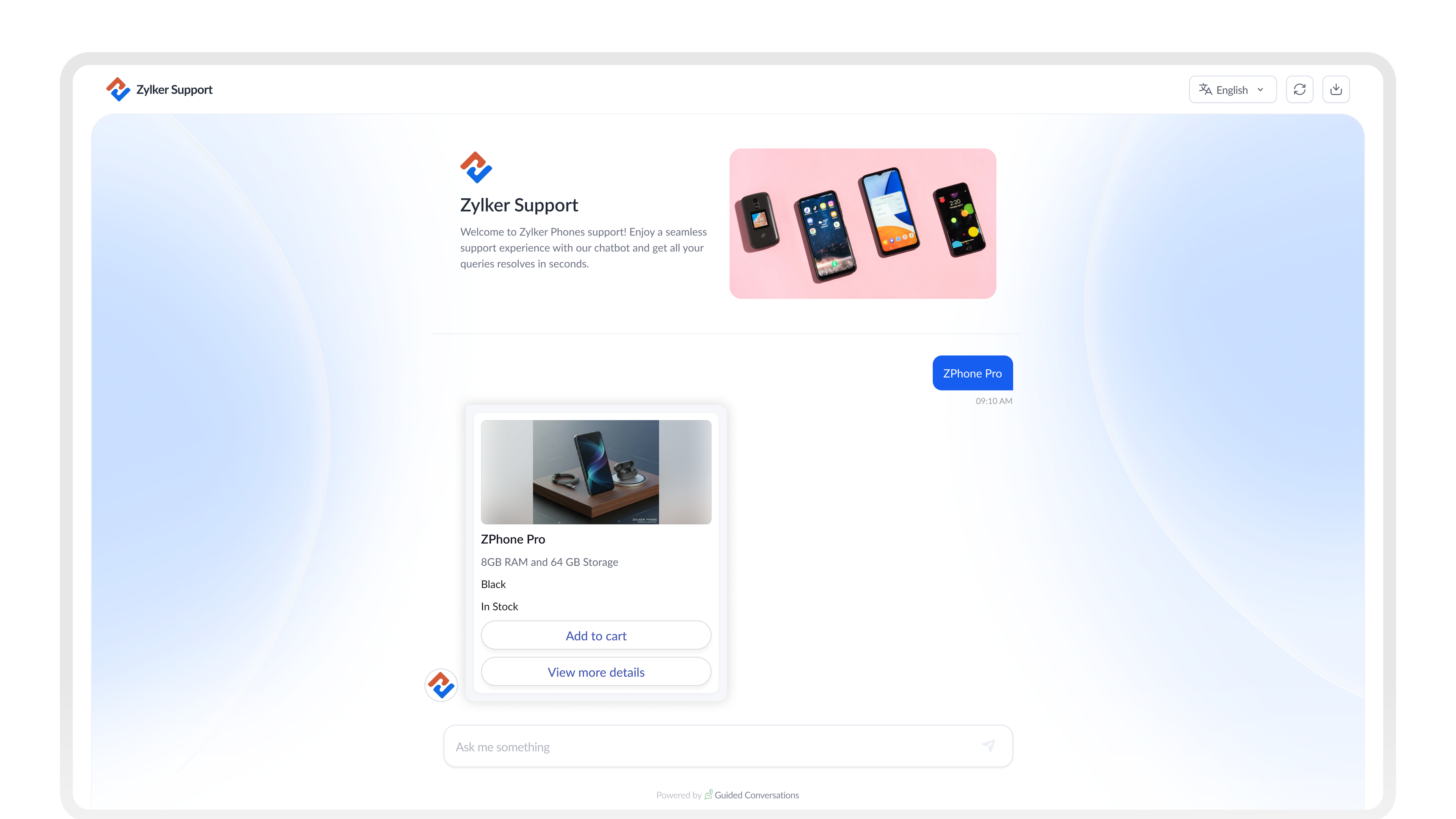
En lugar de utilizar simples botones de texto, Card Choice permite mostrar opciones mediante tarjetas enriquecidas. Cada tarjeta puede incluir:

  • Una imagen del producto
  • Un título y un subtítulo
  • Una descripción breve
  • Especificaciones clave, como precio o disponibilidad
  • Botones de acción como:
    • Ver detalles
    • Comparar
    • Añadir al carrito


¿Tarjetas estáticas o dinámicas?

Antes de empezar la configuración, determina qué tipo se adapta mejor a tu caso de uso.

Usa tarjetas estáticas cuando...
Usa tarjetas dinámicas cuando...
Las opciones son fijas y cambian poco
Departamentos o categorías de soporte
Tipos de citas o reservas
Planes de suscripción
Los datos provienen de un sistema externo
Catálogos de productos que cambian con frecuencia
Precios o stock actualizados en tiempo real
Amplias gamas de productos


Idea
CONSEJO
Para la mayoría de los flujos de comercio electrónico, las tarjetas dinámicas son la mejor opción. Obtienen los datos automáticamente de tu sistema, por lo que no tendrás que actualizar manualmente las tarjetas cada vez que cambien los productos o los precios.

Configuración de Card Choice en tu flujo

1. Diseña el flujo

Comienza con un bloque de preguntas para identificar qué está buscando el cliente. A continuación, añade un bloque de API o webhook para obtener los productos que coincidan con su búsqueda desde tu sistema.

Después, agrega un bloque de Dynamic Card Choice para mostrar los resultados.
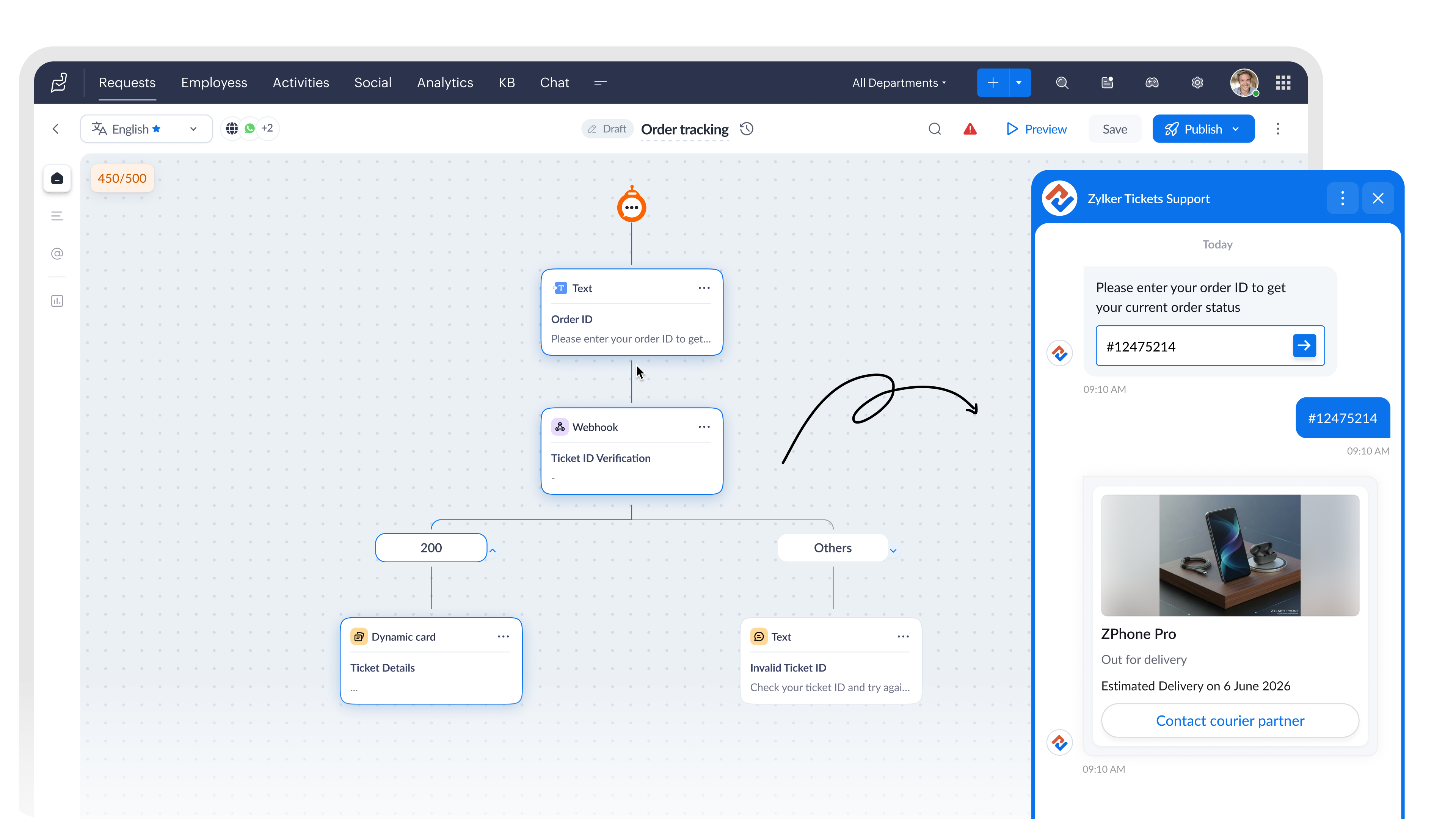

2. Configura el bloque Card Choice

Dentro del bloque, establece Card Type como Dynamic Card.

Después, selecciona el Rendering Style según la cantidad de opciones que quieras mostrar simultáneamente.

Una sola tarjeta funciona bien para...Varias tarjetas funcionan bien para...
Resúmenes de reservas
Confirmaciones de pedidos
 Planes de seguros
Exploración de productos 
Comparación de habitaciones de hotel
Paquetes de servicios


3. Vincula los datos de tus productos con los campos de la tarjeta

Cuando se ejecuta el bloque Webhook, este obtiene los datos de producto desde tu API y guarda la respuesta como una variable del flujo.

Después, puedes asignar esa variable directamente a los campos del bloque Dynamic Card Choice, de modo que cada tarjeta se complete automáticamente con información actualizada del producto, como:

  • Nombre
  • Precio
  • Imagen
  • Descripción

Todo ello sin necesidad de introducir los datos manualmente.

Función de cada campo

  • Imagen: muestra la fotografía del producto. Configura el tipo de dato como Image.
  • Título: nombre principal del producto obtenido desde la API.
  • Subtítulo: ideal para mostrar precio, marca o disponibilidad.
  • Descripción: resumen breve del producto (2 o 3 líneas).
  • Etiqueta: etiqueta que acompaña a un valor, como «Almacenamiento» o «Stock».
  • Variable: almacena la selección realizada por el cliente para utilizarla posteriormente en el flujo.
  • Ocultar campo: oculta datos internos, como identificadores de producto, para que no aparezcan en la tarjeta.

4. Utiliza la selección del cliente

En un bloque Dynamic Card Choice (Selección de tarjetas dinámicas), la elección realizada por el cliente se guarda automáticamente en la variable del bloque.

Puedes utilizar esta variable en los siguientes pasos del flujo, por ejemplo para:

  • Realizar una llamada a un webhook
  • Crear un ticket
  • Transferir la conversación a un agente

¿Qué cambia para tu equipo?

Una vez configurado Card Choice, los clientes dejan de hacer preguntas como:

  • «¿Puedes enviarme una imagen?»
  • «¿Cuál es el precio de ese producto?»
  • «¿Qué modelo tiene más capacidad de almacenamiento?»
  • «¿Puedes mostrarme más opciones?»

Toda esa información ya está disponible directamente en la tarjeta.

Esto se traduce en:

  • Menos mensajes de seguimiento antes de que el cliente tome una decisión.
  • Menor intervención de agentes durante la fase de descubrimiento de productos.
  • Conversaciones más cortas y con resultados más claros.
  • Clientes que llegan al agente sabiendo exactamente qué quieren.
Notes
NOTA
Si estás creando flujos para WhatsApp, los bloques Static Card Choice y Dynamic Card Choice no están disponibles en ese canal.

Pruébalo

Card Choice es una de esas funcionalidades que marcan una diferencia real una vez puesta en marcha. Los clientes exploran más rápido, toman decisiones antes y los agentes dedican menos tiempo a responder preguntas sobre productos que deberían resolverse automáticamente.

Si ya lo has configurado o estás creando un flujo ahora mismo, comparte tus preguntas o capturas de pantalla en los comentarios. Estaremos encantados de ayudarte a resolver cualquier problema o compartir buenas prácticas.

Ruta: Zoho Desk → Guided Conversations → Card Choice Block.

Redactado por Prabin de Zoho Desk

Beatriz Moya | Zoho España

Marketing Specialist


    Access your files securely from anywhere


          All-in-one knowledge management and training platform for your employees and customers.


                                Zoho Developer Community


                                                      • Desk Community Learning Series


                                                      • Digest


                                                      • Functions


                                                      • Meetups


                                                      • Kbase


                                                      • Resources


                                                      • Glossary


                                                      • Desk Marketplace


                                                      • MVP Corner


                                                      • Word of the Day


                                                      • Ask the Experts


                                                                Manage your brands on social media


                                                                      Zoho TeamInbox Resources


                                                                          Zoho CRM Plus Resources

                                                                            Zoho Books Resources


                                                                              Zoho Subscriptions Resources

                                                                                Zoho Projects Resources


                                                                                  Zoho Sprints Resources


                                                                                    Qntrl Resources


                                                                                      Zoho Creator Resources


                                                                                          Zoho CRM Resources

                                                                                          • CRM Community Learning Series

                                                                                            CRM Community Learning Series


                                                                                          • Kaizen

                                                                                            Kaizen

                                                                                          • Functions

                                                                                            Functions

                                                                                          • Meetups

                                                                                            Meetups

                                                                                          • Kbase

                                                                                            Kbase

                                                                                          • Resources

                                                                                            Resources

                                                                                          • Digest

                                                                                            Digest

                                                                                          • CRM Marketplace

                                                                                            CRM Marketplace

                                                                                          • MVP Corner

                                                                                            MVP Corner


                                                                                              Design. Discuss. Deliver.

                                                                                              Create visually engaging stories with Zoho Show.

                                                                                              Get Started Now


                                                                                                Zoho Show Resources

                                                                                                  Zoho Writer

                                                                                                  Get Started. Write Away!

                                                                                                  Writer is a powerful online word processor, designed for collaborative work.

                                                                                                    Zoho CRM コンテンツ


                                                                                                      Nederlandse Hulpbronnen


                                                                                                          ご検討中の方


                                                                                                                    • Recent Topics

                                                                                                                    • Cliq iOS can't see shared screen

                                                                                                                      Hello, I had this morning a video call with a colleague. She is using Cliq Desktop MacOS and wanted to share her screen with me. I'm on iPad. I noticed, while she shared her screen, I could only see her video, but not the shared screen... Does Cliq iOS is able to display shared screen, or is it somewhere else to be found ? Regards
                                                                                                                    • Alternate color rows

                                                                                                                      After I changed the background color to a dark gray and changed the alternate rows to a light gray. I have discovered that I can no longer change the text in the light gray rows to Bold.
                                                                                                                    • Collapsible Sections & Section Navigation Needed

                                                                                                                      The flexibility of Zoho CRM has expanded greatly in the last few years, to the point that a leads module is now permissible to contain up to 350 fields. We don't use that many, but we are using 168 fields which are broken apart into 18 different sections.
                                                                                                                    • Important update on our transition to the new video platform framework

                                                                                                                      As part of our ongoing platform changes, users in select regions, including the United States and other supported data center locations, have been migrated to our new video platform framework. Due to this migration, some participants may notice changes
                                                                                                                    • Zoho CRM Layout Rules: Nine New Actions, Profile-Based Execution, and Interactive Preview

                                                                                                                      Hello everyone, Availability: This feature is now available for customers in the JP and SA DCs. It is planned to be released for other customers in soon. We’re excited to announce powerful new enhancements to Layout Rules in Zoho CRM - a feature built
                                                                                                                    • Validation Rule Not Working for Mandatory Field in Zoho Blueprint

                                                                                                                      As a Zoho user, we created a validation rule for a specific field. However, we noticed that when we made the same field mandatory within a Blueprint, the validation rule we defined did not work. When we reported this issue to Zoho Support, they stated
                                                                                                                    • CRM x WorkDrive: We're rolling out the WorkDrive-powered file storage experience for existing users

                                                                                                                      Release plan: Gradual rollout to customers without file storage add-ons, in this order: 1. Standalone CRM 2. CRM Plus and Zoho One DCs: All | Editions: All Available now for: - Standalone CRM accounts in Free and Standard editions without file storage
                                                                                                                    • Ticket id issues

                                                                                                                      When I reply a ticket from desktop, it doesn't have ticket id in the subject and it's great. When I reply a ticket from Zoho desk mobile, Zoho adds ticket id in the subject and I don't want that. Please help in this matter.
                                                                                                                    • Zoho Desk Community Module Reporting

                                                                                                                      I can't seem to find any reporting for the community module in Zoho Desk. Am I missing something or are there just no reports available?
                                                                                                                    • Une collaboration simplifiée grâce à l’interopérabilité des calendriers

                                                                                                                      L’interopérabilité des calendriers permet aux équipes utilisant différentes plateformes, comme Zoho Calendar et Google Calendar, de consulter facilement les disponibilités de leurs collègues sans avoir à utiliser plusieurs outils. Dans les entreprises
                                                                                                                    • Zia AI capabilities now available in all paid editions

                                                                                                                      Hello everyone, We are expanding the availability of AI-powered features in Desk to the other paid subscriptions from 7th July 2026. Right now, the following AI-based features are available for Enterprise edition users: Intelligence: Sentiment analysis,
                                                                                                                    • Overview on users IMAP settings

                                                                                                                      We have about 30 users who all have the channels/email/email configuration/IMAP integration/O365 enabled and emails are synchronized. Here my problem: Passwords for the email accounts are expiring on individual bases and most of the users forget to update
                                                                                                                    • Format of data after export to spreadsheet

                                                                                                                      Dear Zoho, can you explain to me what is the point of a report exporting to XLSX if the format of the amounts that will be created there is in text format and not suitable for anything? Why do I need data in a sheet with which nothing more can be do
                                                                                                                    • How to add custom icons in Sites ?

                                                                                                                      I've been trying to upload some of my own icons (specific to my business) to my zoho Site draft, and can't find a way to do it. I guess the workaround could be to insert images instead of icons and upload my icons as images, but I was wondering if its possible to customize the icon library.
                                                                                                                    • Zoho Forms API

                                                                                                                      Is there any way to get all form entry list using API? Looking forward to hear from you
                                                                                                                    • #21 Five Minutes Every Monday That Replace an Hour of Digging

                                                                                                                      Welcome to the final stretch of our journey. In this series so far, you have configured Zoho Invoice, created and managed your transactions and built a workflow that shares invoices and collects payments almost on its own. You have been doing the work.
                                                                                                                    • Kaizen #251: From Campaign Leads to Sales Orders with Zoho CRM Mass Action APIs

                                                                                                                      Hello all!! In growing businesses, sales teams often deal with a large volume of records every day - leads from campaigns, qualified prospects ready for conversion, and approved quotes that must be converted into sales orders. Performing these actions
                                                                                                                    • Introducing the Employee Portal for internal job posting

                                                                                                                      Employee referrals and internal applications are one of the most trusted hiring channels. But in many organizations, employees only hear about openings through messages, word of mouth, or after the role has already been open for a while. When employees
                                                                                                                    • Inspection Table

                                                                                                                      Hello Latha, We created a job sheet that includes the new table (Inspection Table) which was introduced recently. However, agents are not able to see the rows in the inspection table. Could you please investigate this issue and get back to us? Please
                                                                                                                    • Zoho Mail is down?

                                                                                                                      We stopped getting new emails since 8:42am EST and mail.zoho.com shows an error.
                                                                                                                    • Forwarding without verification

                                                                                                                      Hi, I use Tripit to keep track of all my business travel. I've recently moved over to Zoho and wanted to set up a forwarding rule to send various travel confirmation emails automatically to plans@tripit.com Obviously this is an email address I don't control,
                                                                                                                    • Disappearing Mouse cursor in Zoho Mail / Windows 11 (Chrome + Edge)

                                                                                                                      I'm seeing an issue when writing mails with the light theme with the mouse cursor being white and the document area also being white - making it nearly impossible to see the mouse cursor. I see the problem on Windows 11 under Chrome and Edge. (Yet to
                                                                                                                    • Request to unblock user creation error (This user is not allowed to add in Zoho)

                                                                                                                      Hello Zoho Support Team, I am the Super Admin of my Zoho Mail organization. When I try to create a new business email user account, I encounter the following error message: "This user is not allowed to add in Zoho. Please contact support-as@zohocorp.com
                                                                                                                    • Zoho Mail account blocked after malware incident – request for review and unblock

                                                                                                                      Hi Zoho team and community, My Zoho Mail account has been blocked due to outgoing email activity that was detected as spam or unusual sending behavior. The root cause was a malware infection on my computer, which compromised several of my accounts, including
                                                                                                                    • creating an alias

                                                                                                                      your instructions for creating an alias are wrong. there is no add alias in my mail account. also i dont have a control panel link just a settings link how do i really make an alias
                                                                                                                    • IP Address blocked by many servers

                                                                                                                      hello team this is to inform you that the zoho ip address 103.117.158.51 has been marked spam and not trustworthy by outlook and many other company servers. kindly discontinue using this ip to maintain a healthy domain reputation for your clients. Regards
                                                                                                                    • Automatically set the default VAT percentage on a quote

                                                                                                                      Every time I create a quote, I have to manually adjust the VAT and activate the checkbox for 21%. But all of our quotes include 21% VAT. So now occasionally, it happens that the checkbox is forgotten, and the customer receives an incorrect quote (without
                                                                                                                    • What's New in Zoho Inventory | June 2026

                                                                                                                      Hello users, June 2026 introduces a range of exciting enhancements to Zoho Inventory. With the full rollout of the Zoho Inventory Windows application, the launch of Terminal Payments, and new tracking combinations in Advanced Inventory Tracking, you can
                                                                                                                    • Time Zone is incorrect

                                                                                                                      Time zone is not working properly...I've checked it twice.  I'm eastern U.S. time it's currently 12:22 pm EST.  CRM shows 3:22 pm EST.
                                                                                                                    • Send a converted Contact or Deal back to Leads using the Restore Lead extension for Zoho CRM

                                                                                                                      Hello everyone, This comes up more than people expect: a Lead gets converted into a Contact, and sometimes a Deal along with it, because at the time it looked ready. Then the situation changes the opportunity turns out to be much further off than expected,
                                                                                                                    • Zoho CRM mobile updates: Reports module, record tags, dynamic formula field, and more

                                                                                                                      Hello everyone, We've made a few updates to the Zoho CRM mobile app to enhance your mobile CRM experience and efficiency. Here's a quick look at what's new: Reports module (iOS ) Record tags (iOS) Dynamic formula field (Android) WhatsApp business deep
                                                                                                                    • Side scroll bar missing from "new editor"

                                                                                                                      The "new editor" simply lacks a side scroll bar. Unable to navigate long notes without using the keyboard. Bad upgrade... (using web version)
                                                                                                                    • Zoho Desk MCP doesn't expose all functions

                                                                                                                      Hello, I'd like to be able to draft (rather than send) ticket replies using Claude Cowork. However, the Zoho Desk MCP doesn't currently offer that, despite it being available in the API (https://desk.zoho.com/DeskAPIDocument#Threads#Threads_DraftEmailReply).
                                                                                                                    • Zoho Community Digest - July 2026 | Part 1

                                                                                                                      Hello everyone! Keeping up with everything across the Zoho ecosystem is a lot, so we're bringing back the Zoho Community Digest, now weekly. Each week we round up the need-to-know announcements from the Zoho Community Forums, four editions a month, so
                                                                                                                    • Canva Integration

                                                                                                                      Hello! As many marketing departments are streamlining their teams, many have begun utilizing Canva for all design mockups and approvals prior to its integration into Marketing automation software. While Zoho Social has this integration already accomplished,
                                                                                                                    • Feature Suggestion for Zoho Social: Auto-reply to Comments or Keywords

                                                                                                                      Hi Zoho team, I'd like to suggest a very specific feature that would be extremely helpful for customer engagement: the ability to automatically send a reply to comments on posts — either all comments or those containing specific keywords. For example,
                                                                                                                    • Bring more clarity to your blueprints with color-coded transitions

                                                                                                                      As your hiring processes evolve, blueprints naturally become more detailed. When multiple transitions connect different stages, it can take extra effort to identify approvals, rejections, reviews, and other actions at a glance. With this enhancement,
                                                                                                                    • Zoho CRM gets a new email compose and lot more

                                                                                                                      Dear Customers,  [UPDATE October 21, 2021: We have started opening these features to some of the customers already. And, it will be available to all the customers before November 2nd Week, 2021. Sorry for the delay caused]  [UPDATE February 21, 2022:
                                                                                                                    • Create modules using natural language prompts

                                                                                                                      Hello all, We’ve introduced a new enhancement to Zia that allows you to create custom and team modules in Zoho CRM using plain language prompts. Why this enhancement? Creating a custom module traditionally involves multiple steps—choosing field types,
                                                                                                                    • Automatic Matching from Bank Statements / Feeds

                                                                                                                      Is it possible to have transactions from a feed or bank statement automatically match when certain criteria are met? My use case, which is pretty broadly applicable, is e-commerce transactions for merchant services accounts (clearing accounts). In these
                                                                                                                    • Next Page