Unlock seamless data-capturing with QR codes
Unlock seamless data-capturing with QR codes


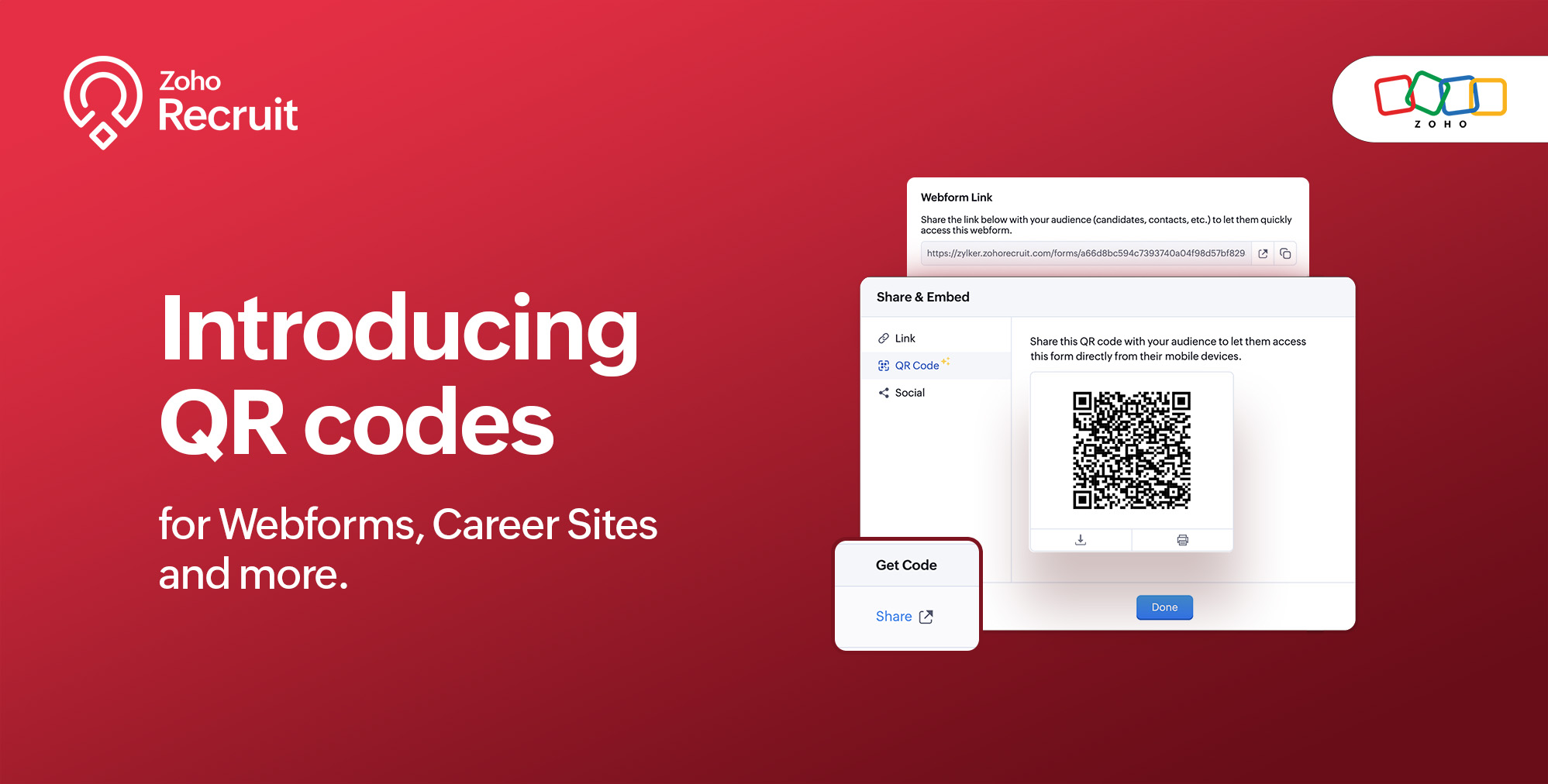
We're thrilled to share a groundbreaking enhancement that will reshape the way you connect with candidates. In our continuous efforts to enhance your recruiting experience, we proudly present the QR Code feature for Webforms, Career Sites and more. This exciting addition aims to simplify and amplify the way you engage with potential hires, promising a more efficient and seamless process.

Benefits

Unleash the full spectrum of advantages that QR Codes bring to your recruitment toolkit.

Effortless Sharing

Simplify the distribution of application forms and job listings by sharing QR codes effortlessly. Whether you're networking at an event, collaborating with partners, or reaching out through various channels, the QR codes make the process seamless. Recruiters can now disseminate vital information with just a scan, facilitating quicker connections with potential candidates.

Enhanced Candidate Experience

Elevate the candidate journey by providing swift and hassle-free access to application forms. The convenience of scanning a QR code enables candidates to engage with your opportunities instantly, reducing friction in the application process. This enhancement aims to leave a positive and lasting impression on candidates, reflecting your commitment to a user-centric recruitment experience.

Time-saving Recruitment

Say goodbye to manual data entry woes. The QR Code feature significantly reduces the time and effort invested in data collection. Candidates can efficiently fill out forms, and recruiters can focus on analyzing and selecting the best-fit talent. This time-saving aspect not only boosts overall productivity but also allows recruiters to invest more energy in strategic aspects of the recruitment process.

Streamlined Data Collection

Embrace a new era of streamlined data collection. With QR codes seamlessly linking candidates to your forms, you eliminate the need for manual information input. This not only reduces the risk of errors but also ensures that your database is populated with accurate and relevant candidate information. Streamlining data collection is a pivotal step towards creating a more efficient and error-free recruitment process.

Use Cases

Explore the various ways in which QR Codes can be seamlessly integrated into your recruitment strategy, catering to diverse scenarios and enhancing your overall outreach.

Event Recruiting

Picture a bustling career fair or industry conference where capturing candidates' attention is crucial. Utilizing QR codes to provide instant access to your Webforms and Career Sites, turns casual interactions with candidates into potential job applications. This empowers recruiters to make a lasting impression at events, fostering a bridge between in-person engagement and online application processes.

Printed Materials

Enrich your printed marketing materials, such as brochures, posters, or promotional handouts, with QR codes. Instead of directing candidates to lengthy URLs, a quick scan seamlessly guides them to relevant application forms or job listings. This not only simplifies the candidate's journey but also transforms your print materials into interactive gateways, blending the physical and digital realms for a more engaging experience.

Onboarding Efficiency

Beyond the recruitment phase, leverage QR codes to streamline the onboarding process for new hires. Include QR codes in onboarding materials, facilitating quick access to essential forms, training materials, and relevant documentation. This enhances the efficiency of the onboarding journey, ensuring a smooth transition for new employees and reinforcing a positive impression from the start.

Cross-Platform Consistency

Achieve cross-platform consistency by incorporating QR codes across various channels. Whether engaging candidates at events, through printed materials, or in the digital landscape, the QR Code feature ensures a unified application experience. This consistency not only reinforces your brand identity but also simplifies the candidate journey, making it seamless and accessible, regardless of the engagement platform.

How to get started?

Zoho Recruit automatically generates QR codes for your Webforms and Career Sites, which you can directly print or download with a click of a button. Given below are step-by-step instructions on how to find the generated QR codes.

To access the QR code of a webform;
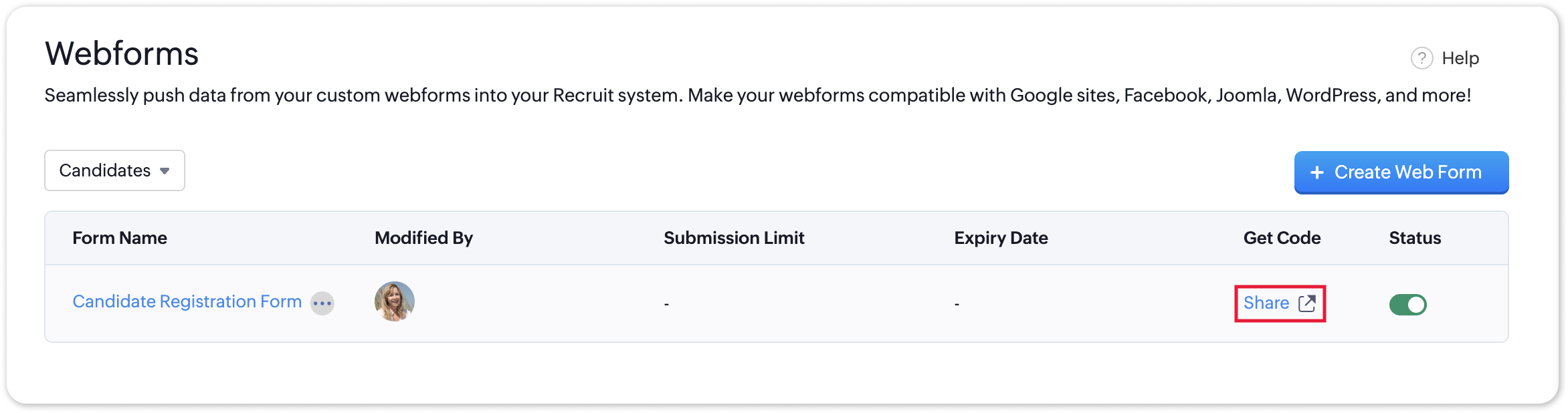
  • Navigate to Setup > Career Website > Webforms and click the Share button for the webform of your choosing.
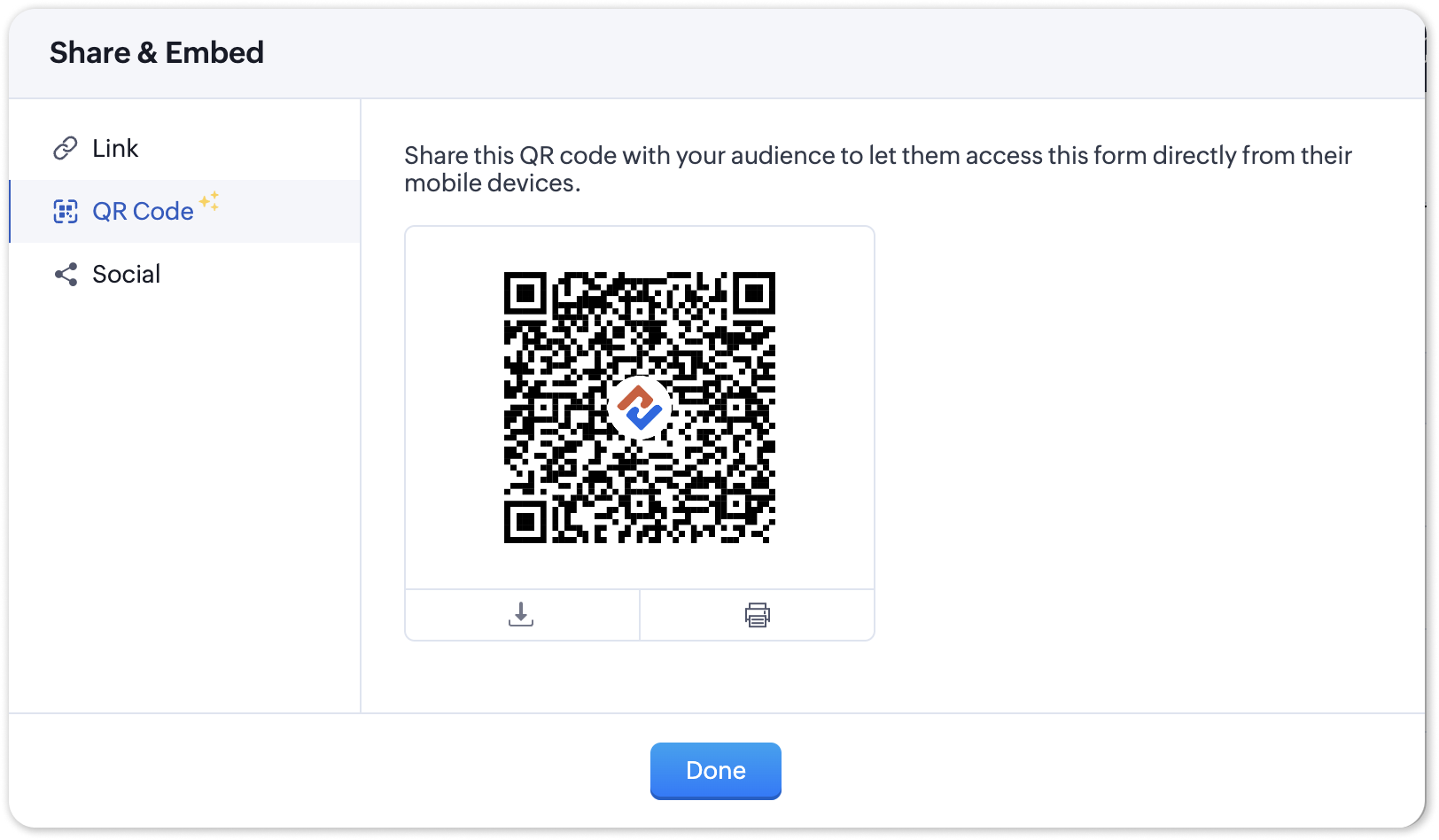
  • In the Share & Embed pop-up, select the QR section.
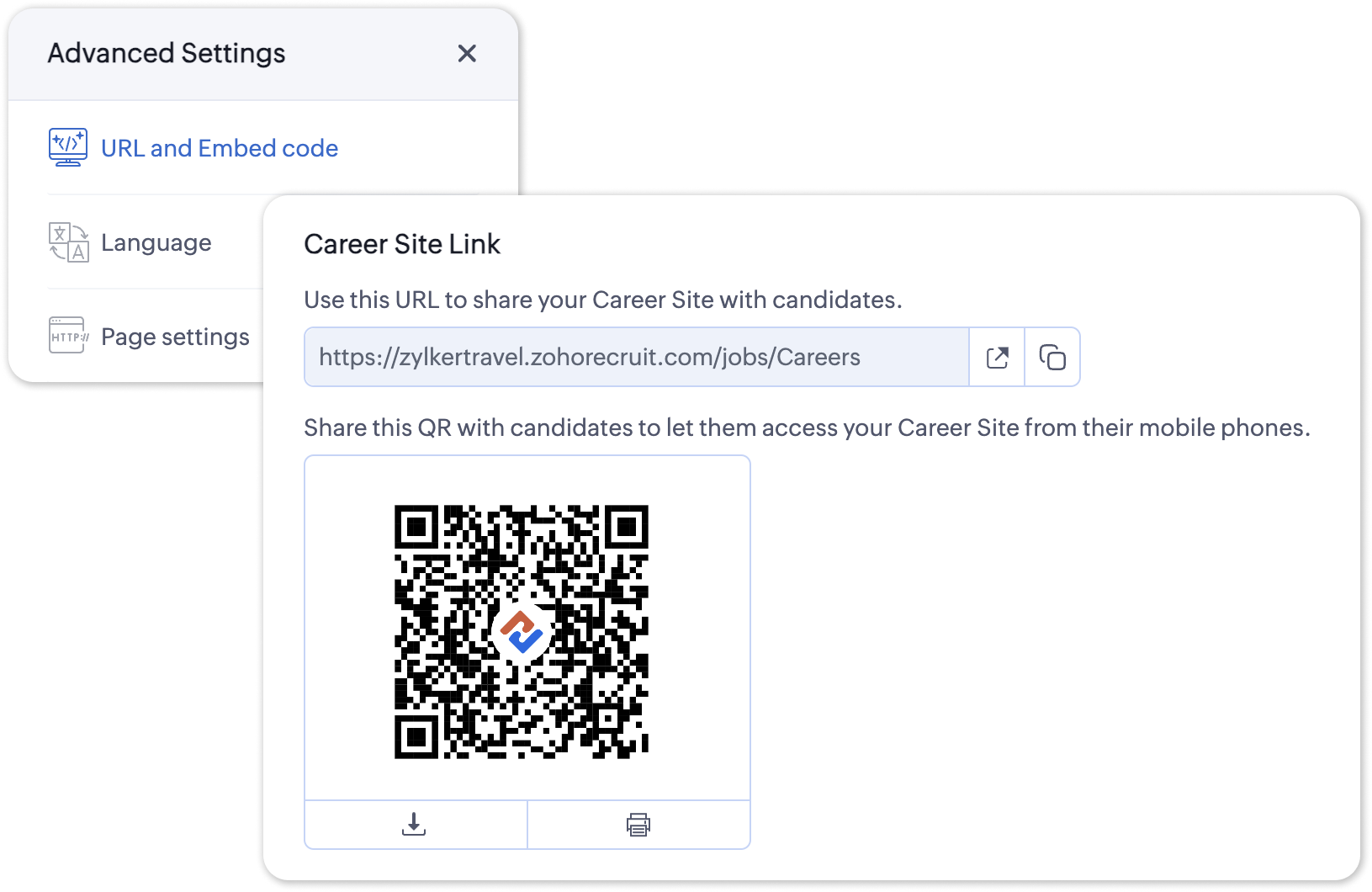
To access the QR code for your Career Site;
  • Navigate to Setup > Career Website > Career Site and Customize a career site of your choosing.
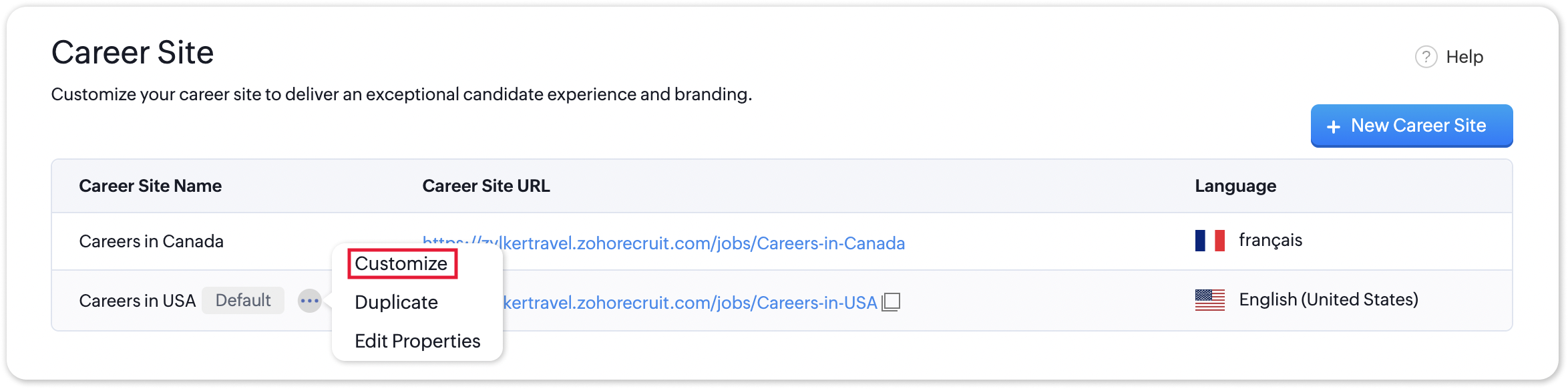
  • Under the Advanced Settings section, select URL and Embed Code. The QR code for the selected career site will be displayed here.
Additional Details

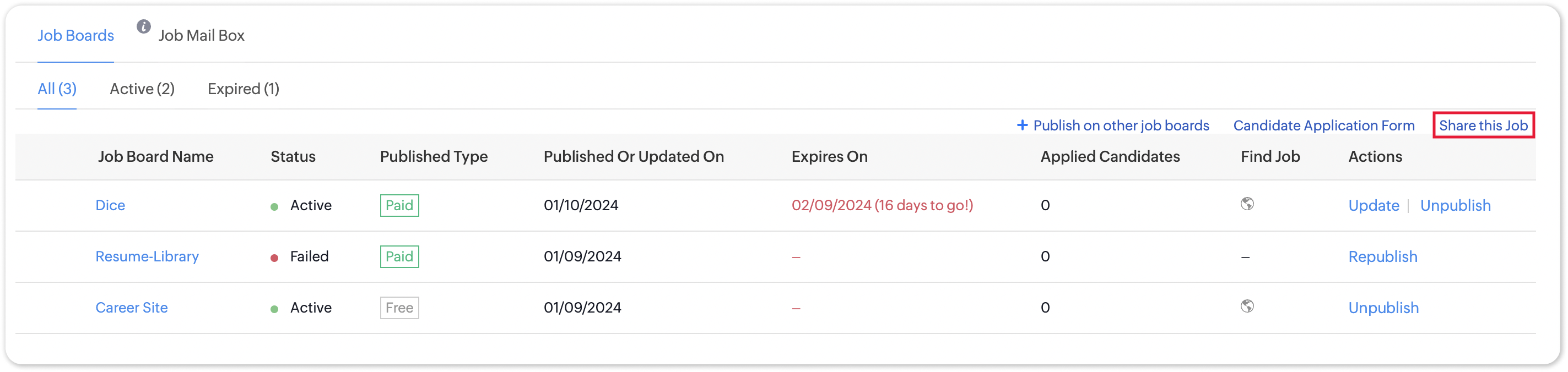
Zoho Recruit generates QR codes for every individual job listing added to your Career Site. Follow the steps given below to access the generated QR code for a published job opening.

To access the QR code for a specific Career Site job listing;
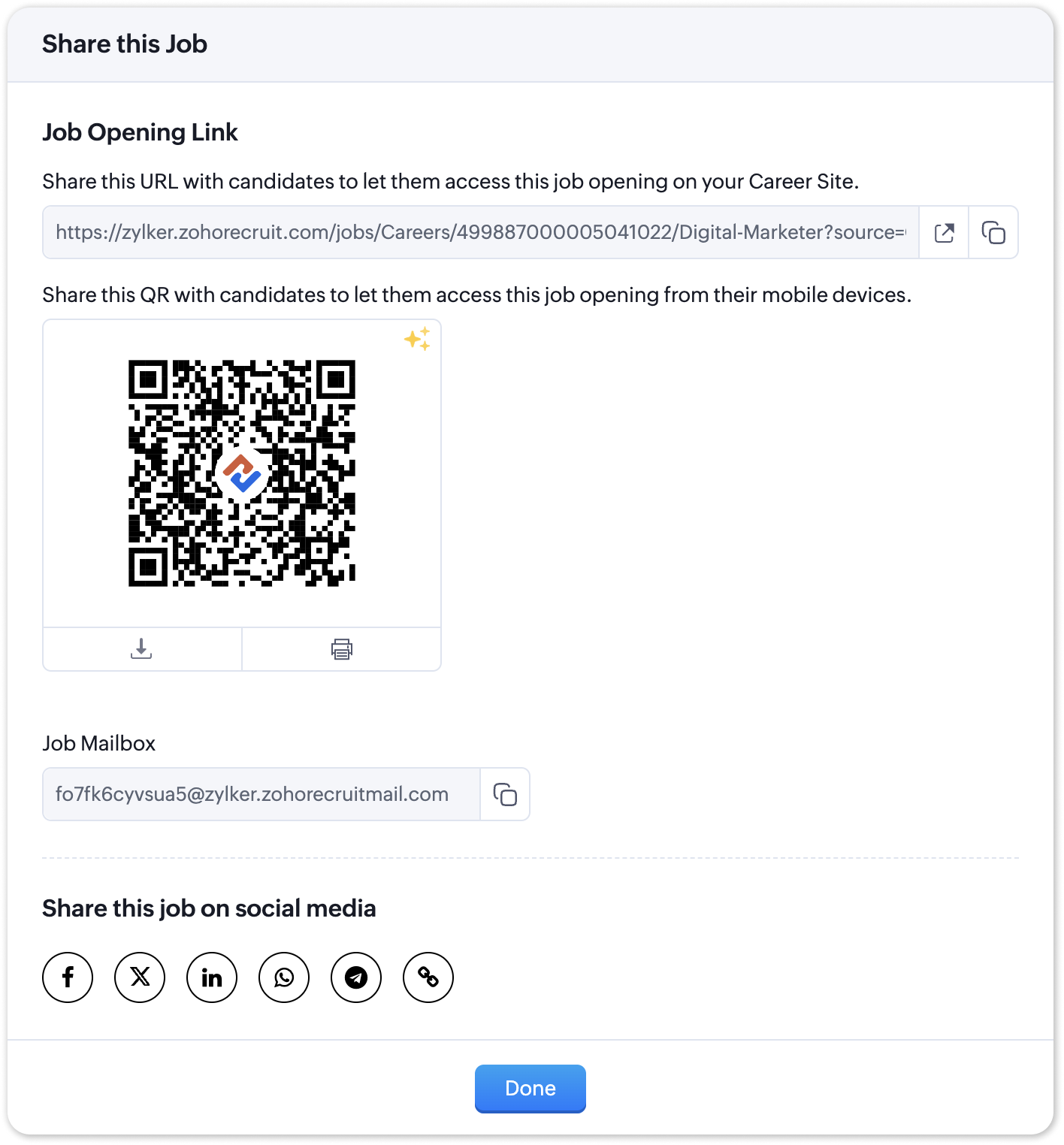
  • Navigate to the published job opening and click Sourcing Summary from the Quick Access panel on the left. In the sourcing summary section, click Share this Job.
  • In the pop-up that is displayed, you will be able to access the QR code for the job's Career Site listing and other key information.
Note: 

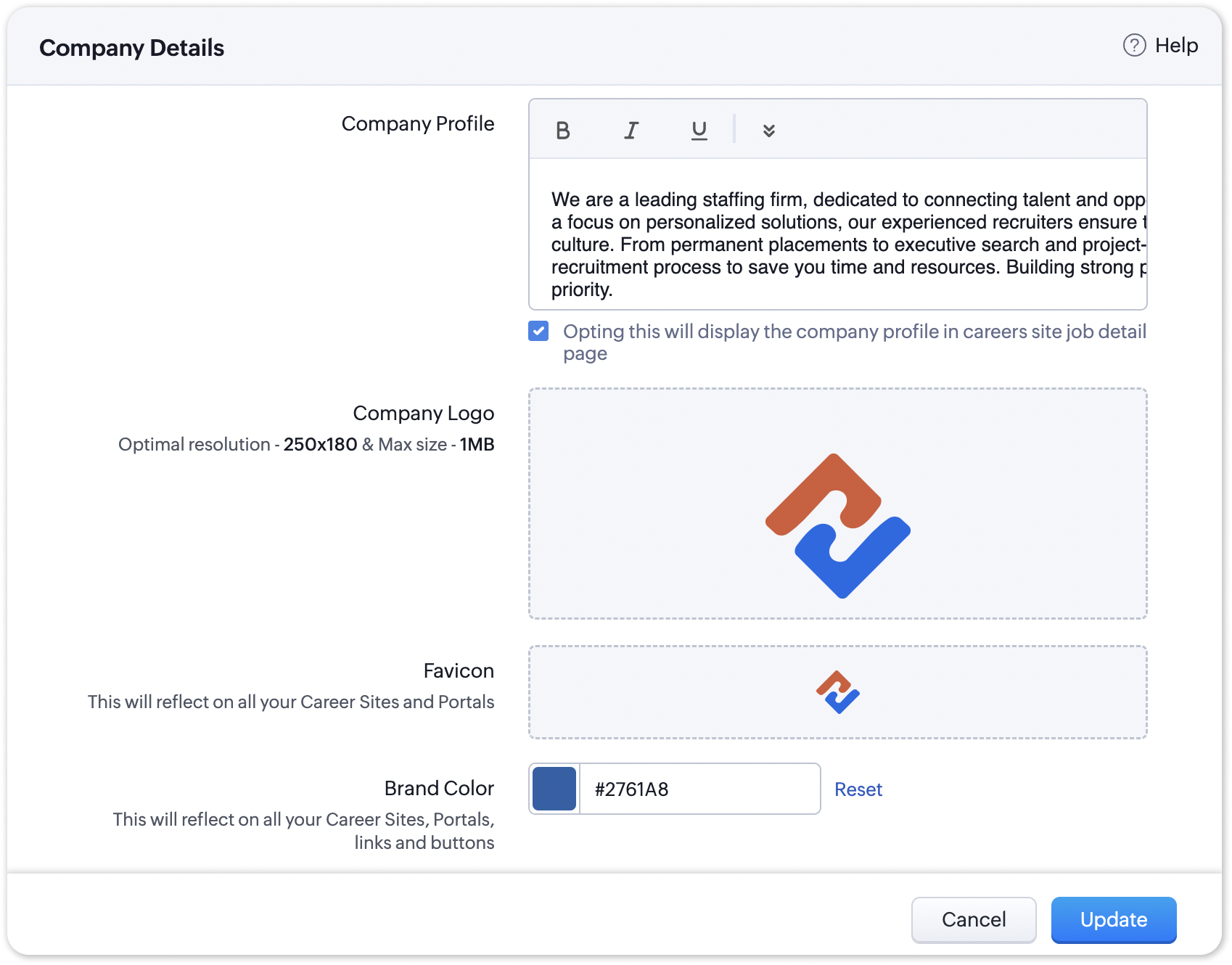
The favicon you upload during the Company Profile Verification stage will be added to your generated QR codes.

Join us in transforming recruitment into a streamlined, dynamic experience—where QR codes open doors, candidates find their path, and your team discovers a new era of efficiency.

Questions? Suggestions? Leave a comment below or reach out to our customer support team at support@zohorecruit.com

Regards,
Team Zoho Recruit

    Access your files securely from anywhere


                            Zoho Developer Community


                                                  • Desk Community Learning Series


                                                  • Digest


                                                  • Functions


                                                  • Meetups


                                                  • Kbase


                                                  • Resources


                                                  • Glossary


                                                  • Desk Marketplace


                                                  • MVP Corner


                                                  • Word of the Day


                                                  • Ask the Experts


                                                            • Sticky Posts

                                                            • An update to improve email delivery | Email Authentication & Relay

                                                              Update Rollout Latest Update: Enterprise users (8th July, 2025) This update is now live for Enterprise plan users in all regions. This includes People Plus, but not Zoho One, which will be covered in an upcoming update. Professional users (31st May 2025)
                                                            • Zoho Recruit User Group Meet-up | INDIA 2025 (Venue Finalised)

                                                              Hello Zoho Recruit users from India, We’re pleased and excited to announce our 2025 edition of Zoho user group meet-up in India in five cities! In this meet-up, our team of experts will help you understand the intricate nuances to use Zoho Recruit better,
                                                            • Zoho Recruit is coming to the UK | Zoho Community Learning Series

                                                              Customers from the United Kingdom, Exciting news: We will be in London for the Zoho Recruit user meet up. Our team will help you better understand the intricate nuances of Zoho Recruit to help you hire faster, inform about new and upcoming features, and
                                                            • Ask the experts - A live Q & A discussion on Zoho Recruit

                                                              We are delighted to come back with another edition of Ask the Experts community series. This edition, we'll be focusing on everything about Zoho Recruit. The topics will focus on the features that are used/asked by the majority of users and also based
                                                            • Restriction on 'From' addresses with a public domain

                                                              Dear Zoho Recruit Community, We hope this message finds you well. This post is to inform you about some important updates regarding email restrictions within Zoho Recruit. Effective post 31st March 2025, we will be implementing changes to the use of email


                                                            Manage your brands on social media


                                                                  Zoho TeamInbox Resources


                                                                      Zoho CRM Plus Resources

                                                                        Zoho Books Resources


                                                                          Zoho Subscriptions Resources

                                                                            Zoho Projects Resources


                                                                              Zoho Sprints Resources


                                                                                Qntrl Resources


                                                                                  Zoho Creator Resources


                                                                                      Zoho CRM Resources

                                                                                      • CRM Community Learning Series

                                                                                        CRM Community Learning Series


                                                                                      • Kaizen

                                                                                        Kaizen

                                                                                      • Functions

                                                                                        Functions

                                                                                      • Meetups

                                                                                        Meetups

                                                                                      • Kbase

                                                                                        Kbase

                                                                                      • Resources

                                                                                        Resources

                                                                                      • Digest

                                                                                        Digest

                                                                                      • CRM Marketplace

                                                                                        CRM Marketplace

                                                                                      • MVP Corner

                                                                                        MVP Corner


                                                                                          Design. Discuss. Deliver.

                                                                                          Create visually engaging stories with Zoho Show.

                                                                                          Get Started Now


                                                                                            Zoho Show Resources

                                                                                              Zoho Writer

                                                                                              Get Started. Write Away!

                                                                                              Writer is a powerful online word processor, designed for collaborative work.

                                                                                                Zoho CRM コンテンツ


                                                                                                  Nederlandse Hulpbronnen


                                                                                                      ご検討中の方


                                                                                                              • Recent Topics

                                                                                                              • User

                                                                                                                If user is already part of manage engine endpoint central , what hapens when i try to add them to another Zoho org / directory? Are these users added as external users?
                                                                                                              • Add an background image to an email template in CRM

                                                                                                                Hi all, We wants to put an background image behind all our email templates. Is there a way to import this thru html. If i put the option background image in <body style="background-image:...</body> and i look to the preview it shows our background, but
                                                                                                              • Create static subforms in Zoho CRM: streamline data entry with pre-defined values

                                                                                                                Last modified on (9 July, 2025): This feature was available in early access and is currently being rolled out to customers in phases. Currently available for users in the the AU, CA, and SA DCs. It will be enabled for the remaining DCs in the next couple
                                                                                                              • Outlook - Zoho CRM Calendar Integration

                                                                                                                I'm facing an issue integrating Outlook with Zoho CRM. Has anyone successfully connected their Outlook to Zoho, and are all your meetings and emails being captured correctly in the CRM? Any insights or troubleshooting tips would be appreciated
                                                                                                              • Can 1 Zoho CRM instance sync with 2 Zoho Marketing Automation instances?

                                                                                                                Can 1 Zoho CRM instance sync with 2 Zoho Marketing Automation instances?
                                                                                                              • 【Zoho CRM】ポータル機能のアップデート

                                                                                                                ユーザーの皆さま、こんにちは。コミュニティチームの藤澤です。 今回は「Zoho CRM アップデート情報」の中から、ポータル機能のアップデートをご紹介します。 ポータル管理の新機能「自動招待」により、Zoho CRMからポータルへの招待を自動化できるようになりました。これまで必要だった、ユーザーごとの手動設定は不要になります。設定した条件に基づいて、対象ユーザーに自動で招待が送信されます。 ポータルの新機能 条件に基づく自動招待:指定した条件を満たすユーザーに、自動で招待を送信 招待設定:招待メールの言語を選択し、言語ごとに条件を設定可能
                                                                                                              • Contact data removes Account data when creating a quote

                                                                                                                Hi, Our customer has address fields in their quote layout which should be the address of the Account. They prefill the information, adding the account name - the address data is populated as per what is in the account - great. However when they then add
                                                                                                              • I need to know the IP address of ZOHO CRM.

                                                                                                                The link below is the IP address for Analytics, do you have CRM's? IP address for Analytics I would like to know the IP address of ZOHO CRM to allow communication as the API server I am developing is also run from CRM. Moderation Update: The post below
                                                                                                              • Email was sent out without our permission

                                                                                                                Hi there, One customer just reached out to us about this email that we were not aware was being sent to our customers. Can you please check on your end?
                                                                                                              • IMAP search support

                                                                                                                Does Zoho Mail support IMAP search? https://www.rfc-editor.org/rfc/rfc9051.html#name-search-command TEXT <string> Messages that contain the specified string in the header (including MIME header fields) or body of the message. Servers are allowed to implement
                                                                                                              • Export all of our manuals from Zoho Learn in one go

                                                                                                                Hi, I know there's a way to export manuals in Zoho Learn, but I want to export everything in one go so it won't take so long. I can't see a way to do this, can I get some assistance or is this a feature in the pipeline? Thanks, Hannah
                                                                                                              • Automation#31: Automate Splitting Names for New Contact Records

                                                                                                                Hello Everyone, This week, we present to you a custom function, which allows you to split the first and last names from the user's email ID based on the separator used in the ID. Having grown into a large firm, Zylker Techfix aims to optimize its processes,
                                                                                                              • Automatically remove commas

                                                                                                                Team, Please be consistent in Zoho Books. In Payments, you have commas here: But when we copy and paste the amount in the Payments Made field, it does not accept it because the default setting is no commas. Please have Zoho Books remove commas autom
                                                                                                              • Can not add m365 outlook account to zohomail.

                                                                                                                I am attempting to use zoho mail as an imap client to add my outlook.com m365 account. In the m365 exchange admin center i have made sure the imap is enabled. In zoho mail i go to settings, mail accounts, add account, add imap account, i select "outlook",
                                                                                                              • Transfer ownership of files and folders in My Folders

                                                                                                                People work together as a team to achieve organizational goals and objectives. In an organization, there may be situations when someone leaves unexpectedly or is no longer available. This can put their team in a difficult position, especially if there
                                                                                                              • Project Change Orders and Additions

                                                                                                                We are in the process of migrating from QuickBooks Online to Zoho Books. We have Zoho One and like the ability to sync all of our data across everything. And I like that projects work in a way that's less dumb than QuickBooks. I'm trying to figure out
                                                                                                              • ZOHO Desk - Description of slave ticket disappeared after Merge

                                                                                                                Dear Support, On Zoho Desk the description of a ticket disappeared after merging two ticket. The one which was the slave one completely disappeared. The problem that in this description there was an image which i had only on Desk in that ticket. Could
                                                                                                              • How do I insert a cross-reference link to a different section within one Knowledge Base article using Zoho Desk?

                                                                                                                I would like to insert a link within a Knowledge Base article to a different section of that same article. The section I want to link to is formatted with the Heading 3 style and is displayed within my TOC. However, I do not see any way to add a link
                                                                                                              • Problem Adding Facebook Account

                                                                                                                Hi, I'm new here, I'm having trouble setting up my Facebook account as a social channel. I think the issue is down to how my Facebook is set up, which is pretty confusing. I have a personal Facebook account (let’s called it A) which is my main Facebook
                                                                                                              • Zoho Desk Teams App is not loading

                                                                                                                Hi Zoho Desk support. Need an assistance on the Zoho Desk Teams app. Once I click View Ticket, it isn't showing anything. Kindly refer to attached: ZohoDesk Teams App_View Ticket Error.jpg For our Dashboard, we are still experiencing the same issue. Kindly
                                                                                                              • About Meetings (Events module)

                                                                                                                I was working on an automation to cancel appointments in zoho flow , and in our case, we're using the Meetings module (which is called Events in API terms). But while working with it, I'm wondering what information I can display in the image where the
                                                                                                              • Zoho People - Retrieve the Leave Details - get("LeaveCount")

                                                                                                                Hi, Zoho People I need to collect all of an employee's leave requests for the calendar year and check how many half-days they have taken. If I run the script on the query he just modified, I can retrieve the information related to that query and use the
                                                                                                              • Mapping a new Ticket in Zoho Desk to an Account or Deal in Zoho CRM manually

                                                                                                                Is there any way for me to map an existing ticket in Zoho desk to an account or Deal within Zoho CRM? Sometimes people use different email to put in a ticket than the one that we have in the CRM, but it's still the same person. We would like to be able
                                                                                                              • Which WhatsApp API works seamlessly with Zoho CRM?

                                                                                                                I’m exploring WhatsApp API solutions that integrate seamlessly with Zoho CRM for customer communication, lead nurturing, and automation. I would love to hear insights from those who have successfully implemented WhatsApp within Zoho CRM. My Requirements:
                                                                                                              • Allow people to sign a zoho form by using esign or scanned signature

                                                                                                                Allow people to sign a zoho form by using esign or scanned signature
                                                                                                              • Button to Reapply Filters on Sheet(s)

                                                                                                                I wrote a macro that I attached to a button to reapply the filters on all my sheets and it says it works, but it doesn't actually do anything. What is wrong with it? Is there another way? Or even make it work for one sheet? Sub UniversalFilterRefresh()
                                                                                                              • Forgot my admin Panel Id and password

                                                                                                                Sir, I have an account , where a domain mycityestate.in is added for Zoho email , now it is hard for me to manage email because i have forgotten the Email account and password registered with Admin Panel of Zoho. Just need email name which is registered
                                                                                                              • Integrate Multiple ZohoBooks organization with zoho projects

                                                                                                                We have successfully connected our Zoho Books with Zoho Projects for synronizing timesheet data. Our Business specialty is, that the staff of the Main company (A) is working on several projects, but the Clients are sometimes contracted and paying to a
                                                                                                              • Zoho OAuth Connector Deprecation and Its Impact on Zoho Desk

                                                                                                                Hello everyone, Zoho believes in continuously refining its integrations to uphold the highest standards of security, reliability, and compliance. As part of this ongoing improvement, the Zoho OAuth default connector will be deprecated for all Zoho services
                                                                                                              • Flexible Partial-Use Coupons (Stored Value Credits)

                                                                                                                Subject: Feature Request: Ability for users to apply partial coupon balances per transaction Problem Statement Currently, our coupons are "one-and-done." If a user has a $50 coupon but only spends $30, they either lose the remaining $20 or are forced
                                                                                                              • Unable to Assign Multiple Categories to a Single Product in Zoho Commerce

                                                                                                                Hello Zoho Commerce Support Team, I am facing an issue while assigning categories to products in Zoho Commerce. I want to assign multiple categories to a single product, but in the Item edit page, the Category field allows selecting only one category
                                                                                                              • How do I add todays date to merge field

                                                                                                                I don't see any selection of todays date when creating a letter. Surely the date option of printing is standard? John
                                                                                                              • Polish signer experience to compete with docusign

                                                                                                                I would like to suggest that someone spend the little bit of time to polish the signer experience, and the email templates to more of a modern professional feel. They are currently very early 2000s and with some simple changes could vastly improve the
                                                                                                              • Add RTL and Hebrew Support for Candidate Portal (and Other Zoho Recruit Portals)

                                                                                                                Dear Zoho Recruit Team, I hope you're doing well. We would like to request the ability to set the Candidate Portal to be Right-to-Left (RTL) and in Hebrew, similar to the existing functionality for the Career Site. Currently, when we set the Career Site
                                                                                                              • Uplifted homepage experience

                                                                                                                Hello everyone, Creating your homepage is now much easier, more visual, and more impactful. Until now, your homepage allowed you to display custom views, widgets, analytic components, and Kiosk. With the following improvements, the homepage is now a smarter,
                                                                                                              • Tracking Emails sent through Outlook

                                                                                                                All of our sales team have their Outlook 365 accounts setup with IMAP integration. We're trying to track their email activity that occurs outside the CRM. I can see the email exchanges between the sales people and the clients in the contact module. But
                                                                                                              • Whats that

                                                                                                                Price?
                                                                                                              • Crossbeam

                                                                                                                Does anyone use Crossbeam with their Zoho CRM? I'm looking for a way to import Crossbeam partner leads into Zoho CRM. If so: - What's your experience been like? - Are you able to automatically import Crossbeam leads > Zoho CRM? How? - What doesn't work
                                                                                                              • The same Contact associated to multiple Companies - Deals

                                                                                                                Hi, I would like to know if there is an option to associate the same contact with multiple companies (two or more) deals, using the same contact details for all. This is because we have contacts who are linked to different companies or branches of the
                                                                                                              • How to Print the Data Model Zoho CRM

                                                                                                                I have created the data model in Zoho CRM and I want the ability to Print this. How do we do this please? I want the diagram exported to a PDF. There doesnt appear to be an option to do this. Thanks Andrew
                                                                                                              • Next Page