Upcoming update to field values in Zoho Books - Zoho Analytics integration
Hello Users,
We'd like to inform you of an upcoming update to the tax_category values in the Zoho Books integration for Zoho Analytics from October 20, 2026.
What's Changing?
tax_category field values are being renamed to align with the conventions already in use within Zoho Books and its related reporting modules. This provides a more consistent and clear experience across all data channels.
|
Field Name |
Current Value |
New Value |
|
tax_category |
Section 194 I(a) |
Section 194 IA |
|
tax_category |
Section 194 I(b) |
Section 194 IB |
|
tax_category |
Section 194 I(c) |
Section 194 IC |
|
tax_category |
3297 |
Section 392-Non Union Employees |
|
tax_category |
3298 |
Section 392-Other Govt Employees |
|
tax_category |
3299 |
Section 392-Indian Govt Employees |
|
tax_category |
3300 |
Section 392(7) |
|
tax_category |
3001 |
Section 393(1) Sl1(i) |
|
tax_category |
3002 |
Section 393(1) Sl1(ii) |
|
tax_category |
3003 |
Section 393(1) Sl2(i) |
|
tax_category |
3004 |
Section 393(1) Sl2(ii)D(a) |
|
tax_category |
3005 |
Section 393(1) Sl2(ii)D(b) |
|
tax_category |
3006 |
Section 393(1) Sl3(i) |
|
tax_category |
3007 |
Section 393(1) Sl3(ii) |
|
tax_category |
3008 |
Section 393(1) Sl3(iii) |
|
tax_category |
3009 |
Section 393(1) Sl4(i) |
|
tax_category |
3010 |
Section 393(1) Sl4(ii)-Interest |
|
tax_category |
3011 |
Section 393(1) Sl4(ii)-Dividend |
|
tax_category |
3012 |
Section 393(1) Sl4(ii)-Rent |
|
tax_category |
3013 |
Section 393(1) Sl4(iii) |
|
tax_category |
3014 |
Section 393(1) Sl4(iv) |
|
tax_category |
3015 |
Section 393(1) Sl5(i) |
|
tax_category |
3016 |
Section 393(1) Sl5(ii)D(a) |
|
tax_category |
3017 |
Section 393(1) Sl5(ii)D(b) |
|
tax_category |
3018 |
Section 393(1) Sl5(iii) |
|
tax_category |
3019 |
Section 393(1) Sl6(i)D(a) |
|
tax_category |
3020 |
Section 393(1) Sl6(i)D(b) |
|
tax_category |
3021 |
Section 393(1) Sl6(ii) |
|
tax_category |
3022 |
Section 393(1) Sl6(iii)D(a) |
|
tax_category |
3023 |
Section 393(1) Sl6(iii)D(b)-Fees |
|
tax_category |
3024 |
Section 393(1) Sl6(iii)D(b)-Remuneration |
|
tax_category |
3025 |
Section 393(1) Sl7 |
|
tax_category |
3026 |
Section 393(1) Sl8(i) |
|
tax_category |
3027 |
Section 393(1) Sl8(ii) |
|
tax_category |
3028 |
Section 393(1) Sl8(iv) |
|
tax_category |
3029 |
Section 393(1) Sl8(iv) Note6 |
|
tax_category |
3030 |
Section 393(1) Sl8(v) |
|
tax_category |
3031 |
Section 393(1) Sl8(vii) |
|
tax_category |
3032 |
Section 393(1) Sl8(vi)-NonAudit |
|
tax_category |
3033 |
Section 393(1) Sl8(vi)-Audit |
|
tax_category |
3034 |
Section 393(1) Sl8(vi) Note 6 |
|
tax_category |
3101 |
Section 393(2) Sl1 |
|
tax_category |
3102 |
Section 393(2) Sl2 |
|
tax_category |
3103 |
Section 393(2) Sl3 |
|
tax_category |
3104 |
Section 393(2) Sl4E(a) |
|
tax_category |
3105 |
Section 393(2) Sl4E(b) |
|
tax_category |
3106 |
Section 393(2) Sl5 |
|
tax_category |
3107 |
Section 393(2) Sl6E(a) |
|
tax_category |
3108 |
Section 393(2) Sl6E(b) |
|
tax_category |
3109 |
Section 393(2) Sl7 |
|
tax_category |
3110 |
Section 393(2) Sl8 |
|
tax_category |
3111 |
Section 393(2) Sl9 |
|
tax_category |
3112 |
Section 393(2) Sl10 |
|
tax_category |
3113 |
Section 393(2) Sl11 |
|
tax_category |
3114 |
Section 393(2) Sl12 |
|
tax_category |
3115 |
Section 393(2) Sl13 |
|
tax_category |
3116 |
Section 393(2) Sl14 |
|
tax_category |
3117 |
Section 393(2) Sl15 |
|
tax_category |
3118 |
Section 393(2) Sl16 |
|
tax_category |
3119 |
Section 393(2) Sl17 |
|
tax_category |
3201 |
Section 393(3) Sl1 |
|
tax_category |
3202 |
Section 393(3) Sl1 Note2 |
|
tax_category |
3203 |
Section 393(3) Sl2 |
|
tax_category |
3204 |
Section 393(3) Sl2 Note2 |
|
tax_category |
3205 |
Section 393(3) Sl3 |
|
tax_category |
3206 |
Section 393(3) Sl4 |
|
tax_category |
3207 |
Section 393(3) Sl5D(a) |
|
tax_category |
3208 |
Section 393(3) Sl5D(b) |
|
tax_category |
3209 |
Section 393(3) Sl6 |
|
tax_category |
3210 |
Section 393(3) Sl7 |
There is no change to existing functionality or underlying data behavior. This update is limited to the display names of these field type values.
What action do you need to take?
The current field values will be updated automatically. However, if you use exact field values ("Section 194 IA" or "Section 194 IB" or "Section 194 IC" or any value under current value column from above table) in query tables, filters, or formulas, you will need to update them manually on or after October 20, 2026.
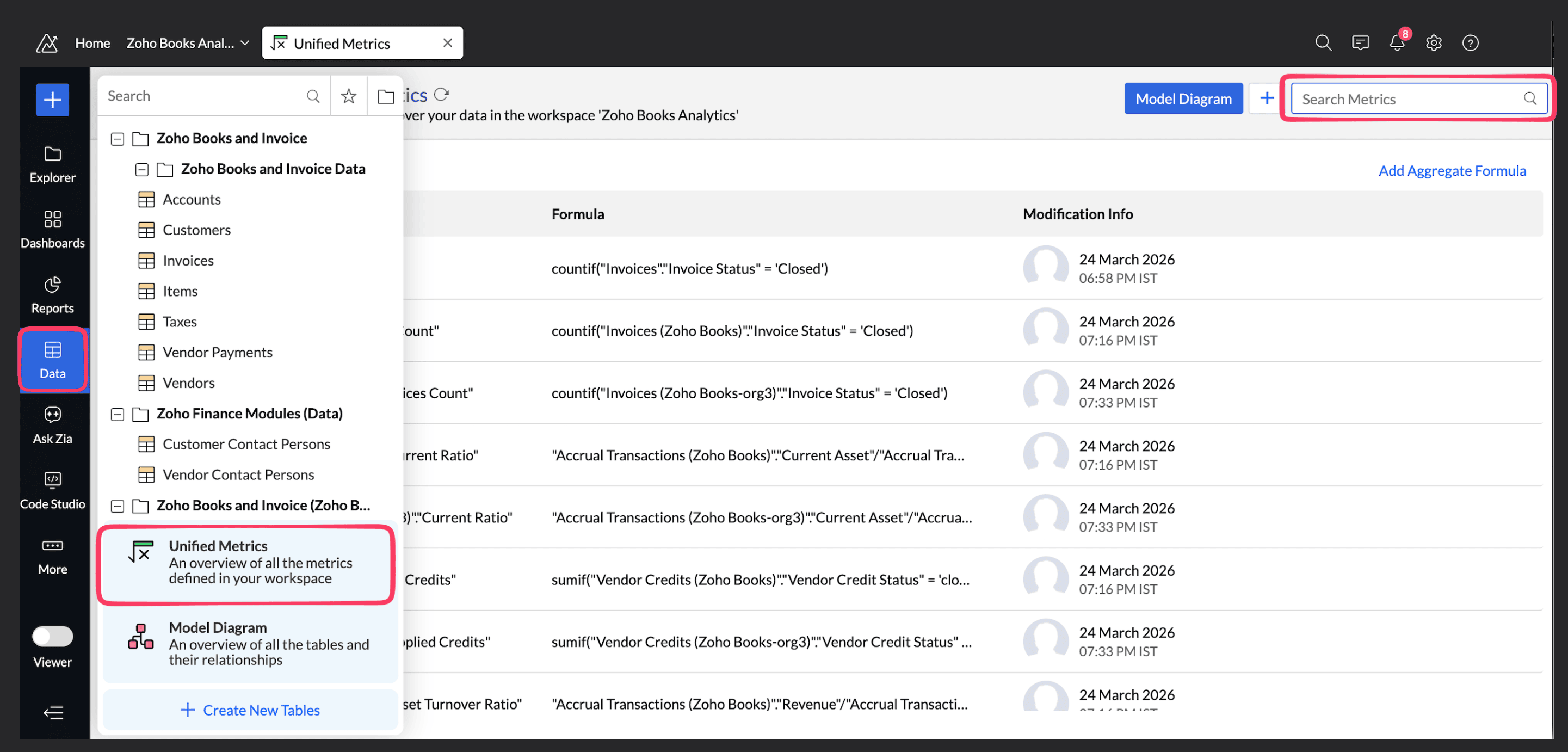
To check formulas: Go to Zoho Analytics > Data (left navigation) > Unified Metrics. Search for the relevant metrics using the field name to identify any formulas referencing these values.
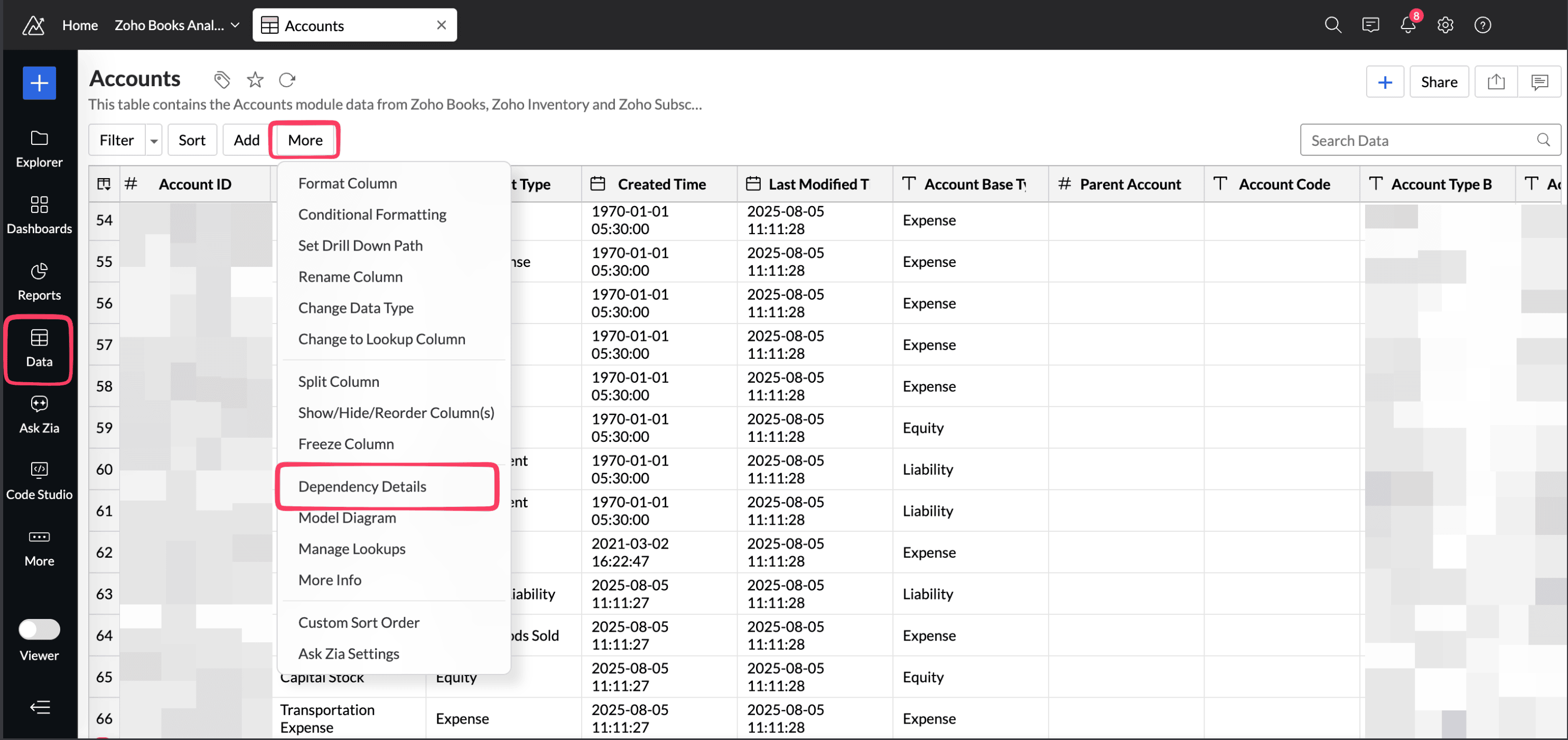
To check filters in reports, dashboards, and query tables: Open the Accounts table containing the Account Type field. Click the More options icon next to the table name and select Dependency Details. This gives you a consolidated list of all dependent reports, dashboards, and query tables - review the filters in each.
This will help you prepare in advance for the changes going live on October 20,2026.
If you have any questions or need assistance, please feel free to write to us at support@zohoanalytics.com and we will be happy to help.