Use Action Responses Across Kiosk Screens with Sequential Actions
Use Action Responses Across Kiosk Screens with Sequential Actions
This is exactly what Sequential Actions bring to Kiosk Studio in Zoho CRM.
Sequential actions allow kiosks to wait for one action to finish before moving on to the next screen. This ensures that action responses—such as newly created records or function outputs—are immediately available for use in subsequent screens and components.
What Are Sequential Actions?
Sequential actions enable you to use action responses in later screens within the same kiosk. When enabled, the kiosk waits for an action to complete before continuing, allowing you to:
- Reuse newly created records
- Pass function outputs across screens
- Drive decisions based on real-time results
- Create smarter, data-aware kiosk flows
Example: Using Created Records in the Next Step
Consider a kiosk where the first step creates a new record, such as a lead.
With sequential actions enabled:
- The kiosk waits until the lead is successfully created.
- The newly created lead becomes immediately available in the next screen.
- You can then schedule a meeting, create a task, trigger follow-ups, or evaluate conditions based on that lead—without any manual configuration.

1. Wait for Completion
The Wait for completion toggle ensures that a kiosk waits for an action to finish before displaying the next screen. This makes the action’s response available for use later in the kiosk.
By default, this option is enabled for most actions. It must be manually enabled for the following actions:
- Activities (tasks, calls, and meetings)
- Create Record
- Webhooks
- Functions
If this option is not enabled, actions will run in parallel, and their responses will not be available in subsequent screens.
2. Failure Path (Optional)
When Wait for completion is enabled, you can optionally configure a failure path.
If an action fails:
- The kiosk can branch into a failure path instead of the success path.
- You can define alternative steps or error-handling logic.
- The failure path is visually distinct from the success path, making it easier to design robust flows.
3. Message on Load
For actions such as webhooks and functions that may take time to execute, you can display a custom message to users while the action is processing. This improves the user experience by keeping users informed during execution.
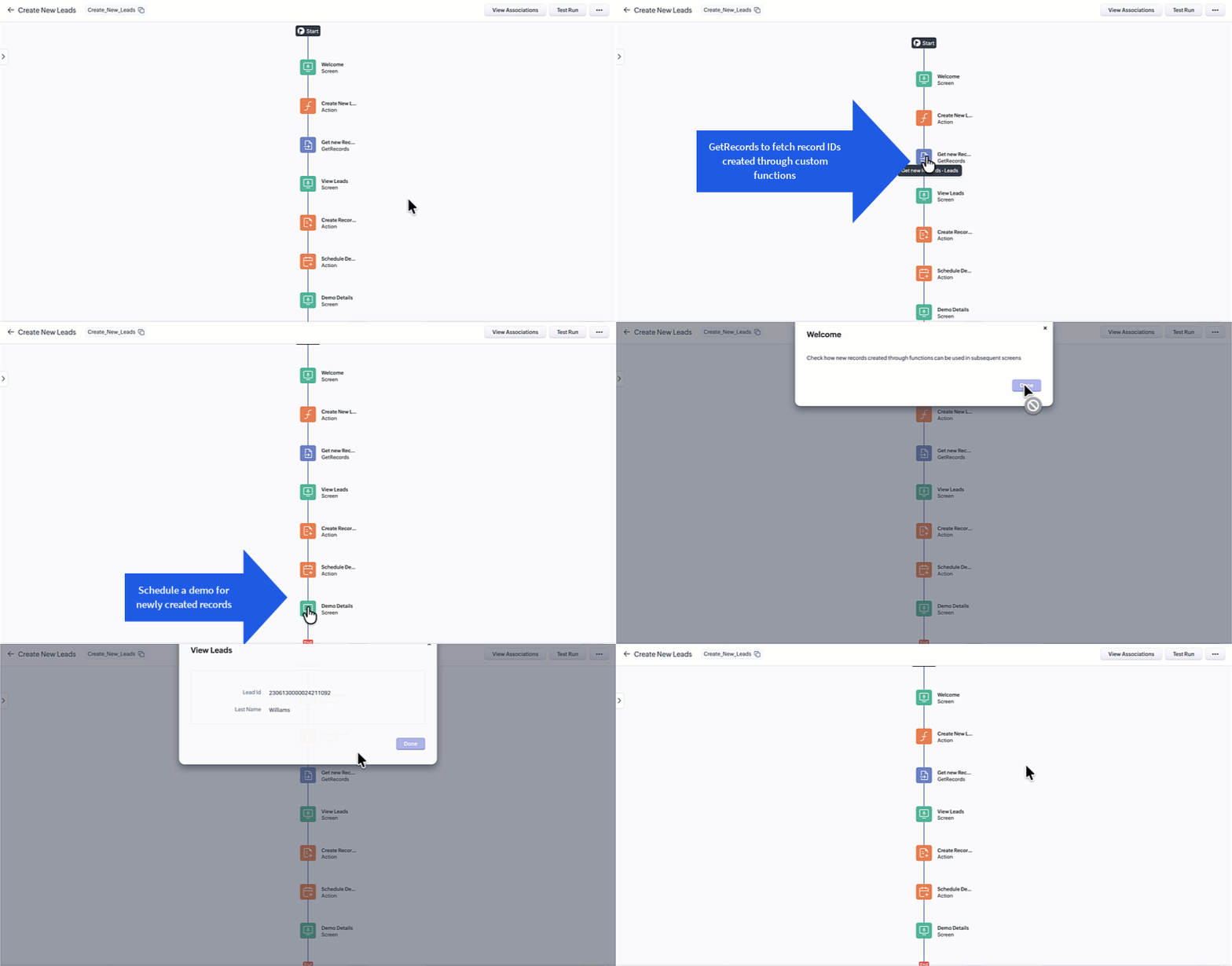
Let’s say you want to create new leads in Zoho CRM using a custom function.
- Create a function that inserts new lead records.
- The function returns the record IDs of the newly created leads.
- Enable Wait for completion on the function action.
- The kiosk waits for the function to finish and captures its output.
- In the next screen:
- Use the GetRecords component to fetch the newly created record IDs.
- Configure a Create Record or Activities action using those IDs.
- Schedule a demo or meeting for the newly created leads.
This approach allows kiosks to react dynamically to real-time outputs from functions or external APIs.
New Components and Field Enhancements
KioskRecords and CreatedRecords
With sequential actions, newly created records can now be accessed through CreatedRecords.
To simplify configuration:
- GetRecords
- CurrentRecords
- CreatedRecords
are now grouped under a single category called KioskRecords, providing a unified view of all record-related options.
Using CreatedRecords in Decision Components
Previously, decision components only supported conditions based on GetRecords and CurrentRecords.
With sequential actions, you can now:
- Add conditions based on CreatedRecords
- Use newly created data to control kiosk flow logic
Using CreatedRecords in Action Components
Actions can now be configured using CreatedRecords as the record type.
For example:
- Update a field on a newly created record
- Trigger follow-up actions on records created earlier in the kiosk
- Perform updates, assignments, or activity creation dynamically
Kiosk Fields
All screen fields and action fields are now grouped under Kiosk Fields.
This unified section makes it easier to:
- Access all available inputs
- Configure actions
- Build decision logic without switching context
Sequential Action Specifications
Keep the following limits and behaviors in mind:
- You can add up to three sequential actions (webhooks or functions) between two screens or between the start and end of a kiosk.
- Webhooks and Deluge functions have a 10-second execution wait time.
- If execution exceeds this limit, the action is marked as failed.
- The failure path (if configured) will be triggered.
- The action may still execute, but its response will not be available.
- A maximum of 25 fields can be created for webhooks and Deluge functions.
- Errors such as sockettimeout, threadtimeout, or connectiontimeout will move the kiosk to the failure path if configured.
- Only JSONObject responses are supported for sequential actionsJSONArray responses are not supported.
- Functions support only the string return type, so JSONObject responses must be parsed and returned as strings.

Sequential actions make kiosks more intelligent, responsive, and connected. By enabling real-time data flow across screens, this enhancement allows you to build dynamic kiosk experiences that adapt instantly to user actions and system responses.
This powerful addition to Kiosk Studio gives you greater control, smoother flows, and more flexibility when designing complex, data-driven processes.
If you have questions or need help getting started, feel free to leave a comment and we’ll be happy to assist.
