View, manage, and perform mass actions on scheduled replies in Zoho Desk
Hello Enterprise Community!
As we come to the end of the week, I wanted to take some time to tell everyone about a new enhancement to the Scheduled Reply feature in Zoho Desk that went live recently.
If you are not aware of the Scheduled Reply feature, once enabled for a department, this feature will allow for agents to draft a response for a ticket, then choose when they would like for the email to be sent, either by delaying the email for a set amount of time or by indicating a specific date/time for when the email response should be sent.

This can be very useful in situations where a drafted response is completed during a time when sending the reply immediately may result in the email getting buried in an inbox, such as after the customer's business hours and on the weekends. Scheduling the reply to instead be sent out during a time when the customer has been known to respond quickly or otherwise be active may help to ensure that it is attended in a timely manner.
The newest enhancement to this feature addresses the challenge that agents and admins may have faced when managing scheduled replies which have been created but not yet sent, the new Scheduled Replies View. Previously, managing previously scheduled replies required used to navigate to the individual tickets, but the new "All Scheduled Replies" and "My Scheduled Replies" views collect and displays them in a table view. The "All Scheduled Replies" view enabled admins and managers to easily find all of the current scheduled replies for the entire department, while the "My Scheduled Replies" allows for agents to view the scheduled replies for their own tickets.
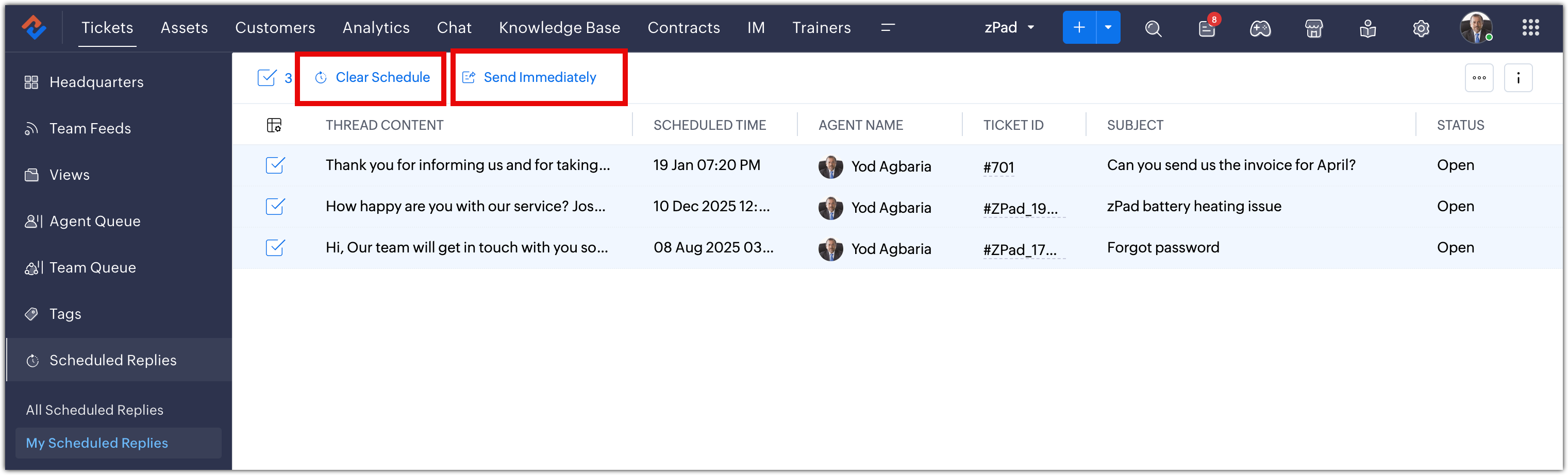
In addition, these two new views allow for mass actions upon selected replies, with options to "Clear Schedule" and prevent the replies from sending at the designated time, or to "Send Immediately" instead. These options can be very helpful in cases where a widespread issue has affected multiple customers and agents have scheduled a reply to be sent out at the time that the bug fix is scheduled to go live, but then either the fix is either delayed or deployed early.
In the case of a delay, clearing the schedule for multiple emails would prevent the announcement that the issue is resolved from being sent out prematurely, and in the case of an early deployment, customers can be notified right away.
What are some ways that you and your team are already using the Scheduled Replies feature? What are some ideas you may have to help us to further improve it?
Please feel free to share your feedback with us, we are always happy to hear from you all as we continue to improve our platform.
Thanks for reading!
Enterprise Support Community Team
