Weekly Tips: Insert frequently used phrases in a jiffy using Hotkeys
You often find yourself using similar phrases in an email —like confirming appointments or providing standard information. Constantly switching between the mouse and keyboard interrupts your flow and slows you down.Instead of typing the same phrases over and over, you want to quickly insert those common phrases to save time. What if you could instantly perform these actions and insert frequently used phrases without breaking your typing rhythm?
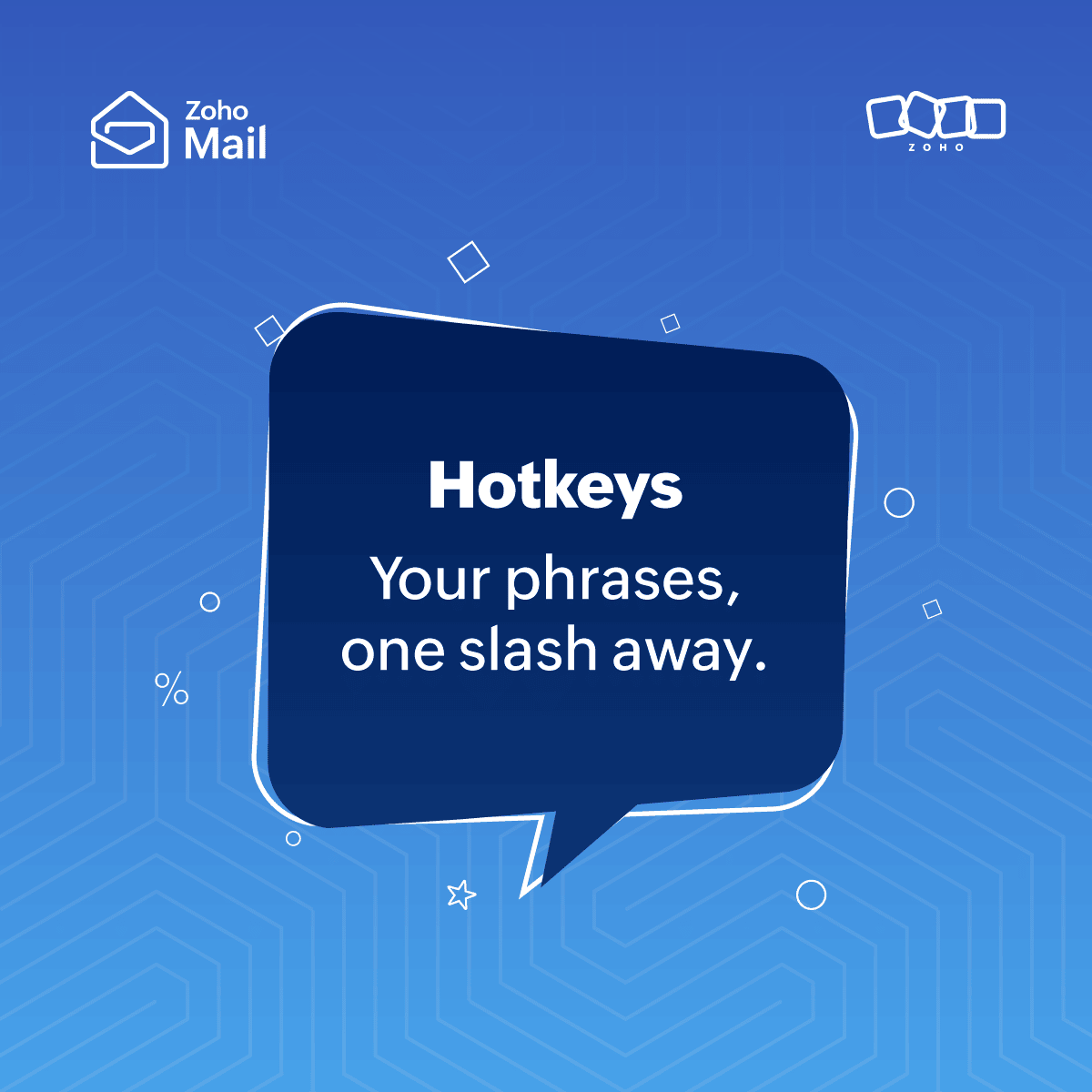
Hotkeys in Zoho Mail help you get through your emails faster and more efficiently without repetitive clicking or typing the same content repeatedly, Ex:- As soon as possible - ASAP.
HotKeys
You can create custom text shortcuts using Hotkeys in Zoho Mail. Hotkeys can be used to expand and replace easy abbreviations of your choice with full words and phrases as you type in the mail composer.
Create Hotkeys
- Login to your Zoho Mail account.
- Click on the Settings icon.
- Navigate to Mail > Hotkeys section.
- Click + Add a Hotkey.

- Provide the Hotkey of your choice and its replacement text in the appropriate fields.
- Click Save to add the hotkey.
You can also use the Import Hotkeys from a csv or json file option to import your existing hotkeys into Zoho Mail.
To use Hotkeys, in the composer, type '/' to see all your Hotkeys and their text replacements. Select one to insert the Hotkey.