Weekly Tips: Stay on Track with Zoho To-Do
Every day, we carry out numerous tasks, both personal and professional. It can be overwhelming and challenging to keep track of all these tasks, including their status, progress, and priority. Simply jotting them down in a notebook or relying on memory can result in missing important tasks or deadlines. What if you could organize all your tasks in one structured system, with reminders for overdue tasks and much more, all within your inbox?
Introducing Zoho ToDo, formerly known as Zoho Tasks, to help streamline your task management process.
Zoho To-Do
With Zoho To-Do app, you can easily manage all your tasks in one place. Add tasks, set deadlines, and prioritize items based on urgency. Whether you are managing your personal work or collaborating with your team, you can organize tasks seamlessly. The app helps you stay focused, and you are always clear on what needs to be done next. Also, as you read through an email, you can add them to your to-do list, set deadlines, and even break them down into smaller, manageable sub-tasks.
How to Access Zoho ToDo
- Log into your Zoho Mail account.
- In the left pane, navigate to ToDo.
- You can easily view, create, and manage your tasks all in one place.
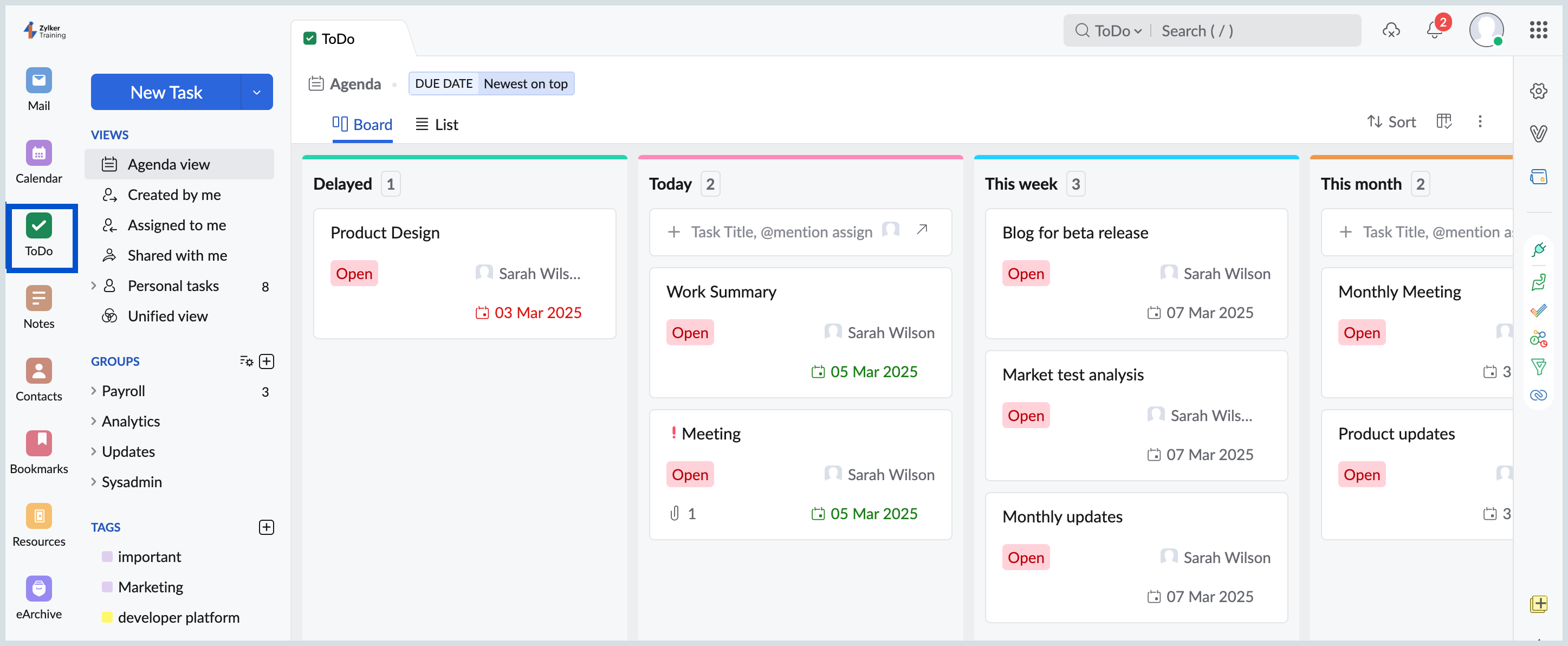
- Tasks will be displayed in different views.
- Agenda View- list all the tasks
- Created by me- tasks created by you
- Assigned to me- tasks that are assigned to you by another user
- Shared with me- tasks which are shared with you
- Personal tasks- tasks that you have created and are visible only to you
- Unified view- tasks created across different Zoho applications
You can also view tasks by group and filter them based on tags. Stay organized and keep your work on track with Zoho ToDo application.