Weekly Tips: Track Email Engagement with Read Receipts in Zoho Mail
While email is a convenient and widely used way to communicate, it doesn't offer the immediate feedback you get from face-to-face conversations or phone calls. When we send an email, there is no way to know for sure if the recipient has acknowledged its content unless they reply. This can leave you wondering whether they have seen your message, especially if there is no response.
But Zoho Mail makes things easier by letting you use the Read Receipts feature.
Read Receipts
When you send emails, you might need an acknowledgment to know whether the recipient has read the email. In such cases, you can use the Read Receipt feature. When this option is turned on, the recipient will see a pop-up when they open your email, asking if they want to share an acknowledgement of the receipt of the email. If they agree, you will be notified that they have opened your message.
How to Turn on Ask Receipts
- Log into your Zoho Mail account.
- Navigate to Settings >Compose >Read Receipts.
- Click on the Read Receipts Check box.

- All the outgoing emails you send will now ask the recipients for Read Receipts.
Note:
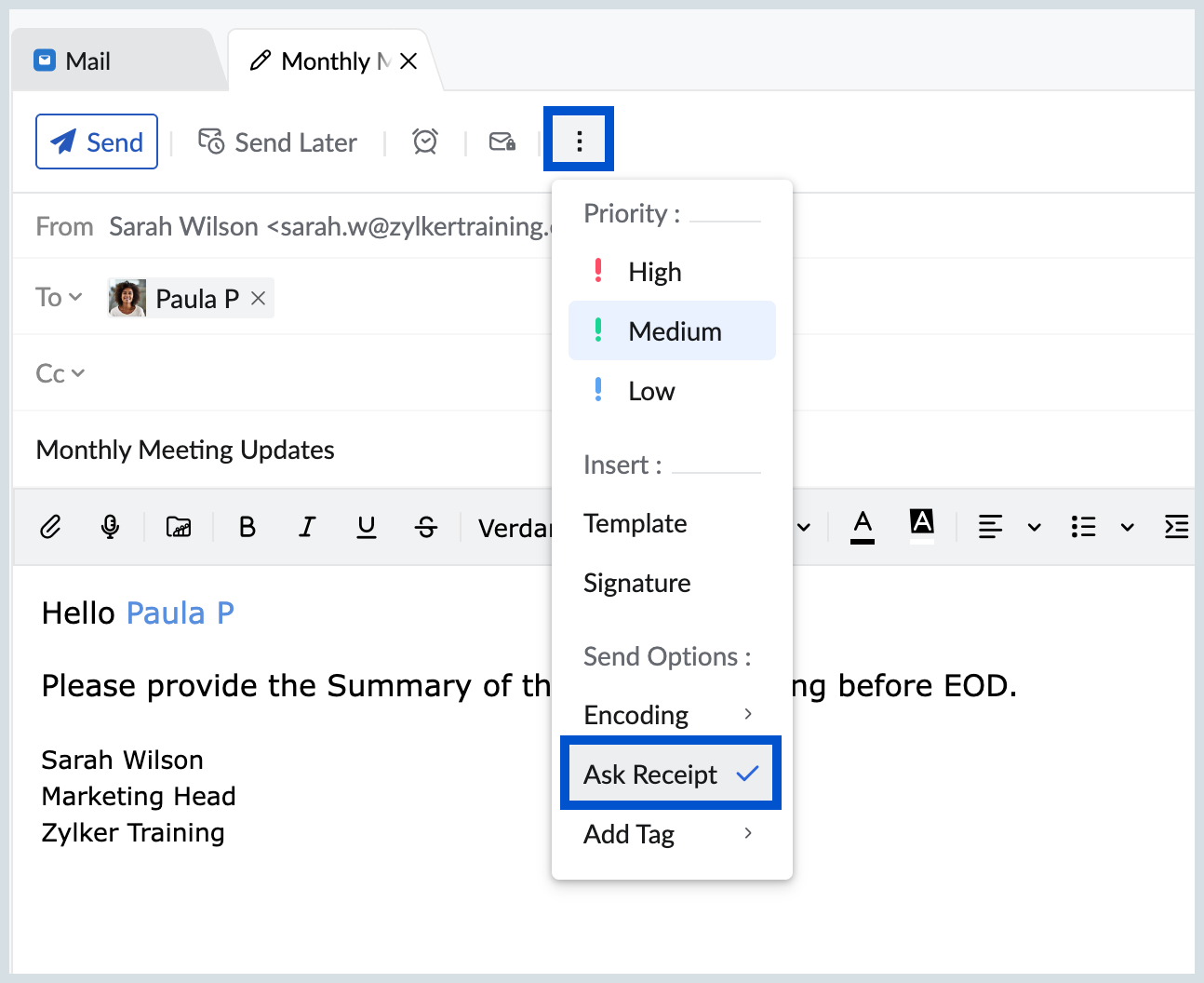
If you prefer not to request read receipts for every outgoing email, you can also choose to request read receipts only for specific emails. Simply click on the Ask Receipt option under More Options while composing your email.