What's New in Zoho Inventory | July & August 2026
Hello users,
The July and August 2026 releases bring a range of new features and improvements across the product. From the Nigeria Edition and Super Admin enhancements to Sri Lanka IRD-compliant invoicing, Loyalty Program Management, and improvements to the Android app, there’s plenty to explore in this release.
New Releases
Nigerian Edition of Zoho Inventory Is Now Live
We’re excited to announce the successful launch of the Nigerian Edition of Zoho Inventory, expanding our inventory management solution to businesses in Nigeria. With this launch, Zoho Inventory continues to expand its regional availability and provide businesses with inventory management capabilities tailored to their local requirements. Explore the help documentations
Custom Dashboards for Zoho Inventory
Custom Dashboards are now available in Zoho Inventory, along with entity-level permissions for Reports within Roles. Users can personalize their dashboards by adding the required predefined panels and report panels, while role-based permissions ensure they can access only the reports and data they’re authorized to view. This provides a more flexible dashboard experience, giving users faster access to the inventory insights most relevant to their day-to-day operations.
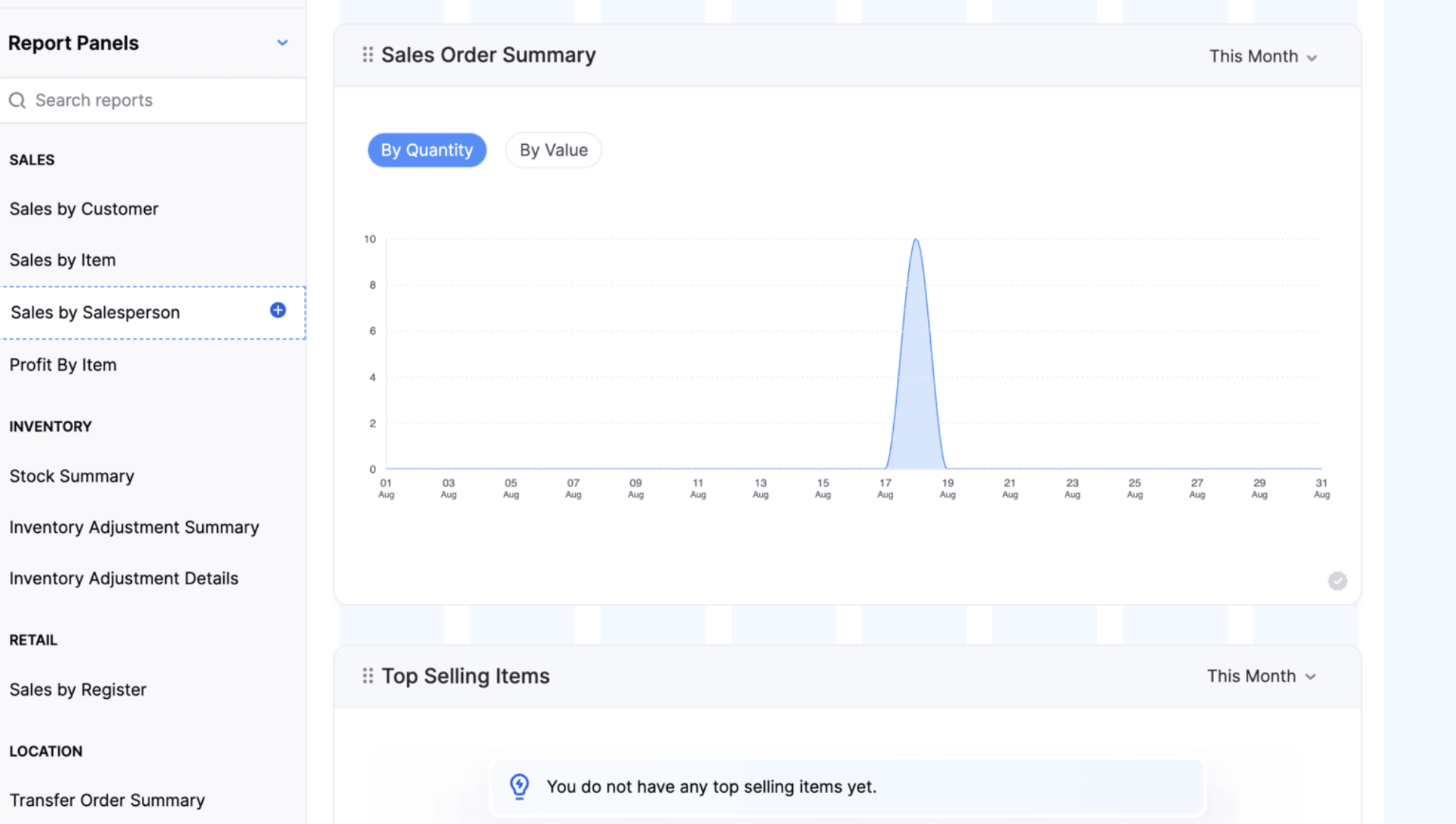
Note: This feature is available only on the Enterprise plan.
Introducing Super Admin
Super Admin is a high-level privilege assigned to an administrator, giving them exclusive control over other admins and the ability to set up and manage the organization across all Zoho Finance applications. Learn More
Customer & Users Management
Loyalty Program Management
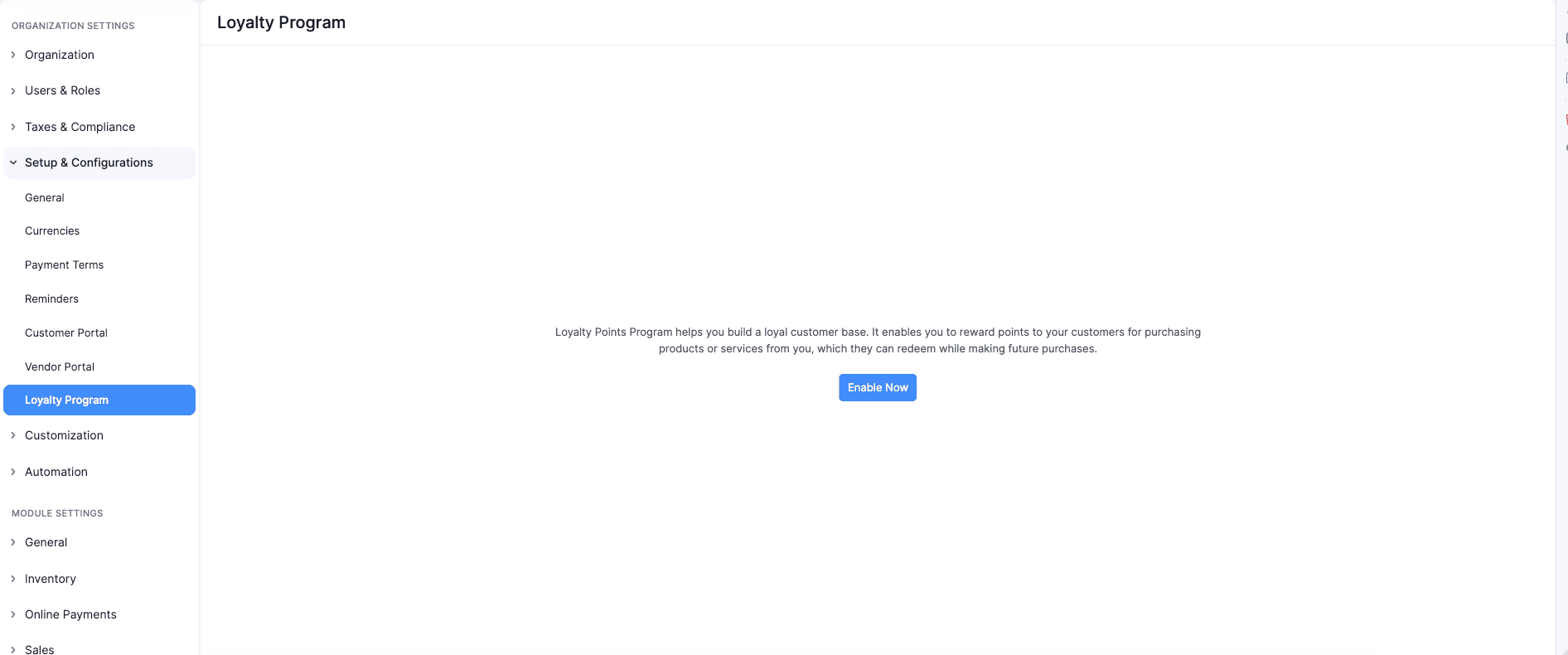
Create and manage loyalty programs and associate them with customers to reward purchases with loyalty points. Customers can earn and redeem points across supported sales channels, helping businesses improve customer retention and engagement.
Configure organization-wide loyalty preferences, including point adjustments, rounding rules, redemption behavior, return handling, and the loyalty points tracking account. Set up individual programs with earning and redemption rules, schedules, minimum redemption points, and redemption windows. Customers earn points automatically on eligible sales based on their associated loyalty program. Points earned from the original sale are automatically reversed when a Credit Note is created for a return. Customers can redeem available points partially or fully on invoices and during Retail Store checkout, and pay the remaining balance using other payment methods.
To enable Loyalty Program Management > Go to Settings > Navigate to Setup & Configurations > Click Loyalty Program > Click Enable Now.
Role-Based Access for Extension Installations
You can now control which user roles can access an extension during installation. Administrators can select the roles that can access the extension components and restrict access for others. Access can also be modified later from the extension details page. Organization-wide backend components are not covered by role-based access.
Vendor Hierarchy
You can now organize related vendors into a hierarchy by associating sub-vendors with a parent vendor. This makes it easier to manage and track transactions across vendors from a single parent vendor.
Note: Vendor Hierarchy is available in Early Access on the Enterprise plan. Contact support@zohoinventory.com to enable it for your organization.
Contact Person Custom Fields
You can now create custom fields for Contact Persons to capture additional information specific to your business needs. Custom fields can be created and managed from the Customer and Vendor Custom Fields page and are available for both primary and other contact Persons. You can also display Contact Person custom fields on the Customers and Vendors details page, list view page, and portals.
The custom fields are also supported in Contact Person import and export, audit trails, and integrations with Zoho Analytics, Microsoft, Zoho CRM, and Bigin.
Items & Item Setup
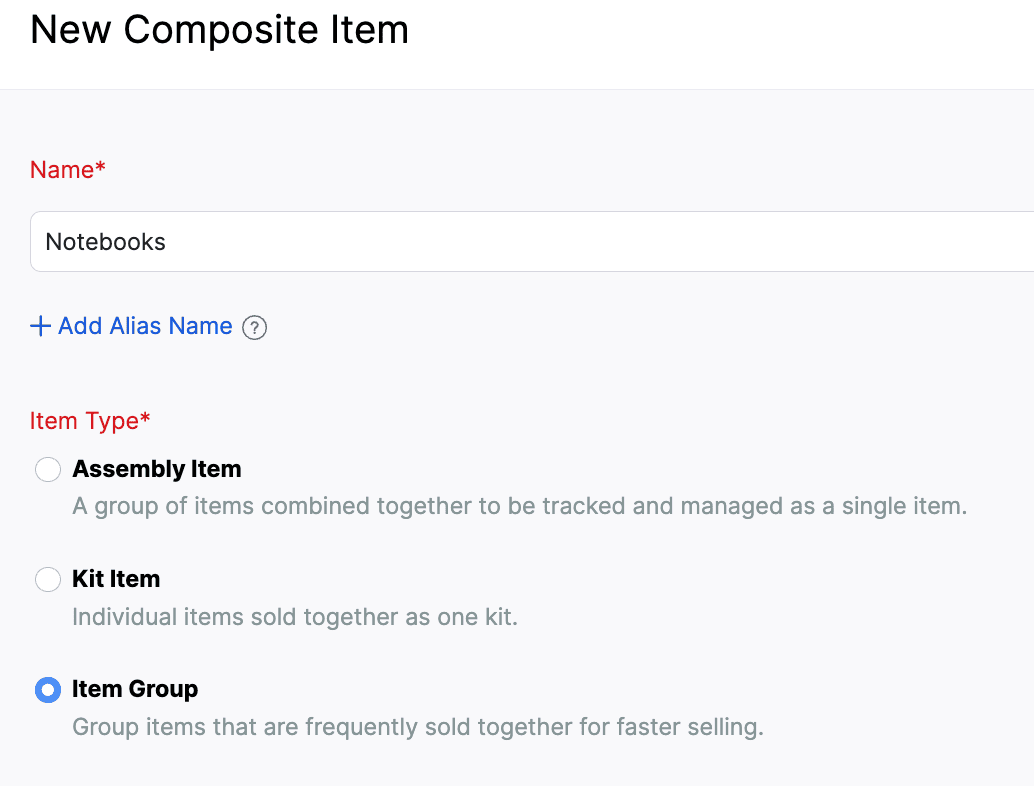
Create and Sell Item Groups [Early Access]
Create Item Groups to combine individual items that are commonly sold together. Add the group to sales transactions to automatically include its components with predefined quantities.
Item Groups do not have standalone pricing, taxes, inventory tracking, or accounting. These are managed for individual components. You can add or remove components, edit their quantities, rates, taxes, and discounts, and rearrange them during transaction creation. In packages, picklists, purchase returns, backorders, dropshipments, and reports, only the individual components are considered. You can display group components in transaction PDFs using the Show Item Components option in PDF customization.
To create an Item Group > Go to Inventory > Composite Items > Click + New > Select Item Group > Enter the group details and add component items > Click Save.
Create and Manage Item Modifiers
We’ve introduced a new Item Modifiers module that lets you customize items during transactions using predefined options. Create reusable modifier groups, configure selection rules and additional prices, and associate them with one or more items.
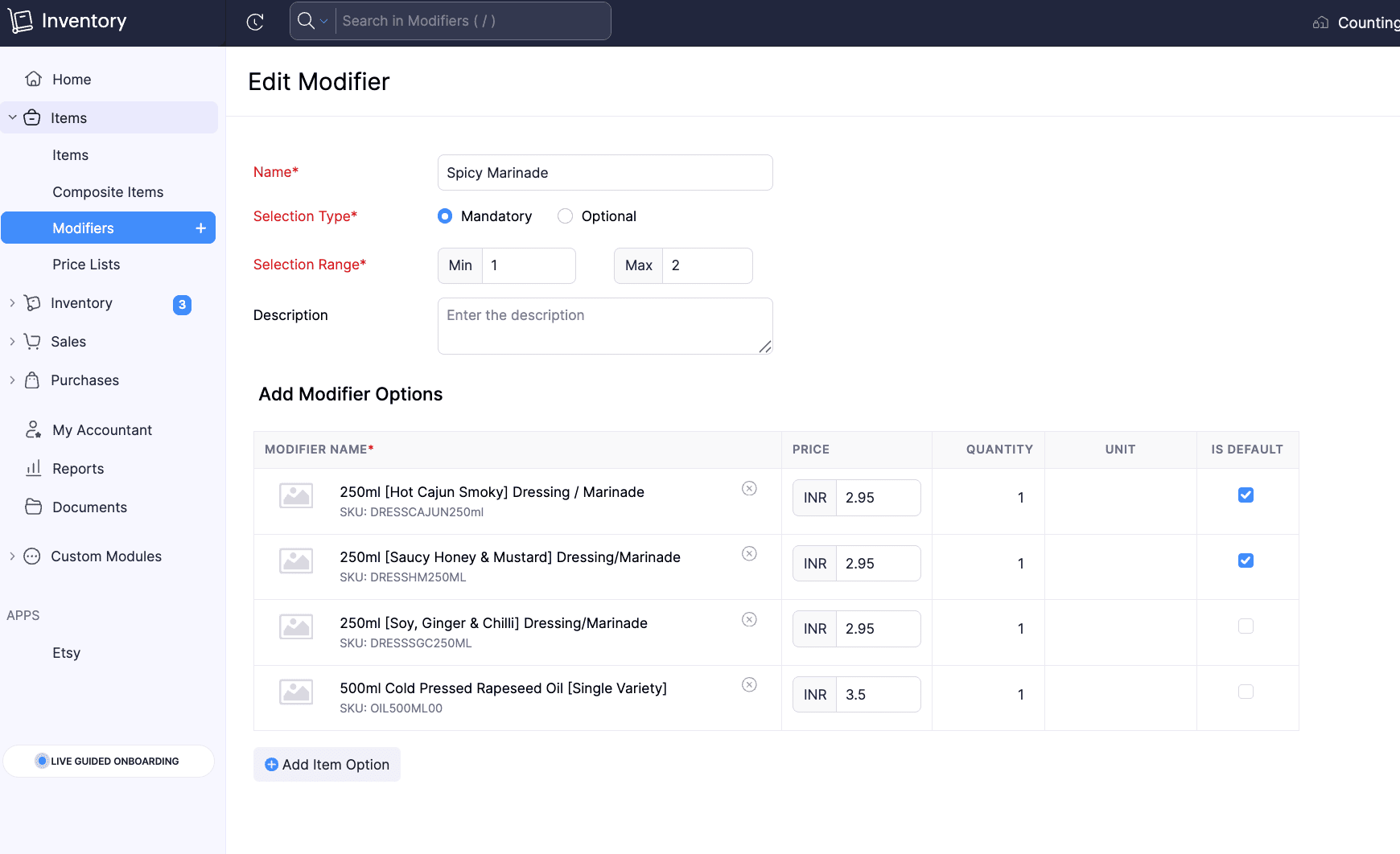
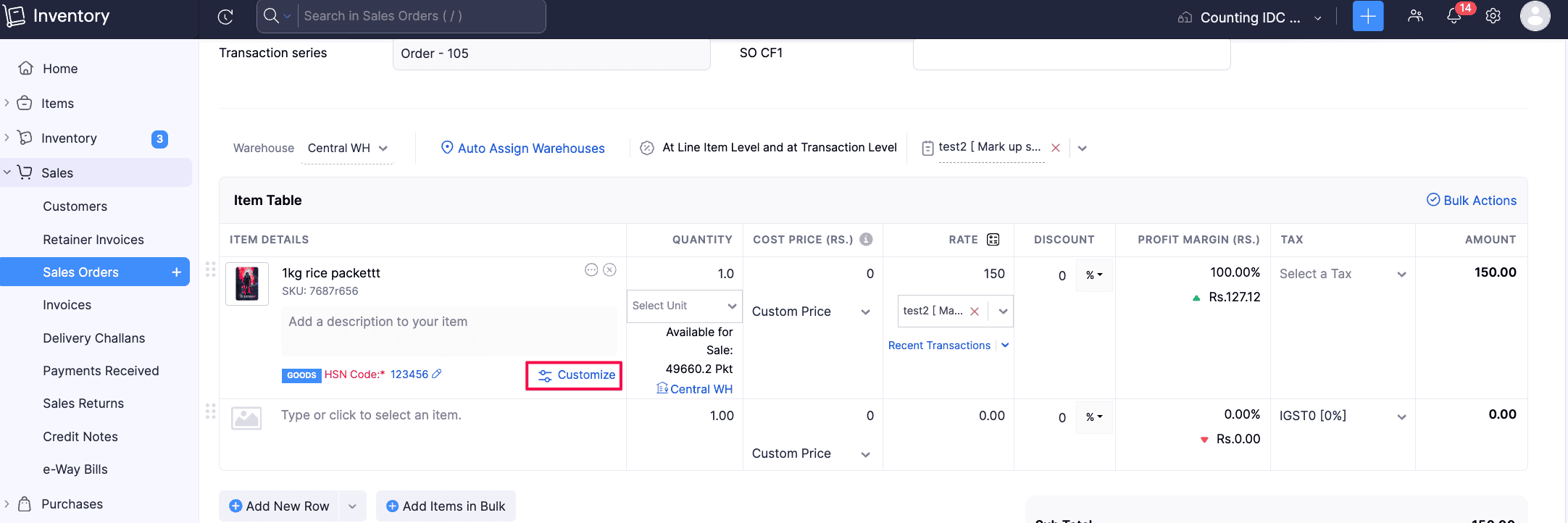
Selected modifiers are displayed under the parent item and are included separately in packages, picklists, returns, PDFs, and the Sales by Item report.
To create Item Modifiers: Go to Items > Click Modifiers > + New, configure the modifier group and options, associate it with items, and save.
Note: This feature is in Early Access and is available only to users on the Enterprise plan. Contact support@zohoinventory.com to enable it for your organization.
Customize Item Identifier Fields and Access
Customize the UPC, EAN, MPN, and ISBN item identifier fields, including their display names. Configure each field to be mandatory, active, or inactive, and set role-based access to show or hide them. The SKU field is also included in this customization framework.
To customize item identifier fields > Go to Settings > Module Settings > General > Items > Navigate to Item Identifier Fields (UPC, EAN, MPN, ISBN, SKU) > Mark fields as Mandatory
Introducing Combo Items [Early Access]
You can now create Combo Items, a new Composite Item Type that lets you sell multiple products together while providing flexibility in the components included. Unlike Kits, where all components are predefined, Combo Items allow you to configure multiple component groups with different options. During a transaction, you can select one option from each group to create the combo. You can also customize the selected components, manage their quantities and tracking details, and handle packing, backorders, returns, PDFs, and reports for Combo Items.
Note: This feature is in Early Access and is available only to users on the Enterprise plan. Contact support@zohoinventory.com to enable it for your organization.
Purchases
Create Purchase Returns [All Editions]
The Purchase Returns module is now available for all editions. Create returns as standalone documents or directly from existing Purchase Orders with pre-filled details. Once confirmed, generate picklists, packages, shipments, and vendor credits to track physical movement and financial adjustments. The Purchase Return Summary and Purchase Return Details reports provide visibility into return transactions and item-level data. Learn More
To enable the Purchase Returns module: Go to Settings > Click General under Setup & Configurations > Enable Purchase Returns
Filter Purchase Receives by Approval Status
Filter Purchase Receives by their approval status to quickly locate and manage records. You can filter records by Draft, Pending Approval, Approved, In Transit, Billed or Rejected status from the Purchase Receive list page, custom views, advanced search, Item transaction details, and Vendor transaction details.
Sales & Returns
Configure Approval Workflows for Sales Returns
Configure simple multilevel and custom approval workflows for sales returns to control their status changes. Set approvers, manage the movement of returns to Accepted or Declined status, and filter the Sales Returns lists view page and history reports by approval status. Users with the necessary permissions can save, submit, or accept returns based on the configured workflow.
To configure Sales Return approvals > Go to Settings > Preferences > Approvals > Select Sales Returns > Choose Simple, Multi-Level, or Custom workflow > Add approvers and conditions > Save and Enable
Allocate Stock to Sales Orders [Early Access]
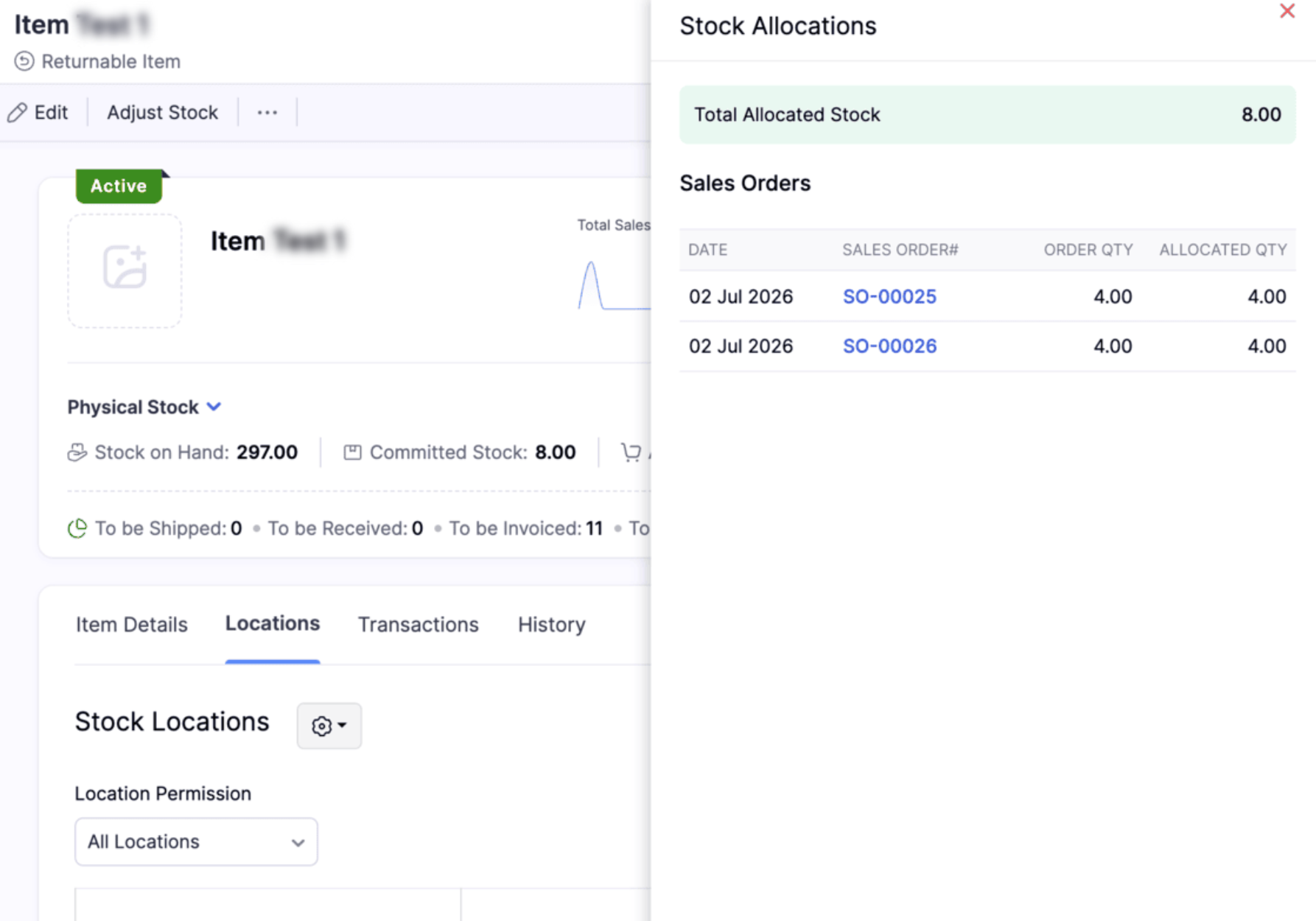
Allocate available inventory to confirmed sales orders to reserve stock for specific customers. This prevents the same stock from being allocated to multiple sales orders. You can track allocated quantities for each order and item, including batch and serial-tracked items. Allocated stock remains available in your physical inventory until it is shipped. Allocations are automatically updated as items are fulfilled, and you can remove allocations before picking or packing starts. You can also filter Sales Orders by allocation status and view allocation details by item and location.
To view the available stocks for an item, Go to Items > Select the item > Click Allocated Stock in the details page
Inventory Operations and AI Enhancements
Adjust Inventory Value to Zero
You can now adjust an item's total stock value to zero using Value Adjustment. Previously, adjusted values of zero or below were restricted. With this enhancement, only negative values are restricted, allowing you to accurately reflect inventory with no remaining financial value, such as damaged, obsolete, expired, or fully written-off stock.
Role Permissions for Assemblies
Assembly permissions are now available as a separate entity under Roles & Permissions. Admins can now manage access to each Assembly action separately instead of assigning all Assembly permissions together under the Composite Items module.
Manage Inventory with CoCreate Agent
We’ve introduced the CoCreate Agent, which helps you create sales transactions such as sales orders, invoices, and credit notes using simple prompts. Instead of entering details in each field manually, you can describe the transaction in simple English, and the agent creates it for you. Learn More
Note: This feature is available only on the Enterprise plan.
Templates & Customization
Sri Lanka IRD-Compliant Invoice Template [Global Edition]
You can now generate Sri Lanka IRD-compliant invoices from the Templates Gallery under the Global Edition. The template reflects the mandatory Tax Invoice requirements set by the Sri Lanka Inland Revenue Department and includes supplier and purchaser details, invoice serial number, date of supply, tax values, and total consideration in Sri Lankan Rupees.
Create Custom Barcode Templates
Create fully customizable barcode labels using HTML and CSS. Design flexible layouts, define custom label sizes, and use placeholders to display organization details, item custom fields, batch custom fields, and serial custom fields. Create separate templates for item, batch, and serial number barcodes based on your requirements.
To create a custom barcode template > Go to Settings > PDF Templates > Item Barcodes > Click New Template > Select Build from Scratch > Open the Code Editor
Note: This feature is available only for the Premium and Enterprise plans
Currency Support in Oman
Currency symbol support is now available for the Omani Rial (OMR) or transactions with up to 200 line items, the respective currency symbol will be displayed automatically. For transactions exceeding 200 line items, the currency codes SAR, AED, and OMR will continue to be displayed.
Enhanced Zoho Analytics Integration
Enable Weighted Average Cost Module in Zoho Analytics
Enable the Weighted Average Cost (WAC) module in Zoho Analytics to access inventory transaction valuation details. The module includes a Current WAC column that provides the valuation cost of outward inventory transactions for custom reports and queries. Organizations using the WAC valuation method can use this data for accurate Profit and Loss, inventory valuation, and other accounting reports.
To enable the WAC module: Go to Settings > Integrations & Marketplace > Zoho Apps > Zoho Analytics > Click Edit for the Analytics configuration > Select the Weighted Average Cost module > Click Save.
Sync Picklists, Move Orders, and Putaways with Zoho Analytics
Sync picklists, move orders, and putaways with Zoho Analytics to access and analyze their data in custom reports and dashboards.
Report Enhancements
Purchase Order By Item Report
The new Purchase Order By Item report provides an overview of purchase order data by item for a selected date range. Use customizable columns, advanced filters, multi-level grouping, and export options to analyze purchase order details. You can also create custom reports and schedule the report for automatic delivery.
View In-Transit Quantities in Inventory Summary Report
View the quantity of purchase receives that are in transit in the In-Transit column of the Inventory Summary Report. When the Shipment and Receipts filter is selected, this column displays the combined quantity of in-transit purchase receives and Transfer Order stock.
Minor Enhancements
Include Credit Notes in the Profit by Item Report using the Report By filter. This ensures that returns are considered when calculating item-level profit.
Select months or years as the time interval in the Inventory Aging Summary Report to analyze inventory age over longer periods.
Schedule the Batch Details Report to generate and send automatically at your preferred intervals. Set a recurring frequency schedule and select the recipients for report delivery.
The Order Fulfillment by Item Report now includes Sales Order Number, Customer Name, and Sales Order Custom Fields in the Advanced Filters. Users can apply specific filters to quickly identify and analyze order fulfillment data based on sales orders, customers, and business-specific custom fields.
The FIFO Cost Lot Tracking Report now includes an Age column under the Product In section. It shows how long each stock has been held based on its received date, providing better visibility into stock age under the FIFO valuation method.
Taxes & Payments
Terminal Payments
Terminal Payments via Zoho Payments are now available in the India edition. You can accept customer payments through supported terminal devices directly from the web, Windows app, and Retail app.
Import and Export TDS Rates
Import and export TDS and TDS Group tax rates to manage tax rates more efficiently.
To import or export TDS rates > Go to Settings > Direct Taxes > Income TDS Rates > Import or Export the required tax rates
TDS Summary in Invoice and Bill PDFs [IN Edition]
Invoice and Bill PDFs can now include a dedicated TDS Summary table, displaying the TDS rate, taxable amount, TDS amount, and total taxable & TDS amount. The table appears when Show TDS Summary is enabled in the PDF template and the transaction contains TDS, making it easier to view the complete TDS breakdown directly in the generated PDF.
E-Way Bill Support for Purchase Transactions [IN Edition]
E-Way Bills can now be created for Bills and Vendor Credits in the India edition, including purchase transactions that exceed the applicable threshold. You can also select the required address while generating the E-Way Bill, making it easier to create and manage E-Way Bills for purchase transactions.
Direct Avalara Integration Updates [US & CA Editions]
The direct Avalara integration now supports customer codes. You can use customer codes to match the correct customer record in Avalara when customers have branches, partner customers, or naming differences across systems. This ensures the correct exemption certificate is applied during tax calculation without manual adjustments.
Android App Updates
Picklist Item Grouping: The Picklist module now supports item grouping, so users can view items grouped by sales order and filter by sales order or assignee.
Credit Note Template Selection: Users can now change the template directly in the Credit Notes module, making it easier to align templates with their document needs.
Alias Name for Items: Items can now include an alias name, and that value can be used during item search for quicker lookups.
Onboarding Dashboard Order: The onboarding dashboard now follows the sequence of sales order, package, shipment, and purchase order for a clearer workflow view.
That's a wrap for now, folks! We hope these updates make your inventory management smoother and more powerful. Try these features out and let us know what you think in the comments below. If you have any questions, feel free to reach out to us at support@zohoinventory.com.
Best regards,
The Zoho Inventory Team