What's New in Zoho Inventory | September 2026
Hello users,
September brings a range of new features and enhancements across Zoho Inventory. From improved inventory operations and reporting capabilities to greater customization, automation, and enhancements to Delivery Challans, there’s plenty to explore in this release. Here's a look at the latest updates.
Inventory Management
Sales, Purchases & Fulfillment
Items & Item Configuration
Reports & Analytics
Customization & Automation
Payments & Documents
Retail Store
Mobile App
Warehouse Operations
Inventory Management
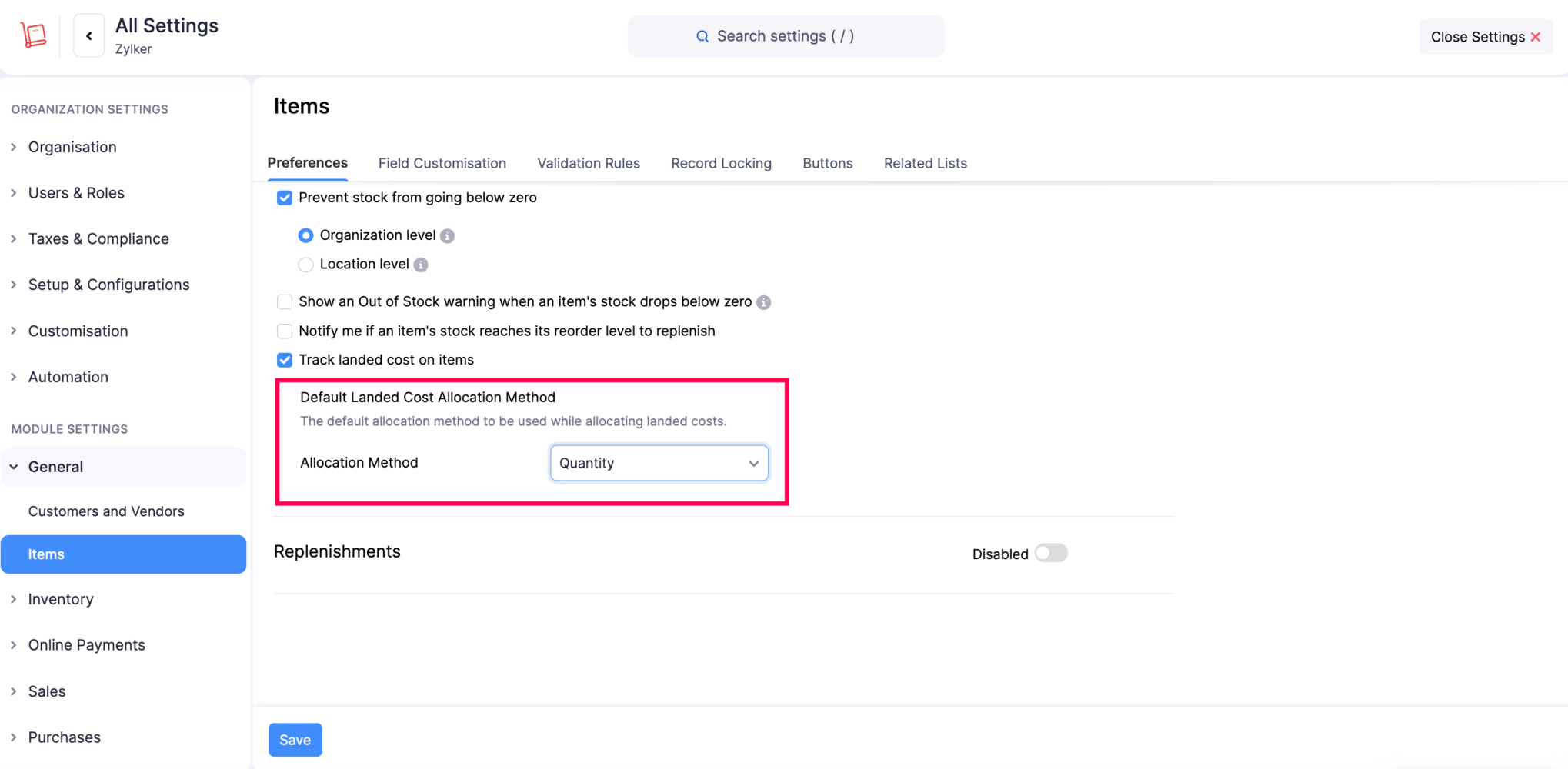
Set a Default Landed Cost Allocation Method
You can now configure a default Landed Cost Allocation Method for your organization. This eliminates the need to manually select the allocation method each time you record landed costs, especially if your business consistently uses methods such as Value instead of the default Quantity method.
To configure the default method > Go to Settings > Items > Enable Track landed cost on items > Default Landed Cost Allocation Method.
Receive Items at a Different Warehouse Location [Early Access]
You can now receive items at a warehouse location different from the one specified in the purchase order, as long as the selected location belongs to the same business location. This gives you more flexibility when receiving goods based on storage availability, delivery requirements, or operational needs. When creating a purchase receive, you can select the required warehouse location from the locations available under the purchase order's business location.
Note: When creating a bill, you can choose either the purchase order's location or the warehouse location specified in the purchase receive. If Advanced Inventory Tracking is set to Bills for the purchase order, the warehouse location cannot be changed for the items in the purchase receive.
To receive items at a different warehouse location > Open a Purchase Receive and select the required warehouse location from the locations available under the Purchase Order's business location.

Import Default Preferred Bins for Items
You can now import the Default Preferred Bin configured for your items. This makes it easier to assign preferred bins to items in bulk when importing item data.
View Stock Details in Multiple Units
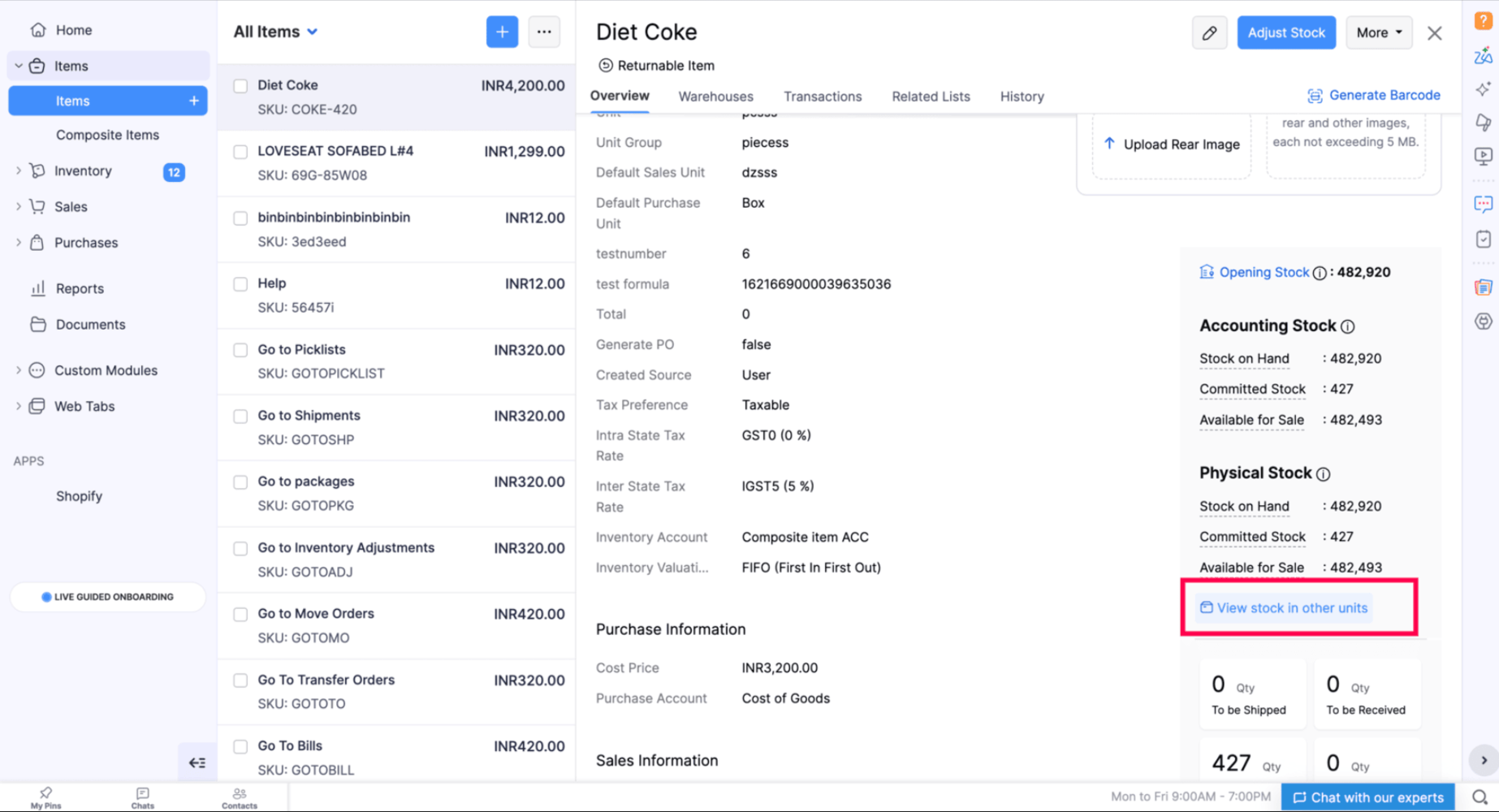
You can now view an item's stock details in all the units associated with it, including its base unit and available conversion units, directly from the Item Overview page. This makes it easier to track stock across different units without manually converting quantities from the base unit.
To view stock details in multiple units > Go to the Item Overview page.
Adjust Inventory with Greater Control
You can now enhance Inventory Adjustments with item-level custom fields, validation rules, and record locking. These options help you capture additional item-level information, enforce specific data requirements, and control whether adjustments can be edited or deleted.
Sales, Purchases & Fulfillment
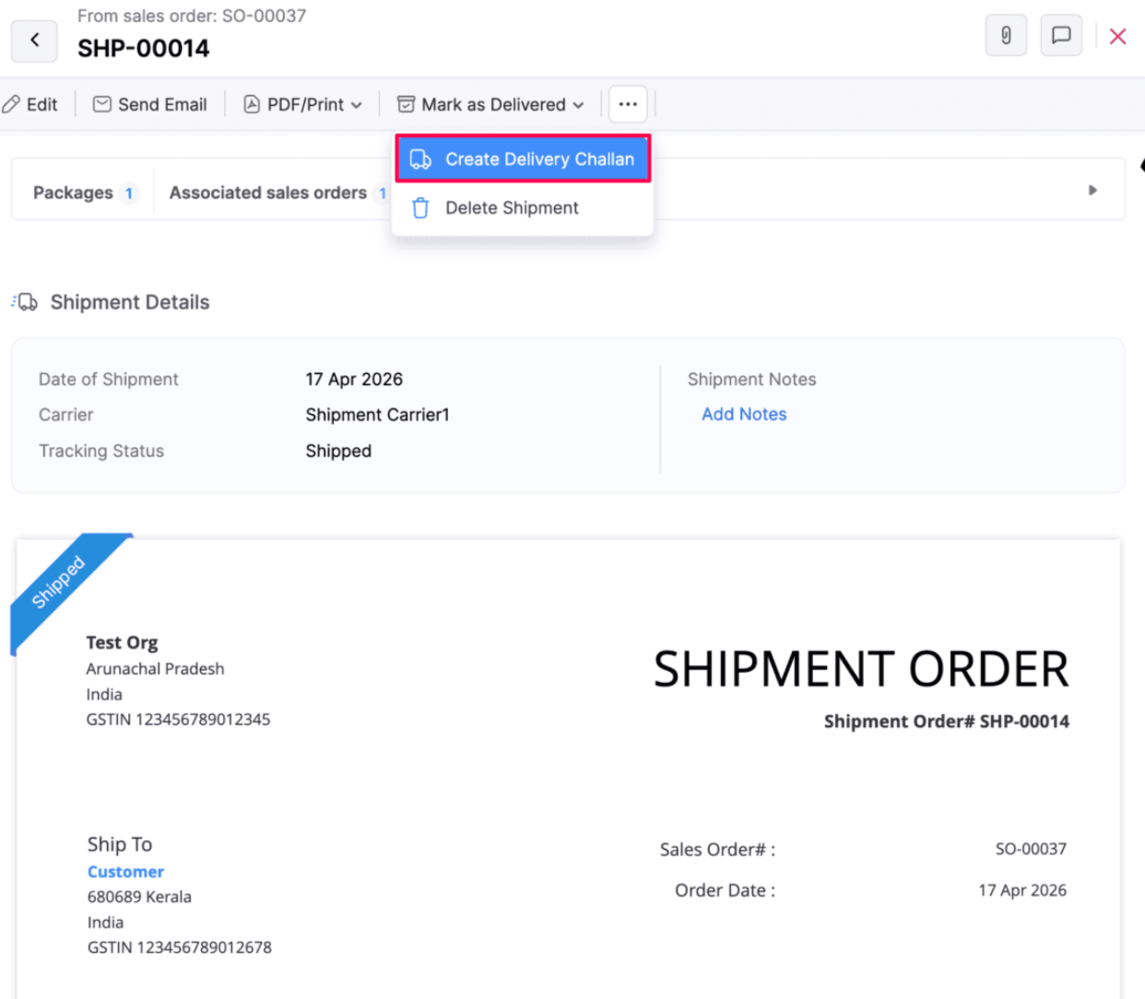
Create Delivery Challans from Shipments
You can now create a delivery challan directly from shipments generated from sales orders. This is useful when goods need to be dispatched before an invoice is created, allowing you to provide a delivery challan as a supporting document during transportation. You can either quickly create a delivery challan by entering the challan number and type, or use the detailed creation option to enter additional details on the delivery challan creation page. The delivery challan status is automatically updated based on the corresponding shipment status.
Note: Creating a delivery challan from a shipment does not affect stock. The line items cannot be edited, except for discounts and custom fields.
Create and Link Packages with Invoices [Early Access]
You can now create a package directly from an Invoice that is associated with a sales order, with the relevant items and quantities automatically carried over. You can also create invoices and packages separately and link them later, including linking existing documents. This provides greater flexibility in managing invoices and packages and simplifies the fulfilment process. Note: You cannot create a package directly from a standalone invoice. The invoice must be associated with a sales order.
This feature is currently available under Early Access. If you want to try it, write to us at support@zohoinventory.com and we'll enable it for you.Add Attachments to Sales Returns
You can now add attachments when creating a sales return and access them from the sales return details page. This makes it easier to keep supporting documents and files associated with the return for future reference.
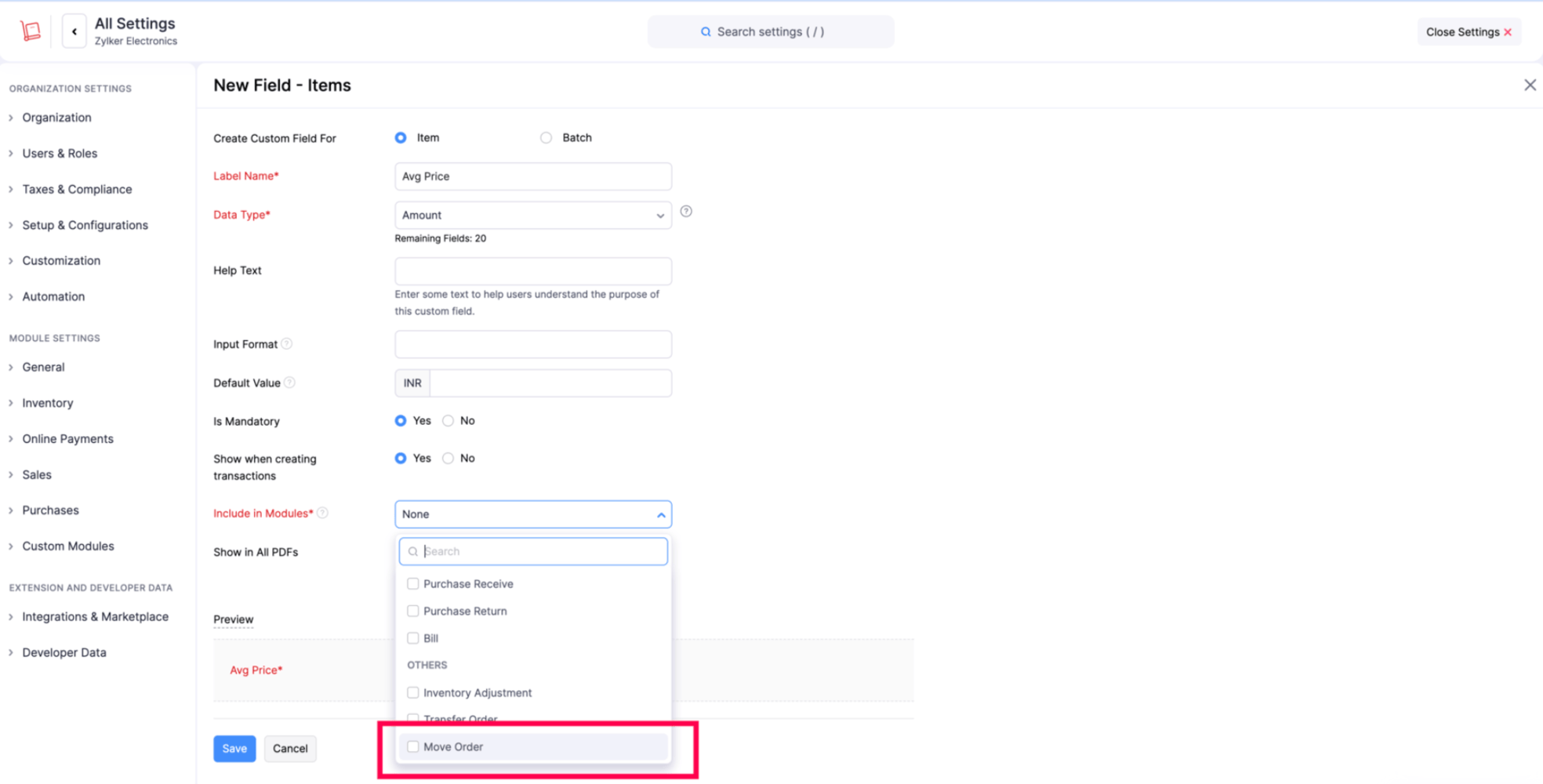
Add Custom Fields to Move Orders
You can now add custom fields and item-level custom fields in move orders. This gives you more flexibility to capture and manage additional information at both the move order and individual item levels.
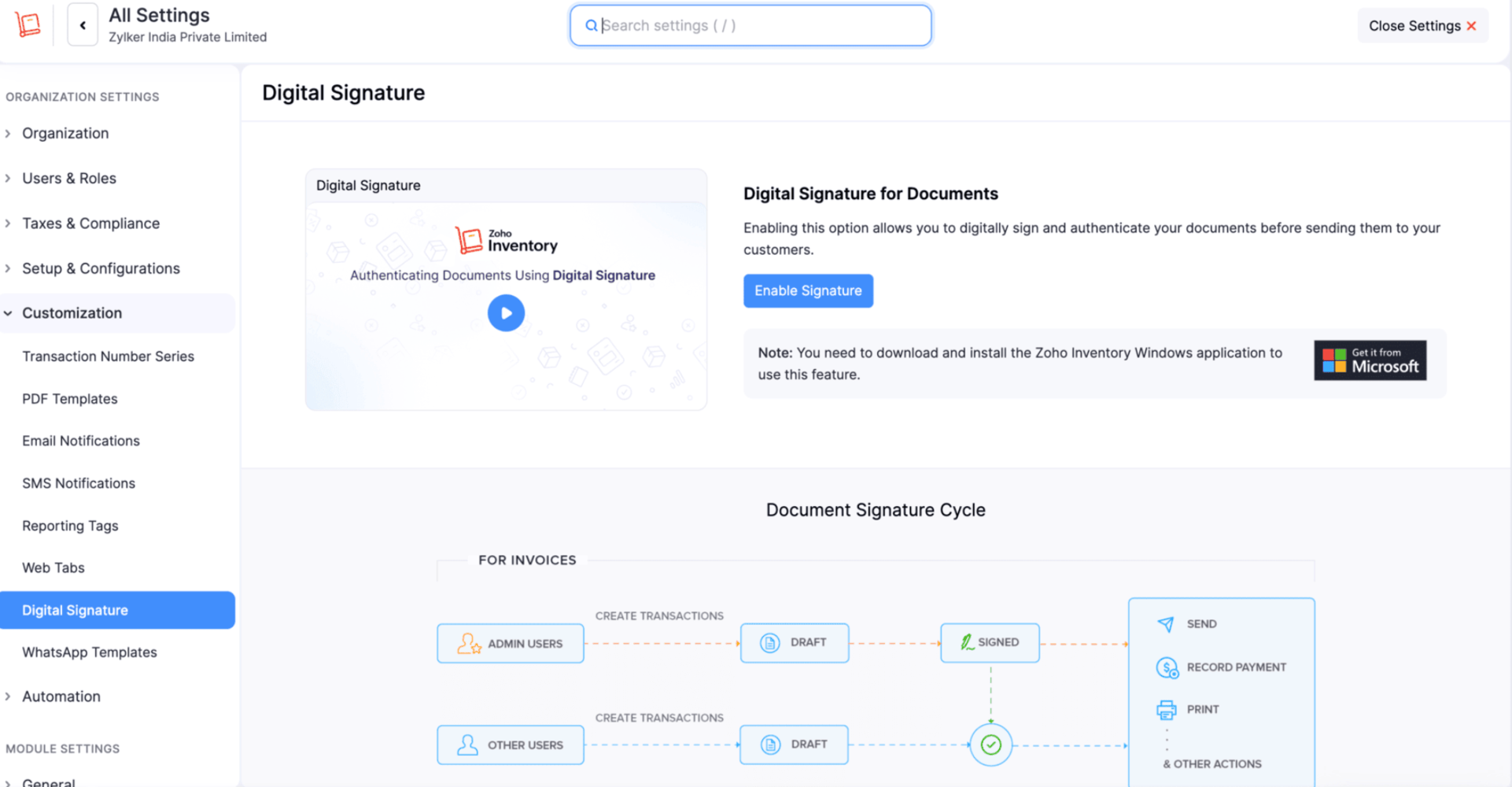
Digital Signatures for Transactions
Digital Signatures are now available in Zoho Inventory for the India Edition. You can digitally sign supported transactions using your digital signature certificate to help ensure document authenticity and protect them from unauthorized changes.
Digital signatures are supported for Invoices, Credit Notes, and Purchase Orders. You can configure your signature preferences and digitally sign transactions using the Zoho Inventory Windows application.
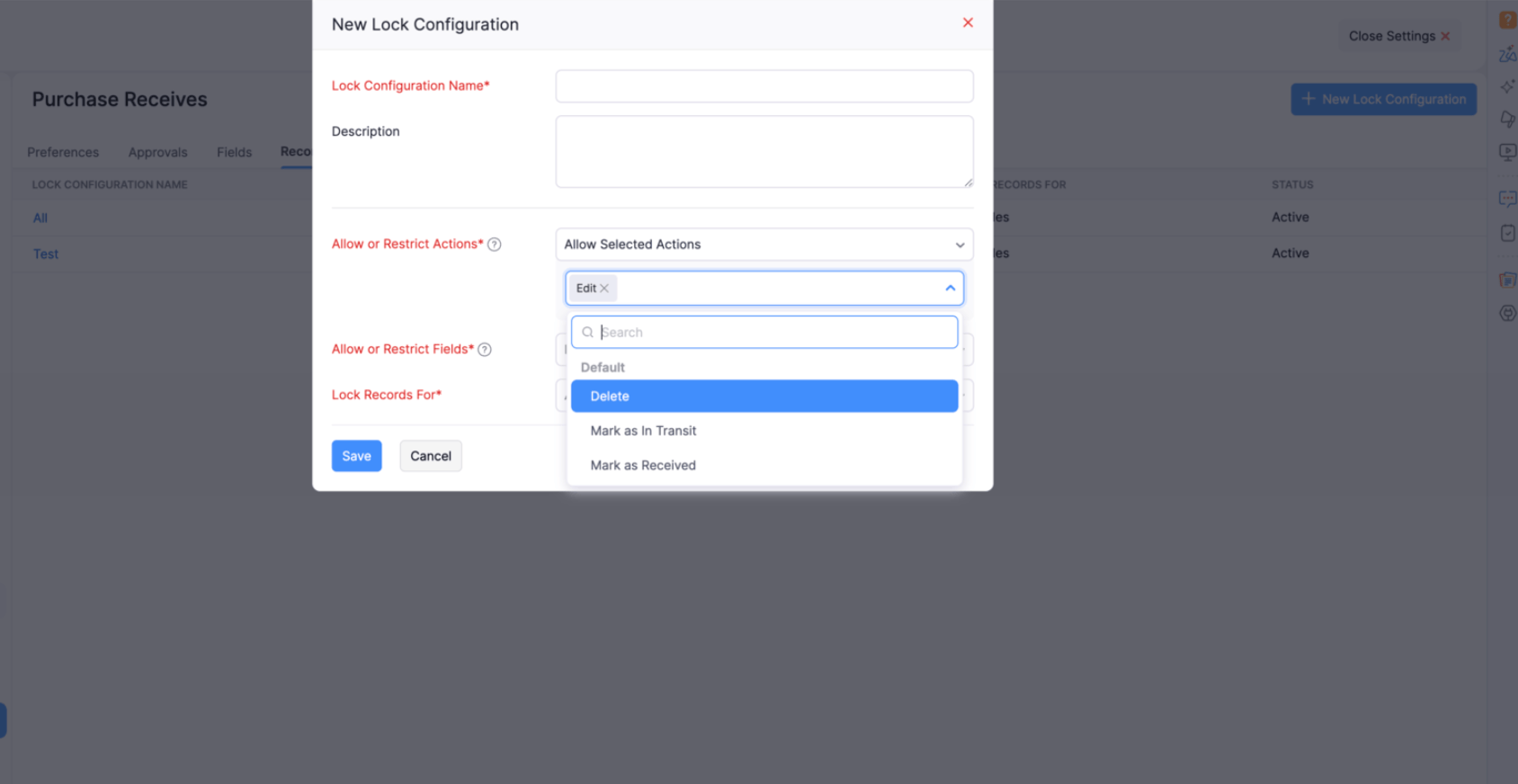
Record Locking for Purchase Receives
You can now use Record Locking for purchase receives to control changes to records and protect important transaction details from unauthorized modifications. You can configure locking for actions such as editing, deleting, and changing the status of purchase receives, as well as for specific fields such as Tracking Number and Quantity Received.
Items & Item Configuration
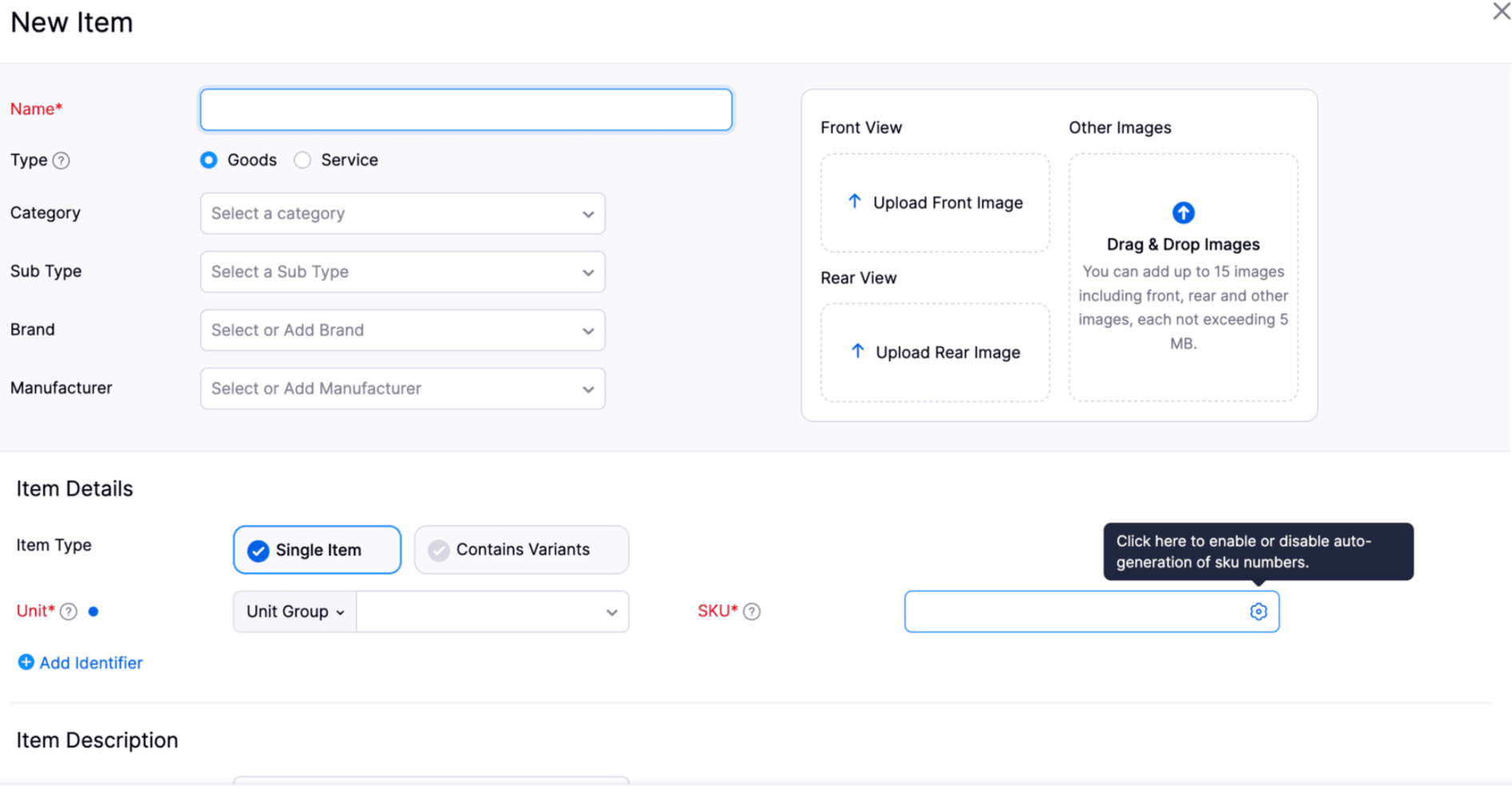
Automatically Generate SKUs for Items [Early Access]
You can now enable SKU Auto-Numbering to automatically generate unique SKUs for items based on your configured numbering preference. This reduces manual effort, helps prevent duplicate SKUs, and maintains a consistent numbering sequence across your organization. Generated SKUs can be edited before saving the item. For variant items, a unique SKU is automatically generated for each variant and can also be edited before saving.
Enhancements to Item Barcode Templates
You can now customize Item Barcode Templates with enhancements such as resizing the organization logo, printing item names in a secondary language, and displaying barcode values in QR code templates. These enhancements provide greater flexibility when designing barcode labels for different business and printing requirements.

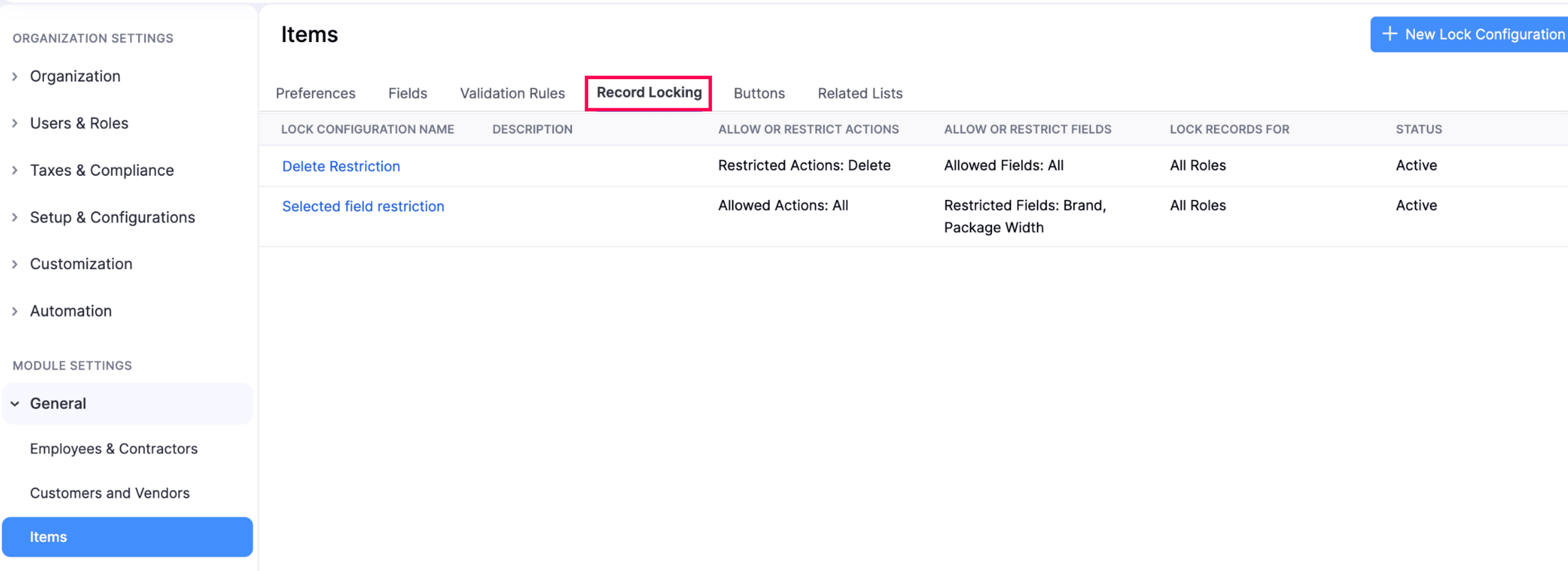
Record Locking for Composite Items and Assemblies
You can now configure Record Locking for Composite Items and Assemblies to control changes to these records. Record locking can be configured from the respective settings and applied to individual composite items and assemblies.
Reports & Analytics
Analyze Inventory by Location in the ABC Classification Report
You can now use the Location filter in the ABC Classification report to analyze and classify inventory items based on their importance and contribution at a specific location. This provides better visibility into location-wise inventory performance.
Filter Sales by Item Composition
You can now use the Item Composition filter in the Sales by Item report to analyze sales based on the type of item sold. You can filter sales of Individual Items, Kits, Combos, or Modifiers to get more granular insights into item-level sales performance.
To filter sales by item composition > Go to the Sales by Item Report and use the Item Composition filter.
Analyze Inventory by Project in Reports
You can now use the Project filter in the Committed Stock Details, Inventory Summary, Transfer Order Details, Transfer Order Summary, Inventory Adjustment Details, Inventory Adjustment Summary, Stock Movement, and Location/Warehouse Details reports. This enhancement helps you track inventory transactions and stock availability on a project-wise basis, providing better visibility into how inventory is utilized across different projects.
To analyze inventory by project > Open any of the supported reports and use the Project filter.
Enhancements to the Inventory Valuation Report
You can now select MRP and MRP Amount as columns in the Inventory Valuation report. The Inventory Valuation Summary report also supports multi-level grouping, allowing you to analyze valuation data across multiple dimensions. Additionally, you can use the Show Only Total option to view summarized totals without displaying other records.
To view MRP and MRP Amount > Customize the Inventory Valuation Report and select the required columns. To summarize valuation data > Use multi-level grouping and enable Show Only Total. Pasted markdown
Enhancements to the Committed Stock Details Report
The Committed Stock Details report now supports multi-level grouping and the Show Only Total option. You can organize report data across multiple grouping levels and view summarized totals without displaying the other detailed records.
Filter Stock Summary Data by Quantity In and Out
You can now use the Quantity In and Quantity Out filters in the Stock Summary report to analyze stock movements based on inward and outward quantities. This makes it easier to identify items based on their quantity in and quantity out values.
View MRP and Selling Price in the Batch Details Report
The Batch Details Report now includes MRP and Selling Price at the batch level, providing better visibility into the pricing associated with each batch.
View Transaction Count in the Sales by Category Report
The Sales by Category Report now includes a Transaction Count column, allowing you to see the number of sales order and invoice transactions associated with each category. This provides better visibility into category-level sales activity.
Customization & Automation
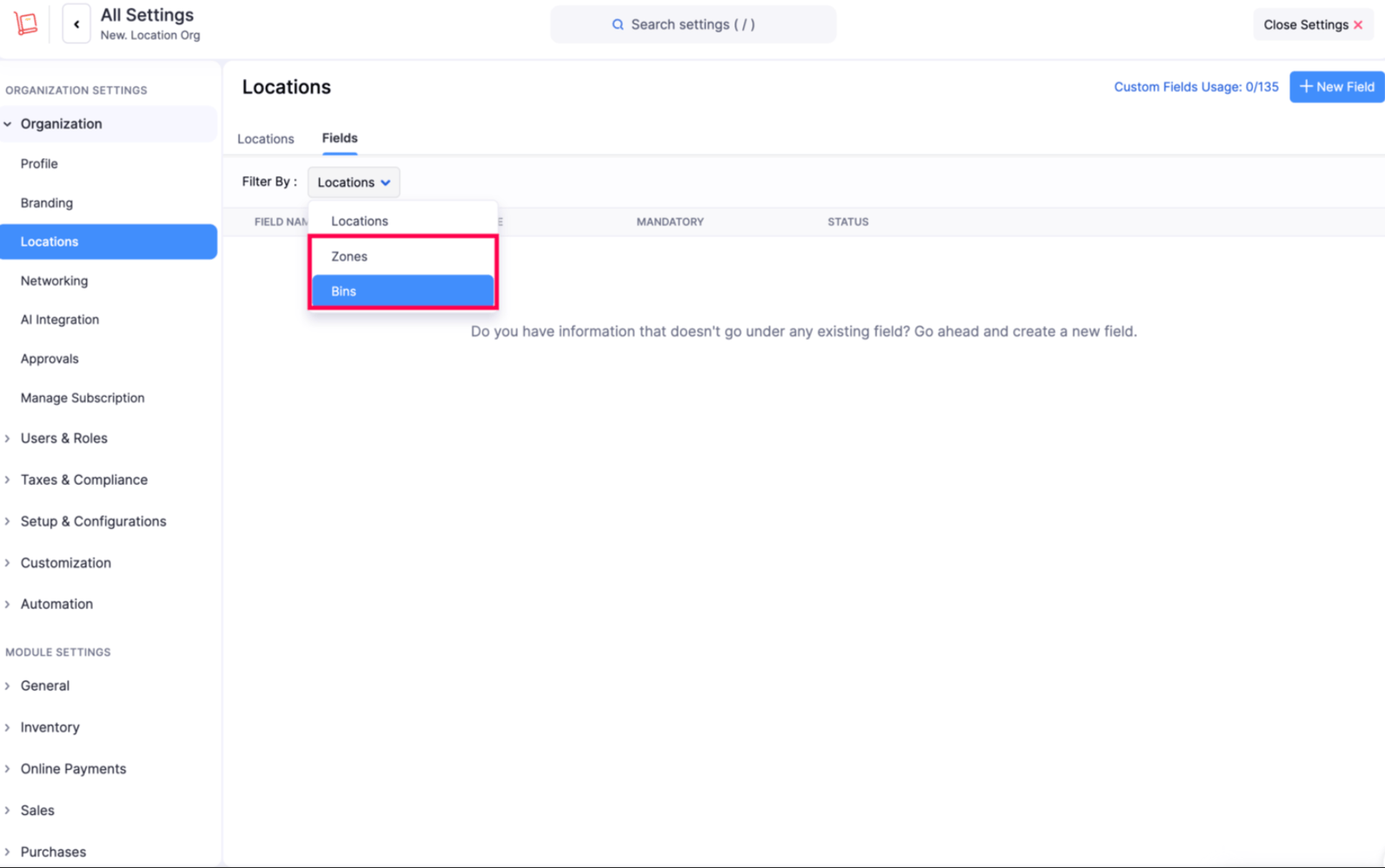
Add Custom Fields to Bin Locations and Zones
You can now add custom fields to both Bin Locations and Zones in organizations with Locations enabled. This allows you to capture additional information specific to your warehouse setup and requirements.
Customize Materials with Advanced Controls
The Materials module now supports item-level custom fields, record locking, custom approvals, workflow rules, and validation rules. You can also configure workflow actions such as field updates, email alerts, in-app notifications, and record locking to streamline and control material management processes.
Secure Web Tabs with JWT Authentication
You can now use JWT Authentication to securely connect Web Tabs, Customer Portal Tabs, and Developer Portal extensions with your applications. Zoho generates a signed, short-lived token when an embedded experience loads, allowing your application to verify the user's identity and organization before providing access to sensitive data. You can configure the token validity period and use the Web Tab Auth SDK to handle token delivery and refresh. Developers can also use the Validate JWT Token tool to verify token details and troubleshoot authentication during development.
Reporting Tags at Entity and Line-Item Levels [Early Access]
You can now associate reporting tags at both the entity and line-item levels, giving you more flexibility in categorizing and tracking transactions. For example, you can assign a reporting tag to an entire invoice and apply different tags to individual line items within the same invoice.
This feature is currently available under Early Access. If you want to try it, write to us at support@zohoinventory.com and we'll enable it for you.Payments & Documents
Include Refunds in the Retail Sales Summary Report
You can now include refund payments in the Retail - Sales Summary Report from the Customize Report section. When enabled, the report displays the net payment value for each payment mode after accounting for refunds, providing a more accurate view of payments received.
Enhancements to Delivery Challans
The Delivery Challan module now includes several enhancements for easier creation, tracking, and management. You can now import Delivery Challans, manage billing addresses, identify challans pending invoicing, create challans for vendors and from shipments, and manage packages, shipments, returns, and receives. We've also added record locking, validation rules, item-level custom fields, bulk update and delete, data backup, comments, workflow PDF attachments, and additional tax and Zoho Analytics capabilities.
Retail Store
Automatically Sync POS Terminal Devices
You can now automatically sync active terminal devices configured in your Zoho Payments account with the Android POS app. Use the Sync Terminal Devices option to sync your terminal devices without having to configure them manually.
Include Refunds in the Retail Sales Summary Report
You can now include refund payments in the Retail - Sales Summary report from the Customize Report section. When enabled, the report displays the net payment value for each payment mode after accounting for refunds, providing a more accurate view of payments received.
Mobile App
Android App Updates
The Zoho Inventory Android app now supports tracking details search when adding line items to invoices. You can scan serial numbers or batch details using your device's camera or an external barcode scanner to quickly add the corresponding items. We've also introduced automatic batch assignment for outgoing transactions, Custom Buttons in the Packages and Shipments modules, an improved unit selection interface in the Items and Composite Items modules with searchable unit names and symbols, and the ability to change templates for Payment Receipts.
Warehouse Operations
Assign Users to Putaways
You can now assign a specific user to a Putaway, making it easier to manage responsibilities and track Putaway tasks.
Quick and Advanced Search for Move Orders and Putaways
You can now use Quick Search and Advanced Search in the Move Orders and Putaways modules, making it easier to quickly find and filter records.
That's a wrap for this release! We hope these enhancements help you manage your inventory more efficiently, streamline your workflows, and get better visibility into your business operations.
Try out these features and let us know what you think in the comments below. If you have any questions, feel free to reach out to us at support@zohoinventory.com
Best regards,
The Zoho Inventory Team