What's New in Zoho Inventory | April & May 2026

What's New in Zoho Inventory | April & May 2026

Hello users,

We're excited to roll out the latest Zoho Inventory updates for April and May 2026. These enhancements are designed to make your daily operations smoother and more efficient, from advanced inventory management and flexible pricing to automated tax compliance and useful mobile features. These updates help you save time, reduce costs, and manage your inventory more effectively.

Items & Locations Enhancements

Default Inventory Valuation Method

You can now configure a default inventory valuation method (FIFO or WAC) for your items. Once configured, the selected method will be automatically filled when creating new items, ensuring consistency across your inventory records.

The configured method will also be applied when:

  • Importing items without specifying an inventory valuation method.

  • Creating items through API requests without providing the inventory_valuation_method node.


To configure a default inventory valuation method: Settings > General > Items > Default Inventory Valuation Method> Select your preferred inventory valuation method and save the changes.


Board_212.png


Location-Based Price List

Similar to customers, price lists can now be associated with business locations for more flexible pricing. When creating a transaction, the price list assigned to the customer is applied automatically. If no price list is assigned to the customer, the price list associated with the selected business location is used.

To configure, go to Settings > Organization > Locations> create or select the location, and associate a price list with the required business location.

Board_212.png


Alias Name in Items List View

The Alias Name column is now available in the items list view page. You can enable this in the settings and add it through Column Customization to display in the Items List View page. It makes it easier to identify items by their alternative names.

To enable this, Settings > General> Items> Field Customization > Enable Alias Name


Purchase & Warehouse Operations

Introducing Purchase Returns

We have introduced the Purchase Returns module to manage returns to vendors more efficiently. Purchase Returns helps you initiate return requests, commit stock for return, update inventory, and adjust vendor payables. Once a purchase return is confirmed, you can create picklists, packages, shipments, and vendor credits directly from it. Learn More


To enable Purchase Returns: Settings > General> Purchase Returns


Note: This feature is available in the India, US, and Global editions of Zoho Inventory for Enterprise plans. To enable it, contact support@zohoinventory.com

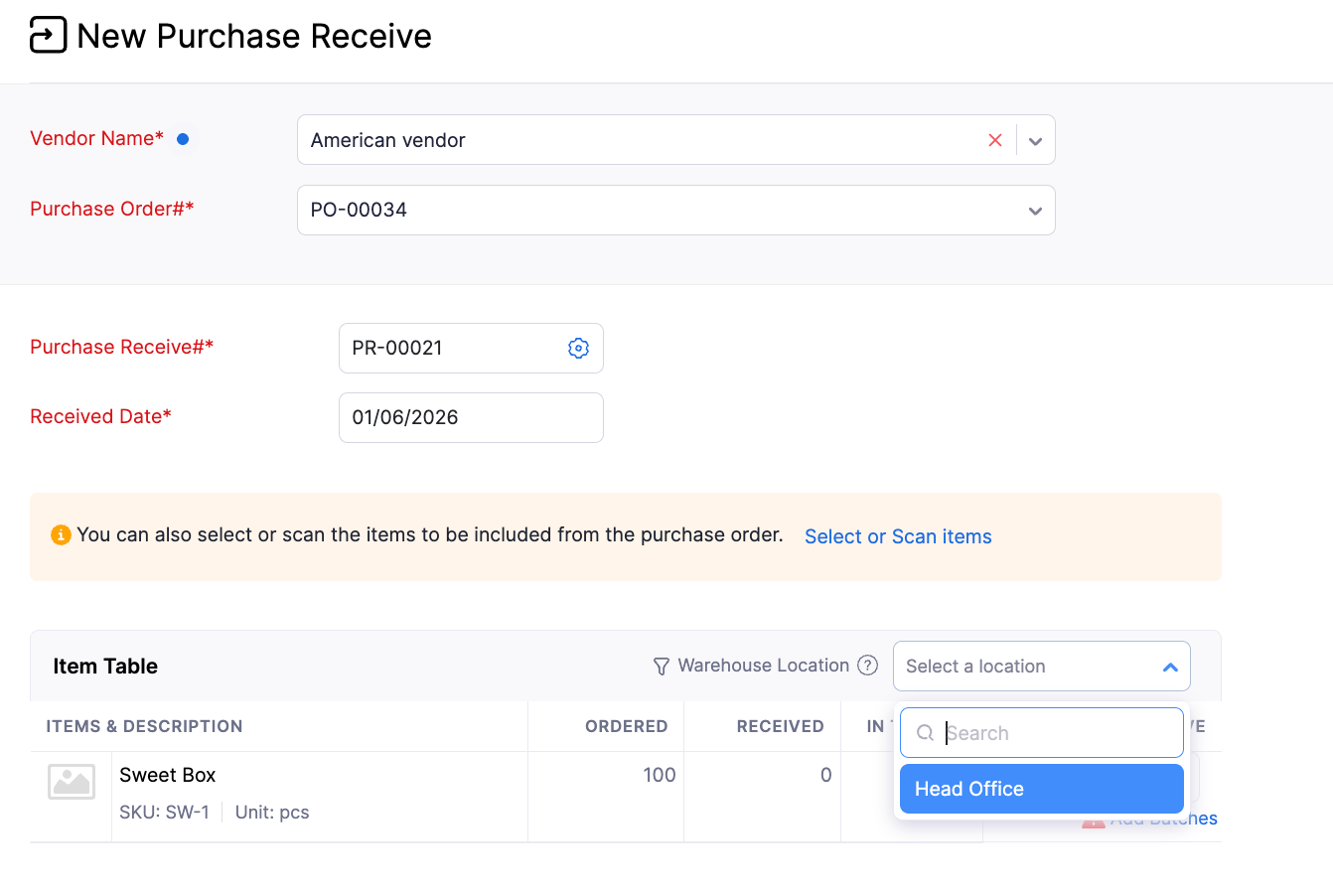
Filter Items by Warehouse Location in Purchase Receives

When creating a purchase receive from a purchase order that contains items in multiple warehouses for the selected location, you can now filter line items by warehouse location. This makes it easier to identify and receive items for a specific warehouse without manually reviewing and removing unrelated line items. The filter displays only the warehouses associated with the selected purchase order, helping streamline the receiving process and improve efficiency when managing inventory across multiple warehouses.
                                   Board_961.png


Partial Replenishments

The Replenishments module now allows partial replenishments. This makes it easier to fully restock items when the order quantity parameter Maximum Order Quantity is applied. If an order created from a replenishment task does not fulfill the entire required quantity, the system automatically creates a new replenishment task for the remaining quantity. The new task retains the original replenishment details and provides visibility into the quantities that have already been replenished.


Invoice and Sales Channels Management

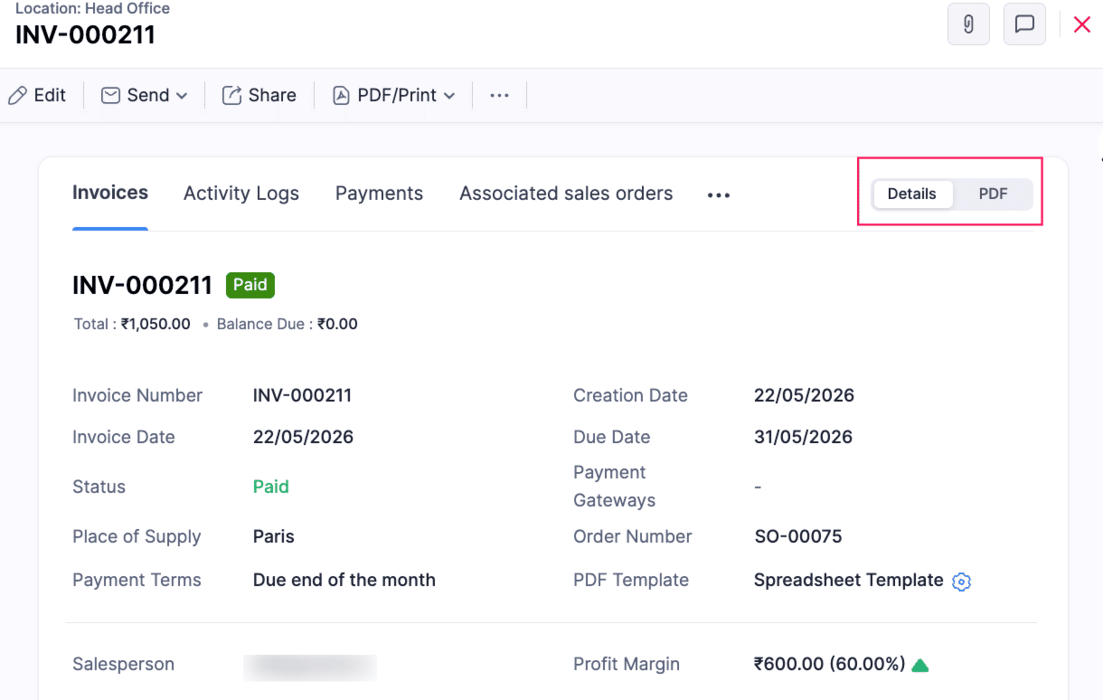
Revamped Invoice Details Page

The Invoice details page now opens in a non-PDF view by default, with associated transactions organized into separate tabs. It also displays invoice details, customer information, custom fields, line items, email receipts, and transaction-level reporting tags in a structured layout.

Note: This update is currently available for the France Edition and newly created organizations. It will be rolled out gradually to existing organizations.
                                     Board_683.png


Sync Sales Order and Invoice Numbers from Sales Channels

Two new configuration options have been introduced in the Sales Channel preference page to help maintain the same transaction numbering between sales channels and Zoho Inventory.

  • When the Sync Sales Order Number option is enabled, sales orders synced from will retain the same sales order number from the sales channel instead of using the auto-generated number series in Zoho Inventory.

  • When the Sync Invoice Number option is enabled, Invoices synced from Sales Channels will retain the same Invoice number from the sales channel instead of using the auto-generated number series in Zoho Inventory.


Sales Return Sync in Shopify Integration

Sales Return Sync in Shopify is now available across all editions. Once enabled in the Shopify integration preferences, sales returns and their associated inventory updates are automatically synced to Zoho Inventory. This helps streamline returns management, maintain accurate stock levels, and reduce manual effort in keeping return transactions synchronized across both platforms.


Walmart Integration [US Edition]

You can connect your Walmart seller account with Zoho Inventory either through the Walmart Seller Center or directly from Zoho Inventory. Once connected, items, orders, inventory levels, and shipment updates are synced automatically between the two platforms. Items are mapped based on whether they are single or variant items, while orders are created as Sales Orders in Zoho Inventory. With configurable sync frequency, stock update controls, and customer mapping options, businesses can efficiently manage Walmart sales and fulfillment from a single platform.

To integrate in Zoho Inventory: Go to Settings > Integrations & Marketplace > eCommerce > click Set Up Now under Walmart Integration.


Reporting & Analytics

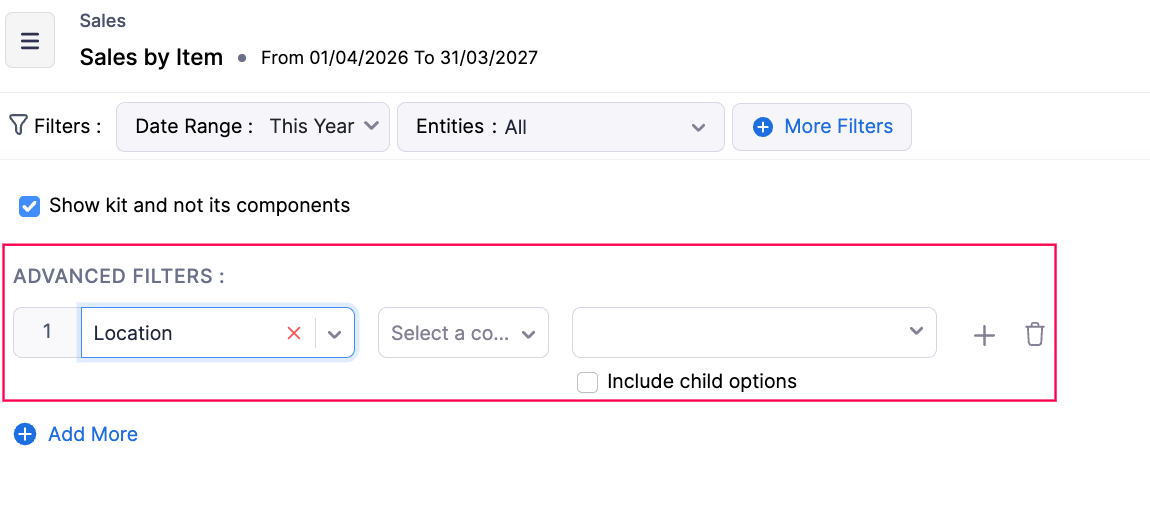
Include Child Options in Reporting Tag Filters

Advanced Filters in Reports now support Include Child Options for reporting tags. When you select a parent option and enable Include Child Options, the report automatically includes all associated child options. This makes it easier to filter hierarchical reporting tag data without manually selecting each child option.
                                   

Board_684.png

Organization Details in Report Export Files

Export reports and custom reports along with organization details by enabling the Organization Details option under Configure Report Layout before exporting.


To enable this, Reports> Category> More icon > Configure Report > Choose Details to Display > Enable Organization Details


                               Board_681.png


Custom Report Enhancements 

Custom Report permissions have been enhanced for admin users. Admins can now access, edit, clone, and delete all Custom Reports in the organization, including reports created by other users in the organization. Additionally, admins can now filter custom reports by date ranges directly from the report page without editing the report preferences.


To do this, go to Reports> Select the custom report > Click the dropdown > Select the action


Taxes & Compliance

Introducing Withholding Tax for Customers and Vendors [Kenya]

We have introduced the Withholding Tax preference for customers and vendors. Withholding tax is a direct tax deducted at source on specific payments such as interest, dividends, royalties, and management fees made to residents or non-residents. After enabling this preference for a customer or vendor, you can apply withholding tax at the line-item level in invoices and bills, and record payments after deducting the withheld amount.


To enable this, go to Settings >Organization Settings> Taxes and Compliance >Withholding Tax > Withholding Tax Settings >Slide the toggle to enable Withholding Tax > Select the Customers, Vendors, or both you want to enable withholding tax settings. Learn More


             Board_895.png


Sales Tax Automation [US & Canada Edition]

Sales Tax Automation is now enabled for the US and Canada editions. This feature automatically calculates accurate sales tax in real time based on where you're registered, what you sell, and where you sell. The system applies the correct tax on every sale, automatically identifies whether an item is taxable, zero-rated, or exempt, and ensures compliance as you expand sales across states. Tax rates update automatically with changing tax rules. You can configure address preferences, verify customer addresses, switch tax modes, recalculate tax, and view detailed tax calculation breakdowns. Check out the help docs available for the US and CA editions to learn more.


Supply Date and Service Period Support in Credit Notes [Germany Edition]

Credit Notes now support Supply Date, Service Start Date, Service End Date, and Transaction Posting Date as system custom fields. These four date fields can be configured from Settings to help businesses capture and manage legally relevant dates more accurately across credit note workflows.


To enable this: Go to Settings > Sales > Credit Notes > Field Customization > Select field > Mark as Active

View Total Amount Before TDS Deduction [India & Singapore]

The Total Amount Excluding TDS option has been added to the invoice details page to show the invoice amount before TDS deduction. This helps clearly view the original total for sharing invoices and accounting reference.


To enable this option: Go to Settings > Customization > PDF Template > Choose the Invoice template > Total > Enable Total Amount Excluding TDS


TDS Columns in Applied Excess Payment Import

You can now import TDS details while importing Applied Excess Vendor Payments. This enhancement helps you accurately apply excess vendor payments to bills along with the associated tax deductions.

Supported columns:

  • India: Bill TDS Amount

  • Global: Bill TDS Amount, TDS Account

  • Australia: Bill PAYG Withholding Amount, PAYG Withholding Account


Early Access Features

Track Record Participants and Non-Participants

The Record Participants and Non-Participants feature helps you track the users associated with a transaction record. Users automatically become participants when they create, edit, add comments, get mentioned in comments, or approve a record. Based on these actions, the system automatically categorizes users as Participants and Non-Participants for better visibility. This feature is currently supported for modules such as Items, Invoices, Inventory Adjustment, Packages, Shipment, Customers, Sales Orders, Delivery Challans, Sales Returns, Vendors, Purchase Receives, and Vendor Credits.


To track the record Participants and Non-Participants in the comment: Go to the module that supports this feature> Details Page> Comment icon > Enter "@" in the message box > You can view the Record Participants and Non-Participant users


Note: This feature is available by default for new organizations. For existing organizations, it is in Early Access. Contact support@zohoinventory.com to enable it


Auto Batch Assignment with FIFO, FEFO, and LIFO Strategies

The Auto Batch Assignment feature automatically identifies and allocates inventory batches for batch-tracked items during outward transactions based on a configured assignment strategy. Businesses can choose from the following allocation methods:

  • FIFO (First In, First Out) – Moves the oldest available stock first.

  • FEFO (First Expiry, First Out) – Prioritizes batches that are closest to expiry.

  • LIFO (Last In, First Out) – Consumes the most recently received stock first.

The system automatically handles batch allocation in the background during sales orders, invoices, picklists, and other outward transactions, eliminating repetitive manual batch selection. This helps improve inventory rotation, reduce stock aging and expiry-related losses, accelerate fulfillment workflows, and ensure consistent inventory handling across warehouse operations.

Note: This feature is available in Early Access for Enterprise plans. Contact support@zohoinventory.com to enable it for your organization.


Other Enhancements & Availability

Feature Availability

  • The Unit of Measurement feature is now enabled by default for all organizations in the Premium and Enterprise plans.

  • The Items Unified Flow has been enabled for all plans except the US and India editions. For the US and India editions, it is currently available for Free Plans.

  • Sales Return and Receive sync functionality in Shopify is now available for all editions.


Minor Enhancements

  • Barcode scanning is now supported in Custom Tables for easier item entry and management.

  • The Packing History Report now supports show/hide columns, advanced filters, custom reports, and current view export.

  • The Profit by Item Report now includes category filters.

  • The Batch Details Report has been enhanced with additional inward, outward, and price-related columns, along with Transaction Date filters.

  • Bulk Update support for Reporting Tags is now available.


Mobile App Updates

Updates for Both Android and iOS

  • Preferred Bin Locations in Picklists
    Preferred bin locations are now displayed while adding items in Picklists, helping users pick items faster and more accurately.


Board_669.png


  • Sales Return Status Update
    Sales Return status now displays as Accepted instead of Approved for clearer tracking.

  • Mobile Number with Country Code Selection
    Mobile number fields now include country code selection for better global formatting.


Board_970.png


  • Custom Fields in Assemblies Module
    Custom fields are now supported in the Assemblies module, allowing additional information to be captured during assembly creation.

  • Line Item Custom Fields in Purchase Receives & Picklists
    Purchase Receives and Picklists now support custom fields at the line item level for more detailed tracking.

  • Draft Status in Payments Received
    The Payments Received module now supports Draft status, allowing users to save and edit before final submission.

  • Tap to Pay Support
    Tap to Pay support has been introduced in Australia, Austria, Belgium, Denmark, Finland, France, Germany, Ireland, Italy, Malaysia, the Netherlands, New Zealand, Poland, Singapore, Sweden, Switzerland, and the United Kingdom for faster in-person contactless payments. Payments can be accepted using cards and digital wallets without additional hardware


Android-Specific Updates

  • Faster Stock Counts Experience
    Users can now start Stock Counts immediately while data loads in the background for improved speed.

  • Purchase Receives Enhancements
    Purchase Receives now supports editing and simple approval workflows for smoother processing.

  • Transfer Order Approvals
    Transfer Orders now support simple approval workflows for better control and validation.

  • Image Upload in Custom Fields
    Custom fields now support image uploads for richer data capture.

  • Custom Buttons for Customer & Vendor Modules
    Custom buttons are now supported for the Customer and Vendor modules to enable quick actions.

  • Revamped Custom Modules UI
    Custom Modules now come with a refreshed and improved user interface.

  • Sales Returns Draft Support
    Sales Returns now support Draft status for flexible editing before finalization.

  • Default Inventory Valuation Method at Item Creation
    Default inventory valuation methods can now be set during item creation for consistent costing.

  • Customer View Status in Documents
    Customer view status is now displayed in Invoices and Retainer Invoices to track customer visibility.


iOS-Specific Updates

  • Multi-Select Lookup Fields Support
    Multi-select lookup custom fields are now supported across all modules that support custom fields.

  • Tap to Pay via Stripe Integration
    Tap to Pay is now available for organizations integrated with Stripe. Digital payments can be accepted directly on an iPhone using debit cards, credit cards, Apple Pay, and other digital wallets without additional hardware.


We hope these updates empower you to manage your inventory more effectively and deliver exceptional value to your customers. As always, we're committed to continuously improving Zoho Inventory based on your feedback and evolving business needs. If you have any queries, feel free to reach out to us at support@zohoinventory.com. Stay tuned for more updates from Zoho Inventory!


Best regards,
The Zoho Inventory Team.

    Access your files securely from anywhere

          All-in-one knowledge management and training platform for your employees and customers.


                                Zoho Developer Community


                                                      • Desk Community Learning Series


                                                      • Digest


                                                      • Functions


                                                      • Meetups


                                                      • Kbase


                                                      • Resources


                                                      • Glossary


                                                      • Desk Marketplace


                                                      • MVP Corner


                                                      • Word of the Day


                                                      • Ask the Experts


                                                                Manage your brands on social media


                                                                      Zoho TeamInbox Resources


                                                                          Zoho CRM Plus Resources

                                                                            Zoho Books Resources


                                                                              Zoho Subscriptions Resources

                                                                                Zoho Projects Resources


                                                                                  Zoho Sprints Resources


                                                                                    Qntrl Resources


                                                                                      Zoho Creator Resources


                                                                                          Zoho CRM Resources

                                                                                          • CRM Community Learning Series

                                                                                            CRM Community Learning Series


                                                                                          • Kaizen

                                                                                            Kaizen

                                                                                          • Functions

                                                                                            Functions

                                                                                          • Meetups

                                                                                            Meetups

                                                                                          • Kbase

                                                                                            Kbase

                                                                                          • Resources

                                                                                            Resources

                                                                                          • Digest

                                                                                            Digest

                                                                                          • CRM Marketplace

                                                                                            CRM Marketplace

                                                                                          • MVP Corner

                                                                                            MVP Corner


                                                                                              Design. Discuss. Deliver.

                                                                                              Create visually engaging stories with Zoho Show.

                                                                                              Get Started Now


                                                                                                Zoho Show Resources

                                                                                                  Zoho Writer

                                                                                                  Get Started. Write Away!

                                                                                                  Writer is a powerful online word processor, designed for collaborative work.

                                                                                                    Zoho CRM コンテンツ


                                                                                                      Nederlandse Hulpbronnen


                                                                                                          ご検討中の方


                                                                                                                  • Recent Topics

                                                                                                                  • Ticket Status

                                                                                                                    HI, Any idea on how to create other options for this header??? I want to add an "Ordered" status. Its under "tickets" in Overview, I need a new status created (see second picture)
                                                                                                                  • Power up Zoho CRM with project intelligence

                                                                                                                    Dear user, You're probably one of those businesses using your CRM as a single source of truth. It's where sales, project execution, and finance teams go to analyze past decisions and formulate future strategies. But what happens when project data is either
                                                                                                                  • Print multiple uploaded images in an HTML snippet in a Page

                                                                                                                    I have a Form: Job_Preparation It stores details of each new item that must be built by the fabricators in our workshop. The form has a field: Documents I upload 4 image files to the Documents field. I want to print a sheet for our workshop staff with
                                                                                                                  • "Track Inventory for this item" is forced checked by default for goods items (eTims issue?)

                                                                                                                    Hello, Since connecting our Zoho books to eTims (Kenya) the "Track Inventory for this item" is forced checked by default (eTims issue?) in the Item creation page for any type of goods. So when purchasing anything that the company does not intend to sale,
                                                                                                                  • Its 2022, can our customers log into CRM on their mobiles? Zoho Response: Maybe Later

                                                                                                                    I am a long time Zoho CRM user. I have just started using the client portal feature. On the plus side I have found it very fast and very easy (for someone used to the CRM config) to set up a subset of module views that make a potentially extremely useful
                                                                                                                  • Why can't we choose Fixed Asset account for Purchased Items? (eTims issue?)

                                                                                                                    Hello, When the company purchase items not for sale and not supposed to be in the inventory stock, like equipment for operational use, there is no way to access the Fixed Asset accounts in the drop down list. Is that an eTims limitation again? Or something
                                                                                                                  • Zoho Team Inbox - roadmap

                                                                                                                    Hi, would be good to understand the Teaminbox roadmap, in particular: 1. API / Zoho Deluge connections. We have a process where the each email needs to be either tagged or assigned daily. It would be great if we could automate a 5pm alert for any exemptions
                                                                                                                  • SalesIQ Integration with LINE: API Rate Limit Issue and Pre-Chat Flow Concerns

                                                                                                                    Hello SalesIQ Developer Team. I have investigated the issue and found that the LINE Rate Limit is being consumed unusually quickly. LINE API free usage limit: 300 messages per month per band. This limit will be reached within the first few days. 1. LINE
                                                                                                                  • Free webinar! Sign documents across borders: AES, QES, ID verification

                                                                                                                    Hello all, Signing paperwork across geographies sounds simple, until critical questions around legality, security, and compliance pop up. Join our upcoming webinar to see how Zoho Sign helps businesses worldwide sign documents with confidence. Agenda:
                                                                                                                  • Blueprint Not Triggering When Lead Status Is Updated by Workflow (IndiaMART Integration)

                                                                                                                    I have set up a blueprint that triggers when a lead’s status is “New Lead.” Our CRM is integrated with IndiaMART, and when leads are created from IndiaMART, their Lead Status is initially set to None. To handle this, I created a workflow that automatically
                                                                                                                  • Add field "Expected Availability Date" to Purchase Orders

                                                                                                                    Hi there. We drop ship and 'make to order' whereby we backorder sales order items directly with factories for manufacturing. One of the leading questions from Customers is "when is the order ready". Currently there is an 'Expected Delivery Date', which
                                                                                                                  • Related list view for Assets

                                                                                                                    We first set up all our parent assets in FSM and now we are adding child assets which are the parts for the parent assets. When under the customer related list, since it only displays 5 rows of data, I have to click through many assets to locate the parent
                                                                                                                  • How To Invoice Immediately for Future Subscription

                                                                                                                    Hi, When a new subscription is created that has a future start date, Zoho Subscriptions does not invoice the customer until the start date of the subscription. Is there a way to immediately invoice the customer as soon as the subscription is created,
                                                                                                                  • Problem with the blueprint flow.

                                                                                                                    Scenario: 3 departments in a single environment: A-B-C agents from department 1 D-E-F agents from department 2 G-H agents from department 3 Since we've been using Zohodesk (2023), agents can assign tickets to the correct department using the blueprint
                                                                                                                  • Create Tasklist with Tasklist Template using API v3

                                                                                                                    In the old API, we could mention the parameter 'task_template_id' when creating a tasklist via API to apply a tasklist template: https://www.zoho.com/projects/help/rest-api/tasklists-api.html#create-tasklist In API v3 there does not seem to be a way to
                                                                                                                  • Spell Check Red Underlines Keep Appearing Even After Disabling

                                                                                                                    Hello Zoho Support, I'm facing an issue in Zoho Writer where red spell-check underlines keep appearing even after I disable Spell Check. I have already: Turned OFF Spelling Errors Turned OFF Grammar Turned OFF Writing Quality Turned OFF browser spell
                                                                                                                  • Add multiple users to a task

                                                                                                                    When I´m assigning a task it is almost always related to more than one person. Practical situation: When a client request some improvement the related department opens the task with the situation and people related to it as the client itself, the salesman
                                                                                                                  • iOS Books app shows filtered view after changing to All sales orders

                                                                                                                    My boss often checks sales orders on his iPhone. The app is mostly working fine, but there's an ongoing issue: When switching between different filters (also called custom views on the web), going back to All doesn't often work. It typically gets stuck
                                                                                                                  • Empowered Custom Views: Cross-Module Criteria Now Supported in Zoho CRM

                                                                                                                    Hello everyone, We’re excited to introduce cross-module criteria support in custom views! Custom views provide personalized perspectives on your data and that you can save for future use. You can share these views with all users or specific individuals
                                                                                                                  • Recurring Invoices

                                                                                                                    I'm looking to set up recurring invoices on a monthly basis, using GoCardless as a payment gateway. I've done this successfully, however there's a big problem with the Invoice Date and Due Date. We prefer to provide sufficient notice of collection (10
                                                                                                                  • Recurring Events Not Appearing in "My Events" and therefore not syncing with Google Apps

                                                                                                                    We use the Google Sync functionality for our events, and it appears to have been working fine except: I've created a set of recurring events that I noticed were missing from my Google Apps calendar. Upon further research, it appears this is occurring
                                                                                                                  • Vorrei disdire l'abbonamento

                                                                                                                    Vorrei disdire l'abbonamento, ma non trovo il modo. Mi assistete?
                                                                                                                  • Service line items

                                                                                                                    Hello Latha, Could you please let me know the maximum number of service line items that can be added to a single work order? Thanks, Chethiya.
                                                                                                                  • Has anyone successfully gotten conditional rendering to work in Zoho Books Sales Order HTML PDF templates?

                                                                                                                    I’m trying to hide a custom field box when the custom field is blank. The value placeholder itself works perfectly: ${salesorder.cf_distribution_reference_numb} If the Sales Order has a value, it renders correctly. Example: 45488045. But when I wrap that
                                                                                                                  • What's New in Zoho Inventory | April & May 2026

                                                                                                                    Hello users, We're excited to roll out the latest Zoho Inventory updates for April and May 2026. These enhancements are designed to make your daily operations smoother and more efficient, from advanced inventory management and flexible pricing to automated
                                                                                                                  • Latest updates to Zia in Office Integrator

                                                                                                                    Hello Zoho Office Integrator users! We’re pleased to share exciting updates to the proofing capabilities of Zia, our AI-driven writing assistant, in Office Integrator. With these updates, you can now get spell and grammar check in Brazilian Portuguese,
                                                                                                                  • Implementing Back Button Navigation in Zoho Creator

                                                                                                                    Zoho Creator does not currently support a native Back button within forms, so implementing backward navigation requires a workaround. We recently implemented this in an application that was split into 9 modular forms. Since users needed to move between
                                                                                                                  • Deleted User Emails

                                                                                                                    I need to delete a user as I need to re-use their license, but I'd like to keep all their emails that are attached to various contacts in the CRM. Their emails are hosted externally on an M365 license. Anyone any idea how best to engineer this? TIA
                                                                                                                  • In wiki editor, dragging an image fails

                                                                                                                    Expected behavior: Within the WYSIWYG editor, we have been able to select and drag an image (that is already inserted in the page) to move it to a different position on the page. Current behavior: For a few days recently (possibly longer and I didn't
                                                                                                                  • Not able to see appointements when the territory permission is activated

                                                                                                                    Hello, I created different territories to separate the various departments within the company that will be working on different projects. The issue I am currently experiencing is that when I enable territory-based permissions, I can see the work order
                                                                                                                  • Quotes Module - import data

                                                                                                                    Hello Zoho, is it possible to import Quotes records? I was trying and i have no results. Raport shows no data imported. Could you help me please how to do it?
                                                                                                                  • Introducing the new Zoho Announcements Hub

                                                                                                                    Hello, Enterprise Support Community! We are excited to announce a new way to keep up to date with recent product releases and announcements for the Zoho apps you use on a regular basis. Introducing our new centralized location to bring together all Zoho
                                                                                                                  • Introducing Custom Columns in Forecasts in Zoho CRM

                                                                                                                    Hello all, Forecasts in Zoho CRM help sales representatives, managers, and business stakeholders evaluate performance and plan future sales activities. While standard metrics such as Target, Achieved Amount, and Pipeline Amount provide a baseline view,
                                                                                                                  • Can Zoho CRM Emails be used in Zoho Analytics in any capacity?

                                                                                                                    We're wanting to display details about Lead Activity in regular reports through Zoho Analytics but we're having difficulty integrating Emails at all. We'd like to be able to note when an email is received and when it is sent somewhere other than just
                                                                                                                  • Zoho Books - France

                                                                                                                    L’équipe de Zoho France reçoit régulièrement des questions sur la conformité de ses applications de finances (Zoho Books/ Zoho Invoice) pour le marché français. Voici quelques points pour clarifier la question : Zoho Books est un logiciel de comptabilité
                                                                                                                  • Smart URL Determination

                                                                                                                    I would like to see Vault implement some sort of "smart" URL determination. When one starts to add a new username-password combination from a new site, Vault brings in the exact URL of the page from which this is happening. All too often, it looks something
                                                                                                                  • Project Statuses

                                                                                                                    Hi All, We have projects that sometimes may not make it through to completion. As such, they were being marked as "Cancelled". I noticed that these projects still show as "Active" though which seems counter intuitive. In fact, the only way I can get them
                                                                                                                  • Composite Services and Account Tracking

                                                                                                                    I am looking to garner support/request the ability to make composite services. A quick search in the forums brings up multiple requests for this feature. I fail to see why an item is mandatory while services are optional. I also would like to see the
                                                                                                                  • Marketer's Space: Lists vs. segments—what's the difference?

                                                                                                                    Hello Marketers, Welcome back to another post in Marketer's Space! In email marketing, reaching the right audience is just as important as crafting the right message. Yet many marketers often confuse lists and segments, using them interchangeably without
                                                                                                                  • Building a Multi-Step Form Experience in Zoho Creator Using Standard Forms

                                                                                                                    Zoho Creator does not currently provide native multi-step form functionality. For applications with a large number of fields, a common requirement is to split data collection into manageable sections while maintaining a single application record. In this
                                                                                                                  • Next Page