Zoho Book’s native record page is now rendered in CRM
Refashioned Zoho Books integration with Zoho CRM
Dear Customers,
We're pleased to announce a significant upgrade to the Zoho Books integration in Zoho CRM, offering greater convenience.

TL;DR:
Zoho Books record's information is now accessible directly inside CRM. This paves the way to access all the controls available in Book’s record interface from within the comfort of Zoho CRM.
You can submit, approve, or reject invoices, apply retainer into an existing invoice, update shipping information and such, without ever actually leaving CRM.
Why this update?
Until now, when you opened a Books transaction—such as an invoice, estimate, or sales order—from inside CRM, you'd see a PDF preview of the record alongside a fixed set of CRM-side buttons like Send Email and Mark as Sent. These buttons were displayed over the record space and covered only a small, fixed set of Books actions; anything beyond that meant switching over to Zoho Books.
Also, if you had an approval process configured in Books, the only signal in CRM was a "Pending Approval" tag on the PDF preview; you still had to log into Books to act on it.

This created two problems:
- Every time Books added or refreshed an action, the CRM side had to be re-implemented to match. Customers waited for the catch-up.
- The CRM record view stayed thin. Users could see the record, but not act on it.
How this update solves
With this update, we've changed the model. Instead of duplicating Books actions inside CRM, the actual Books record page now loads inside CRM as an embedded view. Any action available on a Books record page is now accessible from within CRM. And the approval process flows through automatically.
1. Richer Books record details inside CRM
Alongside the header information—status, customer, totals, due date, and balance—you'll see the record's Books-native action set (Edit, Send, Mark as Sent, and so on) and any linked transactions related to the record (for example, the invoice generated from an estimate, or payments recorded against an invoice). You can also apply retainer amount to an invoice, update shipping information, achieve synchronization of transaction status—all from within CRM.
- For sales reps, this means you can check the live status of an estimate or invoice tied to a deal—whether it's been sent, accepted, paid, or is overdue—without leaving the CRM record context.
- For finance and admin users, routine actions on a Books record happen in the same place where the surrounding CRM context (the account, the deal, the contact's history) already lives, reducing the back-and-forth between products.
And, because the CRM side no longer maintains its own duplicate set of buttons for these actions, new Zoho Books capabilities will appear inside CRM as soon as they're available in Books.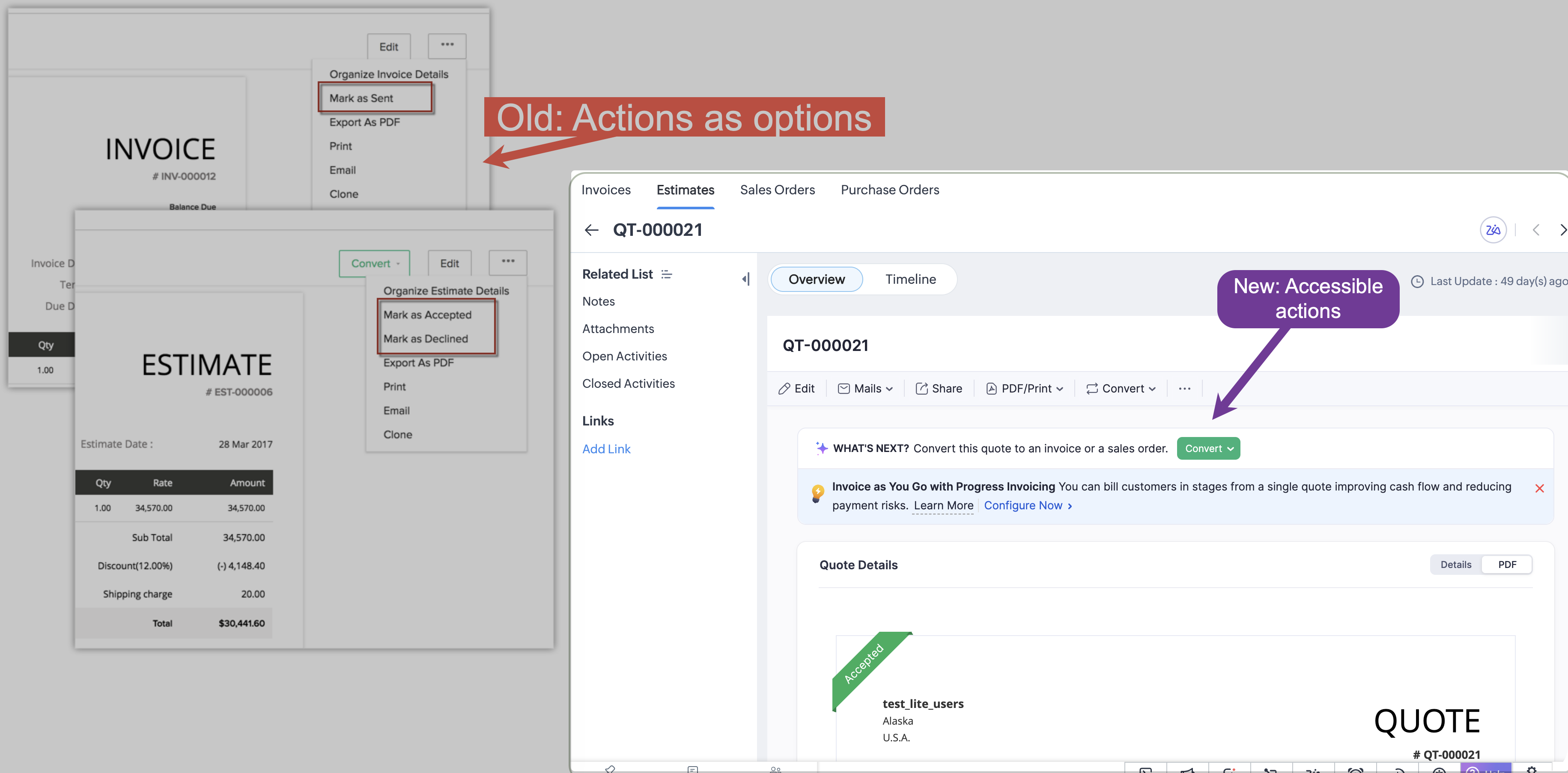
2. Approval process, end-to-end inside CRM
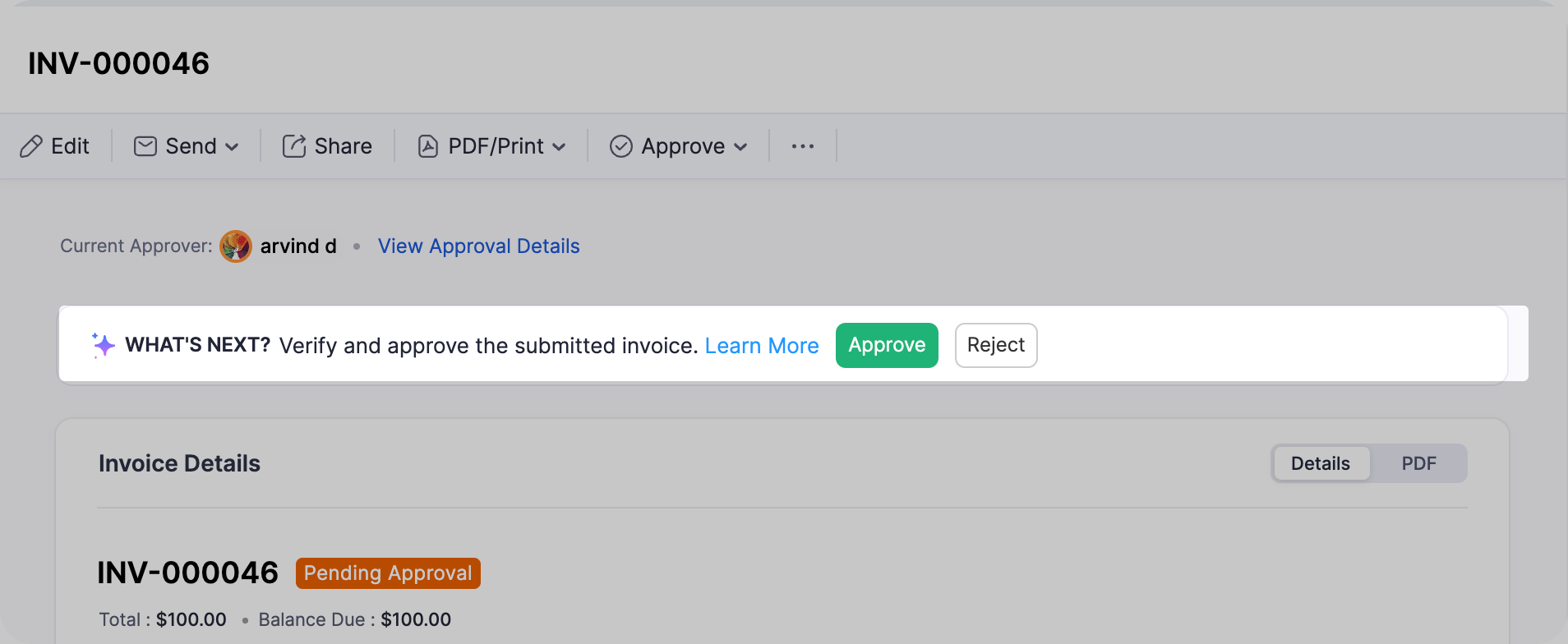
As a result of rendering Book’s UI from within CRM, Approval processes are also accessible/ actionable from CRM’s interface.
- Submit for approval from the CRM record page. Before submission, a Submit for Approval option replaces the usual action set.
- Approve or reject the transaction directly from CRM, if you have approval permission in Books.
- See approval state at a glance, like who has already approved, who the next approver is, and where the record stands.

For example, a sales rep closes a deal in CRM and generates an invoice.
In Books, an approval process is configured for invoices above a certain value, with the finance manager set as the approver. Previously, the rep would create the invoice and the finance manager had to switch over to Books, locate the record, and approve it there. Now, the finance manager sees the same record inside CRM with an Approve / Reject option directly on the page, and the rep sees the updated status the moment the approval goes through.
3. Item-level details on transactions
Item-level information on records is now part of the embedded view, giving you full visibility into the line-by-line breakdown of a transaction without having to navigate elsewhere.

Who can approve from CRM
Any user who is:
- Synced between Zoho Books and Zoho CRM as part of the integration, and
- has approval permission for that module in Zoho Books
can approve or reject records from within Zoho CRM.
One restriction to note: Integration users themselves cannot be configured as approvers in Books. This is a Books-side rule, not a CRM limitation. Only regular Zoho Books users can be set as approvers. If you're configuring an approval process and don't see an integration user in the approver list, this is expected.

Points to be noted
- The Books approval process is configured per module inside Zoho Books. This release does not auto-enable approvals, you'll need to enable the approval flow for each module manually (Estimates, Invoices, etc.) where you want it.
- If approvals are not configured for a module, the approval controls won't appear on the CRM record page. The rest of the embedded Books page continues to work as usual.
- Approval notifications continue to be raised inside Zoho Books and will not surface as CRM notifications. The approval banner on the CRM record page itself is the in-CRM signal that an approval is pending.
Release plan
This update is open for customers in all DCs.
That's all for this enhancement. Let us know your feedback in the comments below.
Thanks
Saranya Balasubramanian