Zoho Campaigns 3.0 is here
Zoho CampaignsAnnouncements
We're excited to introduce the all-new Zoho Campaigns, where we have introduced our biggest update yet.
Marketing has evolved far beyond email. Today's campaigns span email, SMS, and WhatsApp, customers expect personalized experiences, and AI is becoming an essential part of everyday marketing. As marketing has changed, we believe the tools marketers use should evolve too.
The new version of Zoho Campaigns introduces AI-driven content generation with Zia, built into every channel, so you can generate content for email, SMS, and WhatsApp all from one place. Alongside this, the release brings a redesigned campaign creation experience, WhatsApp marketing, enhanced automation, smarter reporting, improved contact management, and much more - all designed to help you create campaigns faster and manage them with confidence.
Read on for a full look at what’s new, what’s improved, and what’s coming next, or explore the Zoho Campaigns 3.0 prototype to try it out for yourself.
What's New
1. AI features
Zia AI content creation: Zia AI now drafts content for you across Email, SMS, and WhatsApp. Generate subject lines, pre-headers, full body copy, SMS messages, even WhatsApp headers and body copy. Tell it about your campaign once, and it writes from that context when you're generating content. You can change the tone, adjust the length, simplify it, or just hit regenerate if you are not satisfied with the draft. If you wrote something yourself, Zia can rephrase it, fix the grammar, translate it, or rewrite.
2. A cleaner experience
The interface has a modern, cleaner look, and list views are better across the board, with custom views and advanced filtering built in. The information you need shows up right where you need it, so you can find, organize, and act on your data without hopping between screens.
 The new interface
3. Multi-channel: Email, SMS, WhatsApp
- Email: Fewer setup steps, Lists + Segments with exclusions, a clear recipient count before you send, attachments, and A/B testing across subject lines, sender addresses, and content at once. Reporting is now more transparent, too. You can see the delivery status of every email, whether it's queued, delivered, bounced, or deferred. Sending campaigns is now about 4 times faster.
- WhatsApp (new): Bulk campaigns with approved templates, WhatsApp steps inside workflows, action-triggered messages, and delivery and engagement reporting.
- SMS: Simpler gateway setup, a cleaner creation flow, and better reporting.
4. The new template editor (rebuilt from scratch)
- Themes: Set your primary and secondary brand colors once, in the Template Style section, and every linked element in the template, buttons, headings, icons, highlights, updates automatically wherever it's used. Change your primary color from blue to green, for example, and the whole design updates at once, no need to edit each section by hand. We also suggest a complementary secondary color based on your primary pick, but you can override it with any color you like. This makes it much easier to reuse templates across different brands or campaigns.
- More control over layout: The new editor puts the design controls in your hands. Style each section the way you want, including background colors and images, spacing, padding, borders, and layout settings.
- Dedicated mobile view: Most emails get opened on a phone, so you now get a separate space to design and fine-tune the mobile version on its own.
- Revamped dynamic content: Set advanced criteria and tailor individual content blocks to different audience segments, all inside a single email. This is coming in the next update.
- Reusable bookmarks and centralized design settings: Save blocks you use often and reuse them anywhere, and control global design choices from one place so your branding stays consistent.
- Leaner output: We've trimmed down the size of the generated email, so emails render more consistently across inbox providers and you're less likely to run into clipping in major email clients.
5. Smarter segmentation
Build highly targeted segments by combining multiple criteria, engagement metrics, and layered condition groups, with faster processing behind it.
 Smarter segmentation
6. Analytics & e-commerce
- Dedicated dashboards for Email, SMS, and WhatsApp, plus a Contact Dashboard and a new E-commerce Dashboard covering ROI, revenue, orders, and cart performance.
- The Zoho Analytics integration goes deeper now. It automatically syncs your marketing data, every contact field plus activity across email, SMS, WhatsApp, and workflows, so you get unified reporting without piecing data together yourself.
- UTM parameter management for consistent tracking.
7. Integrations & CRM sync
- Smarter CRM sync: Pull all contacts or only those matching specific criteria, and import CRM custom views straight into mailing lists instead of recreating the same filtering logic. You can also create campaigns from CRM data without switching products.
 Smarter CRM sync
 Smarter CRM sync
 - Expanded webhook support for sending real-time data to external apps.
8. Faster, easier contact management
- A rebuilt, guided import flow that lets you create custom fields right inside the import.
- A clear import history showing new, updated, and ignored records, with reasons for the skips.
- Speed: importing contacts is now 5 times faster.
- Shareable Custom Views, a richer contact timeline, and native tagging (single or bulk).
Preference pages and signup forms are still running on the older interface for now. We're working on bringing those in line with the new look soon.
 Faster, easier contact management
9. Others
Frequency capping across all three channels, so contacts aren't over-messaged.
Unified Contact Scoring across all three channels.
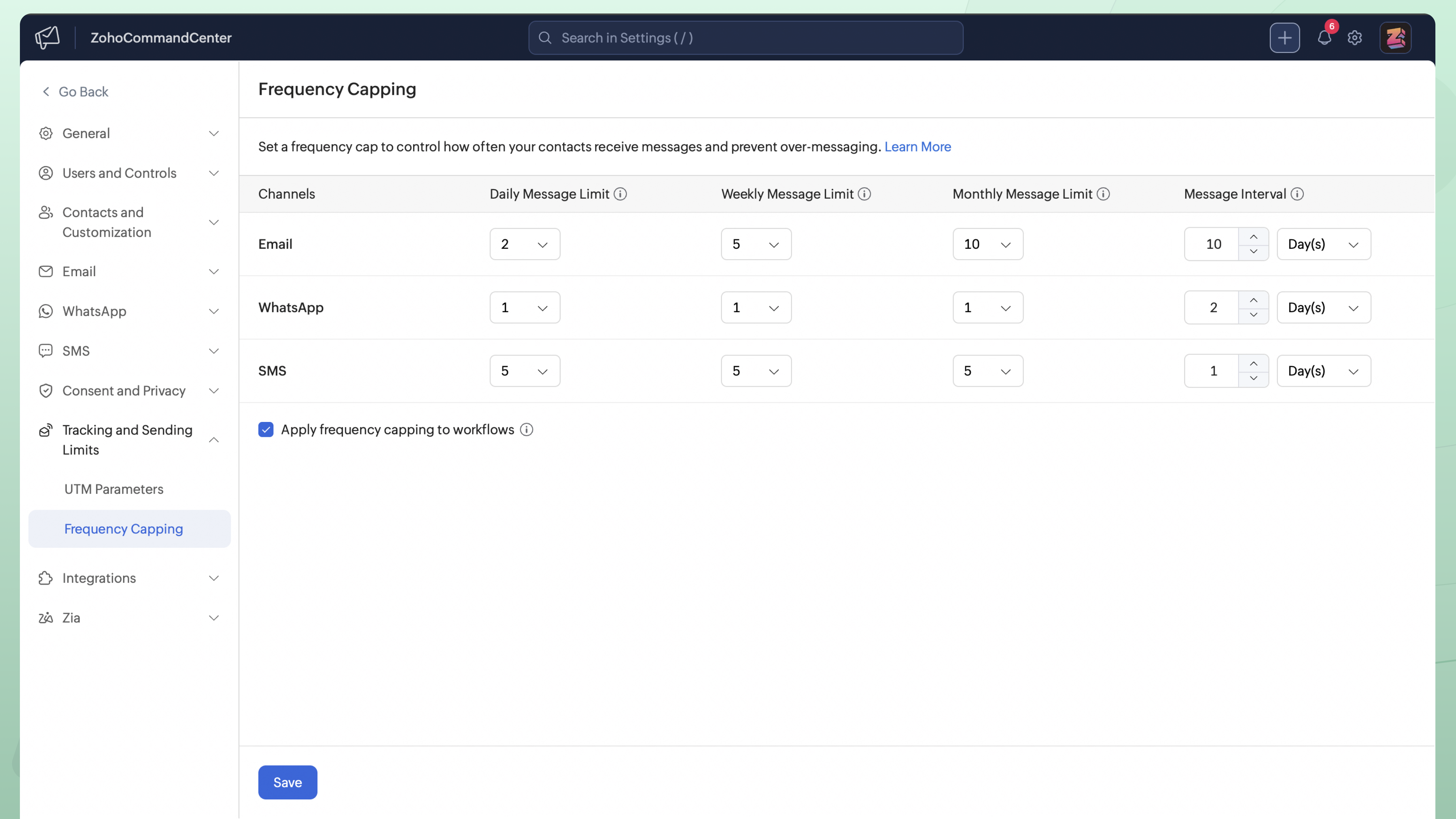
Getting started with Zoho Campaigns 3.0
Zoho Campaigns 3.0 is now open to all users starting today.
We have put together a clear migration path for existing Zoho Campaigns 2.0 users, so that the move to 3.0 is as smooth as possible. In this first phase, migration is enabled only through Zoho Campaigns support.
Before you reach out, these two guides will help you plan the move:
| Prerequisites for migrating to Zoho Campaigns 3.0: a checklist of what to set up in your account before you migrate. | What’s changed and what’s deprecated in Zoho Campaigns 3.0: a module-by-module look at what’s different, what’s been retired, and what happens to your existing data. |
When you’re ready to switch, contact us at support@zohocampaigns.com. If your account is in the EU data center, write to support@eu.zohocampaigns.com.