Zoho Campaigns 3.0 - Padding Controls Not Intuitive
Hi Campaigns Team,
3.0 looks amazing, but I have noticed one part which is not intuitive at all.
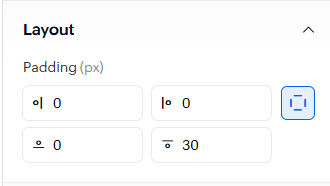
The padding controls show a circle and a line.
Intuitively, the circle is the object and the line is the edge which you want to add the padding to. However, in the current update, this seems to be reversed.
Currently, if you want to add padding to the bottom edge, you need to use the box where the circle is on the bottom edge. See the box with "30" in the screenshot.
I hope this feedback will help you improve the tool and make it easier for other users to use.
Thanks,
Ashley