Zoho Desk: 2023 Feature Release - All New Zoho Desk with accessibility controls and exciting new features and enhancements

Zoho Desk: 2023 Feature Release - All New Zoho Desk with accessibility controls and exciting new features and enhancements

Redefining customer service experiences

I. New Generation Zoho Desk
The Zoho Desk UI has been enhanced with a more engaging, intuitive, and user-friendly interface. The new design adheres to an advanced unified component library and follows standard design guidelines.

The fresh Zoho Desk interface brings changes that provide support to agents with a range of easy-to-use and convenient options that save time and effort while increasing productivity.

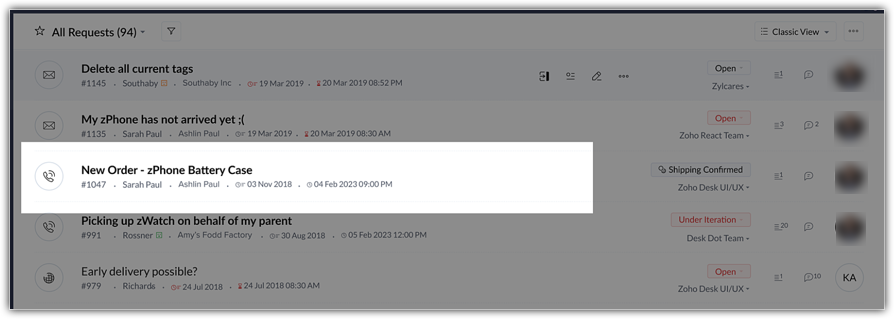
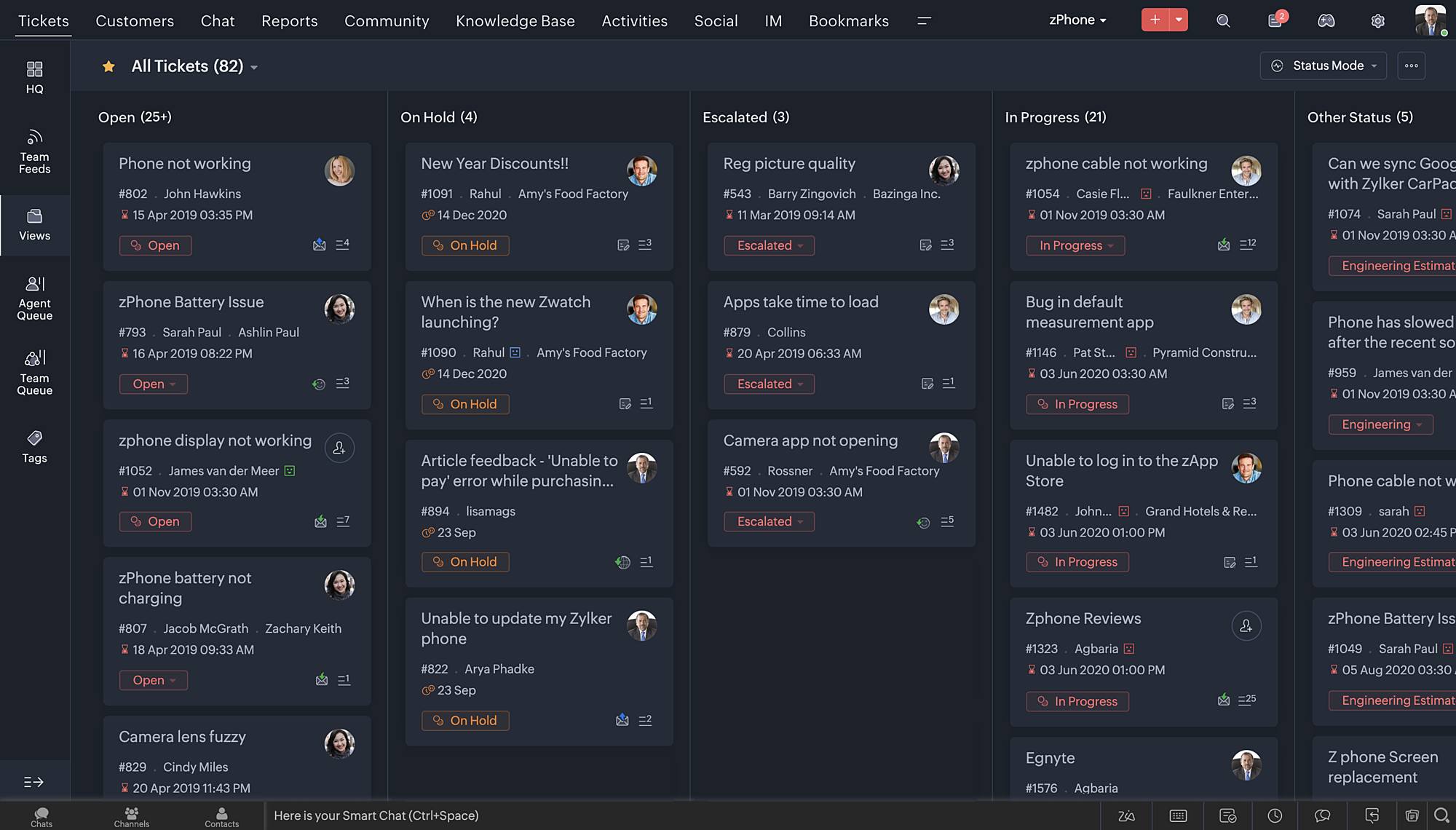
Take a look at some of the elements of our new UI:

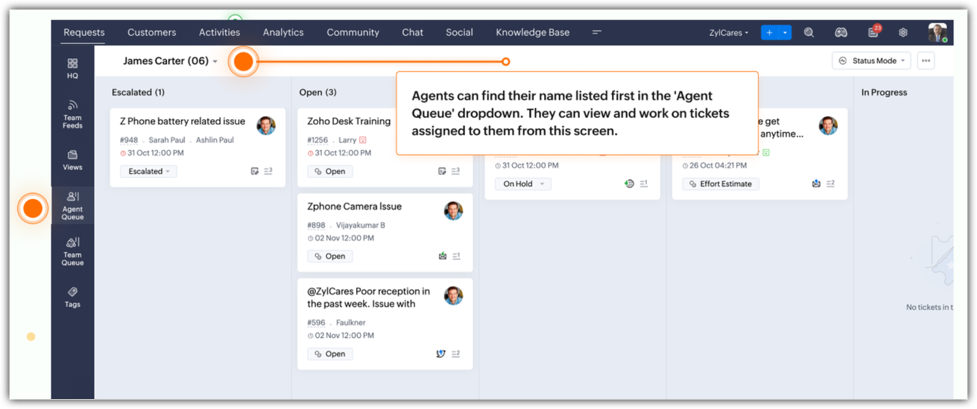
The Agent Queue now displays the agent's name first in the queue. Agents can work on assigned tickets right from this window. 

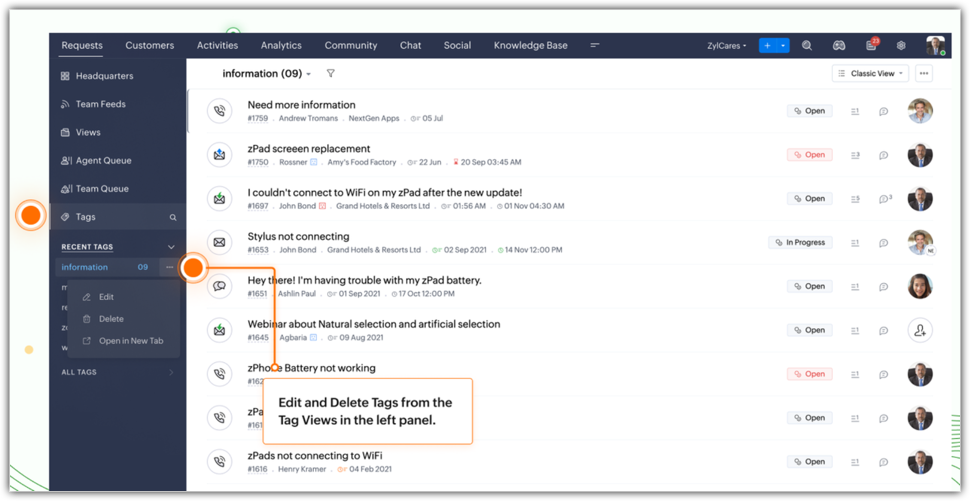
Tags can be edited and deleted from the Tag view in the left panel.

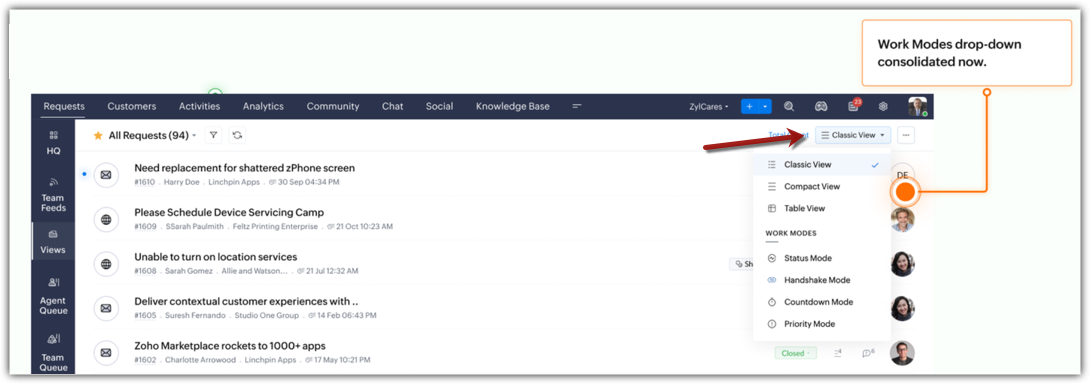
Work Modes provide an organized and clutter-free view. All work modes, including status, handshake, countdown, and priority are consolidated under the list views. 

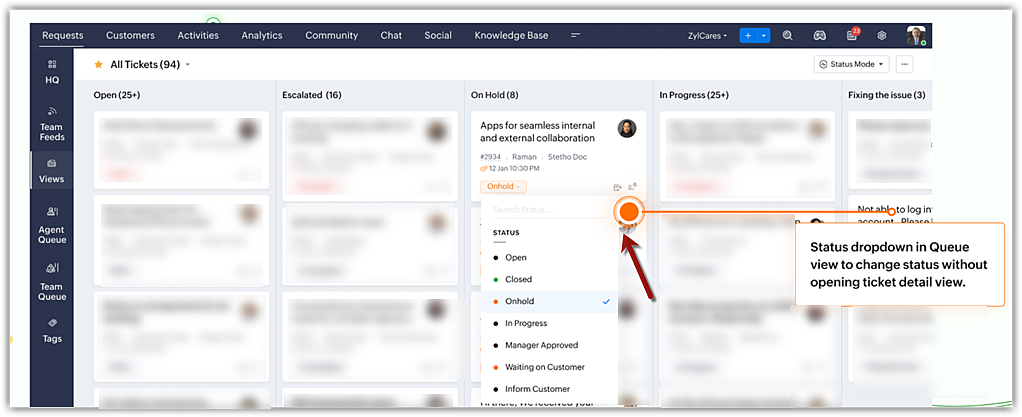
Ticket status can now be changed right from the Queue view without opening the Ticket Detail view. 

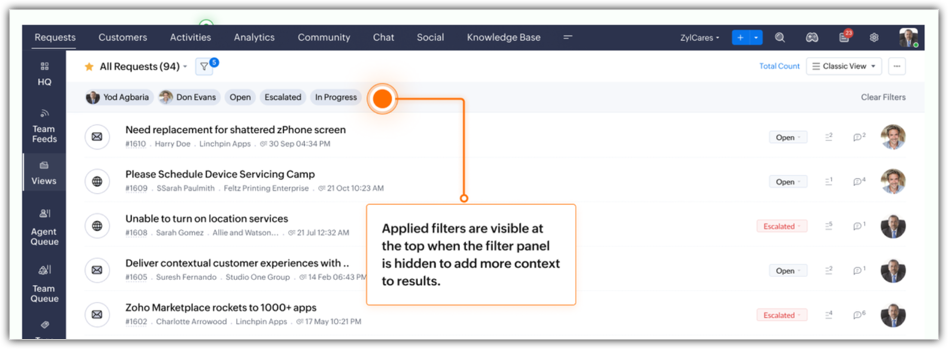
Filters applied to quick search a record are now displayed as breadcrumbs to provide better context and facilitate better understanding.

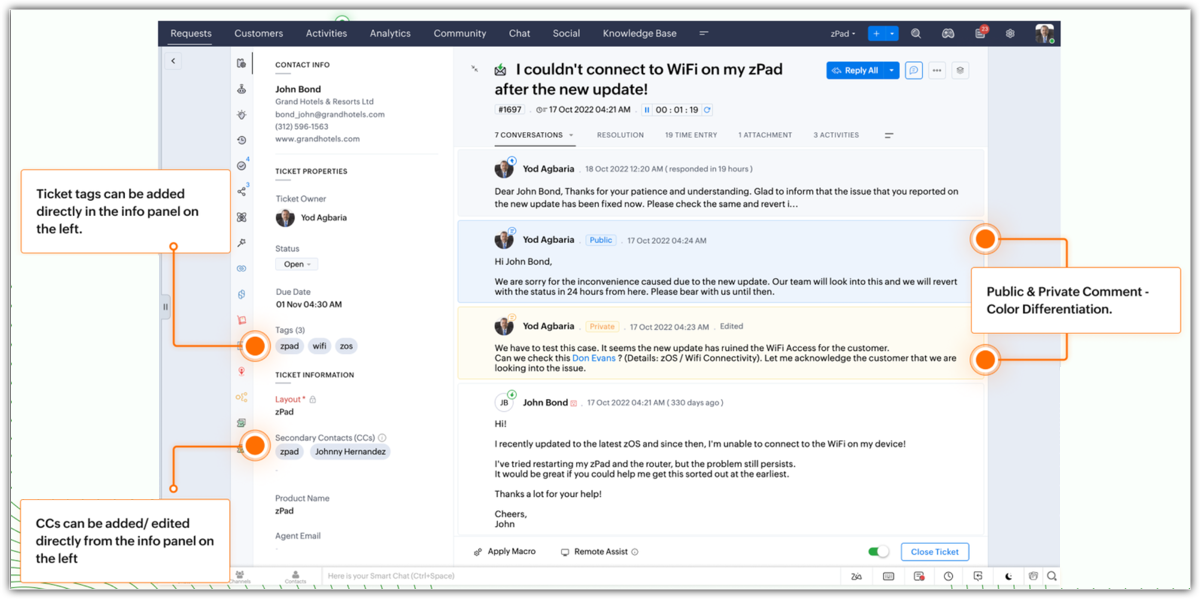
Ticket Detail view now includes more functionalities:
  • Tags can be added from the info panel.
  • CCs can be added and edited from the info panel.
  • Color distinction differentiates between public and private comments.
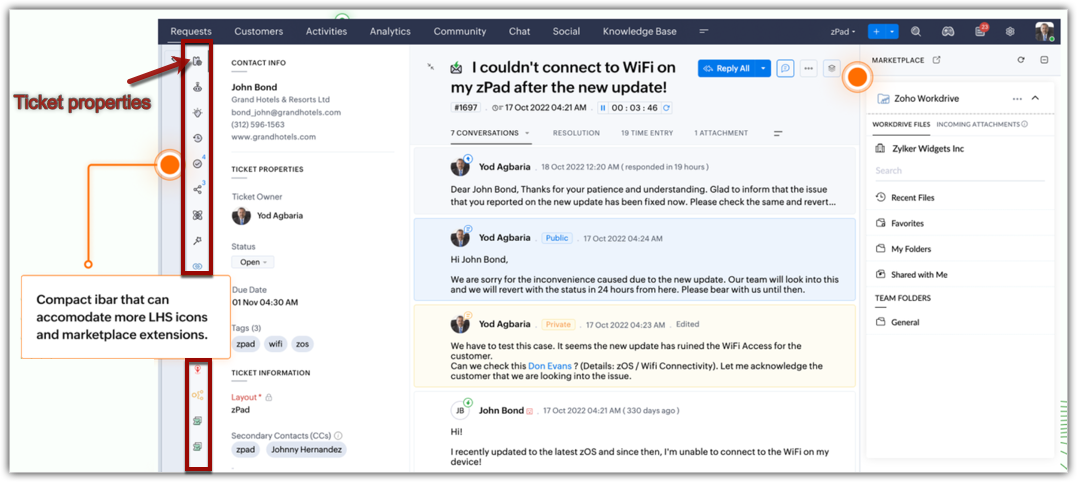
  • Compact info bar holds more icons and displays extensions for quick access.
This is just a glimpse of some of the key changes incorporated into the new UI design.
Resources: Help documents 

II. Providing inclusive experiences

We believe that software should be accessible to all. This was our goal in building an all-inclusive interface to cater to our world-wide customer base. With this in mind, we introduce:
  • Accessibility controls that help users adjust, enable, or disable visual and display preferences to their liking. Users now have the option to:
    • Highlight critical information, such as Ticket ID, agent name, email address, and ticket owner in striking colors for prominence and cognitive appeal.
    • Underline links for quick identification.
    • Emphasize areas that a user should focus on with highlights and colored outlines around the text.
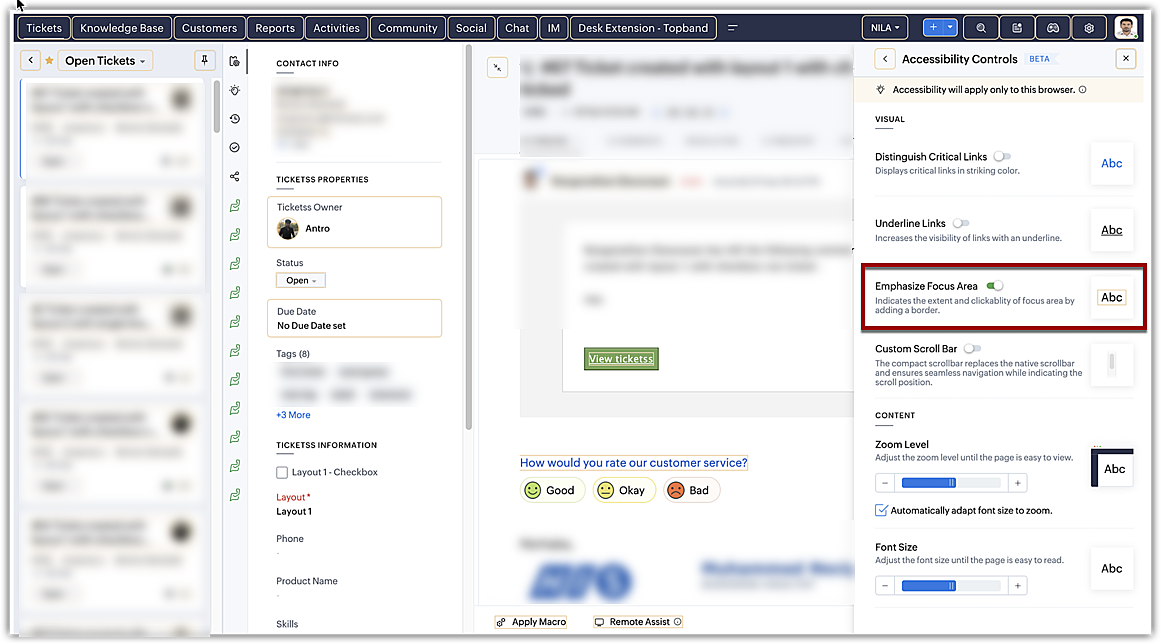
    • Optimize animations, motion graphics, and transitions by reducing motion or by allowing Zoho Desk to auto-adjust based on the computer settings. The screen jerks, page transitions, unwanted animations, and motions that can cause distraction and increase strain on the eyes can be mitigated substantially.
    • Use a reading mask to shine a spotlight on the text as you hover over it. Blur the background for distinction, less distraction, and better comprehension. 
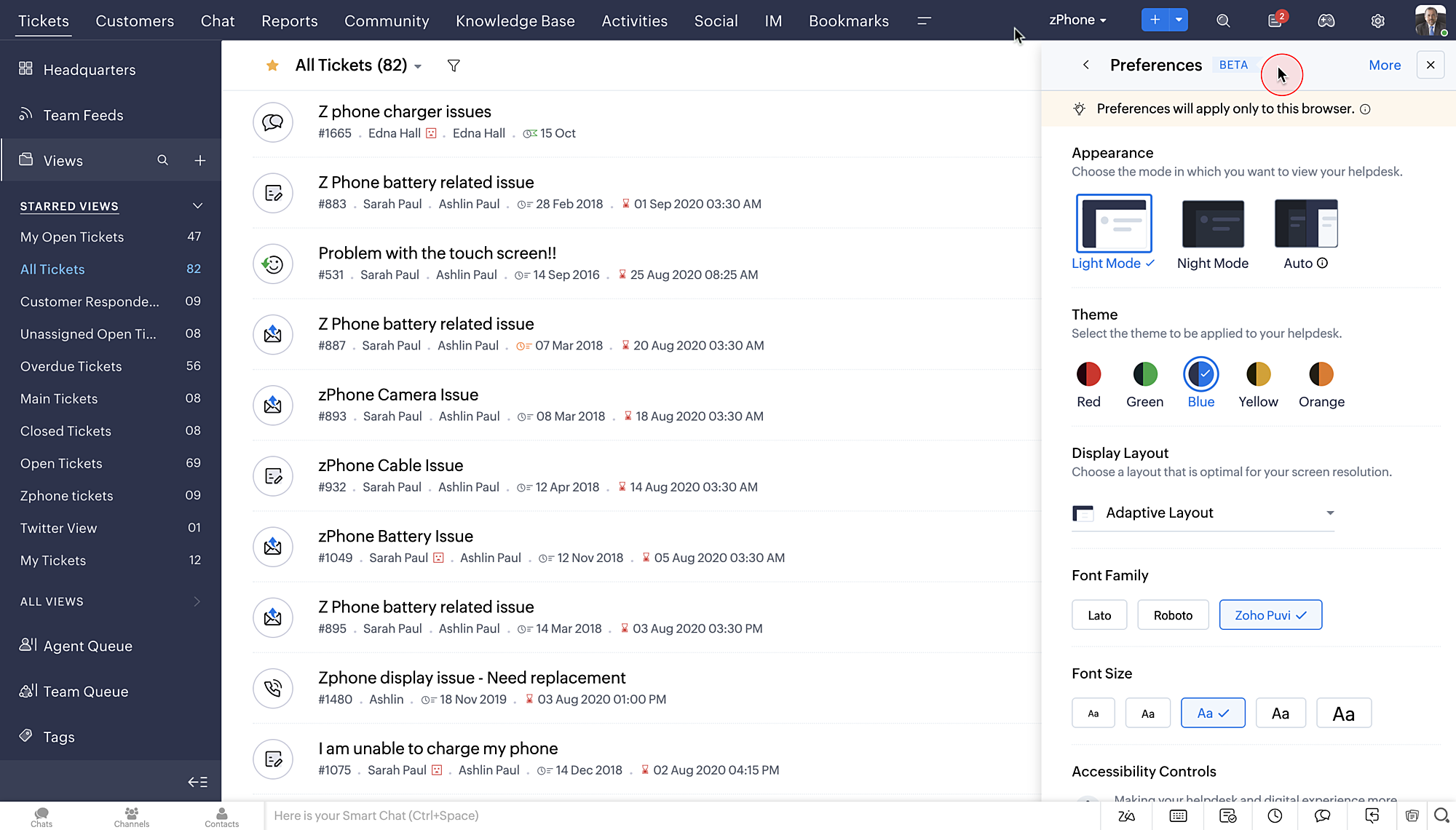
    • Adjust display and layout with page zoom and font size and type. 
    • Set display preferences with new themes and night/dark mode. Switch between light mode, night mode, or auto-mode based on your surroundings.


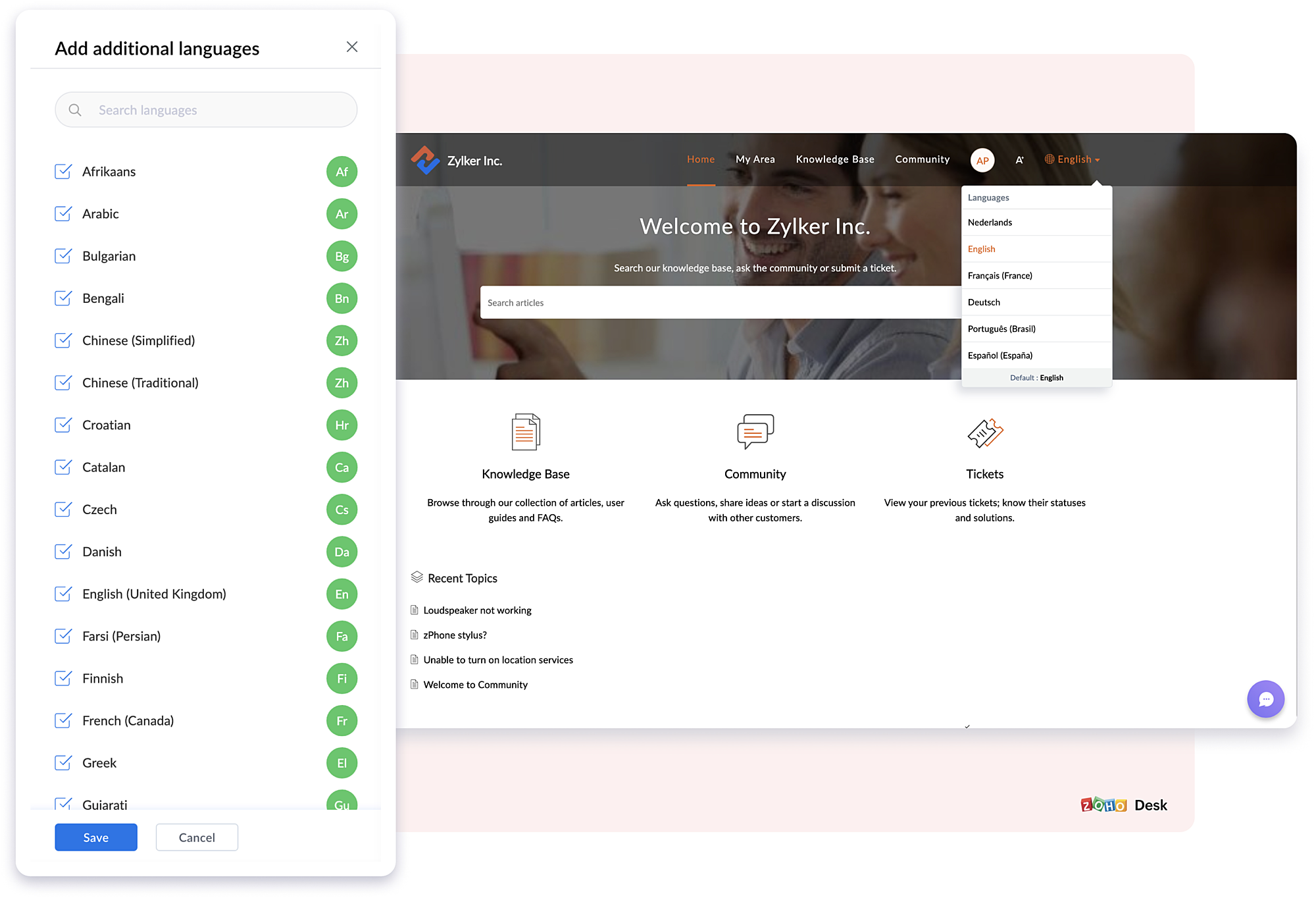
  • Multilingual support for your Knowledge Base helps customers access self-service content in their preferred language. Your KB content can be translated and published in 50+ languages.
III. Introducing enhanced privacy and transparent management

Data is the backbone of a business and it requires secure handling. This year, Zoho Desk took big strides to enhance privacy and provide better data management options by introducing:

Data subject rights: In accordance with GDPR, Zoho Desk now provides a reliable and secure system to protect and process customer data. DSR protects two different rights: Right to Access and Right to Erasure. Refer to the help doc for more details.
  • Right to Access: Data subjects can request a copy of their personal data. In Zoho Desk, you can register a request and send a copy of the data from one or more modules. Data will be exported, and you can send it securely from your official email account.
  • Right to Erasure: Data subjects can raise a request asking the organization to delete their personal data. In Zoho Desk, you can take up this request and permanently delete the data from one or more modules.
Read receipts for emails: Emails sent from tickets will bear a green double check mark when they've been read by the recipient. This helps agents manage high-priority tasks, deadlines, follow-up conversations, and more. Check marks in different colors indicate whether CC or BCC recipients have read the email, the number of recipients that replied to the email, whether the email bounced or failed, and more. Read the help doc for more details.

Data Backup: A foolproof method for preventing data loss is to periodically back up your data. Zoho Desk now facilitates instant and scheduled backups. Data from the Tickets, Products, KB, Activities, Agents, Teams, and other modules can be backed up as and when needed. Refer to the help doc for more details. 

Other new features and enhancements

Aside from these updates, we have some exciting new features:

Auto-translation of your help center
To support your multilingual knowledge base further, Zoho Desk now offers auto-translation of your KB articles to multiple languages. The article, title, tags, SEO title, meta descriptions, and meta keywords will be auto-translated using tools such as Google Translate, Unbable, or Zia, based on their configuration. Refer to the help doc for more details.

Custom actions gallery for Workflow automations
Introducing custom actions to improve workflow automations. The new set of available actions includes: Assign Ticket, Add Comment, Send Email Reply, Share Ticket, Send Cliq Notification, Reply and Notify via Instant Messaging, and more. Refer to the help doc for more details. 

Idle timeout to improve agent productivity and optimize ticket assignment
Desk provides the option to set the maximum duration for which an agent can remain idle.  After that time, their status will automatically change from online to offline. Increase productivity and maintain better control over ticket assignment by choosing agents based on status. Refer to the help doc for more details.  

More functionalities added to Blueprints
Advanced configurations we've added to Blueprint include:
  • Strict mode: Agents can be restricted from performing certain actions, like editing fields, sending replies, leaving comments, and asking for approvals during a transition. These functions will be hidden from the ticket interface.
  • Dynamic transition owner: Users can assign transition owners for records as and when needed. The transition owners need not be necessarily from the same department that the record belongs to.
  • Save draft: Blueprints that are in progress can be saved as drafts so you can resume work at another time.
  • Additional fields provided during transition: During transition, "tags" is included as a field that can be updated by the agent.  Ticket sharing is also an available action. If the agents want, they can share a ticket with team members during the transition.
  • Transition draft: Save a transition until its finalized as a partial draft. During this stage, multiple transition owners can be involved in its completion. The draft will display the name of the person who drafted the transition and when it was drafted.
New set of marketplace extensions
Earlier this year, we introduced a set of new extensions aimed at enhancing Zoho Desk's performance. The new extensions are:

Zoho Campaigns integration
Experience the benefits of Campaigns within your help desk. Create mailing lists, add or remove customers from mailing lists, find out how many campaigns customers are part of, and more. Refer to the help doc for more details.

Broadcast email template
Create email templates for multiple departments at once, insert an agent's signature and default happiness rating within the template, provide profile-based access to the template, and more. Refer to the help doc for more details.

Related tickets by custom fields
Improve ticket resolutions by adding custom fields. Using these fields, agents can look up tickets with similar field values to identify similar problems, and provide quicker and more personalized solutions. Up to five custom fields can be added to a layout, and can display information such as ticket ID, ticket owner, status, and date/time created from related tickets. Refer to the help doc for more details.   

That's a wrap.
We're excited to share the new version of Zoho Desk with its inclusive functionality, improved automation, comprehensive privacy options, helpful extensions, and more.

The new features are now available for all users. Give them a try and share your feedback.

Regards,
Anumita Gupta

Book the date!
We will be hosting an exclusive webinar for the 2023 Release Features on 22nd December (Thursday) at 9pm IST
Kindly register using the link below. 


    Access your files securely from anywhere


                            Zoho Developer Community


                                                  • Desk Community Learning Series


                                                  • Digest


                                                  • Functions


                                                  • Meetups


                                                  • Kbase


                                                  • Resources


                                                  • Glossary


                                                  • Desk Marketplace


                                                  • MVP Corner


                                                  • Word of the Day


                                                  • Ask the Experts


                                                            • Sticky Posts

                                                            • Zoho Desk Partners with Microsoft's M365 Copilot for seamless customer service experiences

                                                              Hello Zoho Desk users, We are happy to announce that Zoho Desk has partnered with Microsoft's M365 to empower customer service teams with enhanced capabilities and seamless experiences for agents. Microsoft announced their partnership during their keynote
                                                            • WhatsApp pricing changes: Pay per message starting July 1, 2025

                                                              Starting July 1, 2025, WhatsApp is shifting from conversation-based pricing to per-message billing. That means every business-initiated message you send will count. Not just the first one in a 24-hour window. Pricing updates on the WhatsApp Business Platform
                                                            • Live Webinar - Work smarter with Zoho Desk and Zoho Workplace integration

                                                              Hello customers! Zoho Desk and Zoho Workplace are coming together for a webinar on 14th May, 2024. Zoho Workplace is a suite of productivity apps for email, chat, docs, calls, and more at one single place. Zoho Desk is closely integrated with a few tools
                                                            • Apple iOS 17 and iPadOS 17 updates for Zoho Desk users

                                                              Hello Zoho Desk users! Apple recently announced the release of iOS 17 and iPad OS 17. These latest OS updates will help you stay productive and efficient, through interactive and seamless user experiences. Zoho Desk has incorporated the updates to help
                                                            • Zoho Desk Cheat Sheet For The Year-End

                                                              Check out these Zoho Desk best practices to end this year on a high and have a great one ahead! #1 Set Business (Holiday) Hours - If you have limited working hours, please make sure you restrict your business hours or set them as holidays for the coming days. Let your customers know when you will, and won't, be available. #2 Update the Annual Holiday List - Check the holidays for the new year and update the holiday schedule. Usually, holidays from the current year will be carried over for the next


                                                            Manage your brands on social media


                                                                  Zoho TeamInbox Resources


                                                                      Zoho CRM Plus Resources

                                                                        Zoho Books Resources


                                                                          Zoho Subscriptions Resources

                                                                            Zoho Projects Resources


                                                                              Zoho Sprints Resources


                                                                                Qntrl Resources


                                                                                  Zoho Creator Resources


                                                                                      Zoho CRM Resources

                                                                                      • CRM Community Learning Series

                                                                                        CRM Community Learning Series


                                                                                      • Kaizen

                                                                                        Kaizen

                                                                                      • Functions

                                                                                        Functions

                                                                                      • Meetups

                                                                                        Meetups

                                                                                      • Kbase

                                                                                        Kbase

                                                                                      • Resources

                                                                                        Resources

                                                                                      • Digest

                                                                                        Digest

                                                                                      • CRM Marketplace

                                                                                        CRM Marketplace

                                                                                      • MVP Corner

                                                                                        MVP Corner


                                                                                          Design. Discuss. Deliver.

                                                                                          Create visually engaging stories with Zoho Show.

                                                                                          Get Started Now


                                                                                            Zoho Show Resources

                                                                                              Zoho Writer

                                                                                              Get Started. Write Away!

                                                                                              Writer is a powerful online word processor, designed for collaborative work.

                                                                                                Zoho CRM コンテンツ


                                                                                                  Nederlandse Hulpbronnen


                                                                                                      ご検討中の方


                                                                                                              • Recent Topics

                                                                                                              • form data load issue when saving as duplicate record is made

                                                                                                                Hello. I have a form with a lookup when a value is selected the data from the corresponding record is filled into all of the fields in the form. But the form is loaded in such a state that if any value is changed it will take all of the values pre loaded
                                                                                                              • Recurring Tasks and Reminders in Projects

                                                                                                                Recurring tasks are tasks that are created once, and then recreated automatically after a designated time period. For example, the invoice for your billable tasks is due every week. You can set that task to recreate itself every week. Also, the future
                                                                                                              • Unable to remove the “Automatically Assigned” territory from existing records

                                                                                                                Hello Zoho Community Team, We are currently using Territory Management in Zoho CRM and have encountered an issue with automatically assigned territories on Account records. Once any account is created the territory is assigned automatically, the Automatically
                                                                                                              • Track online, in-office, and client location meetings separately with the new meeting venue option

                                                                                                                Hello everyone! We’re excited to announce meeting enhancements in Zoho CRM that bring more clarity and structure to how meetings are categorized. You can now specify the meeting venue to clearly indicate whether a meeting is being held online, at the
                                                                                                              • Google Fonts Integration in Pagesense Popup Editor

                                                                                                                Hello Zoho Pagesense Team, We hope you're doing well. We’d like to submit a feature request to enhance Zoho Pagesense’s popup editor with Google Fonts support. Current Limitation: Currently, Pagesense offers a limited set of default fonts. Google Fonts
                                                                                                              • Improved Contact Sync flow in Google Integration with Zoho CRM

                                                                                                                Hello Everyone, Your contact sync in Google integration just got revamped! We have redesigned the sync process to give users more control over what data flows into Google and ensure that this data flows effortlessly between Zoho CRM and Google. With this
                                                                                                              • CRM Canvas - Upload Attachments

                                                                                                                I am in the process of changing my screens to Canvas.  On one screen, I have tabs with related lists, one of which is attachments.  There doesn't appear to be a way to upload documents though.  Am I missing something really obvious?  Does anyone have
                                                                                                              • Custom Fonts in Zoho CRM Template Builder

                                                                                                                Hi, I am currently creating a new template for our quotes using the Zoho CRM template builder. However, I noticed that there is no option to add custom fonts to the template builder. It would greatly enhance the flexibility and branding capabilities if
                                                                                                              • Improved Functionality PO Bill SO Invoice

                                                                                                                Hello, I need to enter over 100 items, it's frustrating to scroll a few item rows and wait for more to load, then scroll again. It would be nice to have buttons that scroll to the top or bottom with one click. Furthermore, these items I'm adding are VAT
                                                                                                              • Camera access

                                                                                                                My picture doesn't appear in a group discussion. (The audio is fine.) The guide says "Click the lock icon on address bar," but I can't find it. Advise, please
                                                                                                              • Wishes for 2026

                                                                                                                Hello, and a happy new year 2026! Let's hope it's better for everyone. I'd like to share some thoughts on Zoho One and what could be useful in the short, medium, and long term. Some things are already there, but not applied to Zoho One. Others seem like
                                                                                                              • How to Integrate Zoho Books with Xero (No Native Connection Available)

                                                                                                                Hi everyone, I’m currently facing an issue with integrating Zoho Books invoices with Xero, as I’ve noticed Zoho does not provide a native integration with Xero at this time. I would like to ask: What are the common or recommended solutions for syncing
                                                                                                              • How to install Widget in inventory module

                                                                                                                Hi, I am trying to install a app into Sales Order Module related list, however there is no button allow me to do that. May I ask how to install widget to inventory module related list?
                                                                                                              • Picklist field shows "none" as default

                                                                                                                Hello, Is there an option to avoid showing "none" as the default value in a picklist field? I also don't want to see any option displayed. My expectation is to have a blank bar, and then when I display the drop-down list, I can choose whichever I wa
                                                                                                              • error while listing mails

                                                                                                                I can't access email in any of my folders: Oops, an error occurred - retry produces the second error response: error while listing mails (cannot parse null string). I've signed in and out of Zoho, restarted my iMac.
                                                                                                              • Unlocking New Levels: Zoho Payroll's Journey in 2025

                                                                                                                Every year brings its own set of challenges and opportunities to rethink how payroll works across regulations and teams. In 2025, Zoho Payroll continued to evolve with one clear focus: giving businesses more flexibility, clarity, and control as they grow.
                                                                                                              • CRM project association via deluge

                                                                                                                I have created a workflow in my Zoho CRM for closing a deal. Part of this workflow leverages a deluge script to create a project for our delivery team. Creating the project works great however, after or during the project creation, I would like to associate
                                                                                                              • Zoho Browser??

                                                                                                                hai guys, this sounds awkward but can v get a ZOHO BROWSER same as zoho writer, etc. where i can browse websites @ home and continue browsing the same websites @ my office, as v have the option in Firefox, once i save and close the browser and again when i open it i will be getting the same sites. If u people r not clear with my explanation, plz let me know. Thanks, Sandeep  
                                                                                                              • Sync desktop folders instantly with WorkDrive TrueSync (Beta)

                                                                                                                Keeping your important files backed up and accessible has never been easier! With WorkDrive desktop app (TrueSync), you can now automatically sync specific desktop folders to WorkDrive Web, ensuring seamless, real-time updates across devices. Important:
                                                                                                              • MCP no longer works with Claude

                                                                                                                Anyone else notice Zoho MCP no longer works with Claude? I'm unable to turn this on in the claude chat. When I try to toggle it on, it just does nothing at all. I've tried in incognito, new browsers, etc. - nothing seems to work.
                                                                                                              • Enable History Tracking for Picklist Values Not Available

                                                                                                                When I create a custom picklist field in Deals, the "Enable History Tracking for Picklist Values" option is not available in the Edit Properties area of the picklist. When I create a picklist in any other Module, that option is available. Is there a specific reason why this isn't available for fields in the Deals Module?
                                                                                                              • Ability to Edit YouTube Video Title, Description & Thumbnail After Publishing

                                                                                                                Hi Zoho Social Team, How are you? We would like to request an enhancement to Zoho Social that enables users to edit YouTube video details after the video has already been published. Your team confirmed that while Zoho Social currently allows editing the
                                                                                                              • Free Webinar : Unlock AI driven business insights with Zoho Inventory + Zoho Analytics

                                                                                                                Are you tired of switching between apps and exporting data to build customized reports? Say hello to smarter & streamlined insights! Join us for this exclusive webinar where we explore the power of the Zoho Inventory–Zoho Analytics integration. Learn
                                                                                                              • Critical Issue: Tickets Opened for Zoho Support via the Zoho Help Portal Were Not Processed

                                                                                                                Hi everyone, We want to bring to your attention a serious issue we’ve experienced with the Zoho support Help Portal. For more than a week, tickets submitted directly via the Help Portal were not being handled at all. At the same time no alert was posted
                                                                                                              • Hide/Show Subform Fields On User Input

                                                                                                                Hello, Are there any future updates in Hide/Show Subform Fields "On User Input"?
                                                                                                              • Cloning Item With Images Or The Option With Images

                                                                                                                Hello, when I clone an item, I expect the images to carry over to the cloned item, however this is not the case in Inventory. Please make it possible for the images to get cloned or at least can we get a pop up asking if we want to clone the images as
                                                                                                              • Archiving Contacts

                                                                                                                How do I archive a list of contacts, or individual contacts?
                                                                                                              • Custom validation in CRM schema

                                                                                                                Validation rules in CRM layouts work nicely, good docs by @Kiran Karthik P https://help.zoho.com/portal/en/kb/crm/customize-crm-account/validation-rules/articles/create-validation-rules I'd prefer validating data input 'closer to the schema'
                                                                                                              • Adding Default Module Image into mail merge field

                                                                                                                As with most people finding their way to these forums i have a specific requirement that doesn't seem to be supported by Zoho I have created 2 custom modules to suit my purpose 1 is an inventory type module that lists aluminium extrusions, and all relevant
                                                                                                              • Is it possible to roll up all Contact emails to the Account view?

                                                                                                                Is there a way to track all emails associated with an Account in one single view? Currently, email history is visible when opening an individual Contact record. However, since multiple Contacts are often associated with a single Account, it would be beneficial
                                                                                                              • Free Training - Explore What’s New in Zoho One 2025

                                                                                                                Greetings! We hope you have all had a chance by now to get hands-on with the new features and updates released as part of ZO25. Yes, we understand that you may have questions and feedback. To ensure you gain a comprehensive understanding of these updates,
                                                                                                              • Good news! Calendar in Zoho CRM gets a face lift

                                                                                                                Dear Customers, We are delighted to unveil the revamped calendar UI in Zoho CRM. With a complete visual overhaul aligned with CRM for Everyone, the calendar now offers a more intuitive and flexible scheduling experience. What’s new? Distinguish activities
                                                                                                              • Edit default "We are here to help you" text in chat SalesIQ widget

                                                                                                                Does anyone know how this text can be edited? I can't find it anywhere in settings. Thanks!
                                                                                                              • Quick way to add a field in Chat Window

                                                                                                                I want to add Company Field in chat window to lessen the irrelevant users in sending chat and set them in mind that we are dealing with companies. I request that it will be as easy as possible like just ticking it then typing the label then connecting
                                                                                                              • How to create a two way Sync with CRM Contacts Module?

                                                                                                                Newbie creator here (but not to Zoho CRM). I want to create an app that operates on a sub-set of CRM Contacts - only those with a specific tag. I want the app records to mirror the tagged contacts in CRM. I would like it to update when the Creator app
                                                                                                              • Zoho Sheet for Desktop

                                                                                                                Does Zoho plans to develop a Desktop version of Sheet that installs on the computer like was done with Writer?
                                                                                                              • Where is the settings option in zoho writer?

                                                                                                                hi, my zoho writer on windows has menu fonts too large. where do i find the settings to change this option? my screen resolution is correct and other apps/softwares in windows have no issues. regards
                                                                                                              • Develop and publish a Zoho Recruit extension on the marketplace

                                                                                                                Hi, I'd like to develop a new extension for Zoho Recruit. I've started to use Zoho Developers creating a Zoho CRM extension. But when I try to create a new extension here https://sigma.zoho.com/workspace/testtesttestest/apps/new I d'ont see the option of Zoho Recruit (only CRM, Desk, Projects...). I do see extensions for Zoho Recruit in the marketplace. How would I go about to create one if the option is not available in sigma ? Cheers, Rémi.
                                                                                                              • How to import data from PDF into Zoho Sheet

                                                                                                                I am looking to import Consolidated Account Statement (https://www.camsonline.com/Investors/Statements/Consolidated-Account-Statement) into zoho sheet. Any help is appreciated. The pdf is received as attachment in the email, this document is password
                                                                                                              • Zoho Projects Android app: Integration with Microsoft Intune

                                                                                                                Hello everyone! We’re excited to announce that Zoho Projects now integrates with Microsoft Intune, enabling enhanced security and enterprise app management. We have now added support for Microsoft Intune Mobile Application Management (MAM) policies through
                                                                                                              • Next Page