Zoho Reports - New feature rolled out on Aug. 24, 2015
Enhancements in KPI Widgets
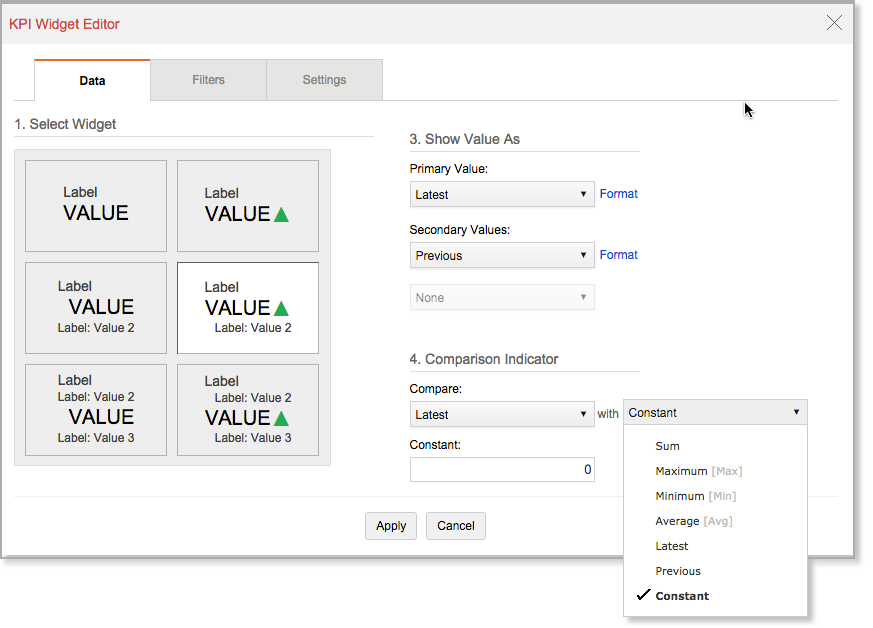
Support to Customize the Comparison Indicator
Now Zoho Reports allows you to customize the comparison indicator. Till now the indicators will only be displayed based on the result of comparison between latest and previous value. From now on you will be able set the indicator by choosing what to compare with the given aggregate values.
With this you can display the indicator based on various patterns such as comparison between maximum & minimum value and so on. You can also set the indicator by comparing it with a constant value.
Support to Customize the Primary Value
With this update Zoho Reports allows you to display dynamic values in the Label & Value component of the KPI widgets. You can do this by specifying the values in a parametrized format.
Follow the below given format to specify a parametrized format.
${ColumnName}.VALUE - Refers to the corresponding functional value of the column used.
${OPERATION} - Refers to the corresponding Show Value As operation.