Cluster Analysis

Cluster Analysis

Clustering is a method used in data analysis to group similar data points together based on certain factors or similarities. Each cluster contains data points that are more similar to each other than to those in other clusters. Zoho Analytics uses the K-means, K-modes, and K-prototype algorithms to group data points.
Business Use Cases

Customer Segmentation: Customers can be grouped based on different factors like demographics, regions, and preferences. Grouping helps businesses tailor and strategize marketing efforts that improve sales and retention.

Inventory Management: Efficient inventory management facilitates a streamlined supply chain. Clustering can identify seasonal trends related to product purchases and items that are highly in demand and help manage stocks better.

Points to Note 

  • A minimum of 5 data points are required for clustering.
  • Cluster analysis is supported for scatter plots, bar charts, and bubble charts.
  • Cluster analysis is not supported for Forecast, Trend line, and Anomaly analysis.

How to Apply Cluster Analysis

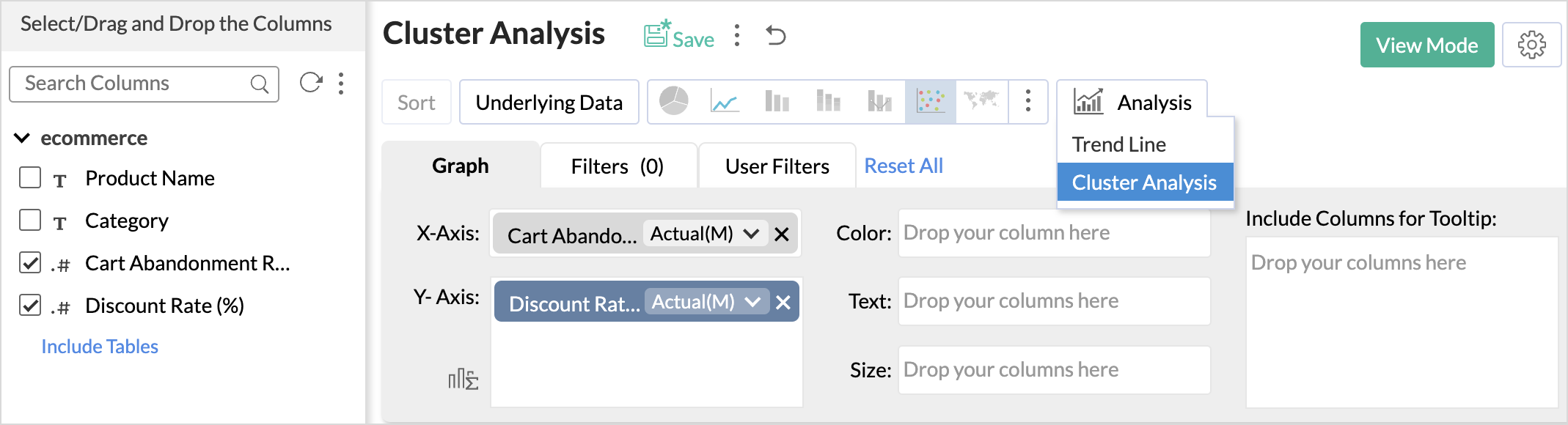
  1. To conduct a cluster analysis, click the Analysis icon on the tool bar and select Cluster Analysis from the drop-down menu.
  2. In the Cluster Analysis dialog that opens, click Add Clusters
  3. The algorithm model is auto selected based on the columns used in the report.
  4. Factors are the columns based on which the data points are grouped. The columns are listed based on the model selected; all the Numerical Columns available in the data will be listed for K-mean, Categorical columns for K-modes, and both numerical and categorical for K-prototype.
  5. Specify the number of clusters. A minimum of two clusters and a maximum of 30 clusters can be specified for clustering. 
  6. Choose the Normalization method that should be used to transform the data before clustering. Normalization is the technique used to transform the data to have a common scale. 
    • Min-Max Scale - In this method, all the data points are rescaled between the ranges of 0 and 1.
    • Z-Score - Z-Score represents the number of standard deviations a data point is from the mean of the dataset. This transformation is designed to center the data around a mean of 0 and standardize it so that the standard deviation is 1 for the entire dataset. In this method, all the data points are rescaled between the ranges of -1 and 1.
  7. For the K- prototype model, specify the Weightage to be given from numerical and categorical factors. The weightage values range from 0.2 to 2. By default, Zoho Analytics gives equal weightage (1.00) to both numerical and categorical factors. Weightage value closer to 0.2 indicates, numerical columns will have more weightage and value closer to 2 indicates,categorical columns will have more weightage.
  8. Click Apply.

Viewing Cluster Information

This section provides the summary and statistical information that help evaluate the quality of the clusters and how well the data points are grouped. Clusters info option will be enabled once the clustering is applied.
 

Summary

This section provides the following details:

  • This section provides the following details, such as the algorithm used for clustering, Number of Data points, and Number of clusters in to which the data points are clustered. 
  • The Stop Criteria field gives the reason based on which the clustering process was terminated.
  • The Distance formula that was used for clustering. 
    • Euclidean distance is the method used for K-means algorithm.
    • Binary Dissimilarity is the method used for K-modes algorithm.
  • The Factors(Columns) and the Normalization method used for clustering.

Performance/Quality Indicators

  • CH Index - The Calinski-Harabasz index (CHI) is a metric used to evaluate the quality of a cluster. The CHI calculates the ratio of between-cluster variance to within-cluster variance. A higher CHI value denotes that the clusters are well grouped.
  • DB Index - The Davies-Bouldin index (DBI) is another metric to assess the quality of clustering. The DBI is calculated by considering the ratio of the average similarity between each cluster and its most similar cluster, to the average dissimilarity between the clusters.
  • Purity - In K-mode clustering, purity is a measure used to evaluate the quality of the clustering results. It assesses how well-defined and internally consistent the clusters are by comparing the dominant class labels within each cluster to the actual class labels in the dataset. The purity score is given in percentage.

Note

  • The CH Index and DB Index is calculated for the K-means and K-prototype models
  • The Purity indicator is calculated for K-modes and K-prototype clustering models. 
     

Centroid and Cluster Information

This section provides the details specific to each cluster, such as the number of data points in each cluster and the average (centroid) or the mode of the data points for each factor.

Analysis of Variance (ANOVA)

Analysis of variance is calculated only for the K-means algorithm. ANOVA is used to evaluate whether the centroids (or means) of the clusters are significantly different from each other in terms of the values of the factors used for clustering. It is also a statistical significance test that is used to check whether the null hypothesis can be rejected or not during hypothesis testing.

Within the Sum of Squares - It calculates how much the individual data points within each group differ from the mean of that group. This can also be called as Mean Square between the Clusters (MSB).

Between the Sum of Squares - It calculates how much the mean values of different groups differ from the overall mean value. This can also be called as Mean Square within the Clusters (MSW).

F- Statistic Value 

The F-Statistic calculates the ratio of the Mean Square Between (MSB) the clusters to the Mean Square Within (MSW) the clusters. If the F-Statistic is greater than the critical value, we can conclude that the data points are well clustered.

P - Value

It helps to decide whether the differences between groups are likely to have occurred by chance or if they are statistically significant.

FactorsF-StatisticBetween the Sum of SquaresDegrees of Freedom (between clusters)Within the Sum of SquaresDegrees of Freedom (within clusters)
Columns used for clustering

MSB/MSW

MSB - Mean Square between clusters

MSW- Mean Square within clusters.

Calculates the difference between the means across different clusters 

A large value indicates that the data points are well clustered and there is no overlapping.

k-1

where, k - number of clusters

The between-clusters degrees of freedom is calculated based on the number of clusters (groups) being compared.

Calculates the difference between the means within each cluster.

N-k

where,

  • N - Total number of observations.
  • k - number of clusters.

The within-clusters degrees of freedom is calculated based on the number of observations within each cluster and the number of clusters.

Algorithms Used for Cluster Analysis

The methods used for clustering depend mainly on the data type of columns based on which the data points are grouped.

K-means

K-means is a ML algorithm for partitioning a dataset into a predefined k number of clusters. Each data point is assigned to a cluster based on the centroid. The goal of this algorithm is to reduce the sum of the distance between the points and corresponding clusters. This method is best suited for grouping data points based on numerical factors. Refer to the section to learn about the working of K- means.

K-modes

K-modes aims to partition a dataset into K clusters, where each cluster contains similar data points. The centroid of each cluster is represented by the most frequent value (mode) for each categorical attribute within the cluster. The algorithm aims to minimize the total dissimilarity between data points and their respective centroids.

K-prototype

K-prototype is used to partition data that contain both numerical and categorical attributes. It calculates the centroid of each clusters using the combination of euclidean distance for numerical features and a matching dissimilarity measure for categorical features. For example, Segmenting customers based on the purchase pattern and age.


        Create. Review. Publish.

        Write, edit, collaborate on, and publish documents to different content management platforms.

        Get Started Now


          Access your files securely from anywhere

            Zoho CRM Training Programs

            Learn how to use the best tools for sales force automation and better customer engagement from Zoho's implementation specialists.

            Zoho CRM Training
              Redefine the way you work
              with Zoho Workplace

                Zoho DataPrep Personalized Demo

                If you'd like a personalized walk-through of our data preparation tool, please request a demo and we'll be happy to show you how to get the best out of Zoho DataPrep.

                Zoho CRM Training

                  Create, share, and deliver

                  beautiful slides from anywhere.

                  Get Started Now


                    Zoho Sign now offers specialized one-on-one training for both administrators and developers.

                    BOOK A SESSION


                                Quick LinksWorkflow AutomationData Collection
                                Web FormsEnterpriseOnline Data Collection Tool
                                Embeddable FormsBankingBegin Data Collection
                                Interactive FormsWorkplaceData Collection App
                                CRM FormsCustomer ServiceAccessible Forms
                                Digital FormsMarketingForms for Small Business
                                HTML FormsEducationForms for Enterprise
                                Contact FormsE-commerceForms for any business
                                Lead Generation FormsHealthcareForms for Startups
                                Wordpress FormsCustomer onboardingForms for Small Business
                                No Code FormsConstructionRSVP tool for holidays
                                Free FormsTravelFeatures for Order Forms
                                Prefill FormsNon-Profit

                                Intake FormsLegal
                                Mobile App
                                Form DesignerHR
                                Mobile Forms
                                Card FormsFoodOffline Forms
                                Assign FormsPhotographyMobile Forms Features
                                Translate FormsReal EstateKiosk in Mobile Forms
                                Electronic Forms
                                Drag & drop form builder

                                Notification Emails for FormsAlternativesSecurity & Compliance
                                Holiday FormsGoogle Forms alternative GDPR
                                Form to PDFJotform alternativeHIPAA Forms
                                Email FormsFormstack alternativeEncrypted Forms

                                Wufoo alternativeSecure Forms

                                TypeformWCAG

                                    All-in-one knowledge management and training platform for your employees and customers.

                                              Create. Review. Publish.

                                              Write, edit, collaborate on, and publish documents to different content management platforms.

                                              Get Started Now


                                                                You are currently viewing the help pages of Qntrl’s earlier version. Click here to view our latest version—Qntrl 3.0's help articles.


                                                                    Manage your brands on social media


                                                                      • Desk Community Learning Series


                                                                      • Digest


                                                                      • Functions


                                                                      • Meetups


                                                                      • Kbase


                                                                      • Resources


                                                                      • Glossary


                                                                      • Desk Marketplace


                                                                      • MVP Corner


                                                                      • Word of the Day


                                                                      • Ask the Experts


                                                                        Zoho Sheet Resources


                                                                            Zoho Forms Resources


                                                                              Secure your business
                                                                              communication with Zoho Mail


                                                                              Mail on the move with
                                                                              Zoho Mail mobile application

                                                                                Stay on top of your schedule
                                                                                at all times


                                                                                Carry your calendar with you
                                                                                Anytime, anywhere


                                                                                      Zoho Sign Resources

                                                                                        Sign, Paperless!

                                                                                        Sign and send business documents on the go!

                                                                                        Get Started Now


                                                                                                Zoho TeamInbox Resources


                                                                                                          Zoho DataPrep Demo

                                                                                                          Get a personalized demo or POC

                                                                                                          REGISTER NOW


                                                                                                            Design. Discuss. Deliver.

                                                                                                            Create visually engaging stories with Zoho Show.

                                                                                                            Get Started Now


                                                                                                                                • Related Articles

                                                                                                                                • Cluster Analysis

                                                                                                                                  Clustering is a method used in data analysis to group similar data points together based on certain factors or similarities. Each cluster contains data points that are more similar to each other than to those in other clusters. Zoho Analytics uses ...
                                                                                                                                • Auto Analysis

                                                                                                                                  Zoho Analytics provides Augmented Analytical capabilities using technologies like artificial intelligence (AI), machine learning (ML), and natural language processing (NLP) in various scenarios. One such feature is to auto-generate reports and ...
                                                                                                                                • What-If Analysis

                                                                                                                                  Zoho Analytics supports What-if Analysis using Variables. What-If Analysis enables you to do powerful scenario analysis on your data. It enables you to measure the difference in outcome when one or more variables change. This helps in effective ...
                                                                                                                                • Advanced Analytics for SendGrid

                                                                                                                                  The Advanced Analytics connector for SendGrid streamlines the integration of your email delivery data, offering deep insights into email performance, deliverability, recipient engagement, and sender reputation. By unifying metrics like delivery ...
                                                                                                                                • Advanced Analytics for Zoho FSM

                                                                                                                                  Zoho Field Service Management (FSM) is a cloud-based field service management platform that helps businesses automate and manage the full lifecycle of field service operations, from work order creation, scheduling, dispatching, and real-time tracking ...
                                                                                                                                  Wherever you are is as good as
                                                                                                                                  your workplace

                                                                                                                                    Resources

                                                                                                                                    Videos

                                                                                                                                    Watch comprehensive videos on features and other important topics that will help you master Zoho CRM.


                                                                                                                                    eBooks

                                                                                                                                    Download free eBooks and access a range of topics to get deeper insight on successfully using Zoho CRM.


                                                                                                                                    Webinars

                                                                                                                                    Sign up for our webinars and learn the Zoho CRM basics, from customization to sales force automation and more.


                                                                                                                                    CRM Tips

                                                                                                                                    Make the most of Zoho CRM with these useful tips.


                                                                                                                                      Zoho Show Resources