Ask Zia for Data Engineers

Ask Zia for Data Engineers

The data preparation layer is a critical part of the analytics process, often consuming up to 80% of the total effort. DataPrep skills, powered by Ask Zia - Agentic AI, enable you to clean, transform, and automate data pipelines efficiently with minimal manual intervention.

Access to DataPrep Skills

Users with administrator privileges can access the data preparation skills. The Account Admin can grant access to other org and workspace admins. Refer to the GenAI configuration article to learn more.

Build and Automate Data Pipeline

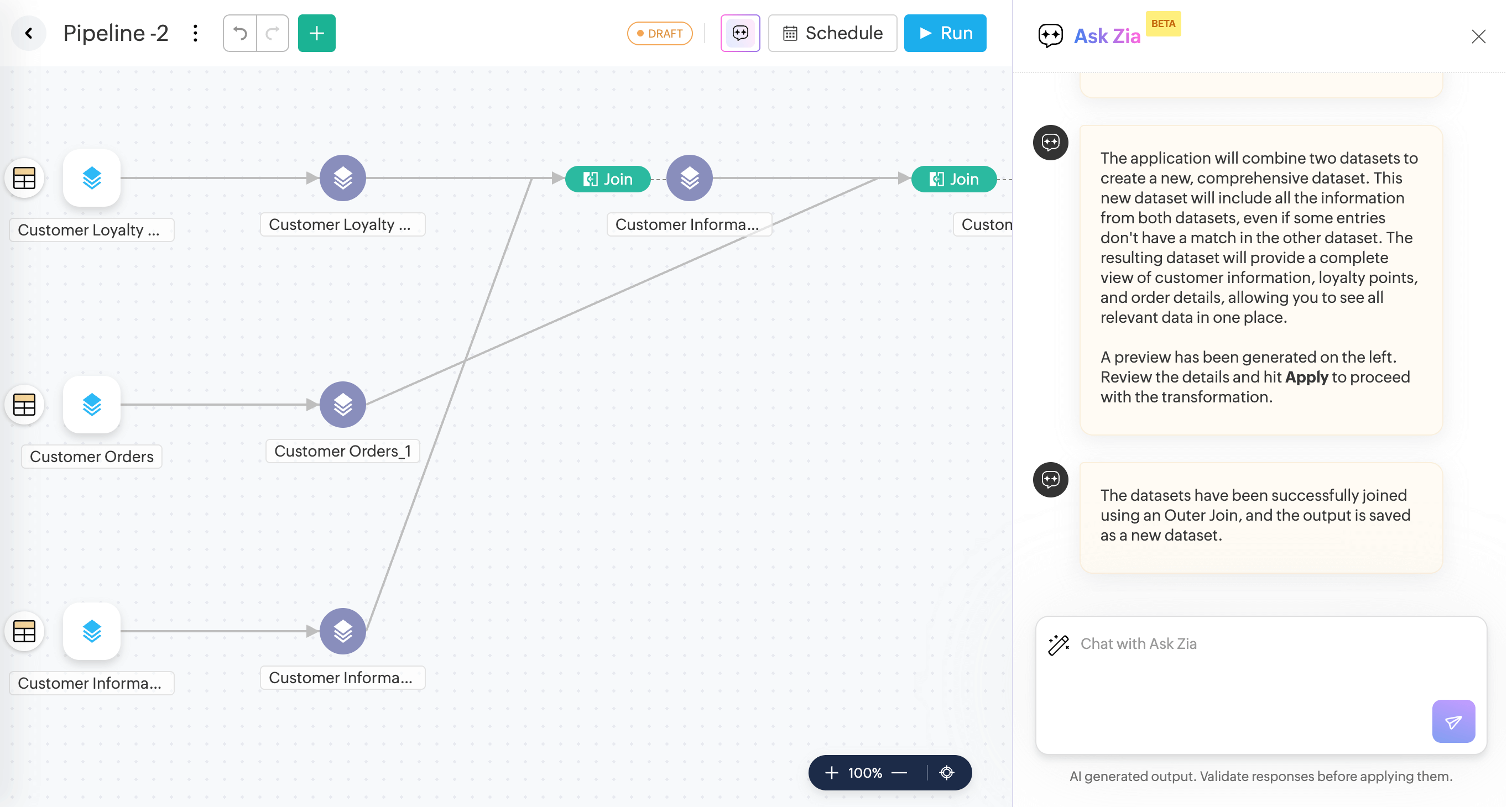
With Ask Zia in Pipeline Builder, you can import data from various sources, apply transformations, and export it to different destinations. You can also schedule the pipeline using Ask-Zia.

  1. Access the Datapipeline builder from the side navigation panel.
  2. Choose the tables.
  3. Click the Ask Zia icon on the top right corner of the pipeline builder.
  4. Enter your requirement on how to build the pipeline in the command prompt.
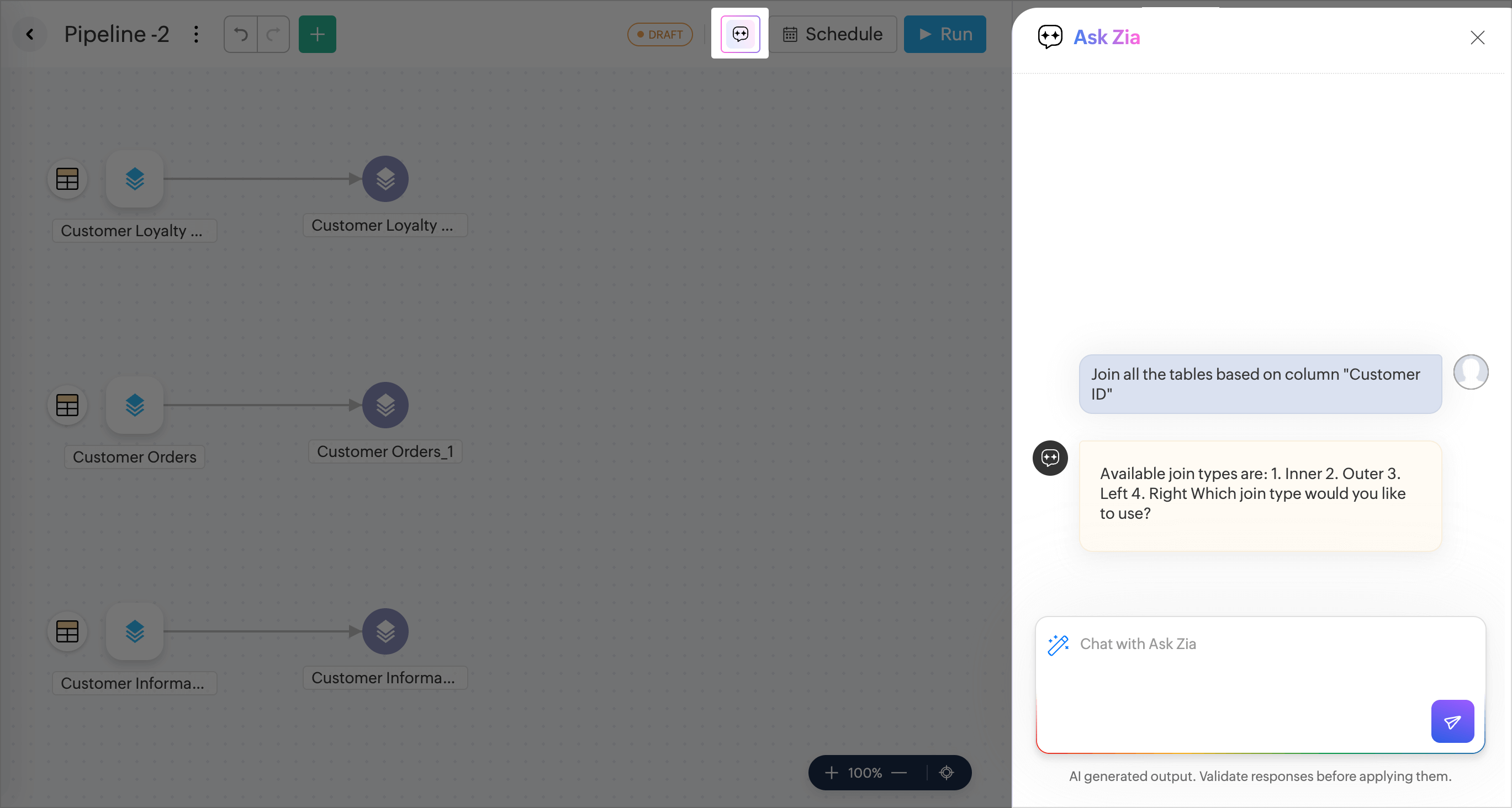
  5. Ask Zia will prompt for any required information needed to execute the query. 
  6. A preview of the data will be generated. Verify the data and click Apply Transform to apply the transform to the entire data.
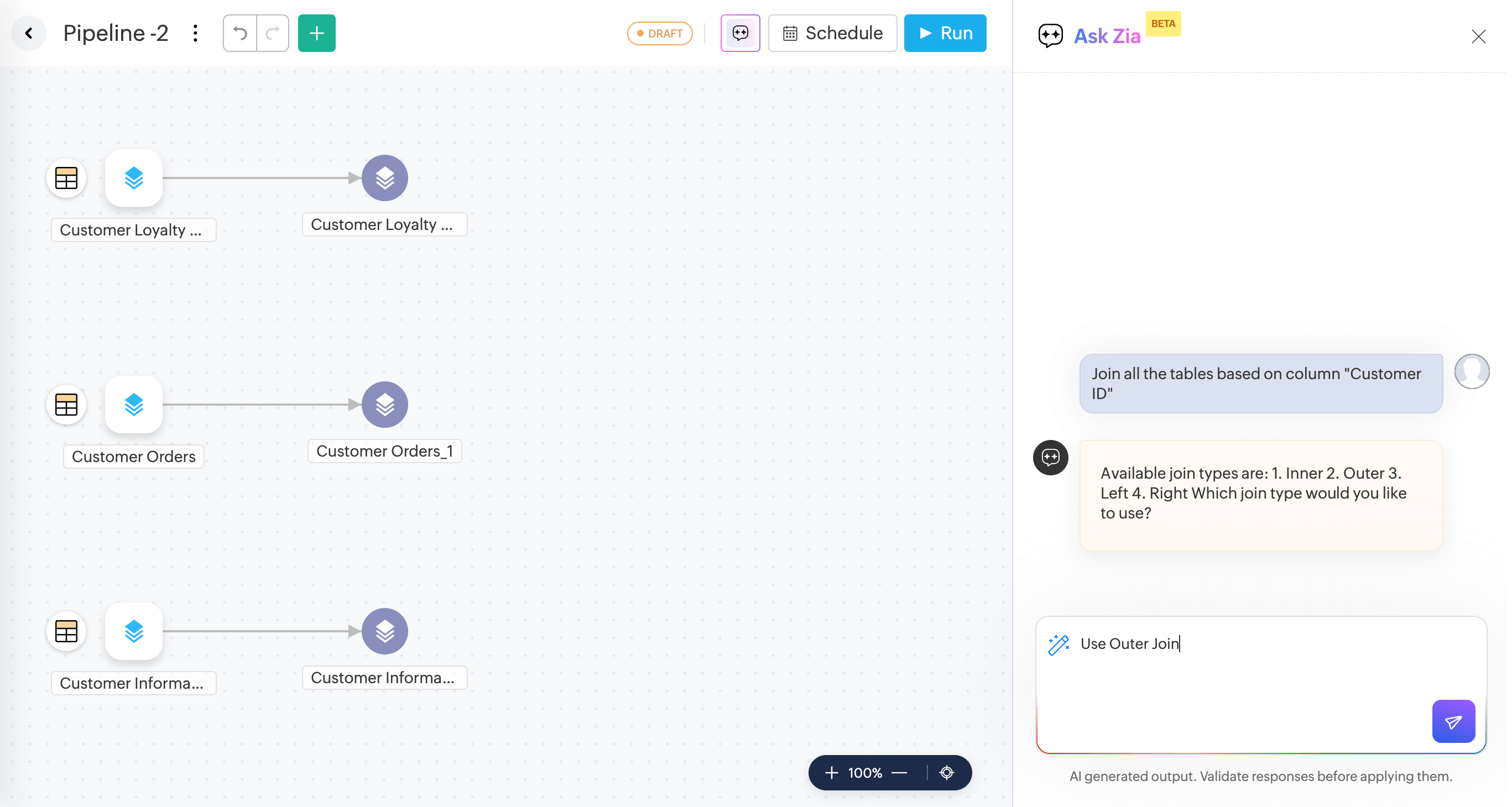
  7. A  pipeline will be created.

  8. You can also schedule data pipeline execution.

Transform by Examples

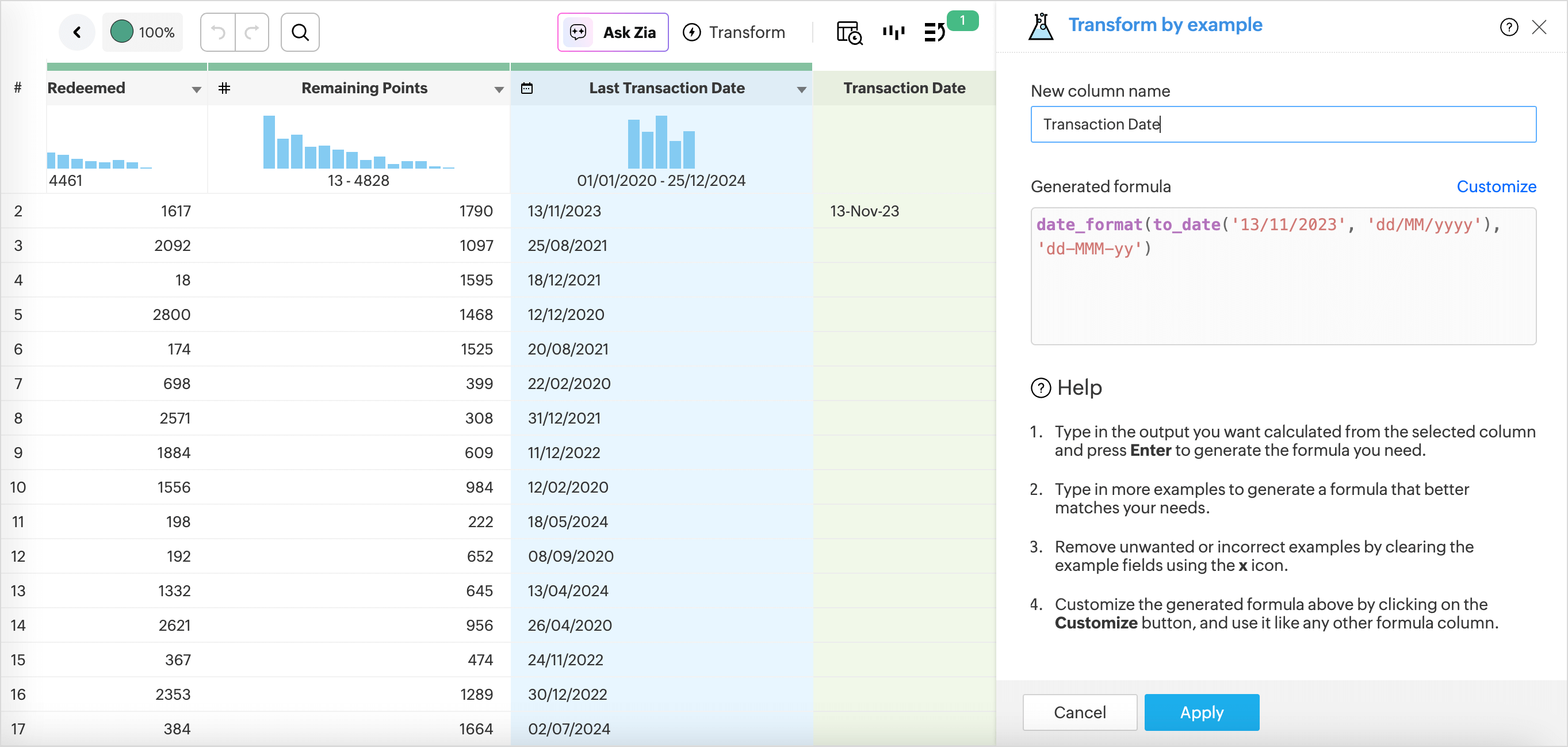
Transform by example easily helps you transform the data in any column to your needs just by providing examples of the output. Enter the required output against a few cell values in your data column as examples, and the rest of the output will be auto-generated.

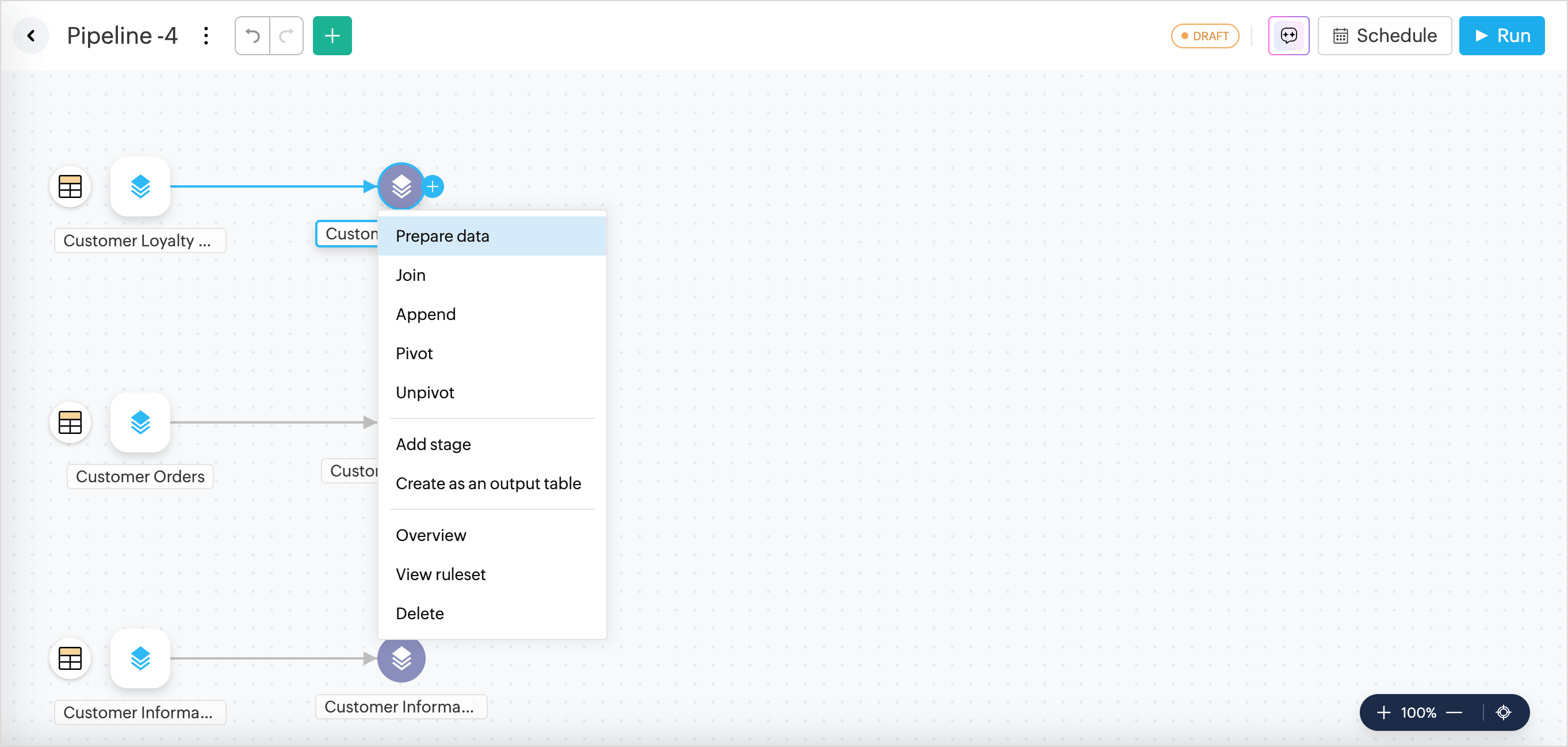
  1. Access the pipeline builder from the side navigation pannel.
  2. Click More (+) > Prepare Data.

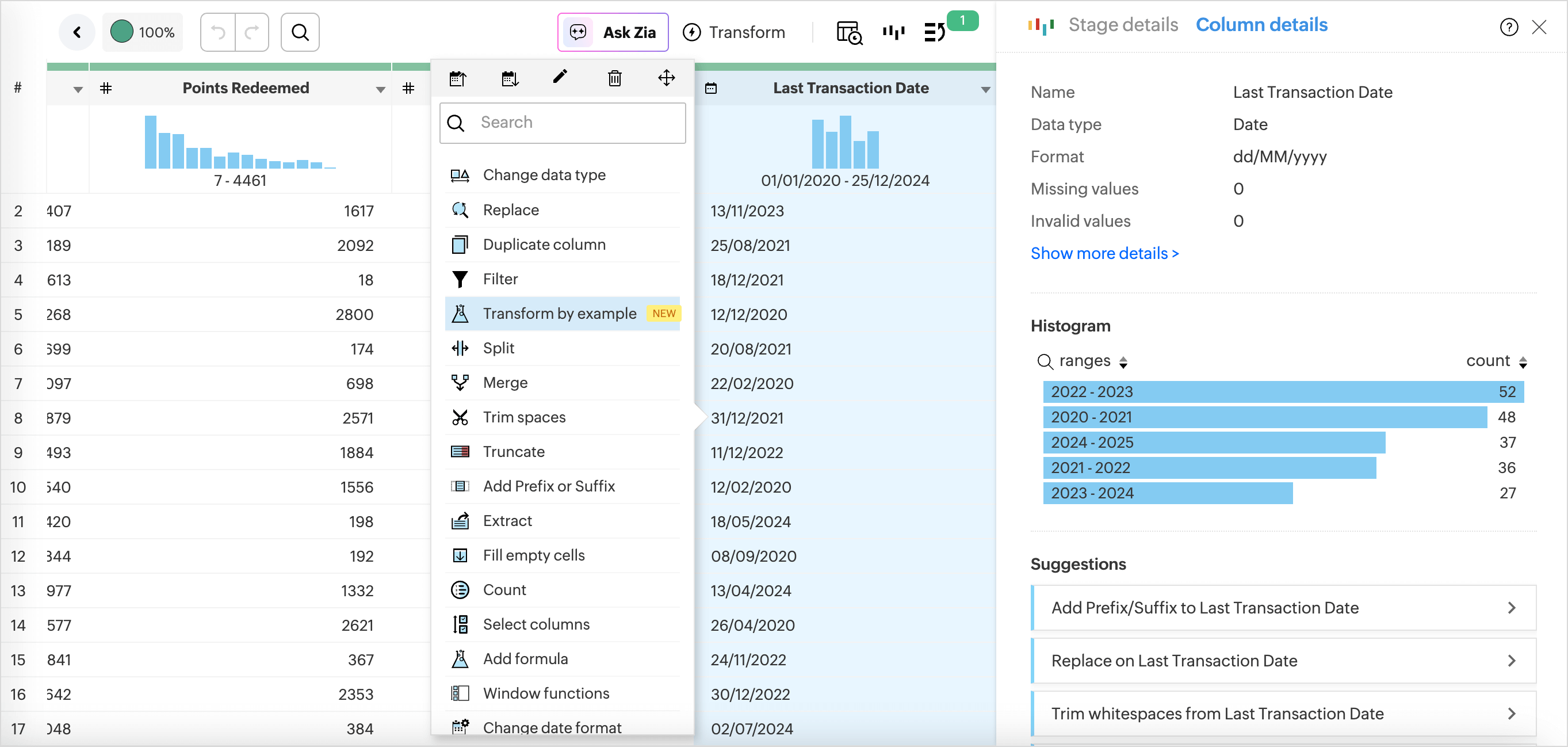
  3. Right-click the column you want to transform and choose Transform by Example from the drop-down menu.
  4. Type in the expected result in the Preview section and press Enter.
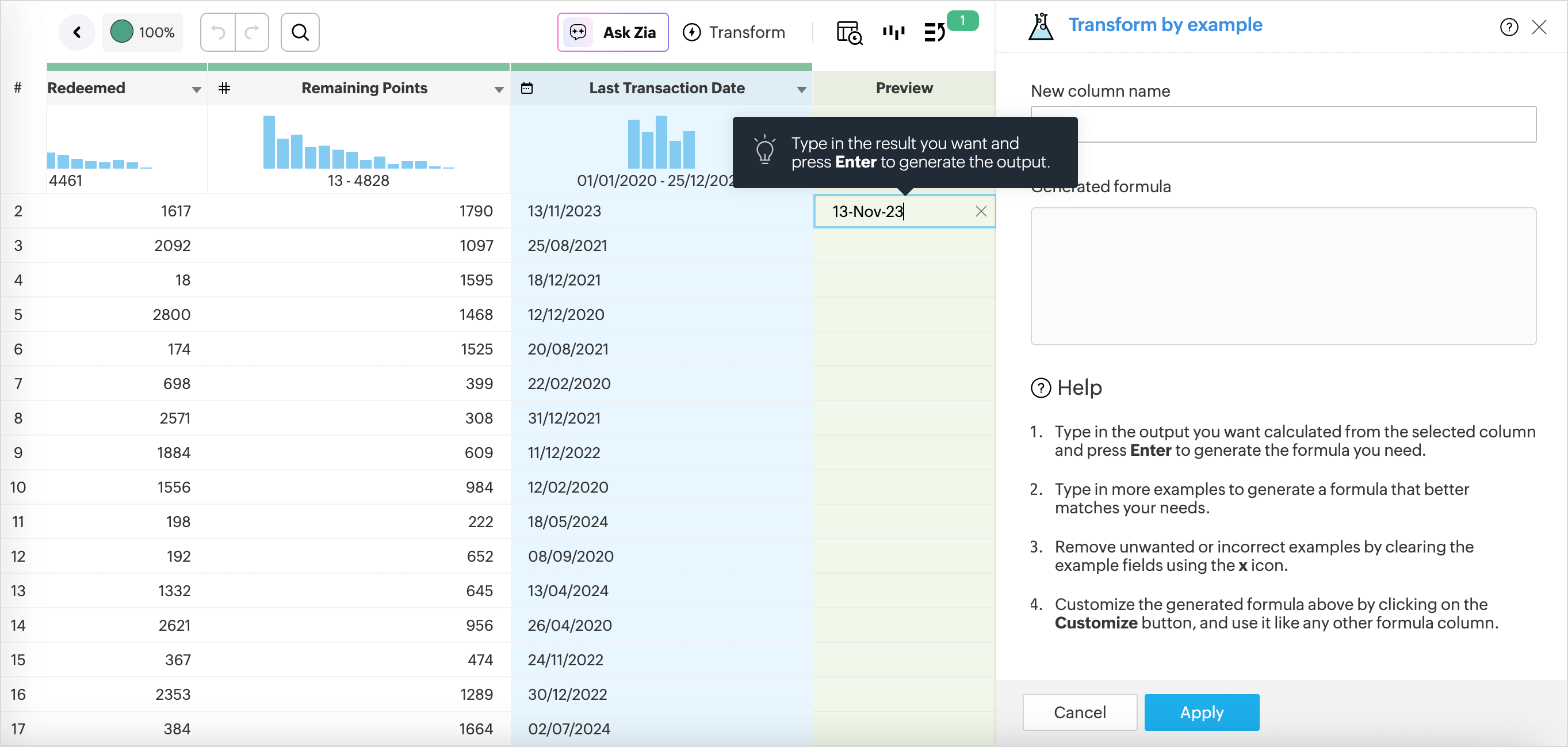
  5. The logic or the formula required to perform the transformations is displayed in the Generated Formula section.
  6. Specify the New Column Name.

  7. Click Apply.

Formula Suggestion

Finding the correct formula for analyzing data can be tedious and time consuming. With the Ask Zia - Formula suggester, you can create formulas by asking questions in simple natural language and get intelligent suggestions.

You can ask for formula suggestions in the following two methods,

From the Formula Pane

  1. Access the table for which you want to add formulas.
  2. Click the Add icon on the toolbar and choose Formula Column from the drop-down menu.
    (or)
    Right click on a column in the table and select Add Formula > Formula Column
  3. The Add Formula Column pane will open.
  4. Click the Zia Formula Suggester drop-down icon.
  5. Describe the formula you want to create, like give me the formula to calculate the percentage of return on investment. Including relevant table or field details will help Zia generate a more accurate formula.
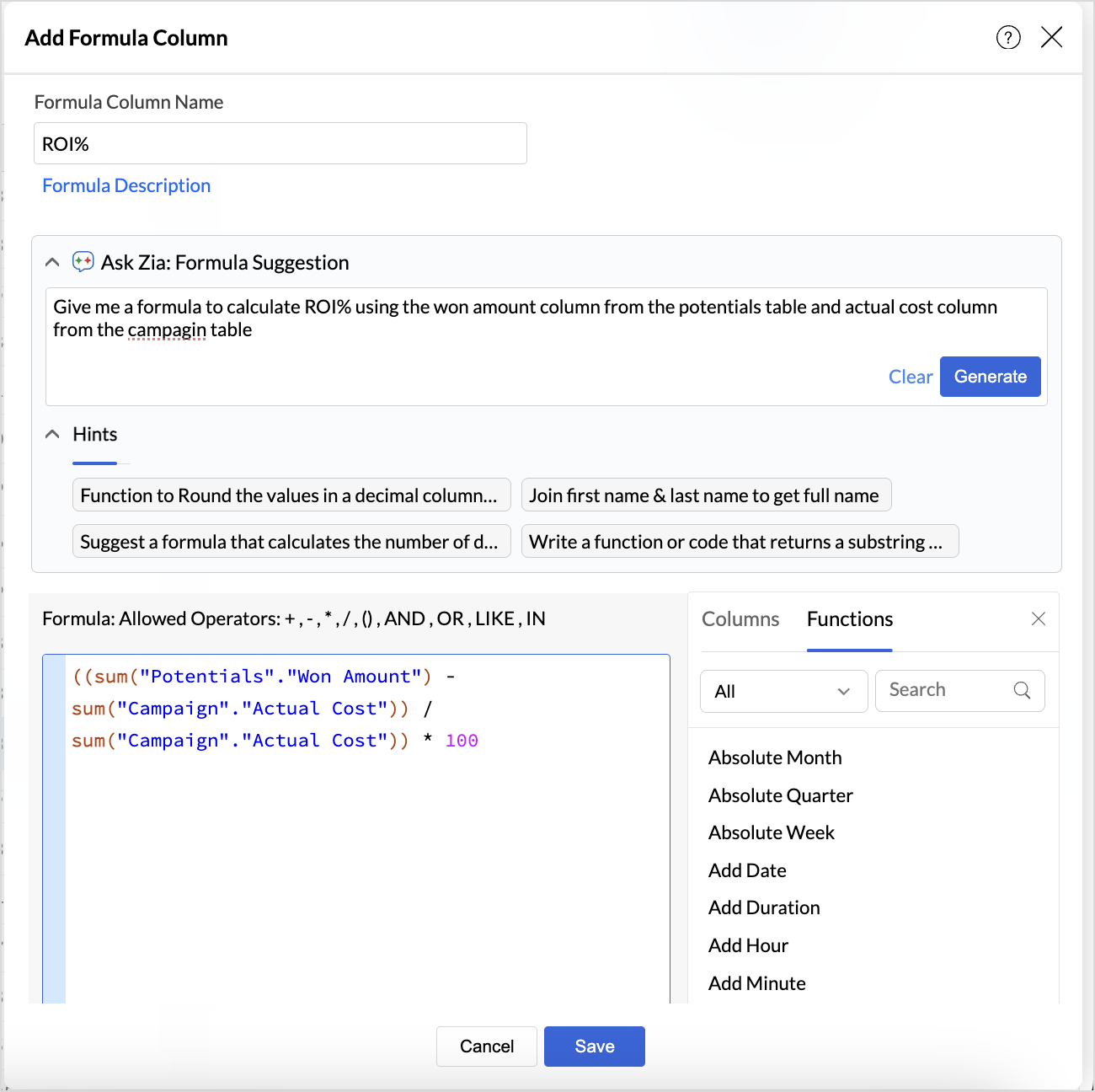
  6. The generated formula will be displayed in the Formula Pane. Review and edit the formula if needed.
  7. Click Apply to save the formula.

From the Ask Zia tab

  1. Access the Ask Zia tab from the side navigation panel and enable Conversation Mode.
  2. In the prompt section, Type in Create a formula or Help me with a formula to invoke.
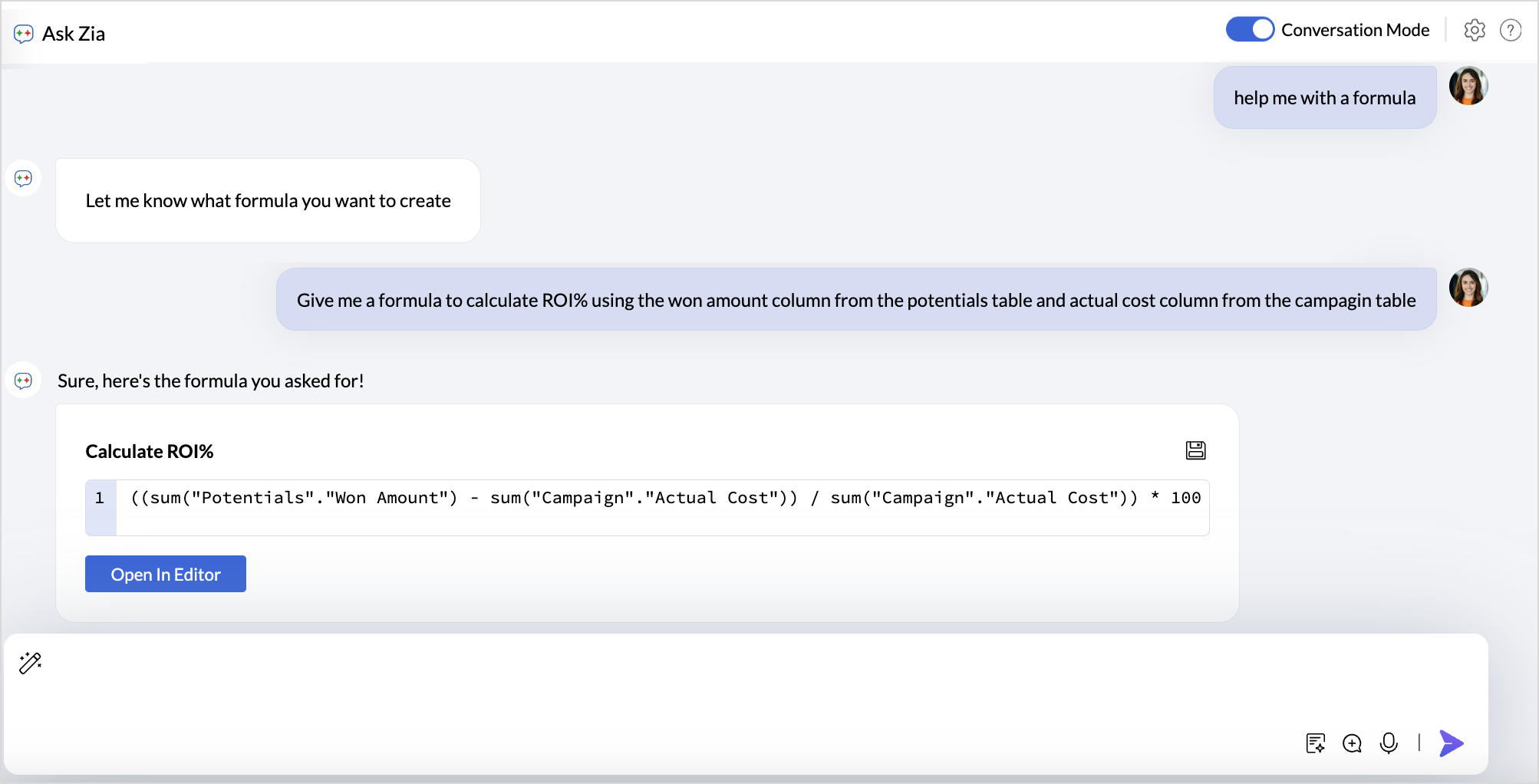
  3. Describe your use case. You can also include table details to get more accurate responses.
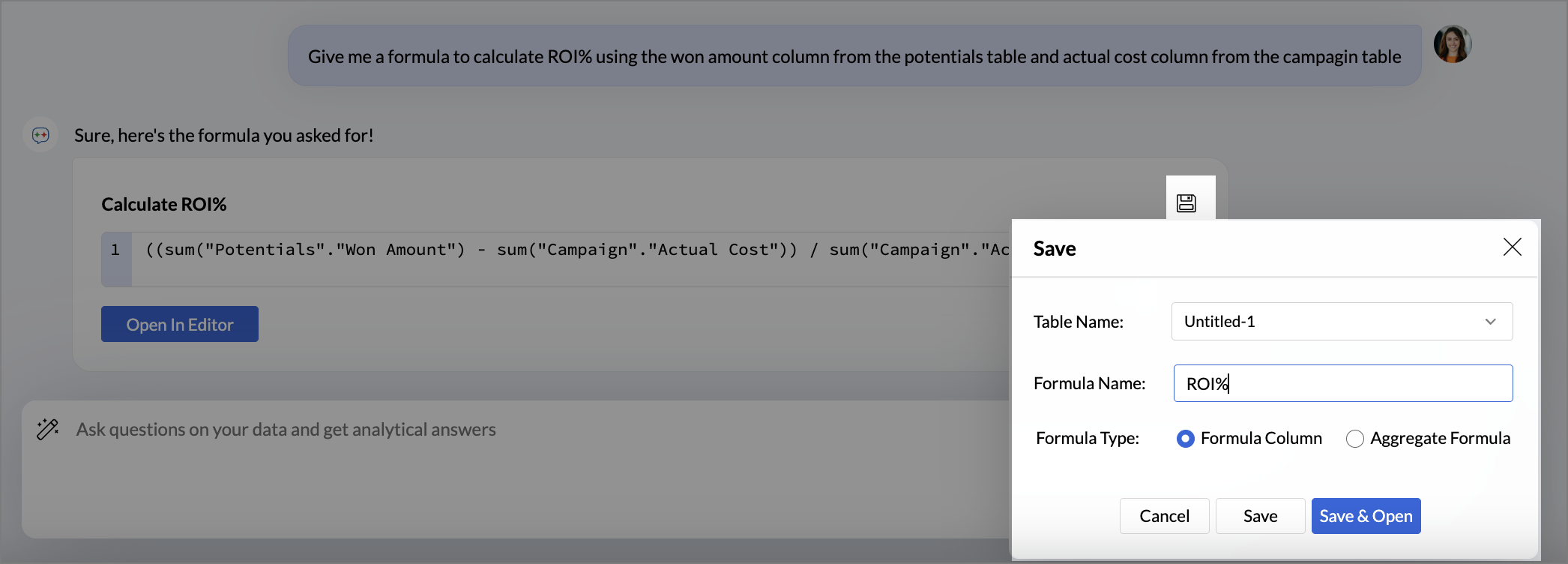
  4. Click the Save icon to add the formula as a formula column or as an aggregate formula.
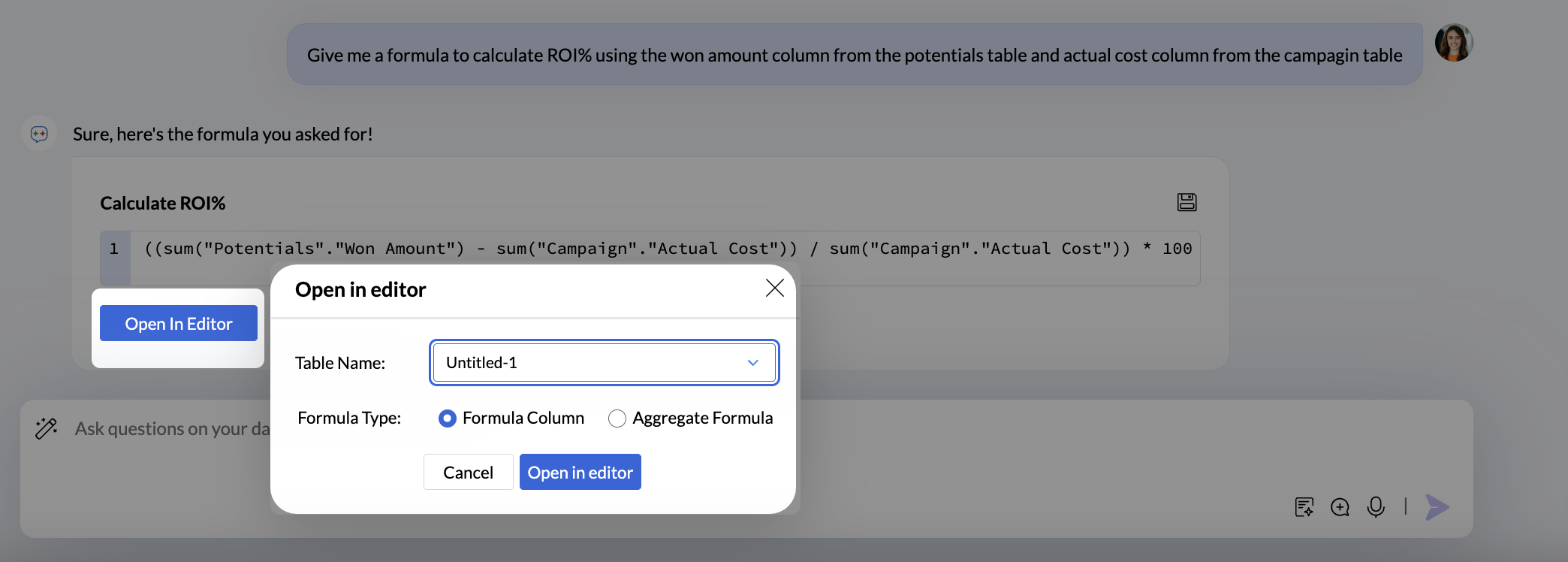
  5. Click the Open in editor icon to modify the formula. Choose the Table to which the formula should be added and the formula type, Formula column or Aggregate Formula.
Query Suggestion

Build complex queries by providing inputs in natural language, thus saving a significant amount of time to construct the queries.

You can ask for query suggestions in one of the following two methods.

From the Query Table Window

  1. Click the Create icon on the side navigation panel and choose Query Table from the drop-down menu.
  2. Click the Ask Zia - Query Suggester drop-down icon.
  3. Describe the query you require in the prompt section. For example, Combine Accounts and Transaction tables.
  4. Click the Select icon drop-down to choose the table names to be used to get more accurate responses.
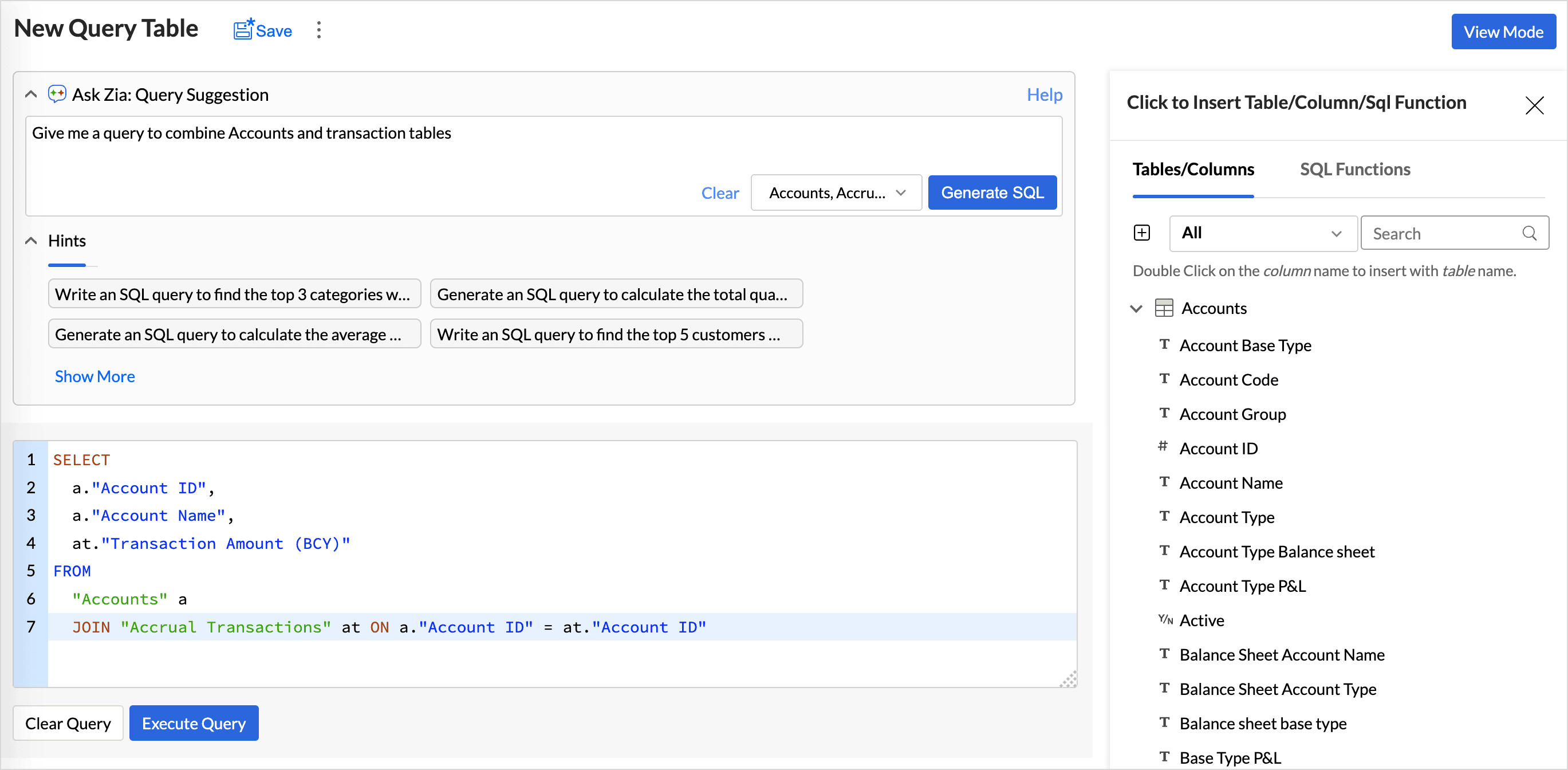
  5. The Hint section gives an idea of how the prompts can be phrased.
  6. Click Generate SQL.
  7. The query will be displayed in the Query Editor. Review and make modifications if needed.
  8. Click Execute Query.

From the Ask Zia tab

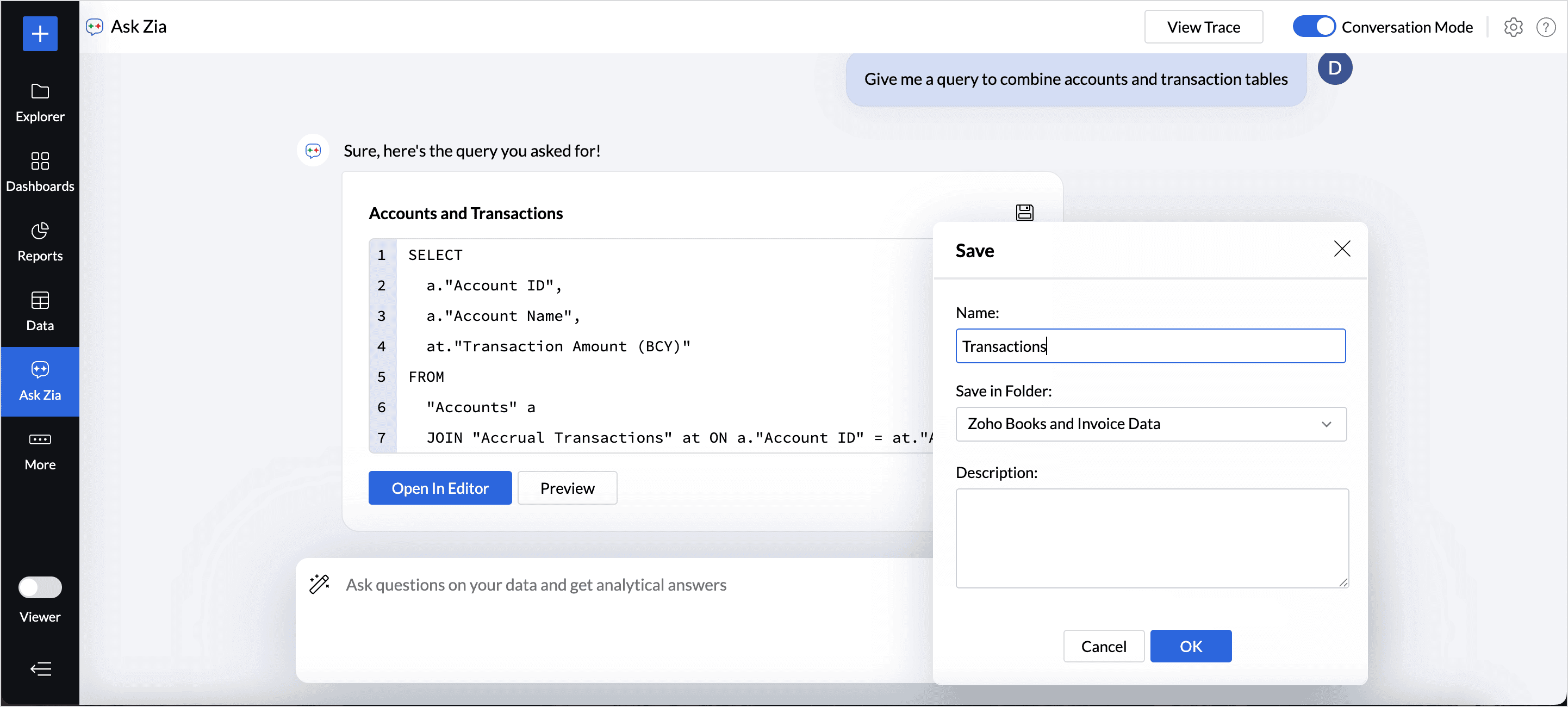
  1. Access the Ask Zia tab from the side navigation panel and enable Conversation mode.
  2. Type in Create a query or Help me with a query to invoke.
  3. Describe the query requirements. Include table details to get more accurate responses.
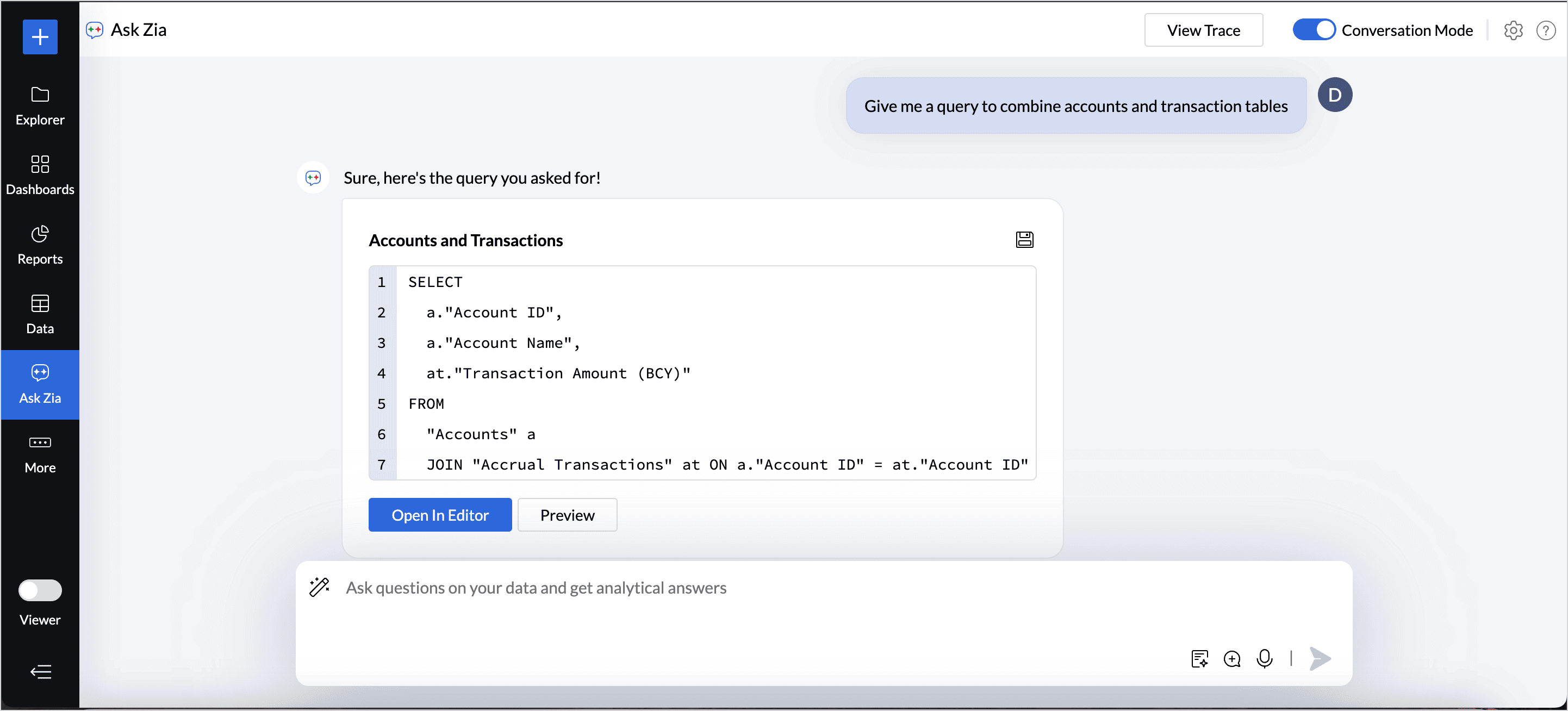
  4. Once the query is generated, choose any one of the following options:
    • Click the Save icon to add the query table to the workspace. Specify the query table name and choose the folder in which it should be saved, and then click Ok. A new query table will be created. And you can generate visualizations based on it.
    • Click the Open in Editor option to modify the query.
    • Click Preview to view the query generated.


        Create. Review. Publish.

        Write, edit, collaborate on, and publish documents to different content management platforms.

        Get Started Now


          Access your files securely from anywhere

            Zoho CRM Training Programs

            Learn how to use the best tools for sales force automation and better customer engagement from Zoho's implementation specialists.

            Zoho CRM Training
              Redefine the way you work
              with Zoho Workplace

                Zoho DataPrep Personalized Demo

                If you'd like a personalized walk-through of our data preparation tool, please request a demo and we'll be happy to show you how to get the best out of Zoho DataPrep.

                Zoho CRM Training

                  Create, share, and deliver

                  beautiful slides from anywhere.

                  Get Started Now


                    Zoho Sign now offers specialized one-on-one training for both administrators and developers.

                    BOOK A SESSION


                                Quick LinksWorkflow AutomationData Collection
                                Web FormsEnterpriseOnline Data Collection Tool
                                Embeddable FormsBankingBegin Data Collection
                                Interactive FormsWorkplaceData Collection App
                                CRM FormsCustomer ServiceAccessible Forms
                                Digital FormsMarketingForms for Small Business
                                HTML FormsEducationForms for Enterprise
                                Contact FormsE-commerceForms for any business
                                Lead Generation FormsHealthcareForms for Startups
                                Wordpress FormsCustomer onboardingForms for Small Business
                                No Code FormsConstructionRSVP tool for holidays
                                Free FormsTravelFeatures for Order Forms
                                Prefill FormsNon-Profit

                                Intake FormsLegal
                                Mobile App
                                Form DesignerHR
                                Mobile Forms
                                Card FormsFoodOffline Forms
                                Assign FormsPhotographyMobile Forms Features
                                Translate FormsReal EstateKiosk in Mobile Forms
                                Electronic Forms
                                Drag & drop form builder

                                Notification Emails for FormsAlternativesSecurity & Compliance
                                Holiday FormsGoogle Forms alternative GDPR
                                Form to PDFJotform alternativeHIPAA Forms
                                Email FormsFormstack alternativeEncrypted Forms

                                Wufoo alternativeSecure Forms

                                TypeformWCAG


                                    All-in-one knowledge management and training platform for your employees and customers.

                                              Create. Review. Publish.

                                              Write, edit, collaborate on, and publish documents to different content management platforms.

                                              Get Started Now


                                                                You are currently viewing the help pages of Qntrl’s earlier version. Click here to view our latest version—Qntrl 3.0's help articles.


                                                                    Manage your brands on social media


                                                                      • Desk Community Learning Series


                                                                      • Digest


                                                                      • Functions


                                                                      • Meetups


                                                                      • Kbase


                                                                      • Resources


                                                                      • Glossary


                                                                      • Desk Marketplace


                                                                      • MVP Corner


                                                                      • Word of the Day


                                                                      • Ask the Experts


                                                                        Zoho Sheet Resources


                                                                            Zoho Forms Resources


                                                                              Secure your business
                                                                              communication with Zoho Mail


                                                                              Mail on the move with
                                                                              Zoho Mail mobile application

                                                                                Stay on top of your schedule
                                                                                at all times


                                                                                Carry your calendar with you
                                                                                Anytime, anywhere


                                                                                      Zoho Sign Resources

                                                                                        Sign, Paperless!

                                                                                        Sign and send business documents on the go!

                                                                                        Get Started Now


                                                                                                Zoho TeamInbox Resources


                                                                                                          Zoho DataPrep Demo

                                                                                                          Get a personalized demo or POC

                                                                                                          REGISTER NOW


                                                                                                            Design. Discuss. Deliver.

                                                                                                            Create visually engaging stories with Zoho Show.

                                                                                                            Get Started Now


                                                                                                                                • Related Articles

                                                                                                                                • Ask Zia - Agentic AI in BI

                                                                                                                                  Generative AI is redefining how business users interact with data. In Zoho Analytics, every stage of the analysis, from data preparation and visualization to building powerful machine learning models, is seamlessly infused with AI. At the core of ...
                                                                                                                                • Training Ask Zia

                                                                                                                                  Ask Zia natural language interface understands your data model to answer your questions appropriately. However, it may not interpret every domain-specific terminals (language parols).  In such scenarios, you can train Ask Zia to learn your ...
                                                                                                                                • Using Ask Zia

                                                                                                                                  What is Ask Zia? Ask Zia is a search-driven analytical assistant that helps you create reports instantly. You can ask questions in natural language and Ask Zia generates the most relevant reports as answers to you. Who can use Ask Zia To use Ask Zia ...
                                                                                                                                • Constructing Questions for Ask Zia

                                                                                                                                  You can ask your question to Zia in plain English. Zia will understand your question's intent and will reply with the most appropriate report that matches your question. However, there can be some communication gaps like how it exists among people. ...
                                                                                                                                • Conversing with Zia

                                                                                                                                  Now you can hold a meaningful conversation with Zia and quickly get insightful reports. You can talk to Zia using a chat like interface. Zia will understand your questions and provide the best possible answers as reports. You can also ask about Zoho ...
                                                                                                                                  Wherever you are is as good as
                                                                                                                                  your workplace

                                                                                                                                    Resources

                                                                                                                                    Videos

                                                                                                                                    Watch comprehensive videos on features and other important topics that will help you master Zoho CRM.


                                                                                                                                    eBooks

                                                                                                                                    Download free eBooks and access a range of topics to get deeper insight on successfully using Zoho CRM.


                                                                                                                                    Webinars

                                                                                                                                    Sign up for our webinars and learn the Zoho CRM basics, from customization to sales force automation and more.


                                                                                                                                    CRM Tips

                                                                                                                                    Make the most of Zoho CRM with these useful tips.


                                                                                                                                      Zoho Show Resources