Using Ask Zia l Zoho Analytics Help

Using Ask Zia

What is Ask Zia?

Ask Zia is a search-driven analytical assistant that helps you create reports instantly. You can ask questions in natural language and Ask Zia generates the most relevant reports as answers to you.


Who can use Ask Zia

To use Ask Zia you need permission to create reports in that Workspace. One of the following user privileges allows you to do this.

Invoking Ask Zia

You can easily invoke Ask Zia in the following ways.
  1. Ask Zia Tab
  2. Workspace Search Option
  3. Dashboard Designer Page

Ask Zia Tab

You can invoke by clicking the Ask Zia tab on the left panel of your workspace. The Ask Zia interface will open. 


Workspace Search Option

You can open the Search Views field by clicking the Workspace Search icon on the top right corner of the workspace. In the Search Views field that opens, select the Ask Zia tab to invoke it.


To converse with Zia, click the Continue Conversation button. The Ask Zia interface in Conversation Mode will open. Click here to learn about, Conversing with Zia.


Dashboard Designer Page

You can also invoke Ask Zia conversation dialog from the Dashboard Designer page by clicking the Ask Zia button on top right.


The Ask Zia conversation dialog will open and you can start conversing with Zia. Click here to learn more.


Using Ask Zia

On invoking the Ask Zia option on the workspace. The Ask Zia interface will open. 

Type your question in the search box provided. Ask Zia will interpret the question and will get the best possible report as an answer. 


You can add more qualifiers to your question to have Ask Zia generates the most relevant insight for you. 


Auto Suggestion

Ask Zia will keep learning from the patterns in your question and provides intelligent suggestions to assist you in drafting the question. These suggestions are highly personalized based on the relationship among the tables, previous history, Ask Zia customization etc.

The Auto Suggestion also helps users by suggesting supporting phrases like Top 10 / Bottom 10, sort options, chart types etc., 


You will also find a list of Recent Questions and Suggested Questions for your workspace. You can easily generate reports by clicking these questions.


Generated Report

Ask Zia will understand the intent in your question, resolve ambiguities and generates the most appropriate report that matches your question. The generated report will be displayed as a preview. The Preview screen displays a detailed description and report information on how the report is plotted. You can verify the report and save them. 

Description

Ask Zia will automatically generate a detailed description and displays at the bottom.


This description lets you know how the data is grouped, the aggregate column used, function applied over them and filters used. The following color classification is used in the description. 

  • Blue - Metric Column 
  • Green - Function applied to the metric column 
  • Brown - Grouped by Columns 
  • Light Green - Date Function 
  • Light Brown - Column used to filter
  • Sky Blue - Filtered values
  • Pink - Negative filter negation
  • Purple - Sorting applied
Report Information

On the right side of the preview, you will find the Report Information. This section list the facet of a report (X &Y Axes and Color for chart and Column, Row and Data for Pivot) and how the columns are used. You will also find details on filters applied over the report.


Change Chart Type

When Ask Zia generates a chart, you can choose to change the type of chart. Follow the steps given below to do this.

  1. Click the Chart icon in the contextual menu on top of the Preview screen.
  2. Select the required chart type from the drop-down.
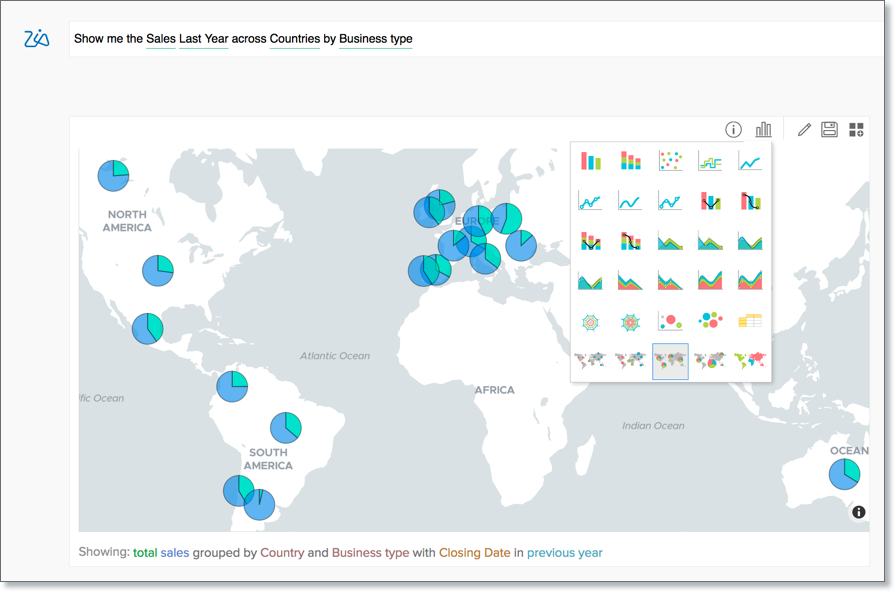

  3. Save the report.

Edit Report

You can easily edit the report that Ask Zia generates. Follow the below steps to edit the report.

  1. Click the Edit icon in the contextual menu on top of the Preview screen.
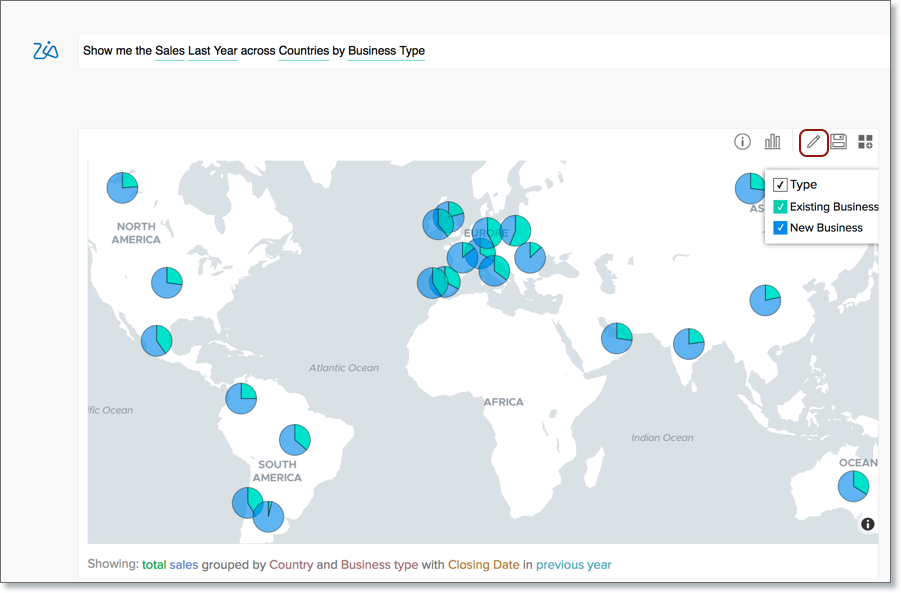

  2. This will open the report editor with the columns recommended by Ask Zia. You can modify them as needed. 
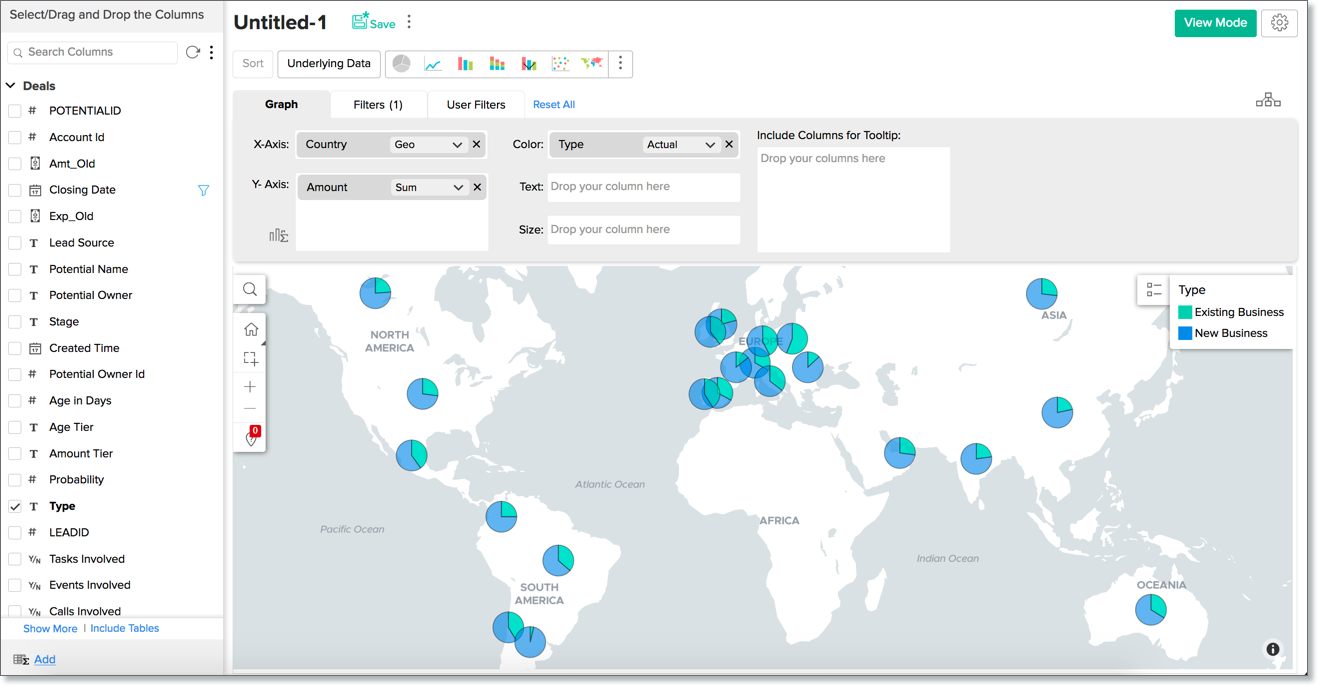

  3. Save the report.

Save Report

You can save the report permanently by following the below steps:

  1. Click the Save icon in the contextual menu on top of the Preview screen.
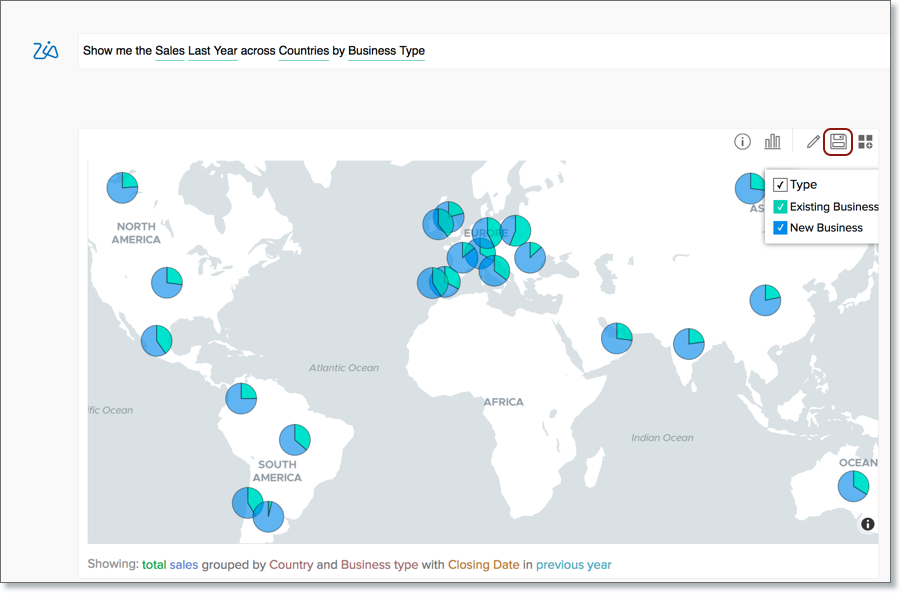

  2. The Save dialog will open. Specify the View Name.
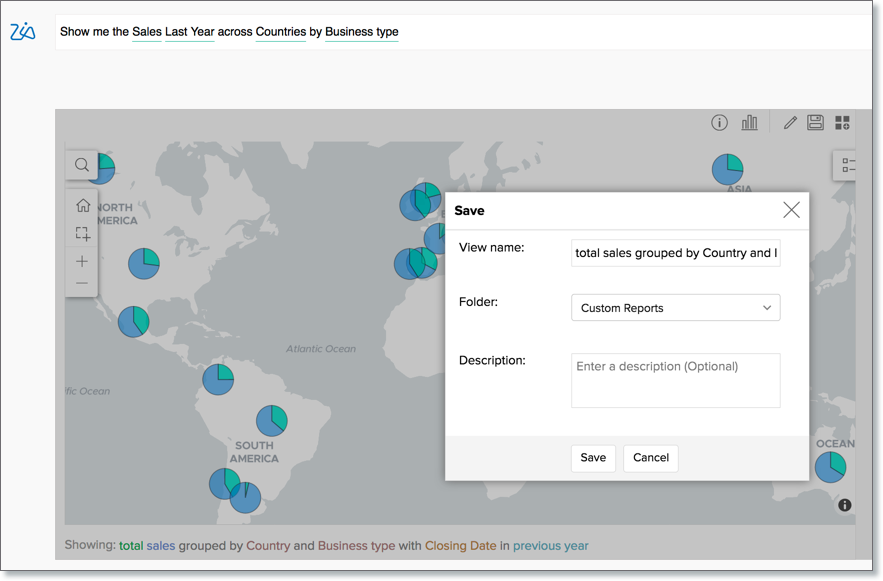

  3. Select the Folder to save the view. 
  4. Click Save to save the report. 

Add Report to Dashboard

You can also directly add the reports to a dashboard. Follow the below steps to add the report to a dashboard:

  1. Click the dashboard icon in the contextual menu on top of the preview.
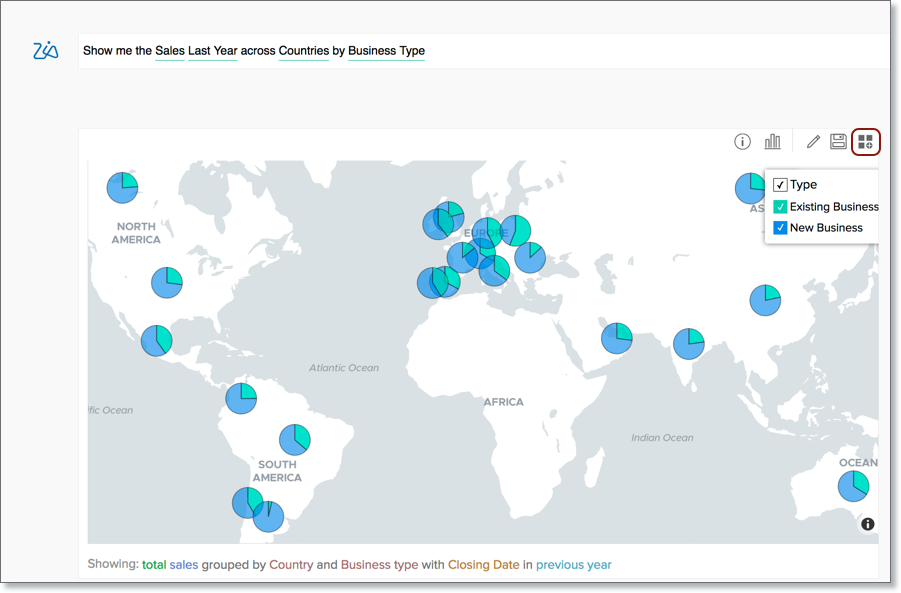

  2. The Save & Add to Dashboard dialog will open. Specify the View Name.
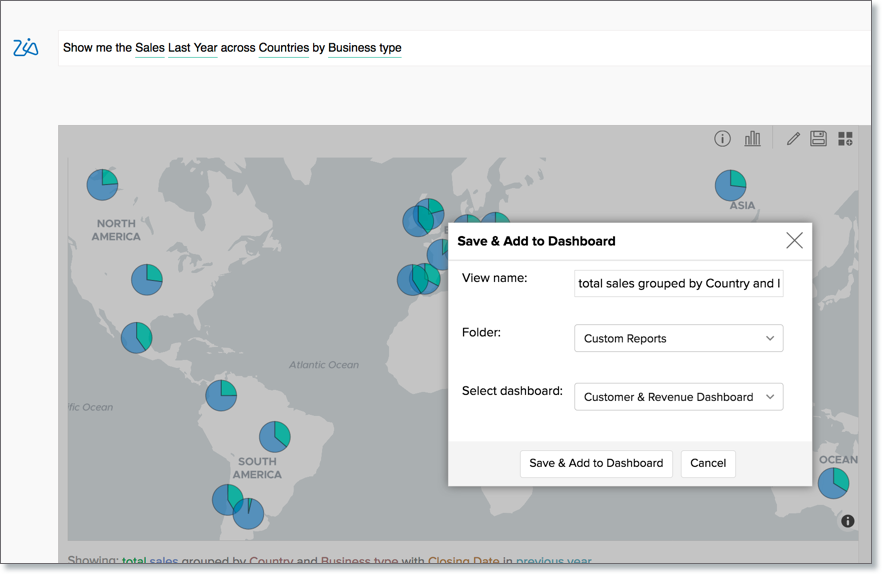

  3. Select the Folder to save the report before adding into the dashboard. 
  4. Select the Dashboard in which you want to add the report. 
  5. Click Save & Add to Dashboard to save the report and add it in the dashboard.  The report will be added as the first view in the dashboard. You can realign the dashboard later as needed. 

        Create. Review. Publish.

        Write, edit, collaborate on, and publish documents to different content management platforms.

        Get Started Now


          Access your files securely from anywhere

            Zoho CRM Training Programs

            Learn how to use the best tools for sales force automation and better customer engagement from Zoho's implementation specialists.

            Zoho CRM Training
              Redefine the way you work
              with Zoho Workplace

                Zoho DataPrep Personalized Demo

                If you'd like a personalized walk-through of our data preparation tool, please request a demo and we'll be happy to show you how to get the best out of Zoho DataPrep.

                Zoho CRM Training

                  Create, share, and deliver

                  beautiful slides from anywhere.

                  Get Started Now


                    Zoho Sign now offers specialized one-on-one training for both administrators and developers.

                    BOOK A SESSION


                                Quick LinksWorkflow AutomationData Collection
                                Web FormsEnterpriseOnline Data Collection Tool
                                Embeddable FormsBankingBegin Data Collection
                                Interactive FormsWorkplaceData Collection App
                                CRM FormsCustomer ServiceAccessible Forms
                                Digital FormsMarketingForms for Small Business
                                HTML FormsEducationForms for Enterprise
                                Contact FormsE-commerceForms for any business
                                Lead Generation FormsHealthcareForms for Startups
                                Wordpress FormsCustomer onboardingForms for Small Business
                                No Code FormsConstructionRSVP tool for holidays
                                Free FormsTravelFeatures for Order Forms
                                Prefill FormsNon-Profit

                                Intake FormsLegal
                                Mobile App
                                Form DesignerHR
                                Mobile Forms
                                Card FormsFoodOffline Forms
                                Assign FormsPhotographyMobile Forms Features
                                Translate FormsReal EstateKiosk in Mobile Forms
                                Electronic Forms
                                Drag & drop form builder

                                Notification Emails for FormsAlternativesSecurity & Compliance
                                Holiday FormsGoogle Forms alternative GDPR
                                Form to PDFJotform alternativeHIPAA Forms
                                Email FormsFormstack alternativeEncrypted Forms

                                Wufoo alternativeSecure Forms

                                TypeformWCAG

                                  Zoho FSM Video Tutorials


                                        All-in-one knowledge management and training platform for your employees and customers.

                                                  Create. Review. Publish.

                                                  Write, edit, collaborate on, and publish documents to different content management platforms.

                                                  Get Started Now


                                                                    You are currently viewing the help pages of Qntrl’s earlier version. Click here to view our latest version—Qntrl 3.0's help articles.


                                                                        Manage your brands on social media


                                                                          • Desk Community Learning Series


                                                                          • Digest


                                                                          • Functions


                                                                          • Meetups


                                                                          • Kbase


                                                                          • Resources


                                                                          • Glossary


                                                                          • Desk Marketplace


                                                                          • MVP Corner


                                                                          • Word of the Day


                                                                          • Ask the Experts


                                                                            Zoho Sheet Resources


                                                                                Zoho Forms Resources


                                                                                  Secure your business
                                                                                  communication with Zoho Mail


                                                                                  Mail on the move with
                                                                                  Zoho Mail mobile application

                                                                                    Stay on top of your schedule
                                                                                    at all times


                                                                                    Carry your calendar with you
                                                                                    Anytime, anywhere


                                                                                          Zoho Sign Resources

                                                                                            Sign, Paperless!

                                                                                            Sign and send business documents on the go!

                                                                                            Get Started Now


                                                                                                    Zoho TeamInbox Resources


                                                                                                              Zoho DataPrep Demo

                                                                                                              Get a personalized demo or POC

                                                                                                              REGISTER NOW


                                                                                                                Design. Discuss. Deliver.

                                                                                                                Create visually engaging stories with Zoho Show.

                                                                                                                Get Started Now


                                                                                                                                    • Related Articles

                                                                                                                                    • Training Ask Zia

                                                                                                                                      Ask Zia natural language interface understands your data model to answer your questions appropriately. However, it may not interpret every domain-specific terminals (language parols).  In such scenarios, you can train Ask Zia to learn your ...
                                                                                                                                    • Constructing Questions for Ask Zia

                                                                                                                                      You can ask your question to Zia in plain English. Zia will understand your question's intent and will reply with the most appropriate report that matches your question. However, there can be some communication gaps like how it exists among people. ...
                                                                                                                                    • Conversing with Zia

                                                                                                                                      Now you can hold a meaningful conversation with Zia and quickly get insightful reports. You can talk to Zia using a chat like interface. Zia will understand your questions and provide the best possible answers as reports. You can also ask about Zoho ...
                                                                                                                                    • Visualization Type

                                                                                                                                      Ask Zia has the ability to create a wide variety of reports. As you type the question, Ask Zia will understand your intent, and reply with the best report type that suits your scenario. You can always change the report type by adding then in your ...
                                                                                                                                    • Advanced Analytics for BigCommerce

                                                                                                                                      Advanced Analytics for BigCommerce helps you to effectively analyze your BigCommerce data. Generating reports and dashboards in Zoho Analytics allows you to understand the customer purchase trends and wish list analysis, efficient inventory stock ...
                                                                                                                                      Wherever you are is as good as
                                                                                                                                      your workplace

                                                                                                                                        Resources

                                                                                                                                        Videos

                                                                                                                                        Watch comprehensive videos on features and other important topics that will help you master Zoho CRM.


                                                                                                                                        eBooks

                                                                                                                                        Download free eBooks and access a range of topics to get deeper insight on successfully using Zoho CRM.


                                                                                                                                        Webinars

                                                                                                                                        Sign up for our webinars and learn the Zoho CRM basics, from customization to sales force automation and more.


                                                                                                                                        CRM Tips

                                                                                                                                        Make the most of Zoho CRM with these useful tips.


                                                                                                                                          Zoho Show Resources