Advanced Analytics for Twilio
Setting up the Integration
A user with administrator privileges (Account Admin and Organization Admin) can configure the integration.
Get your Twilio Credentials
Before setting up the connector in Zoho Analytics, copy your Account credentials from your Twilio account:
- Sign in to your Twilio account from https://console.twilio.com/.
- In the left pane, click the Developer tab.
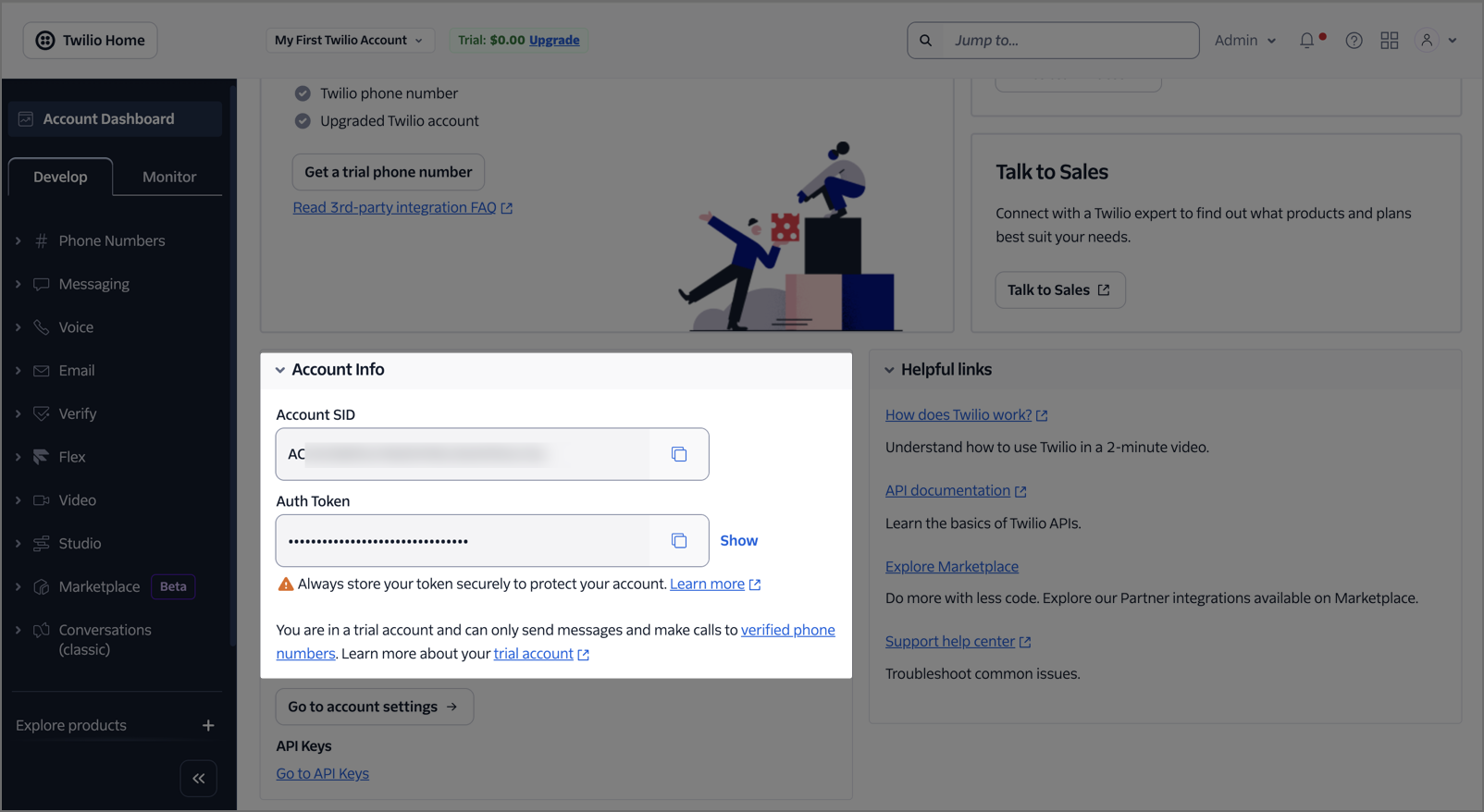
- From the Account Info section, you can copy the Account SID and the Auth Token.
Import your Twilio data into Zoho Analytics
Follow the below steps to import your Twilio data into Zoho Analytics seamlessly:
- On the Zoho Analytics home page, click Import Your Data.
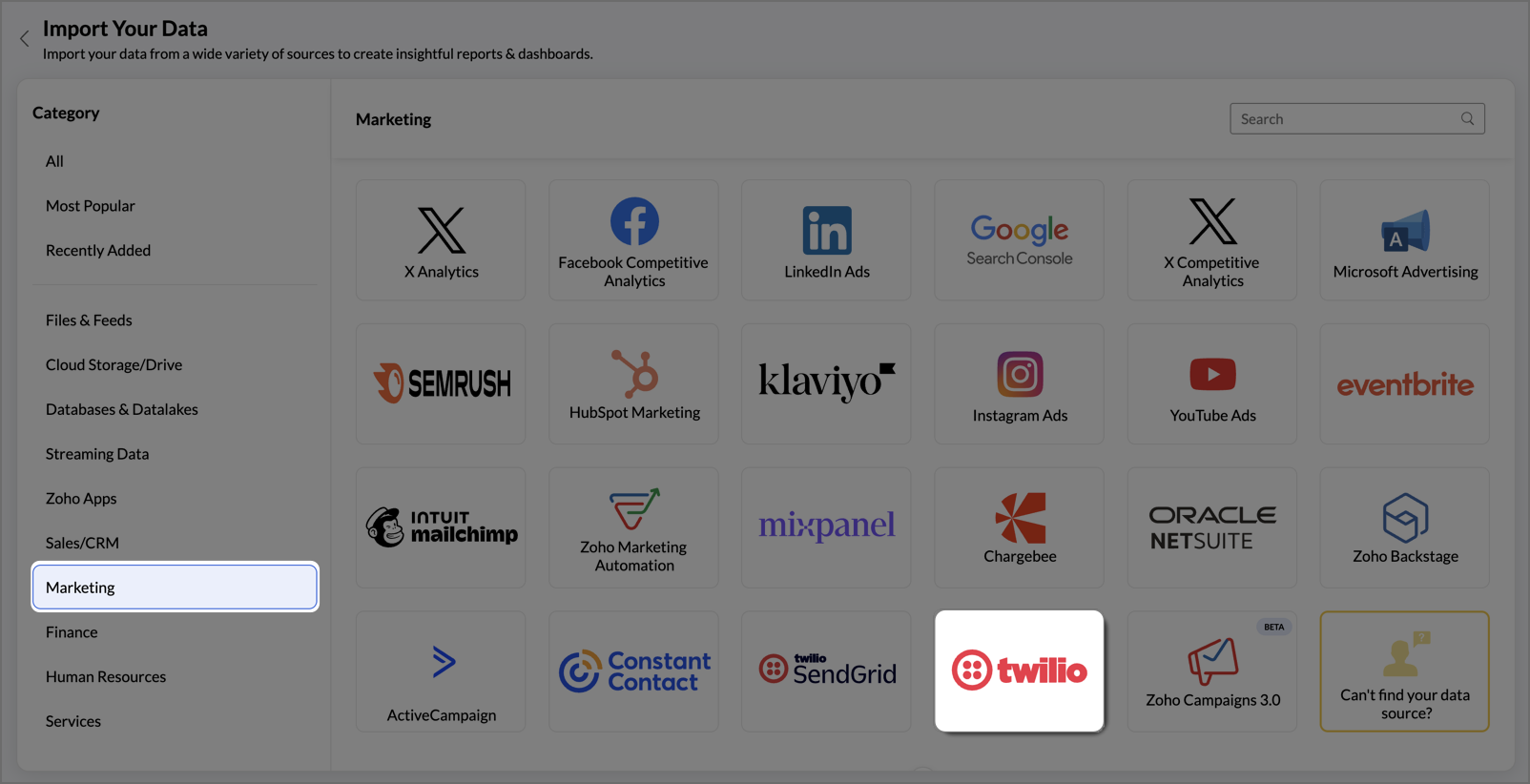
- Navigate to the Marketing tab and select Twilio from the available data sources.
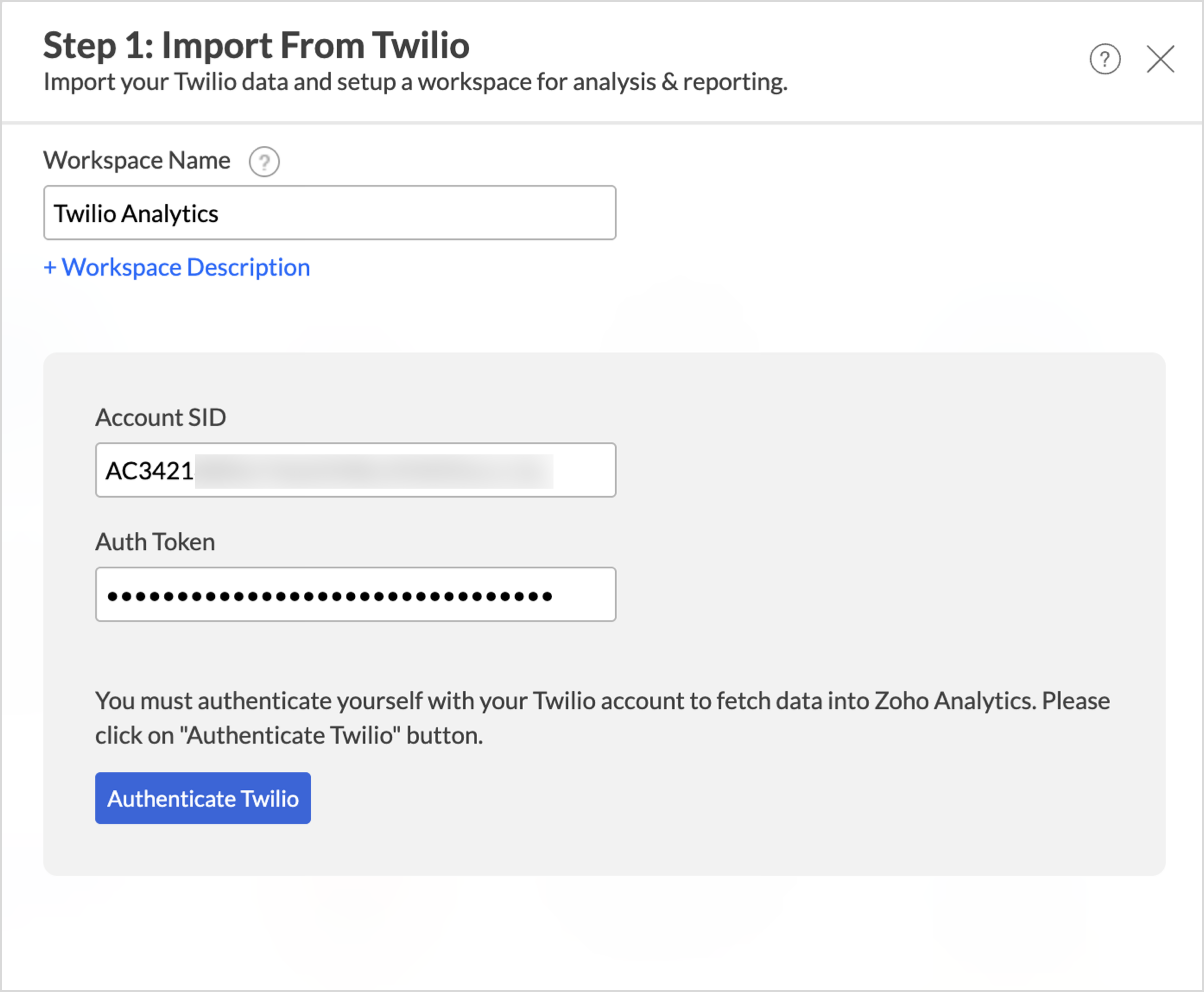
- In the Step 1: Import From Twilio dialog, enter the Workspace Name and Workspace Description (optional).
- Enter the Account Credentials you copied from your Twilio account.
- Click Authenticate Twilio to validate your Twilio account.
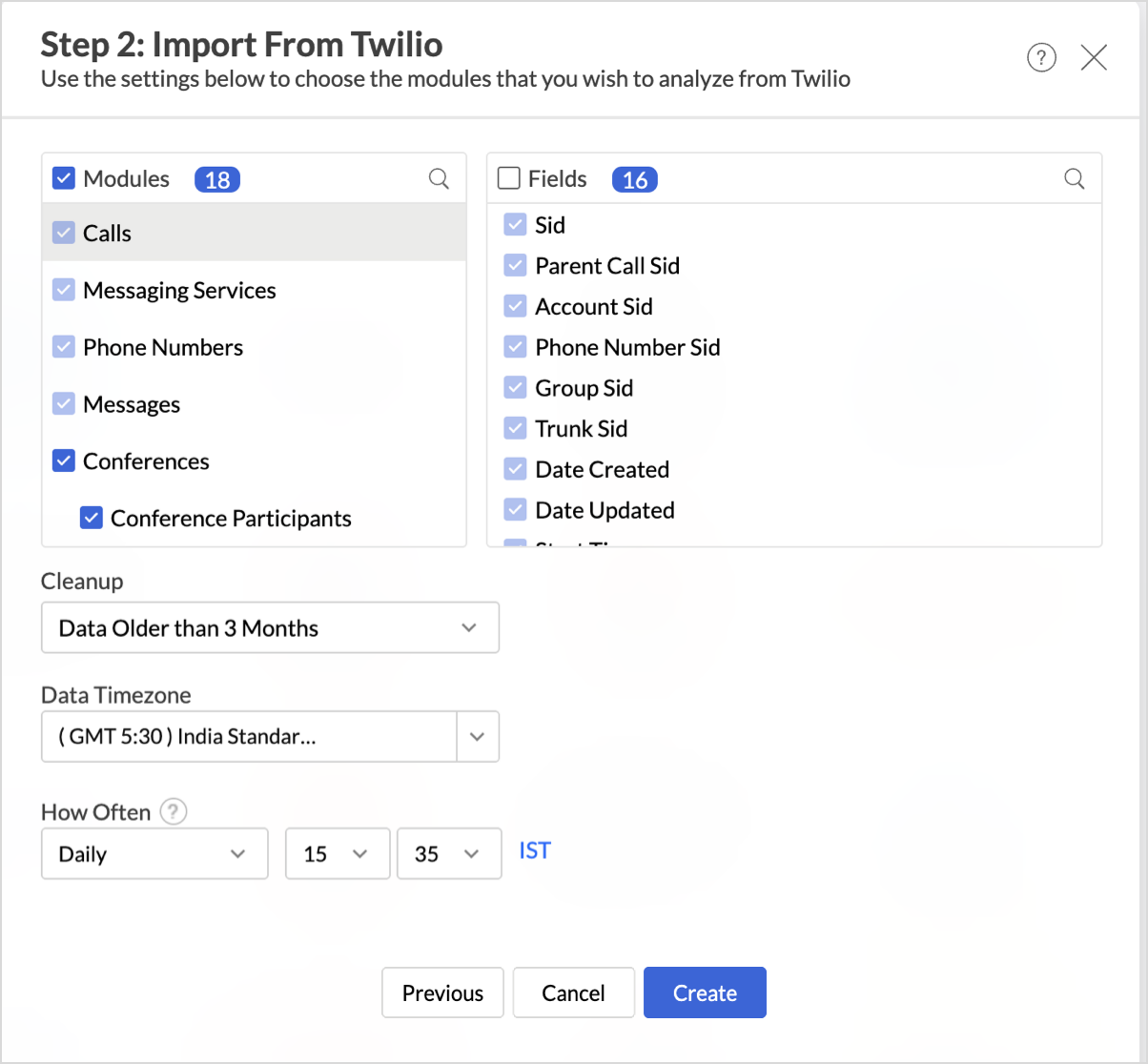
- In the Step 2: Import From Twilio dialog, select the Modules and Fields you want to analyze.
- From the Cleanup dropdown, choose whether to periodically remove older data during sync. By default, Don't cleanup retains all data.
- Select the Data Timezone in which the date and time values should be interpreted.
- From the How Often section, choose the interval in which the data should be synced. Refer to the Data Sync Frequency section to learn more.
- Click Create. Import will be initiated.
 Note:
Note:- The initial fetch might take a few minutes depending on the volume of the data to be imported. An email and an in-app notification will be sent once the initial fetch is complete.
- The setup process can sometimes fail for a variety of reasons. In this case, we request you to access the Data Sources tab and click the Retry link to import again. If the issue persists, write to us at support@zohoanalytics.com.
Modules & Fields
The below table lists the modules and fields that will be synced to Zoho Analytics.
| Module | Fields |
| Calls | Sid, Parent Call Sid, Account Sid, Phone Number Sid, Group Sid, Trunk Sid, Date Created, Date Updated, Start Time, End Time, Status, Direction, Duration, From, To, Caller Name, Price Unit, Queue Time, Annotation, Answered By, Forwarded From, From Formatted, To Formatted, Price |
| Messaging Services | Sid, Account Sid, Fallback To Long Code, Area Code Geomatch, Date Created, Date Updated, Friendly Name, Inbound Request Url, Fallback Url, Status Callback, Sticky Sender, Mms Converter, Smart Encoding, Synchronous Validation, Us App To Person Registered, Use Inbound Webhook On Number, Usecase, Validity Period |
| Phone Numbers | Sid, Account Sid, Service Sid, Date Created, Date Updated, Phone Number, Country Code |
| Messages | Sid, Account Sid, Messaging Service Sid, Error Code, Date Created, Date Updated, Date Sent, Status, Direction, From, To, Num Media, Num Segments, Body, Error Message, Price Unit, Price |
| Conferences | Sid, Account Sid, Ending Conference Call Sid, Date Created, Date Updated, Friendly Name, Status, Conference Ended |
| Conference Participants | Participant Sid, Conference Sid, Call Sid, Account Sid, Label, From, To, Join Time, Leave Time, Duration, Call Status, Call Type, Direction, Outbound Queue Length, Outbound Time In Queue, Jitter Buffer Size, Quality Issues, Processing State, Is Moderator, Is Coach, Country Code, Participant Region, Conference Region |
| Coached Participants | Participant Sid, Coached Participant Sid |
| Queues | Sid, Account Sid, Date Created, Date Updated, Friendly Name, Current Size, Average Wait Time, Max Size |
| Members | Call Sid, Date Enqueued, Position, Wait Time, Queue Sid |
| Conversation Services | Account Sid, Service Sid, Date Created, Date Updated, Friendly Name |
| Conversations | Account Sid, Chat Service Sid, Messaging Service Sid, Conversation Sid, Date Created, Date Updated, Friendly Name, State, Unique Name |
| Conversation Messages | Account Sid, Conversation Sid, Message Sid, Participant Sid, Content Sid, Date Created, Date Updated, Author, Body, Index, Delivered, Failed, Read, Sent, Total, Undelivered |
| Conversation Participants | Account Sid, Conversation Sid, Participant Sid, Role Sid, Date Created, Date Updated, Identity, Last Read Message Index, Last Read Timestamp, Address, Level, Name, Projected Address, Proxy Address, Type |
| Users | User Sid, Account Sid, Chat Service Sid, Role Sid, Date Created, Date Updated, Identity, Friendly Name, Is Online, Is Notifiable |
| Roles | Role Sid, Account Sid, Chat Service Sid, Date Created, Date Updated, Friendly Name, Type |
| Flows | Flow Sid, Account Sid, Author Sid, Date Created, Date Updated, Friendly Name, Status, Revision, Valid, Webhook Url, Commit Message |
| Executions | Execution Sid, Account Sid, Flow Sid, Contact Sid, Date Created, Date Updated, Status, Contact Channel Address, Flow Version, Initiated By |
| Trunk | Sid, Account Sid, Date Created, Date Updated, Friendly Name, Domain Name, Disaster Recovery Url, Secure, Transfer Mode, Cnam Lookup Enabled, Auth Type, Symmetric Rtp Enabled |
Data Sync Frequency
Zoho Analytics offers flexible sync schedules to ensure that your data is always up-to-date for effective analysis. These schedules allow you to automate the process of updating your data, ensuring that your analyses are based on the latest information.
- 1 Hour (Enterprise plan)
- 3 Hours (Standard plan and above)
- 6 Hours (Standard plan and above)
- 12 Hours (Standard plan and above)
- Daily (Basic plan and above)
Handling Data Synchronization Failure
Data synchronization can fail if,
- Authentication to the Twilio account has expired or was revoked.
- The data type of a field is changed in the Twilio application.
- The Modules and Fields selected for analysis are deleted in the source application.
- The user who configured the integration no longer has permission to access the modules.
In any of the above mentioned cases, the data sync will be paused. You will be notified via email and in-app notification with the exact reason for failure along with the solution.
To resolve the sync failure, delete or restructure the views, or restore the specific modules and fields from the source application. Refer to Data Sync failure and solutions article for more details.
Once you have made the changes, click the Sync now option to resume the data sync. If the issue persists, mail us at support@zohoanalytics.com.
Managing Data Sources
The Data Sources tab provides essential information to monitor and manage the integration setup. It also allows you to edit the settings as needed. Users with administrator privileges will be able to view and modify the connection settings.
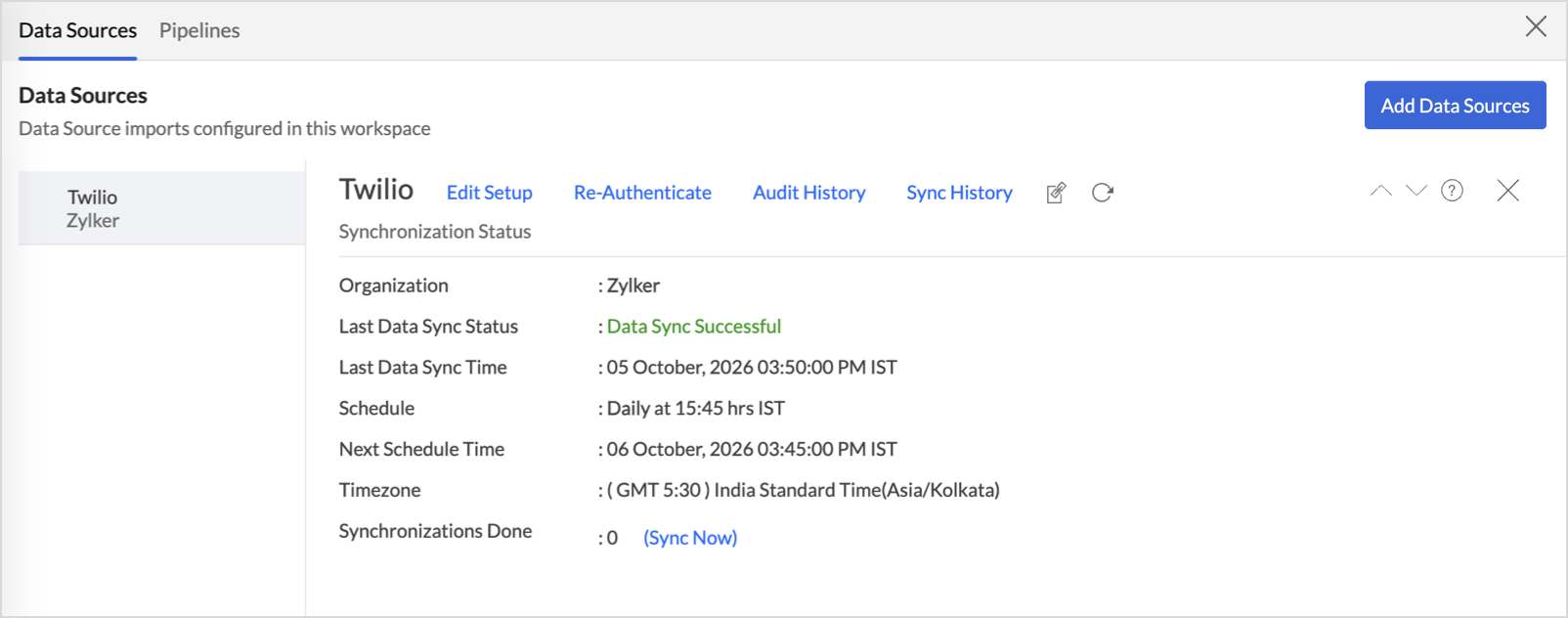
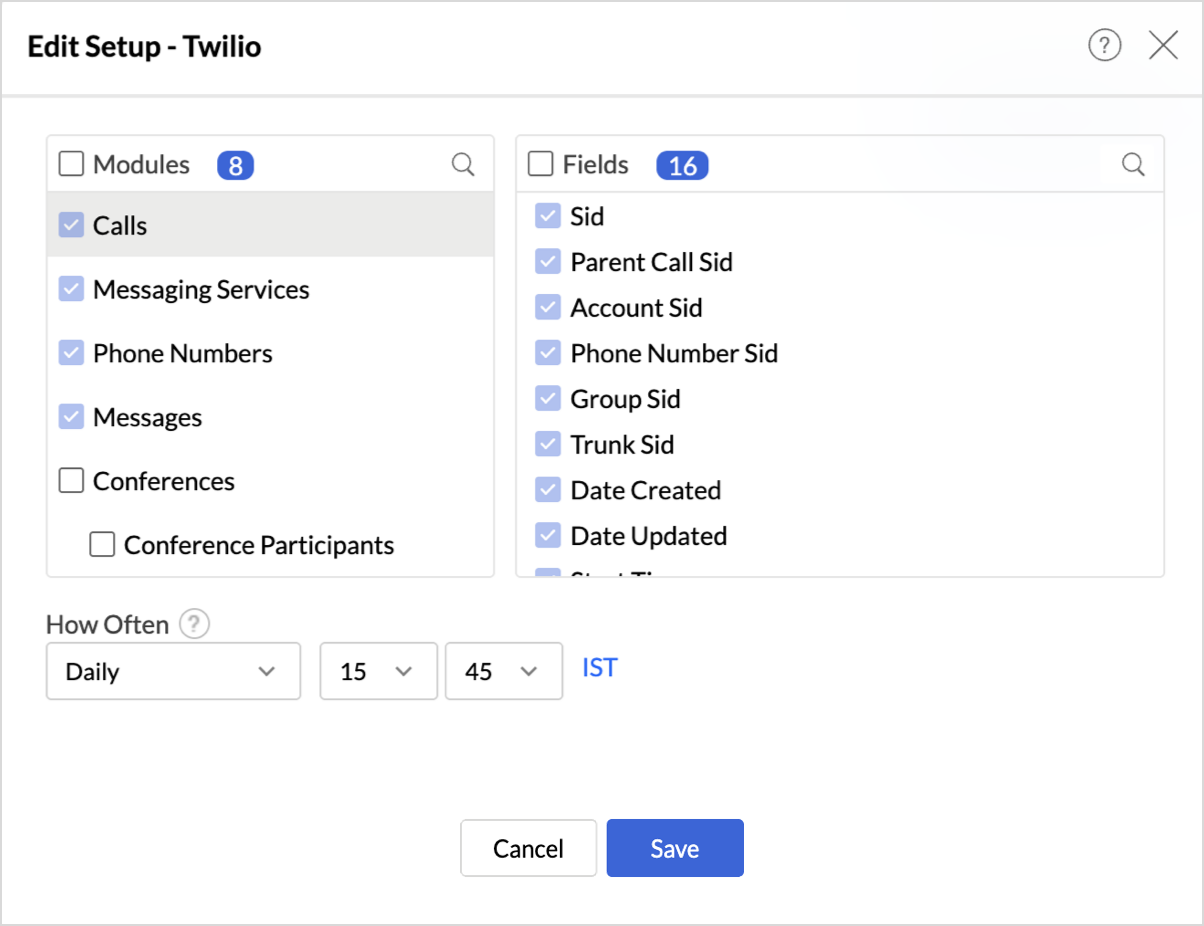
- Edit Setup: The Edit Setup tab allows you to add or delete modules or fields, change the schedule interval, and modify other settings specific to the business application.To modify the settings,Click Data Sources > Edit Setup.
- The Edit Setup - Twilio dialog will open.
- Modify the settings as needed and click Save.
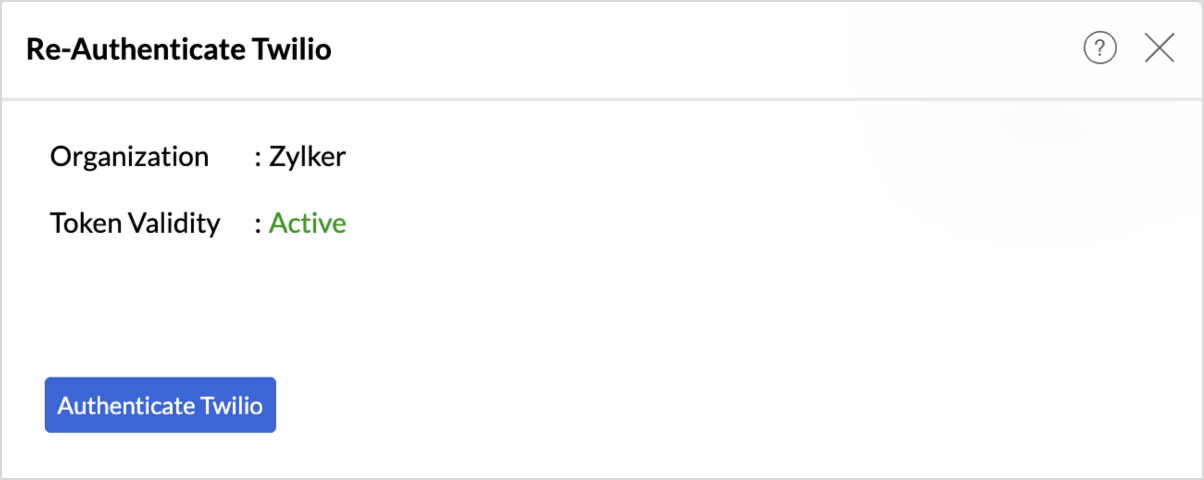
- Re-Authenticate: Re-authentication will be helpful when the API key or credentials are changed. In this case, the data sync will be paused, and the administrator who configured the connector must re-authenticate to resume the data sync.To re-authenticate,
- Click Data Sources > Re-Authenticate.
- The Re-Authenticate Twilio dialog will open. Enter the credentials and click Authenticate Twilio.
- Audit History: Use Audit History to review user actions and system events recorded for the Twilio data source. Learn more.
- Sync History: Use Sync History to review data sync activity for the last 45 days, including sync time, status, and failure details. Learn more.
- Data Source URL: Use the Data Source URL to open the Data Sources tab and view sync status, last sync time, and next scheduled sync. Learn more.
- Remove Data Source: Use Remove Data Source to stop sync and delete the Twilio tables, reports, and dashboards associated with the integration. Learn more.
Transferring Twilio Connector to Another Admin
If the user who configured the Twilio connector leaves the organization or hands over administration responsibilities, ownership of the connector can be transferred to another administrator. This ensures uninterrupted data sync and continued access to the workspace.
For detailed steps on transferring connector ownership, refer here.
Data Modeling & Preparation
Zoho Analytics lets you prepare and model your Twilio data for analysis. Join tables using lookup columns or query tables, create formulas, and clean or transform data as needed. For more context on data modeling and preparation, see Data Modeling & Preparation.
Formulas
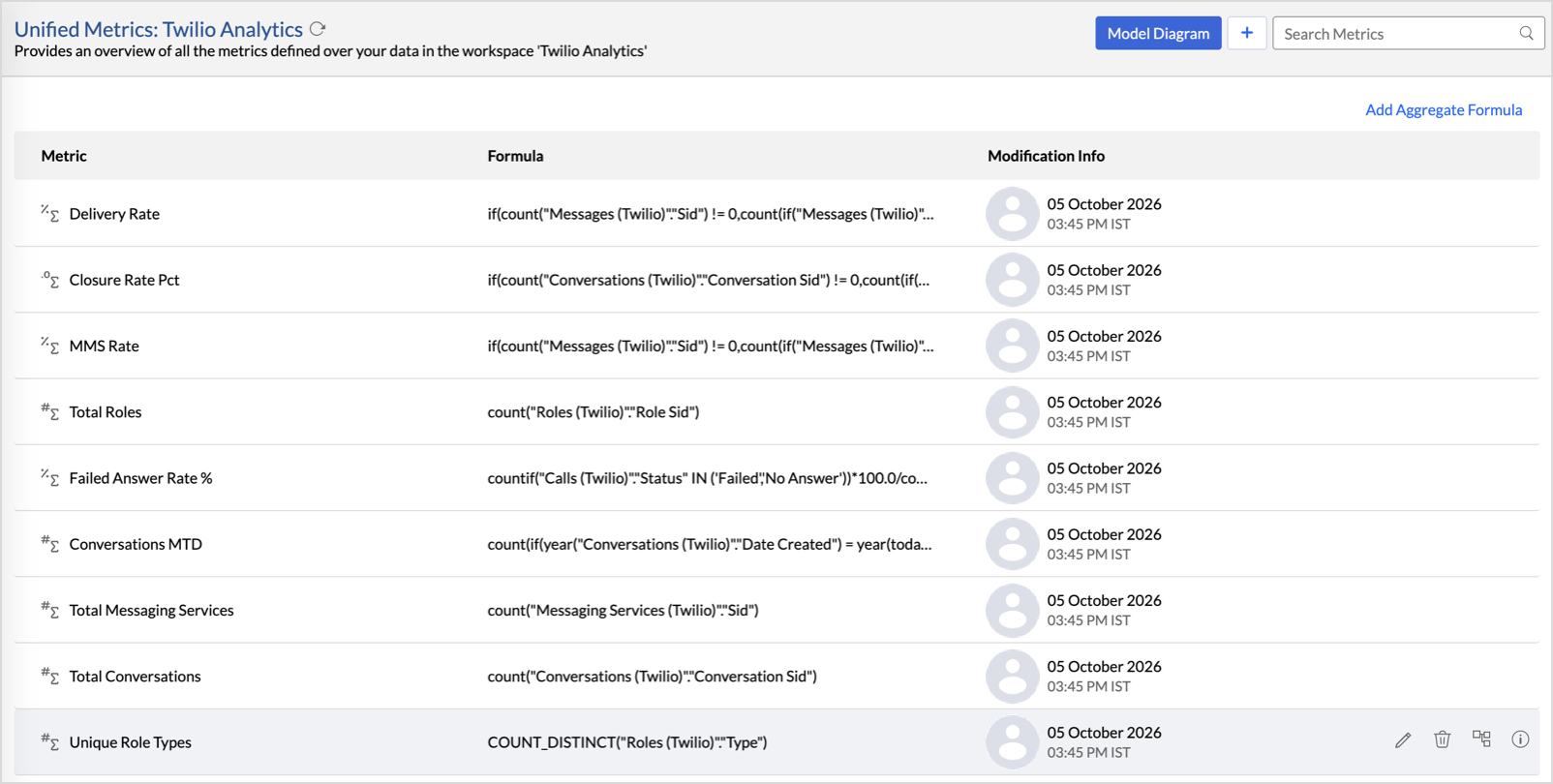
Zoho Analytics provides a set of pre-built formulas along with the connector. To access these formulas, open your Twilio Advanced Analytics workspace, click Data from the side panel, and click Unified Metrics. This lists all the prebuilt formulas and other formulas available across the workspace.
You can also create your own custom formulas in Zoho Analytics. To know how to create your own formulas, refer to Formulas (Calculations).
Data Blending
Data Blending combines data from Twilio with data from other data sources to create correlation reports and dashboards. When you import multiple data sources into the same workspace, Zoho Analytics identifies the relationships between them and blends the data using lookup columns and query tables.
For the complete steps on blending data across sources, see Data Blending.
How can you visualize and analyze Twilio data?
Zoho Analytics allows you to create a wide range of visualizations to analyze Twilio data and gain actionable insights into your email program. You can build reports and dashboards to track delivery and bounce rates, monitor open and click engagement, analyze spam reports and unsubscribes, evaluate sender reputation, and measure overall email performance across campaigns and recipients.
- Zoho Analytics offers a wide range of visualization types to conduct your analysis. Refer to the Creating Reports section to learn more. The chart type primer lists all the viz types available in Zoho Analytics.
- With Predictive analytics, forecast future trends, detect anomalies, and segment data using Cluster analysis.
- Find the What, Why, and How behind any outcome with Zia Insights.
Sharing & Collaboration
- Use fine-grained permission control over your shared data and reports, while collaborating with your colleagues & friends.
- Efficiently collaborate with your users by setting up real-time commenting on a shared view.
- Publish reports for wider consumption. Embed reports/dashboards within your websites, web applications, and blogs.
- Export, email, and print reports in a variety of formats.
- Use Zoho Analytics mobile apps (optimized for both iOS and Android platforms) and access data, reports, and dashboards on the go.
Help & Support
We offer 24x5 technical support (Monday to Friday). In case if you need our assistance, kindly do mail us your questions to support@zohoanalytics.com.
You can also reach out to us on our toll-free numbers.
United States: +1 (888) 900 9646
United Kingdom: +44 (20) 35647890
Australia: +61-2-80662898
India: +91 44 6965 6060