Advanced Analytics for Airtable

Advanced Analytics for Airtable

Advanced Analytics for Airtable, powered by Zoho Analytics, enables you to efficiently monitor and manage the execution of projects. It also helps devise powerful strategies to manage risks and track key project metrics to scale up the operational efficiencies of the organization.

Setting up the Integration

A user with administrator privileges (Account admin and Org admin) can configure the integration.

Note:

  • The initial fetch might take a few minutes depending on the volume of the data to be imported. An email and an in-app notification will be sent, once the initial fetch is complete.
  • The setup process can sometimes fail for a variety of reasons. In this case we request you to access the Data source tab and click the retry link to import again. If the issue persists then write to support@zohoanalytics.com

Data Sync Frequency

Zoho Analytics offers flexible sync schedules to ensure that your data is always up-to-date for effective analysis. These schedules allow you to automate the process of updating your data, ensuring that your analyses are based on the latest information.

  • 1 Hour (Enterprise plan only)
  • 3 Hours
  • 6 Hours
  • 12 Hours
  • Every day

Handling Data Synchronization Failure

Data synchronization can fail,

  • If the data type of a field is changed in the Airtable Application.
  • If the Modules and Field selected for analysis are deleted in the source application.
  • If the user who configured the integration no longer has permission to access the modules.

In any of the above mentioned cases, the data sync will be paused. You will be notified via email and in- app notification with the exact reason for failure along with the solution.

To resolve the sync failure, delete or restructure the views, or restore the specific modules and fields from the source application. Refer to Data Sync failure and solutions article for more details.

Once you have made the changes, click the Sync now option in the data source tab to resume data sync. If the issue persists, contact support@zohoanalytics.com

Managing Data Sources

The Data Sources tab provides essential information to monitor and manage the integration setup. It also allows you to edit the settings as needed. Users with administrator privileges will be able to view and modify the connection settings.
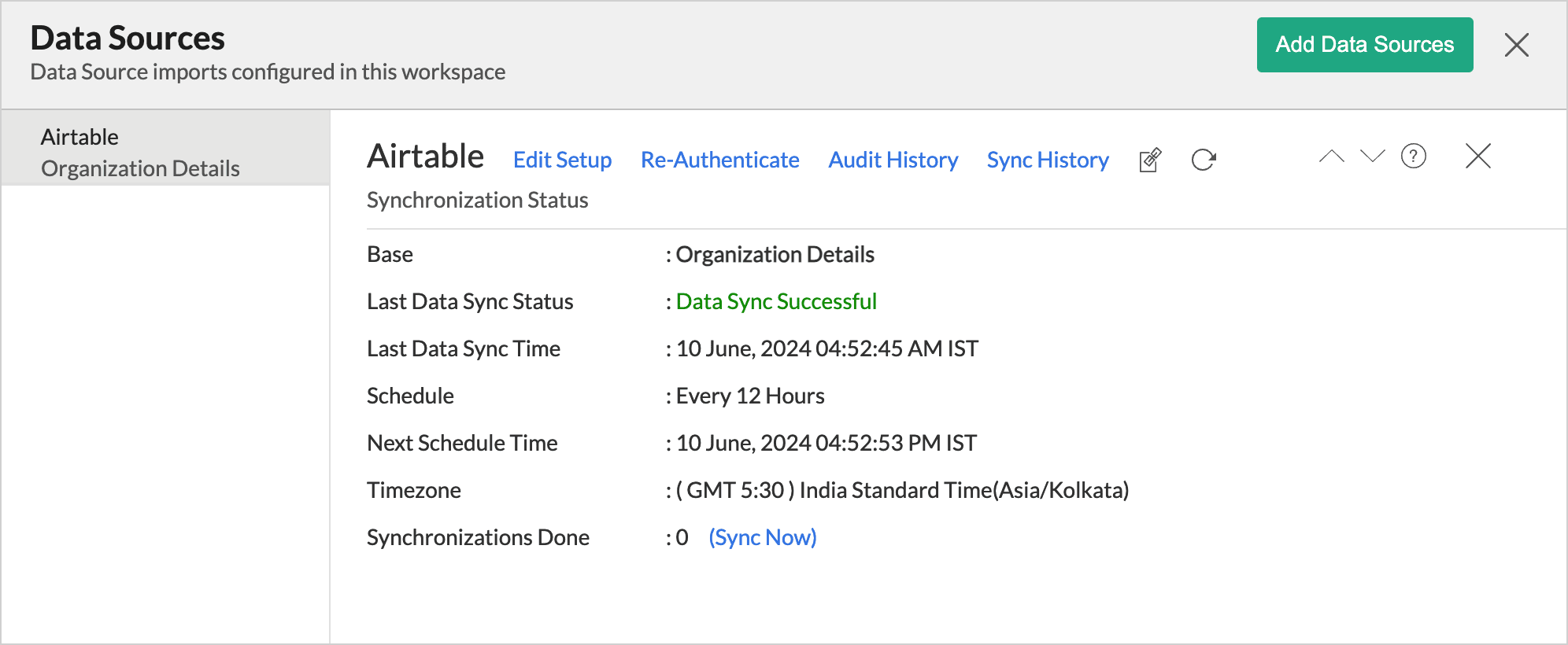

The Data Source Permalink helps you easily access the data source tab, and this link can be pasted in dashboards so that everyone accessing the dashboard can know about the sync status.

Edit Setup

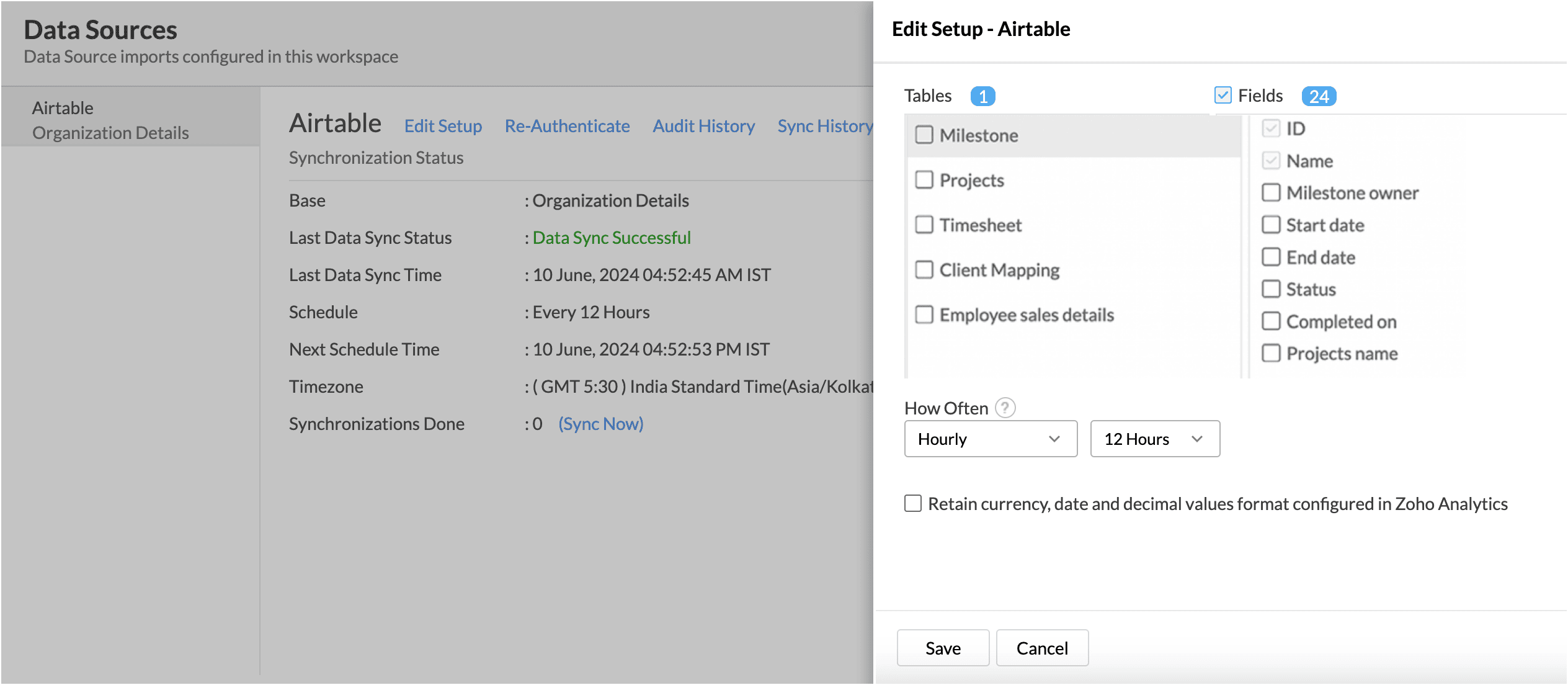
The Edit Setup tab allows you to add or delete modules or fields, change the schedule interval, and modify other settings specific to the business application.

To modify the settings, 

  1. Click Data Sources > Edit Setup.
  2. The Edit Setup - Airtable dialog will open. Modify the settings as needed and click Save.
Re- Authenticate 

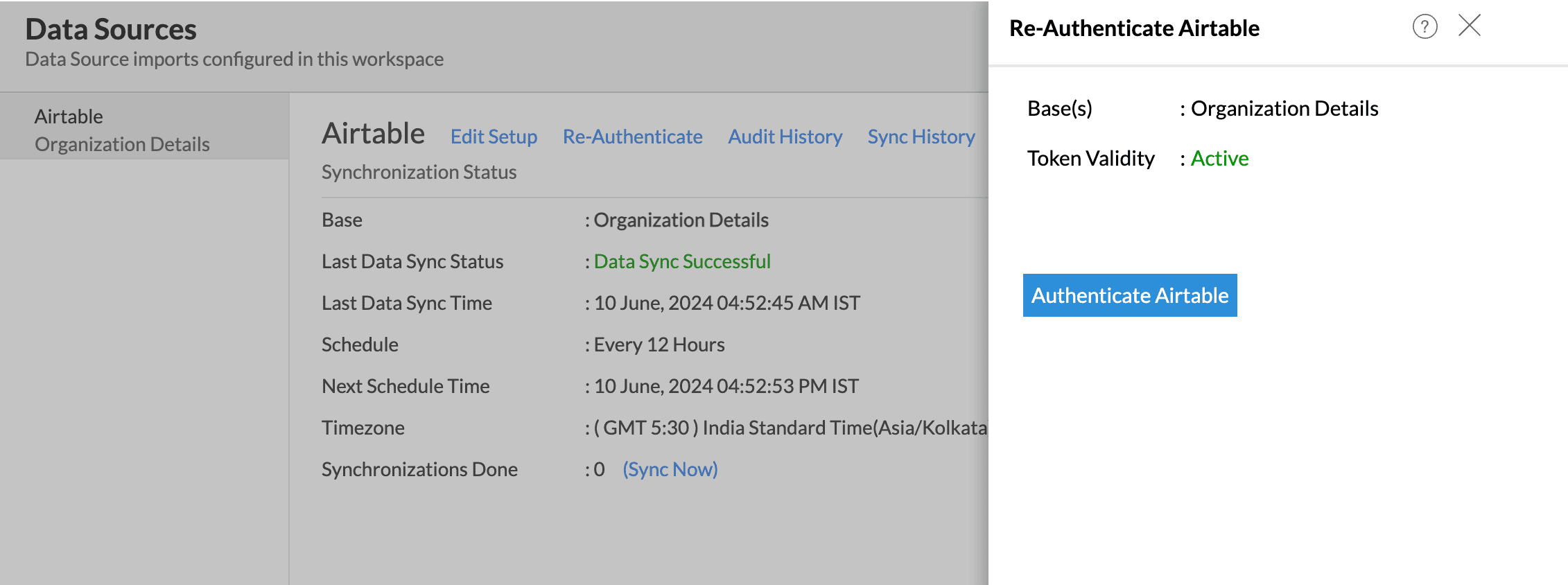
Re-authentication will be helpful when the API key or password is changed. In this case, the data sync will be paused, and the administrator who configure the connector setup must re-authenticate to resume the data sync.

To re-authenticate,

  1. Click Data Sources > Re-Authenticate.
  2. The Re-authenticate - Airtable dialog will open. Click Authenticate Airtable.
     

Sync History

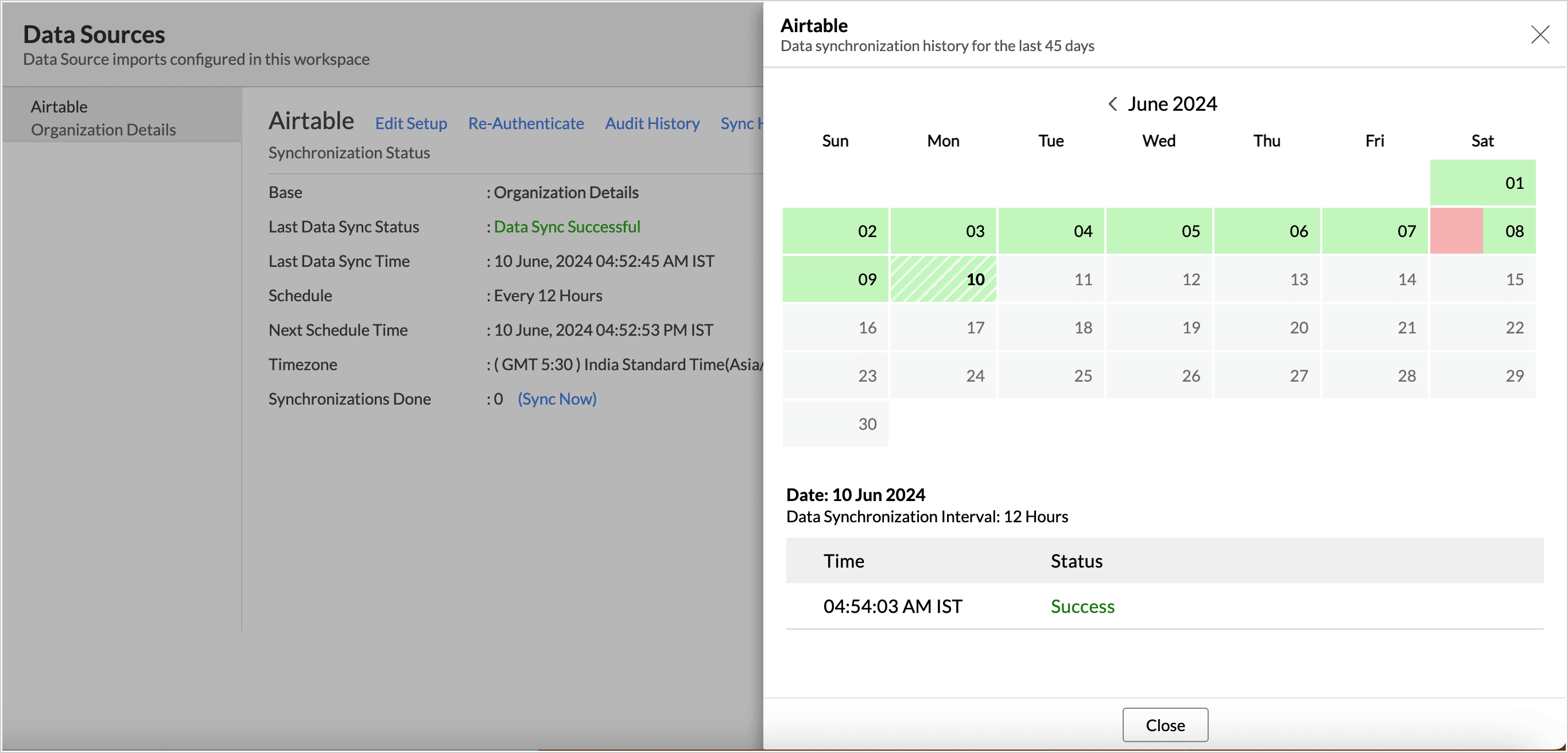
The Sync History tab provides details about the data sync for the last 45 days. A successful data sync is marked in green, and a sync failure is marked in red.

To view the Sync history,

  1. Click Data sources > Sync History.
  2. A calendar with the Sync History of the last 45 days will open. The date when the data sync has happened will be highlighted. Hover to view the number of times the data had got synced on a specific date.
  3. Click the date to view more details. 
    • Time - Displays the time when the data is synced.
    • Status - Shows whether the sync was a success or a failure.In case of failure, the reason will be displayed. Refer to this page to learn how to resolve the issue and avoid further failure.
Audit History

Zoho Analytics logs all the user activities and system events within the Airtable workspace. The following actions that are logged in Zoho Analytics,

  • User Action: Create, Modules Added, Modules Removed, Fields Added, Fields Removed, Schedule Change and Entities Modified, Delete, Take Ownership, Re-authenticate, Sync Now, Retry.
  • System Action: Plan upgrade or downgrade.

To view the audit history,

  1. Click Data Sources > Audit History.
  2. A dialog with the activities for the last 180 days will open.

Remove Data Source

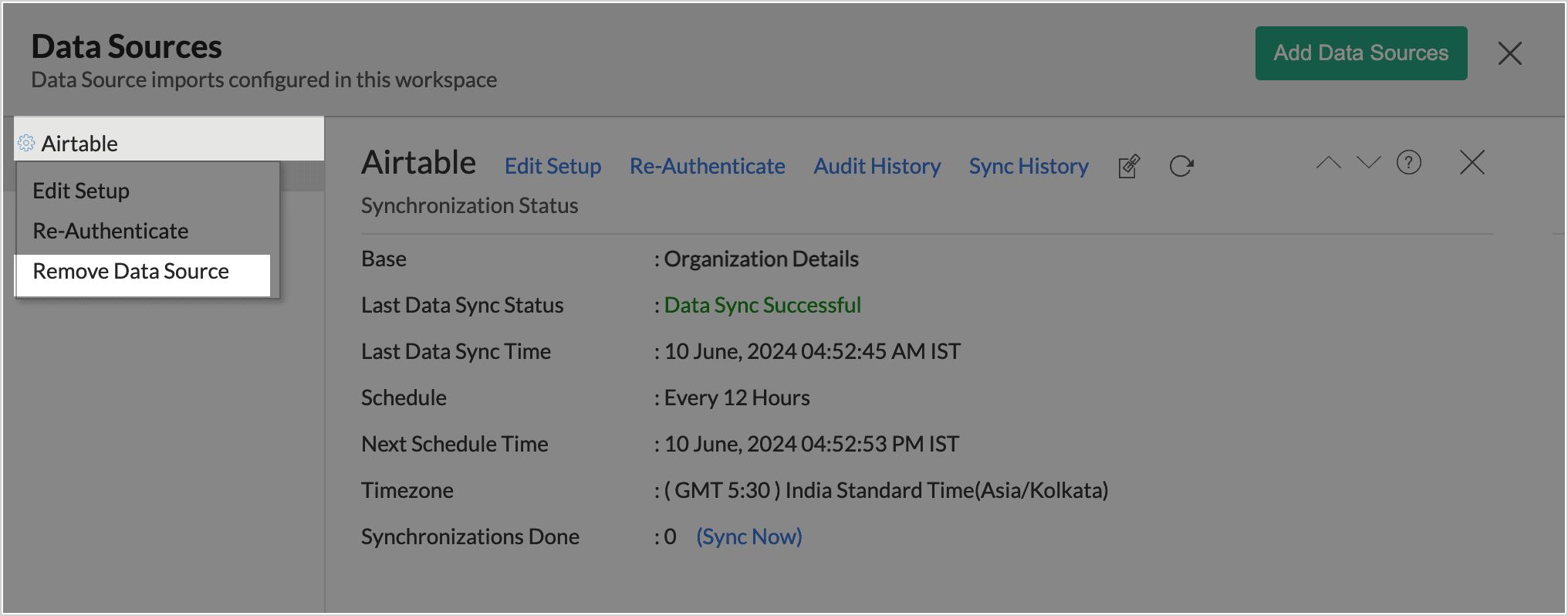
Zoho Analytics allows you to remove the integration if needed. Removing the integration will suspend further data synchronization. The data tables and the reports will be available.

Click the Settings icon in the Data Sources tab, and select Remove Data Source from the drop-down menu.

Data Modeling & Preparation

Zoho Analytics allows you to combine data from various sources such as Files, Feeds, Databases and Business Applications for an in-depth analysis. Query Tables allows you to combine data from different tables to create reports.

While blending data from other data sources, Zoho Analytics automatically identifies similar columns and provides suggestions for lookups. Refer to the Joining Tables article for more details.

Data Visualization/Analysis

Visualization 
 Types
Bar 
Stacked bar, Histogram, Horizontal bar
Stacked Bar 
Horizontal Stacked bar, 100% vertical and horizontal stacked bar
Area
Area with markers, Smooth Area, Smooth area with Markers
Line and Bar Combination chart
Bar with Line, Bar with Bubble, Bar with Scatter, Bar with Area, Area with Bubble, Line with Bubble and Custom Combination
Bubble Chart
Bubble Pie, Packed Bubble, Word Cloud
Stacked Area
Stacked area with markers, Smooth stacked area, Smooth stacked area with markers
Map
Heat Map, Map Scatter, Map Bubble, Map Pie, Map Bubble Pie, Map Filled, Geo Heat Map
Tree map
Standard tree map
Pie 
Pie, Ring, Semi Pie, Semi Ring
Doughnut
Standard Doughnut chart
Matrix View
Pivot table
Tabular
Summary and Tabular view
Dashboards and KPI widgets
Single Numeric Widget, Dial Chart Widget
Bullet, Chart Widget

Sharing and Collaboration 

Help & Support

We offer 24x5 technical support (Monday to Friday). In case if you need our assistance kindly do mail us your questions to support@zohoanalytics.com.

You can also reach out to us on our toll-free numbers.
United States: +1 (888) 900 9646
United Kingdom: +44 (20) 35647890
Australia: +61-2-80662898
India: 044 - 6965606


        Create. Review. Publish.

        Write, edit, collaborate on, and publish documents to different content management platforms.

        Get Started Now


          Access your files securely from anywhere

            Zoho CRM Training Programs

            Learn how to use the best tools for sales force automation and better customer engagement from Zoho's implementation specialists.

            Zoho CRM Training
              Redefine the way you work
              with Zoho Workplace

                Zoho DataPrep Personalized Demo

                If you'd like a personalized walk-through of our data preparation tool, please request a demo and we'll be happy to show you how to get the best out of Zoho DataPrep.

                Zoho CRM Training

                  Create, share, and deliver

                  beautiful slides from anywhere.

                  Get Started Now


                    Zoho Sign now offers specialized one-on-one training for both administrators and developers.

                    BOOK A SESSION


                                Quick LinksWorkflow AutomationData Collection
                                Web FormsEnterpriseOnline Data Collection Tool
                                Embeddable FormsBankingBegin Data Collection
                                Interactive FormsWorkplaceData Collection App
                                CRM FormsCustomer ServiceAccessible Forms
                                Digital FormsMarketingForms for Small Business
                                HTML FormsEducationForms for Enterprise
                                Contact FormsE-commerceForms for any business
                                Lead Generation FormsHealthcareForms for Startups
                                Wordpress FormsCustomer onboardingForms for Small Business
                                No Code FormsConstructionRSVP tool for holidays
                                Free FormsTravelFeatures for Order Forms
                                Prefill FormsNon-Profit

                                Intake FormsLegal
                                Mobile App
                                Form DesignerHR
                                Mobile Forms
                                Card FormsFoodOffline Forms
                                Assign FormsPhotographyMobile Forms Features
                                Translate FormsReal EstateKiosk in Mobile Forms
                                Electronic Forms
                                Drag & drop form builder

                                Notification Emails for FormsAlternativesSecurity & Compliance
                                Holiday FormsGoogle Forms alternative GDPR
                                Form to PDFJotform alternativeHIPAA Forms
                                Email FormsFormstack alternativeEncrypted Forms

                                Wufoo alternativeSecure Forms

                                TypeformWCAG

                                    All-in-one knowledge management and training platform for your employees and customers.

                                              Create. Review. Publish.

                                              Write, edit, collaborate on, and publish documents to different content management platforms.

                                              Get Started Now


                                                                You are currently viewing the help pages of Qntrl’s earlier version. Click here to view our latest version—Qntrl 3.0's help articles.


                                                                    Manage your brands on social media


                                                                      • Desk Community Learning Series


                                                                      • Digest


                                                                      • Functions


                                                                      • Meetups


                                                                      • Kbase


                                                                      • Resources


                                                                      • Glossary


                                                                      • Desk Marketplace


                                                                      • MVP Corner


                                                                      • Word of the Day


                                                                      • Ask the Experts


                                                                        Zoho Sheet Resources


                                                                            Zoho Forms Resources


                                                                              Secure your business
                                                                              communication with Zoho Mail


                                                                              Mail on the move with
                                                                              Zoho Mail mobile application

                                                                                Stay on top of your schedule
                                                                                at all times


                                                                                Carry your calendar with you
                                                                                Anytime, anywhere


                                                                                      Zoho Sign Resources

                                                                                        Sign, Paperless!

                                                                                        Sign and send business documents on the go!

                                                                                        Get Started Now


                                                                                                Zoho TeamInbox Resources


                                                                                                          Zoho DataPrep Demo

                                                                                                          Get a personalized demo or POC

                                                                                                          REGISTER NOW


                                                                                                            Design. Discuss. Deliver.

                                                                                                            Create visually engaging stories with Zoho Show.

                                                                                                            Get Started Now


                                                                                                                                • Related Articles

                                                                                                                                • AirTable

                                                                                                                                  AirTable - Zoho Analytics Integration Airtable is an easy-to-use online platform for creating and sharing relational databases. Integration with Airtable is part of our to-do-list and we'll be enabling it in the near future. Meanwhile, for apps/tools ...
                                                                                                                                • Crafting Analytics Presentation with Advanced Slideshow

                                                                                                                                  Advanced Slideshow is a powerful data storytelling feature that enables you to craft immersive presentation blending visualizations created in Zoho Analytics. Along with visualizations add narrative elements - text, infographics, videos, and shapes - ...
                                                                                                                                • Advanced Analytics for QuickBooks

                                                                                                                                  Zoho Analytics Advanced Analytics for QuickBooks empowers you with financial analytical capabilities over your QuickBooks Online data. With this connector, you can create insightful reports & dashboards over your QuickBooks data for in-depth ...
                                                                                                                                • Zoho People Advanced Analytics

                                                                                                                                  The Zoho People advanced analytics connector powered by Zoho Analytics, allows you to analyse your Zoho People data to help strategically manage people as business resources. It helps HR managers and personnel with deep insights on employee ...
                                                                                                                                • Eventbrite Advanced Analytics

                                                                                                                                  Eventbrite Advanced Analytics helps you to analyze and draw insights from the key elements of an event, like the registration count, attendees count, tickets sold, etc. By analyzing and tracking these KPIs, you can get insights about how successful ...
                                                                                                                                  Wherever you are is as good as
                                                                                                                                  your workplace

                                                                                                                                    Resources

                                                                                                                                    Videos

                                                                                                                                    Watch comprehensive videos on features and other important topics that will help you master Zoho CRM.


                                                                                                                                    eBooks

                                                                                                                                    Download free eBooks and access a range of topics to get deeper insight on successfully using Zoho CRM.


                                                                                                                                    Webinars

                                                                                                                                    Sign up for our webinars and learn the Zoho CRM basics, from customization to sales force automation and more.


                                                                                                                                    CRM Tips

                                                                                                                                    Make the most of Zoho CRM with these useful tips.


                                                                                                                                      Zoho Show Resources